ignition DODGE GRAND CARAVAN 2020 User Guide
[x] Cancel search | Manufacturer: DODGE, Model Year: 2020, Model line: GRAND CARAVAN, Model: DODGE GRAND CARAVAN 2020Pages: 380, PDF Size: 14.92 MB
Page 41 of 380

GETTING TO KNOW YOUR VEHICLE39
When exiting the vehicle the driver can choose
to have the headlights remain on for 30, 60 or
90 seconds or not remain on. To change the
timer setting, see an authorized dealer.
The headlight delay time is programmable on
vehicles equipped with an instrument cluster
display. Refer to “Instrument Cluster Display” in
“Getting To Know Your Instrument Panel” for
further information.
If the headlights are turned off before the
ignition, they will turn off in the normal manner.
NOTE:
The headlights must be turned off within 45
seconds of placing the ignition in the OFF
position to activate this feature.
Lights-On Reminder
If the headlights or the parking lights are left on,
or if the dimmer control is in the extreme top
position after the ignition has been placed in
the OFF position, a chime will sound when the
driver's door is opened.
Front Fog Lights — If Equipped
To activate the front fog lights, turn on the
parking lights or the low beam headlights and
push in the headlight switch control knob. Pushing the headlight switch control knob a
second time will turn the front fog lights off.
Turn Signals
Move the multifunction lever up or down and
the arrows on each side of the instrument
cluster display will flash to show proper
operation of the front and rear turn signal lights.
NOTE:
If either light remains on and does not flash, or
there is a very fast flash rate, check for a
defective outside light bulb. If an indicator fails
to light when the lever is moved, it would
suggest that the indicator bulb is defective.
Turn Signal Warning
If the vehicle electronics sense that the vehicle
has traveled at over 18 mph (29 km/h) for
about 1 mile (1.6 km) with the turn signals on, a
chime will sound to alert the driver.
Lane Change Assist
Tap the lever up or down once, without moving
beyond the detent, and the turn signal (right or
left) will flash three times then automatically
turn off.
Battery Protection
This feature provides battery protection to avoid
wearing down the battery if the headlights or
parking lights are left on for extended periods of
time when the ignition is in the OFF position.
After eight minutes of the ignition being placed
in the OFF position, and the headlight switch in
any position other than OFF or AUTO, the lights
will turn off automatically until the next cycle of
the ignition or headlight switch.
The battery protection feature will be disabled if
the ignition is placed in any position other than
OFF during the eight minute delay.
INTERIOR LIGHTS
Courtesy/Interior Lighting
At the forward end of the overhead console are
two courtesy lights (standard dome light has
two buttons). These interior lights are turned on
when a door or the liftgate is opened, the
remote keyless entry key fob is activated, or
when the dimmer control is moved to the
extreme top.
2
20_RT_OM_EN_USC_t.book Page 39
Page 42 of 380

40GETTING TO KNOW YOUR VEHICLE
The interior lights will automatically turn off in
approximately 10 minutes for the first
activation and 90 seconds every activation
thereafter until the engine is started, if one of
the following occur:
A door, sliding door or the liftgate is left open.
Any overhead reading light is left on.
NOTE:
The ignition must be placed in the OFF position
for this feature to operate.
The courtesy lights also function as reading
lights. Push in on each lens to turn these lights
on while inside the vehicle. Push a second time
to turn each light off. You may adjust the
direction of these lights by pushing the outside
ring, which is identified with four directional
arrows (LED lamps only).
Rear Courtesy/Reading Lights — If Equipped
The overhead console has two sets of courtesy
lights. The lights turn on when a front door, a
sliding door or the liftgate is opened. If your
vehicle is equipped with Remote Keyless Entry,
the lights will also turn on when the unlock
button on the key fob is pushed.
The courtesy lights also function as reading
lights. Push in on each lens to turn these lights
on while inside the vehicle. Push the lens a
second time to turn each light off. You may
adjust the direction of these lights by pushing
the outside ring, which is identified with four
directional arrows.
Reading Lights
Rear Console Halo Lighting
Halo lights are strategically placed soft lighting
that help to illuminate specific areas to aid the
occupants in locating specific features while
driving at night.
The rear overhead console has recessed halo
lighting around the perimeter of the console
base. This feature provides additional lighting
options while traveling and is controlled by the
ambient light dimmer control of the headlight
switch.
Ambient Light Dimmer Control
20_RT_OM_EN_USC_t.book Page 40
Page 61 of 380
GETTING TO KNOW YOUR VEHICLE59
WINDOWS
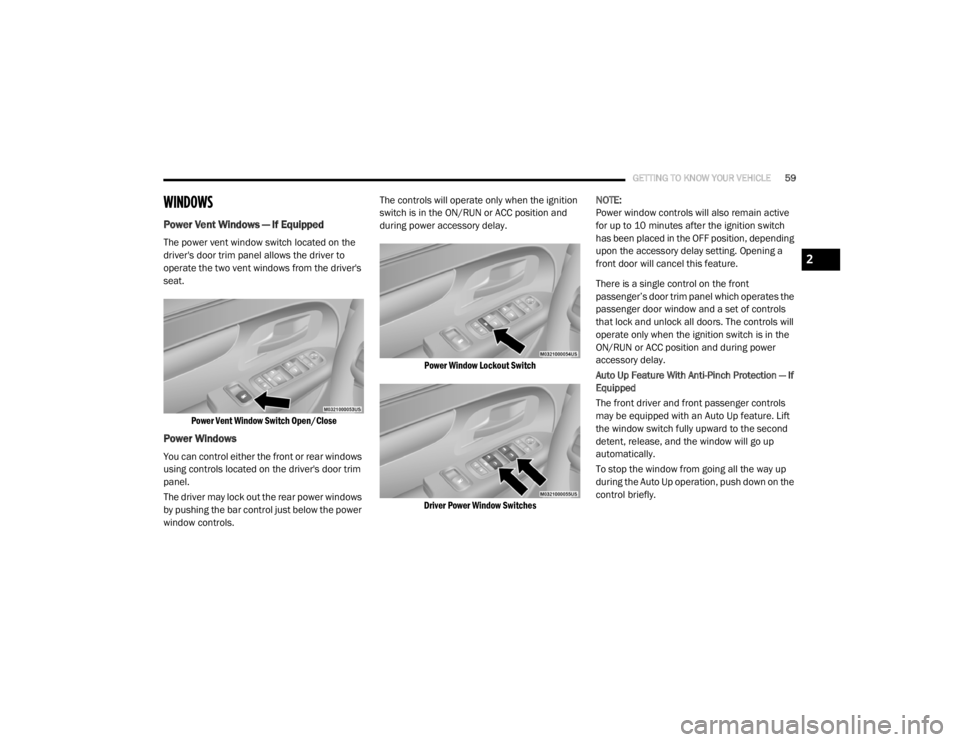
Power Vent Windows — If Equipped
The power vent window switch located on the
driver's door trim panel allows the driver to
operate the two vent windows from the driver's
seat.
Power Vent Window Switch Open/Close
Power Windows
You can control either the front or rear windows
using controls located on the driver's door trim
panel.
The driver may lock out the rear power windows
by pushing the bar control just below the power
window controls. The controls will operate only when the ignition
switch is in the ON/RUN or ACC position and
during power accessory delay.
Power Window Lockout Switch
Driver Power Window Switches
NOTE:
Power window controls will also remain active
for up to 10 minutes after the ignition switch
has been placed in the OFF position, depending
upon the accessory delay setting. Opening a
front door will cancel this feature.
There is a single control on the front
passenger’s door trim panel which operates the
passenger door window and a set of controls
that lock and unlock all doors. The controls will
operate only when the ignition switch is in the
ON/RUN or ACC position and during power
accessory delay.
Auto Up Feature With Anti-Pinch Protection — If
Equipped
The front driver and front passenger controls
may be equipped with an Auto Up feature. Lift
the window switch fully upward to the second
detent, release, and the window will go up
automatically.
To stop the window from going all the way up
during the Auto Up operation, push down on the
control briefly.
2
20_RT_OM_EN_USC_t.book Page 59
Page 62 of 380
60GETTING TO KNOW YOUR VEHICLE
To close the window part way, lift the window
control to the first detent and release when you
want the window to stop.
NOTE:
If the window runs into any obstacle during
auto-closure, it will reverse direction and
then go back down. Remove the obstacle and
use the window control again to close the
window.
Any impact due to rough road conditions may
trigger the auto reverse function unexpect -
edly during auto-closure. If this happens, pull
the control lightly to the first detent and hold
to close window manually. Auto Up Reset — If Equipped
To reactivate the Auto Up feature, perform the
following steps after vehicle power is restored:
1. Pull the window control up to close the
window completely and continue to hold
the control up for an additional two
seconds after the window is closed.
2. Push the window control down firmly to the second detent to open the window
completely and continue to hold the control
down for an additional two seconds after
the window is fully open.
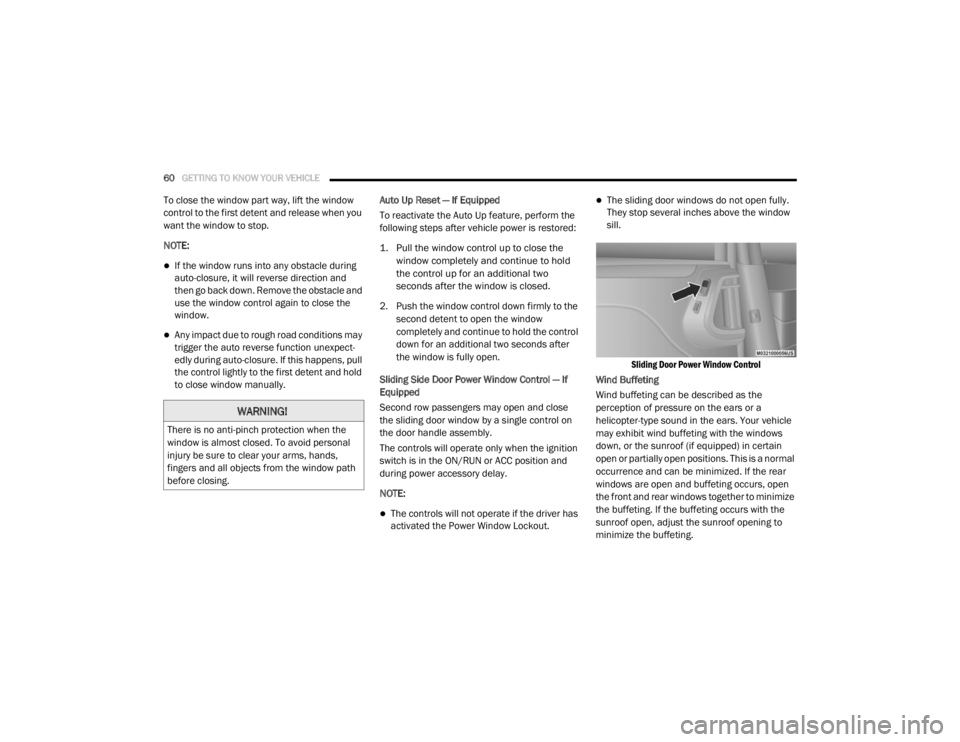
Sliding Side Door Power Window Control — If
Equipped
Second row passengers may open and close
the sliding door window by a single control on
the door handle assembly.
The controls will operate only when the ignition
switch is in the ON/RUN or ACC position and
during power accessory delay.
NOTE:
The controls will not operate if the driver has
activated the Power Window Lockout.
The sliding door windows do not open fully.
They stop several inches above the window
sill.
Sliding Door Power Window Control
Wind Buffeting
Wind buffeting can be described as the
perception of pressure on the ears or a
helicopter-type sound in the ears. Your vehicle
may exhibit wind buffeting with the windows
down, or the sunroof (if equipped) in certain
open or partially open positions. This is a normal
occurrence and can be minimized. If the rear
windows are open and buffeting occurs, open
the front and rear windows together to minimize
the buffeting. If the buffeting occurs with the
sunroof open, adjust the sunroof opening to
minimize the buffeting.
WARNING!
There is no anti-pinch protection when the
window is almost closed. To avoid personal
injury be sure to clear your arms, hands,
fingers and all objects from the window path
before closing.
20_RT_OM_EN_USC_t.book Page 60
Page 66 of 380
64GETTING TO KNOW YOUR VEHICLE
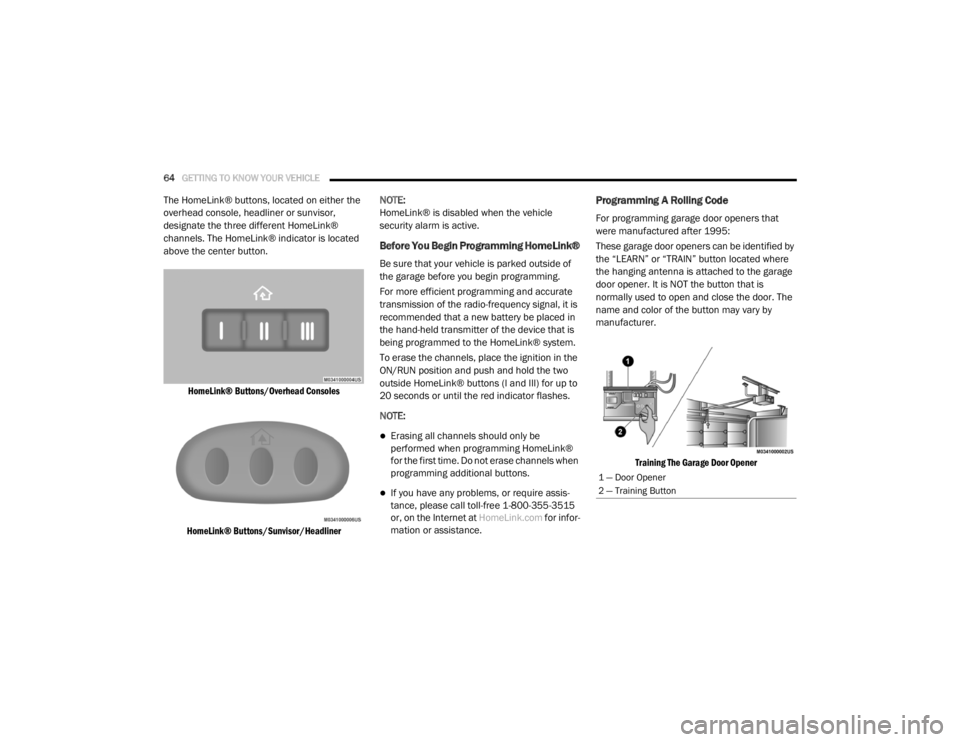
The HomeLink® buttons, located on either the
overhead console, headliner or sunvisor,
designate the three different HomeLink®
channels. The HomeLink® indicator is located
above the center button.
HomeLink® Buttons/Overhead Consoles
HomeLink® Buttons/Sunvisor/Headliner
NOTE:
HomeLink® is disabled when the vehicle
security alarm is active.
Before You Begin Programming HomeLink®
Be sure that your vehicle is parked outside of
the garage before you begin programming.
For more efficient programming and accurate
transmission of the radio-frequency signal, it is
recommended that a new battery be placed in
the hand-held transmitter of the device that is
being programmed to the HomeLink® system.
To erase the channels, place the ignition in the
ON/RUN position and push and hold the two
outside HomeLink® buttons (I and III) for up to
20 seconds or until the red indicator flashes.
NOTE:
Erasing all channels should only be
performed when programming HomeLink®
for the first time. Do not erase channels when
programming additional buttons.
If you have any problems, or require assis
-
tance, please call toll-free 1-800-355-3515
or, on the Internet at HomeLink.com for infor-
mation or assistance.
Programming A Rolling Code
For programming garage door openers that
were manufactured after 1995:
These garage door openers can be identified by
the “LEARN” or “TRAIN” button located where
the hanging antenna is attached to the garage
door opener. It is NOT the button that is
normally used to open and close the door. The
name and color of the button may vary by
manufacturer.
Training The Garage Door Opener
1 — Door Opener
2 — Training Button
20_RT_OM_EN_USC_t.book Page 64
Page 67 of 380

GETTING TO KNOW YOUR VEHICLE65
1. Place the ignition in the ON/RUN position.
2. Place the hand-held transmitter
1 to 3 inches (3 to 8 cm) away from the
HomeLink® button you wish to program
while keeping the HomeLink® indicator
light in view.
3. Push and hold the HomeLink® button you want to program while you push and hold
the hand-held transmitter button.
4. Continue to hold both buttons and observe the indicator light. The HomeLink®
indicator will flash slowly and then rapidly
after HomeLink® has received the
frequency signal from the hand-held
transmitter. Release both buttons after the
indicator light changes from slow to rapid.
5. At the garage door opener (in the garage), locate the “LEARN” or “TRAINING” button.
This can usually be found where the
hanging antenna wire is attached to the
garage door opener/device motor. Firmly
push and release the “LEARN” or
“TRAINING” button. On some garage door
openers/devices there may be a light that
blinks when the garage door opener/device
is in the LEARN/TRAIN mode. NOTE:
You have 30 seconds in which to initiate the
next step after the LEARN button has been
pushed.
6. Return to the vehicle and push the
programmed HomeLink® button twice
(holding the button for two seconds each
time). If the garage door opener/device
activates, programming is complete.
NOTE:
If the garage door opener/device does not
activate, push the button a third time (for two
seconds) to complete the training. To program the remaining two HomeLink®
buttons, repeat each step for each remain -
ing button. DO NOT erase the channels.
Reprogramming A Single HomeLink® Button
(Rolling Code)
To reprogram a channel that has been
previously trained, follow these steps:
1. Place the ignition in the ON/RUN position.
2. Push and hold the desired HomeLink®
button until the indicator light begins to
flash after 20 seconds. Do not release the
button.
3. Without releasing the button , proceed with
“Programming A Rolling Code” step two and
follow all remaining steps.
Programming A Non-Rolling Code
For programming garage door openers
manufactured before 1995:
1. Place the ignition in the ON/RUN position.
NOTE:
For vehicles equipped with Keyless Enter-N-Go,
place the ignition in the RUN position with the
engine on. Make sure while programming
HomeLink® with the engine on that your vehicle
is outside of your garage, or that the garage
door remains open at all times.
2. Place the hand-held transmitter 1 to 3 inches (3 to 8 cm) away from the
HomeLink® button you wish to program
while keeping the HomeLink® indicator
light in view.
2
20_RT_OM_EN_USC_t.book Page 65
Page 68 of 380

66GETTING TO KNOW YOUR VEHICLE
3. Push and hold the HomeLink® button you
want to program while you push and hold
the hand-held transmitter button.
4. Continue to hold both buttons and observe the indicator light. The HomeLink®
indicator will flash slowly and then rapidly
after HomeLink® has received the
frequency signal from the hand-held
transmitter. Release both buttons after the
indicator light changes from slow to rapid.
5. Push and hold the programmed HomeLink® button and observe the
indicator light.
If the indicator light stays on constantly,
programming is complete and the garage
door/device should activate when the
HomeLink® button is pushed.
To program the two remaining
HomeLink® buttons, repeat each step
for each remaining button. DO NOT erase
the channels.
Reprogramming A Single HomeLink® Button
(Non-Rolling Code)
To reprogram a channel that has been
previously trained, follow these steps:
1. Place the ignition in the ON/RUN position.
2. Push and hold the desired HomeLink® button until the indicator light begins to
flash after 20 seconds. Do not release the
button.
3. Without releasing the button , proceed with
“Programming A Non-Rolling Code” step two
and follow all remaining steps.
Canadian/Gate Operator Programming
For programming transmitters in
Canada/United States that require the
transmitter signals to “time-out” after several
seconds of transmission:
Canadian radio frequency laws require
transmitter signals to time-out (or quit) after
several seconds of transmission, which may not
be long enough for HomeLink® to pick up the
signal during programming. Similar to this
Canadian law, some U.S. gate operators are
designed to time-out in the same manner. It may be helpful to unplug the device during the
cycling process to prevent possible overheating
of the garage door or gate motor.
1. Place the ignition in the ON/RUN position.
2. Place the hand-held transmitter
1 to 3 inches (3 to 8 cm) away from the
HomeLink® button you wish to program
while keeping the HomeLink® indicator
light in view.
3. Continue to push and hold the HomeLink® button while you push and release (“cycle”)
your hand-held transmitter every two
seconds until HomeLink® has successfully
accepted the frequency signal. The
indicator light will flash slowly and then
rapidly when fully trained.
4. Watch for the HomeLink® indicator to change flash rates. When it changes, it is
programmed. It may take up to 30 seconds
or longer in rare cases. The garage door
may open and close while you are
programming.
20_RT_OM_EN_USC_t.book Page 66
Page 77 of 380
GETTING TO KNOW YOUR VEHICLE75
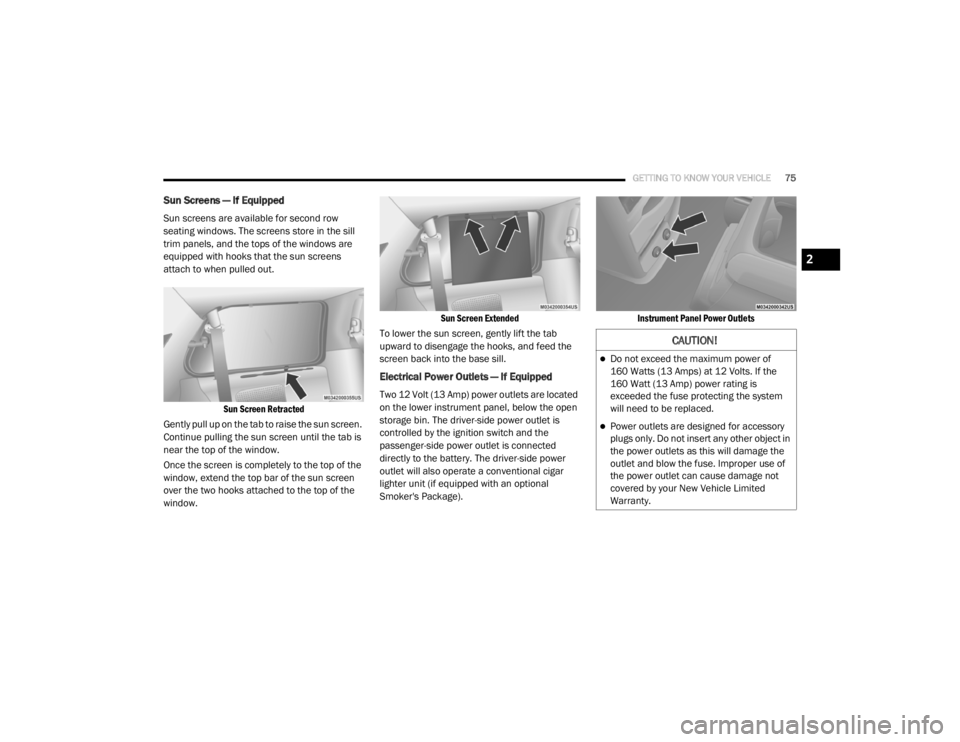
Sun Screens — If Equipped
Sun screens are available for second row
seating windows. The screens store in the sill
trim panels, and the tops of the windows are
equipped with hooks that the sun screens
attach to when pulled out.
Sun Screen Retracted
Gently pull up on the tab to raise the sun screen.
Continue pulling the sun screen until the tab is
near the top of the window.
Once the screen is completely to the top of the
window, extend the top bar of the sun screen
over the two hooks attached to the top of the
window.
Sun Screen Extended
To lower the sun screen, gently lift the tab
upward to disengage the hooks, and feed the
screen back into the base sill.
Electrical Power Outlets — If Equipped
Two 12 Volt (13 Amp) power outlets are located
on the lower instrument panel, below the open
storage bin. The driver-side power outlet is
controlled by the ignition switch and the
passenger-side power outlet is connected
directly to the battery. The driver-side power
outlet will also operate a conventional cigar
lighter unit (if equipped with an optional
Smoker's Package).
Instrument Panel Power Outlets
CAUTION!
Do not exceed the maximum power of
160 Watts (13 Amps) at 12 Volts. If the
160 Watt (13 Amp) power rating is
exceeded the fuse protecting the system
will need to be replaced.
Power outlets are designed for accessory
plugs only. Do not insert any other object in
the power outlets as this will damage the
outlet and blow the fuse. Improper use of
the power outlet can cause damage not
covered by your New Vehicle Limited
Warranty.
2
20_RT_OM_EN_USC_t.book Page 75
Page 78 of 380
76GETTING TO KNOW YOUR VEHICLE
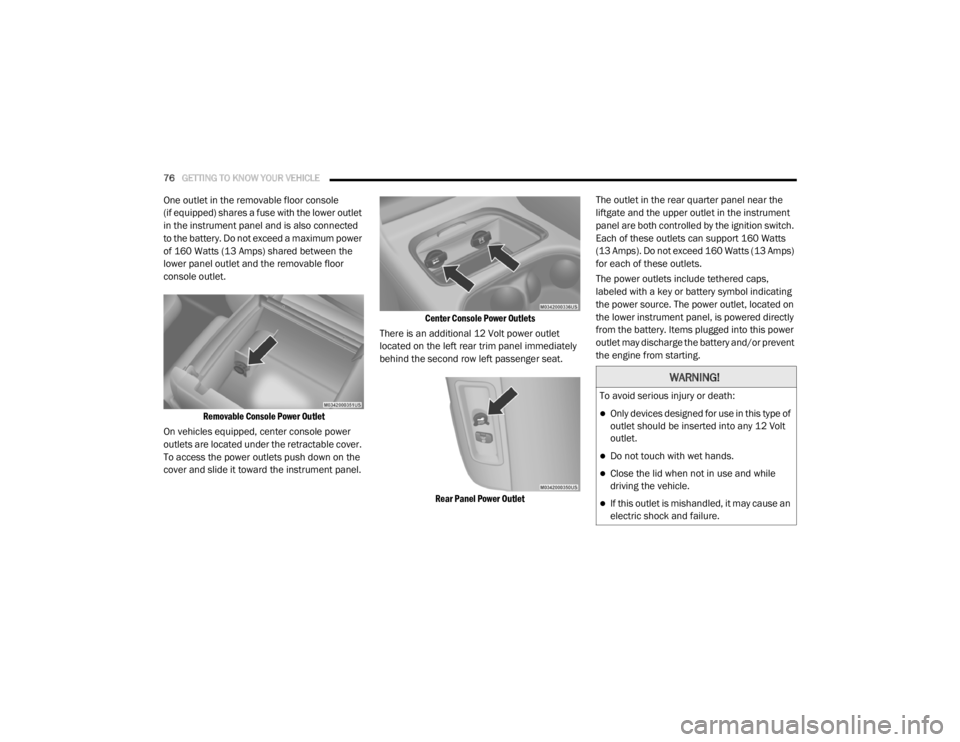
One outlet in the removable floor console
(if equipped) shares a fuse with the lower outlet
in the instrument panel and is also connected
to the battery. Do not exceed a maximum power
of 160 Watts (13 Amps) shared between the
lower panel outlet and the removable floor
console outlet.
Removable Console Power Outlet
On vehicles equipped, center console power
outlets are located under the retractable cover.
To access the power outlets push down on the
cover and slide it toward the instrument panel.
Center Console Power Outlets
There is an additional 12 Volt power outlet
located on the left rear trim panel immediately
behind the second row left passenger seat.
Rear Panel Power Outlet
The outlet in the rear quarter panel near the
liftgate and the upper outlet in the instrument
panel are both controlled by the ignition switch.
Each of these outlets can support 160 Watts
(13 Amps). Do not exceed 160 Watts (13 Amps)
for each of these outlets.
The power outlets include tethered caps,
labeled with a key or battery symbol indicating
the power source. The power outlet, located on
the lower instrument panel, is powered directly
from the battery. Items plugged into this power
outlet may discharge the battery and/or prevent
the engine from starting.
WARNING!
To avoid serious injury or death:
Only devices designed for use in this type of
outlet should be inserted into any 12 Volt
outlet.
Do not touch with wet hands.
Close the lid when not in use and while
driving the vehicle.
If this outlet is mishandled, it may cause an
electric shock and failure.
20_RT_OM_EN_USC_t.book Page 76
Page 86 of 380
84GETTING TO KNOW YOUR INSTRUMENT PANEL
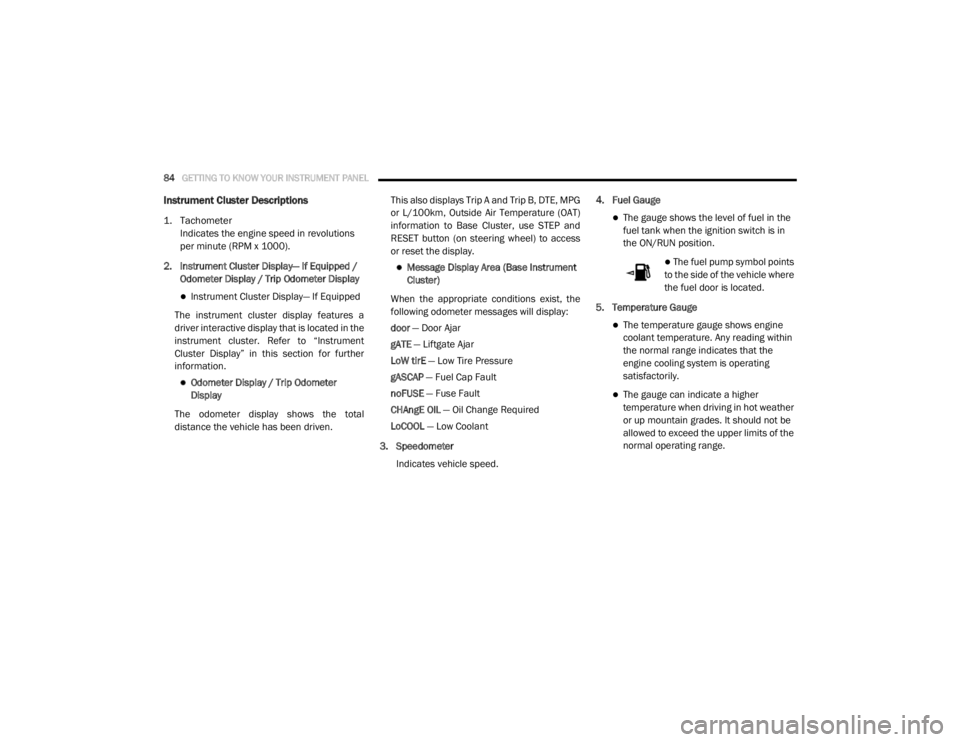
Instrument Cluster Descriptions
1. Tachometer
Indicates the engine speed in revolutions
per minute (RPM x 1000).
2. Instrument Cluster Display— If Equipped / Odometer Display / Trip Odometer Display
Instrument Cluster Display— If Equipped
The instrument cluster display features a
driver interactive display that is located in the
instrument cluster. Refer to “Instrument
Cluster Display” in this section for further
information.
Odometer Display / Trip Odometer
Display
The odometer display shows the total
distance the vehicle has been driven. This also displays Trip A and Trip B, DTE, MPG
or L/100km, Outside Air Temperature (OAT)
information to Base Cluster, use STEP and
RESET button (on steering wheel) to access
or reset the display.
Message Display Area (Base Instrument
Cluster)
When the appropriate conditions exist, the
following odometer messages will display:
door — Door Ajar
gATE — Liftgate Ajar
LoW tirE — Low Tire Pressure
gASCAP — Fuel Cap Fault
noFUSE — Fuse Fault
CHAngE OIL — Oil Change Required
LoCOOL — Low Coolant
3. Speedometer Indicates vehicle speed. 4. Fuel Gauge
The gauge shows the level of fuel in the
fuel tank when the ignition switch is in
the ON/RUN position.
The fuel pump symbol points
to the side of the vehicle where
the fuel door is located.
5. Temperature Gauge
The temperature gauge shows engine
coolant temperature. Any reading within
the normal range indicates that the
engine cooling system is operating
satisfactorily.
The gauge can indicate a higher
temperature when driving in hot weather
or up mountain grades. It should not be
allowed to exceed the upper limits of the
normal operating range.
20_RT_OM_EN_USC_t.book Page 84