automatic transmission DODGE GRAND CARAVAN 2020 Owners Manual
[x] Cancel search | Manufacturer: DODGE, Model Year: 2020, Model line: GRAND CARAVAN, Model: DODGE GRAND CARAVAN 2020Pages: 380, PDF Size: 14.92 MB
Page 6 of 380

4
ENGINE BREAK-IN RECOMMENDATIONS ...... 163
PARK BRAKE ..................................................... 164
AUTOMATIC TRANSMISSION............................ 165 Key Ignition Park Interlock ........................ 166Brake/Transmission Shift Interlock
System ........................................................ 166 Fuel Economy (ECON) Mode .....................167Six-Speed Automatic Transmission ..........167
Gear Ranges ..............................................168
POWER STEERING ............................................. 172
Power Steering Fluid Check ......................173
SPEED CONTROL — IF EQUIPPED .................... 173
To Activate .................................................. 174To Set A Desired Speed .............................174To Vary The Speed Setting ........................ 174To Accelerate For Passing ........................ 175To Resume Speed......................................175
To Deactivate .............................................175
PARKSENSE REAR PARK ASSIST
— IF EQUIPPED ................................................... 175
ParkSense Sensors ...................................176
ParkSense Warning Display ......................176
ParkSense Display ..................................... 176Enabling/Disabling ParkSense ................. 178
Service The ParkSense Rear Park Assist
System ........................................................ 178 Cleaning The ParkSense System ..............178
ParkSense System Usage Precautions ....178 PARKVIEW REAR BACK UP CAMERA ............. 179
REFUELING THE VEHICLE ................................. 181
Loose Fuel Filler Cap Message ................. 181
VEHICLE LOADING ............................................182
Certification Label ..................................... 182
TRAILER TOWING ............................................... 183
Common Towing Definitions ..................... 183Trailer Hitch Classification ........................ 184
Trailer Towing Weights
(Maximum Trailer Weight Ratings) .......... 186 Trailer And Tongue Weight ....................... 186
Towing Requirements ............................... 187Towing Tips ................................................ 189
RECREATIONAL TOWING
(BEHIND MOTORHOME, ETC.) .......................... 191
Towing This Vehicle Behind Another
Vehicle ........................................................ 191 Recreational Towing — All Models ............ 191
DRIVING TIPS ...................................................... 192
Driving On Slippery Surfaces .................... 192
Driving Through Water .............................. 192
IN CASE OF EMERGENCY
HAZARD WARNING FLASHERS .......................194
BULB REPLACEMENT ........................................ 194Replacement Bulbs .................................. 194Replacing Exterior Bulbs ........................... 196 FUSES .................................................................. 197
General Information .................................. 198
Totally Integrated Power Module
(Fuses) ....................................................... 198
JACKING AND TIRE CHANGING ....................... 202
Jack Location ............................................. 203
Spare Tire Tools ......................................... 203To Access Spare Tire Winch Drive Nut ..... 203Spare Tire Removal .................................. 205
Spare Tire Removal Instructions .............. 205
Preparations For Jacking ......................... 206
Jacking Instructions................................... 206
Securing The Compact Spare Tire ............ 210
Road Tire Installation ................................ 211
TIRE SERVICE KIT — IF EQUIPPED ................... 212
JUMP STARTING ................................................ 219
Preparations For Jump Start ..................... 219
Jump Starting Procedure .......................... 220
IF YOUR ENGINE OVERHEATS ......................... 221
GEAR SELECTOR OVERRIDE ........................... 222
FREEING A STUCK VEHICLE ............................. 223
TOWING A DISABLED VEHICLE ....................... 224
ENHANCED ACCIDENT RESPONSE
SYSTEM (EARS) ................................................. 225
EVENT DATA RECORDER (EDR) ....................... 225
20_RT_OM_EN_USC_t.book Page 4
Page 7 of 380

5
SERVICING AND MAINTENANCE
SCHEDULED SERVICING .................................. 226Maintenance Plan......................................227
ENGINE COMPARTMENT .................................. 231
Engine Compartment — 3.6L ....................231
Checking Oil Level......................................232
Adding Washer Fluid .................................232
Maintenance-Free Battery .......................232
Pressure Washing ......................................233
DEALER SERVICE .............................................. 233
Engine Oil .................................................. 233Engine Oil Filter ..........................................234Engine Air Cleaner Filter ...........................235
Air Conditioner Maintenance ...................235Accessory Drive Belt Inspection................236Body Lubrication ........................................237
Windshield Wiper Blades ..........................238
Exhaust System ........................................238
Cooling System ..........................................239Brake System ............................................242
Automatic Transmission ............................243
RAISING THE VEHICLE ...................................... 244
TIRES ................................................................... 245
Tire Safety Information .............................245Tires — General Information .....................252Tire Types ...................................................256
Spare Tires — If Equipped .........................257
Wheel And Wheel Trim Care ....................259
Tire Chains and Traction Devices ............260
Tire Rotation Recommendations .............261 DEPARTMENT OF TRANSPORTATION
UNIFORM TIRE QUALITY GRADES .................. 261
Treadwear .................................................. 261
Traction Grades ......................................... 261
Temperature Grades ................................. 262
VEHICLE STORAGE .............................................262
BODYWORK ........................................................ 262
Protection From Atmospheric Agents....... 262
Body And Underbody Maintenance .......... 263Preserving The Bodywork .......................... 263
INTERIORS ......................................................... 264
Seats And Fabric Parts .............................. 264
Plastic And Coated Parts ........................... 264
Glass Surfaces .......................................... 265Cleaning The Instrument Panel
Cupholders ................................................. 265
TECHNICAL SPECIFICATIONS
IDENTIFICATION DATA .......................................266
Vehicle Identification Number .................. 266
BRAKE SYSTEM .................................................. 266
WHEEL AND TIRE TORQUE
SPECIFICATIONS ................................................ 266
Torque Specifications ................................ 266
FUEL REQUIREMENTS ......................................267
3.6L Engine ................................................ 267
Reformulated Gasoline ............................ 268
Materials Added To Fuel ........................... 268
Gasoline/Oxygenate Blends ..................... 268 Do Not Use E-85 In Non-Flex Fuel
Vehicles ...................................................... 269 CNG And LP Fuel System
Modifications ............................................. 269 MMT In Gasoline........................................ 269
Fuel System Cautions................................ 270
Carbon Monoxide Warnings...................... 270
FLUID CAPACITIES ............................................ 271
FLUIDS AND LUBRICANTS ................................ 272
Engine ........................................................ 272
Chassis ....................................................... 274
MULTIMEDIA
CYBERSECURITY ............................................... 275
SAFETY AND GENERAL INFORMATION .......... 276Safety Guidelines....................................... 276
RADIO 430/430 NAV........................................ 277
General Handling....................................... 277
Getting Started .......................................... 279
Radio Mode ................................................ 281
Media Mode ............................................... 286
Remote Devices......................................... 299Uconnect Phone— If Equipped ................. 304
Navigation — If Equipped .......................... 317
STEERING WHEEL AUDIO CONTROLS — IF
EQUIPPED .......................................................... 340
Radio Operation......................................... 340CD Player.................................................... 340
20_RT_OM_EN_USC_t.book Page 5
Page 19 of 380
GETTING TO KNOW YOUR VEHICLE17
(Continued)
Power Door Locks — If Equipped
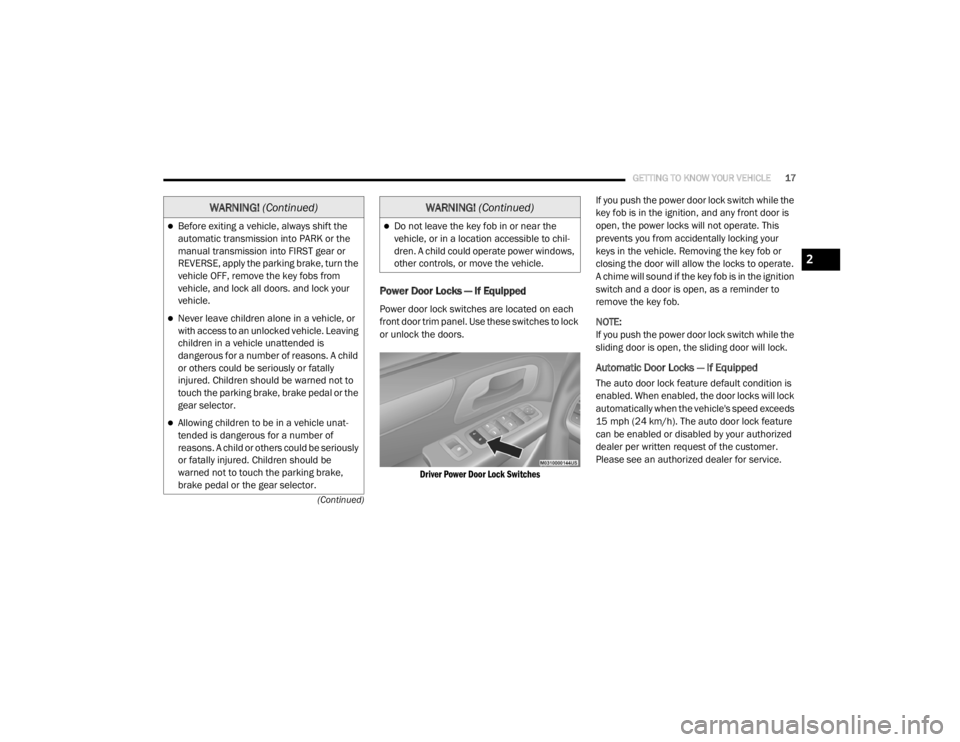
Power door lock switches are located on each
front door trim panel. Use these switches to lock
or unlock the doors.
Driver Power Door Lock Switches
If you push the power door lock switch while the
key fob is in the ignition, and any front door is
open, the power locks will not operate. This
prevents you from accidentally locking your
keys in the vehicle. Removing the key fob or
closing the door will allow the locks to operate.
A chime will sound if the key fob is in the ignition
switch and a door is open, as a reminder to
remove the key fob.
NOTE:
If you push the power door lock switch while the
sliding door is open, the sliding door will lock.
Automatic Door Locks — If Equipped
The auto door lock feature default condition is
enabled. When enabled, the door locks will lock
automatically when the vehicle's speed exceeds
15 mph (24 km/h). The auto door lock feature
can be enabled or disabled by your authorized
dealer per written request of the customer.
Please see an authorized dealer for service.
Before exiting a vehicle, always shift the
automatic transmission into PARK or the
manual transmission into FIRST gear or
REVERSE, apply the parking brake, turn the
vehicle OFF, remove the key fobs from
vehicle, and lock all doors. and lock your
vehicle.
Never leave children alone in a vehicle, or
with access to an unlocked vehicle. Leaving
children in a vehicle unattended is
dangerous for a number of reasons. A child
or others could be seriously or fatally
injured. Children should be warned not to
touch the parking brake, brake pedal or the
gear selector.
Allowing children to be in a vehicle unat
-
tended is dangerous for a number of
reasons. A child or others could be seriously
or fatally injured. Children should be
warned not to touch the parking brake,
brake pedal or the gear selector.
WARNING! (Continued)
Do not leave the key fob in or near the
vehicle, or in a location accessible to chil-
dren. A child could operate power windows,
other controls, or move the vehicle.
WARNING! (Continued)
2
20_RT_OM_EN_USC_t.book Page 17
Page 40 of 380

38GETTING TO KNOW YOUR VEHICLE
Daytime Running Lights (DRLs) — If
Equipped
The headlights on your vehicle will illuminate
when the engine is started and the
transmission is in any gear except PARK. This
provides a constant "lights on" condition until
the ignition is placed in the OFF position. The
lights illuminate at less than half of normal
intensity. If the parking brake is applied, the
Daytime Running Lights (DRLs) will turn off.
Also, if a turn signal is activated, the DRL lamp
on the same side of the vehicle may turn off for
the duration of the turn signal activation. Once
the turn signal is no longer active, the DRL lamp
will illuminate.
High/Low Beam Switch
Push the multifunction lever toward the
instrument panel to switch the headlights to
high beams. Pulling the multifunction lever
back toward the steering wheel will return the
lights to low beams.
Flash-To-Pass
You can signal another vehicle with your
headlights by lightly pulling the multifunction
lever toward you. This will cause the high beam
headlights to turn on, and remain on, until the
lever is released.
Automatic Headlights
This system automatically turns the headlights
on or off according to ambient light levels. To
turn the system on, rotate the headlight switch
counterclockwise to the AUTO position. When
the system is on, the headlight time delay
feature is also on. This means the headlights
will stay on for up to 90 seconds after you place
the ignition into the OFF position. The headlight
time delay can be programmed to 0, 30, 60, or
90 seconds. Refer to “Headlight Delay” in this
section for further information.
To turn the automatic system off, move the
headlight switch out of the AUTO position.
NOTE:
The engine must be running before the
headlights will come on in the automatic mode.
Headlights On With Wipers — If Equipped
When your headlights are in the AUTO mode
and the engine is running, the headlights will
automatically turn on when the wiper system is
also turned on. Headlights on when windshield
wipers are on may be found on vehicles
equipped with an automatic headlight system.
NOTE:
The Headlights with Wipers feature can be
turned on or off through the instrument cluster
display. Refer to “Instrument Cluster Display” in
“Getting To Know Your Instrument Panel” for
further information.
Headlight Delay — If Equipped
This feature provides the safety of headlight
illumination for up to 90 seconds after exiting
your vehicle.
To activate the delay feature, place the ignition
in the OFF position while the headlights are still
on. Then turn off the headlights within 45
seconds. The 90 second delay interval begins
when the headlight switch is turned off. If the
headlights or parking lights are turned back on
or the ignition switch is placed in the ON
position, the delay will be cancelled.
20_RT_OM_EN_USC_t.book Page 38
Page 92 of 380

90GETTING TO KNOW YOUR INSTRUMENT PANEL
1. Turn the ignition switch ON.
2. Push and release the up or down arrow
button until the Setup
(Customer-Programmable Features) menu
is reached, then push the right arrow
button.
3. Push and release the down arrow button
until the “Compass Variance” message is
displayed in the instrument cluster display,
then press the right arrow button. The last
variance zone number displays in the
instrument cluster display.
4. Push and release the right arrow button
until the proper variance zone is selected,
according to the map.
5. Push and release the RETURN button to
exit.
Turn Menu OFF
Select from Main Menu using the up or down
arrow button. Pushing the right arrow button
clears the menu display. Pushing any one of the
four Display control buttons will bring the menu
back.
Customer-Programmable Features
(System Setup)
Personal Settings allows you to set and recall
features when the transmission is in PARK. If
the transmission is out of PARK or the vehicle
begins moving, a warning message SYSTEM
SETUP NOT AVAILABLE VEHICLE NOT IN PARK
displays when you try to select “System Setup”
from the main menu.
Push and release the up or down arrow button
until "System Setup" is highlighted in the main
menu of the instrument cluster display. Then,
push and release the right arrow button to enter
the System Setup submenu. Push and release
the up or down arrow button to select a feature
form the following choices.
Language
When in this display you may select one of three
languages for all display screens, including the
trip functions and the navigation system (if
equipped). Push and release the up or down
arrow button while in this display and scroll
through the language choices. Push and release the
right arrow button to
select English, Spanish (Español), or French
(Français). Then, as you continue, the informa -
tion will display in the selected language.
Nav–Turn By Turn
When this feature is selected, the navigation
system utilizes voice commands, guiding you
through the drive route mile by mile,
turn-by-turn, until the final destination is
reached. To make your selection, push and
release the right arrow button until a
check-mark appears next to the feature
showing the system has been activated, or the
check-mark is removed showing the system has
been deactivated.
Auto Lock Doors
When selected, all doors will lock automatically
when the vehicle reaches a speed of 15 mph
(24 km/h). To make your selection, push and
release the right arrow button until a
check-mark appears.
20_RT_OM_EN_USC_t.book Page 90
Page 93 of 380

GETTING TO KNOW YOUR INSTRUMENT PANEL91
Auto Unlock Doors
When this feature is selected, all doors will
unlock when the vehicle is stopped and the
transmission is in the PARK or NEUTRAL
position and the driver's door is opened. To
make your selection, push and release the right
arrow button until a check-mark appears next to
the feature showing the system has been
activated, or the check-mark is removed
showing the system has been deactivated.
Remote Unlock Sequence
When Unlock Driver Door Only On 1st Press is
selected, only the driver’s side doors will unlock
on the first push of the key fob unlock button.
With Unlock Driver Door Only On 1st Press , you
must push the key fob unlock button twice to
unlock the passenger’s doors. When Unlock All
Doors On 1st Press is selected, all of the doors
will unlock on the first push of the key fob
unlock button. To make your selection, push
and release the right arrow button until a
check-mark appears next to the feature
showing the system has been activated or the
check-mark is removed showing the system has
been deactivated. Remote Start Comfort Sys.
When this feature is selected and the remote
start is activated, the heated steering wheel
and driver heated seat features will automat
-
ically turn on in cold weather. These features
will stay on through the duration of remote start
or until the key is cycled to ON/RUN position. To
make your selection, push and release the right
arrow button until a check-mark appears next to
the feature showing the system has been
activated or the check-mark is removed
showing the system has been deactivated.
Horn With Remote Lock
When this feature is selected, a short horn
sound will occur when the key fob lock button is
pushed. To make your selection, push and
release the right arrow button until a
check-mark appears next to the feature
showing the system has been activated or the
check-mark is removed showing the system has
been deactivated. Flash Lamps With Lock
When selected, the front and rear turn signals
will flash when the doors are locked with the key
fob. To make your selection, push and release
the
right arrow button until a check-mark
appears next to the feature showing the system
has been activated or the check-mark is
removed showing the system has been
deactivated.
Automatic High Beams — If Equipped
When this feature is selected, the high beam
headlights will deactivate automatically under
certain conditions. To make your selection,
push and release the right arrow button until a
check-mark appears next to the feature
showing the system has been activated or the
check-mark is removed showing the system has
been deactivated.
3
20_RT_OM_EN_USC_t.book Page 91
Page 100 of 380
98GETTING TO KNOW YOUR INSTRUMENT PANEL
Engine Check/Malfunction Indicator Warning
Light (MIL)
The Engine Check/Malfunction
Indicator Light (MIL) is a part of an
Onboard Diagnostic System called
OBD II that monitors engine and
automatic transmission control systems. This
warning light will illuminate when the ignition is
in the ON/RUN position before engine start. If
the bulb does not come on when turning the
ignition switch from OFF to ON/RUN, have the
condition checked promptly.
Certain conditions, such as a loose or missing
gas cap, poor quality fuel, etc., may illuminate
the light after engine start. The vehicle should
be serviced if the light stays on through several
typical driving styles. In most situations, the
vehicle will drive normally and will not require
towing.
When the engine is running, the MIL may flash
to alert serious conditions that could lead to
immediate loss of power or severe catalytic
converter damage. The vehicle should be
serviced by an authorized dealer as soon as
possible if this occurs.
Tire Pressure Monitoring System (TPMS)
Warning Light
The warning light switches on and a
message is displayed to indicate that
the tire pressure is lower than the
recommended value and/or that slow
pressure loss is occurring. In these cases,
optimal tire duration and fuel consumption may
not be guaranteed.
Should one or more tires be in the condition
mentioned above, the display will show the
indications corresponding to each tire.
WARNING!
A malfunctioning catalytic converter, as
referenced above, can reach higher
temperatures than in normal operating
conditions. This can cause a fire if you drive
slowly or park over flammable substances
such as dry plants, wood, cardboard, etc. This
could result in death or serious injury to the
driver, occupants or others.
CAUTION!
Prolonged driving with the Malfunction
Indicator Light (MIL) on could cause damage
to the vehicle control system. It also could
affect fuel economy and driveability. If the
MIL is flashing, severe catalytic converter
damage and power loss will soon occur.
Immediate service is required.CAUTION!
Do not continue driving with one or more flat
tires as handling may be compromised. Stop
the vehicle, avoiding sharp braking and
steering. If a tire puncture occurs, repair
immediately using the dedicated tire repair
kit and contact an authorized dealer as soon
as possible.
20_RT_OM_EN_USC_t.book Page 98
Page 103 of 380

GETTING TO KNOW YOUR INSTRUMENT PANEL101
ONBOARD DIAGNOSTIC SYSTEM — OBD II
Your vehicle is equipped with a sophisticated
Onboard Diagnostic system called OBD II. This
system monitors the performance of the
emissions, engine, and automatic transmission
control systems. When these systems are
operating properly, your vehicle will provide
excellent performance and fuel economy, as
well as emissions well within current
government regulations.
If any of these systems require service, the
OBD II system will turn on the Malfunction
Indicator Light (MIL). It will also store diagnostic
codes and other information to assist your
service technician in making repairs. Although
your vehicle will usually be drivable and not
need towing, see an authorized dealer for
service as soon as possible.
Onboard Diagnostic System (OBD II)
Cybersecurity
Your vehicle is required to have an Onboard
Diagnostic system (OBD II) and a connection
port to allow access to information related to
the performance of your emissions controls.
Authorized service technicians may need to
access this information to assist with the
diagnosis and service of your vehicle and
emissions system. For further information, refer to “Cybersecurity”
in “Multimedia”.
CAUTION!
Prolonged driving with the MIL on could
cause further damage to the emission
control system. It could also affect fuel
economy and driveability. The vehicle must
be serviced before any emissions tests can
be performed.
If the MIL is flashing while the vehicle is
running, severe catalytic converter damage
and power loss will soon occur. Immediate
service is required.
WARNING!
ONLY an authorized service technician
should connect equipment to the OBD II
connection port in order to read the VIN,
diagnose, or service your vehicle.
If unauthorized equipment is connected to
the OBD II connection port, such as a
driver-behavior tracking device, it may:
Be possible that vehicle systems,
including safety related systems, could
be impaired or a loss of vehicle control
could occur that may result in an
accident involving serious injury or
death.
Access, or allow others to access,
information stored in your vehicle
systems, including personal
information.
3
20_RT_OM_EN_USC_t.book Page 101
Page 111 of 380

SAFETY109
Disabling And Enabling HSA
This feature can be turned on or turned off. To
change the current setting, proceed as follows:
For vehicles equipped with the instrument
cluster display, refer to “Instrument Cluster
Display” in “Getting To Know Your Instrument
Panel” for further information.
For vehicles not equipped with the instrument
cluster display, perform the following steps:
1. Center the steering wheel (front wheels
pointing straight forward).
2. Shift the transmission into PARK.
3. Apply the parking brake.
4. Start the engine.
5. Rotate the steering wheel slightly more than one-half turn to the left.
6. Push the “ESC OFF” button located in the lower switch bank below the climate control
four times within 20 seconds. The “ESC OFF
Indicator Light” should turn on and turn off
two times.
7. Rotate the steering wheel back to center and then an additional slightly more than
one-half turn to the right. 8. Place the ignition switch to the OFF position
and then back to the ON position. If the
sequence was completed properly, the
“ESC OFF Indicator Light” will blink several
times to confirm HSA is disabled.
9. Repeat these steps if you want to return this feature to its previous setting.
Traction Control System (TCS)
The Traction Control System (TCS) monitors the
amount of wheel spin of each of the driven
wheels. If wheel spin is detected, the TCS may
apply brake pressure to the spinning wheel(s)
and/or reduce vehicle power to provide
enhanced acceleration and stability. A feature
of the TCS, Brake Limited Differential (BLD),
functions similar to a limited slip differential
and controls the wheel spin across a driven
axle. If one wheel on a driven axle is spinning
faster than the other, the system will apply the
brake of the spinning wheel. This will allow more
vehicle torque to be applied to the wheel that is
not spinning. BLD may remain enabled even if
TCS and ESC are in a reduced mode.
Trailer Sway Control (TSC)
Trailer Sway Control (TSC) uses sensors in the
vehicle to recognize an excessively swaying
trailer and will take the appropriate actions to
attempt to stop the sway. TSC will become
active automatically once an excessively
swaying trailer is recognized. Note that TSC
cannot stop all trailers from swaying. Always
use caution when towing a trailer and follow the
trailer tongue weight recommendations. Refer
to “Trailer Towing” in “Starting And Operating”
for further information. When TSC is
functioning, the “ESC Activation/Malfunction
Indicator Light” will flash, the engine power may
be reduced and you may feel the brakes being
applied to individual wheels to attempt to stop
the trailer from swaying. TSC is disabled when
the ESC system is in the “Partial Off” mode.
WARNING!
If TSC activates while driving, slow the vehicle
down, stop at the nearest safe location, and
adjust the trailer load to eliminate trailer
sway.
4
20_RT_OM_EN_USC_t.book Page 109
Page 141 of 380

SAFETY139
(Continued)
Your vehicle may also be designed to perform
any of these other functions in response to the
Enhanced Accident Response System:
Turn off the Fuel Filter Heater, Turn off the
HVAC Blower Motor, Close the HVAC Circula -
tion Door
Cut off battery power to the:
Engine
Electric Motor (if equipped)
Electric power steering
Brake booster
Electric park brake
Automatic transmission gear selector
Horn
Front wiper
Headlamp washer pump NOTE:
After an accident, remember to cycle the
ignition to the STOP (OFF/LOCK) position and
remove the key from the ignition switch to avoid
draining the battery. Carefully check the vehicle
for fuel leaks in the engine compartment and on
the ground near the engine compartment and
fuel tank before resetting the system and
starting the engine. If there are no fuel leaks or
damage to the vehicle electrical devices (e.g.
headlights) after an accident, reset the system
by following the procedure described below. If
you have any doubt, contact an authorized
dealer.
Enhanced Accident Response System Reset
Procedure
In order to reset the Enhanced Accident
Response System functions after an event, the
ignition switch must be changed from ignition
START or ON/RUN to ignition OFF. Carefully
check the vehicle for fuel leaks in the engine
compartment and on the ground near the
engine compartment and fuel tank before
resetting the system and starting the engine.
Maintaining Your Air Bag System
WARNING!
Modifications to any part of the air bag
system could cause it to fail when you need
it. You could be injured if the air bag system
is not there to protect you. Do not modify
the components or wiring, including adding
any kind of badges or stickers to the
steering wheel hub trim cover or the upper
passenger side of the instrument panel. Do
not modify the front bumper, vehicle body
structure, or add aftermarket side steps or
running boards.
It is dangerous to try to repair any part of
the air bag system yourself. Be sure to tell
anyone who works on your vehicle that it
has an air bag system.
4
20_RT_OM_EN_USC_t.book Page 139