instrument panel DODGE GRAND CARAVAN 2020 User Guide
[x] Cancel search | Manufacturer: DODGE, Model Year: 2020, Model line: GRAND CARAVAN, Model: DODGE GRAND CARAVAN 2020Pages: 380, PDF Size: 14.92 MB
Page 43 of 380

GETTING TO KNOW YOUR VEHICLE41
Dimmer Controls
The dimmer switch is located next to the
headlight switch.
Instrument Panel Dimmer Control
With the parking lights or headlights on, rotating
the left dimmer control upward will increase the
brightness of the instrument panel lights.
Rotating the left dimmer control completely
upward to the second detent (extreme top
position) will turn on the interior lights. The
interior lights will remain on when the dimmer
control is in this position.
Rotating the left dimmer control to the off
position (extreme bottom) will turn the interior
lights off, and will remain off when the doors or
liftgate are opened.
Parade Mode (Daytime Brightness Feature)
Rotate the dimmer control upward to the first
detent. This feature brightens all text displays
such as the odometer, instrument cluster
display, and radio when the parking lights or
headlights are on.
WINDSHIELD WIPER AND WASHERS
The wipers and washers are operated by a
switch within the multifunction lever. Rotate the
end of the multifunction lever to select the
desired wiper speed.
Washer And Wiper Controls
NOTE:
Always remove any buildup of snow that
prevents the windshield wiper blades from
returning to the off position. If the windshield
wiper switch is turned off and the blades cannot
return to the off position, damage to the wiper
motor may occur.
Windshield Wiper Operation
Rotate the end of the lever upward, to the first
detent past the intermittent settings for
low-speed wiper operation. Rotate the end of
the lever upward to the second detent past the
intermittent settings for high-speed wiper
operation.
WARNING!
Sudden loss of visibility through the
windshield could lead to a collision. You might
not see other vehicles or other obstacles. To
avoid sudden icing of the windshield during
freezing weather, warm the windshield with
the defroster before and during windshield
washer use.
2
20_RT_OM_EN_USC_t.book Page 41
Page 44 of 380
42GETTING TO KNOW YOUR VEHICLE
Intermittent Wiper System
Use the intermittent wiper when weather
conditions make a single wiping cycle with a
variable pause between cycles desirable.
Rotate the end of the multifunction lever to the
first detent position, and then turn the end of
the lever to select the desired delay interval.
There are five delay settings, which allow you to
regulate the wipe interval from a minimum of
one cycle every second to a maximum of
approximately 36 seconds between cycles. The
delay intervals will double in duration when the
vehicle speed is 10 mph (16 km/h) or less.
Windshield Washers
To use the windshield washer, push on the end
of the lever to the second detent and hold while
spray is desired. If the lever is pushed while on
the intermittent setting, the wipers will turn on
and operate for several wipe cycles after the
lever is released, and then resume the
intermittent interval previously selected. If the
lever is pushed while the wipers are in the off
position, the wipers will operate several wipe
cycles, then turn off.
Mist Feature
Push the end of the multifunction lever inward
(toward the steering column) to the first detent
and release for a single wiping cycle.
NOTE:
The mist feature does not activate the washer
pump; therefore, no washer fluid will be sprayed
on the windshield. The wash function must be
used in order to spray the windshield with
washer fluid.
Rear Wiper And Washer
Rotating the center ring of the wiper lever to the
first detent activates the rear intermittent
wipers. To activate the washers, rotate the
center ring fully forward and the washers will
spray until the ring is released, and then
resume the intermittent interval.
NOTE:
Rear window wipers function in the intermittent
wiper speed only.
CLIMATE CONTROLS
The Climate Control system allows you to
regulate the temperature, air flow, and direction
of air circulating throughout the vehicle. The
controls are located on the touchscreen (if
equipped) and on the instrument panel below
the radio.
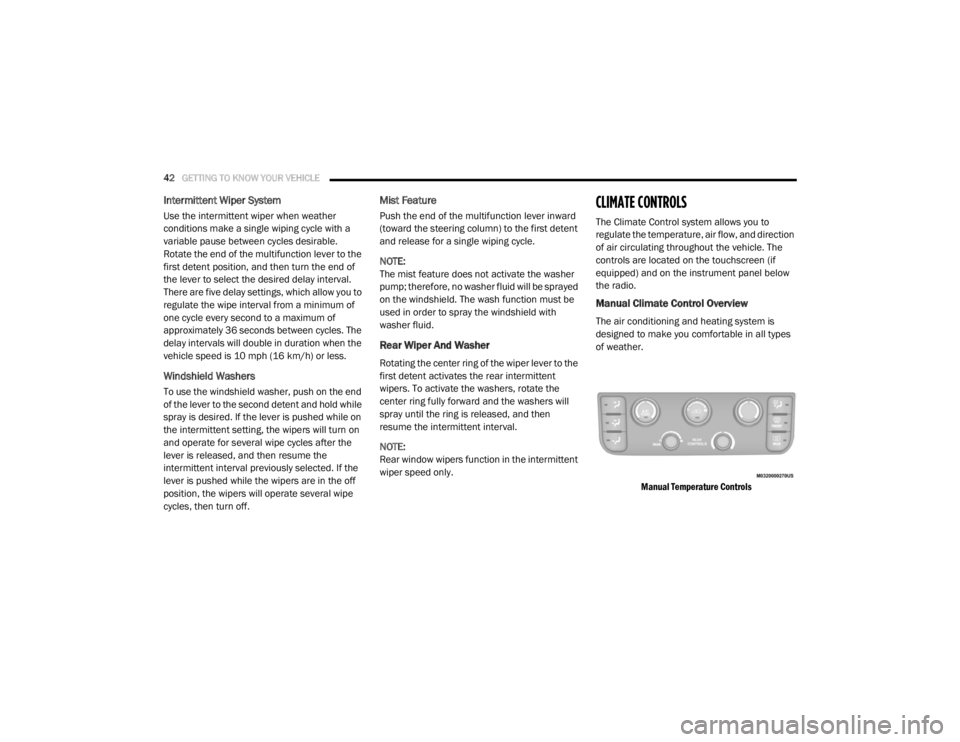
Manual Climate Control Overview
The air conditioning and heating system is
designed to make you comfortable in all types
of weather.
Manual Temperature Controls
20_RT_OM_EN_USC_t.book Page 42
Page 46 of 380

44GETTING TO KNOW YOUR VEHICLE
Front Blower Control
There are seven blower speeds. Use this control to regulate the amount of air forced through the system in any mode you
select. The blower speed increases as you move the control clockwise from the off position.
Right Front Temperature Control
Provides right front seat occupant with independent temperature control. Turn left for cooler or right for warmer
temperature settings.
Panel Mode Panel Mode Button
Push button to select Panel Mode. The indicator illuminates when this mode is on. Air comes from the outlets in the
instrument panel. Each of these outlets can be individually adjusted to direct the flow of air. The air vanes of the center
outlets and outboard outlets can be moved up and down or side to side to regulate airflow direction.
Bi-Level Mode Bi-Level Mode Button
Push button to select Bi–Level Mode. The indicator illuminates when this mode is on. Air comes from the instrument panel
outlets and floor outlets. A slight amount of air is directed through the defrost and side window demister outlets.
NOTE:
Bi-Level mode is designed under comfort conditions to provide cooler air out of the panel outlets and warmer air from the
floor outlets.
Icon
Description
20_RT_OM_EN_USC_t.book Page 44
Page 47 of 380

GETTING TO KNOW YOUR VEHICLE45
Controlling The Rear Climate Controls From
The Front Panel Controls
The rear Manual Climate Control system has
floor air outlets at the rear right side of the third
row seats and overhead outlets at each
outboard rear seating position. The system
provides heated air through the floor outlets or
cool, dehumidified air through the headliner
outlets. The rear system temperature control buttons on
the faceplate are located below the radio
system, located on the instrument panel.
Floor Mode
Floor Mode Button
Push button to select Floor Mode. The indicator illuminates when this mode is on. Air comes from the floor outlets. A slight
amount of air is directed through the defrost and side window demister outlets.
Mix Mode Mix Mode Button
Push button to select Mix Mode. The indicator illuminates when this mode is on. Air is directed through the floor, defrost,
and side window demister outlets. This setting works best in cold or snowy conditions that require extra heat to the
windshield. This setting is good for maintaining comfort while reducing moisture on the windshield.
Icon Description
2
20_RT_OM_EN_USC_t.book Page 45
Page 52 of 380

50GETTING TO KNOW YOUR VEHICLE
Blower Control
There are seven blower speeds. Use this control to regulate the amount of air forced through the system in any mode you
select. The blower speed increases as you move the control clockwise from the off position.
NOTE:
Depending on the configuration, your vehicle may be equipped with four blower speeds.
Modes Control Button
Toggle the Modes Control Button to adjust airflow distribution. The airflow distribution mode can be adjusted so air comes
from the instrument panel outlets, floor outlets, defrost outlets and demist outlets. The Mode settings are as follows:
Panel Mode Panel Mode
Toggle the Modes Control Button until you see Panel Mode Icon on the display. Air comes from the outlets in the instrument
panel. Each of these outlets can be individually adjusted to direct the flow of air. The air vanes of the center outlets and
outboard outlets can be moved up and down or side to side to regulate airflow direction.
Bi-Level Mode Bi-Level Mode
Toggle the Modes Control Button until you see Bi-Level Mode Icon on the display. Air comes from the instrument panel
outlets and floor outlets. A slight amount of air is directed through the defrost and side window demister outlets.
NOTE:
Bi-Level mode is designed under comfort conditions to provide cooler air out of the panel outlets and warmer air from the
floor outlets.
Floor Mode Floor Mode
Toggle the Modes Control Button until you see Floor Mode Icon on the display. Air comes from the floor outlets. A slight
amount of air is directed through the defrost and side window demister outlets.
Icon Description
20_RT_OM_EN_USC_t.book Page 50
Page 53 of 380

GETTING TO KNOW YOUR VEHICLE51
Controlling The Rear Climate Controls From
The Front ATC Panel
The rear ATC system has floor air outlets at the
rear right side of the third row seats and
overhead outlets at each outboard rear seating
position. The system provides heated air
through the floor outlets or cool, dehumidified
air through the headliner outlets. The rear
system temperature control buttons are located
in the Uconnect system, located on the
instrument panel.
Front ATC Panel Rear Control Display
Mix Mode
Mix Mode
Toggle the Modes Control Button until you see Mix Mode Icon on the display. Air is directed through the floor, defrost, and
side window demister outlets. This setting works best in cold or snowy conditions that require extra heat to the windshield.
This setting is good for maintaining comfort while reducing moisture on the windshield.
Front Defrost Mode Front Defrost Mode Button
Push the button to select Front Defrost Mode. The indicator illuminates when this mode is on. Air comes from the
windshield and side window demist outlets. When the defrost mode is selected, the blower level will increase. Use Defrost
mode with maximum temperature settings for best windshield and side window defrosting and defogging.
Icon Description
2
20_RT_OM_EN_USC_t.book Page 51
Page 63 of 380
GETTING TO KNOW YOUR VEHICLE61
HOOD
Opening The Hood
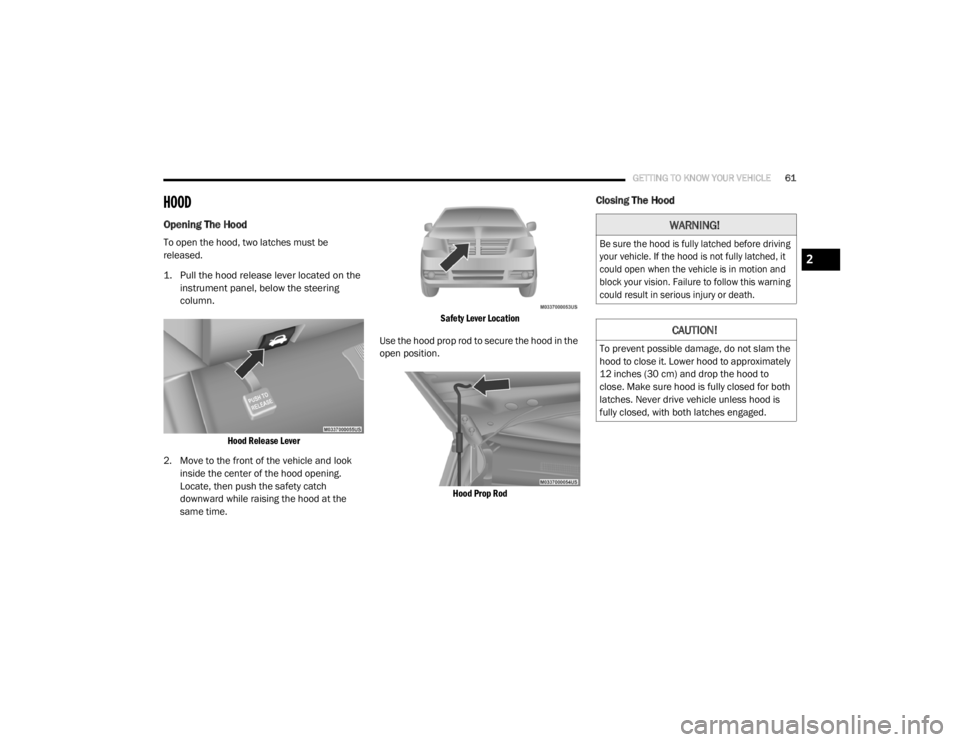
To open the hood, two latches must be
released.
1. Pull the hood release lever located on the
instrument panel, below the steering
column.
Hood Release Lever
2. Move to the front of the vehicle and look inside the center of the hood opening.
Locate, then push the safety catch
downward while raising the hood at the
same time.
Safety Lever Location
Use the hood prop rod to secure the hood in the
open position.
Hood Prop Rod
Closing The Hood
WARNING!
Be sure the hood is fully latched before driving
your vehicle. If the hood is not fully latched, it
could open when the vehicle is in motion and
block your vision. Failure to follow this warning
could result in serious injury or death.
CAUTION!
To prevent possible damage, do not slam the
hood to close it. Lower hood to approximately
12 inches (30 cm) and drop the hood to
close. Make sure hood is fully closed for both
latches. Never drive vehicle unless hood is
fully closed, with both latches engaged.
2
20_RT_OM_EN_USC_t.book Page 61
Page 70 of 380

68GETTING TO KNOW YOUR VEHICLE
General Information
The following regulatory statement applies to all
Radio Frequency (RF) devices equipped in this
vehicle:
This device complies with Part 15 of the FCC
Rules and with Innovation, Science and
Economic Development Canada license-exempt
RSS standard(s). Operation is subject to the
following two conditions:
1. This device may not cause harmful
interference, and
2. This device must accept any interference received, including interference that may
cause undesired operation.
Le présent appareil est conforme aux CNR
d`Innovation, Science and Economic
Development applicables aux appareils radio
exempts de licence. L'exploitation est autorisée
aux deux conditions suivantes:
1. l'appareil ne doit pas produire de brouillage, et
2. l'utilisateur de l'appareil doit accepter tout
brouillage radioélectrique subi, même si le
brouillage est susceptible d'en compro -
mettre le fonctionnement.
La operación de este equipo está sujeta a las
siguientes dos condiciones:
1. es posible que este equipo o dispositivo no cause interferencia perjudicial y
2. este equipo o dispositivo debe aceptar cualquier interferencia, incluyendo la que
pueda causar su operación no deseada.
NOTE:
Changes or modifications not expressly
approved by the party responsible for
compliance could void the user’s authority to
operate the equipment.
INTERNAL EQUIPMENT
Storage
Glove Compartments
The glove compartment is located on the
passenger side of the instrument panel and
features both an upper and lower storage area.
Upper And Lower Glove Compartments
To open the upper compartment, push in the
release button located on the left side of the
upper door. The door will automatically open.
Upper Compartment Release Button
To close the compartment door, push
downward on the door's surface to latch the
door closed.
20_RT_OM_EN_USC_t.book Page 68
Page 72 of 380
70GETTING TO KNOW YOUR VEHICLE
Super Console — If Equipped
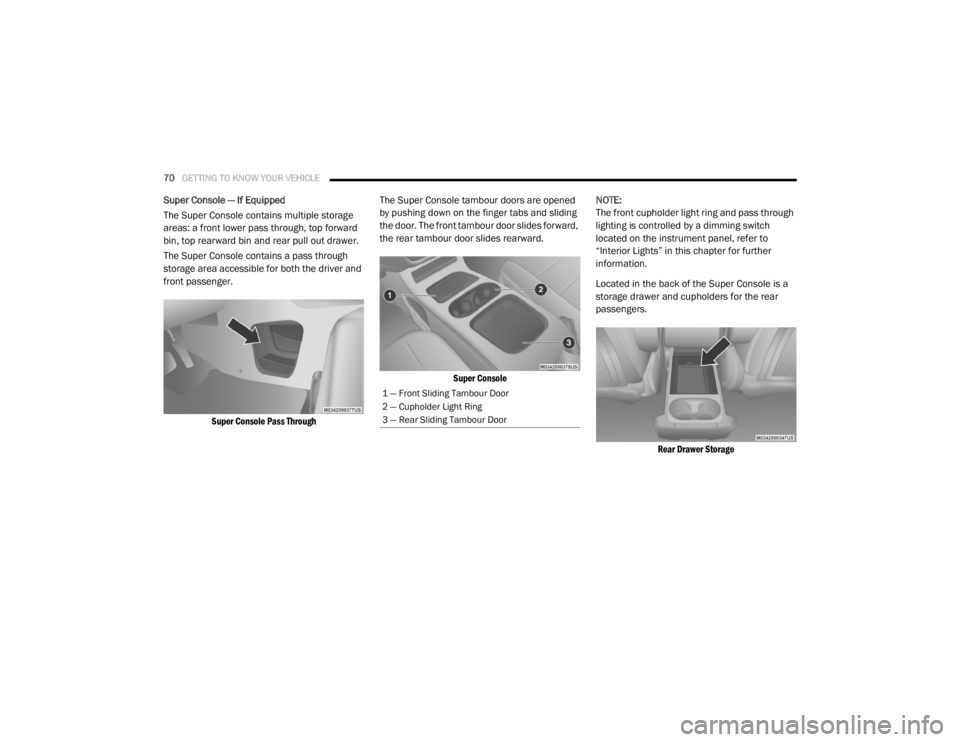
The Super Console contains multiple storage
areas: a front lower pass through, top forward
bin, top rearward bin and rear pull out drawer.
The Super Console contains a pass through
storage area accessible for both the driver and
front passenger.
Super Console Pass Through
The Super Console tambour doors are opened
by pushing down on the finger tabs and sliding
the door. The front tambour door slides forward,
the rear tambour door slides rearward.
Super Console
NOTE:
The front cupholder light ring and pass through
lighting is controlled by a dimming switch
located on the instrument panel, refer to
“Interior Lights” in this chapter for further
information.
Located in the back of the Super Console is a
storage drawer and cupholders for the rear
passengers.
Rear Drawer Storage
1 — Front Sliding Tambour Door
2 — Cupholder Light Ring
3 — Rear Sliding Tambour Door
20_RT_OM_EN_USC_t.book Page 70
Page 73 of 380
GETTING TO KNOW YOUR VEHICLE71
Front And Rear Overhead Consoles
Front Overhead Console
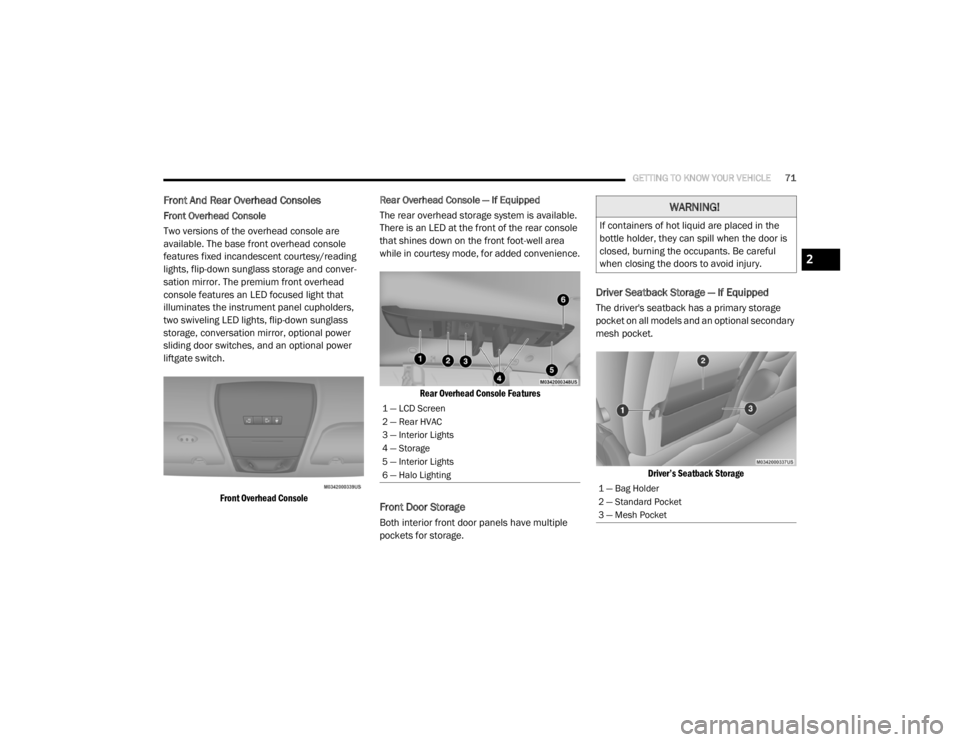
Two versions of the overhead console are
available. The base front overhead console
features fixed incandescent courtesy/reading
lights, flip-down sunglass storage and conver -
sation mirror. The premium front overhead
console features an LED focused light that
illuminates the instrument panel cupholders,
two swiveling LED lights, flip-down sunglass
storage, conversation mirror, optional power
sliding door switches, and an optional power
liftgate switch.
Front Overhead Console
Rear Overhead Console — If Equipped
The rear overhead storage system is available.
There is an LED at the front of the rear console
that shines down on the front foot-well area
while in courtesy mode, for added convenience.
Rear Overhead Console Features
Front Door Storage
Both interior front door panels have multiple
pockets for storage.
Driver Seatback Storage — If Equipped
The driver's seatback has a primary storage
pocket on all models and an optional secondary
mesh pocket.
Driver’s Seatback Storage
1 — LCD Screen
2 — Rear HVAC
3 — Interior Lights
4 — Storage
5 — Interior Lights
6 — Halo Lighting
WARNING!
If containers of hot liquid are placed in the
bottle holder, they can spill when the door is
closed, burning the occupants. Be careful
when closing the doors to avoid injury.
1 — Bag Holder
2 — Standard Pocket
3 — Mesh Pocket
2
20_RT_OM_EN_USC_t.book Page 71