key DODGE GRAND CARAVAN 2020 User Guide
[x] Cancel search | Manufacturer: DODGE, Model Year: 2020, Model line: GRAND CARAVAN, Model: DODGE GRAND CARAVAN 2020Pages: 380, PDF Size: 14.92 MB
Page 19 of 380
GETTING TO KNOW YOUR VEHICLE17
(Continued)
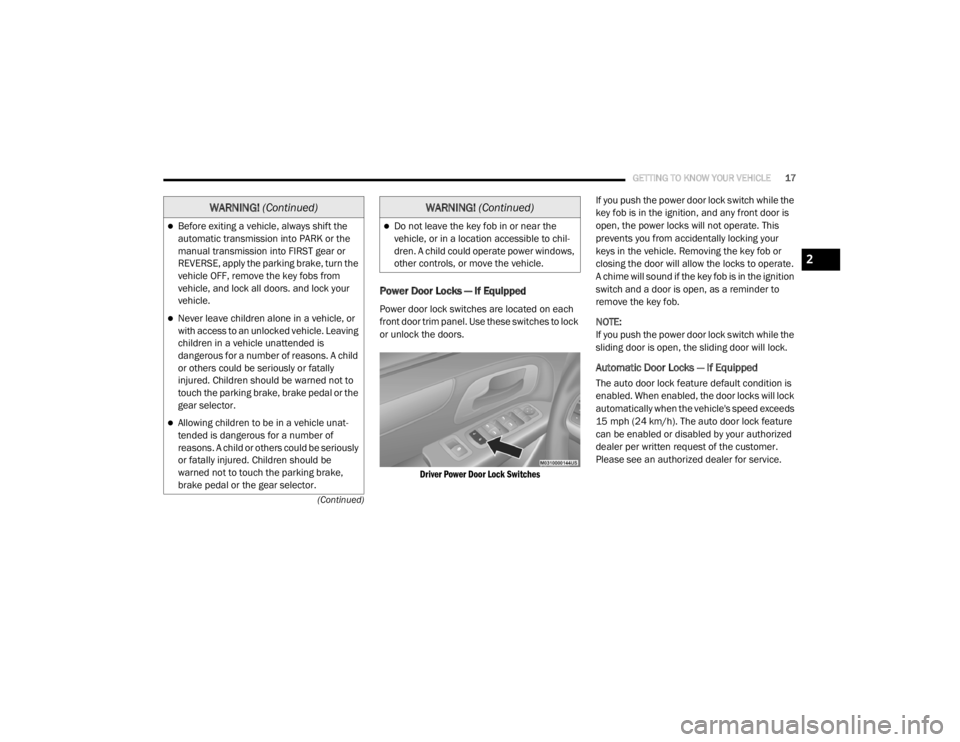
Power Door Locks — If Equipped
Power door lock switches are located on each
front door trim panel. Use these switches to lock
or unlock the doors.
Driver Power Door Lock Switches
If you push the power door lock switch while the
key fob is in the ignition, and any front door is
open, the power locks will not operate. This
prevents you from accidentally locking your
keys in the vehicle. Removing the key fob or
closing the door will allow the locks to operate.
A chime will sound if the key fob is in the ignition
switch and a door is open, as a reminder to
remove the key fob.
NOTE:
If you push the power door lock switch while the
sliding door is open, the sliding door will lock.
Automatic Door Locks — If Equipped
The auto door lock feature default condition is
enabled. When enabled, the door locks will lock
automatically when the vehicle's speed exceeds
15 mph (24 km/h). The auto door lock feature
can be enabled or disabled by your authorized
dealer per written request of the customer.
Please see an authorized dealer for service.
Before exiting a vehicle, always shift the
automatic transmission into PARK or the
manual transmission into FIRST gear or
REVERSE, apply the parking brake, turn the
vehicle OFF, remove the key fobs from
vehicle, and lock all doors. and lock your
vehicle.
Never leave children alone in a vehicle, or
with access to an unlocked vehicle. Leaving
children in a vehicle unattended is
dangerous for a number of reasons. A child
or others could be seriously or fatally
injured. Children should be warned not to
touch the parking brake, brake pedal or the
gear selector.
Allowing children to be in a vehicle unat
-
tended is dangerous for a number of
reasons. A child or others could be seriously
or fatally injured. Children should be
warned not to touch the parking brake,
brake pedal or the gear selector.
WARNING! (Continued)
Do not leave the key fob in or near the
vehicle, or in a location accessible to chil-
dren. A child could operate power windows,
other controls, or move the vehicle.
WARNING! (Continued)
2
20_RT_OM_EN_USC_t.book Page 17
Page 20 of 380
18GETTING TO KNOW YOUR VEHICLE
Unlock Doors Automatically On Exit — If
Equipped
The Unlock Doors Automatically On Exit feature
unlocks all of the vehicle doors when any door
is opened. This will occur only after the gear
selector has been placed into the PARK
position, after the vehicle has been driven (the
gear selector has been placed out of the PARK
position and all doors closed).
The Unlock Doors Automatically On Exit feature
will not operate if there is any manual operation
of the power door locks (lock or unlock).
On vehicles equipped with the optional
instrument cluster display, refer to “Instrument
Cluster Display” in “Getting To Know Your
Instrument Panel” for further information.
NOTE:
Use the Automatic Door Locks at 15 mph
(24 km/h) and Unlock Doors Automatically On
Exit features in accordance with local laws.
Power Sliding Side Door — If Equipped
Push the button on the key fob twice
within five seconds to open, close, or
reverse a power sliding door. The power sliding door may be power opened or
closed in several ways:
Key fob
Inside or outside handles
Buttons located:
In the overhead console
Just inside the sliding door
On the outside handle
Push the button on the key fob twice within five
seconds to open a power sliding door. When the
door is fully open, pushing the button twice
within five seconds a second time will close the
door.
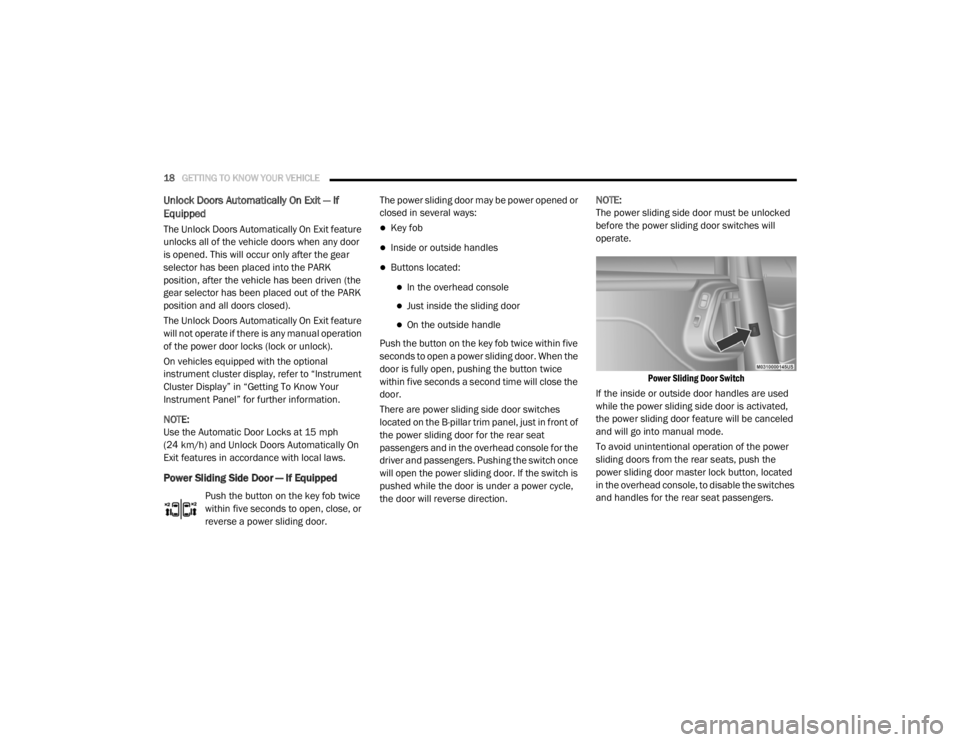
There are power sliding side door switches
located on the B-pillar trim panel, just in front of
the power sliding door for the rear seat
passengers and in the overhead console for the
driver and passengers. Pushing the switch once
will open the power sliding door. If the switch is
pushed while the door is under a power cycle,
the door will reverse direction. NOTE:
The power sliding side door must be unlocked
before the power sliding door switches will
operate.
Power Sliding Door Switch
If the inside or outside door handles are used
while the power sliding side door is activated,
the power sliding door feature will be canceled
and will go into manual mode.
To avoid unintentional operation of the power
sliding doors from the rear seats, push the
power sliding door master lock button, located
in the overhead console, to disable the switches
and handles for the rear seat passengers.
20_RT_OM_EN_USC_t.book Page 18
Page 41 of 380

GETTING TO KNOW YOUR VEHICLE39
When exiting the vehicle the driver can choose
to have the headlights remain on for 30, 60 or
90 seconds or not remain on. To change the
timer setting, see an authorized dealer.
The headlight delay time is programmable on
vehicles equipped with an instrument cluster
display. Refer to “Instrument Cluster Display” in
“Getting To Know Your Instrument Panel” for
further information.
If the headlights are turned off before the
ignition, they will turn off in the normal manner.
NOTE:
The headlights must be turned off within 45
seconds of placing the ignition in the OFF
position to activate this feature.
Lights-On Reminder
If the headlights or the parking lights are left on,
or if the dimmer control is in the extreme top
position after the ignition has been placed in
the OFF position, a chime will sound when the
driver's door is opened.
Front Fog Lights — If Equipped
To activate the front fog lights, turn on the
parking lights or the low beam headlights and
push in the headlight switch control knob. Pushing the headlight switch control knob a
second time will turn the front fog lights off.
Turn Signals
Move the multifunction lever up or down and
the arrows on each side of the instrument
cluster display will flash to show proper
operation of the front and rear turn signal lights.
NOTE:
If either light remains on and does not flash, or
there is a very fast flash rate, check for a
defective outside light bulb. If an indicator fails
to light when the lever is moved, it would
suggest that the indicator bulb is defective.
Turn Signal Warning
If the vehicle electronics sense that the vehicle
has traveled at over 18 mph (29 km/h) for
about 1 mile (1.6 km) with the turn signals on, a
chime will sound to alert the driver.
Lane Change Assist
Tap the lever up or down once, without moving
beyond the detent, and the turn signal (right or
left) will flash three times then automatically
turn off.
Battery Protection
This feature provides battery protection to avoid
wearing down the battery if the headlights or
parking lights are left on for extended periods of
time when the ignition is in the OFF position.
After eight minutes of the ignition being placed
in the OFF position, and the headlight switch in
any position other than OFF or AUTO, the lights
will turn off automatically until the next cycle of
the ignition or headlight switch.
The battery protection feature will be disabled if
the ignition is placed in any position other than
OFF during the eight minute delay.
INTERIOR LIGHTS
Courtesy/Interior Lighting
At the forward end of the overhead console are
two courtesy lights (standard dome light has
two buttons). These interior lights are turned on
when a door or the liftgate is opened, the
remote keyless entry key fob is activated, or
when the dimmer control is moved to the
extreme top.
2
20_RT_OM_EN_USC_t.book Page 39
Page 42 of 380

40GETTING TO KNOW YOUR VEHICLE
The interior lights will automatically turn off in
approximately 10 minutes for the first
activation and 90 seconds every activation
thereafter until the engine is started, if one of
the following occur:
A door, sliding door or the liftgate is left open.
Any overhead reading light is left on.
NOTE:
The ignition must be placed in the OFF position
for this feature to operate.
The courtesy lights also function as reading
lights. Push in on each lens to turn these lights
on while inside the vehicle. Push a second time
to turn each light off. You may adjust the
direction of these lights by pushing the outside
ring, which is identified with four directional
arrows (LED lamps only).
Rear Courtesy/Reading Lights — If Equipped
The overhead console has two sets of courtesy
lights. The lights turn on when a front door, a
sliding door or the liftgate is opened. If your
vehicle is equipped with Remote Keyless Entry,
the lights will also turn on when the unlock
button on the key fob is pushed.
The courtesy lights also function as reading
lights. Push in on each lens to turn these lights
on while inside the vehicle. Push the lens a
second time to turn each light off. You may
adjust the direction of these lights by pushing
the outside ring, which is identified with four
directional arrows.
Reading Lights
Rear Console Halo Lighting
Halo lights are strategically placed soft lighting
that help to illuminate specific areas to aid the
occupants in locating specific features while
driving at night.
The rear overhead console has recessed halo
lighting around the perimeter of the console
base. This feature provides additional lighting
options while traveling and is controlled by the
ambient light dimmer control of the headlight
switch.
Ambient Light Dimmer Control
20_RT_OM_EN_USC_t.book Page 40
Page 64 of 380

62GETTING TO KNOW YOUR VEHICLE
LIFTGATE
Opening
To Unlock/Enter The Liftgate
The liftgate may be released in several ways:
Overhead console liftgate button
Key fob
Outside handle
Push the liftgate button on the key fob twice
within five seconds to release the liftgate.
Liftgate Handle
Closing
To Close The Liftgate
Grasp the liftgate closing handle and initiate
lowering the liftgate. Release the handle when
the liftgate takes over the closing effort.
The power liftgate may be closed by pushing the
rear power liftgate switch, located in the upper
left trim in the liftgate opening. Pushing once
will only close the liftgate. This button cannot be
used to open the liftgate.
Rear Power Liftgate Switch
Power Liftgate — If Equipped
The power liftgate may be opened or closed in
several ways:
Overhead console liftgate button
Key fob
Outside handle (opens liftgate only)
Rear power liftgate switch
(when liftgate is open)
WARNING!
Driving with the liftgate open can allow
poisonous exhaust gases into your vehicle.
You and your passengers could be injured
by these fumes. Keep the liftgate closed
when you are operating the vehicle.
If you are required to drive with the liftgate
open, make sure that all windows are
closed, and the climate control blower
switch is set at high speed. Do not use the
recirculation mode.
20_RT_OM_EN_USC_t.book Page 62
Page 65 of 380
GETTING TO KNOW YOUR VEHICLE63
Using the above ways:
When the liftgate is fully closed, the liftgate
will open
When the liftgate is fully open, the liftgate will
close
When the liftgate is moving, the liftgate will
reverse
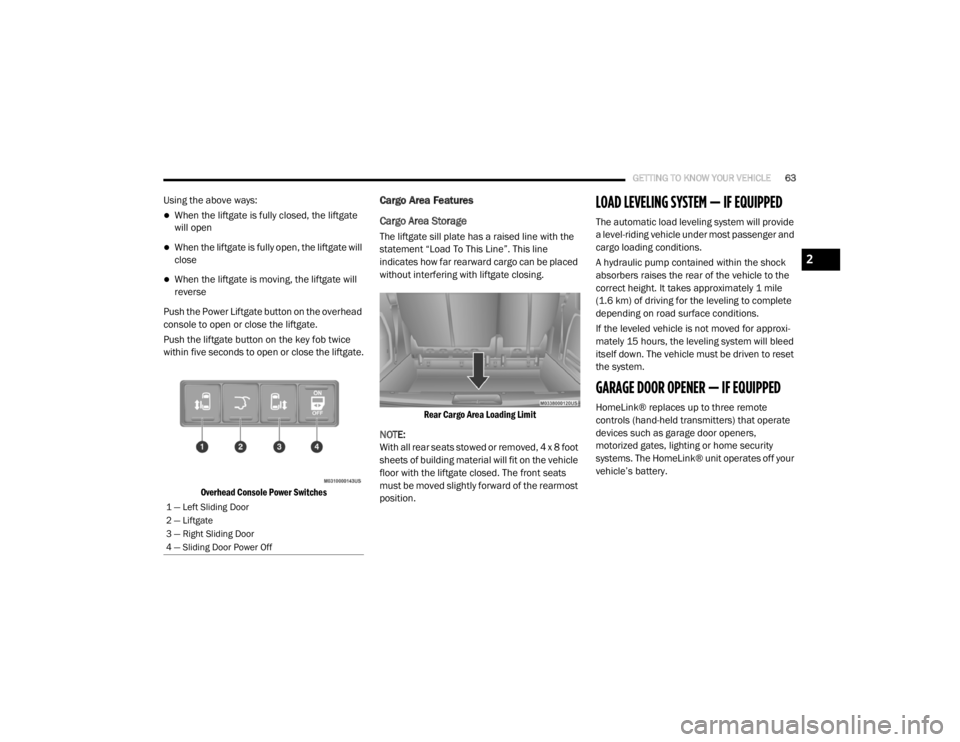
Push the Power Liftgate button on the overhead
console to open or close the liftgate.
Push the liftgate button on the key fob twice
within five seconds to open or close the liftgate.
Overhead Console Power Switches
Cargo Area Features
Cargo Area Storage
The liftgate sill plate has a raised line with the
statement “Load To This Line”. This line
indicates how far rearward cargo can be placed
without interfering with liftgate closing.
Rear Cargo Area Loading Limit
NOTE:
With all rear seats stowed or removed, 4 x 8 foot
sheets of building material will fit on the vehicle
floor with the liftgate closed. The front seats
must be moved slightly forward of the rearmost
position.
LOAD LEVELING SYSTEM — IF EQUIPPED
The automatic load leveling system will provide
a level-riding vehicle under most passenger and
cargo loading conditions.
A hydraulic pump contained within the shock
absorbers raises the rear of the vehicle to the
correct height. It takes approximately 1 mile
(1.6 km) of driving for the leveling to complete
depending on road surface conditions.
If the leveled vehicle is not moved for approxi-
mately 15 hours, the leveling system will bleed
itself down. The vehicle must be driven to reset
the system.
GARAGE DOOR OPENER — IF EQUIPPED
HomeLink® replaces up to three remote
controls (hand-held transmitters) that operate
devices such as garage door openers,
motorized gates, lighting or home security
systems. The HomeLink® unit operates off your
vehicle’s battery.
1 — Left Sliding Door
2 — Liftgate
3 — Right Sliding Door
4 — Sliding Door Power Off
2
20_RT_OM_EN_USC_t.book Page 63
Page 67 of 380

GETTING TO KNOW YOUR VEHICLE65
1. Place the ignition in the ON/RUN position.
2. Place the hand-held transmitter
1 to 3 inches (3 to 8 cm) away from the
HomeLink® button you wish to program
while keeping the HomeLink® indicator
light in view.
3. Push and hold the HomeLink® button you want to program while you push and hold
the hand-held transmitter button.
4. Continue to hold both buttons and observe the indicator light. The HomeLink®
indicator will flash slowly and then rapidly
after HomeLink® has received the
frequency signal from the hand-held
transmitter. Release both buttons after the
indicator light changes from slow to rapid.
5. At the garage door opener (in the garage), locate the “LEARN” or “TRAINING” button.
This can usually be found where the
hanging antenna wire is attached to the
garage door opener/device motor. Firmly
push and release the “LEARN” or
“TRAINING” button. On some garage door
openers/devices there may be a light that
blinks when the garage door opener/device
is in the LEARN/TRAIN mode. NOTE:
You have 30 seconds in which to initiate the
next step after the LEARN button has been
pushed.
6. Return to the vehicle and push the
programmed HomeLink® button twice
(holding the button for two seconds each
time). If the garage door opener/device
activates, programming is complete.
NOTE:
If the garage door opener/device does not
activate, push the button a third time (for two
seconds) to complete the training. To program the remaining two HomeLink®
buttons, repeat each step for each remain -
ing button. DO NOT erase the channels.
Reprogramming A Single HomeLink® Button
(Rolling Code)
To reprogram a channel that has been
previously trained, follow these steps:
1. Place the ignition in the ON/RUN position.
2. Push and hold the desired HomeLink®
button until the indicator light begins to
flash after 20 seconds. Do not release the
button.
3. Without releasing the button , proceed with
“Programming A Rolling Code” step two and
follow all remaining steps.
Programming A Non-Rolling Code
For programming garage door openers
manufactured before 1995:
1. Place the ignition in the ON/RUN position.
NOTE:
For vehicles equipped with Keyless Enter-N-Go,
place the ignition in the RUN position with the
engine on. Make sure while programming
HomeLink® with the engine on that your vehicle
is outside of your garage, or that the garage
door remains open at all times.
2. Place the hand-held transmitter 1 to 3 inches (3 to 8 cm) away from the
HomeLink® button you wish to program
while keeping the HomeLink® indicator
light in view.
2
20_RT_OM_EN_USC_t.book Page 65
Page 78 of 380
76GETTING TO KNOW YOUR VEHICLE
One outlet in the removable floor console
(if equipped) shares a fuse with the lower outlet
in the instrument panel and is also connected
to the battery. Do not exceed a maximum power
of 160 Watts (13 Amps) shared between the
lower panel outlet and the removable floor
console outlet.
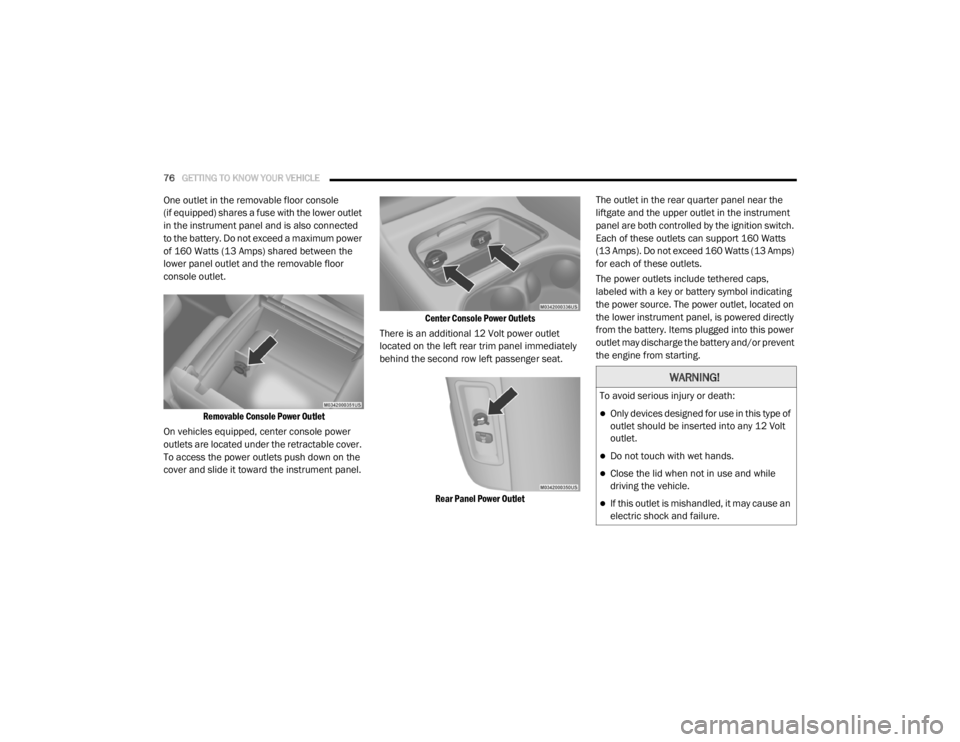
Removable Console Power Outlet
On vehicles equipped, center console power
outlets are located under the retractable cover.
To access the power outlets push down on the
cover and slide it toward the instrument panel.
Center Console Power Outlets
There is an additional 12 Volt power outlet
located on the left rear trim panel immediately
behind the second row left passenger seat.
Rear Panel Power Outlet
The outlet in the rear quarter panel near the
liftgate and the upper outlet in the instrument
panel are both controlled by the ignition switch.
Each of these outlets can support 160 Watts
(13 Amps). Do not exceed 160 Watts (13 Amps)
for each of these outlets.
The power outlets include tethered caps,
labeled with a key or battery symbol indicating
the power source. The power outlet, located on
the lower instrument panel, is powered directly
from the battery. Items plugged into this power
outlet may discharge the battery and/or prevent
the engine from starting.
WARNING!
To avoid serious injury or death:
Only devices designed for use in this type of
outlet should be inserted into any 12 Volt
outlet.
Do not touch with wet hands.
Close the lid when not in use and while
driving the vehicle.
If this outlet is mishandled, it may cause an
electric shock and failure.
20_RT_OM_EN_USC_t.book Page 76
Page 87 of 380
GETTING TO KNOW YOUR INSTRUMENT PANEL85
NOTE:
The hard telltales will illuminate for a bulb check
when the ignition is first cycled.
INSTRUMENT CLUSTER DISPLAY
Your vehicle is equipped with an instrument
cluster display, which offers useful information
to the driver. With the ignition in the OFF
position (and the key removed, for vehicles with
mechanical key), opening/closing of a door will
activate the display for viewing, and display the
total miles or kilometers in the odometer. Your
instrument cluster display is designed to display
important information about your vehicle’s
systems and features. Using a driver interactive
display located on the instrument panel, your
instrument cluster display can show you how
systems are working and give you warnings
when they are not. The steering wheel mounted
controls allow you to scroll through and enter
the main menus and submenus. You can
access the specific information you want and
make selections and adjustments.
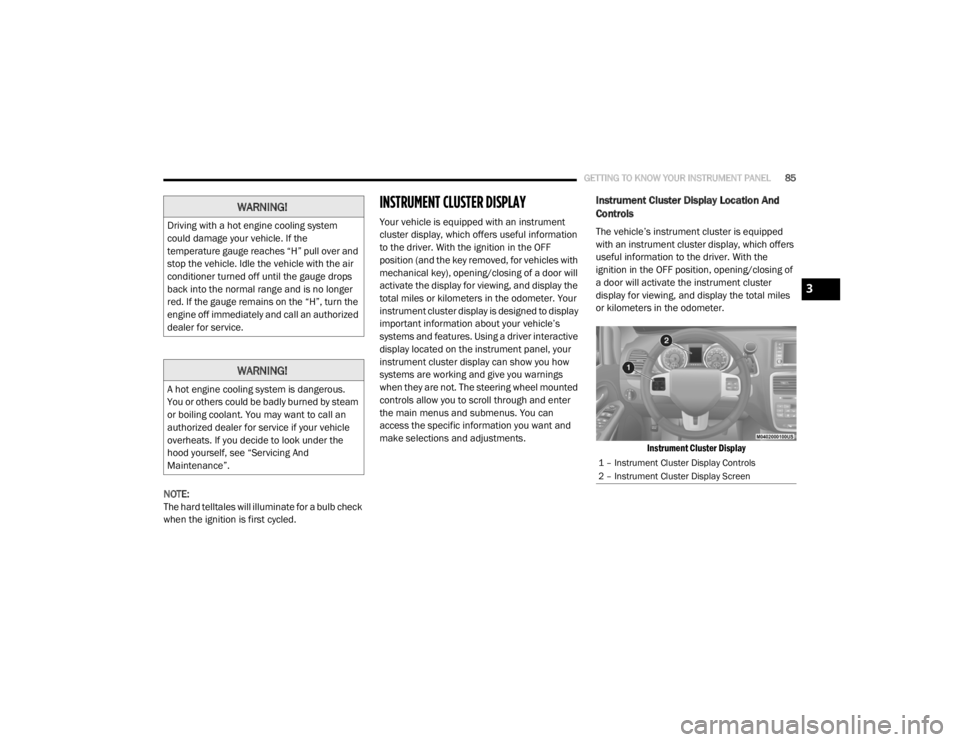
Instrument Cluster Display Location And
Controls
The vehicle’s instrument cluster is equipped
with an instrument cluster display, which offers
useful information to the driver. With the
ignition in the OFF position, opening/closing of
a door will activate the instrument cluster
display for viewing, and display the total miles
or kilometers in the odometer.
Instrument Cluster Display
WARNING!
Driving with a hot engine cooling system
could damage your vehicle. If the
temperature gauge reaches “H” pull over and
stop the vehicle. Idle the vehicle with the air
conditioner turned off until the gauge drops
back into the normal range and is no longer
red. If the gauge remains on the “H”, turn the
engine off immediately and call an authorized
dealer for service.
WARNING!
A hot engine cooling system is dangerous.
You or others could be badly burned by steam
or boiling coolant. You may want to call an
authorized dealer for service if your vehicle
overheats. If you decide to look under the
hood yourself, see “Servicing And
Maintenance”.
1 – Instrument Cluster Display Controls
2 – Instrument Cluster Display Screen
3
20_RT_OM_EN_USC_t.book Page 85
Page 93 of 380

GETTING TO KNOW YOUR INSTRUMENT PANEL91
Auto Unlock Doors
When this feature is selected, all doors will
unlock when the vehicle is stopped and the
transmission is in the PARK or NEUTRAL
position and the driver's door is opened. To
make your selection, push and release the right
arrow button until a check-mark appears next to
the feature showing the system has been
activated, or the check-mark is removed
showing the system has been deactivated.
Remote Unlock Sequence
When Unlock Driver Door Only On 1st Press is
selected, only the driver’s side doors will unlock
on the first push of the key fob unlock button.
With Unlock Driver Door Only On 1st Press , you
must push the key fob unlock button twice to
unlock the passenger’s doors. When Unlock All
Doors On 1st Press is selected, all of the doors
will unlock on the first push of the key fob
unlock button. To make your selection, push
and release the right arrow button until a
check-mark appears next to the feature
showing the system has been activated or the
check-mark is removed showing the system has
been deactivated. Remote Start Comfort Sys.
When this feature is selected and the remote
start is activated, the heated steering wheel
and driver heated seat features will automat
-
ically turn on in cold weather. These features
will stay on through the duration of remote start
or until the key is cycled to ON/RUN position. To
make your selection, push and release the right
arrow button until a check-mark appears next to
the feature showing the system has been
activated or the check-mark is removed
showing the system has been deactivated.
Horn With Remote Lock
When this feature is selected, a short horn
sound will occur when the key fob lock button is
pushed. To make your selection, push and
release the right arrow button until a
check-mark appears next to the feature
showing the system has been activated or the
check-mark is removed showing the system has
been deactivated. Flash Lamps With Lock
When selected, the front and rear turn signals
will flash when the doors are locked with the key
fob. To make your selection, push and release
the
right arrow button until a check-mark
appears next to the feature showing the system
has been activated or the check-mark is
removed showing the system has been
deactivated.
Automatic High Beams — If Equipped
When this feature is selected, the high beam
headlights will deactivate automatically under
certain conditions. To make your selection,
push and release the right arrow button until a
check-mark appears next to the feature
showing the system has been activated or the
check-mark is removed showing the system has
been deactivated.
3
20_RT_OM_EN_USC_t.book Page 91