lock DODGE GRAND CARAVAN 2020 Owner's Manual
[x] Cancel search | Manufacturer: DODGE, Model Year: 2020, Model line: GRAND CARAVAN, Model: DODGE GRAND CARAVAN 2020Pages: 380, PDF Size: 14.92 MB
Page 40 of 380

38GETTING TO KNOW YOUR VEHICLE
Daytime Running Lights (DRLs) — If
Equipped
The headlights on your vehicle will illuminate
when the engine is started and the
transmission is in any gear except PARK. This
provides a constant "lights on" condition until
the ignition is placed in the OFF position. The
lights illuminate at less than half of normal
intensity. If the parking brake is applied, the
Daytime Running Lights (DRLs) will turn off.
Also, if a turn signal is activated, the DRL lamp
on the same side of the vehicle may turn off for
the duration of the turn signal activation. Once
the turn signal is no longer active, the DRL lamp
will illuminate.
High/Low Beam Switch
Push the multifunction lever toward the
instrument panel to switch the headlights to
high beams. Pulling the multifunction lever
back toward the steering wheel will return the
lights to low beams.
Flash-To-Pass
You can signal another vehicle with your
headlights by lightly pulling the multifunction
lever toward you. This will cause the high beam
headlights to turn on, and remain on, until the
lever is released.
Automatic Headlights
This system automatically turns the headlights
on or off according to ambient light levels. To
turn the system on, rotate the headlight switch
counterclockwise to the AUTO position. When
the system is on, the headlight time delay
feature is also on. This means the headlights
will stay on for up to 90 seconds after you place
the ignition into the OFF position. The headlight
time delay can be programmed to 0, 30, 60, or
90 seconds. Refer to “Headlight Delay” in this
section for further information.
To turn the automatic system off, move the
headlight switch out of the AUTO position.
NOTE:
The engine must be running before the
headlights will come on in the automatic mode.
Headlights On With Wipers — If Equipped
When your headlights are in the AUTO mode
and the engine is running, the headlights will
automatically turn on when the wiper system is
also turned on. Headlights on when windshield
wipers are on may be found on vehicles
equipped with an automatic headlight system.
NOTE:
The Headlights with Wipers feature can be
turned on or off through the instrument cluster
display. Refer to “Instrument Cluster Display” in
“Getting To Know Your Instrument Panel” for
further information.
Headlight Delay — If Equipped
This feature provides the safety of headlight
illumination for up to 90 seconds after exiting
your vehicle.
To activate the delay feature, place the ignition
in the OFF position while the headlights are still
on. Then turn off the headlights within 45
seconds. The 90 second delay interval begins
when the headlight switch is turned off. If the
headlights or parking lights are turned back on
or the ignition switch is placed in the ON
position, the delay will be cancelled.
20_RT_OM_EN_USC_t.book Page 38
Page 42 of 380

40GETTING TO KNOW YOUR VEHICLE
The interior lights will automatically turn off in
approximately 10 minutes for the first
activation and 90 seconds every activation
thereafter until the engine is started, if one of
the following occur:
A door, sliding door or the liftgate is left open.
Any overhead reading light is left on.
NOTE:
The ignition must be placed in the OFF position
for this feature to operate.
The courtesy lights also function as reading
lights. Push in on each lens to turn these lights
on while inside the vehicle. Push a second time
to turn each light off. You may adjust the
direction of these lights by pushing the outside
ring, which is identified with four directional
arrows (LED lamps only).
Rear Courtesy/Reading Lights — If Equipped
The overhead console has two sets of courtesy
lights. The lights turn on when a front door, a
sliding door or the liftgate is opened. If your
vehicle is equipped with Remote Keyless Entry,
the lights will also turn on when the unlock
button on the key fob is pushed.
The courtesy lights also function as reading
lights. Push in on each lens to turn these lights
on while inside the vehicle. Push the lens a
second time to turn each light off. You may
adjust the direction of these lights by pushing
the outside ring, which is identified with four
directional arrows.
Reading Lights
Rear Console Halo Lighting
Halo lights are strategically placed soft lighting
that help to illuminate specific areas to aid the
occupants in locating specific features while
driving at night.
The rear overhead console has recessed halo
lighting around the perimeter of the console
base. This feature provides additional lighting
options while traveling and is controlled by the
ambient light dimmer control of the headlight
switch.
Ambient Light Dimmer Control
20_RT_OM_EN_USC_t.book Page 40
Page 46 of 380

44GETTING TO KNOW YOUR VEHICLE
Front Blower Control
There are seven blower speeds. Use this control to regulate the amount of air forced through the system in any mode you
select. The blower speed increases as you move the control clockwise from the off position.
Right Front Temperature Control
Provides right front seat occupant with independent temperature control. Turn left for cooler or right for warmer
temperature settings.
Panel Mode Panel Mode Button
Push button to select Panel Mode. The indicator illuminates when this mode is on. Air comes from the outlets in the
instrument panel. Each of these outlets can be individually adjusted to direct the flow of air. The air vanes of the center
outlets and outboard outlets can be moved up and down or side to side to regulate airflow direction.
Bi-Level Mode Bi-Level Mode Button
Push button to select Bi–Level Mode. The indicator illuminates when this mode is on. Air comes from the instrument panel
outlets and floor outlets. A slight amount of air is directed through the defrost and side window demister outlets.
NOTE:
Bi-Level mode is designed under comfort conditions to provide cooler air out of the panel outlets and warmer air from the
floor outlets.
Icon
Description
20_RT_OM_EN_USC_t.book Page 44
Page 49 of 380

GETTING TO KNOW YOUR VEHICLE47
Icon Description
Panel Mode
Rear Panel Mode
To change Rear Mode to Panel Mode, turn the Rear Mode Knob to Rear Panel Mode position. Air comes from the outlets in
the headliner. Each of these outlets can be individually adjusted to direct the flow of air. Moving the air vanes of the outlets
to one side will shut off the airflow.
Bi-Level Mode Rear Bi-Level Mode
Air comes from both the headliner outlets and the floor outlets.
NOTE:
To change Rear Mode to Bi-Level Mode, turn the Rear Mode Knob to Rear Bi-Level Mode position. In many temperature
positions, the Bi-Level mode is designed to provide cooler air out of the headliner outlets and warmer air from the floor outlets.
Floor Mode
Rear Floor Mode
To change Rear Mode to Floor Mode, turn the Rear Mode Knob to Rear Floor Mode position. Air comes from the floor outlets.
Rear Temperature Control Knob
To change the temperature in the rear of the vehicle, turn the Temperature Control Knob. Turn it to the right to raise the
temperature, or turn it to the left to lower the temperature. The rear temperature settings are displayed in control head.
When rear controls are locked by the front system, the Rear Temperature Lock symbol on the control head is illuminated and
any rear overhead adjustments are ignored.
Rear Blower Control Knob
The rear blower control can be manually set to off, or any fixed blower speed by rotating the Blower Control Knob in the rear
of the vehicle. This allows the rear seat occupants to control the volume of air circulated in the rear of the vehicle.
2
20_RT_OM_EN_USC_t.book Page 47
Page 52 of 380

50GETTING TO KNOW YOUR VEHICLE
Blower Control
There are seven blower speeds. Use this control to regulate the amount of air forced through the system in any mode you
select. The blower speed increases as you move the control clockwise from the off position.
NOTE:
Depending on the configuration, your vehicle may be equipped with four blower speeds.
Modes Control Button
Toggle the Modes Control Button to adjust airflow distribution. The airflow distribution mode can be adjusted so air comes
from the instrument panel outlets, floor outlets, defrost outlets and demist outlets. The Mode settings are as follows:
Panel Mode Panel Mode
Toggle the Modes Control Button until you see Panel Mode Icon on the display. Air comes from the outlets in the instrument
panel. Each of these outlets can be individually adjusted to direct the flow of air. The air vanes of the center outlets and
outboard outlets can be moved up and down or side to side to regulate airflow direction.
Bi-Level Mode Bi-Level Mode
Toggle the Modes Control Button until you see Bi-Level Mode Icon on the display. Air comes from the instrument panel
outlets and floor outlets. A slight amount of air is directed through the defrost and side window demister outlets.
NOTE:
Bi-Level mode is designed under comfort conditions to provide cooler air out of the panel outlets and warmer air from the
floor outlets.
Floor Mode Floor Mode
Toggle the Modes Control Button until you see Floor Mode Icon on the display. Air comes from the floor outlets. A slight
amount of air is directed through the defrost and side window demister outlets.
Icon Description
20_RT_OM_EN_USC_t.book Page 50
Page 54 of 380

52GETTING TO KNOW YOUR VEHICLE
Icon Description
Rear Lock Button
Press to lock out the rear manual temperature controls from adjusting the rear temperature and blower settings.
Rear Passenger Temperature Up and Down Buttons
Provides the rear passengers with independent temperature control. Push the up arrow button to increase the
temperature. Push the down arrow button to decrease the temperature. When the SYNC feature is active, the rear
temperature and the front passenger’s temperature will move up and down with the driver’s temperature.
SYNC Button — If Equipped
Press the SYNC button to toggle the Sync feature on/off. The SYNC indicator is illuminated when this feature is enabled.
SYNC is used to synchronize the front and rear passenger temperature settings with the driver temperature setting.
Changing the front or rear passenger temperature setting while in SYNC will automatically exit this feature.
Rear Blower Control
Turn the Blower Control Knob clockwise or counter clockwise to adjust blower speed. There are seven blower speeds. Use
this control to regulate the amount of air forced through the system in any mode you select in Rear Compartment. The
blower speed increases as you move the control clockwise from the off position.
Panel Mode Rear Panel Mode
Toggle the Modes Control Button until Rear Panel Mode appears on the display. Air comes from the outlets in the headliner.
Each of these outlets can be individually adjusted to direct the flow of air. Moving the air vanes of the outlets to one side
will shut off the airflow.
20_RT_OM_EN_USC_t.book Page 52
Page 57 of 380

GETTING TO KNOW YOUR VEHICLE55
Rear Temperature Control Knob
To change the temperature in the rear of the vehicle, turn the Temperature Control Knob. Turn it to the right to raise the
temperature, or turn it to the left to lower the temperature. The rear temperature settings are displayed in control head.
When rear controls are locked by the front system, the Rear Temperature Lock symbol on the control head is illuminated and
any rear overhead adjustments are ignored.
Push the Rear Temperature Lock button on the front ATC panel. This turns off the Rear Temperature Lock icon in the rear
temperature knob.
Rear Blower Control Knob
The rear blower control can be manually set to off, or any fixed blower speed by rotating the Blower Control Knob in the rear
of the vehicle. This allows the rear seat occupants to control the volume of air circulated in the rear of the vehicle.
Rear AUTO Mode
Rear AUTO is selected by adjusting the rear blower knob counterclockwise to AUTO. The ATC system will automatically achieve
and maintain that comfort level. When the system is set up for your comfort level, it is not necessary to change the settings.
You will experience the greatest efficiency by simply allowing the system to function automatically.
Icon Description
2
20_RT_OM_EN_USC_t.book Page 55
Page 61 of 380
GETTING TO KNOW YOUR VEHICLE59
WINDOWS
Power Vent Windows — If Equipped
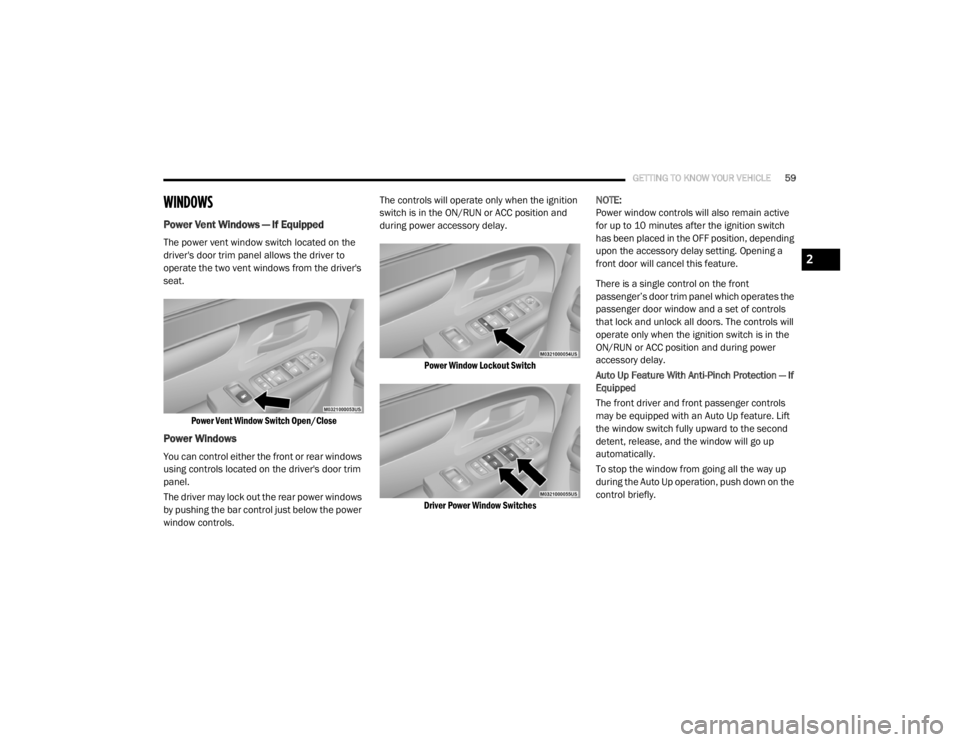
The power vent window switch located on the
driver's door trim panel allows the driver to
operate the two vent windows from the driver's
seat.
Power Vent Window Switch Open/Close
Power Windows
You can control either the front or rear windows
using controls located on the driver's door trim
panel.
The driver may lock out the rear power windows
by pushing the bar control just below the power
window controls. The controls will operate only when the ignition
switch is in the ON/RUN or ACC position and
during power accessory delay.
Power Window Lockout Switch
Driver Power Window Switches
NOTE:
Power window controls will also remain active
for up to 10 minutes after the ignition switch
has been placed in the OFF position, depending
upon the accessory delay setting. Opening a
front door will cancel this feature.
There is a single control on the front
passenger’s door trim panel which operates the
passenger door window and a set of controls
that lock and unlock all doors. The controls will
operate only when the ignition switch is in the
ON/RUN or ACC position and during power
accessory delay.
Auto Up Feature With Anti-Pinch Protection — If
Equipped
The front driver and front passenger controls
may be equipped with an Auto Up feature. Lift
the window switch fully upward to the second
detent, release, and the window will go up
automatically.
To stop the window from going all the way up
during the Auto Up operation, push down on the
control briefly.
2
20_RT_OM_EN_USC_t.book Page 59
Page 62 of 380
60GETTING TO KNOW YOUR VEHICLE
To close the window part way, lift the window
control to the first detent and release when you
want the window to stop.
NOTE:
If the window runs into any obstacle during
auto-closure, it will reverse direction and
then go back down. Remove the obstacle and
use the window control again to close the
window.
Any impact due to rough road conditions may
trigger the auto reverse function unexpect -
edly during auto-closure. If this happens, pull
the control lightly to the first detent and hold
to close window manually. Auto Up Reset — If Equipped
To reactivate the Auto Up feature, perform the
following steps after vehicle power is restored:
1. Pull the window control up to close the
window completely and continue to hold
the control up for an additional two
seconds after the window is closed.
2. Push the window control down firmly to the second detent to open the window
completely and continue to hold the control
down for an additional two seconds after
the window is fully open.
Sliding Side Door Power Window Control — If
Equipped
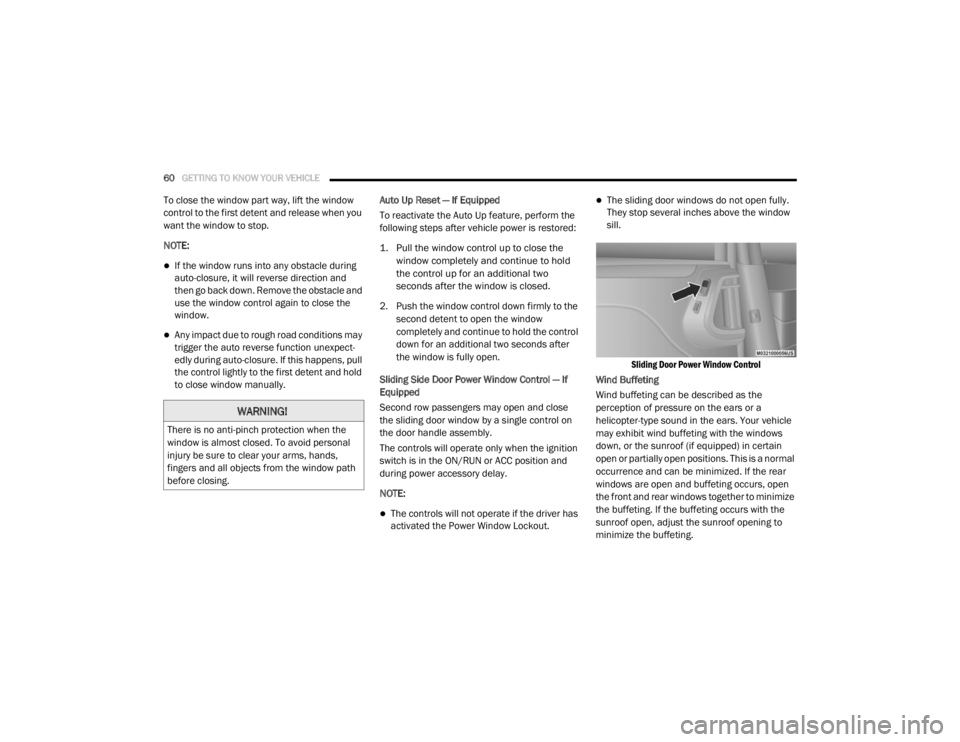
Second row passengers may open and close
the sliding door window by a single control on
the door handle assembly.
The controls will operate only when the ignition
switch is in the ON/RUN or ACC position and
during power accessory delay.
NOTE:
The controls will not operate if the driver has
activated the Power Window Lockout.
The sliding door windows do not open fully.
They stop several inches above the window
sill.
Sliding Door Power Window Control
Wind Buffeting
Wind buffeting can be described as the
perception of pressure on the ears or a
helicopter-type sound in the ears. Your vehicle
may exhibit wind buffeting with the windows
down, or the sunroof (if equipped) in certain
open or partially open positions. This is a normal
occurrence and can be minimized. If the rear
windows are open and buffeting occurs, open
the front and rear windows together to minimize
the buffeting. If the buffeting occurs with the
sunroof open, adjust the sunroof opening to
minimize the buffeting.
WARNING!
There is no anti-pinch protection when the
window is almost closed. To avoid personal
injury be sure to clear your arms, hands,
fingers and all objects from the window path
before closing.
20_RT_OM_EN_USC_t.book Page 60
Page 63 of 380
GETTING TO KNOW YOUR VEHICLE61
HOOD
Opening The Hood
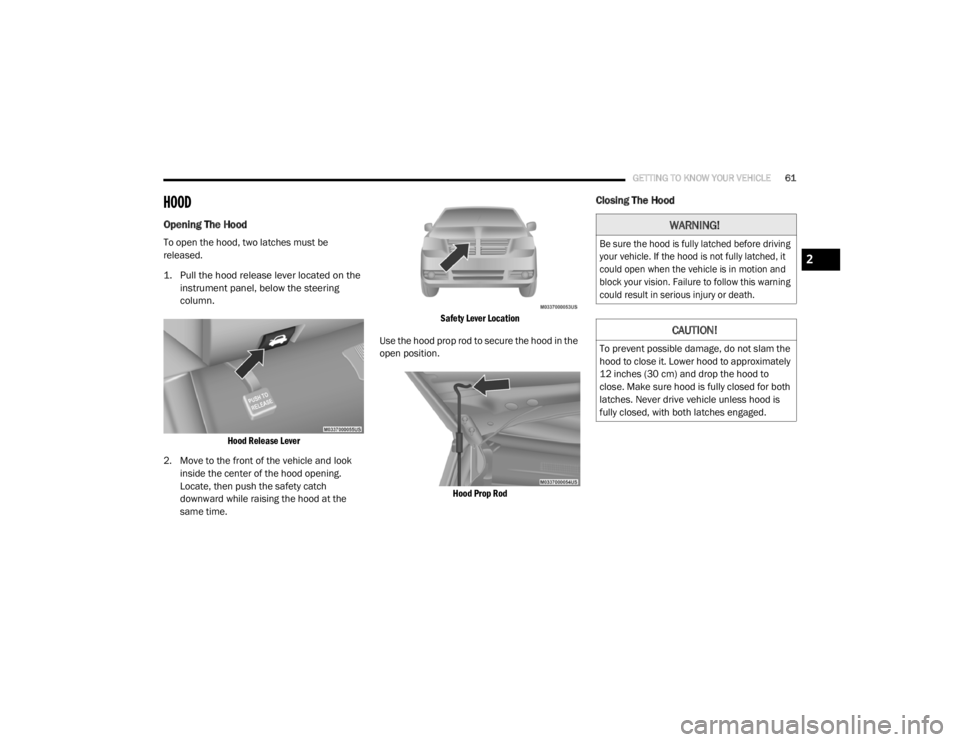
To open the hood, two latches must be
released.
1. Pull the hood release lever located on the
instrument panel, below the steering
column.
Hood Release Lever
2. Move to the front of the vehicle and look inside the center of the hood opening.
Locate, then push the safety catch
downward while raising the hood at the
same time.
Safety Lever Location
Use the hood prop rod to secure the hood in the
open position.
Hood Prop Rod
Closing The Hood
WARNING!
Be sure the hood is fully latched before driving
your vehicle. If the hood is not fully latched, it
could open when the vehicle is in motion and
block your vision. Failure to follow this warning
could result in serious injury or death.
CAUTION!
To prevent possible damage, do not slam the
hood to close it. Lower hood to approximately
12 inches (30 cm) and drop the hood to
close. Make sure hood is fully closed for both
latches. Never drive vehicle unless hood is
fully closed, with both latches engaged.
2
20_RT_OM_EN_USC_t.book Page 61