lock DODGE GRAND CARAVAN 2020 User Guide
[x] Cancel search | Manufacturer: DODGE, Model Year: 2020, Model line: GRAND CARAVAN, Model: DODGE GRAND CARAVAN 2020Pages: 380, PDF Size: 14.92 MB
Page 19 of 380
GETTING TO KNOW YOUR VEHICLE17
(Continued)
Power Door Locks — If Equipped
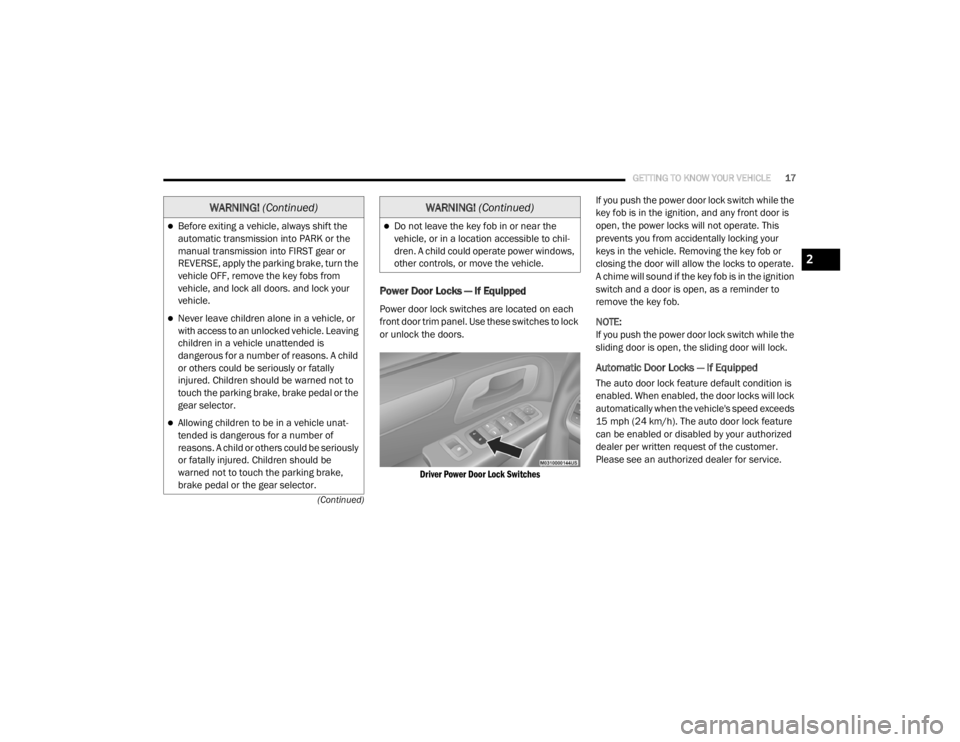
Power door lock switches are located on each
front door trim panel. Use these switches to lock
or unlock the doors.
Driver Power Door Lock Switches
If you push the power door lock switch while the
key fob is in the ignition, and any front door is
open, the power locks will not operate. This
prevents you from accidentally locking your
keys in the vehicle. Removing the key fob or
closing the door will allow the locks to operate.
A chime will sound if the key fob is in the ignition
switch and a door is open, as a reminder to
remove the key fob.
NOTE:
If you push the power door lock switch while the
sliding door is open, the sliding door will lock.
Automatic Door Locks — If Equipped
The auto door lock feature default condition is
enabled. When enabled, the door locks will lock
automatically when the vehicle's speed exceeds
15 mph (24 km/h). The auto door lock feature
can be enabled or disabled by your authorized
dealer per written request of the customer.
Please see an authorized dealer for service.
Before exiting a vehicle, always shift the
automatic transmission into PARK or the
manual transmission into FIRST gear or
REVERSE, apply the parking brake, turn the
vehicle OFF, remove the key fobs from
vehicle, and lock all doors. and lock your
vehicle.
Never leave children alone in a vehicle, or
with access to an unlocked vehicle. Leaving
children in a vehicle unattended is
dangerous for a number of reasons. A child
or others could be seriously or fatally
injured. Children should be warned not to
touch the parking brake, brake pedal or the
gear selector.
Allowing children to be in a vehicle unat
-
tended is dangerous for a number of
reasons. A child or others could be seriously
or fatally injured. Children should be
warned not to touch the parking brake,
brake pedal or the gear selector.
WARNING! (Continued)
Do not leave the key fob in or near the
vehicle, or in a location accessible to chil-
dren. A child could operate power windows,
other controls, or move the vehicle.
WARNING! (Continued)
2
20_RT_OM_EN_USC_t.book Page 17
Page 20 of 380
18GETTING TO KNOW YOUR VEHICLE
Unlock Doors Automatically On Exit — If
Equipped
The Unlock Doors Automatically On Exit feature
unlocks all of the vehicle doors when any door
is opened. This will occur only after the gear
selector has been placed into the PARK
position, after the vehicle has been driven (the
gear selector has been placed out of the PARK
position and all doors closed).
The Unlock Doors Automatically On Exit feature
will not operate if there is any manual operation
of the power door locks (lock or unlock).
On vehicles equipped with the optional
instrument cluster display, refer to “Instrument
Cluster Display” in “Getting To Know Your
Instrument Panel” for further information.
NOTE:
Use the Automatic Door Locks at 15 mph
(24 km/h) and Unlock Doors Automatically On
Exit features in accordance with local laws.
Power Sliding Side Door — If Equipped
Push the button on the key fob twice
within five seconds to open, close, or
reverse a power sliding door. The power sliding door may be power opened or
closed in several ways:
Key fob
Inside or outside handles
Buttons located:
In the overhead console
Just inside the sliding door
On the outside handle
Push the button on the key fob twice within five
seconds to open a power sliding door. When the
door is fully open, pushing the button twice
within five seconds a second time will close the
door.
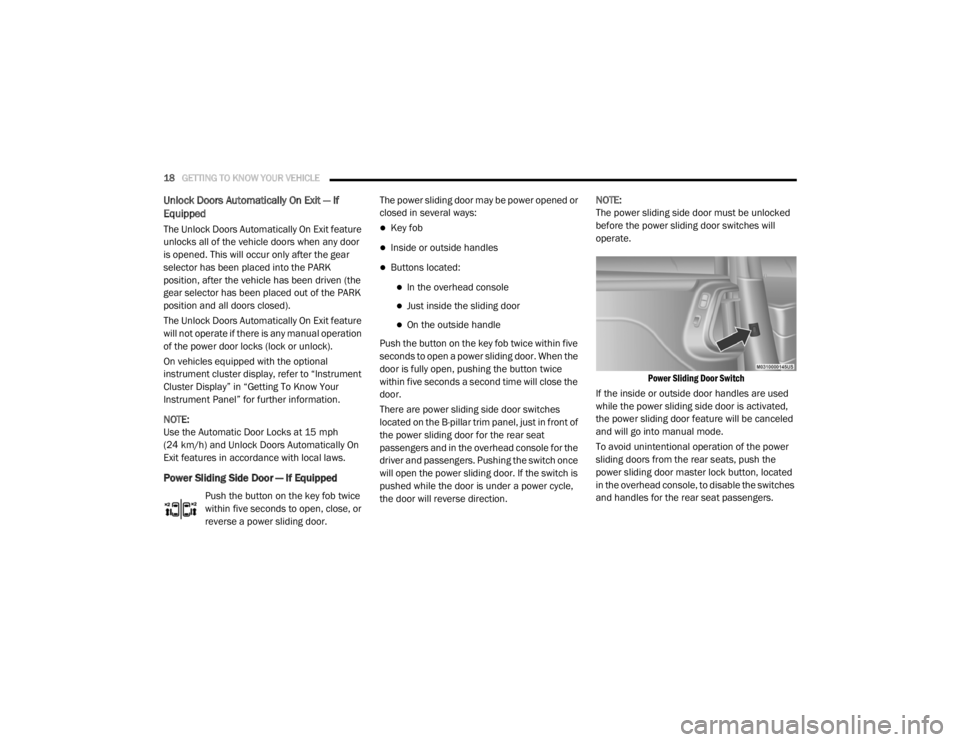
There are power sliding side door switches
located on the B-pillar trim panel, just in front of
the power sliding door for the rear seat
passengers and in the overhead console for the
driver and passengers. Pushing the switch once
will open the power sliding door. If the switch is
pushed while the door is under a power cycle,
the door will reverse direction. NOTE:
The power sliding side door must be unlocked
before the power sliding door switches will
operate.
Power Sliding Door Switch
If the inside or outside door handles are used
while the power sliding side door is activated,
the power sliding door feature will be canceled
and will go into manual mode.
To avoid unintentional operation of the power
sliding doors from the rear seats, push the
power sliding door master lock button, located
in the overhead console, to disable the switches
and handles for the rear seat passengers.
20_RT_OM_EN_USC_t.book Page 18
Page 21 of 380
GETTING TO KNOW YOUR VEHICLE19
NOTE:
The power sliding side door switches will not
open the power sliding door if the gear
selector is in gear or the vehicle speed is
above 0 mph (0 km/h). To close the power
sliding door with the gear selector in gear and
vehicle speed at 0 mph (0 km/h), the brake
must be pushed.
If anything obstructs the power sliding side
door while it is closing or opening, the door
will automatically reverse to the closed or
open position, provided it meets sufficient
resistance.
If the power sliding side door is not in the full
open or close position, it will fully open when
a power sliding door switch is pushed. To
close the door, wait until it is fully open and
then push the switch again.
If the power sliding door encounters multiple
obstructions within the same cycle, the
system will automatically stop, the power
sliding door motor will make a clicking sound
until the door has no further movement. This
clicking sound can be stopped by pulling the inside or outside handle. If this condition
occurs, no damage is done to the power
sliding door motor. The power sliding door
must be opened or closed manually.
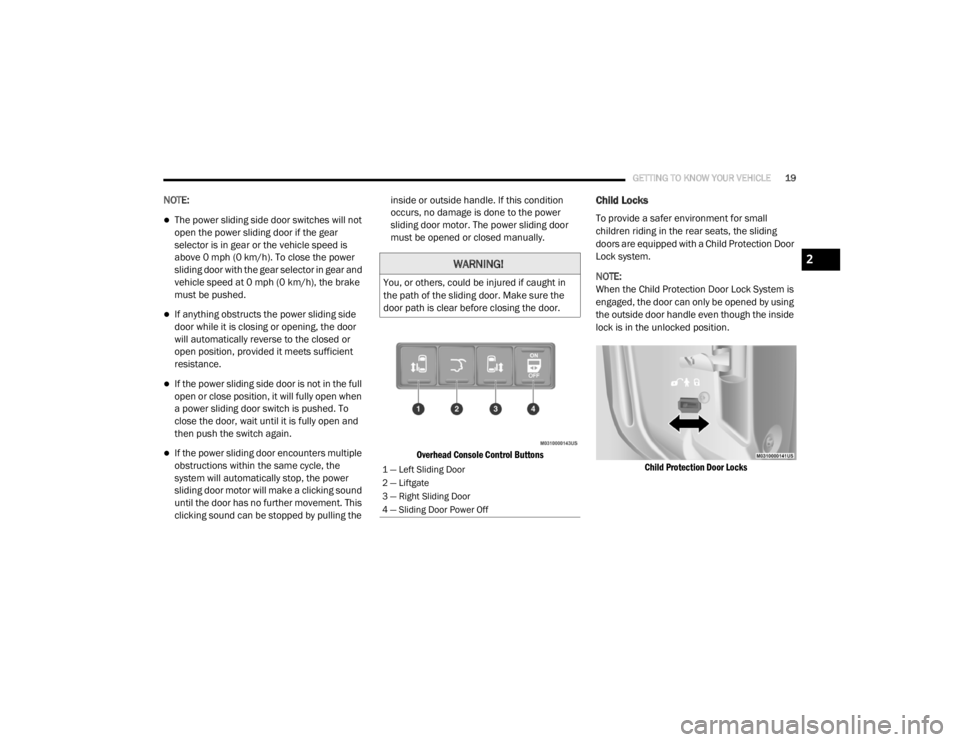
Overhead Console Control Buttons
Child Locks
To provide a safer environment for small
children riding in the rear seats, the sliding
doors are equipped with a Child Protection Door
Lock system.
NOTE:
When the Child Protection Door Lock System is
engaged, the door can only be opened by using
the outside door handle even though the inside
lock is in the unlocked position.
Child Protection Door Locks
WARNING!
You, or others, could be injured if caught in
the path of the sliding door. Make sure the
door path is clear before closing the door.
1 — Left Sliding Door
2 — Liftgate
3 — Right Sliding Door
4 — Sliding Door Power Off
2
20_RT_OM_EN_USC_t.book Page 19
Page 24 of 380
22GETTING TO KNOW YOUR VEHICLE
4. Slide the storage bin locking mechanism to
the “lock” position and then pull up on the
storage bin latch to open the cover.
Storage Bin Cover Lock Release
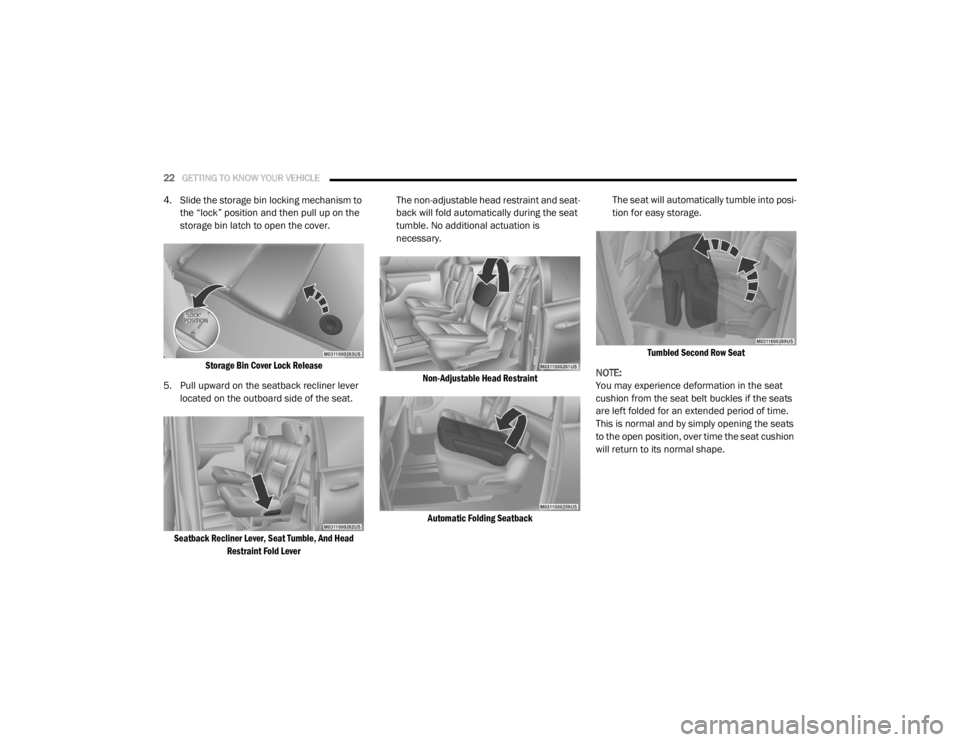
5. Pull upward on the seatback recliner lever located on the outboard side of the seat.
Seatback Recliner Lever, Seat Tumble, And Head Restraint Fold Lever
The non-adjustable head restraint and seat
-
back will fold automatically during the seat
tumble. No additional actuation is
necessary.
Non-Adjustable Head RestraintAutomatic Folding Seatback
The seat will automatically tumble into posi
-
tion for easy storage.
Tumbled Second Row Seat
NOTE:
You may experience deformation in the seat
cushion from the seat belt buckles if the seats
are left folded for an extended period of time.
This is normal and by simply opening the seats
to the open position, over time the seat cushion
will return to its normal shape.
20_RT_OM_EN_USC_t.book Page 22
Page 25 of 380

GETTING TO KNOW YOUR VEHICLE23
(Continued)
6. Push the seat into the storage bin.
Seat In Storage Bin
7. Close the storage bin cover.
To Unstow Second Row Seats
To unstow the second row seat, proceed as
follows:
1. Pull up on the storage bin latch to open the cover.
2. Pull up on the strap to lift the seat out of the
storage bin and push the seat rearward to
latch the seat anchors.
3. Lift the seatback to the full upright position.
4. Return the head restraint to its upright position, close the storage bin cover and
slide the storage bin locking mechanism to
the “unlocked” position.
WARNING!
In a collision, serious injury could result if the
seat storage bin covers are not properly
latched:
Do not drive the vehicle with the storage bin
covers open.
Keep the storage bin covers closed and
latched while the vehicle is in motion.
Do not use a storage bin latch as a tie
down.
CAUTION!
The storage bin cover must be locked and
flat to avoid damage from contact with the
front seat tracks, which have minimal clear -
ance to the cover.
Do not sit on the second row seat when it is
in the stowed position with the seatback
upright otherwise damage to the seat may
occur.
WARNING! (Continued)
WARNING!
In a collision, you or others in your vehicle
could be injured if seats are not properly
latched to their floor attachments. Always
be sure the seats are fully latched.
Sitting in a seat with the head restraint in its
lowered position could result in serious
injury or death in a collision. Always make
sure the head restraints are in their upright
positions when the seat is to be occupied.
2
20_RT_OM_EN_USC_t.book Page 23
Page 27 of 380
GETTING TO KNOW YOUR VEHICLE25
Second Row Bench Seat — If Equipped
While the bench seat does not stow in the floor,
it is removable for added cargo space.
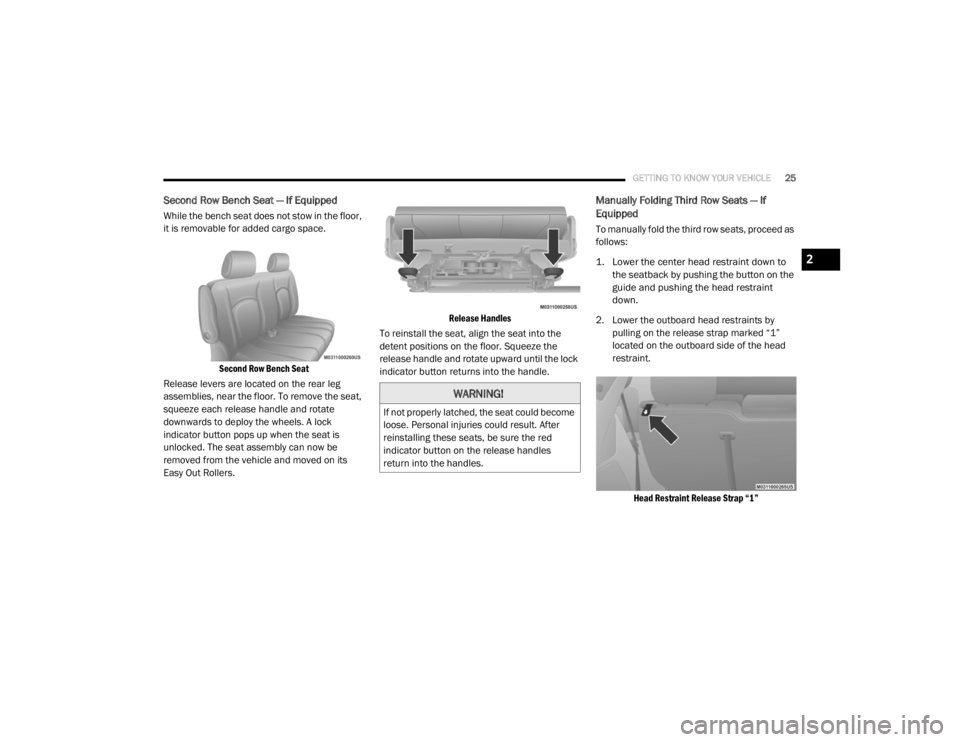
Second Row Bench Seat
Release levers are located on the rear leg
assemblies, near the floor. To remove the seat,
squeeze each release handle and rotate
downwards to deploy the wheels. A lock
indicator button pops up when the seat is
unlocked. The seat assembly can now be
removed from the vehicle and moved on its
Easy Out Rollers.
Release Handles
To reinstall the seat, align the seat into the
detent positions on the floor. Squeeze the
release handle and rotate upward until the lock
indicator button returns into the handle.
Manually Folding Third Row Seats — If
Equipped
To manually fold the third row seats, proceed as
follows:
1. Lower the center head restraint down to the seatback by pushing the button on the
guide and pushing the head restraint
down.
2. Lower the outboard head restraints by pulling on the release strap marked “1”
located on the outboard side of the head
restraint.
Head Restraint Release Strap “1”
WARNING!
If not properly latched, the seat could become
loose. Personal injuries could result. After
reinstalling these seats, be sure the red
indicator button on the release handles
return into the handles.
2
20_RT_OM_EN_USC_t.book Page 25
Page 28 of 380
26GETTING TO KNOW YOUR VEHICLE
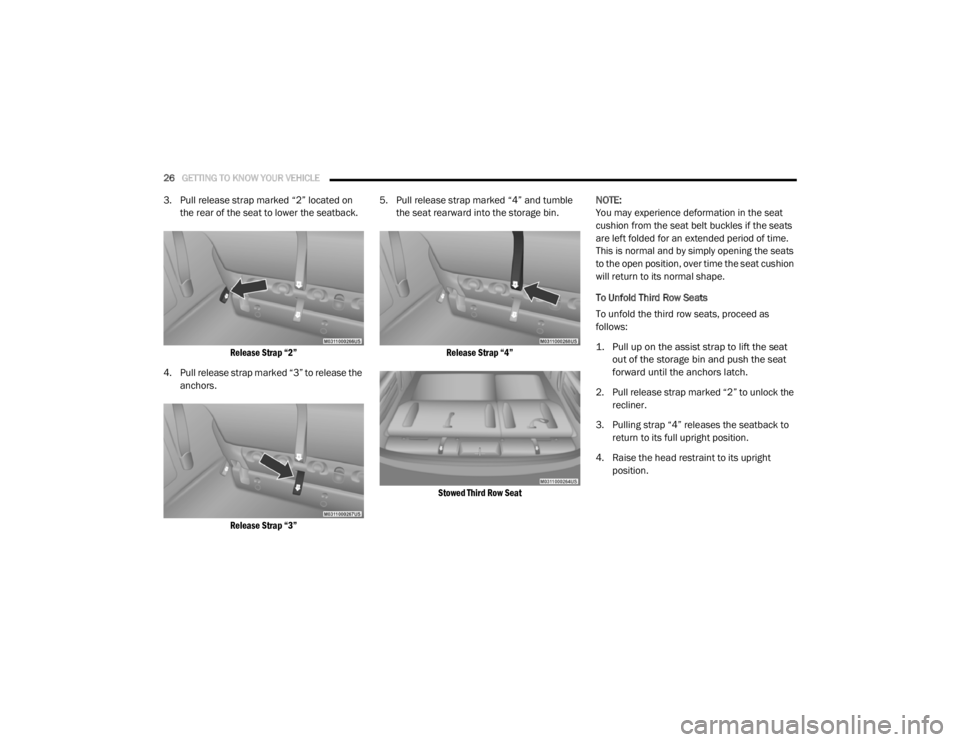
3. Pull release strap marked “2” located on
the rear of the seat to lower the seatback.
Release Strap “2”
4. Pull release strap marked “3” to release the anchors.
Release Strap “3”
5. Pull release strap marked “4” and tumble
the seat rearward into the storage bin.
Release Strap “4”
Stowed Third Row Seat
NOTE:
You may experience deformation in the seat
cushion from the seat belt buckles if the seats
are left folded for an extended period of time.
This is normal and by simply opening the seats
to the open position, over time the seat cushion
will return to its normal shape.
To Unfold Third Row Seats
To unfold the third row seats, proceed as
follows:
1. Pull up on the assist strap to lift the seat
out of the storage bin and push the seat
forward until the anchors latch.
2. Pull release strap marked “2” to unlock the recliner.
3. Pulling strap “4” releases the seatback to return to its full upright position.
4. Raise the head restraint to its upright position.
20_RT_OM_EN_USC_t.book Page 26
Page 35 of 380
GETTING TO KNOW YOUR VEHICLE33
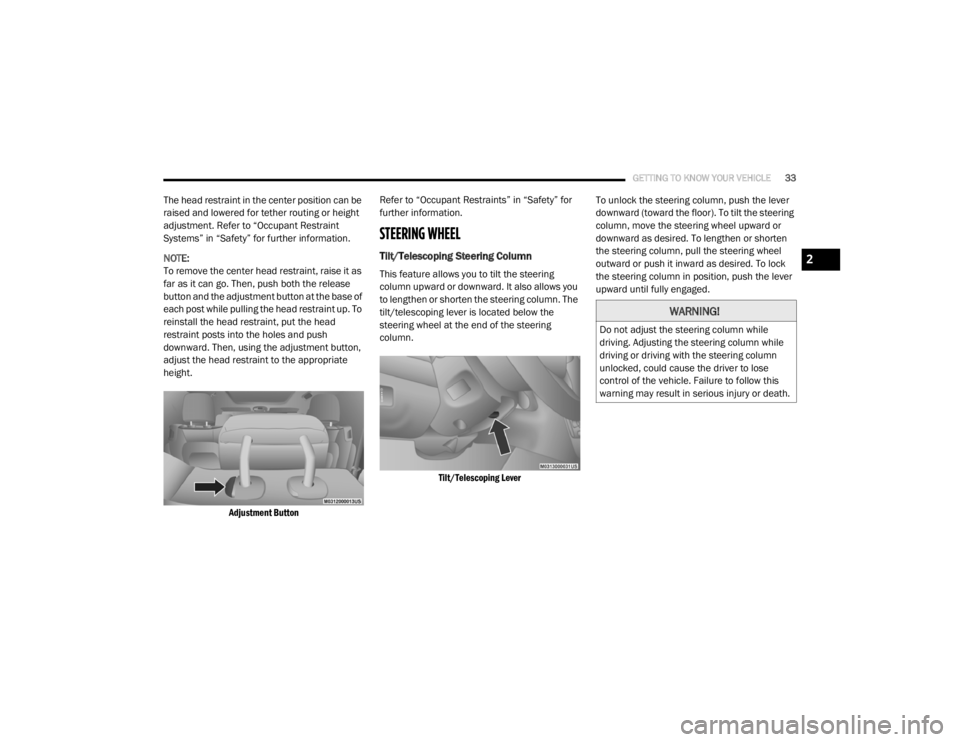
The head restraint in the center position can be
raised and lowered for tether routing or height
adjustment. Refer to “Occupant Restraint
Systems” in “Safety” for further information.
NOTE:
To remove the center head restraint, raise it as
far as it can go. Then, push both the release
button and the adjustment button at the base of
each post while pulling the head restraint up. To
reinstall the head restraint, put the head
restraint posts into the holes and push
downward. Then, using the adjustment button,
adjust the head restraint to the appropriate
height.
Adjustment Button
Refer to “Occupant Restraints” in “Safety” for
further information.
STEERING WHEEL
Tilt/Telescoping Steering Column
This feature allows you to tilt the steering
column upward or downward. It also allows you
to lengthen or shorten the steering column. The
tilt/telescoping lever is located below the
steering wheel at the end of the steering
column.
Tilt/Telescoping Lever
To unlock the steering column, push the lever
downward (toward the floor). To tilt the steering
column, move the steering wheel upward or
downward as desired. To lengthen or shorten
the steering column, pull the steering wheel
outward or push it inward as desired. To lock
the steering column in position, push the lever
upward until fully engaged.
WARNING!
Do not adjust the steering column while
driving. Adjusting the steering column while
driving or driving with the steering column
unlocked, could cause the driver to lose
control of the vehicle. Failure to follow this
warning may result in serious injury or death.
2
20_RT_OM_EN_USC_t.book Page 33
Page 37 of 380
GETTING TO KNOW YOUR VEHICLE35
The Automatic Dimming feature can be turned
on or off through the touchscreen.
Press the mirror dimmer button once to turn
the feature on.
Press the mirror dimmer button a second
time to turn the feature off.
Automatic Dimming Mirror
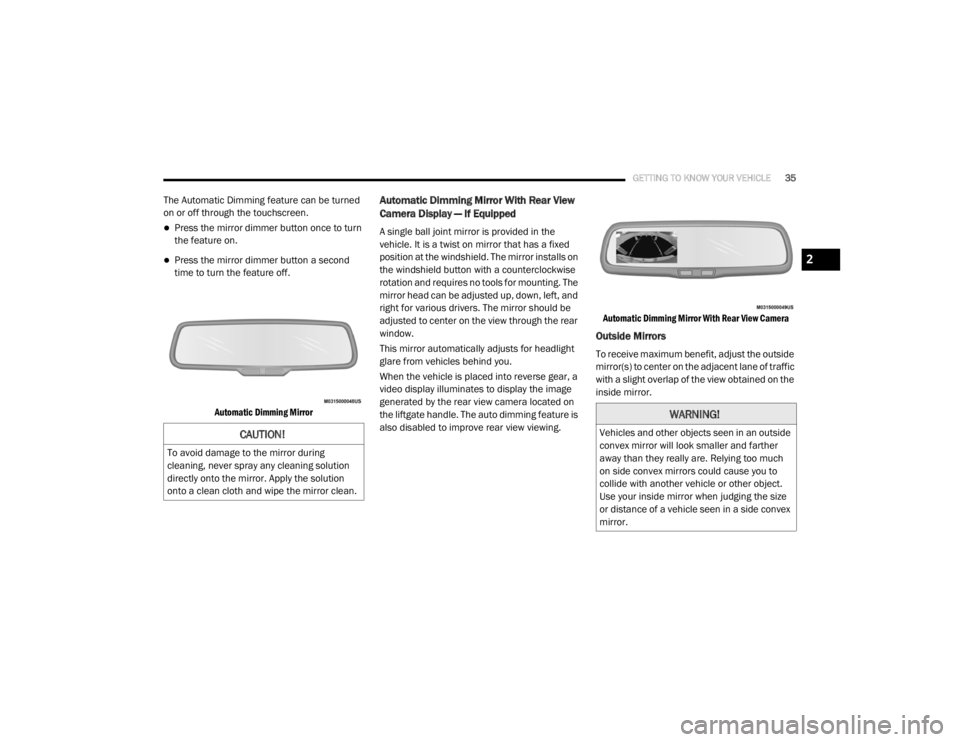
Automatic Dimming Mirror With Rear View
Camera Display — If Equipped
A single ball joint mirror is provided in the
vehicle. It is a twist on mirror that has a fixed
position at the windshield. The mirror installs on
the windshield button with a counterclockwise
rotation and requires no tools for mounting. The
mirror head can be adjusted up, down, left, and
right for various drivers. The mirror should be
adjusted to center on the view through the rear
window.
This mirror automatically adjusts for headlight
glare from vehicles behind you.
When the vehicle is placed into reverse gear, a
video display illuminates to display the image
generated by the rear view camera located on
the liftgate handle. The auto dimming feature is
also disabled to improve rear view viewing.
Automatic Dimming Mirror With Rear View Camera
Outside Mirrors
To receive maximum benefit, adjust the outside
mirror(s) to center on the adjacent lane of traffic
with a slight overlap of the view obtained on the
inside mirror.
CAUTION!
To avoid damage to the mirror during
cleaning, never spray any cleaning solution
directly onto the mirror. Apply the solution
onto a clean cloth and wipe the mirror clean.
WARNING!
Vehicles and other objects seen in an outside
convex mirror will look smaller and farther
away than they really are. Relying too much
on side convex mirrors could cause you to
collide with another vehicle or other object.
Use your inside mirror when judging the size
or distance of a vehicle seen in a side convex
mirror.
2
20_RT_OM_EN_USC_t.book Page 35
Page 39 of 380
GETTING TO KNOW YOUR VEHICLE37
Heated Mirrors — If Equipped
These mirrors are heated to melt frost
or ice. This feature will be activated
whenever you turn on the rear window
defroster (if equipped). Refer to “Climate
Controls” in this chapter for further information.
Illuminated Vanity Mirrors — If Equipped
An illuminated vanity mirror is located on the
sun visor. To use the mirror, rotate the sun visor
down and swing the mirror cover upward. The
lights turn on automatically. Closing the mirror
cover turns off the lights.
Lift Mirror Cover
EXTERIOR LIGHTS
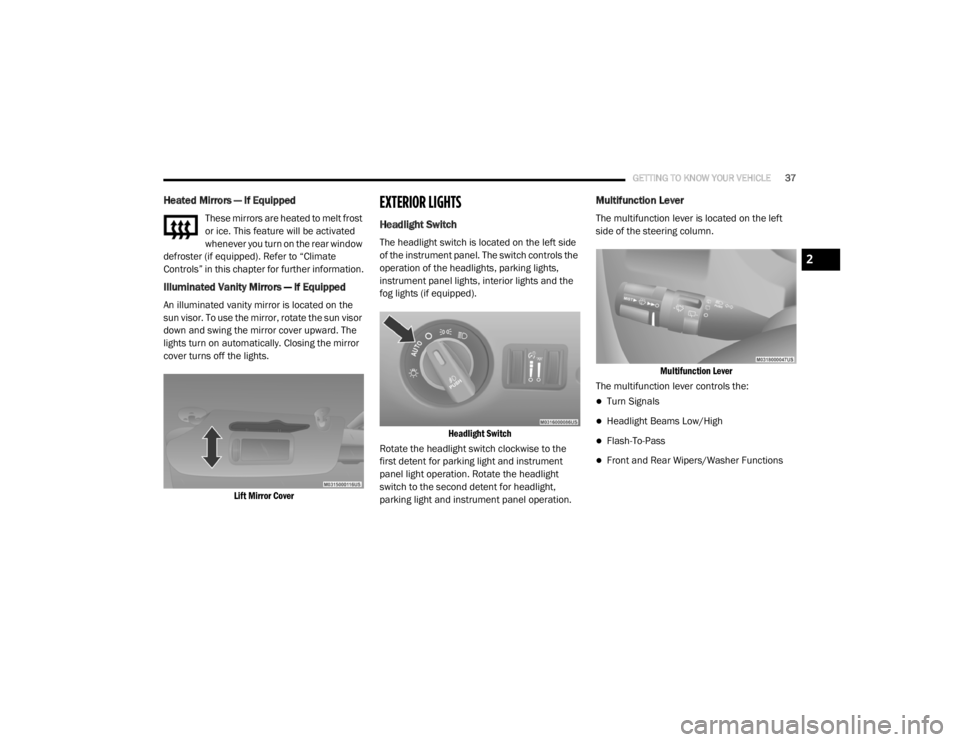
Headlight Switch
The headlight switch is located on the left side
of the instrument panel. The switch controls the
operation of the headlights, parking lights,
instrument panel lights, interior lights and the
fog lights (if equipped).
Headlight Switch
Rotate the headlight switch clockwise to the
first detent for parking light and instrument
panel light operation. Rotate the headlight
switch to the second detent for headlight,
parking light and instrument panel operation.
Multifunction Lever
The multifunction lever is located on the left
side of the steering column.
Multifunction Lever
The multifunction lever controls the:
Turn Signals
Headlight Beams Low/High
Flash-To-Pass
Front and Rear Wipers/Washer Functions
2
20_RT_OM_EN_USC_t.book Page 37