remote control DODGE GRAND CARAVAN 2020 Owner's Manual
[x] Cancel search | Manufacturer: DODGE, Model Year: 2020, Model line: GRAND CARAVAN, Model: DODGE GRAND CARAVAN 2020Pages: 380, PDF Size: 14.92 MB
Page 354 of 380

352MULTIMEDIA
When in shared disc mode both the radio and
the VES have control of the video functions. The
VES has the ability to control the following video
modes:
1. CD: Ability to Fast Forward, Rewind, Scan,
and Track Up/Down.
2. CD Changer (in radio): Ability to Disk Up/Down and program all listed CD controls
(Fast Forward, Rewind, Scan, and Track
Up/Down).
The VES can even control radio modes or video
modes while the radio is turned off. The VES can
access the radio modes or disc modes by
navigating to those modes on the VES and
activating a radio mode or disc mode.
Station List Menu
When listening to Satellite audio, pushing the
remote control’s Pop-Up/Menu button displays
a list of all available channels. Navigate this list
using the remote control’s navigation buttons
(▴, ▾ ) to find the desired station, push the
remote control’s Enter/OK button to tune to
that station. To jump through the list more
quickly, navigate to the Page Up and Page Down
icons on the screen.
Disc Menu
When listening to a CD Audio or CD Data disc,
pushing the remote control’s Pop-Up/Menu
button displays a list of all commands which
control playback of the disc. Using the options
you can activate or cancel Scan play and
Random play.
Display Settings
When watching a video source (DVD Video with
the disc in Play mode, Aux Video, etc.), pushing
the remote control’s Setup button activates the
Display Settings menu. These settings control
the appearance of the video on the screen. The
factory default settings are already set for
optimum viewing, so there is no need to change
these settings under normal circumstances.
To change the settings, push the remote
control’s navigation buttons ( ▴, ▾) to select an
item, then push the remote control’s navigation
buttons ( ▸, ◂) to change the value for the
currently selected item. To reset all values back
to the original settings, select the Default
Settings menu option and press the remote
control’s Enter/OK button. Disc Features control the remote DVD settings
of DVD being watched in the remote player.
Listening To Audio With The Screen Closed
To listen to only audio portion of the channel
with the screen closed:
1. Set the audio to the desired source and
channel.
2. Close the video screen.
3. To change the current audio mode, push the remote control’s Mode button. This will
automatically select the next available
audio mode without using the Mode/Select
menu.
If the screen is closed and there is no audio
heard, verify that the headphones are turned on
(the On indicator is illuminated) and the
headphone selector switch is on the desired
channel. If the headphones are turned on, push
the remote control’s power button to turn audio
on. If audio is still not heard, check that fully
charged batteries are installed in the
headphones.
20_RT_OM_EN_USC_t.book Page 352
Page 356 of 380

354MULTIMEDIA
Compressed Audio Files (MP3 / WMA and ACC)
The DVD is capable of playing MP3 (MPEG-1
Audio Layer 3) and WMA (Windows Media
Audio) files from a CD Data disc (usually a CD-R
or CD-RW).
The DVD player always uses the file extension
to determine the audio format, so MP3 files
must always end with the extension ".mp3" or
".MP3" and WMA files must always end with
the extension ".wma" or ".WMA." AAC files
must always end with the extension "aac" or
"AAC." To prevent incorrect playback, do not
use these extensions for any other types of
files.
For MP3 files, only version 1 ID3 tag data
(such as artist name, track title, album, etc.)
are supported.
Any file that is copy protected (such as those
downloaded from many online music stores)
will not play. The DVD player will automati -
cally skip the file and begin playing the next
available file.
Other compression formats such as AAC,
MP3 Pro, Ogg Vorbis, and ATRAC3 will not
play. The DVD player will automatically skip
the file and begin playing the next available
file.
If you are creating your own files, the recom -
mended fixed bit rate for MP3 files is
between 96 and 192 Kbps and the recom -
mended fixed bit rate for WMA files is
between 64 and 192 Kbps. Variable bit rates
are also supported. For both formats, the
recommended sample rate is either
44.1 kHz or 48 kHz.
To change the current file, use the DVD
player’s ▴ button to advance to the next file,
or the ▾ button to return to the start of the
current or previous file.
To change the current directory, use the
remote control’s PROG UP and Down buttons
or Rewind/skip back and fast fwd/skip
forward. Disc Errors
If the DVD player is unable to read the disc, a
"Disc Error" message is displayed on the Radio
display and the disc is automatically ejected. A
dirty, damaged, or incompatible disc format are
all potential causes for a "Disc Error" message.
If a disc has a damaged track which results in
audible or visible errors that persists for
2.0 seconds, the DVD player will attempt to
continue playing the disc by skipping forward
1 to 3 seconds at a time. If the end of the disc is
reached, the DVD player will return to the
beginning of the disc and attempt to play the
start of the first track.
The DVD player may shut down during extremely
hot conditions, such as when the vehicle’s
interior temperature is above 120°F (49°C).
When this occurs, the DVD Player will display
"High Temp" and will shut off the display until a
safe temperature is reached. This shutdown is
necessary to protect the optics of the DVD.
20_RT_OM_EN_USC_t.book Page 354
Page 357 of 380
MULTIMEDIA355
Display
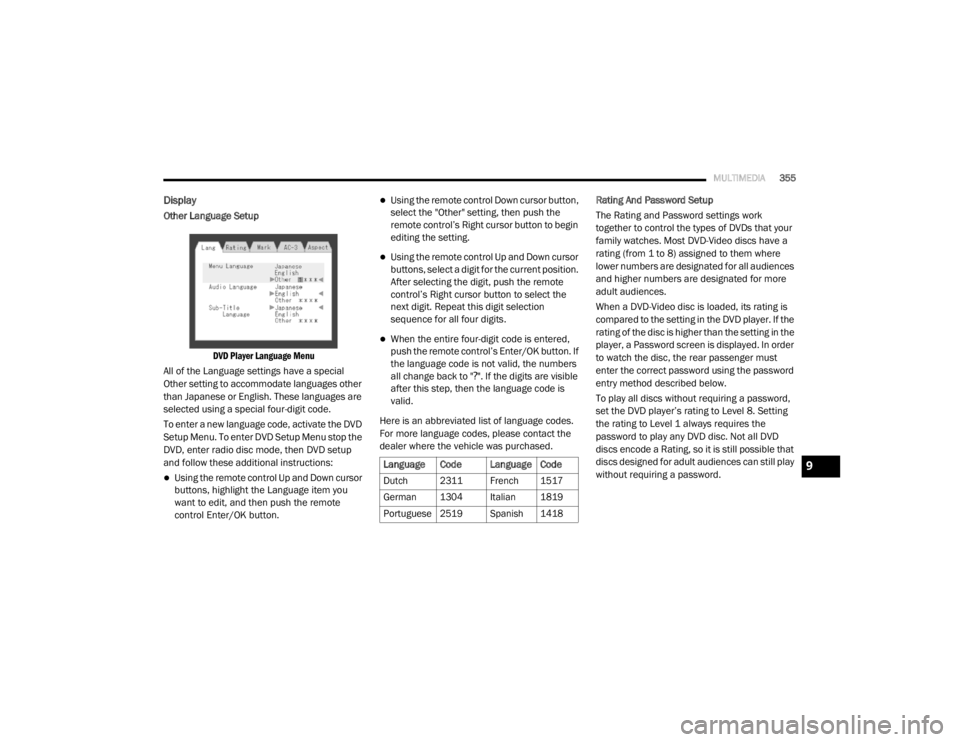
Other Language Setup
DVD Player Language Menu
All of the Language settings have a special
Other setting to accommodate languages other
than Japanese or English. These languages are
selected using a special four-digit code.
To enter a new language code, activate the DVD
Setup Menu. To enter DVD Setup Menu stop the
DVD, enter radio disc mode, then DVD setup
and follow these additional instructions:
Using the remote control Up and Down cursor
buttons, highlight the Language item you
want to edit, and then push the remote
control Enter/OK button.
Using the remote control Down cursor button,
select the "Other" setting, then push the
remote control’s Right cursor button to begin
editing the setting.
Using the remote control Up and Down cursor
buttons, select a digit for the current position.
After selecting the digit, push the remote
control’s Right cursor button to select the
next digit. Repeat this digit selection
sequence for all four digits.
When the entire four-digit code is entered,
push the remote control’s Enter/OK button. If
the language code is not valid, the numbers
all change back to " ?". If the digits are visible
after this step, then the language code is
valid.
Here is an abbreviated list of language codes.
For more language codes, please contact the
dealer where the vehicle was purchased. Rating And Password Setup
The Rating and Password settings work
together to control the types of DVDs that your
family watches. Most DVD-Video discs have a
rating (from 1 to 8) assigned to them where
lower numbers are designated for all audiences
and higher numbers are designated for more
adult audiences.
When a DVD-Video disc is loaded, its rating is
compared to the setting in the DVD player. If the
rating of the disc is higher than the setting in the
player, a Password screen is displayed. In order
to watch the disc, the rear passenger must
enter the correct password using the password
entry method described below.
To play all discs without requiring a password,
set the DVD player’s rating to Level 8. Setting
the rating to Level 1 always requires the
password to play any DVD disc. Not all DVD
discs encode a Rating, so it is still possible that
discs designed for adult audiences can still play
without requiring a password.
Language Code Language Code
Dutch 2311 French 1517
German 1304 Italian 1819
Portuguese
2519 Spanish 1418
9
20_RT_OM_EN_USC_t.book Page 355
Page 358 of 380
356MULTIMEDIA
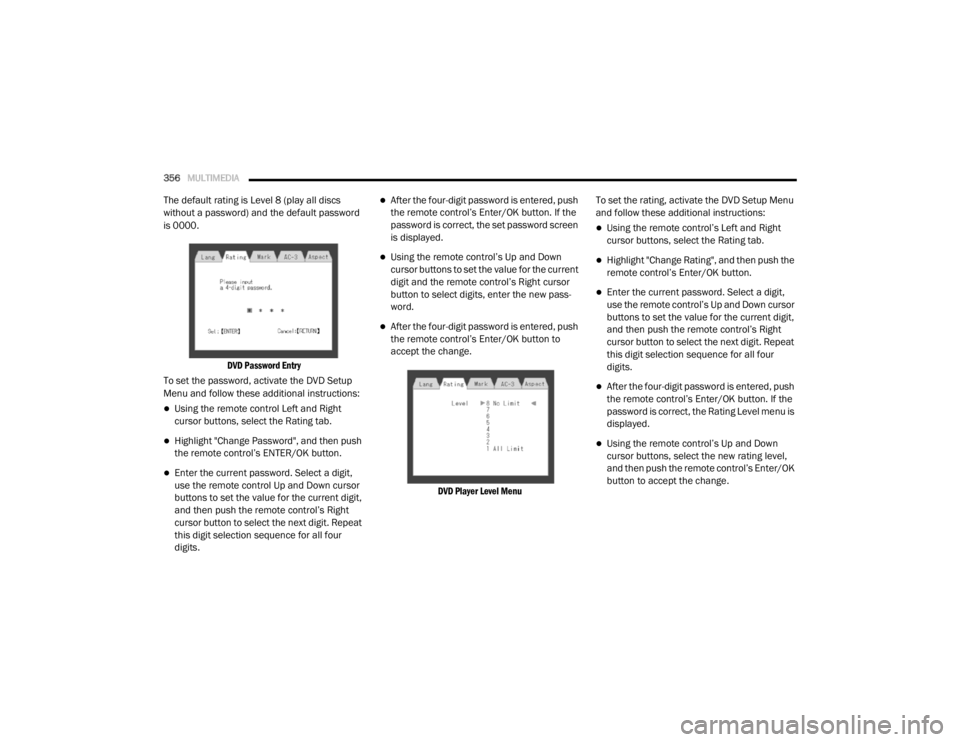
The default rating is Level 8 (play all discs
without a password) and the default password
is 0000.
DVD Password Entry
To set the password, activate the DVD Setup
Menu and follow these additional instructions:
Using the remote control Left and Right
cursor buttons, select the Rating tab.
Highlight "Change Password", and then push
the remote control’s ENTER/OK button.
Enter the current password. Select a digit,
use the remote control Up and Down cursor
buttons to set the value for the current digit,
and then push the remote control’s Right
cursor button to select the next digit. Repeat
this digit selection sequence for all four
digits.
After the four-digit password is entered, push
the remote control’s Enter/OK button. If the
password is correct, the set password screen
is displayed.
Using the remote control’s Up and Down
cursor buttons to set the value for the current
digit and the remote control’s Right cursor
button to select digits, enter the new pass-
word.
After the four-digit password is entered, push
the remote control’s Enter/OK button to
accept the change.
DVD Player Level Menu
To set the rating, activate the DVD Setup Menu
and follow these additional instructions:
Using the remote control’s Left and Right
cursor buttons, select the Rating tab.
Highlight "Change Rating", and then push the
remote control’s Enter/OK button.
Enter the current password. Select a digit,
use the remote control’s Up and Down cursor
buttons to set the value for the current digit,
and then push the remote control’s Right
cursor button to select the next digit. Repeat
this digit selection sequence for all four
digits.
After the four-digit password is entered, push
the remote control’s Enter/OK button. If the
password is correct, the Rating Level menu is
displayed.
Using the remote control’s Up and Down
cursor buttons, select the new rating level,
and then push the remote control’s Enter/OK
button to accept the change.
20_RT_OM_EN_USC_t.book Page 356
Page 372 of 380

370
Dimmer Switch Headlight
.............................................. 37, 38DipsticksAutomatic Transmission............................ 244Oil (Engine)................................................ 232Power Steering.......................................... 173Disabled Vehicle Towing................................ 224DisposalAntifreeze (Engine Coolant)....................... 242Door Ajar................................................... 95, 96Door Ajar Light.......................................... 95, 96Door LocksAutomatic.................................................... 17Doors............................................................... 16Driver’s Seat Back Tilt..................................... 20DrivingThrough Flowing, Rising, Or Shallow
Standing Water
......................................... 192DVD Player (Video Entertainment System).... 344
E
Economy (Fuel) Mode.................................... 167Electric Brake Control System....................... 104Anti-Lock Brake System............................. 103Traction Control System............................ 109Electric Remote Mirrors................................... 36Electrical Power Outlets................................... 75Electronic Speed Control (Cruise Control)...... 173
Electronic Stability Control (ESC).................. 105Electronic Throttle Control Warning Light......... 95Emergency, In Case OfFreeing Vehicle When Stuck..................... 223Hazard Warning Flasher........................... 194Jacking................................... 202, 206, 244Jump Starting........................................... 219Emission Control System Maintenance........ 102Engine........................................................... 231Air Cleaner................................................ 235Block Heater............................................. 163Break-In Recommendations..................... 163Checking Oil Level.................................... 232Compartment........................................... 231Compartment Identification...................... 231Coolant (Antifreeze).................................. 272Cooling..................................................... 239Exhaust Gas Caution....................... 159, 270Fails To Start............................................ 163Flooded, Starting...................................... 163Oil........................................... 233, 271, 272Oil Filler Cap............................................. 231Oil Filter.................................................... 234Oil Selection.................................... 233, 271Oil Synthetic............................................. 234Overheating.............................................. 221Starting..................................................... 162
Engine Oil Viscosity....................................... 234Engine Oil Viscosity Chart.............................. 234Enhanced Accident Response
Feature................................................ 138, 225Ethanol.......................................................... 268Exhaust Gas Cautions.......................... 159, 270Exhaust System................................... 159, 238Exterior Lighting...............................................37Exterior Lights............................... 37, 161, 194
F
FiltersAir Cleaner
................................................ 235Air Conditioning................................. 58, 235Engine Oil........................................ 234, 272Engine Oil Disposal................................... 234FlashersHazard Warning........................................ 194Turn Signals............37, 100, 161, 196, 197Flash-To-Pass............................................ 37, 38Flooded Engine Starting................................ 163Floor Console...................................................69Fluid Capacities............................................ 271Fluid Leaks.................................................... 161Fluid Level ChecksAutomatic Transmission........................... 244Brake........................................................ 243Power Steering......................................... 173
20_RT_OM_EN_USC_t.book Page 370
Page 374 of 380

372
J
Jack Location
................................................. 203Jack Operation..................................... 202, 244Jump Starting................................................ 219
K
Key Fob Arm The Alarm
............................................. 15Disarm The Alarm........................................ 15Programming Additional Key Fobs....... 10, 14Key Fob Battery Service
(Remote Keyless Entry)................................... 10Key Fob Programming
(Remote Keyless Entry)................................... 10Keys................................................................... 9Replacement............................................... 14
L
Lane Change And Turn Signals........................ 37Lane Change Assist.................................. 37, 39Lap/Shoulder Belts....................................... 121Latches.......................................................... 161Hood........................................................... 61Leaks, Fluid................................................... 161Life Of Tires................................................... 255Liftgate............................................................ 62Closing........................................................ 62Opening....................................................... 62Light Bulbs..................................................... 161
Lights............................................................ 161Air Bag...................................... 94, 131, 160Automatic Headlights.................................. 38Back-Up.................................................... 197Battery Saver............................................... 39Brake Assist Warning............................... 107Brake Warning............................................. 94Bulb Replacement.................................... 194Center Mounted Stop............................... 197Cruise....................................................... 100Daytime Running.................................. 37, 38Dimmer Switch, Headlight.................... 37, 38Electronic Stability Program(ESP) Indicator.................................................. 96Exterior..................................................... 161Fog.....................................................39, 196Hazard Warning Flasher........................... 194Headlights..........................................37, 196Headlights On Reminder............................. 39High Beam................................................... 38High Beam/Low Beam Select............... 37, 38Instrument Cluster....................................... 37Interior......................................................... 39License..................................................... 197Lights On Reminder.............................. 37, 39Malfunction Indicator (Check Engine).......... 98Parade Mode (Daytime Brightness)............. 41Park................................................. 100, 196Passing................................................. 37, 38Reading....................................................... 39
Rear Servicing.......................................... 197Rear Tail Lamps........................................ 197Seat Belt Reminder.....................................96Security Alarm.............................................97Service...................................................... 194Side Marker.............................................. 197Traction Control........................................ 107Turn Signals............37, 100, 161, 196, 197Warning Instrument Cluster
Descriptions....................................... 96, 100Load Leveling System......................................63Loading Vehicle...................................... 63, 182Tires.......................................................... 249LocksAutomatic Door............................................17Low Tire Pressure System............................. 115Lubrication, Body.......................................... 237Lug Nuts/Bolts.............................................. 266Luggage Carrier................................................79
M
Maintenance Free Battery............................ 232Maintenance Schedule................................. 226Malfunction Indicator Light
(Check Engine)....................................... 98, 102ManualService...................................................... 367Map/Reading Lights........................................39Media Hub.................................................... 340Methanol....................................................... 268
20_RT_OM_EN_USC_t.book Page 372
Page 375 of 380

373
Mini-Trip Computer
................................... 87, 93Mirrors...................................................... 34, 36Automatic Dimming..................................... 34Electric Remote........................................... 36Exterior Folding........................................... 36Heated................................................. 34, 37Outside................................................. 34, 35Rearview.............................................. 34, 35Vanity.......................................................... 37Modifications/Alterations Vehicle.......................................................... 8Monitor, Tire Pressure System....................... 115Mopar Parts................................................... 366MP3 Control.................................................. 340Multi-Function Control Lever............................ 37
N
New Vehicle Break-In Period.......................... 163
O
Occupant Restraints...................................... 119Octane Rating, Gasoline (Fuel)............ 267, 272Oil Change IndicatorReset........................................................... 87Oil Filter, Change........................................... 234Oil Filter, Selection......................................... 234Oil Pressure Light............................................ 96Oil, Engine........................................... 233, 272Capacity.................................................... 271Change Interval......................................... 233
Checking................................................... 232Disposal................................................... 234Filter................................................ 234, 272Filter Disposal........................................... 234Identification Logo.................................... 234Materials Added To.................................. 234Pressure Warning Light............................... 96Recommendation............................ 233, 271Synthetic.................................................. 234Viscosity.......................................... 234, 271Onboard Diagnostic System.......................... 101Operating Precautions.................................. 101Operator ManualOwner's Manual.................................... 8, 367Outside Rearview Mirrors......................... 34, 35Overhead Console........................................... 71Overhead Travel Information Center................ 71Overheating, Engine...................................... 221Owner’s Manual (Operator Manual)................... 8
P
Paint Care..................................................... 262Parking Brake............................................... 164ParkSense System, Rear.............................. 175Personal Settings............................................. 90Pets.............................................................. 159Phone, Hands-Free (Uconnect)..................... 304Placard, Tire And Loading Information.......... 249
PowerBrakes...................................................... 266Door Locks...................................................17Inverter........................................................77Mirrors.........................................................36Outlet (Auxiliary Electrical Outlet).................75Seats...........................................................27Steering........................................... 172, 173Vent Windows..............................................59Power SeatsDown...........................................................28Forward.......................................................28Rearward.....................................................28Up................................................................28Pregnant Women And Seat Belts.................. 127Preparation For Jacking................................ 206PretensionersSeat Belts................................................. 127Programmable Electronic Features..................90
R
Radial Ply Tires.............................................. 254Radiator Cap (Coolant Pressure Cap)............ 241Radio Operation............................................ 359Radio Remote Controls................................. 340Rear Air Conditioning.......................................45Rear Camera................................................. 179Rear Cross Path............................................ 113Rear ParkSense System................................ 175Reclining Rear Seats........................................21
11
20_RT_OM_EN_USC_t.book Page 373