language DODGE GRAND CARAVAN 2020 Owners Manual
[x] Cancel search | Manufacturer: DODGE, Model Year: 2020, Model line: GRAND CARAVAN, Model: DODGE GRAND CARAVAN 2020Pages: 380, PDF Size: 14.92 MB
Page 92 of 380

90GETTING TO KNOW YOUR INSTRUMENT PANEL
1. Turn the ignition switch ON.
2. Push and release the up or down arrow
button until the Setup
(Customer-Programmable Features) menu
is reached, then push the right arrow
button.
3. Push and release the down arrow button
until the “Compass Variance” message is
displayed in the instrument cluster display,
then press the right arrow button. The last
variance zone number displays in the
instrument cluster display.
4. Push and release the right arrow button
until the proper variance zone is selected,
according to the map.
5. Push and release the RETURN button to
exit.
Turn Menu OFF
Select from Main Menu using the up or down
arrow button. Pushing the right arrow button
clears the menu display. Pushing any one of the
four Display control buttons will bring the menu
back.
Customer-Programmable Features
(System Setup)
Personal Settings allows you to set and recall
features when the transmission is in PARK. If
the transmission is out of PARK or the vehicle
begins moving, a warning message SYSTEM
SETUP NOT AVAILABLE VEHICLE NOT IN PARK
displays when you try to select “System Setup”
from the main menu.
Push and release the up or down arrow button
until "System Setup" is highlighted in the main
menu of the instrument cluster display. Then,
push and release the right arrow button to enter
the System Setup submenu. Push and release
the up or down arrow button to select a feature
form the following choices.
Language
When in this display you may select one of three
languages for all display screens, including the
trip functions and the navigation system (if
equipped). Push and release the up or down
arrow button while in this display and scroll
through the language choices. Push and release the
right arrow button to
select English, Spanish (Español), or French
(Français). Then, as you continue, the informa -
tion will display in the selected language.
Nav–Turn By Turn
When this feature is selected, the navigation
system utilizes voice commands, guiding you
through the drive route mile by mile,
turn-by-turn, until the final destination is
reached. To make your selection, push and
release the right arrow button until a
check-mark appears next to the feature
showing the system has been activated, or the
check-mark is removed showing the system has
been deactivated.
Auto Lock Doors
When selected, all doors will lock automatically
when the vehicle reaches a speed of 15 mph
(24 km/h). To make your selection, push and
release the right arrow button until a
check-mark appears.
20_RT_OM_EN_USC_t.book Page 90
Page 281 of 380
MULTIMEDIA279
Audio Control Menu
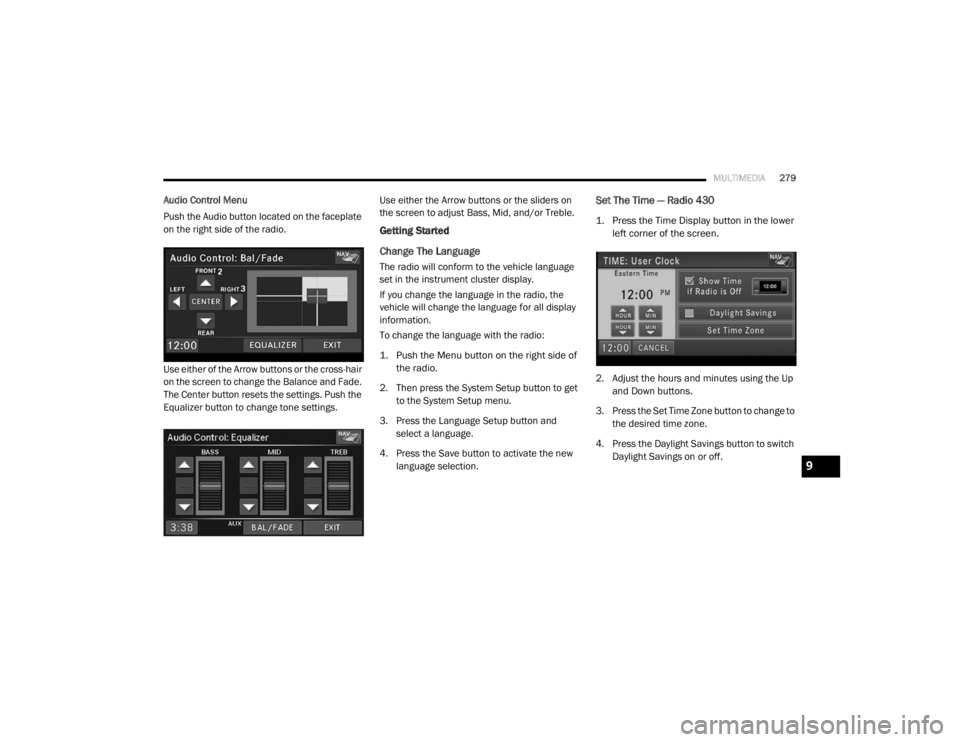
Push the Audio button located on the faceplate
on the right side of the radio.
Use either of the Arrow buttons or the cross-hair
on the screen to change the Balance and Fade.
The Center button resets the settings. Push the
Equalizer button to change tone settings. Use either the Arrow buttons or the sliders on
the screen to adjust Bass, Mid, and/or Treble.
Getting Started
Change The Language
The radio will conform to the vehicle language
set in the instrument cluster display.
If you change the language in the radio, the
vehicle will change the language for all display
information.
To change the language with the radio:
1. Push the Menu button on the right side of
the radio.
2. Then press the System Setup button to get to the System Setup menu.
3. Press the Language Setup button and select a language.
4. Press the Save button to activate the new language selection.
Set The Time — Radio 430
1. Press the Time Display button in the lower left corner of the screen.
2. Adjust the hours and minutes using the Up and Down buttons.
3. Press the Set Time Zone button to change to the desired time zone.
4. Press the Daylight Savings button to switch Daylight Savings on or off.
9
20_RT_OM_EN_USC_t.book Page 279
Page 293 of 380
MULTIMEDIA291
Press the PREV button to start playback from
the beginning of the current chapter or track.
When you press the button twice in quick
succession, playback starts from the beginning
of the preceding chapter or track.
DISC Menu
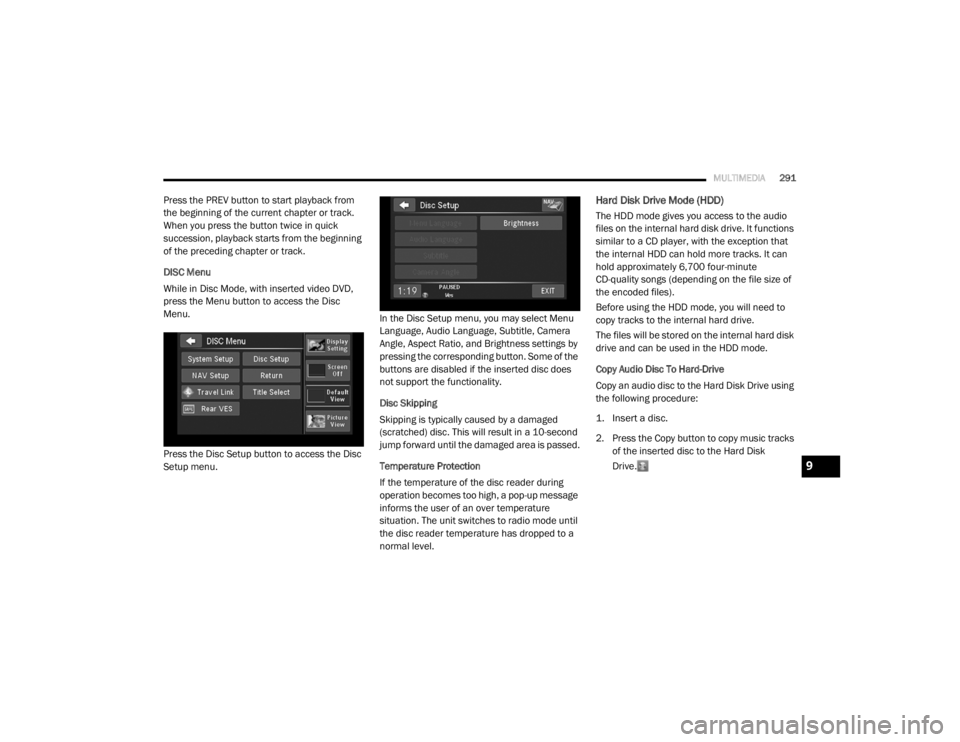
While in Disc Mode, with inserted video DVD,
press the Menu button to access the Disc
Menu.
Press the Disc Setup button to access the Disc
Setup menu. In the Disc Setup menu, you may select Menu
Language, Audio Language, Subtitle, Camera
Angle, Aspect Ratio, and Brightness settings by
pressing the corresponding button. Some of the
buttons are disabled if the inserted disc does
not support the functionality.
Disc Skipping
Skipping is typically caused by a damaged
(scratched) disc. This will result in a 10-second
jump forward until the damaged area is passed.
Temperature Protection
If the temperature of the disc reader during
operation becomes too high, a pop-up message
informs the user of an over temperature
situation. The unit switches to radio mode until
the disc reader temperature has dropped to a
normal level.Hard Disk Drive Mode (HDD)
The HDD mode gives you access to the audio
files on the internal hard disk drive. It functions
similar to a CD player, with the exception that
the internal HDD can hold more tracks. It can
hold approximately 6,700 four-minute
CD-quality songs (depending on the file size of
the encoded files).
Before using the HDD mode, you will need to
copy tracks to the internal hard drive.
The files will be stored on the internal hard disk
drive and can be used in the HDD mode.
Copy Audio Disc To Hard-Drive
Copy an audio disc to the Hard Disk Drive using
the following procedure:
1. Insert a disc.
2. Press the Copy button to copy music tracks
of the inserted disc to the Hard Disk
Drive.
9
20_RT_OM_EN_USC_t.book Page 291
Page 306 of 380
304MULTIMEDIA
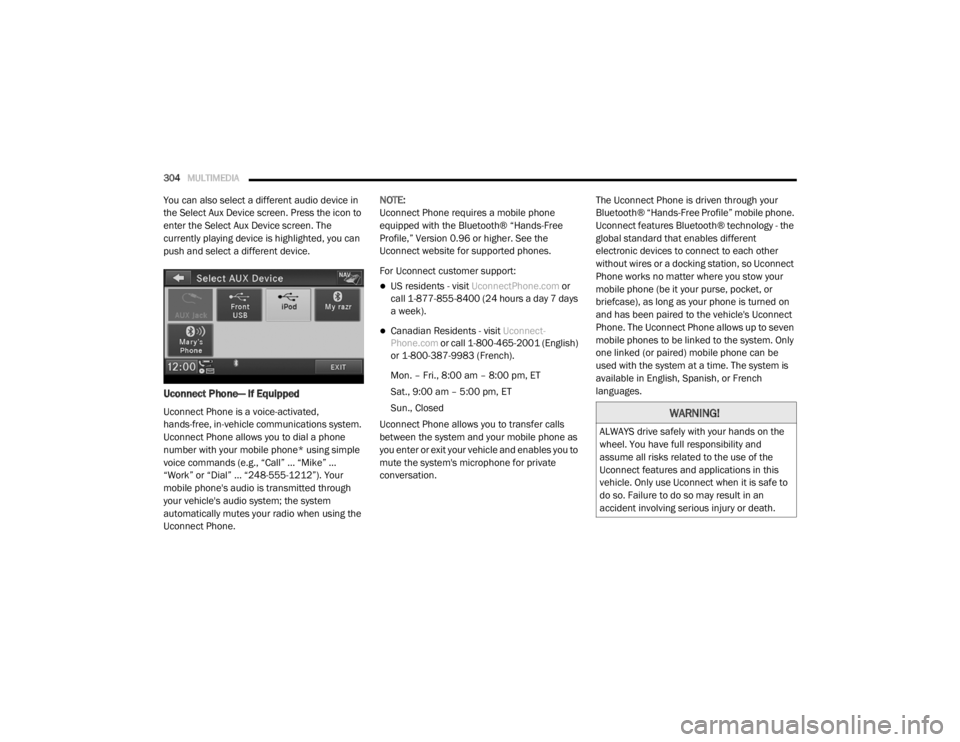
You can also select a different audio device in
the Select Aux Device screen. Press the icon to
enter the Select Aux Device screen. The
currently playing device is highlighted, you can
push and select a different device.
Uconnect Phone— If Equipped
Uconnect Phone is a voice-activated,
hands-free, in-vehicle communications system.
Uconnect Phone allows you to dial a phone
number with your mobile phone* using simple
voice commands (e.g., “Call” … “Mike” …
“Work” or “Dial” … “248-555-1212”). Your
mobile phone's audio is transmitted through
your vehicle's audio system; the system
automatically mutes your radio when using the
Uconnect Phone. NOTE:
Uconnect Phone requires a mobile phone
equipped with the Bluetooth® “Hands-Free
Profile,” Version 0.96 or higher. See the
Uconnect website for supported phones.
For Uconnect customer support:
US residents - visit
UconnectPhone.com or
call 1-877-855-8400 (24 hours a day 7 days
a week).
Canadian Residents - visit Uconnect-
Phone.com or call 1-800-465-2001 (English)
or 1-800-387-9983 (French).
Mon. – Fri., 8:00 am – 8:00 pm, ET
Sat., 9:00 am – 5:00 pm, ET
Sun., Closed
Uconnect Phone allows you to transfer calls
between the system and your mobile phone as
you enter or exit your vehicle and enables you to
mute the system's microphone for private
conversation. The Uconnect Phone is driven through your
Bluetooth® “Hands-Free Profile” mobile phone.
Uconnect features Bluetooth® technology - the
global standard that enables different
electronic devices to connect to each other
without wires or a docking station, so Uconnect
Phone works no matter where you stow your
mobile phone (be it your purse, pocket, or
briefcase), as long as your phone is turned on
and has been paired to the vehicle's Uconnect
Phone. The Uconnect Phone allows up to seven
mobile phones to be linked to the system. Only
one linked (or paired) mobile phone can be
used with the system at a time. The system is
available in English, Spanish, or French
languages.
WARNING!
ALWAYS drive safely with your hands on the
wheel. You have full responsibility and
assume all risks related to the use of the
Uconnect features and applications in this
vehicle. Only use Uconnect when it is safe to
do so. Failure to do so may result in an
accident involving serious injury or death.
20_RT_OM_EN_USC_t.book Page 304
Page 310 of 380

308MULTIMEDIA
When prompted, enter the number designa -
tion (e.g., “Home,” “Work,” “Mobile,” or
“Other”). This will allow you to store multiple
numbers for each phonebook entry, if
desired.
When prompted, recite the phone number for
the phonebook entry that you are adding.
After you are finished adding an entry into the
phonebook, you will be given the opportunity to
add more phone numbers to the current entry
or to return to the main menu.
The Uconnect Phone will allow you to enter up to
32 names in the phonebook with each name
having up to four associated phone numbers
and designations. Each language has a
separate 32-name phonebook accessible only
in that language. In addition, if equipped and
supported by your phone, Uconnect Phone
automatically downloads your mobile phone’s
phonebook.
Edit Uconnect Phonebook Entries
Push the Phone button to begin.
After the “Ready” prompt and the following
beep, say “Phonebook Edit.”
You will then be asked for the name of the
phonebook entry that you wish to edit.
Next, choose the number designation (home,
work, mobile, or other) that you wish to edit.
When prompted, recite the new phone
number for the phonebook entry that you are
editing.
After you are finished editing an entry in the
phonebook, you will be given the opportunity to
edit another entry in the phonebook, call the
number you just edited, or return to the main
menu.
NOTE:
Editing names in the phonebook is recom -
mended when the vehicle is not in motion.
Automatic downloaded phonebook entries
cannot be deleted or edited.
“Phonebook Edit” can be used to add another
phone number to a name entry that already
exists in the phonebook. For example, the entry
John Doe may have a mobile and a home
number, but you can add “John Doe's” work
number later using the “Phonebook Edit”
feature.
Delete Uconnect Phonebook Entry
NOTE:
Editing phonebook entries is recommended
when the vehicle is not in motion.
To delete a Uconnect phonebook entry using
Voice Commands:
1. Push the Phone button to begin.
2. After the “Ready” prompt and the following beep, say “Phonebook Delete.”
3. After you enter the Phonebook Delete menu, you will then be asked for the name
of the entry that you wish to delete. You can
either say the name of a phonebook entry
that you wish to delete, or you can say “List
Names” to hear a list of the entries in the
phonebook from which you choose. To
select one of the entries from the list, push
the Voice Command button while the
Uconnect Phone is playing the desired entry
and say “Delete.”
20_RT_OM_EN_USC_t.book Page 308
Page 311 of 380

MULTIMEDIA309
4. After you enter the name, the Uconnect
Phone will ask you which designation you
wish to delete: home, work, mobile, other, or
all. Say the designation you wish to delete.
Note that only the phonebook entry in the
current language is deleted.
NOTE:
Automatic downloaded phonebook entries
cannot be deleted or edited.
Delete/Erase “All” Uconnect Phonebook
Entries
NOTE:
ONLY the phonebook in the current language
is deleted.
Automatic downloaded phonebook entries
cannot be deleted or edited. To delete or erase all Uconnect phonebook
entries using Voice Command:
1. Push the Phone button to begin.
2. After the “Ready” prompt and the following
beep, say “Phonebook Erase All.”
The Uconnect Phone will ask you to verify
that you wish to delete all the entries
from the phonebook.
3. After confirmation, the phonebook entries will be deleted.
List All Names In The Uconnect Phonebook
Push the Phone button to begin.
After the “Ready” prompt and the following
beep, say “Phonebook List Names.”
The Uconnect Phone will play the names of
all the phonebook entries, including the
downloaded phonebook entries, if available.
To call one of the names in the list, push the
Voice Recognition button during the
playing of the desired name, and say “Call.” NOTE:
The user can also exercise “Edit” or “Delete”
operations at this point.
The Uconnect Phone will then prompt you as
to the number designation you wish to call.
The selected number will be dialed.
Phone Call Features
The following features can be accessed through
the Uconnect Phone if the feature(s) are
available on your mobile service plan. For
example, if your mobile service plan provides
three-way calling, this feature can be accessed
through the Uconnect Phone. Check with your
mobile service provider for the features that you
have.
Answer Or Reject An Incoming Call — No Call
Currently In Progress
When you receive a call on your mobile phone,
the Uconnect Phone will interrupt the vehicle
audio system, if on, and will ask if you would like
to answer the call. Push the Phone button to
accept the call. To reject the call, push and hold
the Phone button until you hear a single
beep, indicating that the incoming call was
rejected.
9
20_RT_OM_EN_USC_t.book Page 309
Page 313 of 380

MULTIMEDIA311
Redial
To redial the last number called from your
mobile phone using Voice Command:
1. Push the Phone button to begin.
2. After the “Ready” prompt and the following
beep, say “Redial.”
The Uconnect Phone will call the last
number that was dialed from your mobile
phone.
NOTE:
This may not be the last number dialed from the
Uconnect Phone.
Call Continuation
Call continuation is the progression of a phone
call on the Uconnect Phone after the vehicle
ignition has been switched to OFF. Call contin -
uation functionality available on the vehicle can
be any one of three types:
1. After the ignition is switched to OFF, a call can continue on the Uconnect Phone either
until the call ends, or until the vehicle
battery condition dictates cessation of the
call on the Uconnect Phone and transfer of
the call to the mobile phone.
2. After the ignition is cycled to OFF, a call can
continue on the Uconnect Phone for a
certain duration, after which the call is
automatically transferred from the
Uconnect Phone to the mobile phone.
3. An active call is automatically transferred to the mobile phone after the ignition is cycled
to OFF.
Uconnect Phone Features
Language Selection
To change the language that the Uconnect
Phone is using:
Push the Phone button to begin.
After the “Ready” prompt and the following
beep, say the name of the language you wish
to switch to / English, Spanish, or French.
Continue to follow the system prompts to
complete the language selection.
After selecting one of the languages, all
prompts and voice commands will be in that
language. NOTE:
After every Uconnect Phone language change
operation, only the language-specific 32-name
phonebook is usable. The paired phone name is
not language-specific and usable across all
languages.
Emergency Assistance
If you are in an emergency and the mobile
phone is reachable:
Pick up the phone and manually dial the
emergency number for your area.
If the phone is not reachable and the Uconnect
Phone is operational, you may reach the
emergency number as follows:
Push the Phone button to begin.
After the “Ready” prompt and the following
beep, say “Emergency” and the Uconnect
Phone will instruct the paired mobile phone
to call the emergency number.
9
20_RT_OM_EN_USC_t.book Page 311
Page 317 of 380
MULTIMEDIA315
At the next prompt, say “Delete” and follow
the prompts.
You can also push the Voice Recognition
button at any time while the list is being
played, and then choose the phone you wish
to delete.
Things You Should Know About Your
Uconnect Phone
Uconnect Phone Tutorial
To hear a brief tutorial of the system features,
push the Phone button and say “Uconnect
Tutorial.”
Voice Training
For users experiencing difficulty with the system
recognizing their voice commands or numbers,
the Uconnect Phone Voice Training feature may
be used. To enter this training mode, follow one
of the two following procedures:
From outside the Uconnect Phone mode
(e.g., from radio mode), push and hold the
Voice Recognition button for five seconds
until the session begins, or,
Push the Voice Recognition button and
say the “Voice Training,” “System Training,”
or “Start Voice Training” command.
You can either push the Uconnect Phone button
to restore the factory setting or repeat the
words and phrases when prompted by the
Uconnect Phone. For best results, the Voice
Training session should be completed when the
vehicle is parked with the engine running, all
windows closed, and the blower fan switched
off.
This procedure may be repeated with a new
user. The system will adapt to the last trained
voice only.
Reset
To Reset all settings using Voice Command:
1. Push the Phone button .
2. After the “Ready” prompt and the following beep, say “Setup,” then “Reset.”
This will delete all phone pairing, phone
book entries, and other settings in all
language modes. The System will prompt
you before resetting to factory settings. Voice Command
For best performance:
Adjust the rearview mirror to provide at least
1/2-inch (1 cm) gap between the overhead
console (if equipped) and the mirror.
Always wait for the beep before speaking.
Speak normally without pausing, just as you
would speak to a person sitting a few feet/
meters away from you.
Make sure that no one other than you is
speaking during a Voice Command period.
Performance is maximized under:
Low-to-medium blower setting
Low-to-medium vehicle speed
Low road noise
Smooth road surface
Fully closed windows
Dry weather condition
9
20_RT_OM_EN_USC_t.book Page 315
Page 321 of 380

MULTIMEDIA319
Getting Started
To access the Navigation system on your Radio,
press the NAV button in the upper right corner
of the screen during any Radio or Media mode.
Setting Up Your System
When using your navigation system for the first
time, complete the following tasks:
1. Acquire satellites.
2. Understand the main menu.
Acquiring Satellites
The bars indicate satellite strength.
Go to an open area, away from tall buildings and
trees.
Acquiring satellite signals can take a few
minutes. Main Menu
Using The On-Screen Buttons
Press and hold to quickly return to the
main menu.
Press and to see more choices.
Press and hold and to scroll faster.Using The On-screen Keyboard
Press a character on the keyboard to enter a
letter or number.
Press “Space” to add a space.
Press to delete a character.
Press and hold to erase the entire entry.
Press to select the keyboard language
mode.
Press to enter special characters, such as
punctuation marks.
Finding A Point Of Interest
The detailed maps loaded in your navigation
system contain points of interest, such as
restaurants, hotels and auto services.
1. From the main menu, press
Where To? >
Points of Interest
.
2. Select a category.
3. If necessary, select a subcategory.
4. Select a destination.
5. Press Go!1 — Press To Find A Destination
2 — Press To View The Map
3 — Press To Stop A Route
4 — Press To Detour A Route
5 — Press To Open The Menu Of Tools
6 — Press To Open The Menu Of Settings
9
20_RT_OM_EN_USC_t.book Page 319
Page 331 of 380
MULTIMEDIA329
Language Settings
From the main menu press Settings >
Language .
Voice Personality — sets the language for
voice prompts.
Keyboard — sets the language for your
keyboard.
Keyboard Layout — sets the keyboard layout.
Restoring The Original Language Settings
From the main menu press Settings >
Language > > Restore.
Restoring All Original Settings
From the main menu, press Settings > >
Restore > Yes .
Appendix
About GPS Satellite Signals
The navigation system must acquire satellite
signals in order to navigate.
When the navigation system has acquired
satellite signals, the signal strength bars on the
main menu are full . When it loses satellite
signals, the bars are clear . For more information about GPS, go to
www.garmin.com/aboutGPS
.
Updating The Software
To update the navigation system software, you
must have a USB mass storage device and an
Internet connection.
1. Go to
auto-update.garmin.com
.
2. Find your model and select Software
Updates > Download .
3. Read and accept the terms of the Software License Agreement.
4. Follow the instructions on the Web site to complete the installation of the software
update.
Updating The Map Data
To update the navigation system map, you must
have a USB mass storage device and an
Internet connection, or visit your local dealer for
assistance. A map update can be purchased
once a year.
1. Go to
auto-update.garmin.com
.
2. Select your vehicle from the drop-down lists. 3. Select
Order Map Updates for your unit.
4. Follow the Web site instructions to update your map.
CAUTION
Garmin and FCA US LLC are not responsible for
the accuracy of, or the consequences of using,
a safety camera database.
Safety camera information is available in some
locations. Go to http://www.garmin.com for
availability. For these locations, the navigation
system includes the locations of hundreds of
safety cameras. Your navigation system alerts
you when you are approaching a safety camera
and can warn you if you are driving too fast. The
data is updated at least weekly, so you always
have access to the most up-to-date information.
You can purchase a new region or extend an
existing subscription at any time. Each region
that you purchase has an expiration date.9
20_RT_OM_EN_USC_t.book Page 329