reset DODGE GRAND CARAVAN 2020 Owners Manual
[x] Cancel search | Manufacturer: DODGE, Model Year: 2020, Model line: GRAND CARAVAN, Model: DODGE GRAND CARAVAN 2020Pages: 380, PDF Size: 14.92 MB
Page 5 of 380

3
WINDOWS ............................................................59 Power Vent Windows — If Equipped .......... 59
Power Windows ............................................ 59
HOOD......................................................................61
Opening The Hood ....................................... 61
Closing The Hood ......................................... 61
LIFTGATE ................................................................62
Opening ........................................................ 62
Closing .......................................................... 62
Power Liftgate — If Equipped ...................... 62
Cargo Area Features ................................... 63
LOAD LEVELING SYSTEM — IF EQUIPPED .........63
GARAGE DOOR OPENER — IF EQUIPPED ..........63
Before You Begin Programming
HomeLink® .................................................. 64 Programming A Rolling Code ...................... 64
Programming A Non-Rolling Code............... 65
Canadian/Gate Operator Programming ..... 66
Using HomeLink® ........................................ 67
Security......................................................... 67
Troubleshooting Tips ................................... 67
General Information .................................... 68
INTERNAL EQUIPMENT ........................................68
Storage ......................................................... 68
Cupholders .................................................. 73
Sun Screens — If Equipped ......................... 75
Electrical Power Outlets — If Equipped....... 75
Power Inverter — If Equipped ...................... 77
Smoker's Package Kit — If Equipped ......... 78
Sunglass Storage Bin — If Equipped........... 78 ROOF LUGGAGE RACK — IF EQUIPPED ............. 79
Deploying The Crossbars............................. 79
Stowing The Crossbars................................ 80
GETTING TO KNOW YOUR INSTRUMENT PANEL
INSTRUMENT CLUSTER ...................................... 82 Instrument Cluster Descriptions ................ 84
INSTRUMENT CLUSTER DISPLAY ..................... 85
Instrument Cluster Display Location And
Controls ....................................................... 85 Oil Life Reset ................................................ 87
Instrument Cluster Display Menu Items .... 87
TRIP COMPUTER ................................................. 93
WARNING LIGHTS AND MESSAGES .................. 94 Red Warning Lights ..................................... 94
Yellow Warning Lights ................................. 97
White Indicator Lights ............................... 100Green Indicator Lights ............................... 100Blue Indicator Lights.................................. 100
ONBOARD DIAGNOSTIC SYSTEM — OBD II..... 101
Onboard Diagnostic System (OBD II)
Cybersecurity ............................................. 101
EMISSIONS INSPECTION AND
MAINTENANCE PROGRAMS .............................102
SAFETY
SAFETY FEATURES .............................................103
Anti-Lock Brake System (ABS) ................. 103
Electronic Brake Control (EBC) System ... 104 AUXILIARY DRIVING SYSTEMS ........................ 110
Blind Spot Monitoring (BSM)
— If Equipped ............................................. 110 Tire Pressure Monitoring System
(TPMS) ........................................................ 115
OCCUPANT RESTRAINT SYSTEMS ................. 119
Occupant Restraint Systems Features .... 119
Important Safety Precautions ................... 119
Seat Belt Systems .................................... 120Supplemental Restraint Systems (SRS)... 131
Child Restraints ......................................... 141Transporting Pets ..................................... 159
SAFETY TIPS ...................................................... 159
Transporting Passengers .......................... 159
Exhaust Gas ............................................... 159
Safety Checks You Should Make
Inside The Vehicle .................................... 160 Periodic Safety Checks You Should
Make Outside The Vehicle ........................ 161
STARTING AND OPERATING
STARTING THE ENGINE .................................... 162
Normal Starting ......................................... 162Cold Weather Operation
(Below –22°F Or −30°C) ......................... 163 After Starting — Warming Up The
Engine ........................................................ 163 If Engine Fails To Start ............................. 163
ENGINE BLOCK HEATER — IF EQUIPPED ........ 163
20_RT_OM_EN_USC_t.book Page 3
Page 14 of 380

12GETTING TO KNOW YOUR VEHICLE
REMOTE START — IF EQUIPPED
How To Use Remote Start
All of the following conditions must be met
before the engine will remote start:
Gear selector in PARK
Doors closed
Hood closed
Liftgate closed
Hazard switch off
Brake switch inactive (brake pedal not
pushed)
Battery at an acceptable charge level
System not disabled from previous remote
start event
Vehicle security alarm not active
Ignition in OFF position
Malfunction Indicator Light is not illuminated
Remote Start Abort Messages
The following messages will display in the
instrument cluster display if the vehicle fails to
remote start or exits remote start prematurely:
Remote Start Aborted — Door Ajar
Remote Start Aborted — Hood Ajar
Remote Start Aborted — Fuel Low
Remote Start Aborted — L/Gate Ajar
Remote Start Disabled — Start Vehicle To
Reset The instrument cluster display message stays
active until the ignition is placed in the ON/RUN
position.
To Enter Remote Start Mode
Push and release the Remote Start button on
the key fob twice within five seconds. The
vehicle doors will lock, the turn signals will flash
twice, and the horn will chirp twice. Then the
engine will start, and the vehicle will remain in
the Remote Start mode for a 15 minute cycle.
NOTE:
If an engine fault is present or fuel level is
low, the vehicle will start and then shut down
in 10 seconds.
The park lamps will turn on and remain on
during Remote Start mode.
For security, power window operation is
disabled when the vehicle is in the Remote
Start mode.
The engine can be started two consecutive
times (two 15 minute cycles) with the key
fob. However, the ignition must be placed in
the ON/RUN position before you can repeat
the start sequence for a third cycle.
WARNING!
Do not start or run an engine in a closed
garage or confined area. Exhaust gas
contains Carbon Monoxide (CO) which is
odorless and colorless. Carbon Monoxide is
poisonous and can cause serious injury or
death when inhaled.
Keep key fobs away from children. Opera
-
tion of the Remote Start System, windows,
door locks or other controls could cause
serious injury or death.
20_RT_OM_EN_USC_t.book Page 12
Page 33 of 380
GETTING TO KNOW YOUR VEHICLE31
(Continued)
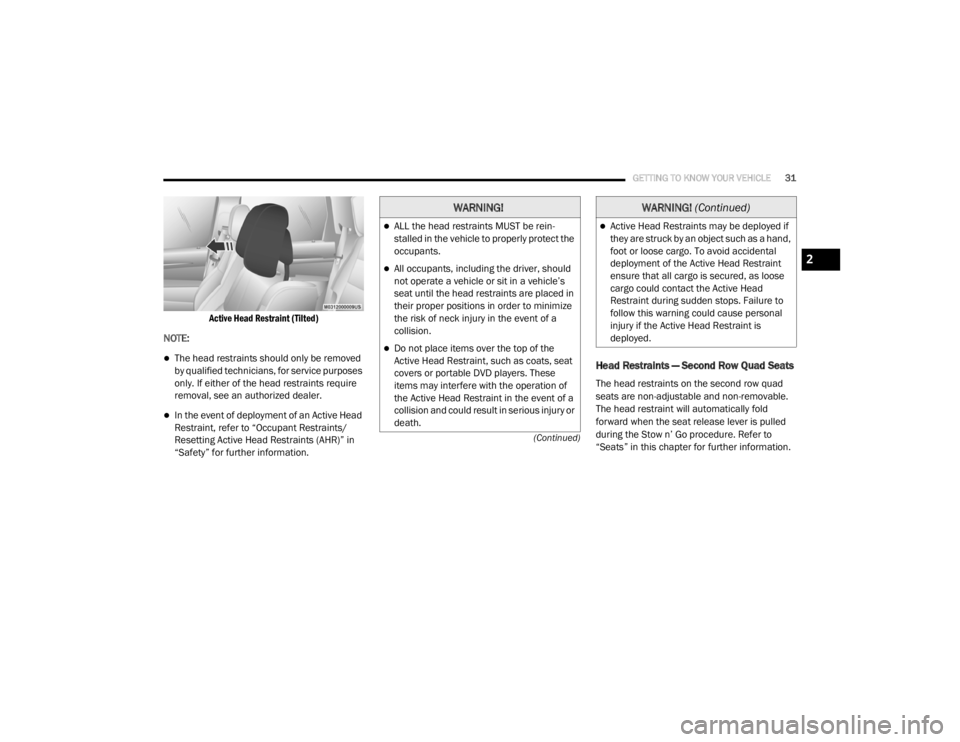
Active Head Restraint (Tilted)
NOTE:
The head restraints should only be removed
by qualified technicians, for service purposes
only. If either of the head restraints require
removal, see an authorized dealer.
In the event of deployment of an Active Head
Restraint, refer to “Occupant Restraints/
Resetting Active Head Restraints (AHR)” in
“Safety” for further information.
Head Restraints — Second Row Quad Seats
The head restraints on the second row quad
seats are non-adjustable and non-removable.
The head restraint will automatically fold
forward when the seat release lever is pulled
during the Stow n’ Go procedure. Refer to
“Seats” in this chapter for further information.
WARNING!
ALL the head restraints MUST be rein -
stalled in the vehicle to properly protect the
occupants.
All occupants, including the driver, should
not operate a vehicle or sit in a vehicle’s
seat until the head restraints are placed in
their proper positions in order to minimize
the risk of neck injury in the event of a
collision.
Do not place items over the top of the
Active Head Restraint, such as coats, seat
covers or portable DVD players. These
items may interfere with the operation of
the Active Head Restraint in the event of a
collision and could result in serious injury or
death.
Active Head Restraints may be deployed if
they are struck by an object such as a hand,
foot or loose cargo. To avoid accidental
deployment of the Active Head Restraint
ensure that all cargo is secured, as loose
cargo could contact the Active Head
Restraint during sudden stops. Failure to
follow this warning could cause personal
injury if the Active Head Restraint is
deployed.
WARNING! (Continued)
2
20_RT_OM_EN_USC_t.book Page 31
Page 62 of 380
60GETTING TO KNOW YOUR VEHICLE
To close the window part way, lift the window
control to the first detent and release when you
want the window to stop.
NOTE:
If the window runs into any obstacle during
auto-closure, it will reverse direction and
then go back down. Remove the obstacle and
use the window control again to close the
window.
Any impact due to rough road conditions may
trigger the auto reverse function unexpect -
edly during auto-closure. If this happens, pull
the control lightly to the first detent and hold
to close window manually. Auto Up Reset — If Equipped
To reactivate the Auto Up feature, perform the
following steps after vehicle power is restored:
1. Pull the window control up to close the
window completely and continue to hold
the control up for an additional two
seconds after the window is closed.
2. Push the window control down firmly to the second detent to open the window
completely and continue to hold the control
down for an additional two seconds after
the window is fully open.
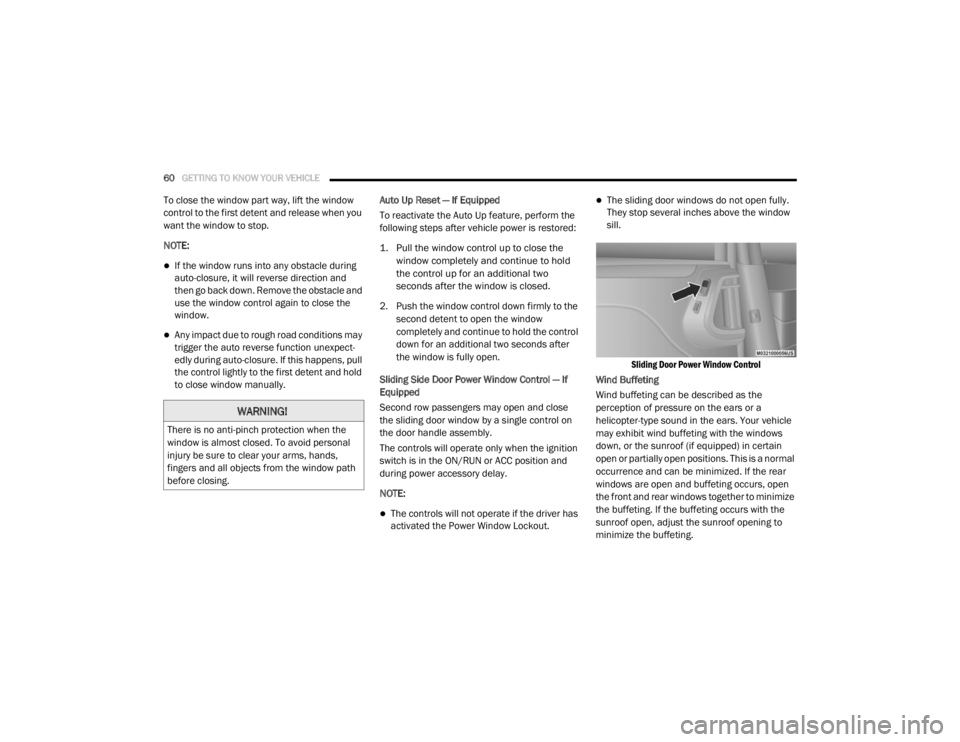
Sliding Side Door Power Window Control — If
Equipped
Second row passengers may open and close
the sliding door window by a single control on
the door handle assembly.
The controls will operate only when the ignition
switch is in the ON/RUN or ACC position and
during power accessory delay.
NOTE:
The controls will not operate if the driver has
activated the Power Window Lockout.
The sliding door windows do not open fully.
They stop several inches above the window
sill.
Sliding Door Power Window Control
Wind Buffeting
Wind buffeting can be described as the
perception of pressure on the ears or a
helicopter-type sound in the ears. Your vehicle
may exhibit wind buffeting with the windows
down, or the sunroof (if equipped) in certain
open or partially open positions. This is a normal
occurrence and can be minimized. If the rear
windows are open and buffeting occurs, open
the front and rear windows together to minimize
the buffeting. If the buffeting occurs with the
sunroof open, adjust the sunroof opening to
minimize the buffeting.
WARNING!
There is no anti-pinch protection when the
window is almost closed. To avoid personal
injury be sure to clear your arms, hands,
fingers and all objects from the window path
before closing.
20_RT_OM_EN_USC_t.book Page 60
Page 65 of 380
GETTING TO KNOW YOUR VEHICLE63
Using the above ways:
When the liftgate is fully closed, the liftgate
will open
When the liftgate is fully open, the liftgate will
close
When the liftgate is moving, the liftgate will
reverse
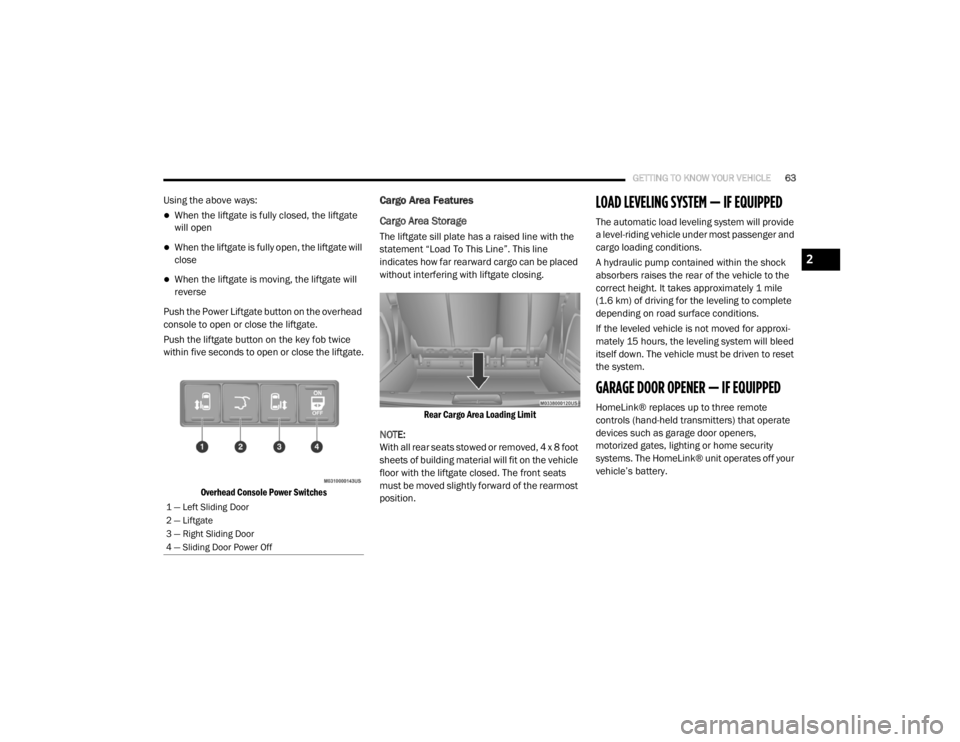
Push the Power Liftgate button on the overhead
console to open or close the liftgate.
Push the liftgate button on the key fob twice
within five seconds to open or close the liftgate.
Overhead Console Power Switches
Cargo Area Features
Cargo Area Storage
The liftgate sill plate has a raised line with the
statement “Load To This Line”. This line
indicates how far rearward cargo can be placed
without interfering with liftgate closing.
Rear Cargo Area Loading Limit
NOTE:
With all rear seats stowed or removed, 4 x 8 foot
sheets of building material will fit on the vehicle
floor with the liftgate closed. The front seats
must be moved slightly forward of the rearmost
position.
LOAD LEVELING SYSTEM — IF EQUIPPED
The automatic load leveling system will provide
a level-riding vehicle under most passenger and
cargo loading conditions.
A hydraulic pump contained within the shock
absorbers raises the rear of the vehicle to the
correct height. It takes approximately 1 mile
(1.6 km) of driving for the leveling to complete
depending on road surface conditions.
If the leveled vehicle is not moved for approxi-
mately 15 hours, the leveling system will bleed
itself down. The vehicle must be driven to reset
the system.
GARAGE DOOR OPENER — IF EQUIPPED
HomeLink® replaces up to three remote
controls (hand-held transmitters) that operate
devices such as garage door openers,
motorized gates, lighting or home security
systems. The HomeLink® unit operates off your
vehicle’s battery.
1 — Left Sliding Door
2 — Liftgate
3 — Right Sliding Door
4 — Sliding Door Power Off
2
20_RT_OM_EN_USC_t.book Page 63
Page 79 of 380
GETTING TO KNOW YOUR VEHICLE77
Power Inverter — If Equipped
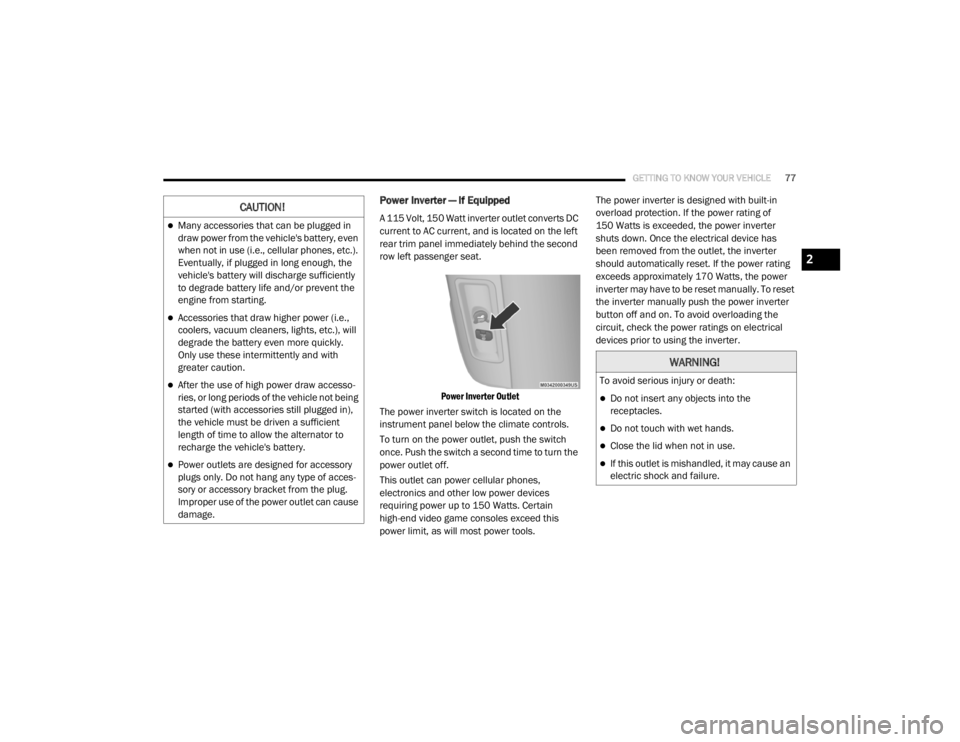
A 115 Volt, 150 Watt inverter outlet converts DC
current to AC current, and is located on the left
rear trim panel immediately behind the second
row left passenger seat.
Power Inverter Outlet
The power inverter switch is located on the
instrument panel below the climate controls.
To turn on the power outlet, push the switch
once. Push the switch a second time to turn the
power outlet off.
This outlet can power cellular phones,
electronics and other low power devices
requiring power up to 150 Watts. Certain
high-end video game consoles exceed this
power limit, as will most power tools. The power inverter is designed with built-in
overload protection. If the power rating of
150 Watts is exceeded, the power inverter
shuts down. Once the electrical device has
been removed from the outlet, the inverter
should automatically reset. If the power rating
exceeds approximately 170 Watts, the power
inverter may have to be reset manually. To reset
the inverter manually push the power inverter
button off and on. To avoid overloading the
circuit, check the power ratings on electrical
devices prior to using the inverter.CAUTION!
Many accessories that can be plugged in
draw power from the vehicle's battery, even
when not in use (i.e., cellular phones, etc.).
Eventually, if plugged in long enough, the
vehicle's battery will discharge sufficiently
to degrade battery life and/or prevent the
engine from starting.
Accessories that draw higher power (i.e.,
coolers, vacuum cleaners, lights, etc.), will
degrade the battery even more quickly.
Only use these intermittently and with
greater caution.
After the use of high power draw accesso
-
ries, or long periods of the vehicle not being
started (with accessories still plugged in),
the vehicle must be driven a sufficient
length of time to allow the alternator to
recharge the vehicle's battery.
Power outlets are designed for accessory
plugs only. Do not hang any type of acces -
sory or accessory bracket from the plug.
Improper use of the power outlet can cause
damage.
WARNING!
To avoid serious injury or death:
Do not insert any objects into the
receptacles.
Do not touch with wet hands.
Close the lid when not in use.
If this outlet is mishandled, it may cause an
electric shock and failure.
2
20_RT_OM_EN_USC_t.book Page 77
Page 86 of 380
84GETTING TO KNOW YOUR INSTRUMENT PANEL
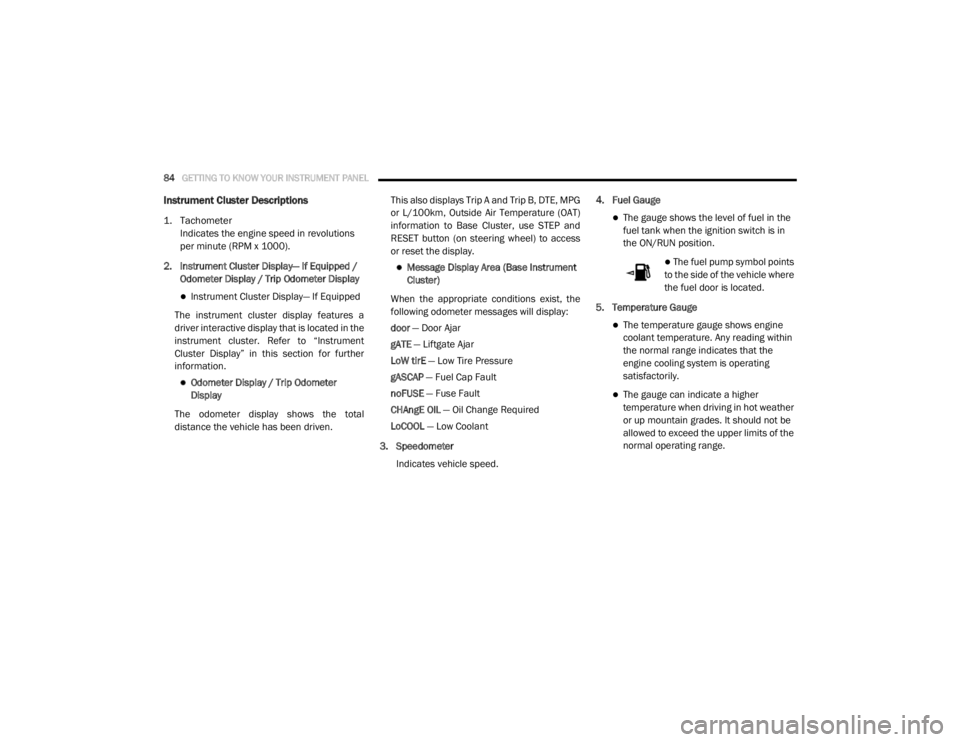
Instrument Cluster Descriptions
1. Tachometer
Indicates the engine speed in revolutions
per minute (RPM x 1000).
2. Instrument Cluster Display— If Equipped / Odometer Display / Trip Odometer Display
Instrument Cluster Display— If Equipped
The instrument cluster display features a
driver interactive display that is located in the
instrument cluster. Refer to “Instrument
Cluster Display” in this section for further
information.
Odometer Display / Trip Odometer
Display
The odometer display shows the total
distance the vehicle has been driven. This also displays Trip A and Trip B, DTE, MPG
or L/100km, Outside Air Temperature (OAT)
information to Base Cluster, use STEP and
RESET button (on steering wheel) to access
or reset the display.
Message Display Area (Base Instrument
Cluster)
When the appropriate conditions exist, the
following odometer messages will display:
door — Door Ajar
gATE — Liftgate Ajar
LoW tirE — Low Tire Pressure
gASCAP — Fuel Cap Fault
noFUSE — Fuse Fault
CHAngE OIL — Oil Change Required
LoCOOL — Low Coolant
3. Speedometer Indicates vehicle speed. 4. Fuel Gauge
The gauge shows the level of fuel in the
fuel tank when the ignition switch is in
the ON/RUN position.
The fuel pump symbol points
to the side of the vehicle where
the fuel door is located.
5. Temperature Gauge
The temperature gauge shows engine
coolant temperature. Any reading within
the normal range indicates that the
engine cooling system is operating
satisfactorily.
The gauge can indicate a higher
temperature when driving in hot weather
or up mountain grades. It should not be
allowed to exceed the upper limits of the
normal operating range.
20_RT_OM_EN_USC_t.book Page 84
Page 88 of 380
86GETTING TO KNOW YOUR INSTRUMENT PANEL
The instrument cluster display menu items
consists of the following:
Fuel Economy
Vehicle Speed
Trip Info
Tire Pressure
Vehicle Info
Messages
Units
System Setup (Personal Settings)
Turn Menu Off
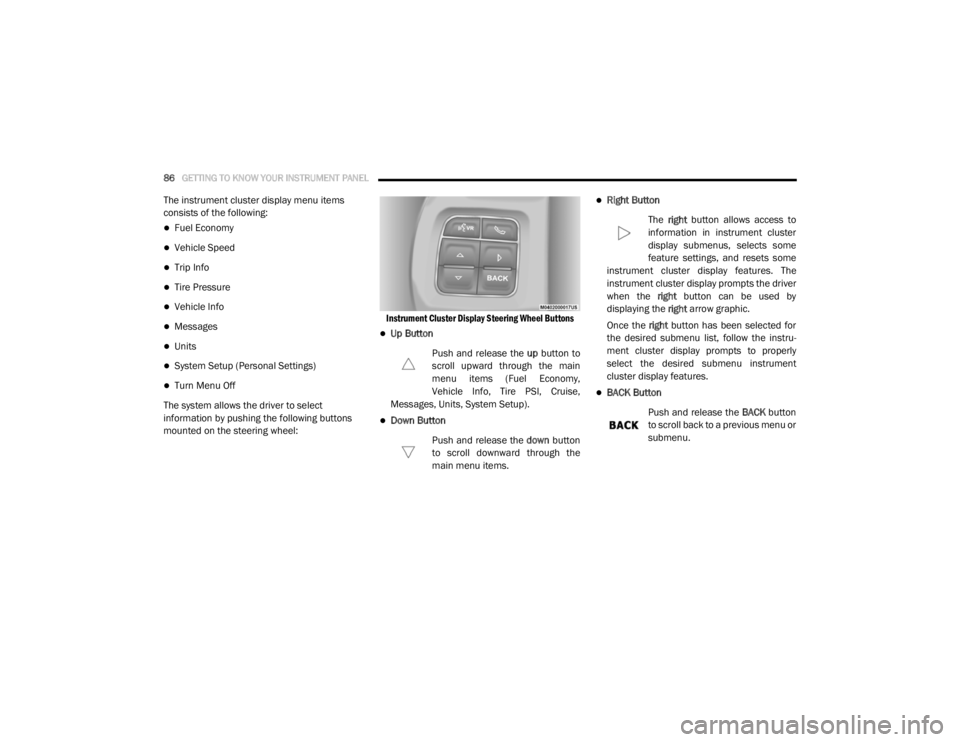
The system allows the driver to select
information by pushing the following buttons
mounted on the steering wheel:
Instrument Cluster Display Steering Wheel Buttons
Up Button
Push and release the up button to
scroll upward through the main
menu items (Fuel Economy,
Vehicle Info, Tire PSI, Cruise,
Messages, Units, System Setup).
Down Button
Push and release the down button
to scroll downward through the
main menu items.
Right Button
The right button allows access to
information in instrument cluster
display submenus, selects some
feature settings, and resets some
instrument cluster display features. The
instrument cluster display prompts the driver
when the right button can be used by
displaying the right arrow graphic.
Once the right button has been selected for
the desired submenu list, follow the instru -
ment cluster display prompts to properly
select the desired submenu instrument
cluster display features.
BACK Button
Push and release the BACK button
to scroll back to a previous menu or
submenu.
20_RT_OM_EN_USC_t.book Page 86
Page 89 of 380

GETTING TO KNOW YOUR INSTRUMENT PANEL87
Oil Life Reset
Your vehicle is equipped with an engine oil
change indicator system. The “Oil Change
Required” message will display for approxi-
mately 10 seconds after a single chime has
sounded, to indicate the next scheduled oil
change interval. The engine oil change indi-
cator system is duty cycle based, which
means the engine oil change interval may
fluctuate, dependent upon your personal
driving style.
Unless reset, this message will continue to
display each time the ignition is cycled to the
ON/RUN position.
To reset the oil change indicator after
performing the scheduled maintenance,
refer to the following procedure.
1. Turn the ignition to the ON/RUN position (do not start the engine).
2. Fully press the accelerator pedal, slowly, three times within 10 seconds.
3. Turn the ignition to the OFF/LOCK position. NOTE:
If the indicator message illuminates when you
start the vehicle, the oil change indicator
system did not reset. If necessary, repeat this
procedure.
Instrument Cluster Display Menu Items
NOTE:
The instrument cluster display menu items
display in the center of the instrument cluster.
Menu items may vary depending on your vehicle
features.
Fuel Economy
Push and release the
up or down arrow button
until “Fuel Economy” displays highlighted in the
instrument cluster display and push the right
arrow button. The following Fuel Economy
functions display in the instrument cluster
display:
Average Fuel Economy
(MPG, L/100 km or km/L)
Distance To Empty (mi or km)
Current Fuel Economy (MPG, L/100 km or
km/L)
Vehicle Speed
Push and release the up or down arrow button
until “Vehicle Speed” displays highlighted in the
instrument cluster display and push the right
arrow button. Push and release the right arrow
button to display the current speed in mph or
km/h. Pushing the right arrow button a second
time will toggle the unit of measure between
mph or km/h.
NOTE:
Changing the unit of measure in the Vehicle
Speed menu will not change the unit of
measure in the instrument cluster display.
Trip Info
Push and release the up or down arrow button
until “Trip Info” is highlighted in the instrument
cluster display and push the right button. Push
and release the up or down arrow button to
highlight one of the following functions:
Trip A
Trip B
Elapsed Time
Trip Reset
3
20_RT_OM_EN_USC_t.book Page 87
Page 95 of 380

GETTING TO KNOW YOUR INSTRUMENT PANEL93
Tilt Mirror In Reverse — If Equipped
When this feature is selected and the vehicle is
placed in a reverse gear, the driver's side mirror
will tilt downward to allow the driver to see into
the previous blind spot and avoid objects in
close proximity to the rear of the vehicle. To
make your selection, push and release the right
arrow button until a check-mark appears next to
the feature showing the system has been
activated, or the check-mark is removed
showing the system has been deactivated.
Blind Spot Alert — If Equipped
There are three selections when operating Blind
Spot Alert (“Blind Spot Alert Lights,” “Blind Spot
Alert Lights/CHM,” and “Blind Spot Alert Off”).
The Blind Spot Alert feature can be activated in
“Blind Spot Alert Lights” mode. When this mode
is selected, the Blind Spot Monitor (BSM)
system is activated and will only show a visual
alert in the outside mirrors. The Blind Spot Alert
feature can be activated in “Blind Spot Alert
Lights/CHM” mode. In this mode, the Blind Spot
Monitor (BSM) will show a visual alert in the
outside mirrors as well as an audible alert when
the turn signal is on. When “Blind Spot Alert Off”
is selected, the Blind Spot Monitor (BSM)
system is deactivated. To make your selection, push and release the
right
arrow button until a check-mark appears
next to the feature, showing the system has
been activated, or the check-mark is removed,
showing the system has been deactivated.
NOTE:
If your vehicle has experienced any damage in
the area where the sensor is located, even if the
fascia is not damaged, the sensor may have
become misaligned. Take your vehicle to an
authorized dealer to verify sensor alignment.
Having a sensor that is misaligned will result in
the BSM not operating to specification.
Calibrate Compass
Push the right arrow button to calibrate the
compass.
TRIP COMPUTER
Push and release the up or down arrow button
until “Trip Info” is highlighted in the instrument
cluster display and push the right button. Push
and release the up or down arrow button to
highlight one of the following functions. Trip A
Shows the total distance traveled for Trip A
since the last reset.
Shows the elapsed time traveled for Trip A
since the last reset.
Trip B
Shows the total distance traveled for Trip B
since the last reset.
Shows the elapsed time traveled for Trip B
since the last reset.
Elapsed Time
Shows the total elapsed time of travel since the
last reset when the ignition switch is in the ACC
position. Elapsed time will increment when the
ignition switch is in the ON or START position.
To Reset A Trip Function
Reset will only occur while a resettable function
is selected (highlighted). Push and hold the right
arrow button to clear the resettable function
being displayed.
3
20_RT_OM_EN_USC_t.book Page 93