climate control DODGE HORNET 2023 User Guide
[x] Cancel search | Manufacturer: DODGE, Model Year: 2023, Model line: HORNET, Model: DODGE HORNET 2023Pages: 288, PDF Size: 14.2 MB
Page 51 of 288
GETTING TO KNOW YOUR VEHICLE49
Combine Modes
Dual Level Combination
Front Defrost and Panel Mode
Tri-Level Combination
Front Defrost, Panel Mode, and Floor Mode
Climate Control OFF Button
Press and release this button on the
touchscreen, or push and release the
button on the faceplate to turn the
Climate Control ON/OFF.
AUTOMATIC TEMPERATURE
CONTROL (ATC)
Automatic Operation
1. Push the AUTO button on the faceplate, or the
AUTO button on the touchscreen (if equipped) on the
Automatic Temperature Control (ATC) Panel.
2. Next, adjust the temperature you would like the system to maintain by adjusting the temperature
control buttons. Once the desired temperature is
displayed, the system achieves and automatically
maintains that comfort level.
3. When the system is set up for your comfort level, it is not necessary to change the settings. You experience
the greatest efficiency by simply allowing the system
to function automatically.
NOTE:
It is not necessary to move the temperature settings for
cold or hot vehicles. The system automatically adjusts
the temperature, mode, and blower speed to provide
comfort as quickly as possible.
The temperature can be displayed in US or Metric units
by selecting the US/Metric customer-programmable
feature.
To provide you with maximum comfort in the Automatic
mode during cold start-ups, the blower fan remains on low
until the engine warms up. The blower increases in speed
and transition into Auto mode.
Manual Operation Override
This system offers a full complement of manual override
features. The AUTO symbol in the front ATC display will be
turned off when the system is being used in the manual
mode.
CLIMATE VOICE COMMANDS
Adjust vehicle temperatures hands-free and keep
everyone comfortable while you keep moving ahead.
Push the VR button on the steering wheel. After the beep,
say one of the following commands:
“Set the driver temperature to 70 degrees ”
“Set the passenger temperature to 70 degrees ”
Did You Know: Voice Command for Climate may only be
used to adjust the interior temperature of your vehicle.
Voice Command will not work to adjust the heated seats
or steering wheel if equipped.
OPERATING TIPS
Refer to the chart at the end of this section for suggested
control settings for various weather conditions.
Summer Operation
The engine cooling system must be protected with a
high-quality antifreeze coolant to provide proper corrosion
protection and to protect against engine overheating.
OAT coolant (conforming to MS.90032) is recommended.
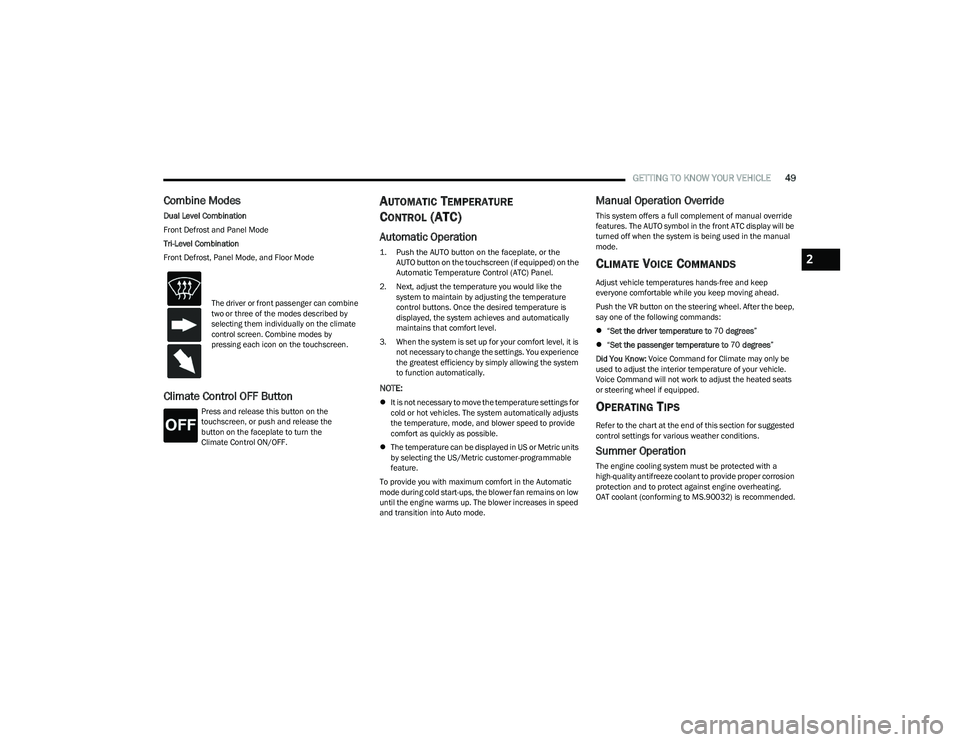
The driver or front passenger can combine
two or three of the modes described by
selecting them individually on the climate
control screen. Combine modes by
pressing each icon on the touchscreen.
2
23_GG_OM_EN_USC_t.book Page 49
Page 52 of 288
50GETTING TO KNOW YOUR VEHICLE
Winter Operation
To ensure the best possible heater and defroster
performance, make sure the engine cooling system is
functioning properly and the proper amount, type, and
concentration of coolant is used. Use of the Air
Recirculation mode during Winter months is not
recommended, because it may cause window fogging.
Vacation/Storage
For information on maintaining the Climate Control system
when the vehicle is being stored for an extended period of
time, see
Úpage 261.
Window Fogging
Vehicle windows tend to fog on the inside in mild, rainy,
and/or humid weather. To clear the windows, select
Defrost or Mix mode and increase the front blower speed.
Do not use the Recirculation mode without A/C for long
periods, as fogging may occur.
Outside Air Intake
Make sure the air intake, located directly in front of the
windshield, is free of obstructions, such as leaves. Leaves
collected in the air intake may reduce airflow, and if they
enter the air distribution box, they could plug the water
drains. In Winter months, make sure the air intake is clear
of ice, slush, and snow.
Cabin Air Filter
The Climate Control system filters out dust and pollen
from the air. Contact an authorized dealer to service your
cabin air filter, and to have it replaced when needed.
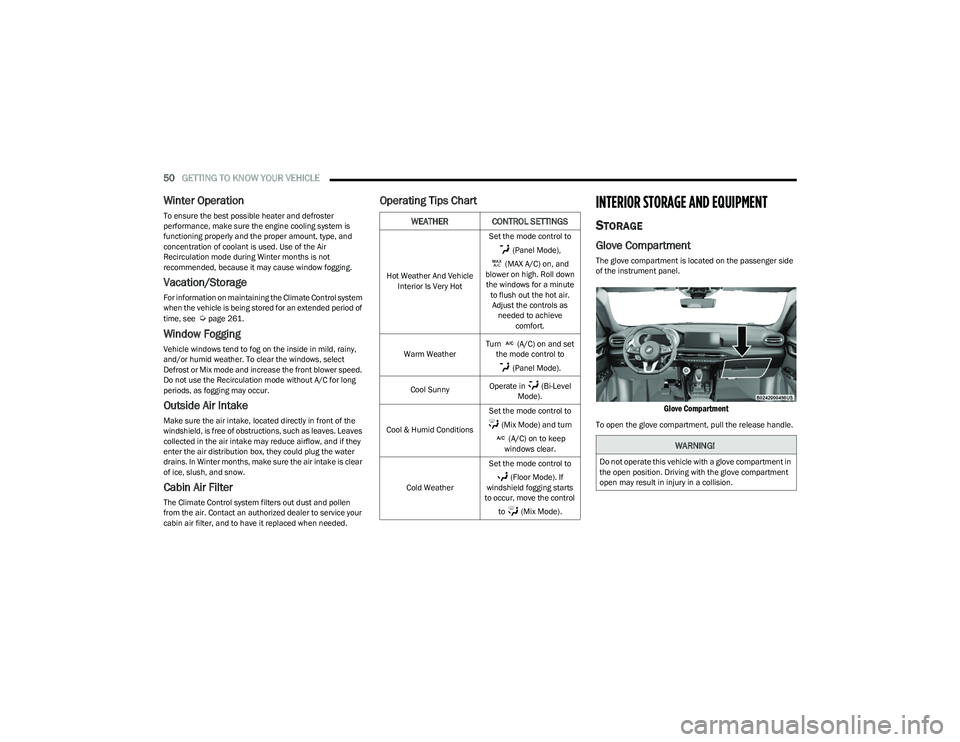
Operating Tips ChartINTERIOR STORAGE AND EQUIPMENT
STORAGE
Glove Compartment
The glove compartment is located on the passenger side
of the instrument panel.
Glove Compartment
To open the glove compartment, pull the release handle.
WEATHER CONTROL SETTINGS
Hot Weather And Vehicle
Interior Is Very Hot Set the mode control to
(Panel Mode),
(MAX A/C) on, and
blower on high. Roll down the windows for a minute to flush out the hot air. Adjust the controls as needed to achieve comfort.
Warm Weather Turn (A/C) on and set
the mode control to
(Panel Mode).
Cool Sunny Operate in (Bi-Level
Mode).
Cool & Humid Conditions Set the mode control to
(Mix Mode) and turn (A/C) on to keep
windows clear.
Cold Weather Set the mode control to
(Floor Mode). If
windshield fogging starts
to occur, move the control
to (Mix Mode).
WARNING!
Do not operate this vehicle with a glove compartment in
the open position. Driving with the glove compartment
open may result in injury in a collision.
23_GG_OM_EN_USC_t.book Page 50
Page 54 of 288
52GETTING TO KNOW YOUR VEHICLE
By using a USB cable to connect an external device:
The device can be played on the vehicle’s sound
system, providing the artist, track title, and album infor -
mation on the radio display.
NOTE:Depending on track configuration, track information may
not be present on the radio display.
The device can be controlled using the radio buttons to
play, and browse the contents of the device.
The audio device battery charges when plugged into
the USB port.
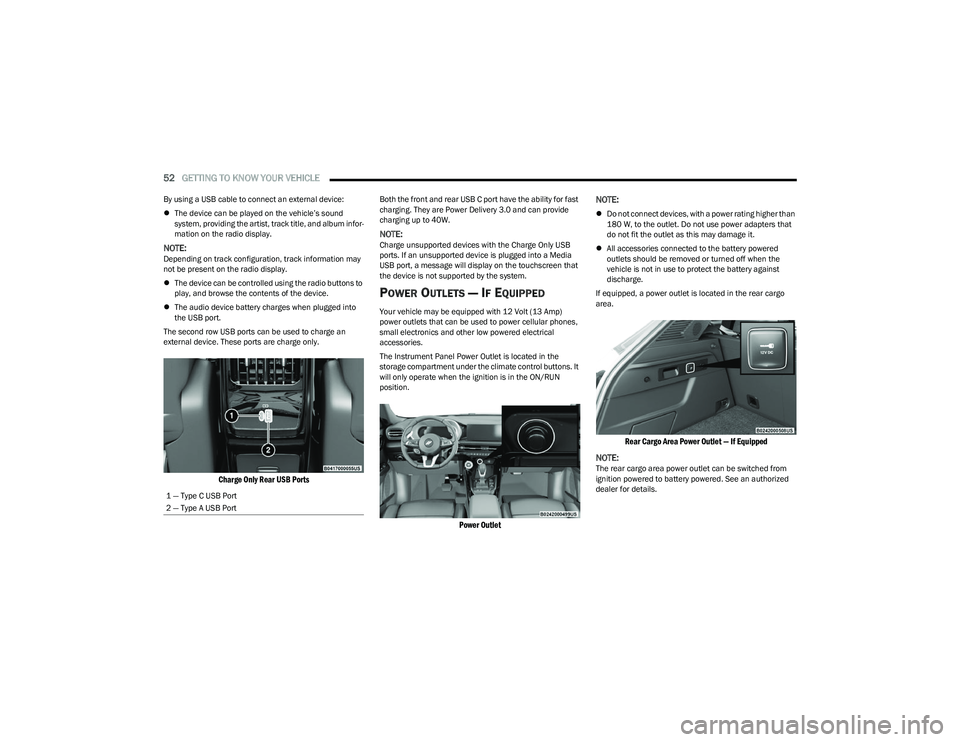
The second row USB ports can be used to charge an
external device. These ports are charge only.
Charge Only Rear USB Ports
Both the front and rear USB C port have the ability for fast
charging. They are Power Delivery 3.0 and can provide
charging up to 40W.
NOTE:Charge unsupported devices with the Charge Only USB
ports. If an unsupported device is plugged into a Media
USB port, a message will display on the touchscreen that
the device is not supported by the system.
POWER OUTLETS — IF EQUIPPED
Your vehicle may be equipped with 12 Volt (13 Amp)
power outlets that can be used to power cellular phones,
small electronics and other low powered electrical
accessories.
The Instrument Panel Power Outlet is located in the
storage compartment under the climate control buttons. It
will only operate when the ignition is in the ON/RUN
position.
Power Outlet
NOTE:
Do not connect devices, with a power rating higher than
180 W, to the outlet. Do not use power adapters that
do not fit the outlet as this may damage it.
All accessories connected to the battery powered
outlets should be removed or turned off when the
vehicle is not in use to protect the battery against
discharge.
If equipped, a power outlet is located in the rear cargo
area.
Rear Cargo Area Power Outlet — If Equipped
NOTE:
The rear cargo area power outlet can be switched from
ignition powered to battery powered. See an authorized
dealer for details.
1 — Type C USB Port
2 — Type A USB Port
23_GG_OM_EN_USC_t.book Page 52
Page 63 of 288
GETTING TO KNOW YOUR VEHICLE61
NOTE:
Before closing the liftgate, make sure to be in posses -
sion of the key fob because the liftgate may be locked.
Use the interior door lock/unlock button on the door
panel or the key fob to lock and unlock the liftgate. The
manual door locks on the doors and the exterior door
lock cylinder will not lock and unlock the liftgate.
The liftgate will either unlock along with the vehicle
doors, or it will need to be unlocked by pushing the
electronic liftgate release, depending on the selected
setting in the Uconnect system
Úpage 130.
The power liftgate buttons will not operate if the vehicle
is in gear or the vehicle speed is above 0 mph (0 km/h).
The power liftgate will not operate in temperatures
below −22°F (−30°C) or temperatures above 150°F
(65°C). Be sure to remove any buildup of snow or ice
from the liftgate before pushing any of the power lift -
gate switches.
If anything obstructs the power liftgate while it is
closing or opening, the liftgate will automatically
reverse to the closed or open position. After multiple
obstructions in the same cycle, the liftgate will auto -
matically stop and must be opened or closed manually.
There are pinch sensors attached to the side of the lift -
gate. Light pressure anywhere along these strips will
cause the liftgate to return to the open position.
The power liftgate must be in the full open position in
order for the rear liftgate close button, on the located
on the base of the liftgate, to operate. If the liftgate is
not fully open, push the liftgate button on the key fob to
fully open the liftgate and then push it again to close.
If the electronic liftgate release handle is pushed a
second time while the power liftgate is opening, the
liftgate motor will disengage to allow manual operation.
If your liftgate is power closing and you put the vehicle
in gear, the liftgate will continue to power close.
However, vehicle movement may result in the detec -
tion of an obstruction.
Allow the power system to open the liftgate. Manually
pushing or pulling the liftgate may activate the liftgate
obstacle detection feature and stop the power opera -
tion or reverse its direction.
ADJUSTABLE POWER LIFTGATE HEIGHT
The maximum height that the liftgate will open can be
adjusted and saved so that the liftgate will only open to the
desired height. To set a desired height, proceed as follows:
1. Open the liftgate fully, then manually pull down on the liftgate to the desired height.
2. Push and hold the liftgate close button or the lock button, which are both located on the bottom of
the liftgate, for three seconds. The turn signals will
flash three times to indicate successful activation.
The liftgate is now programmed to open to the set
position.
To set the saved height setting to one of four preset
positions, select the desired setting in Uconnect Settings
Úpage 130.
Power Liftgate Malfunction Procedure:
1. In the event of a power malfunction to the liftgate, the liftgate can be released by accessing the service
release feature in the latch. This can be done using
a 3 mm diameter screwdriver.
2. From inside the gate, an eyelet can be seen. Place the screwdriver in the eyelet.
3. Rotate the screwdriver handle to actuate the lever and release the latch.
4. If liftgate is left open for an extended period of time, the liftgate may need to be closed manually to reset
power liftgate functionality.
WARNING!
Driving with the liftgate open can allow poisonous
exhaust gases into your vehicle. You and your
passengers could be injured by these fumes.
Keep the liftgate closed when you are operating
the vehicle.
If you are required to drive with the liftgate open,
make sure that all windows are closed, and the
climate control blower switch is set at high speed.
Do not use the recirculation mode.
During power operation, personal injury or cargo
damage may occur. Ensure the liftgate travel path is
clear. Make sure the liftgate is closed and latched
before driving away.
Personal injury or cargo damage may occur if caught
in the path of the liftgate. Make sure the liftgate path
is clear before activating the liftgate.
2
23_GG_OM_EN_USC_t.book Page 61
Page 65 of 288
GETTING TO KNOW YOUR VEHICLE63
NOTE:Allow the power system to open the liftgate. Manually
pushing or pulling the liftgate may activate the liftgate
obstacle detection feature and stop the power operation
or reverse its direction.
CARGO AREA FEATURES
Removable Rear Shelf — If Equipped
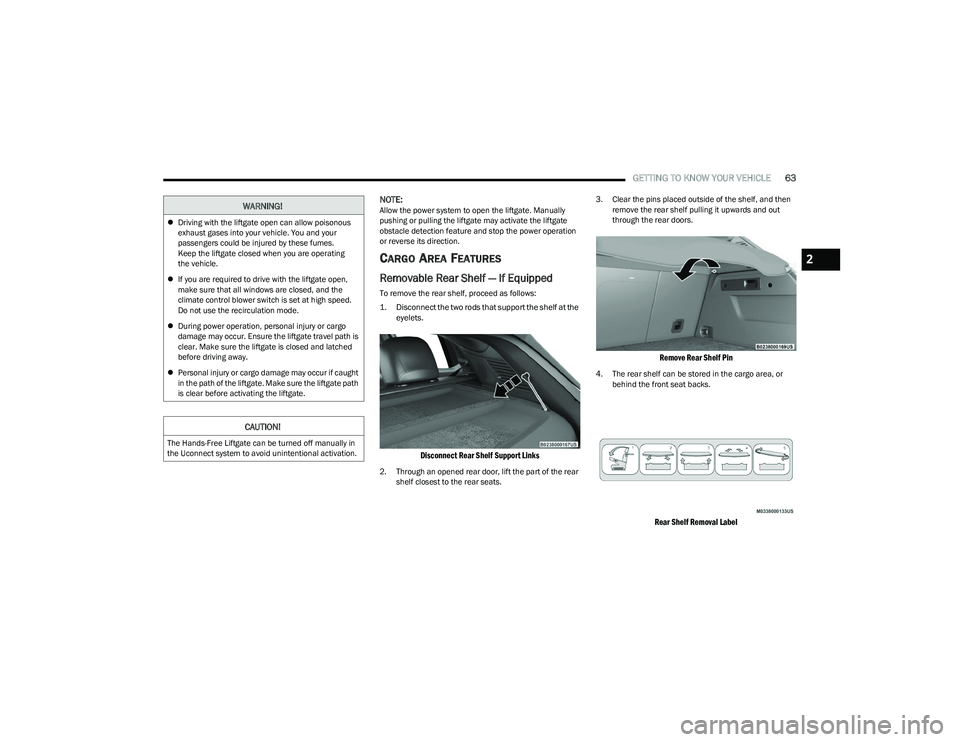
To remove the rear shelf, proceed as follows:
1. Disconnect the two rods that support the shelf at the
eyelets.
Disconnect Rear Shelf Support Links
2. Through an opened rear door, lift the part of the rear shelf closest to the rear seats. 3. Clear the pins placed outside of the shelf, and then
remove the rear shelf pulling it upwards and out
through the rear doors.
Remove Rear Shelf Pin
4. The rear shelf can be stored in the cargo area, or behind the front seat backs.
Rear Shelf Removal Label
WARNING!
Driving with the liftgate open can allow poisonous
exhaust gases into your vehicle. You and your
passengers could be injured by these fumes.
Keep the liftgate closed when you are operating
the vehicle.
If you are required to drive with the liftgate open,
make sure that all windows are closed, and the
climate control blower switch is set at high speed.
Do not use the recirculation mode.
During power operation, personal injury or cargo
damage may occur. Ensure the liftgate travel path is
clear. Make sure the liftgate is closed and latched
before driving away.
Personal injury or cargo damage may occur if caught
in the path of the liftgate. Make sure the liftgate path
is clear before activating the liftgate.
CAUTION!
The Hands-Free Liftgate can be turned off manually in
the Uconnect system to avoid unintentional activation.
2
23_GG_OM_EN_USC_t.book Page 63
Page 204 of 288
202SAFETY
EXHAUST GAS The best protection against carbon monoxide entry into
the vehicle body is a properly maintained engine exhaust
system.
Whenever a change is noticed in the sound of the exhaust
system, when exhaust fumes can be detected inside the
vehicle, or when the underside or rear of the vehicle is
damaged, have an authorized dealer inspect the complete
exhaust system and adjacent body areas for broken,
damaged, deteriorated, or mispositioned parts. Open
seams or loose connections could permit exhaust fumes
to seep into the passenger compartment. In addition,
inspect the exhaust system each time the vehicle is raised
for lubrication or oil change. Replace as required.CARBON MONOXIDE WARNINGS
WARNING!
Exhaust gases can injure or kill. They contain carbon
monoxide (CO), which is colorless and odorless.
Breathing it can make you unconscious and can
eventually poison you. To avoid breathing (CO), follow
these safety tips:
Do not run the engine in a closed garage or in
confined areas any longer than needed to move your
vehicle in or out of the area.
If you are required to drive with the trunk/liftgate/
rear doors open, make sure that all windows are
closed and the climate control BLOWER switch is set
at high speed. DO NOT use the recirculation mode.
If it is necessary to sit in a parked vehicle with the
engine running, adjust your heating or cooling
controls to force outside air into the vehicle.
Set the blower at high speed.
WARNING!
Carbon monoxide (CO) in exhaust gases is deadly.
Follow the precautions provided to prevent carbon
monoxide poisoning:
Do not inhale exhaust gases. They contain carbon
monoxide, a colorless and odorless gas, which can
kill. Never run the engine in a closed area, such as a
garage, and never sit in a parked vehicle with the
engine running for an extended period. If the vehicle
is stopped in an open area with the engine running
for more than a short period, adjust the ventilation
system to force fresh, outside air into the vehicle.
Guard against carbon monoxide with proper mainte -
nance. Have the exhaust system inspected every
time the vehicle is raised. Have any abnormal condi -
tions repaired promptly. Until repaired, drive with all
side windows fully open.
23_GG_OM_EN_USC_t.book Page 202
Page 245 of 288
SERVICING AND MAINTENANCE243
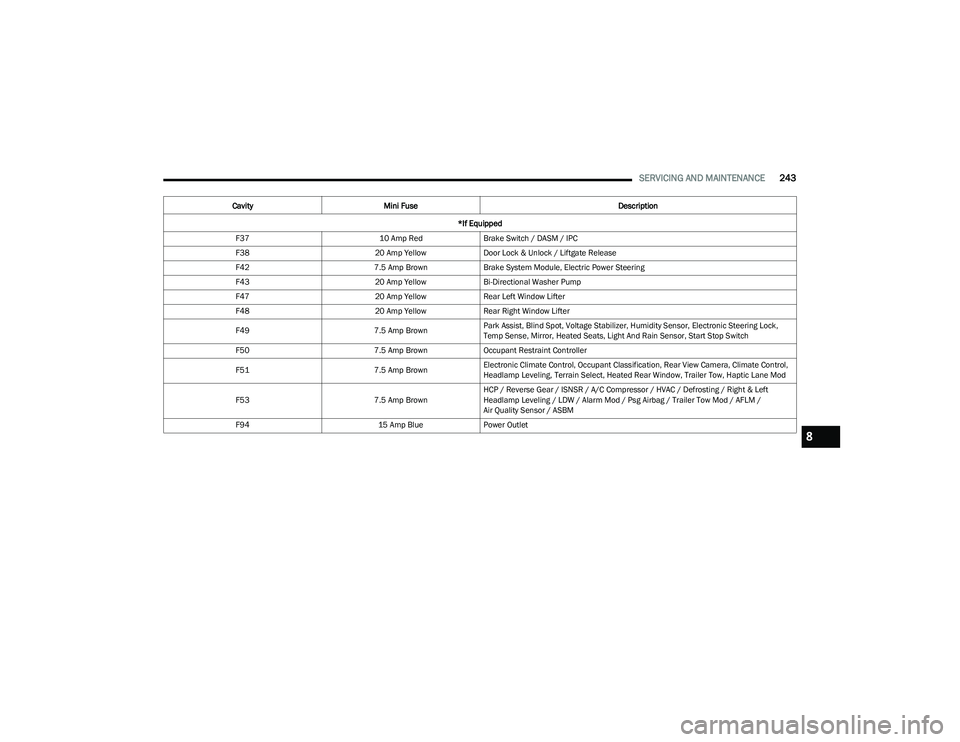
F37 10 Amp RedBrake Switch / DASM / IPC
F38 20 Amp YellowDoor Lock & Unlock / Liftgate Release
F42 7.5 Amp BrownBrake System Module, Electric Power Steering
F43 20 Amp YellowBi-Directional Washer Pump
F47 20 Amp YellowRear Left Window Lifter
F48 20 Amp YellowRear Right Window Lifter
F49 7.5 Amp BrownPark Assist, Blind Spot, Voltage Stabilizer, Humidity Sensor, Electronic Steering Lock,
Temp Sense, Mirror, Heated Seats, Light And Rain Sensor, Start Stop Switch
F50 7.5 Amp BrownOccupant Restraint Controller
F51 7.5 Amp BrownElectronic Climate Control, Occupant Classification, Rear View Camera, Climate Control,
Headlamp Leveling, Terrain Select, Heated Rear Window, Trailer Tow, Haptic Lane Mod
F53 7.5 Amp BrownHCP / Reverse Gear / ISNSR / A/C Compressor / HVAC / Defrosting / Right & Left
Headlamp Leveling / LDW / Alarm Mod / Psg Airbag / Trailer Tow Mod / AFLM /
Air Quality Sensor / ASBM
F94 15 Amp BluePower Outlet
Cavity
Mini Fuse Description
*If Equipped
8
23_GG_OM_EN_USC_t.book Page 243
Page 262 of 288
260SERVICING AND MAINTENANCE
TIRE ROTATION RECOMMENDATIONS
The tires on the front and rear of your vehicle operate at
different loads and perform different steering, handling,
and braking functions. For these reasons, they wear at
unequal rates.
These effects can be reduced by timely rotation of tires.
The benefits of rotation are especially worthwhile with
aggressive tread designs such as those on On/Off Road
type tires. Rotation will increase tread life, help to
maintain mud, snow, and wet traction levels, and
contribute to a smooth, quiet ride.
For the proper maintenance intervals
Úpage 224. The
reasons for any rapid or unusual wear should be corrected
prior to rotation being performed.
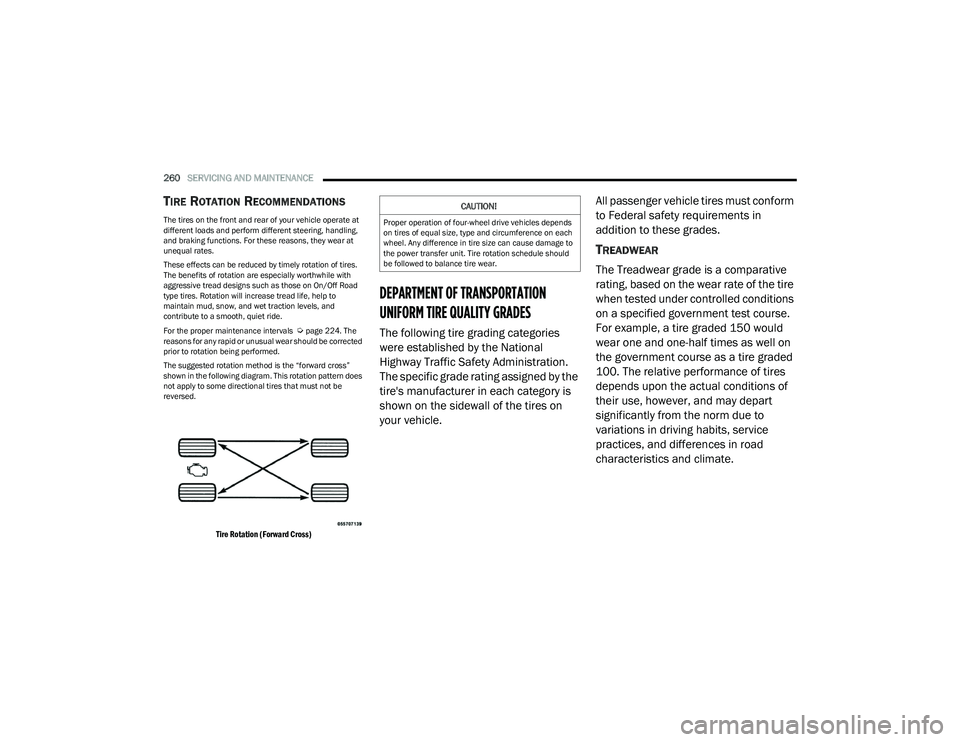
The suggested rotation method is the “forward cross”
shown in the following diagram. This rotation pattern does
not apply to some directional tires that must not be
reversed.
Tire Rotation (Forward Cross)
DEPARTMENT OF TRANSPORTATION
UNIFORM TIRE QUALITY GRADES
The following tire grading categories
were established by the National
Highway Traffic Safety Administration.
The specific grade rating assigned by the
tire's manufacturer in each category is
shown on the sidewall of the tires on
your vehicle. All passenger vehicle tires must conform
to Federal safety requirements in
addition to these grades.
TREADWEAR
The Treadwear grade is a comparative
rating, based on the wear rate of the tire
when tested under controlled conditions
on a specified government test course.
For example, a tire graded 150 would
wear one and one-half times as well on
the government course as a tire graded
100. The relative performance of tires
depends upon the actual conditions of
their use, however, and may depart
significantly from the norm due to
variations in driving habits, service
practices, and differences in road
characteristics and climate.
CAUTION!
Proper operation of four-wheel drive vehicles depends
on tires of equal size, type and circumference on each
wheel. Any difference in tire size can cause damage to
the power transfer unit. Tire rotation schedule should
be followed to balance tire wear.
23_GG_OM_EN_USC_t.book Page 260
Page 280 of 288
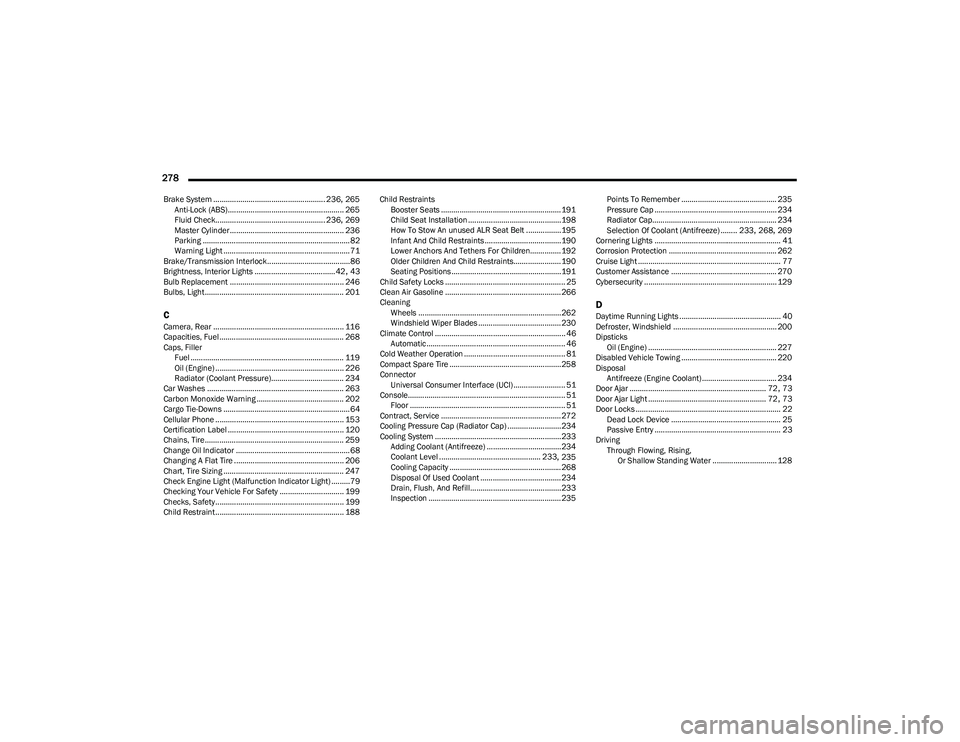
278
Brake System ...................................................... 236, 265
Anti-Lock (ABS)........................................................ 265 Fluid Check..................................................... 236
, 269
Master Cylinder ....................................................... 236
Parking ....................................................................... 82
Warning Light ............................................................. 71
Brake/Transmission Interlock........................................86
Brightness, Interior Lights ....................................... 42
, 43
Bulb Replacement ....................................................... 246
Bulbs, Light................................................................... 201
CCamera, Rear ............................................................... 116
Capacities, Fuel............................................................ 268
Caps, Filler Fuel .......................................................................... 119
Oil (Engine) .............................................................. 226
Radiator (Coolant Pressure)................................... 234
Car Washes .................................................................. 263
Carbon Monoxide Warning .......................................... 202
Cargo Tie-Downs ............................................................. 64
Cellular Phone .............................................................. 153
Certification Label ........................................................ 120
Chains, Tire................................................................... 259
Change Oil Indicator ....................................................... 68
Changing A Flat Tire ..................................................... 206
Chart, Tire Sizing .......................................................... 247
Check Engine Light (Malfunction Indicator Light) .........79
Checking Your Vehicle For Safety ............................... 199
Checks, Safety.............................................................. 199
Child Restraint.............................................................. 188 Child Restraints
Booster Seats .......................................................... 191
Child Seat Installation ............................................. 198How To Stow An unused ALR Seat Belt .................195Infant And Child Restraints ..................................... 190
Lower Anchors And Tethers For Children............... 192
Older Children And Child Restraints....................... 190
Seating Positions ..................................................... 191
Child Safety Locks .......................................................... 25
Clean Air Gasoline ........................................................ 266
Cleaning Wheels .....................................................................262
Windshield Wiper Blades ........................................ 230
Climate Control ............................................................... 46 Automatic ................................................................... 46
Cold Weather Operation ................................................. 81
Compact Spare Tire ...................................................... 258
Connector Universal Consumer Interface (UCI) ......................... 51
Console............................................................................ 51 Floor ........................................................................... 51
Contract, Service .......................................................... 272
Cooling Pressure Cap (Radiator Cap) ..........................234
Cooling System ............................................................. 233 Adding Coolant (Antifreeze) ....................................234
Coolant Level ................................................. 233
, 235
Cooling Capacity ...................................................... 268
Disposal Of Used Coolant ....................................... 234 Drain, Flush, And Refill............................................233
Inspection ................................................................ 235 Points To Remember .............................................. 235
Pressure Cap ........................................................... 234
Radiator Cap............................................................ 234
Selection Of Coolant (Antifreeze) ........ 233
, 268, 269
Cornering Lights ............................................................. 41
Corrosion Protection .................................................... 262
Cruise Light ..................................................................... 77 Customer Assistance ................................................... 270
Cybersecurity ................................................................ 129
DDaytime Running Lights ................................................. 40Defroster, Windshield .................................................. 200
Dipsticks Oil (Engine) .............................................................. 227
Disabled Vehicle Towing .............................................. 220
Disposal Antifreeze (Engine Coolant) .................................... 234
Door Ajar .................................................................. 72
, 73
Door Ajar Light ......................................................... 72, 73
Door Locks ...................................................................... 22 Dead Lock Device ..................................................... 25
Passive Entry ............................................................. 23
Driving Through Flowing, Rising, Or Shallow Standing Water ............................... 128
23_GG_OM_EN_USC_t.book Page 278