instrument panel DODGE HORNET 2023 Owner's Manual
[x] Cancel search | Manufacturer: DODGE, Model Year: 2023, Model line: HORNET, Model: DODGE HORNET 2023Pages: 288, PDF Size: 14.2 MB
Page 77 of 288
GETTING TO KNOW YOUR INSTRUMENT PANEL75
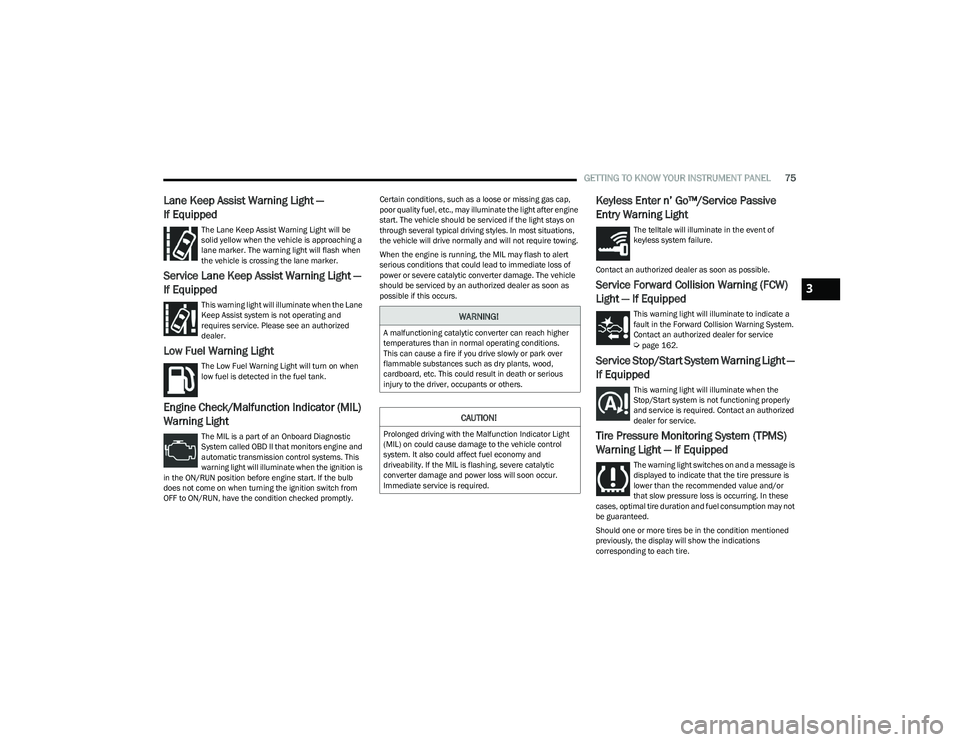
Lane Keep Assist Warning Light —
If Equipped
The Lane Keep Assist Warning Light will be
solid yellow when the vehicle is approaching a
lane marker. The warning light will flash when
the vehicle is crossing the lane marker.
Service Lane Keep Assist Warning Light —
If Equipped
This warning light will illuminate when the Lane
Keep Assist system is not operating and
requires service. Please see an authorized
dealer.
Low Fuel Warning Light
The Low Fuel Warning Light will turn on when
low fuel is detected in the fuel tank.
Engine Check/Malfunction Indicator (MIL)
Warning Light
The MIL is a part of an Onboard Diagnostic
System called OBD II that monitors engine and
automatic transmission control systems. This
warning light will illuminate when the ignition is
in the ON/RUN position before engine start. If the bulb
does not come on when turning the ignition switch from
OFF to ON/RUN, have the condition checked promptly. Certain conditions, such as a loose or missing gas cap,
poor quality fuel, etc., may illuminate the light after engine
start. The vehicle should be serviced if the light stays on
through several typical driving styles. In most situations,
the vehicle will drive normally and will not require towing.
When the engine is running, the MIL may flash to alert
serious conditions that could lead to immediate loss of
power or severe catalytic converter damage. The vehicle
should be serviced by an authorized dealer as soon as
possible if this occurs.
Keyless Enter n’ Go™/Service Passive
Entry Warning Light
The telltale will illuminate in the event of
keyless system failure.
Contact an authorized dealer as soon as possible.
Service Forward Collision Warning (FCW)
Light — If Equipped
This warning light will illuminate to indicate a
fault in the Forward Collision Warning System.
Contact an authorized dealer for service
Úpage 162.
Service Stop/Start System Warning Light —
If Equipped
This warning light will illuminate when the
Stop/Start system is not functioning properly
and service is required. Contact an authorized
dealer for service.
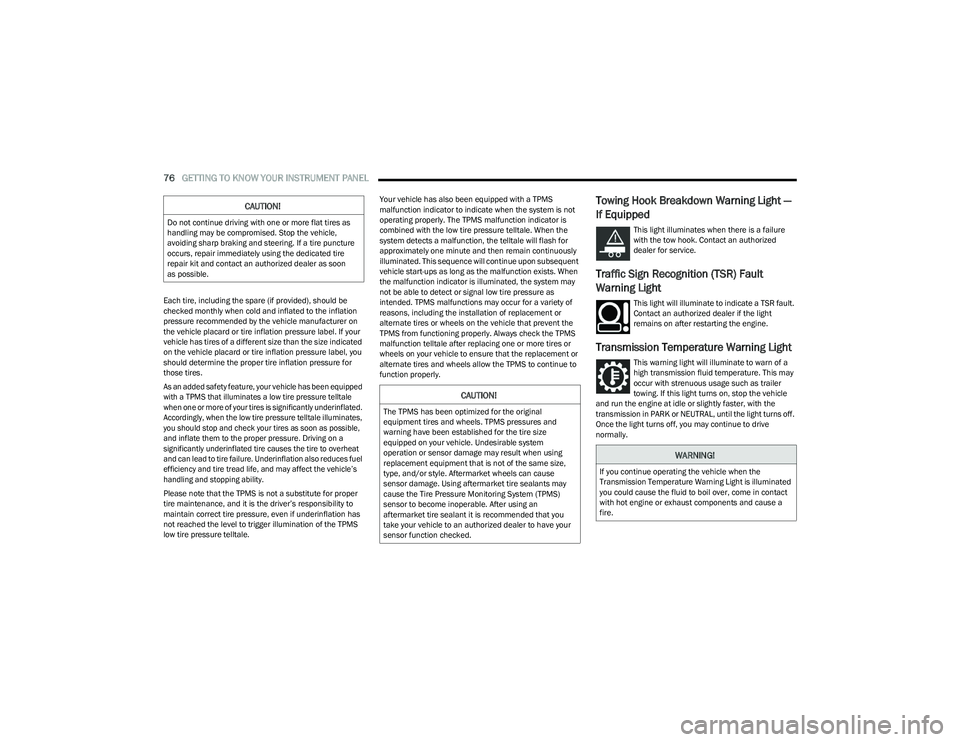
Tire Pressure Monitoring System (TPMS)
Warning Light — If Equipped
The warning light switches on and a message is
displayed to indicate that the tire pressure is
lower than the recommended value and/or
that slow pressure loss is occurring. In these
cases, optimal tire duration and fuel consumption may not
be guaranteed.
Should one or more tires be in the condition mentioned
previously, the display will show the indications
corresponding to each tire.
WARNING!
A malfunctioning catalytic converter can reach higher
temperatures than in normal operating conditions.
This can cause a fire if you drive slowly or park over
flammable substances such as dry plants, wood,
cardboard, etc. This could result in death or serious
injury to the driver, occupants or others.
CAUTION!
Prolonged driving with the Malfunction Indicator Light
(MIL) on could cause damage to the vehicle control
system. It also could affect fuel economy and
driveability. If the MIL is flashing, severe catalytic
converter damage and power loss will soon occur.
Immediate service is required.
3
23_GG_OM_EN_USC_t.book Page 75
Page 78 of 288
76GETTING TO KNOW YOUR INSTRUMENT PANEL
Each tire, including the spare (if provided), should be
checked monthly when cold and inflated to the inflation
pressure recommended by the vehicle manufacturer on
the vehicle placard or tire inflation pressure label. If your
vehicle has tires of a different size than the size indicated
on the vehicle placard or tire inflation pressure label, you
should determine the proper tire inflation pressure for
those tires.
As an added safety feature, your vehicle has been equipped
with a TPMS that illuminates a low tire pressure telltale
when one or more of your tires is significantly underinflated.
Accordingly, when the low tire pressure telltale illuminates,
you should stop and check your tires as soon as possible,
and inflate them to the proper pressure. Driving on a
significantly underinflated tire causes the tire to overheat
and can lead to tire failure. Underinflation also reduces fuel
efficiency and tire tread life, and may affect the vehicle’s
handling and stopping ability.
Please note that the TPMS is not a substitute for proper
tire maintenance, and it is the driver’s responsibility to
maintain correct tire pressure, even if underinflation has
not reached the level to trigger illumination of the TPMS
low tire pressure telltale. Your vehicle has also been equipped with a TPMS
malfunction indicator to indicate when the system is not
operating properly. The TPMS malfunction indicator is
combined with the low tire pressure telltale. When the
system detects a malfunction, the telltale will flash for
approximately one minute and then remain continuously
illuminated. This sequence will continue upon subsequent
vehicle start-ups as long as the malfunction exists. When
the malfunction indicator is illuminated, the system may
not be able to detect or signal low tire pressure as
intended. TPMS malfunctions may occur for a variety of
reasons, including the installation of replacement or
alternate tires or wheels on the vehicle that prevent the
TPMS from functioning properly. Always check the TPMS
malfunction telltale after replacing one or more tires or
wheels on your vehicle to ensure that the replacement or
alternate tires and wheels allow the TPMS to continue to
function properly.
Towing Hook Breakdown Warning Light —
If Equipped
This light illuminates when there is a failure
with the tow hook. Contact an authorized
dealer for service.
Traffic Sign Recognition (TSR) Fault
Warning Light
This light will illuminate to indicate a TSR fault.
Contact an authorized dealer if the light
remains on after restarting the engine.
Transmission Temperature Warning Light
This warning light will illuminate to warn of a
high transmission fluid temperature. This may
occur with strenuous usage such as trailer
towing. If this light turns on, stop the vehicle
and run the engine at idle or slightly faster, with the
transmission in PARK or NEUTRAL, until the light turns off.
Once the light turns off, you may continue to drive
normally.
CAUTION!
Do not continue driving with one or more flat tires as
handling may be compromised. Stop the vehicle,
avoiding sharp braking and steering. If a tire puncture
occurs, repair immediately using the dedicated tire
repair kit and contact an authorized dealer as soon
as possible.
CAUTION!
The TPMS has been optimized for the original
equipment tires and wheels. TPMS pressures and
warning have been established for the tire size
equipped on your vehicle. Undesirable system
operation or sensor damage may result when using
replacement equipment that is not of the same size,
type, and/or style. Aftermarket wheels can cause
sensor damage. Using aftermarket tire sealants may
cause the Tire Pressure Monitoring System (TPMS)
sensor to become inoperable. After using an
aftermarket tire sealant it is recommended that you
take your vehicle to an authorized dealer to have your
sensor function checked.
WARNING!
If you continue operating the vehicle when the
Transmission Temperature Warning Light is illuminated
you could cause the fluid to boil over, come in contact
with hot engine or exhaust components and cause a
fire.
23_GG_OM_EN_USC_t.book Page 76
Page 79 of 288
GETTING TO KNOW YOUR INSTRUMENT PANEL77
YELLOW INDICATOR LIGHTS
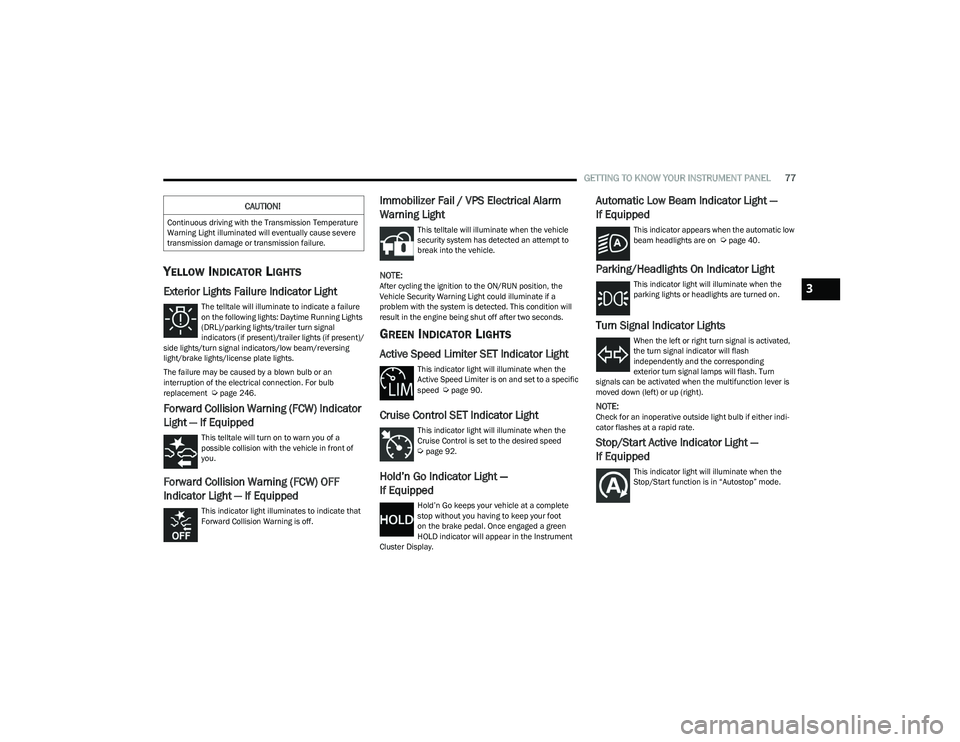
Exterior Lights Failure Indicator Light
The telltale will illuminate to indicate a failure
on the following lights: Daytime Running Lights
(DRL)/parking lights/trailer turn signal
indicators (if present)/trailer lights (if present)/
side lights/turn signal indicators/low beam/reversing
light/brake lights/license plate lights.
The failure may be caused by a blown bulb or an
interruption of the electrical connection. For bulb
replacement
Úpage 246.
Forward Collision Warning (FCW) Indicator
Light — If Equipped
This telltale will turn on to warn you of a
possible collision with the vehicle in front of
you.
Forward Collision Warning (FCW) OFF
Indicator Light — If Equipped
This indicator light illuminates to indicate that
Forward Collision Warning is off.
Immobilizer Fail / VPS Electrical Alarm
Warning Light
This telltale will illuminate when the vehicle
security system has detected an attempt to
break into the vehicle.
NOTE:After cycling the ignition to the ON/RUN position, the
Vehicle Security Warning Light could illuminate if a
problem with the system is detected. This condition will
result in the engine being shut off after two seconds.
GREEN INDICATOR LIGHTS
Active Speed Limiter SET Indicator Light
This indicator light will illuminate when the
Active Speed Limiter is on and set to a specific
speed
Úpage 90.
Cruise Control SET Indicator Light
This indicator light will illuminate when the
Cruise Control is set to the desired speed
Úpage 92.
Hold’n Go Indicator Light —
If Equipped
Hold’n Go keeps your vehicle at a complete
stop without you having to keep your foot
on the brake pedal. Once engaged a green
HOLD indicator will appear in the Instrument
Cluster Display.
Automatic Low Beam Indicator Light —
If Equipped
This indicator appears when the automatic low
beam headlights are on Úpage 40.
Parking/Headlights On Indicator Light
This indicator light will illuminate when the
parking lights or headlights are turned on.
Turn Signal Indicator Lights
When the left or right turn signal is activated,
the turn signal indicator will flash
independently and the corresponding
exterior turn signal lamps will flash. Turn
signals can be activated when the multifunction lever is
moved down (left) or up (right).
NOTE:Check for an inoperative outside light bulb if either indi -
cator flashes at a rapid rate.
Stop/Start Active Indicator Light —
If Equipped
This indicator light will illuminate when the
Stop/Start function is in “Autostop” mode.
CAUTION!
Continuous driving with the Transmission Temperature
Warning Light illuminated will eventually cause severe
transmission damage or transmission failure.
3
23_GG_OM_EN_USC_t.book Page 77
Page 80 of 288
78GETTING TO KNOW YOUR INSTRUMENT PANEL
WHITE INDICATOR LIGHTS
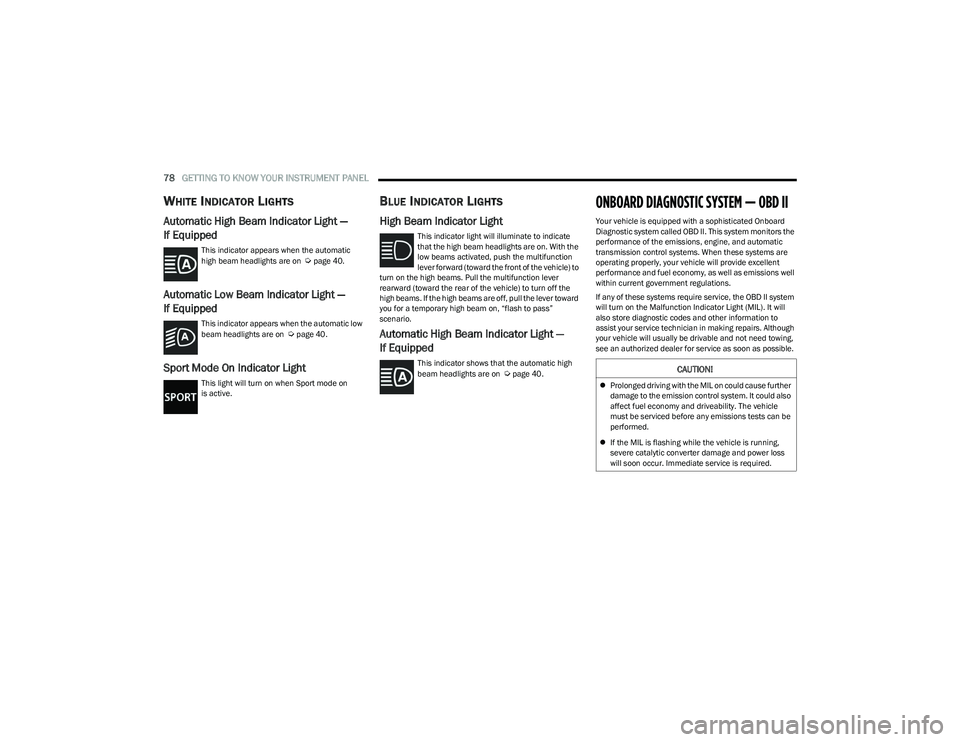
Automatic High Beam Indicator Light —
If Equipped
This indicator appears when the automatic
high beam headlights are on Úpage 40.
Automatic Low Beam Indicator Light —
If Equipped
This indicator appears when the automatic low
beam headlights are on Úpage 40.
Sport Mode On Indicator Light
This light will turn on when Sport mode on
is active.
BLUE INDICATOR LIGHTS
High Beam Indicator Light
This indicator light will illuminate to indicate
that the high beam headlights are on. With the
low beams activated, push the multifunction
lever forward (toward the front of the vehicle) to
turn on the high beams. Pull the multifunction lever
rearward (toward the rear of the vehicle) to turn off the
high beams. If the high beams are off, pull the lever toward
you for a temporary high beam on, “flash to pass”
scenario.
Automatic High Beam Indicator Light —
If Equipped
This indicator shows that the automatic high
beam headlights are on Úpage 40.
ONBOARD DIAGNOSTIC SYSTEM — OBD II
Your vehicle is equipped with a sophisticated Onboard
Diagnostic system called OBD II. This system monitors the
performance of the emissions, engine, and automatic
transmission control systems. When these systems are
operating properly, your vehicle will provide excellent
performance and fuel economy, as well as emissions well
within current government regulations.
If any of these systems require service, the OBD II system
will turn on the Malfunction Indicator Light (MIL). It will
also store diagnostic codes and other information to
assist your service technician in making repairs. Although
your vehicle will usually be drivable and not need towing,
see an authorized dealer for service as soon as possible.
CAUTION!
Prolonged driving with the MIL on could cause further
damage to the emission control system. It could also
affect fuel economy and driveability. The vehicle
must be serviced before any emissions tests can be
performed.
If the MIL is flashing while the vehicle is running,
severe catalytic converter damage and power loss
will soon occur. Immediate service is required.
23_GG_OM_EN_USC_t.book Page 78
Page 81 of 288
GETTING TO KNOW YOUR INSTRUMENT PANEL79
ONBOARD DIAGNOSTIC SYSTEM (OBD II)
C
YBERSECURITY
Your vehicle is required to have an OBD II and a
connection port to allow access to information related to
the performance of your emissions controls. Authorized
service technicians may need to access this information to
assist with the diagnosis and service of your vehicle and
emissions system.
EMISSIONS INSPECTION AND
MAINTENANCE PROGRAMS
In some localities, it may be a legal requirement to pass an
inspection of your vehicle's emissions control system.
Failure to pass could prevent vehicle registration.
For states that require an Inspection and
Maintenance (I/M), this check verifies the
Malfunction Indicator Light (MIL) is functioning
and is not on when the engine is running, and
that the OBD II system is ready for testing.
Normally, the OBD II system will be ready. The OBD II
system may not be ready if your vehicle was recently
serviced, recently had a depleted battery or a battery
replacement. If the OBD II system should be determined
not ready for the I/M test, your vehicle may fail the test.
Your vehicle has a simple ignition actuated test, which you
can use prior to going to the test station. To check if your
vehicle's OBD II system is ready, you must do the following:
1. Cycle the ignition switch to the ON position, but do not crank or start the engine.
NOTE:If you crank or start the engine, you will have to start this
test over. 2. As soon as you cycle the ignition switch to the
ON position, you will see the Malfunction Indicator
Light (MIL) symbol come on as part of a normal
bulb check.
3. Approximately 15 seconds later, one of two things will happen:
The MIL will flash for about 10 seconds and then
return to being fully illuminated until you turn OFF
the ignition or start the engine. This means that
your vehicle's OBD II system is not ready and you
should not proceed to the I/M station.
The MIL will not flash at all and will remain fully illu -
minated until you place the ignition in the off posi -
tion or start the engine. This means that your
vehicle's OBD II system is ready and you can
proceed to the I/M station.
If your OBD II system is not ready, you should see an
authorized dealer or repair facility. If your vehicle was
recently serviced or had a battery failure or replacement,
you may need to do nothing more than drive your vehicle
as you normally would in order for your OBD II system to
update. A recheck with the previously mentioned test
routine may then indicate that the system is now ready.
Regardless of whether your vehicle's OBD II system is
ready or not, if the MIL is illuminated during normal vehicle
operation you should have your vehicle serviced before
going to the I/M station. The I/M station can fail your
vehicle because the MIL is on with the engine running.
WARNING!
ONLY an authorized service technician should
connect equipment to the OBD II connection port in
order to read the VIN, diagnose, or service your
vehicle.
If unauthorized equipment is connected to the OBD II
connection port, such as a driver-behavior tracking
device, it may:
Be possible that vehicle systems, including
safety related systems, could be impaired or a
loss of vehicle control could occur that may
result in an accident involving serious injury or
death.
Access, or allow others to access, information
stored in your vehicle systems, including
personal information.
3
23_GG_OM_EN_USC_t.book Page 79
Page 115 of 288
STARTING AND OPERATING113
Construction equipment, large trucks, and other vibra -
tions could affect the performance of ParkSense.
Sensors may detect a nonexistent obstacle (echo
noise) due to mechanical noises, for example while
washing the vehicle or in the case of rain, strong wind,
and hail.
The sensors may not detect objects of a particular
shape or made from particular materials (very thin
poles, trailer beams, panels, nets, bushes, anti-parking
posts, pavements, rubbish bins, motor vehicles, etc.).
Always take great care to check that the vehicle and its
path are actually compatible with the parking place
identified by the system.
The use of wheels and tires that are different size to the
original equipment could affect the operation of the
system.
The operation of the rear sensors is automatically
deactivated when the trailer's electric plug is inserted
in the vehicle's tow hook socket, while the front
sensors stay active and can provide acoustic and
visual warnings. If this situation occurs, Active Park
Assist will not work. The rear sensors are automatically
reactivated when the trailer's cable plug is removed.
In the case of parking maneuvers on roads with
inclines, the performance of the system could be
inferior and it may deactivate.
If a parking maneuver is being carried out between
two parked vehicles alongside a curb, the system may
cause the vehicle to drive up onto the curb.
Some maneuvers at very tight bends might be impos -
sible to be carried out.
Take great care to ensure that conditions do not
change during the parking maneuver (e.g. if there are
persons and/or animals in the parking place, moving
vehicles, etc.) and intervene immediately if necessary.
During parking maneuvers, pay attention to vehicles
approaching from the opposite direction. Always abide
by the law and road regulations.
NOTE:
Correct system operation is not guaranteed if snow
chains or the compact spare tire are fitted.
The function only informs the driver about the last
appropriate parking place (parallel or perpendicular)
detected by the parking sensors.
Some messages displayed are accompanied by
audible warnings.
LANESENSE — IF EQUIPPED
LANESENSE OPERATION
The LaneSense system is operational at speeds above
37 mph (60 km/h) and below 112 mph (180 km/h). The
LaneSense system uses a forward facing camera to detect
lane markings and measure vehicle position within the
lane boundaries. When both lane markings are detected and the driver
unintentionally drifts out of the lane (no turn signal
applied), the LaneSense system provides a haptic warning
in the form of torque applied to the steering wheel to
prompt the driver to remain within the lane boundaries. If
the driver continues to unintentionally drift out of the lane,
the LaneSense system provides a visual warning through
the instrument cluster display to prompt the driver to
remain within the lane boundaries.
The driver may manually override the haptic warning by
applying torque to the steering wheel at any time.
When only a single lane marking is detected and the driver
unintentionally drifts across the lane marking (no turn
signal applied), the LaneSense system provides a visual
warning through the instrument cluster display to prompt
the driver to remain within the lane. When only a single
lane marking is detected, a haptic (torque) warning will not
be provided.
NOTE:When operating conditions have been met, the Lane
-
Sense system will monitor if the driver’s hands are on the
steering wheel and provides an audible warning to the
driver when the driver’s hands are not detected on the
steering wheel. The system will cancel if the driver does
not return their hands to the wheel.
4
23_GG_OM_EN_USC_t.book Page 113
Page 177 of 288
SAFETY175
If the passenger seating position is equipped with an ALR
and is being used for normal usage, only pull the seat belt
webbing out far enough to comfortably wrap around the
occupant’s mid-section so as to not activate the ALR. If the
ALR is activated, you will hear a clicking sound as the seat
belt retracts. Allow the webbing to retract completely in
this case and then carefully pull out only the amount of
webbing necessary to comfortably wrap around the
occupant’s mid-section. Slide the latch plate into the
buckle until you hear a "click."
In Automatic Locking Mode, the shoulder belt is
automatically pre-locked. The seat belt will still retract to
remove any slack in the shoulder belt. Use the Automatic
Locking Mode anytime a child restraint is installed in a
seating position that has a seat belt with this feature.
Children 12 years old and under should always be properly
restrained in the rear seat of a vehicle with a rear seat. How To Engage The Automatic Locking Mode
1. Buckle the combination lap and shoulder belt.
2. Grab the shoulder portion and pull downward until
the entire seat belt is extracted.
3. Allow the seat belt to retract. As the seat belt retracts, you will hear a clicking sound. This indicates the seat
belt is now in the Automatic Locking Mode.
How To Disengage The Automatic Locking Mode
Unbuckle the combination lap/shoulder belt and allow it
to retract completely to disengage the Automatic Locking
Mode and activate the vehicle sensitive (emergency)
locking mode.SUPPLEMENTAL RESTRAINT SYSTEMS
(SRS)
Some of the safety features described in this section may
be standard equipment on some models, or may be
optional equipment on others. If you are not sure, ask an
authorized dealer.
The air bag system must be ready to protect you in a
collision. The Occupant Restraint Controller (ORC)
monitors the internal circuits and interconnecting wiring
associated with the electrical Air Bag System
Components. Your vehicle may be equipped with the
following Air Bag System Components:
Air Bag System Components
Occupant Restraint Controller (ORC)
Air Bag Warning Light
Steering Wheel and Column
Instrument Panel
Knee Impact Bolsters
Driver and Front Passenger Air Bags
Seat Belt Buckle Switch
Supplemental Side Air Bags
Supplemental Knee Air Bags
Front and Side Impact Sensors
Seat Belt Pretensioners
Seat Track Position Sensors
Occupant Classification System
WARNING!
Never place a rear-facing child restraint in front of an
air bag. A deploying passenger front air bag can
cause death or serious injury to a child 12 years or
younger, including a child in a rear-facing child
restraint.
Never install a rear-facing child restraint in the
front seat of a vehicle. Only use a rear-facing child
restraint in the rear seat. If the vehicle does not have
a rear seat, do not transport a rear-facing child
restraint in that vehicle.
WARNING!
The seat belt assembly must be replaced if the
switchable Automatic Locking Retractor (ALR)
feature or any other seat belt function is not working
properly when checked according to the procedures
in the Service Manual.
Failure to replace the seat belt assembly could
increase the risk of injury in collisions.
Do not use the Automatic Locking Mode to restrain
occupants who are wearing the seat belt or children
who are using booster seats. The locked mode is only
used to install rear-facing or forward-facing child
restraints that have a harness for restraining the
child.6
23_GG_OM_EN_USC_t.book Page 175
Page 178 of 288
176SAFETY
Air Bag Warning Light
The Occupant Restraint Controller (ORC)
monitors the readiness of the electronic parts
of the air bag system whenever the ignition
switch is in the START or ON/RUN position.
If the ignition switch is in the OFF position, the air bag
system is not on and the air bags will not inflate.
The ORC contains a backup power supply system that may
deploy the air bag system even if the battery loses power
or it becomes disconnected prior to deployment.
The ORC turns on the Air Bag Warning Light in the
instrument panel for approximately four to eight seconds
for a self-check when the ignition switch is first in the ON/
RUN position. After the self-check, the Air Bag Warning
Light will turn off. If the ORC detects a malfunction in any
part of the system, it turns on the Air Bag Warning Light,
either momentarily or continuously. A single chime will
sound to alert you if the light comes on again after initial
startup.
The ORC also includes diagnostics that will illuminate the
instrument panel Air Bag Warning Light if a malfunction is
detected that could affect the air bag system. The
diagnostics also record the nature of the malfunction.
While the air bag system is designed to be maintenance
free, if any of the following occurs, have an authorized
dealer service the air bag system immediately.
The Air Bag Warning Light does not come on during the
four to eight seconds when the ignition switch is first in
the ON/RUN position.
The Air Bag Warning Light remains on after the four to
eight-second interval.
The Air Bag Warning Light comes on intermittently or
remains on while driving.
NOTE:If the speedometer, tachometer, or any engine related
gauges are not working, the Occupant Restraint Controller
(ORC) may also be disabled. In this condition the air bags
may not be ready to inflate for your protection. Have an
authorized dealer service the air bag system immediately.
Redundant Air Bag Warning Light
If a fault with the Air Bag Warning Light is
detected, which could affect the Supplemental
Restraint System (SRS), the Redundant Air Bag
Warning Light will illuminate on the instrument
panel. The Redundant Air Bag Warning Light will stay on
until the fault is cleared. In addition, a single chime will
sound to alert you that the Redundant Air Bag Warning
Light has come on and a fault has been detected. If the Redundant Air Bag Warning Light comes on
intermittently or remains on while driving have an
authorized dealer service the vehicle immediately
Úpage 71.
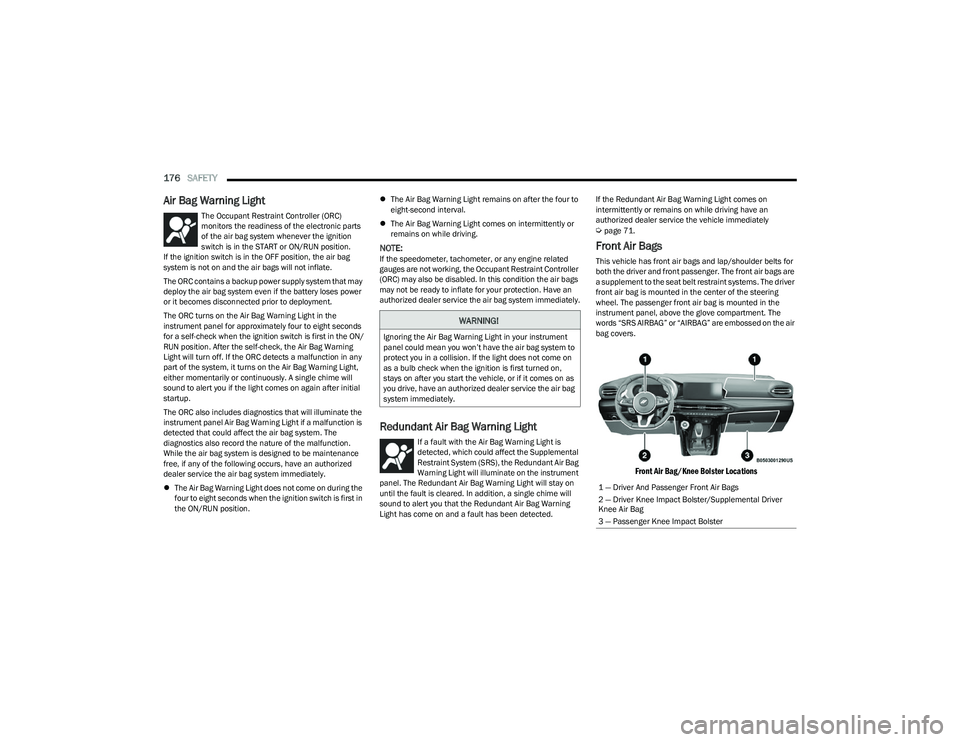
Front Air Bags
This vehicle has front air bags and lap/shoulder belts for
both the driver and front passenger. The front air bags are
a supplement to the seat belt restraint systems. The driver
front air bag is mounted in the center of the steering
wheel. The passenger front air bag is mounted in the
instrument panel, above the glove compartment. The
words “SRS AIRBAG” or “AIRBAG” are embossed on the air
bag covers.
Front Air Bag/Knee Bolster Locations
WARNING!
Ignoring the Air Bag Warning Light in your instrument
panel could mean you won’t have the air bag system to
protect you in a collision. If the light does not come on
as a bulb check when the ignition is first turned on,
stays on after you start the vehicle, or if it comes on as
you drive, have an authorized dealer service the air bag
system immediately.
1 — Driver And Passenger Front Air Bags
2 — Driver Knee Impact Bolster/Supplemental Driver
Knee Air Bag
3 — Passenger Knee Impact Bolster
23_GG_OM_EN_USC_t.book Page 176
Page 179 of 288
SAFETY177
Driver And Passenger Front Air Bag
Features
The Advanced Front Air Bag system has multistage driver
and front passenger air bags. This system provides output
appropriate to the severity and type of collision as
determined by the Occupant Restraint Controller (ORC),
which may receive information from the front impact
sensors (if equipped) or other system components.
The first stage inflator is triggered immediately during an
impact that requires air bag deployment. A low energy
output is used in less severe collisions. A higher energy
output is used for more severe collisions. This vehicle may be equipped with a driver and/or front
passenger seat belt buckle switch that detects whether
the driver or front passenger seat belt is buckled. The seat
belt buckle switch may adjust the inflation rate of the
Advanced Front Air Bags.
This vehicle may be equipped with driver and/or front
passenger seat track position sensors that may adjust the
inflation rate of the Advanced Front Air Bags based upon
seat position.
This vehicle is equipped with a right front passenger
Occupant Classification System (OCS) that is designed to
provide Passenger Advanced Front Air Bag output
appropriate to the occupant’s seated weight input, as
determined by the OCS.
Front Air Bag Operation
Front Air Bags are designed to provide additional
protection by supplementing the seat belts. Front air bags
are not expected to reduce the risk of injury in rear, side,
or rollover collisions. The front air bags will not deploy in all
frontal collisions, including some that may produce
substantial vehicle damage — for example, some pole
collisions, truck underrides, and angle offset collisions.
On the other hand, depending on the type and location of
impact, front air bags may deploy in crashes with little
vehicle front-end damage but that produce a severe initial
deceleration.
Because air bag sensors measure vehicle deceleration
over time, vehicle speed and damage by themselves are
not good indicators of whether or not an air bag should
have deployed.
Seat belts are necessary for your protection in all
collisions, and also are needed to help keep you in
position, away from an inflating air bag.
When the Occupant Restraint Controller (ORC) detects a
collision requiring the front air bags, it signals the inflator
units. A large quantity of non-toxic gas is generated to
inflate the front air bags.
The steering wheel hub trim cover and the upper
passenger side of the instrument panel separate and fold
out of the way as the air bags inflate to their full size. The
front air bags fully inflate in less time than it takes to blink
your eyes. The front air bags then quickly deflate while
helping to restrain the driver and front passenger.WARNING!
Being too close to the steering wheel or instrument
panel during front air bag deployment could cause
serious injury, including death. Air bags need room to
inflate. Sit back, comfortably extending your arms to
reach the steering wheel or instrument panel.
Never place a rear-facing child restraint in front of an
air bag. A deploying passenger front air bag can
cause death or serious injury to a child 12 years or
younger, including a child in a rear-facing child
restraint.
Never install a rear-facing child restraint in the front
seat of a vehicle. Only use a rear-facing child
restraint in the rear seat. If the vehicle does not have
a rear seat, do not transport a rear-facing child
restraint in that vehicle.
WARNING!
No objects should be placed over or near the air bag
on the instrument panel or steering wheel because
any such objects could cause harm if the vehicle is in
a collision severe enough to cause the air bag to
inflate.
Do not put anything on or around the air bag covers
or attempt to open them manually. You may damage
the air bags and you could be injured because the air
bags may no longer be functional. The protective
covers for the air bag cushions are designed to open
only when the air bags are inflating.
Relying on the air bags alone could lead to more
severe injuries in a collision. The air bags work with
your seat belt to restrain you properly. In some colli -
sions, air bags won’t deploy at all. Always wear your
seat belts even though you have air bags.6
23_GG_OM_EN_USC_t.book Page 177
Page 181 of 288
SAFETY179
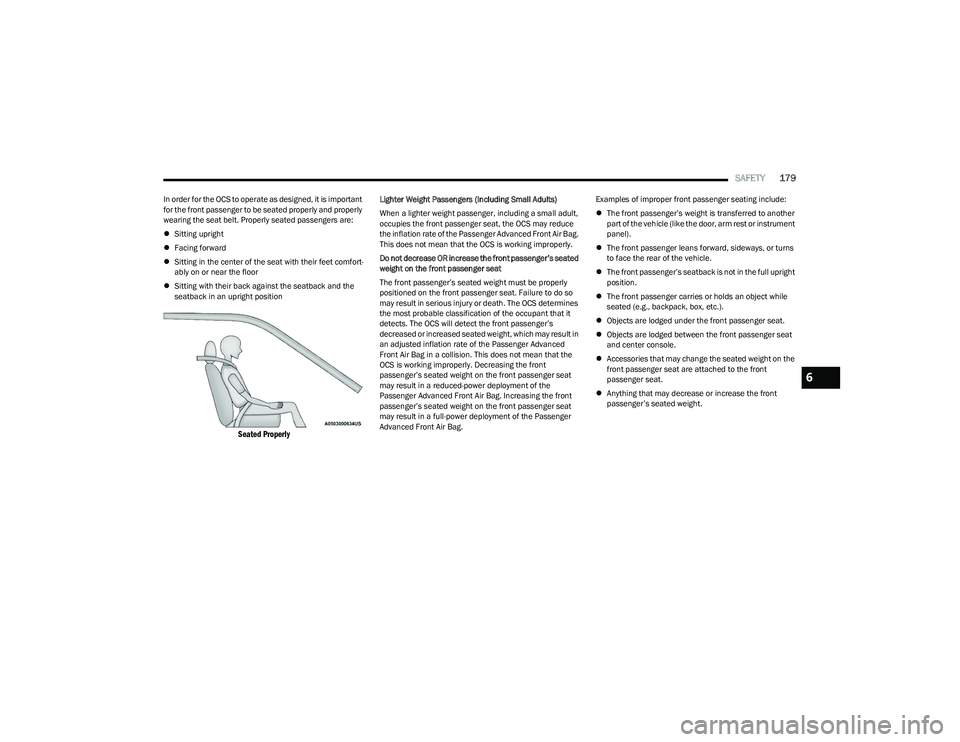
In order for the OCS to operate as designed, it is important
for the front passenger to be seated properly and properly
wearing the seat belt. Properly seated passengers are:
Sitting upright
Facing forward
Sitting in the center of the seat with their feet comfort -
ably on or near the floor
Sitting with their back against the seatback and the
seatback in an upright position
Seated Properly
Lighter Weight Passengers (Including Small Adults)
When a lighter weight passenger, including a small adult,
occupies the front passenger seat, the OCS may reduce
the inflation rate of the Passenger Advanced Front Air Bag.
This does not mean that the OCS is working improperly.
Do not decrease OR increase the front passenger’s seated
weight on the front passenger seat
The front passenger’s seated weight must be properly
positioned on the front passenger seat. Failure to do so
may result in serious injury or death. The OCS determines
the most probable classification of the occupant that it
detects. The OCS will detect the front passenger’s
decreased or increased seated weight, which may result in
an adjusted inflation rate of the Passenger Advanced
Front Air Bag in a collision. This does not mean that the
OCS is working improperly. Decreasing the front
passenger’s seated weight on the front passenger seat
may result in a reduced-power deployment of the
Passenger Advanced Front Air Bag. Increasing the front
passenger’s seated weight on the front passenger seat
may result in a full-power deployment of the Passenger
Advanced Front Air Bag. Examples of improper front passenger seating include:
The front passenger’s weight is transferred to another
part of the vehicle (like the door, arm rest or instrument
panel).
The front passenger leans forward, sideways, or turns
to face the rear of the vehicle.
The front passenger’s seatback is not in the full upright
position.
The front passenger carries or holds an object while
seated (e.g., backpack, box, etc.).
Objects are lodged under the front passenger seat.
Objects are lodged between the front passenger seat
and center console.
Accessories that may change the seated weight on the
front passenger seat are attached to the front
passenger seat.
Anything that may decrease or increase the front
passenger’s seated weight.
6
23_GG_OM_EN_USC_t.book Page 179