steering DODGE HORNET 2023 Repair Manual
[x] Cancel search | Manufacturer: DODGE, Model Year: 2023, Model line: HORNET, Model: DODGE HORNET 2023Pages: 288, PDF Size: 14.2 MB
Page 189 of 288
SAFETY187
(Continued)
Maintaining Your Air Bag System
Event Data Recorder (EDR)
This vehicle is equipped with an event data recorder
(EDR). The main purpose of an EDR is to record, in certain
crash or near crash-like situations, such as an air bag
deployment or hitting a road obstacle, data that will assist
in understanding how a vehicle’s systems performed.
The EDR is designed to record data related to vehicle
dynamics and safety systems for a short period of time,
typically 30 seconds or less. The EDR in this vehicle is
designed to record such data as:
How various systems in your vehicle were operating;
Whether or not the driver and passenger safety belts
were buckled/fastened;
How far (if at all) the driver was depressing the acceler -
ator and/or brake pedal; and,
How fast the vehicle was traveling.
These data can help provide a better understanding of the
circumstances in which crashes and injuries occur.
NOTE:EDR data are recorded by your vehicle only if a non-trivial
crash situation occurs; no data are recorded by the EDR
under normal driving conditions and no personal data
(e.g., name, gender, age, and crash location) are recorded.
However, other parties, such as law enforcement, could
combine the EDR data with the type of personally identi -
fying data routinely acquired during a crash investigation.
To read data recorded by an EDR, special equipment is
required, and access to the vehicle or the EDR is needed.
In addition to the vehicle manufacturer, other parties,
such as law enforcement, that have the special
equipment, can read the information if they have access
to the vehicle or the EDR.
WARNING!
Modifications to any part of the air bag system could
cause it to fail when you need it. You could be injured
if the air bag system is not there to protect you.
Do not modify the components or wiring, including
adding any kind of badges or stickers to the steering
wheel hub trim cover or the upper passenger side of
the instrument panel. Do not modify the front fascia/
bumper, vehicle body structure, or add aftermarket
side steps or running boards.
It is dangerous to try to repair any part of the air bag
system yourself. Be sure to tell anyone who works on
your vehicle that it has an air bag system.
Do not attempt to modify any part of your air bag
system. The air bag may inflate accidentally or may
not function properly if modifications are made. Take
your vehicle to an authorized dealer for any air bag
system service. If your seat, including your trim cover
and cushion, needs to be serviced in any way
(including removal or loosening/tightening of seat
attachment bolts), take the vehicle to an authorized
dealer. Only manufacturer approved seat accesso -
ries may be used. If it is necessary to modify the air
bag system for persons with disabilities, contact an
authorized dealer.
WARNING!
6
23_GG_OM_EN_USC_t.book Page 187
Page 205 of 288
203
IN CASE OF EMERGENCY
HAZARD WARNING FLASHERS
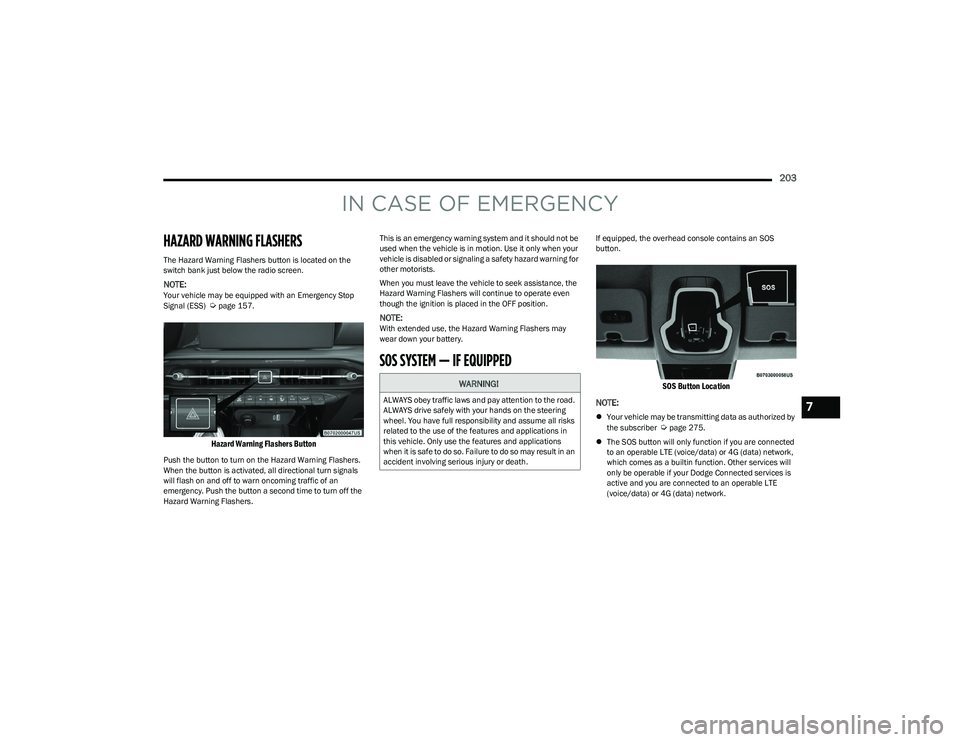
The Hazard Warning Flashers button is located on the
switch bank just below the radio screen.
NOTE:Your vehicle may be equipped with an Emergency Stop
Signal (ESS) Úpage 157.
Hazard Warning Flashers Button
Push the button to turn on the Hazard Warning Flashers.
When the button is activated, all directional turn signals
will flash on and off to warn oncoming traffic of an
emergency. Push the button a second time to turn off the
Hazard Warning Flashers.This is an emergency warning system and it should not be
used when the vehicle is in motion. Use it only when your
vehicle is disabled or signaling a safety hazard warning for
other motorists.
When you must leave the vehicle to seek assistance, the
Hazard Warning Flashers will continue to operate even
though the ignition is placed in the OFF position.
NOTE:With extended use, the Hazard Warning Flashers may
wear down your battery.
SOS SYSTEM — IF EQUIPPED
If equipped, the overhead console contains an SOS
button.
SOS Button Location
NOTE:
Your vehicle may be transmitting data as authorized by
the subscriber Úpage 275.
The SOS button will only function if you are connected
to an operable LTE (voice/data) or 4G (data) network,
which comes as a builtin function. Other services will
only be operable if your Dodge Connected services is
active and you are connected to an operable LTE
(voice/data) or 4G (data) network.
WARNING!
ALWAYS obey traffic laws and pay attention to the road.
ALWAYS drive safely with your hands on the steering
wheel. You have full responsibility and assume all risks
related to the use of the features and applications in
this vehicle. Only use the features and applications
when it is safe to do so. Failure to do so may result in an
accident involving serious injury or death.7
23_GG_OM_EN_USC_t.book Page 203
Page 206 of 288
204IN CASE OF EMERGENCY
SOS Call
1. Press or hold the SOS Call button on the overhead
console.
NOTE:In case the SOS Call button is pushed in error, there will be
a 10 second delay before the SOS Call system initiates a
call to an SOS operator. To cancel the SOS Call
connection, push the SOS call button on the overhead
console or press the cancellation button on the Device
Screen. Termination of the SOS Call will turn off the green
LED light on the overhead console.
2. The LED light located next to the SOS button on the overhead console will turn green once a connection
to a SOS operator has been made.
3. Once a connection between the vehicle and an SOS operator is made, the SOS Call system may transmit
the following important vehicle information to a SOS
operator:
Indication that the occupant placed an SOS Call
The vehicle brand
The last known GPS coordinates of the vehicle
4. You should be able to speak with the SOS operator through the vehicle audio system to determine if
additional assistance is needed.
NOTE:
Your vehicle may be transmitting data as autho -
rized by the subscriber.
Once a connection is made between the vehicle’s
SOS Call system and the SOS operator, the SOS
operator may be able to open a voice connection
with the vehicle to determine if additional assis -
tance is needed. Once the SOS operator opens a
voice connection with the vehicle’s SOS Call
system, the operator should be able to speak with
you or other vehicle occupants and hear sounds
occurring in the vehicle. The vehicle’s SOS Call
system will attempt to remain connected with the
SOS operator until the SOS operator terminates
the connection.
5. The SOS operator may attempt to contact appropriate emergency responders and provide them with
important vehicle information and GPS coordinates.
WARNING!
ALWAYS obey traffic laws and pay attention to the road.
ALWAYS drive safely with your hands on the steering
wheel. You have full responsibility and assume all risks
related to the use of the features and applications in
this vehicle. Only use the features and applications
when it is safe to do so. Failure to do so may result in an
accident involving serious injury or death.
WARNING!
If anyone in the vehicle could be in danger (e.g., fire
or smoke is visible, dangerous road conditions or
location), do not wait for voice contact from an Emer -
gency Services Agent. All occupants should exit the
vehicle immediately and move to a safe location.
Never place anything on or near the vehicle’s oper -
able network and GPS antennas. You could prevent
operable network and GPS signal reception, which
can prevent your vehicle from placing an emergency
call. An operable network and GPS signal reception is
required for the SOS Call system to function properly.
The SOS Call system is embedded into the vehicle’s
electrical system. Do not add aftermarket electrical
equipment to the vehicle’s electrical system. This
may prevent your vehicle from sending a signal to
initiate an emergency call. To avoid interference that
can cause the SOS Call system to fail, never add
aftermarket equipment (e.g., two-way mobile radio,
CB radio, data recorder, etc.) to your vehicle’s elec -
trical system or modify the antennas on your vehicle.
IF YOUR VEHICLE LOSES BATTERY POWER FOR ANY
REASON (INCLUDING DURING OR AFTER AN ACCI -
DENT), THE DODGE CONNECT FEATURES, APPS AND
SERVICES, AMONG OTHERS, WILL NOT OPERATE.
Modifications to any part of the SOS Call system
could cause the air bag system to fail when you need
it. You could be injured if the air bag system is not
there to help protect you.
23_GG_OM_EN_USC_t.book Page 204
Page 207 of 288
IN CASE OF EMERGENCY205
SOS Call System Limitations
Vehicles sold in Mexico DO NOT have SOS Call system
capabilities.
SOS or other emergency line operators in Mexico may not
answer or respond to SOS system calls.
If the SOS Call system detects a malfunction, any of the
following may occur at the time the malfunction is
detected, and at the beginning of each ignition cycle:
The light located next to the SOS button will continu -
ously illuminate red.
The Device Screen will display the following message
“Vehicle device requires service. Please contact an
authorized dealer.”
An In-Vehicle Audio message will state “Vehicle device
requires service. Please contact an authorized dealer.” Even if the SOS Call system is fully functional, factors
beyond FCA US LLC’s control may prevent or stop the
SOS Call system operation. These include, but are not
limited to, the following factors:
The ignition is in the OFF position
The vehicle’s electrical systems are not intact
The SOS Call system software and/or hardware are
damaged during a crash
The vehicle battery loses power or becomes discon -
nected during a vehicle crash
LTE (voice/data) or 4G (data) network and/or Global
Positioning Satellite signals are unavailable or
obstructed
Equipment malfunction at the SOS operator facility
Operator error by the SOS operator
LTE (voice/data) or 4G (data) network congestion
Weather
Buildings, structures, geographic terrain, or tunnels
NOTE:
Your vehicle may be transmitting data as authorized by
the subscriber Úpage 275.
Never place anything on or near the vehicle’s
LTE (voice/data) or 4G (data) and GPS antennas.
You could prevent LTE (voice/data) or 4G (data) and
GPS signal reception, which can prevent your vehicle
from placing an emergency call. An operable LTE
(voice/data) or 4G (data) network connection and a
GPS signal is required for the SOS Call system to
function properly.
Changes or modifications not expressly approved by
the party responsible for compliance could void the
user's authority to operate the equipment.
WARNING!
Ignoring the overhead console light could mean you
will not have SOS Call services. If the overhead
console light is illuminated, have an authorized
dealer service the SOS Call system immediately.
The Occupant Restraint Control module turns on the
air bag Warning Light on the instrument panel if a
malfunction in any part of the system is detected.
If the Air Bag Warning Light is illuminated, have an
authorized dealer service the Occupant Restraint
Control system immediately.
WARNING!
ALWAYS obey traffic laws and pay attention to the road.
ALWAYS drive safely with your hands on the steering
wheel. You have full responsibility and assume all risks
related to the use of the features and applications in
this vehicle. Only use the features and applications
when it is safe to do so. Failure to do so may result in an
accident involving serious injury or death.
7
23_GG_OM_EN_USC_t.book Page 205
Page 216 of 288
214IN CASE OF EMERGENCY
16. Apply the adhesive label from the sealant bottle
where it can be easily seen by the driver as a
reminder that the tire has been treated with a Tire
Inflator Kit, as well as not to exceed the speed
restriction for the treated tire.
CHECKING AND RESTORING TIRE
P
RESSURE
The compressor can also be used to check and, if
necessary, restore the tire pressure.
Proceed as follows:
1. Plug the power cord in the vehicle’s power outlet.
2. Release the quick connector and connect it directly to
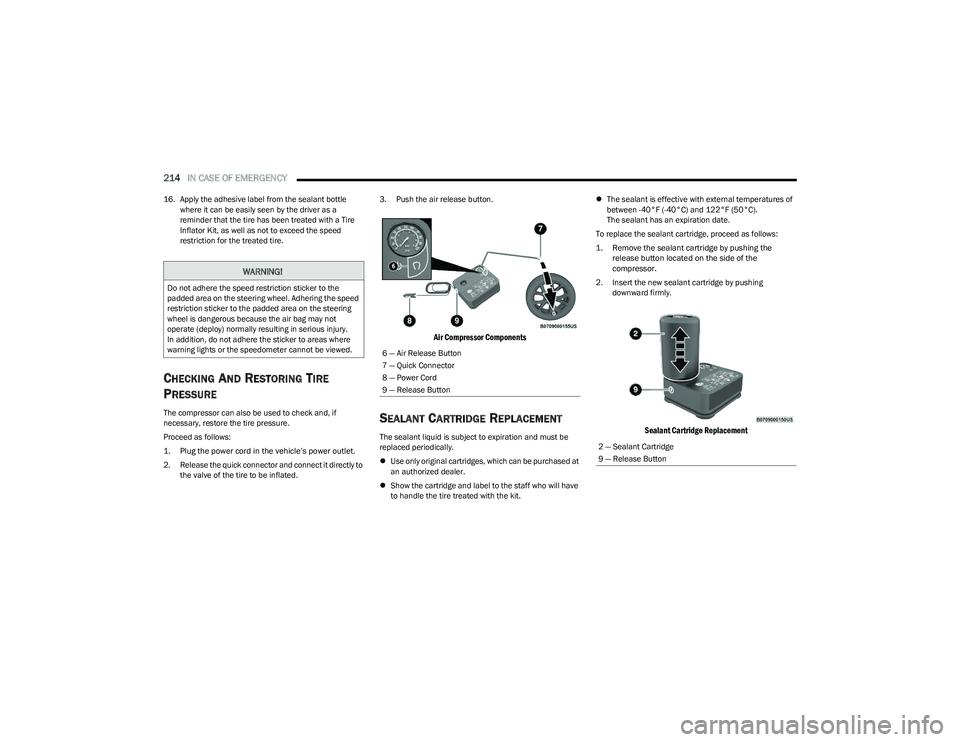
the valve of the tire to be inflated. 3. Push the air release button.
Air Compressor Components
SEALANT CARTRIDGE REPLACEMENT
The sealant liquid is subject to expiration and must be
replaced periodically.
Use only original cartridges, which can be purchased at
an authorized dealer.
Show the cartridge and label to the staff who will have
to handle the tire treated with the kit.
The sealant is effective with external temperatures of
between -40°F (-40°C) and 122°F (50°C).
The sealant has an expiration date.
To replace the sealant cartridge, proceed as follows:
1. Remove the sealant cartridge by pushing the release button located on the side of the
compressor.
2. Insert the new sealant cartridge by pushing downward firmly.
Sealant Cartridge Replacement
WARNING!
Do not adhere the speed restriction sticker to the
padded area on the steering wheel. Adhering the speed
restriction sticker to the padded area on the steering
wheel is dangerous because the air bag may not
operate (deploy) normally resulting in serious injury.
In addition, do not adhere the sticker to areas where
warning lights or the speedometer cannot be viewed.
6 — Air Release Button
7 — Quick Connector
8 — Power Cord
9 — Release Button
2 — Sealant Cartridge
9 — Release Button
23_GG_OM_EN_USC_t.book Page 214
Page 221 of 288
IN CASE OF EMERGENCY219
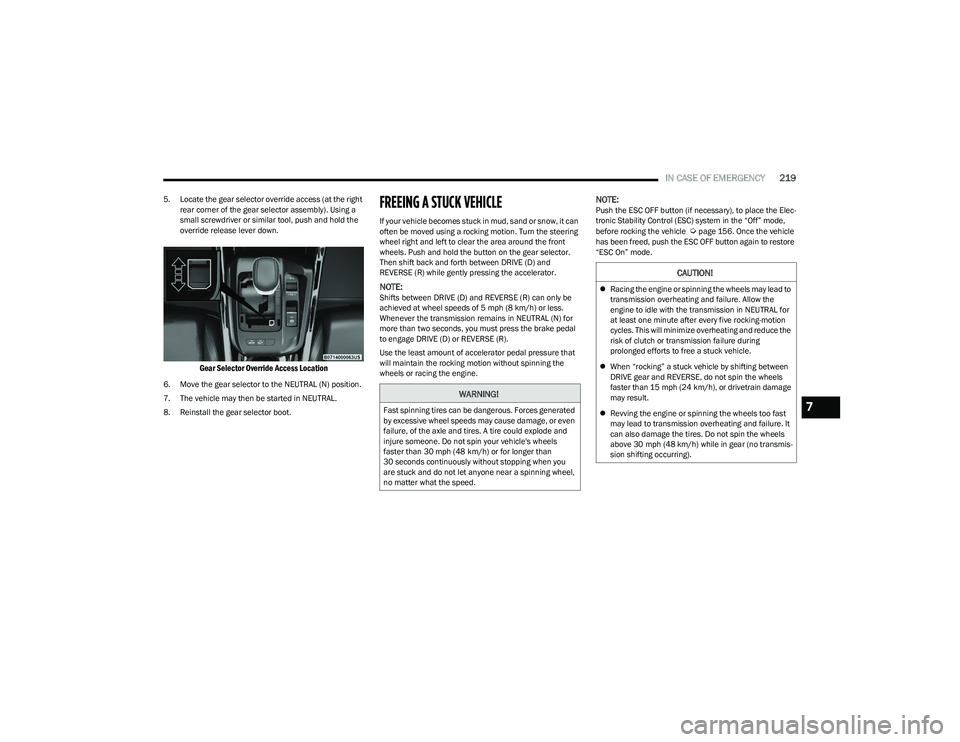
5. Locate the gear selector override access (at the right
rear corner of the gear selector assembly). Using a
small screwdriver or similar tool, push and hold the
override release lever down.
Gear Selector Override Access Location
6. Move the gear selector to the NEUTRAL (N) position.
7. The vehicle may then be started in NEUTRAL.
8. Reinstall the gear selector boot.
FREEING A STUCK VEHICLE
If your vehicle becomes stuck in mud, sand or snow, it can
often be moved using a rocking motion. Turn the steering
wheel right and left to clear the area around the front
wheels. Push and hold the button on the gear selector.
Then shift back and forth between DRIVE (D) and
REVERSE (R) while gently pressing the accelerator.
NOTE:Shifts between DRIVE (D) and REVERSE (R) can only be
achieved at wheel speeds of 5 mph (8 km/h) or less.
Whenever the transmission remains in NEUTRAL (N) for
more than two seconds, you must press the brake pedal
to engage DRIVE (D) or REVERSE (R).
Use the least amount of accelerator pedal pressure that
will maintain the rocking motion without spinning the
wheels or racing the engine.
NOTE:Push the ESC OFF button (if necessary), to place the Elec -
tronic Stability Control (ESC) system in the “Off” mode,
before rocking the vehicle
Úpage 156. Once the vehicle
has been freed, push the ESC OFF button again to restore
“ESC On” mode.
WARNING!
Fast spinning tires can be dangerous. Forces generated
by excessive wheel speeds may cause damage, or even
failure, of the axle and tires. A tire could explode and
injure someone. Do not spin your vehicle's wheels
faster than 30 mph (48 km/h) or for longer than
30 seconds continuously without stopping when you
are stuck and do not let anyone near a spinning wheel,
no matter what the speed.
CAUTION!
Racing the engine or spinning the wheels may lead to
transmission overheating and failure. Allow the
engine to idle with the transmission in NEUTRAL for
at least one minute after every five rocking-motion
cycles. This will minimize overheating and reduce the
risk of clutch or transmission failure during
prolonged efforts to free a stuck vehicle.
When “rocking” a stuck vehicle by shifting between
DRIVE gear and REVERSE, do not spin the wheels
faster than 15 mph (24 km/h), or drivetrain damage
may result.
Revving the engine or spinning the wheels too fast
may lead to transmission overheating and failure. It
can also damage the tires. Do not spin the wheels
above 30 mph (48 km/h) while in gear (no transmis -
sion shifting occurring).
7
23_GG_OM_EN_USC_t.book Page 219
Page 239 of 288
SERVICING AND MAINTENANCE237
Fluid And Filter Changes
Under normal operating conditions, the fluid installed at
the factory will provide satisfactory lubrication for the life
of the vehicle.
Routine fluid and filter changes are not required. However,
change the fluid and filter if the fluid becomes
contaminated (with water, etc.), or if the transmission is
disassembled for any reason.
Selection Of Lubricant
It is important to use the proper transmission fluid to
ensure optimum transmission performance and life.
Use only the manufacturer specified transmission fluid
Úpage 269. It is important to maintain the transmission
fluid at the correct level using the recommended fluid.
NOTE:No chemical flushes should be used in any transmission;
only the approved lubricant should be used.
FUSES
General Information
The fuses protect electrical systems against excessive
current.
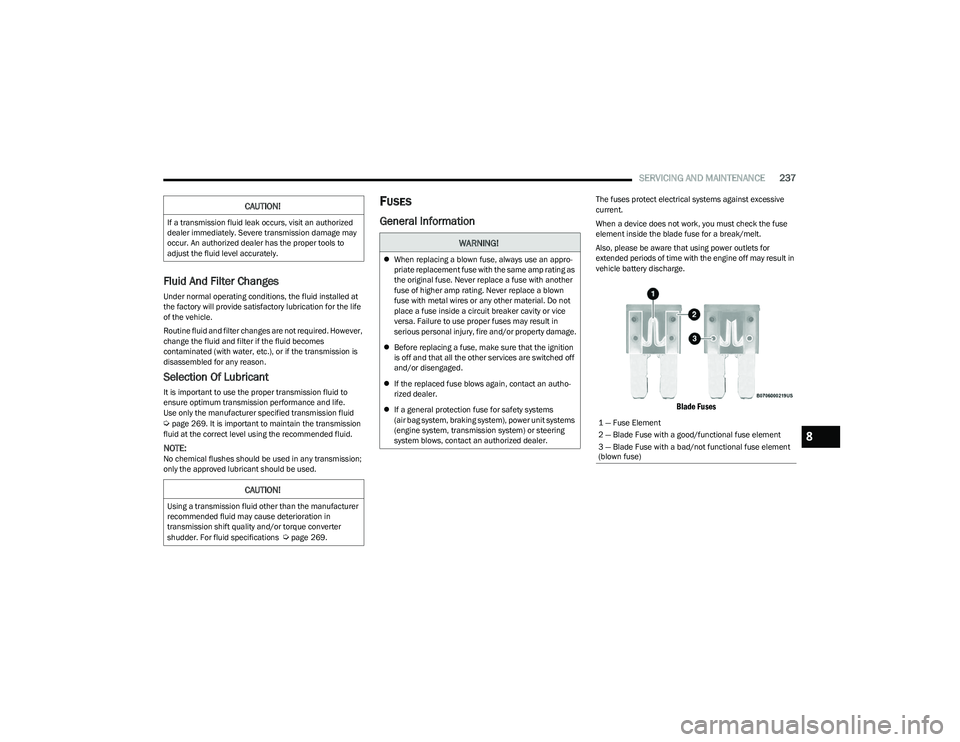
When a device does not work, you must check the fuse
element inside the blade fuse for a break/melt.
Also, please be aware that using power outlets for
extended periods of time with the engine off may result in
vehicle battery discharge.
Blade Fuses
CAUTION!
If a transmission fluid leak occurs, visit an authorized
dealer immediately. Severe transmission damage may
occur. An authorized dealer has the proper tools to
adjust the fluid level accurately.
CAUTION!
Using a transmission fluid other than the manufacturer
recommended fluid may cause deterioration in
transmission shift quality and/or torque converter
shudder. For fluid specifications
Úpage 269.
WARNING!
When replacing a blown fuse, always use an appro -
priate replacement fuse with the same amp rating as
the original fuse. Never replace a fuse with another
fuse of higher amp rating. Never replace a blown
fuse with metal wires or any other material. Do not
place a fuse inside a circuit breaker cavity or vice
versa. Failure to use proper fuses may result in
serious personal injury, fire and/or property damage.
Before replacing a fuse, make sure that the ignition
is off and that all the other services are switched off
and/or disengaged.
If the replaced fuse blows again, contact an autho -
rized dealer.
If a general protection fuse for safety systems
(air bag system, braking system), power unit systems
(engine system, transmission system) or steering
system blows, contact an authorized dealer.
1 — Fuse Element
2 — Blade Fuse with a good/functional fuse element
3 — Blade Fuse with a bad/not functional fuse element
(blown fuse)
8
23_GG_OM_EN_USC_t.book Page 237
Page 244 of 288
242SERVICING AND MAINTENANCE
Interior Fuses
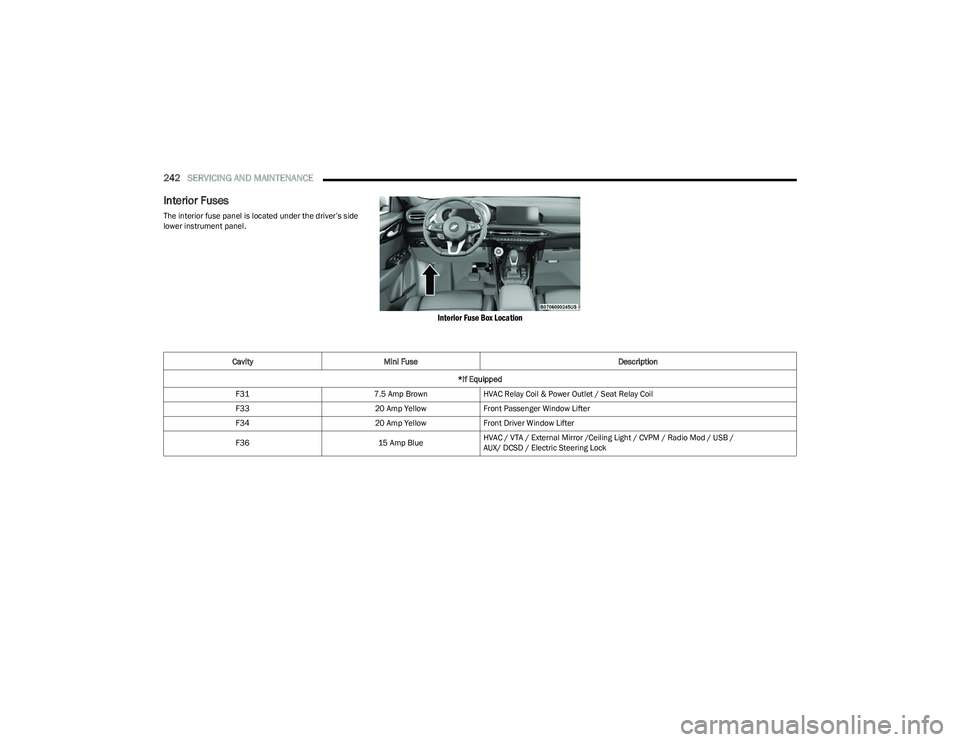
The interior fuse panel is located under the driver’s side
lower instrument panel.
Interior Fuse Box Location
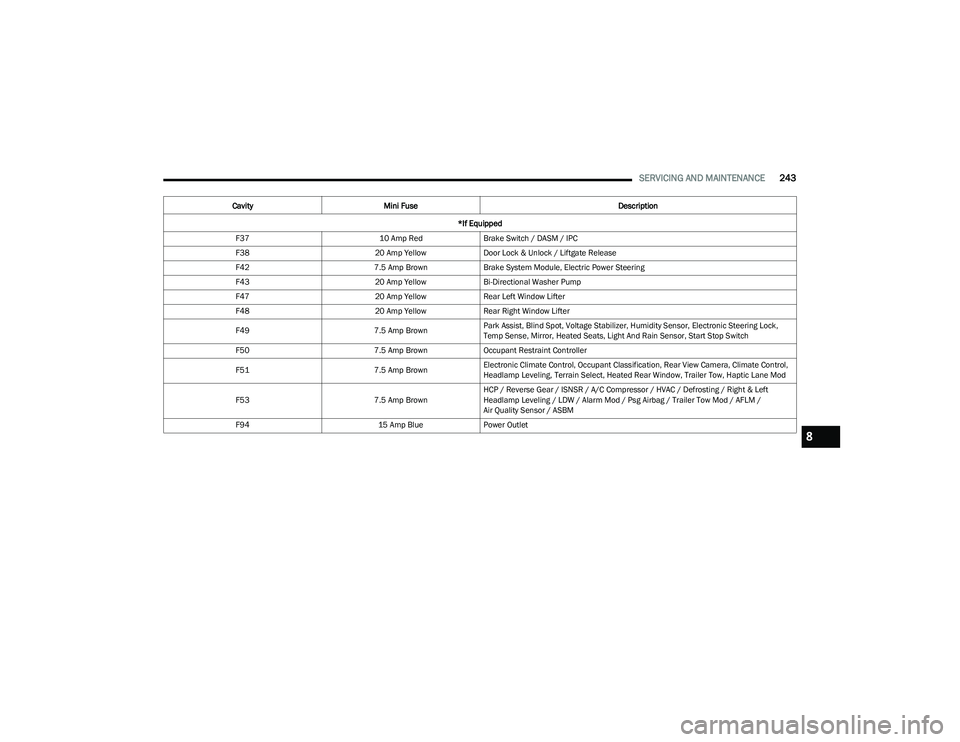
Cavity Mini Fuse Description
*If Equipped
F31 7.5 Amp BrownHVAC Relay Coil & Power Outlet / Seat Relay Coil
F33 20 Amp YellowFront Passenger Window Lifter
F34 20 Amp YellowFront Driver Window Lifter
F36 15 Amp BlueHVAC / VTA / External Mirror /Ceiling Light / CVPM / Radio Mod / USB /
AUX/ DCSD / Electric Steering Lock
23_GG_OM_EN_USC_t.book Page 242
Page 245 of 288
SERVICING AND MAINTENANCE243
F37 10 Amp RedBrake Switch / DASM / IPC
F38 20 Amp YellowDoor Lock & Unlock / Liftgate Release
F42 7.5 Amp BrownBrake System Module, Electric Power Steering
F43 20 Amp YellowBi-Directional Washer Pump
F47 20 Amp YellowRear Left Window Lifter
F48 20 Amp YellowRear Right Window Lifter
F49 7.5 Amp BrownPark Assist, Blind Spot, Voltage Stabilizer, Humidity Sensor, Electronic Steering Lock,
Temp Sense, Mirror, Heated Seats, Light And Rain Sensor, Start Stop Switch
F50 7.5 Amp BrownOccupant Restraint Controller
F51 7.5 Amp BrownElectronic Climate Control, Occupant Classification, Rear View Camera, Climate Control,
Headlamp Leveling, Terrain Select, Heated Rear Window, Trailer Tow, Haptic Lane Mod
F53 7.5 Amp BrownHCP / Reverse Gear / ISNSR / A/C Compressor / HVAC / Defrosting / Right & Left
Headlamp Leveling / LDW / Alarm Mod / Psg Airbag / Trailer Tow Mod / AFLM /
Air Quality Sensor / ASBM
F94 15 Amp BluePower Outlet
Cavity
Mini Fuse Description
*If Equipped
8
23_GG_OM_EN_USC_t.book Page 243
Page 256 of 288
254SERVICING AND MAINTENANCE
(Continued)
TIRES — GENERAL INFORMATION
Tire Pressure
Proper tire inflation pressure is essential to the safe and
satisfactory operation of your vehicle. Four primary areas
are affected by improper tire pressure:
Safety
Fuel Economy
Tread Wear
Ride Comfort and Vehicle Stability
Safety Both underinflation and overinflation affect the stability of
the vehicle and can produce a feeling of sluggish response
or over responsiveness in the steering.
NOTE:
Unequal tire pressures from side to side may cause
erratic and unpredictable steering response.
Unequal tire pressure from side to side may cause the
vehicle to drift left or right.
Fuel Economy
Underinflated tires will increase tire rolling resistance
resulting in higher fuel consumption.
Tread Wear
Improper cold tire inflation pressures can cause abnormal
wear patterns and reduced tread life, resulting in the need
for earlier tire replacement.
Ride Comfort And Vehicle Stability
Proper tire inflation contributes to a comfortable ride.
Overinflation produces a jarring and uncomfortable ride.
Tire Inflation Pressures
The proper cold tire inflation pressure is listed on the
driver's side B-pillar or rear edge of the driver's side door.
At least once a month:
Check and adjust tire pressure with a good quality
pocket-type pressure gauge. Do not make a visual judg -
ment when determining proper inflation. Tires may look
properly inflated even when they are underinflated.
Inspect tires for signs of tire wear or visible damage.
Inflation pressures specified on the placard are always
“cold tire inflation pressure”. Cold tire inflation pressure is
defined as the tire pressure after the vehicle has not been
driven for at least three hours, or driven less than 1 mile
(1.6 km) after sitting for a minimum of three hours. The
cold tire inflation pressure must not exceed the maximum
inflation pressure molded into the tire sidewall.
Check tire pressures more often if subject to a wide range
of outdoor temperatures, as tire pressures vary with
temperature changes.
Tire pressures change by approximately 1 psi (7 kPa) per
12°F (7°C) of air temperature change. Keep this in mind
when checking tire pressure inside a garage, especially in
the Winter.
WARNING!
Improperly inflated tires are dangerous and can
cause collisions.
Underinflation increases tire flexing and can result in
overheating and tire failure.
Overinflation reduces a tire's ability to cushion shock.
Objects on the road and chuckholes can cause
damage that result in tire failure.
Overinflated or underinflated tires can affect vehicle
handling and can fail suddenly, resulting in loss of
vehicle control.
Unequal tire pressures can cause steering problems.
You could lose control of your vehicle.
Unequal tire pressures from one side of the vehicle
to the other can cause the vehicle to drift to the
right or left.
Always drive with each tire inflated to the recom -
mended cold tire inflation pressure.
WARNING!
CAUTION!
After inspecting or adjusting the tire pressure, always
reinstall the valve stem cap. This will prevent moisture
and dirt from entering the valve stem, which could
damage the valve stem.
23_GG_OM_EN_USC_t.book Page 254