ESP DODGE JOURNEY 2013 1.G Owner's Manual
[x] Cancel search | Manufacturer: DODGE, Model Year: 2013, Model line: JOURNEY, Model: DODGE JOURNEY 2013 1.GPages: 630
Page 186 of 630
Natural Speech
Natural speech allows the user to speak commands in
phrases or complete sentences. The system filters out
certain non-word utterances and sounds such as “ah” and
“eh”. The system handles fill-in words such as “I would
like to”.
The system handles multiple inputs in the same phrase
or sentence such as “make a phone call” and “to Kelly
Smith”. For multiple inputs in the same phrase or sen-
tence, the system identifies the topic or context and
provides the associated follow-up prompt such as “Who
do you want to call?” in the case where a phone call was
requested but the specific name was not recognized.The system utilizes continuous dialog; when the system
requires more information from the user it will ask a
question to which the user can respond without pressing
the Uconnect® Voice Command
button.
Uconnect® Voice Commands
The Uconnect® Voice Command system understands
two types of commands. Universal commands are avail-
able at all times. Local commands are available if the
supported radio mode is active.
Start a dialogue by pressing the Uconnect® Voice Com-
mand
button.
184 UNDERSTANDING THE FEATURES OF YOUR VEHICLE
Page 191 of 630
NOTE:
1. You can replace the album, artist, song, genre, playlist,
podcast and audio book names with any correspond-
ing names on the current device that is playing.
2. You can replace “8” with any track on the CD that is
currently playing. Command is only available when
CD is playing.3. Playlist, Podcast and audio book commands are only
available when the iPod is connected and playing.
4.
VR commands, Albums, Artists, and Genre names are
based on the music metadata contained on the loaded/
connected device.
NOTE:Available Voice Commands are shown in bold
face and shaded grey.3
UNDERSTANDING THE FEATURES OF YOUR VEHICLE 189
Page 201 of 630
WARNING!
•Persons who are unable to feel pain to the skin
because of advanced age, chronic illness, diabetes,
spinal cord injury, medication, alcohol use, exhaus-
tion or other physical condition must exercise care
when using the seat heater. It may cause burns
even at low temperatures, especially if used for
long periods of time.
•Do not place anything on the seat or seatback that
insulates against heat, such as a blanket or cushion.
This may cause the seat heater to overheat. Sitting
in a seat that has been overheated could cause
serious burns due to the increased surface tempera-
ture of the seat.
For Vehicles Equipped With Uconnect® 4.3:
Touch the CLIMATE hard-key (located on the left side of the
Uconnect® display) to enter the climate control screen.
Touch the “Driver” or “Pass” seat soft-key (lo-
cated on the Uconnect® display) once to select
HI-level heating. Touch the soft-key a second time
to select LO-level heating. Touch the soft-key a
third time to shut the heating elements OFF.
When the HI-level setting is selected, the heater will
provide a boosted heat level during the first four minutes
of operation. Then, the heat output will drop to the
normal HI-level. If the HI-level setting is selected,
the system will automatically switch to LO-level after
approximately 60 minutes of continuous operation. At
that time, the display will change from HI to LO,
indicating the change. The LO-level setting will turn OFF
automatically after approximately 45 minutes.
3
UNDERSTANDING THE FEATURES OF YOUR VEHICLE 199
Page 235 of 630
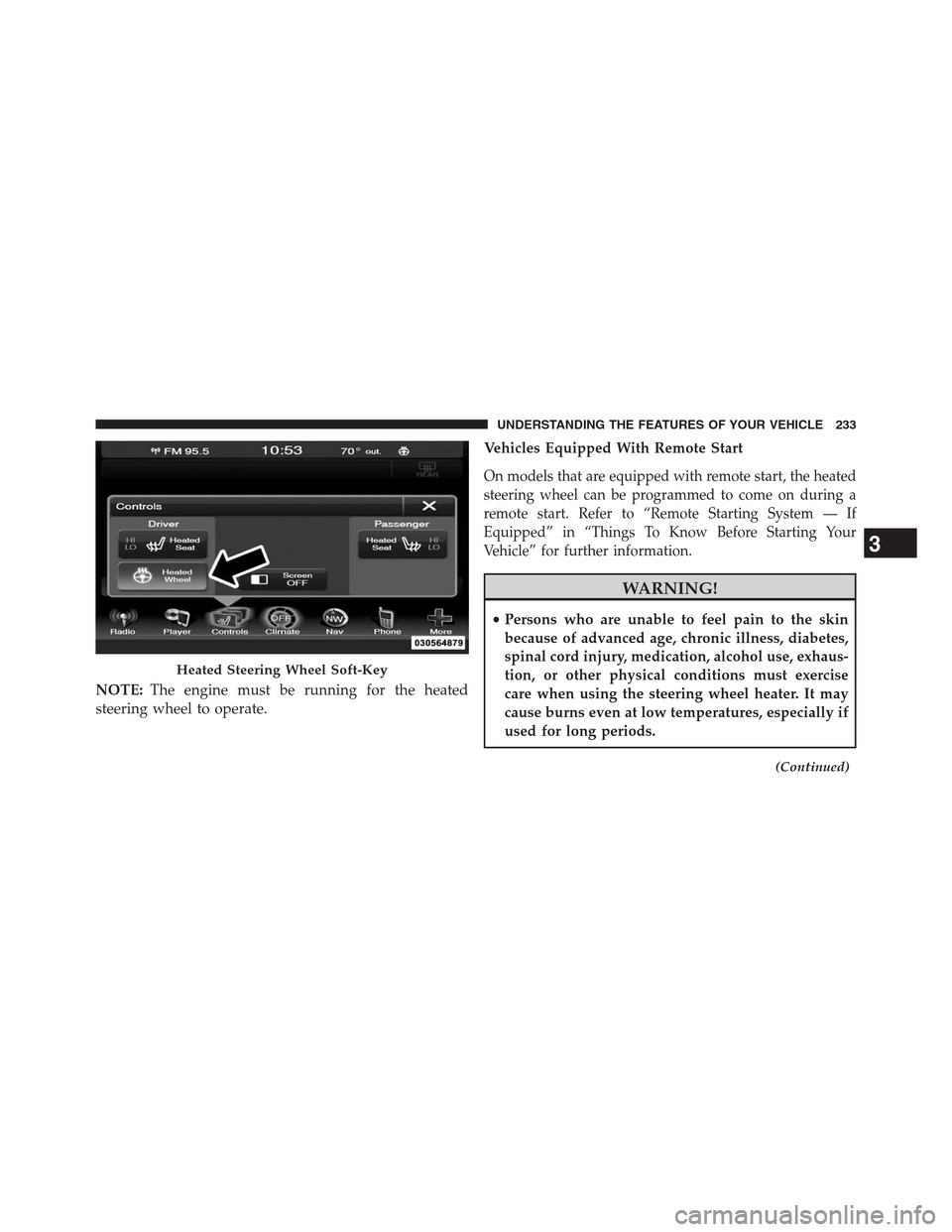
NOTE:The engine must be running for the heated
steering wheel to operate.Vehicles Equipped With Remote Start
On models that are equipped with remote start, the heated
steering wheel can be programmed to come on during a
remote start. Refer to “Remote Starting System — If
Equipped” in “Things To Know Before Starting Your
Vehicle” for further information.
WARNING!
•Persons who are unable to feel pain to the skin
because of advanced age, chronic illness, diabetes,
spinal cord injury, medication, alcohol use, exhaus-
tion, or other physical conditions must exercise
care when using the steering wheel heater. It may
cause burns even at low temperatures, especially if
used for long periods.
(Continued)
Heated Steering Wheel Soft-Key
3
UNDERSTANDING THE FEATURES OF YOUR VEHICLE 233
Page 246 of 630
CAUTION!
•ParkSense® is only a parking aid and it is unable to
recognize every obstacle, including small obstacles.
Parking curbs might be temporarily detected or not
detected at all. Obstacles located above or below the
sensors will not be detected when they are in close
proximity.
•The vehicle must be driven slowly when using
ParkSense® in order to be able to stop in time when an
obstacle is detected. It is recommended that the driver
looks over his/her shoulder when using ParkSense®.
WARNING!
•Drivers must be careful when backing up even when
using ParkSense®. Always check carefully behind
your vehicle, look behind you, and be sure to check
(Continued)
WARNING!(Continued)
for pedestrians, animals, other vehicles, obstructions,
and blind spots before backing up. You are respon-
sible for safety and must continue to pay attention to
your surroundings. Failure to do so can result in
serious injury or death.
•Before using ParkSense®, it is strongly recom-
mended that the ball mount and hitch ball assem-
bly is disconnected from the vehicle when the
vehicle is not used for towing. Failure to do so can
result in injury or damage to vehicles or obstacles
because the hitch ball will be much closer to the
obstacle than the rear fascia when the loudspeaker
sounds the continuous tone. Also, the sensors
could detect the ball mount and hitch ball assem-
bly, depending on its size and shape, giving a false
indication that an obstacle is behind the vehicle.
244 UNDERSTANDING THE FEATURES OF YOUR VEHICLE
Page 248 of 630
WARNING!
Drivers must be careful when backing up even when
using the ParkView® Rear Back Up Camera. Always
check carefully behind your vehicle, and be sure to
check for pedestrians, animals, other vehicles, ob-
structions, or blind spots before backing up. You are
responsible for the safety of your surroundings and
must continue to pay attention while backing up.
Failure to do so can result in serious injury or death.
CAUTION!
•To avoid vehicle damage, ParkView® should only
be used as a parking aid. The ParkView® camera is
unable to view every obstacle or object in your
drive path.
•To avoid vehicle damage, the vehicle must be
driven slowly when using ParkView® to be able to
stop in time when an obstacle is seen. It is recom-
mended that the driver look frequently over his/her
shoulder when using ParkView®.
NOTE:If snow, ice, mud, or any foreign substance builds
up on the camera lens, clean the lens, rinse with water,
and dry with a soft cloth. Do not cover the lens.
246 UNDERSTANDING THE FEATURES OF YOUR VEHICLE
Page 260 of 630
WARNING!
•Your motorized door or gate will open and close
while you are programming the universal trans-
ceiver. Do not program the transceiver if people,
pets or other objects are in the path of the door or
gate. Only use this transceiver with a garage door
opener that has a “stop and reverse” feature as
required by Federal safety standards. This includes
most garage door opener models manufactured
after 1982. Do not use a garage door opener without
these safety features. Call toll-free 1–800–355–3515
or, on the Internet at www.HomeLink.com for
safety information or assistance.
•Vehicle exhaust contains carbon monoxide, a dan-
gerous gas. Do not run your vehicle in the garage
while programming the transceiver. Exhaust gas
can cause serious injury or death.
General Information
This device complies with FCC rules Part 15 and Industry
Canada RSS-210. Operation is subject to the following
two conditions:
1. This device may not cause harmful interference.
2. This device must accept any interference that may be
received including interference that may cause unde-
sired operation.
NOTE:
•
The transmitter has been tested and it complies with FCC
and IC rules. Changes or modifications not expressly
approved by the party responsible for compliance could
void the user ’s authority to operate the device.
•The term IC before the certification/registration num-
ber only signifies that Industry Canada technical speci-
fications were met.
258 UNDERSTANDING THE FEATURES OF YOUR VEHICLE
Page 289 of 630
cross rail ends should always be used to tie down the
load. Check the straps frequently to be sure that the
load remains securely attached.
CAUTION!
•Cross rails should remain equally spaced or paral-
lel at any luggage rack position for proper function.
Noncompliance could result in damage to the roof
rack, cargo, and vehicle.
•To avoid damage to the roof rack and vehicle, do
not exceed the maximum roof rack load capacity of
150 lbs (68 kg). Always distribute loads as evenly as
possible and secure the load appropriately.
•Long loads, which extend over the windshield,
such as wood panels or surfboards, or loads with
large frontal area should be secured to both the
front and rear of the vehicle.
(Continued)
CAUTION!(Continued)
•Place a blanket or other protection between the
surface of the roof and the load.
•Travel at reduced speeds and turn corners carefully
when carrying large or heavy loads on the roof
rack. Wind forces, due to natural causes or nearby
truck traffic, can add sudden upward lift to loads.
This is especially true on large flat loads and may
result in damage to the cargo or your vehicle.
WARNING!
Cargo must be securely tied before driving your
vehicle. Improperly secured loads can fly off the
vehicle, particularly at high speeds, resulting in per-
sonal injury or property damage. Follow the roof rack
cautions when carrying cargo on your roof rack.
3
UNDERSTANDING THE FEATURES OF YOUR VEHICLE 287
Page 299 of 630
Electronic Vehicle Information Center (EVIC) Display
The Electronic Vehicle Information Center (EVIC) features
a driver-interactive display that is located in the instrument
cluster. For further information, refer to “Electronic Vehicle
Information Center (EVIC)”.
9. Park/Headlight ON Indicator — If Equipped
This indicator will illuminate when the park
lights or headlights are turned on.
10. Tire Pressure Monitoring Telltale Light —
If Equipped
Each tire, including the spare (if provided),
should be checked monthly when cold and in-
flated to the inflation pressure recommended by
the vehicle manufacturer on the vehicle placard
or tire inflation pressure label. (If your vehicle has tires of
a different size than the size indicated on the vehicleplacard or tire inflation pressure label, you should deter-
mine the proper tire inflation pressure for those tires.)
As an added safety feature, your vehicle has been
equipped with a Tire Pressure Monitoring System (TPMS)
that illuminates a low tire pressure telltale when one or
more of your tires is significantly under-inflated. Accord-
ingly, when the low tire pressure telltale illuminates, you
should stop and check your tires as soon as possible, and
inflate them to the proper pressure. Driving on a signifi-
cantly under-inflated tire causes the tire to overheat and
can lead to tire failure. Under-inflation also reduces fuel
efficiency and tire tread life, and may affect the vehicle’s
handling and stopping ability.Please note that the TPMS is not a substitute for proper
tire maintenance, and it is the driver ’s responsibility to
maintain correct tire pressure, even if under-inflation has
not reached the level to trigger illumination of the TPMS
low tire pressure telltale.
4
UNDERSTANDING YOUR INSTRUMENT PANEL 297
Page 321 of 630
•Language
Touch the Language soft-key to change this display.
When in this display, you may select one of three
languages for all display nomenclature, including the trip
functions and the navigation system (if equipped). Touch
the English, French (Français) or Spanish (Español) soft-
key to select the language preferred. Then touch the
arrow back soft-key. As you continue, the information
will display in the selected language.
•Units
Touch the Units soft-key to change this display. When in
this display, you may switch the EVIC, odometer, and
navigation system (if equipped) between US and Metric
units of measure. Touch US or Metric then touch the
arrow back soft-key. As you continue, the information
will display in the selected units of measure.•Voice Response
Touch the Voice Response soft-key to change the Voice
Response Length settings. To change the Voice Response
Length, press and release the Brief or Long soft-key. Then
touch the arrow back soft-key.
•Touch Screen Beep
Touch the Touch Screen Beep soft-key to turn on or shut
off the sound heard when a touch screen button (soft-
key) is pressed. To change the Touch Screen Beep setting
press and release the ON or OFF soft-key, then touch the
arrow back soft-key.
4
UNDERSTANDING YOUR INSTRUMENT PANEL 319