light DODGE JOURNEY 2015 1.G Owners Manual
[x] Cancel search | Manufacturer: DODGE, Model Year: 2015, Model line: JOURNEY, Model: DODGE JOURNEY 2015 1.GPages: 648
Page 357 of 648
is selected and the disc is stopped, push the SETUP
button to access the DVD Setup menu. (see the DVD
Setup Menu of this manual.)
16. BACK – When navigating in menu mode, push to
return to the previous screen. When navigating a
DVDs disc menu, the operation depends on the disc’s
contents.
17.##– In radio modes, push to seek to the previous
tunable station. In disc modes, push and hold to fast
rewind through the current audio track or video
chapter. In menu modes use to navigate in the menu.
18. ENTER – Push to select the highlighted option in a
menu.
19.$/ NEXT – In radio modes, push to select to the next
station. In disc modes, push to advance to the next
audio track or video chapter. In menu modes, use to
navigate in the menu.
4
UNDERSTANDING YOUR INSTRUMENT PANEL 355
Page 365 of 648
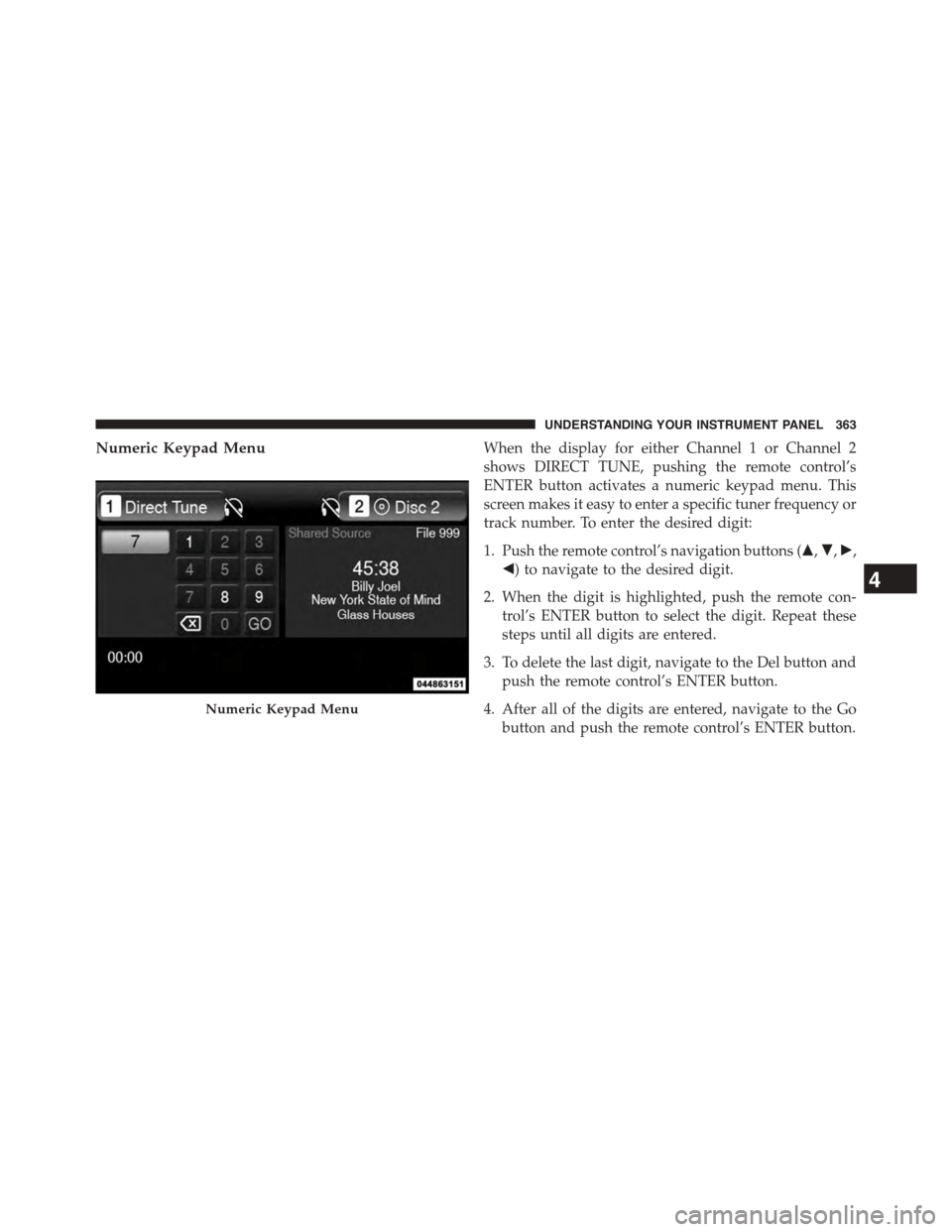
Numeric Keypad MenuWhen the display for either Channel 1 or Channel 2
shows DIRECT TUNE, pushing the remote control’s
ENTER button activates a numeric keypad menu. This
screen makes it easy to enter a specific tuner frequency or
track number. To enter the desired digit:
1. Push the remote control’s navigation buttons ($,",!,
#) to navigate to the desired digit.
2. When the digit is highlighted, push the remote con-
trol’s ENTER button to select the digit. Repeat these
steps until all digits are entered.
3. To delete the last digit, navigate to the Del button and
push the remote control’s ENTER button.
4. After all of the digits are entered, navigate to the Go
button and push the remote control’s ENTER button.
Numeric Keypad Menu
4
UNDERSTANDING YOUR INSTRUMENT PANEL 363
Page 374 of 648
CD/DVD DISC MAINTENANCE
To keep a CD/DVD in good condition, take the following
precautions:
1. Handle the disc by its edge; avoid touching the
surface.
2. If the disc is stained, clean the surface with a soft cloth,
wiping from center to edge.
3. Do not apply paper or tape to the disc; avoid scratch-
ing the disc.
4. Do not use solvents such as benzene, thinner, cleaners,
or anti-static sprays.
5. Store the disc in its case after playing.
6. Do not expose the disc to direct sunlight.
7. Do not store the disc where temperatures may become
too high.
NOTE:If you experience difficulty in playing a particular
disc, it may be damaged (e.g., scratched, reflective coat-
ing removed, a hair, moisture or dew on the disc)
oversized, or have protection encoding. Try a known
good disc before considering disc player service.
RADIO OPERATION AND MOBILE PHONES
Under certain conditions, the mobile phone being on in
your vehicle can cause erratic or noisy performance from
your radio. This condition may be lessened or eliminated
by relocating the mobile phone antenna. This condition is
not harmful to the radio. If your radio performance does
not satisfactorily “clear” by the repositioning of the
antenna, it is recommended that the radio volume be
turned down or off during mobile phone operation when
not using Uconnect® (if equipped).
372 UNDERSTANDING YOUR INSTRUMENT PANEL
Page 380 of 648
Button On The Touchscreen
Use the small blower icon to reduce the blower setting
and the large blower icon to increase the blower setting.
Blower can also be selected by pressing the blower bar
area between the icons.
11. Modes
The airflow distribution mode can be adjusted so air
comes from the instrument panel outlets, floor outlets,
and demist outlets. The Mode settings are as follows:
•Panel Mode
Air comes from the outlets in the instrument
panel. Each of these outlets can be individu-
ally adjusted to direct the flow of air. The air
vanes of the center outlets and outboard outlets can
be moved up and down or side to side to regulate
airflow direction. There is a shut off wheel located
below the air vanes to shut off or adjust the amount
of airflow from these outlets.
•Bi-Level Mode
Air comes from the instrument panel outlets
and floor outlets. A slight amount of air is
directed through the defrost and side window
demister outlets.
NOTE:BI-LEVEL mode is designed under comfort con-
ditions to provide cooler air out of the panel outlets and
warmer air from the floor outlets.
•Floor Mode
Air comes from the floor outlets. A slight
amount of air is directed through the defrost
and side window demister outlets.
•Mix Mode
Air comes from the floor, defrost and side
window demist outlets. This mode works best
in cold or snowy conditions.
378 UNDERSTANDING YOUR INSTRUMENT PANEL
Page 393 of 648
Blower Control Knob On The Faceplate
The blower speed increases as you turn the blower
control knob clockwise from the lowest blower setting.
The blower speed decreases as you turn the blower
control knob counterclockwise.
Buttons On The Touchscreen
Use the small blower icon to reduce the blower setting
and the large blower icon to increase the blower setting.
Blower can also be selected by pressing the blower bar
area between the icons.
12. Modes
The airflow distribution mode can be adjusted so air
comes from the instrument panel outlets, floor outlets
and demist outlets. The Mode settings are as follows:
•Panel Mode
Air comes from the outlets in the instrument
panel. Each of these outlets can be individu-
ally adjusted to direct the flow of air. The air
vanes of the center outlets and outboard outlets can
be moved up and down or side to side to regulate
airflow direction. There is a shut off wheel located
below the air vanes to shut off or adjust the amount
of airflow from these outlets.
•Bi-Level Mode
Air comes from the instrument panel outlets
and floor outlets. A slight amount of air is
directed through the defrost and side window
demister outlets.
NOTE:BI-LEVEL mode is designed under comfort con-
ditions to provide cooler air out of the panel outlets and
warmer air from the floor outlets.
4
UNDERSTANDING YOUR INSTRUMENT PANEL 391
Page 394 of 648
•Floor Mode
Air comes from the floor outlets. A slight
amount of air is directed through the defrost
and side window demister outlets.
•Mix Mode
Air comes from the floor, defrost and side
window demist outlets. This mode works best
in cold or snowy conditions.
13. Climate Control OFF Button
Press and release this button to turn the Climate Control
ON/OFF.
14. Driver Temperature Control Down Button
(Uconnect® 8.4)
Provides the driver with independent temperature con-
trol. Push the button for cooler temperature settings.
NOTE:In Sync mode, this button will also automatically
adjust the passenger temperature setting at the same
time.
15.Driver Temperature Control Up Button (Uconnect® 8.4)
Provides the driver with independent temperature con-
trol. Push the button for warmer temperature settings.
NOTE:In Sync mode, this button will also automatically
adjust the passenger temperature setting at the same
time.
16. Temperature Control (Uconnect® 4.3)
Press the driver or passenger temperature button on the
touchscreen to regulate the temperature of the air inside
the passenger compartment. Moving the temperature bar
into the red area, indicates warmer temperatures. Mov-
ing the temperature bar into the blue area indicates cooler
temperatures. Driver and passenger have independent
temperature control if Sync mode is not illuminated.
392 UNDERSTANDING YOUR INSTRUMENT PANEL
Page 406 of 648
▫Traction............................426
!DRIVING THROUGH WATER.............427
▫Flowing/Rising Water..................427
▫Shallow Standing Water.................427
!POWER STEERING.....................429
▫Power Steering Fluid Check..............430
!PARKING BRAKE......................431
!BRAKE SYSTEM.......................433
!ELECTRONIC BRAKE CONTROL SYSTEM . . . .434
▫Anti-Lock Brake System (ABS)............434
▫Brake Assist System (BAS)...............437
▫Traction Control System (TCS)............437
▫Electronic Roll Mitigation (ERM)..........438
▫Electronic Stability Control (ESC)..........439
▫ESC Activation/Malfunction Indicator Light And
ESC OFF Indicator Light................441
▫Trailer Sway Control (TSC)..............442
▫Hill Start Assist (HSA).................443
!TIRE SAFETY INFORMATION.............446
▫Tire Markings........................446
▫Tire Identification Number (TIN)...........449
▫Tire Terminology And Definitions..........451
▫Tire Loading And Tire Pressure...........452
!TIRES — GENERAL INFORMATION........457
▫Tire Pressure........................457
▫Tire Inflation Pressures.................458
404 STARTING AND OPERATING
Page 415 of 648
After Starting
The idle speed is controlled automatically and it will
decrease as the engine warms up.
ENGINE BLOCK HEATER — IF EQUIPPED
The engine block heater warms the engine, and permits
quicker starts in cold weather. Connect the cord to a
standard 110-115 Volt AC electrical outlet with a
grounded, three-wire extension cord.
The engine block heater must be plugged in at least one
hour to have an adequate effect on the engine.
The engine block heater cord is bundled under the hood
between the headlight assembly and the Totally Inte-
grated Power Module (Fuse Box) on the driver’s side of
the vehicle.
WARNING!
Remember to disconnect the engine block heater
cord before driving. Damage to the 110-115 Volt
electrical cord could cause electrocution.
AUTOMATIC TRANSMISSION
WARNING!
•It is dangerous to shift out of PARK or NEUTRAL
if the engine speed is higher than idle speed. If
your foot is not firmly pressing the brake pedal, the
vehicle could accelerate quickly forward or in re-
verse. You could lose control of the vehicle and hit
someone or something. Only shift into gear when
the engine is idling normally and your foot is
firmly pressing the brake pedal.
(Continued)
5
STARTING AND OPERATING 413
Page 424 of 648
Transmission Limp Home Mode
Transmission function is monitored electronically for
abnormal conditions. If a condition is detected that could
result in transmission damage, Transmission Limp Home
Mode is activated. In this mode, the transmission remains
in second gear (for four-speed transmission) or third gear
(for six-speed transmission) regardless of which forward
gear is selected. PARK, REVERSE, and NEUTRAL will
continue to operate. The Malfunction Indicator Light
(MIL) may be illuminated. Limp Home Mode allows the
vehicle to be driven to an authorized dealer for service
without damaging the transmission.
In the event of a momentary problem, the transmission
can be reset to regain all forward gears by performing the
following steps:
1. Stop the vehicle.
2. Shift the transmission into PARK.
3. Turn the ignition switch to the LOCK/OFF position.
4. Wait approximately 10 seconds.
5. Restart the engine.
6. Shift into the desired gear range. If the problem is no
longer detected, the transmission will return to normal
operation.
NOTE:Even if the transmission can be reset, we recom-
mend that you visit your authorized dealer at your
earliest possible convenience. Your authorized dealer has
diagnostic equipment to determine if the problem could
recur.
If the transmission cannot be reset, authorized dealer
service is required.
422 STARTING AND OPERATING
Page 425 of 648
Overdrive Operation
The automatic transmission includes an electronically
controlled Overdrive (top gear). The transmission will
automatically shift into Overdrive if the following con-
ditions are present:
•The shift lever is in the DRIVE position.
•The transmission fluid has reached an adequate tem-
perature.
•The engine coolant has reached an adequate tempera-
ture.
•The vehicle speed is sufficiently high.
•The driver is not heavily pressing the accelerator.
Torque Converter Clutch
A feature designed to improve fuel economy has been
included in the automatic transmission on your vehicle.
A clutch within the torque converter engages automati-
cally at calibrated speeds. This may result in a slightly
different feeling or response during normal operation in
the upper gears. When the vehicle speed drops or during
some accelerations, the clutch automatically disengages.
NOTE:The torque converter clutch will not engage until
the transmission fluid and engine coolant are warm
(usually after 1 to 3 miles [2 to 5 km] of driving). Because
the engine speed is higher when the torque converter
clutch is not engaged, it may seem as if the transmission
is not shifting into Overdrive when cold. This is normal.
Using the AutoStick® shift control, when the transmis-
sion is sufficiently warm, will demonstrate that the
transmission is able to shift into and out of Overdrive.
5
STARTING AND OPERATING 423