change time DODGE JOURNEY 2015 1.G Owner's Manual
[x] Cancel search | Manufacturer: DODGE, Model Year: 2015, Model line: JOURNEY, Model: DODGE JOURNEY 2015 1.GPages: 648
Page 342 of 648
make your selection, press the “Auto High Beams”
button on the touchscreen, until a check-mark appears
next to setting, showing that setting has been selected.
Press the back arrow button on the touchscreen to return
to the previous menu. Refer to “Lights/SmartBeam™ —
If Equipped” in “Understanding The Features Of Your
Vehicle” for further information.
•Daytime Running Lights — If Equipped
When this feature is selected, the headlights will turn on
whenever the engine is running. To make your selection,
press the “Daytime Running Lights” button on the touch-
screen, until a check-mark appears next to setting, show-
ing that setting has been selected. Press the back arrow
button on the touchscreen to return to the previous
menu.
•Steering Directed Headlights — If Equipped
When this feature is selected, the headlights turn relative
to a change in direction of the steering wheel. To make
your selection, press the “Steering Directed Lights” but-
ton on the touchscreen, until a check-mark appears next
to setting, showing that setting has been selected. Press
the back arrow button on the touchscreen to return to the
previous menu.
•Flash Lamps With Lock
When this feature is selected, the exterior lights will flash
when the doors are locked with the Remote Keyless
Entry (RKE) transmitter. This feature may be selected
with or without the sound horn on lock feature selected.
To make your selection, press the “Flash Lamps with
Lock” button on the touchscreen, until a check-mark
appears next to setting, showing that setting has been
selected. Press the back arrow button on the touchscreen
to return to the previous menu.
340 UNDERSTANDING YOUR INSTRUMENT PANEL
Page 346 of 648
after the ignition is cycled to OFF. Opening either front
door will cancel this feature. To change the Engine Off
Power Delay status press the “0 seconds,” “45 seconds,#
“5 minutes” or “10 minutes” button on the touchscreen.
Then press the back arrow button on the touchscreen.
•Headlight Off Delay
When this feature is selected, the driver can choose to
have the headlights remain on for 0, 30, 60, or 90 seconds
when exiting the vehicle. To change the Headlight Off
Delay status press the “+” or “–” button on the touch-
screen to select your desired time interval. Press the back
arrow button on the touchscreen to return to the previous
menu.
Compass Settings
After pressing the Compass Settings button on the touch-
screen the following settings will be available.
•Variance
Compass Variance is the difference between Magnetic
North and Geographic North. To compensate for the
differences the variance should be set for the zone where
the vehicle is driven, per the zone map. Once properly
set, the compass will automatically compensate for the
differences, and provide the most accurate compass
heading.
NOTE:Keep magnetic materials away from the top of the
instrument panel, such as iPod’s, Mobile Phones, Laptop
Computers and Radar Detectors. This is where the com-
pass module is located, and it can cause interference with
the compass sensor, and it may give false readings.
344 UNDERSTANDING YOUR INSTRUMENT PANEL
Page 373 of 648
Right-Hand Switch Functions
•Push the top of the switch to increase the volume.
•Push the bottom of the switch to decrease the volume.
•Push the button in the center of the switch to change
modes (i.e., AM, FM, etc.).
Left-Hand Switch Functions For Radio Operation
•Push the top of the switch to SEEK the next listenable
station up from the current setting.
•Push the bottom of the switch to SEEK the next
listenable station down from the current setting.
•Push the button in the center of the switch to tune to
the next preset that you have programmed.
Left-Hand Switch Functions For Media (i.e., CD)
Operation
•Push the top of the switch once to listen to the next
track.
•Push the bottom of the switch once either to listen to
the beginning of the current track or to listen to the
beginning of the previous track if it is within eight
seconds after the current track begins to play.
•Push the switch up or down twice to listen to the
second track, three times to listen to the third track,
and so forth.
•Push the button located in the center of the switch to
change to the next preset that you have programmed.
4
UNDERSTANDING YOUR INSTRUMENT PANEL 371
Page 413 of 648
and START. To change the ignition positions without
starting the vehicle and use the accessories follow these
steps:
•Starting with the ignition in the OFF position,
•Press the ENGINE START/STOP button once to place
the ignition to the ACC position (EVIC will display
“ACC”),
•Press the ENGINE START/STOP button a second time
to place the ignition to the RUN position (EVIC will
display “ON/RUN”),
•Press the ENGINE START/STOP button a third time to
return the ignition to the OFF position (EVIC will
display “OFF”).
Extreme Cold Weather (Below –20°F Or−29°C)
To ensure reliable starting at these temperatures, use of
an externally powered electric engine block heater (avail-
able from your authorized dealer) is recommended.
If Engine Fails To Start
WARNING!
•Never pour fuel or other flammable liquid into the
throttle body air inlet opening in an attempt to start
the vehicle. This could result in flash fire causing
serious personal injury.
(Continued)
5
STARTING AND OPERATING 411
Page 550 of 648
CAUTION!(Continued)
could damage your engine. Also, be sure the oil fill
cap is replaced and tightened after adding oil.
Change Engine Oil
The oil change indicator system will remind you that it is
time to take your vehicle in for scheduled maintenance.
Refer to the “Maintenance Schedule” for further informa-
tion.
NOTE: Under no circumstances should oil change in-
tervals exceed 10,000 miles (16,000 km) or twelve
months, whichever occurs first.
Engine Oil Selection
For best performance and maximum protection under all
types of operating conditions, the manufacturer only
recommends engine oils that are API Certified and meet
the requirements of Chrysler Material Standard MS-6395.
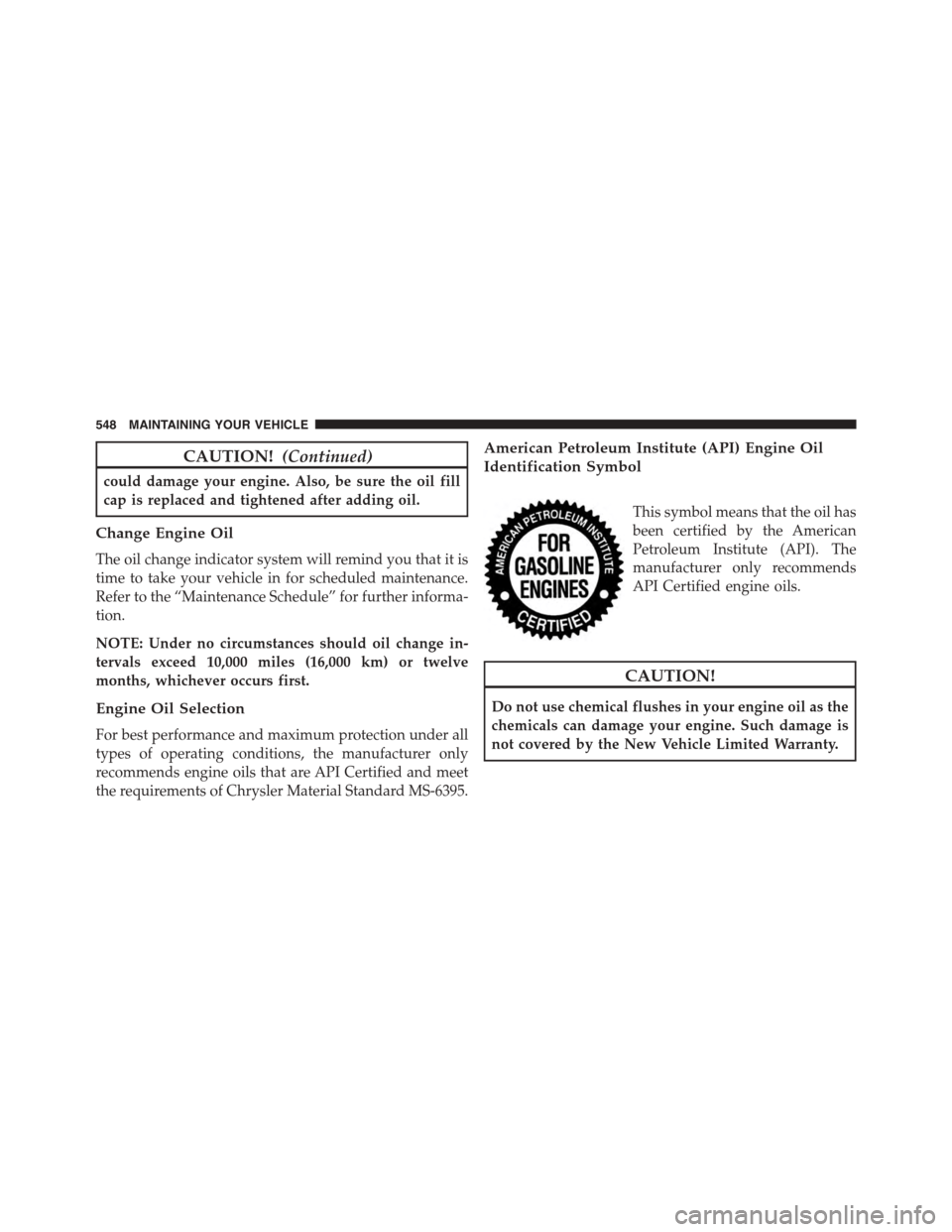
American Petroleum Institute (API) Engine Oil
Identification Symbol
This symbol means that the oil has
been certified by the American
Petroleum Institute (API). The
manufacturer only recommends
API Certified engine oils.
CAUTION!
Do not use chemical flushes in your engine oil as the
chemicals can damage your engine. Such damage is
not covered by the New Vehicle Limited Warranty.
548 MAINTAINING YOUR VEHICLE
Page 561 of 648
Exhaust System
The best protection against carbon monoxide entry into
the vehicle body is a properly maintained engine exhaust
system.
If you notice a change in the sound of the exhaust system;
or if the exhaust fumes can be detected inside the vehicle;
or when the underside or rear of the vehicle is damaged;
have an authorized technician inspect the complete ex-
haust system and adjacent body areas for broken, dam-
aged, deteriorated, or mispositioned parts. Open seams
or loose connections could permit exhaust fumes to seep
into the passenger compartment. In addition, have the
exhaust system inspected each time the vehicle is raised
for lubrication or oil change. Replace as required.
WARNING!
•Exhaust gases can injure or kill. They contain
carbon monoxide (CO), which is colorless and
odorless. Breathing it can make you unconscious
and can eventually poison you. To avoid breathing
CO, refer to “Safety Tips/Exhaust Gas” in “Things
To Know Before Starting Your Vehicle” for further
information.
•A hot exhaust system can start a fire if you park
over materials that can burn. Such materials might
be grass or leaves coming into contact with your
exhaust system. Do not park or operate your ve-
hicle in areas where your exhaust system can con-
tact anything that can burn.
7
MAINTAINING YOUR VEHICLE 559
Page 606 of 648
MAINTENANCE SCHEDULE
Your vehicle is equipped with an automatic oil change
indicator system. The oil change indicator system will
remind you that it is time to take your vehicle in for
scheduled maintenance.
Based on engine operation conditions, the oil change
indicator message will illuminate. This means that ser-
vice is required for your vehicle. Operating conditions
such as frequent short-trips, trailer tow, extremely hot or
cold ambient temperatures, and E85 fuel usage will
influence when the “Change Oil” or “Oil Change Re-
quired” message is displayed. Severe Operating Condi-
tions can cause the change oil message to illuminate as
early as 3,500 miles (5,600 km) since last reset. Have your
vehicle serviced as soon as possible, within the next 500
miles (805 km).
On Electronic Vehicle Information Center (EVIC)
equipped vehicles, “Oil Change Required” will be dis-
played in the EVIC and a single chime will sound,
indicating that an oil change is necessary.
On Non-EVIC equipped vehicles, “Change Oil” will flash
in the instrument cluster odometer and a single chime
will sound, indicating that an oil change is necessary.
Your authorized dealer will reset the oil change indicator
message after completing the scheduled oil change. If a
scheduled oil change is performed by someone other
than your authorized dealer, the message can be reset by
referring to the steps described under “Electronic Vehicle
Information Center (EVIC)” in “Understanding Your
Instrument Panel” for further information.
NOTE:Under no circumstances should oil change inter-
vals exceed 10,000 miles (16,000 km) or twelve months,
whichever comes first.
8
MAINTENANCE
SCHEDULES
604 MAINTENANCE SCHEDULES
Page 610 of 648
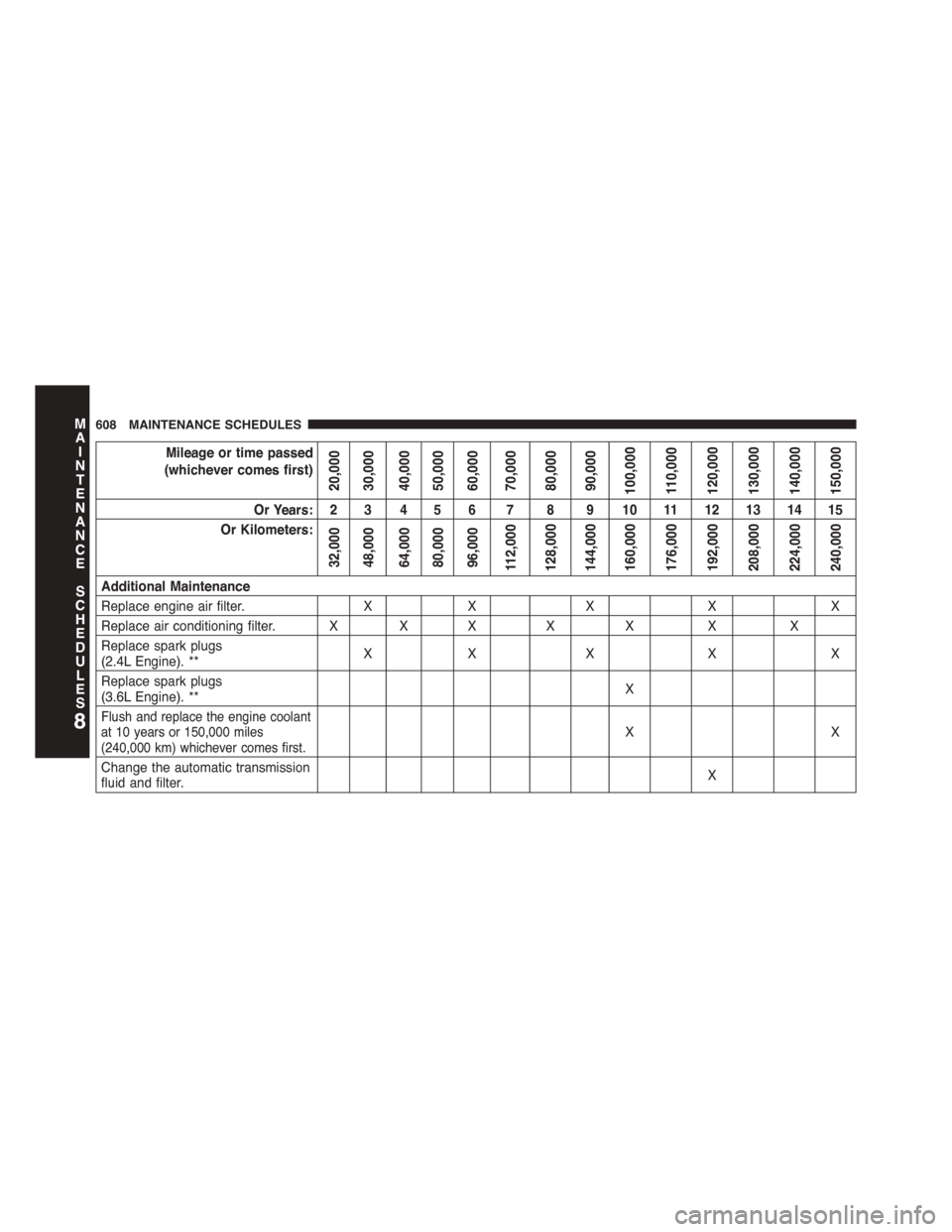
Mileage or time passed
(whichever comes first)
20,00030,00040,00050,00060,00070,00080,00090,000100,000110,000120,000130,000140,000150,000
Or Years: 2 3 4 5 6 7 8 9 10 11 12 13 14 15
Or Kilometers:
32,00048,00064,00080,00096,000112,000128,000144,000160,000176,000192,000208,000224,000240,000
Additional Maintenance
Replace engine air filter.XXXXX
Replace air conditioning filter. X X XXXXX
Replace spark plugs(2.4L Engine). **XX X X X
Replace spark plugs(3.6L Engine). **X
Flush and replace the engine coolantat 10 years or 150,000 miles(240,000 km) whichever comes first.XX
Change the automatic transmissionfluid and filter.X
8
MAINTENANCE
SCHEDULES
608 MAINTENANCE SCHEDULES
Page 611 of 648
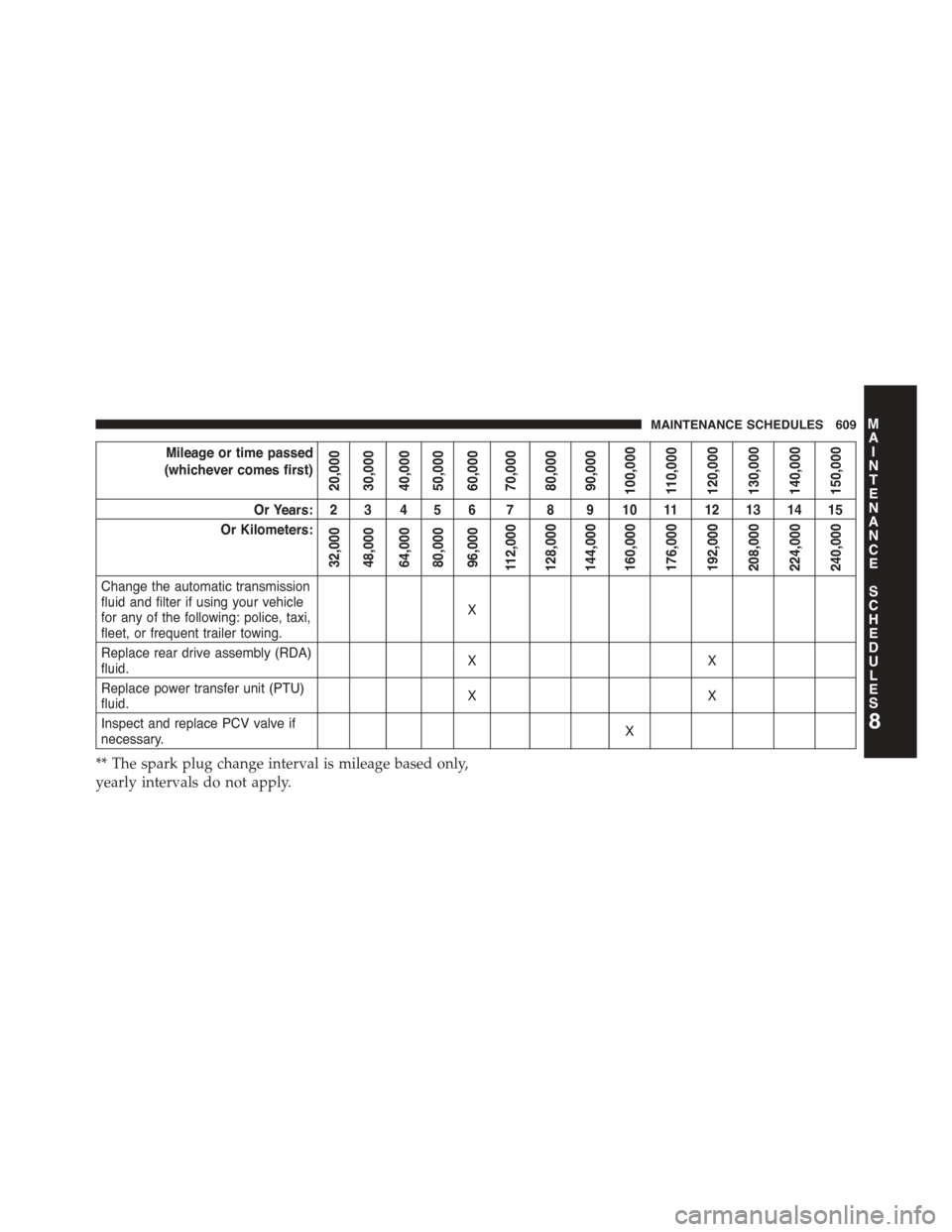
Mileage or time passed
(whichever comes first)
20,00030,00040,00050,00060,00070,00080,00090,000100,000110,000120,000130,000140,000150,000
Or Years: 2 3 4 5 6 7 8 9 10 11 12 13 14 15
Or Kilometers:
32,00048,00064,00080,00096,000112,000128,000144,000160,000176,000192,000208,000224,000240,000
Change the automatic transmissionfluid and filter if using your vehiclefor any of the following: police, taxi,fleet, or frequent trailer towing.
X
Replace rear drive assembly (RDA)fluid.XX
Replace power transfer unit (PTU)fluid.XX
Inspect and replace PCV valve ifnecessary.X
** The spark plug change interval is mileage based only,
yearly intervals do not apply.
8
MAINTENANCE
SCHEDULES
MAINTENANCE SCHEDULES 609