instrument panel DODGE JOURNEY 2015 1.G Owner's Manual
[x] Cancel search | Manufacturer: DODGE, Model Year: 2015, Model line: JOURNEY, Model: DODGE JOURNEY 2015 1.GPages: 648
Page 222 of 648
WARNING!(Continued)
•Do not allow a passenger to sit in a third row seat
with the second row seatback(s) folded flat. In a
collision, the passenger could slide underneath the
seat belt and be seriously or even fatally injured.
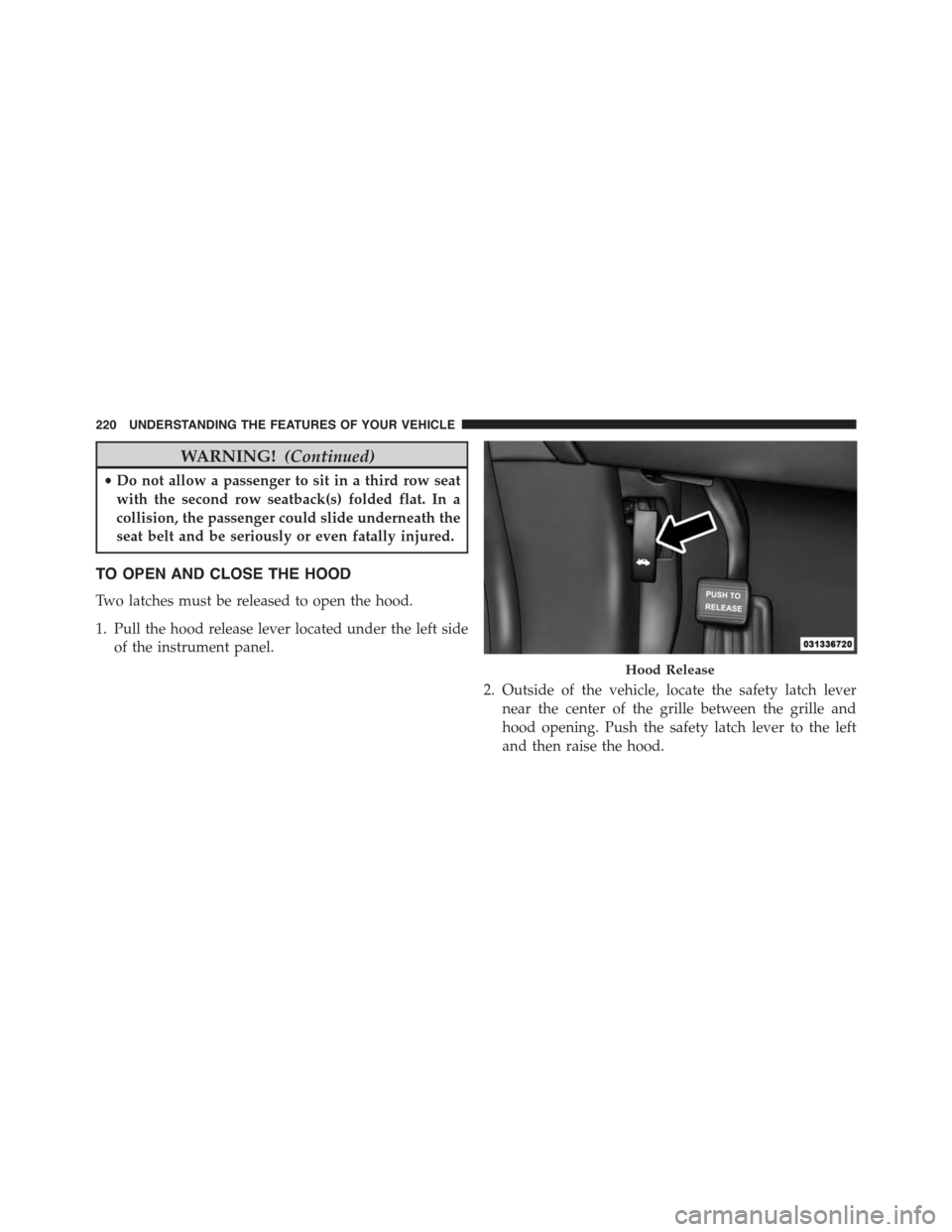
TO OPEN AND CLOSE THE HOOD
Two latches must be released to open the hood.
1. Pull the hood release lever located under the left side
of the instrument panel.
2. Outside of the vehicle, locate the safety latch lever
near the center of the grille between the grille and
hood opening. Push the safety latch lever to the left
and then raise the hood.
Hood Release
220 UNDERSTANDING THE FEATURES OF YOUR VEHICLE
Page 224 of 648
CAUTION!(Continued)
•Do not slam the hood to close it. Use a firm
downward push at the center front edge of the
hood to ensure that both latches engage. Never
drive your vehicle unless the hood is fully closed,
with both latches engaged.
WARNING!
Be sure the hood is fully latched before driving your
vehicle. If the hood is not fully latched, it could open
when the vehicle is in motion and block your vision.
Failure to follow this warning could result in serious
injury or death.
LIGHTS
Headlight Switch
The headlight switch is located on the left side of the
instrument panel. This switch controls the operation of
the headlights, parking lights, instrument panel lights,
instrument panel light dimming, interior lights and fog
lights.
222 UNDERSTANDING THE FEATURES OF YOUR VEHICLE
Page 225 of 648
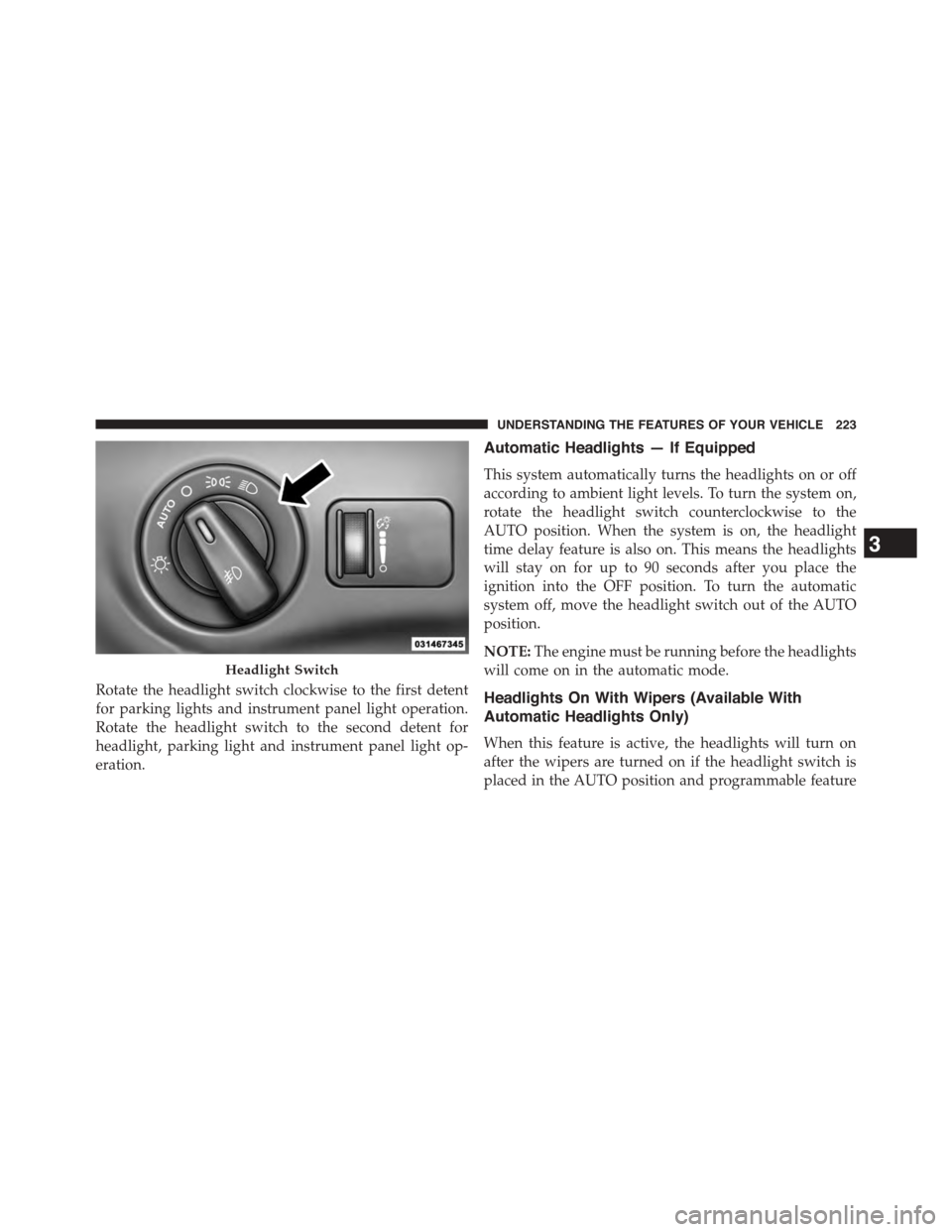
Rotate the headlight switch clockwise to the first detent
for parking lights and instrument panel light operation.
Rotate the headlight switch to the second detent for
headlight, parking light and instrument panel light op-
eration.
Automatic Headlights — If Equipped
This system automatically turns the headlights on or off
according to ambient light levels. To turn the system on,
rotate the headlight switch counterclockwise to the
AUTO position. When the system is on, the headlight
time delay feature is also on. This means the headlights
will stay on for up to 90 seconds after you place the
ignition into the OFF position. To turn the automatic
system off, move the headlight switch out of the AUTO
position.
NOTE:The engine must be running before the headlights
will come on in the automatic mode.
Headlights On With Wipers (Available With
Automatic Headlights Only)
When this feature is active, the headlights will turn on
after the wipers are turned on if the headlight switch is
placed in the AUTO position and programmable feature
Headlight Switch
3
UNDERSTANDING THE FEATURES OF YOUR VEHICLE 223
Page 226 of 648
is set to ON. In addition, the headlights will turn off
when the wipers are turned off if they were turned on by
this feature.
NOTE:The Headlights On with Wipers feature can be
turned on or off using the Uconnect® System. Refer to
“Uconnect® Settings/Customer Programmable Fea-
tures” in “Understanding Your Instrument Panel” for
further information.
Headlight Time Delay
This feature provides the safety of headlight illumination
for up to 90 seconds when leaving your vehicle in an
unlit area.
To activate the delay feature, turn OFF the ignition switch
while the headlights are still on. Then, turn off the
headlights within 45 seconds. The delay interval begins
when the headlight switch is turned off.
NOTE:The lights must be turned off within 45 seconds
of turning the ignition OFF to activate this feature.
If you turn the headlights, parking lights or ignition
switch ON again, the system will cancel the delay.
If you turn the headlights off before the ignition, they will
turn off in the normal manner.
NOTE:The Headlight Time Delay is programmable us-
ing the Uconnect® System, refer to “Uconnect® Settings
— Customer Programmable Features” in “Understand-
ing Your Instrument Panel” for further information.
Daytime Running Lights (DRL) — If Equipped
The Daytime Running Lights will turn ON the first time
the vehicle is shifted out of PARK, and remain ON unless
the parking brake is applied. Upon returning to the
PARK position, the DRLs will turn OFF. DRLs will turn
OFF when the ignition is switched OFF.
224 UNDERSTANDING THE FEATURES OF YOUR VEHICLE
Page 227 of 648
NOTE:The daytime running lights can be turned on and
off using the Uconnect® System, refer to “Uconnect®
Settings — Customer Programmable Features” in “Un-
derstanding Your Instrument Panel” for further informa-
tion.
Lights-On Reminder
If the headlights or parking lights are on after the ignition
is placed in the OFF position, a chime will sound to alert
the driver when the driver’s door is opened.
Fog Lights — If Equipped
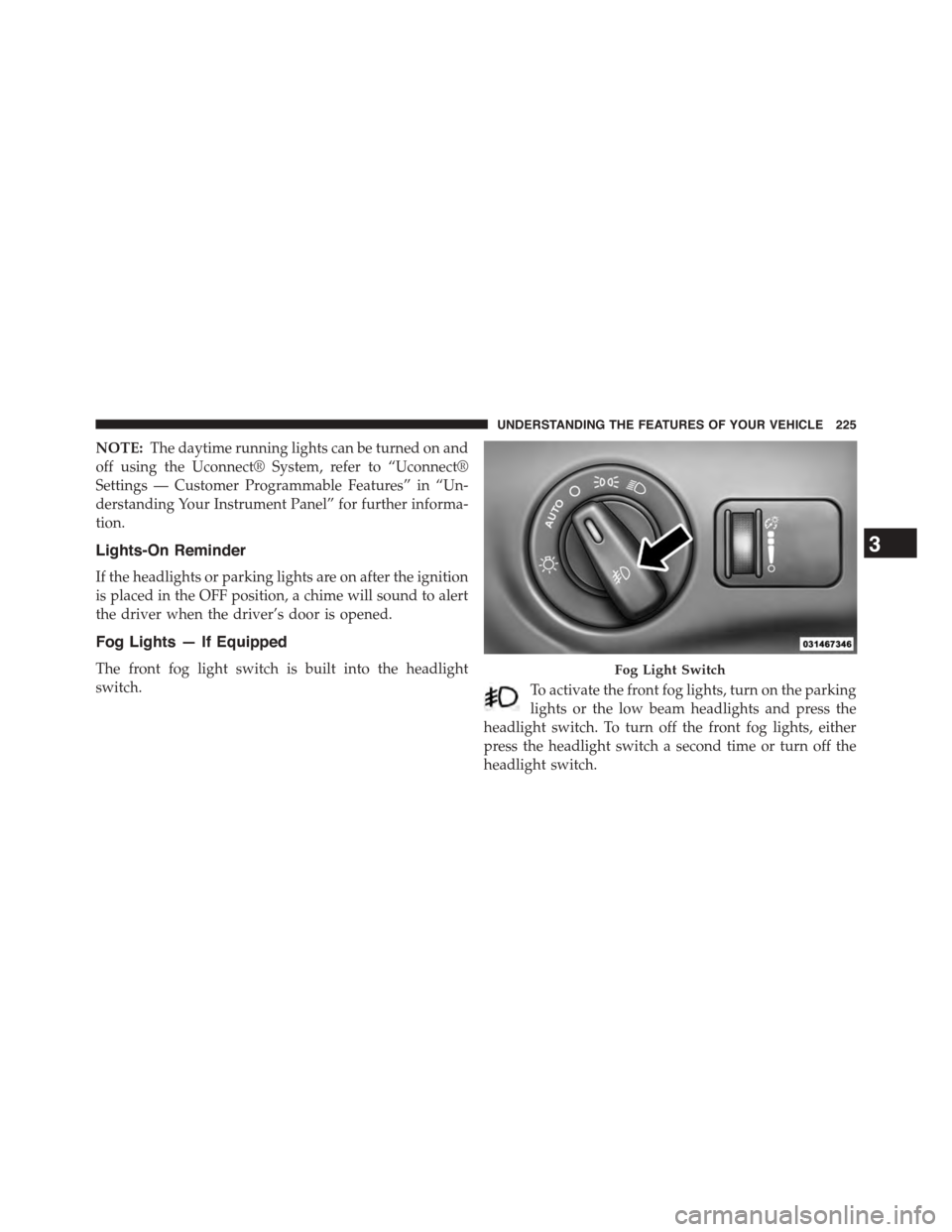
The front fog light switch is built into the headlight
switch.To activate the front fog lights, turn on the parking
lights or the low beam headlights and press the
headlight switch. To turn off the front fog lights, either
press the headlight switch a second time or turn off the
headlight switch.
Fog Light Switch
3
UNDERSTANDING THE FEATURES OF YOUR VEHICLE 225
Page 230 of 648
light. To restore interior light operation, either place the
ignition in the ON/RUN position or cycle the light
switch.
Dimmer Controls
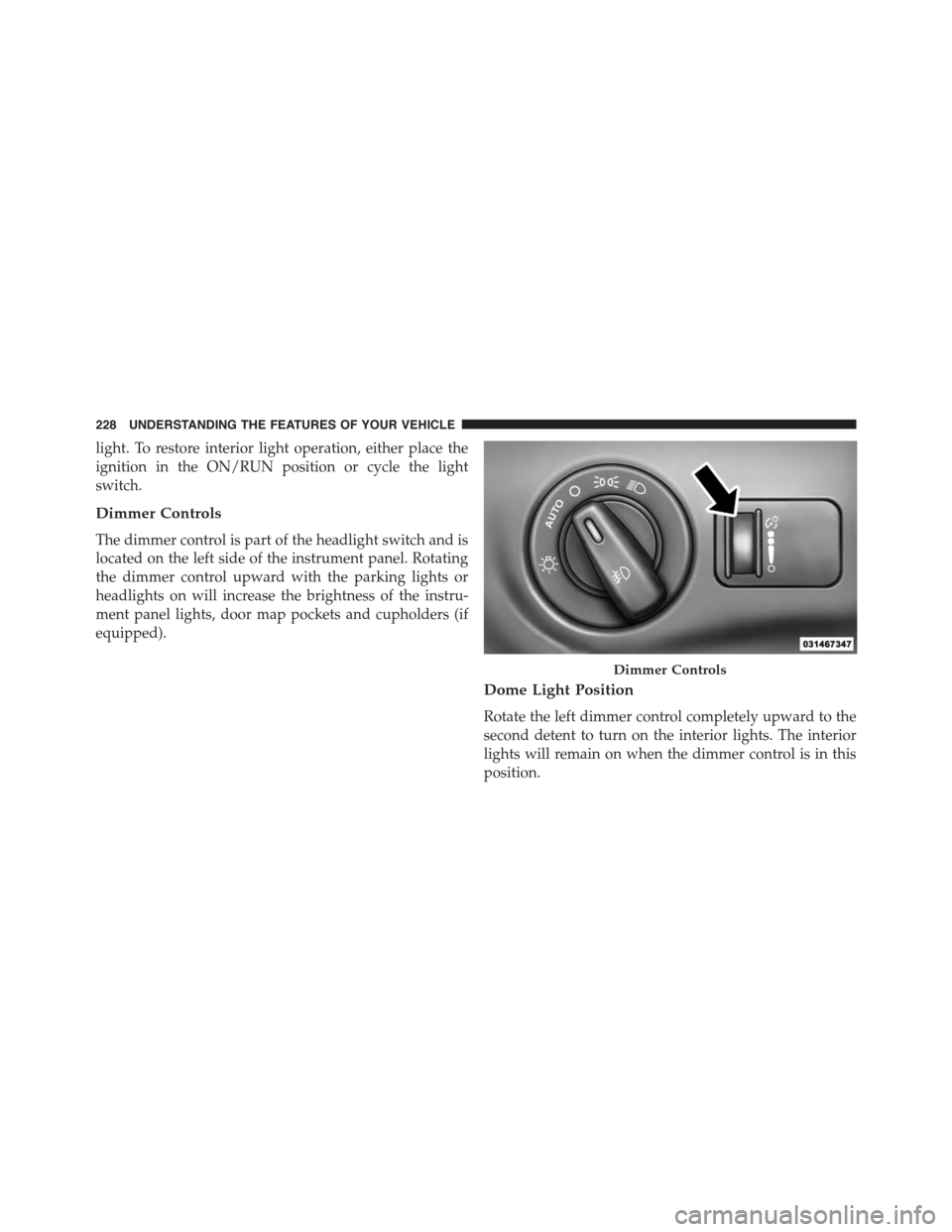
The dimmer control is part of the headlight switch and is
located on the left side of the instrument panel. Rotating
the dimmer control upward with the parking lights or
headlights on will increase the brightness of the instru-
ment panel lights, door map pockets and cupholders (if
equipped).
Dome Light Position
Rotate the left dimmer control completely upward to the
second detent to turn on the interior lights. The interior
lights will remain on when the dimmer control is in this
position.
Dimmer Controls
228 UNDERSTANDING THE FEATURES OF YOUR VEHICLE
Page 235 of 648
WARNING!(Continued)
the windshield during freezing weather, warm the
windshield with the defroster before and during
windshield washer use.
Mist Feature
Push the washer knob, located on the end of the multi-
function lever, inward to the first detent to activate a
single wipe cycle to clear the windshield of road mist or
spray from a passing vehicle. The wipers will continue to
operate until you release the lever.
NOTE:The mist feature does not activate the washer
pump; therefore, no washer fluid will be sprayed on the
windshield. The wash function must be used in order to
spray the windshield with washer fluid.
Headlights On With Wipers (Available With
Automatic Headlights Only)
When this feature is active, the headlights will turn on
after the wipers are turned on if the headlight switch is
placed in the AUTO position and programmable feature
is set to ON. In addition, the headlights will turn off
when the wipers are turned off if they were turned on by
this feature.
NOTE:The Headlights On with Wipers feature can be
turned on or off using the Uconnect® System. Refer to
“Uconnect® Settings/Customer Programmable Fea-
tures” in “Understanding Your Instrument Panel” for
further information.
3
UNDERSTANDING THE FEATURES OF YOUR VEHICLE 233
Page 237 of 648
HEATED STEERING WHEEL — IF EQUIPPED
The steering wheel contains a heating element that helps
warm your hands in cold weather. The heated steering
wheel has only one temperature setting. Once the heated
steering wheel has been turned on it will operate for up
to 80 minutes before automatically shutting off. The
heated steering wheel can shut off early or may not turn
on when the steering wheel is already warm.
The heated steering wheel control button is located
within the Uconnect® system. You can gain access to the
control button through the climate screen or the controls
screen.
•Press the heated steering wheel buttononce to
turn the heating element ON.
•Press the heated steering wheel buttona second
time to turn the heating element OFF.
NOTE:The engine must be running for the heated
steering wheel to operate.
Vehicles Equipped With Remote Start
On models that are equipped with remote start, the
heated steering wheel can be programmed to come on
during a remote start through the Uconnect® system.
Refer to “Uconnect® Settings” in “Understanding Your
Instrument Panel” for further information.
3
UNDERSTANDING THE FEATURES OF YOUR VEHICLE 235
Page 243 of 648
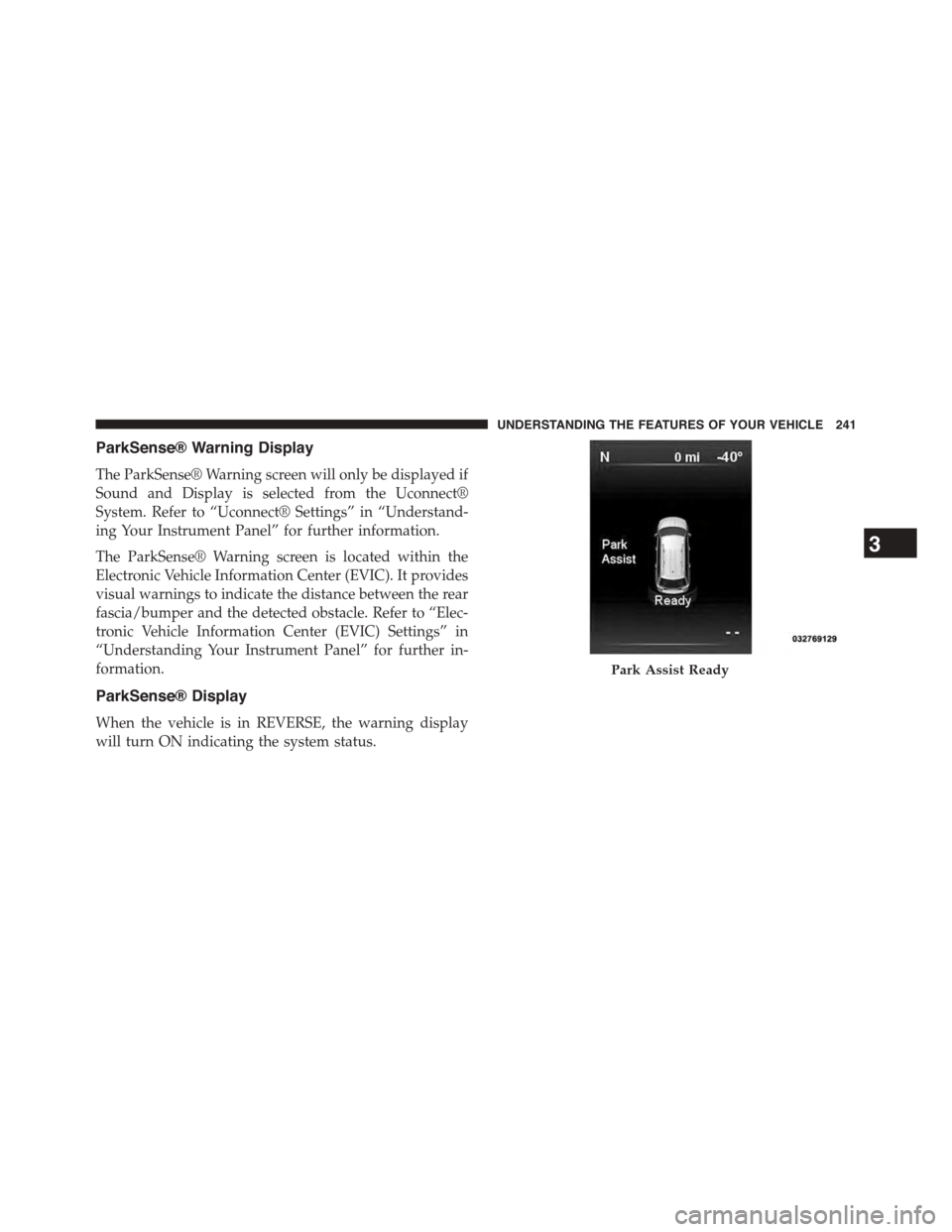
ParkSense® Warning Display
The ParkSense® Warning screen will only be displayed if
Sound and Display is selected from the Uconnect®
System. Refer to “Uconnect® Settings” in “Understand-
ing Your Instrument Panel” for further information.
The ParkSense® Warning screen is located within the
Electronic Vehicle Information Center (EVIC). It provides
visual warnings to indicate the distance between the rear
fascia/bumper and the detected obstacle. Refer to “Elec-
tronic Vehicle Information Center (EVIC) Settings” in
“Understanding Your Instrument Panel” for further in-
formation.
ParkSense® Display
When the vehicle is in REVERSE, the warning display
will turn ON indicating the system status.
Park Assist Ready
3
UNDERSTANDING THE FEATURES OF YOUR VEHICLE 241
Page 246 of 648
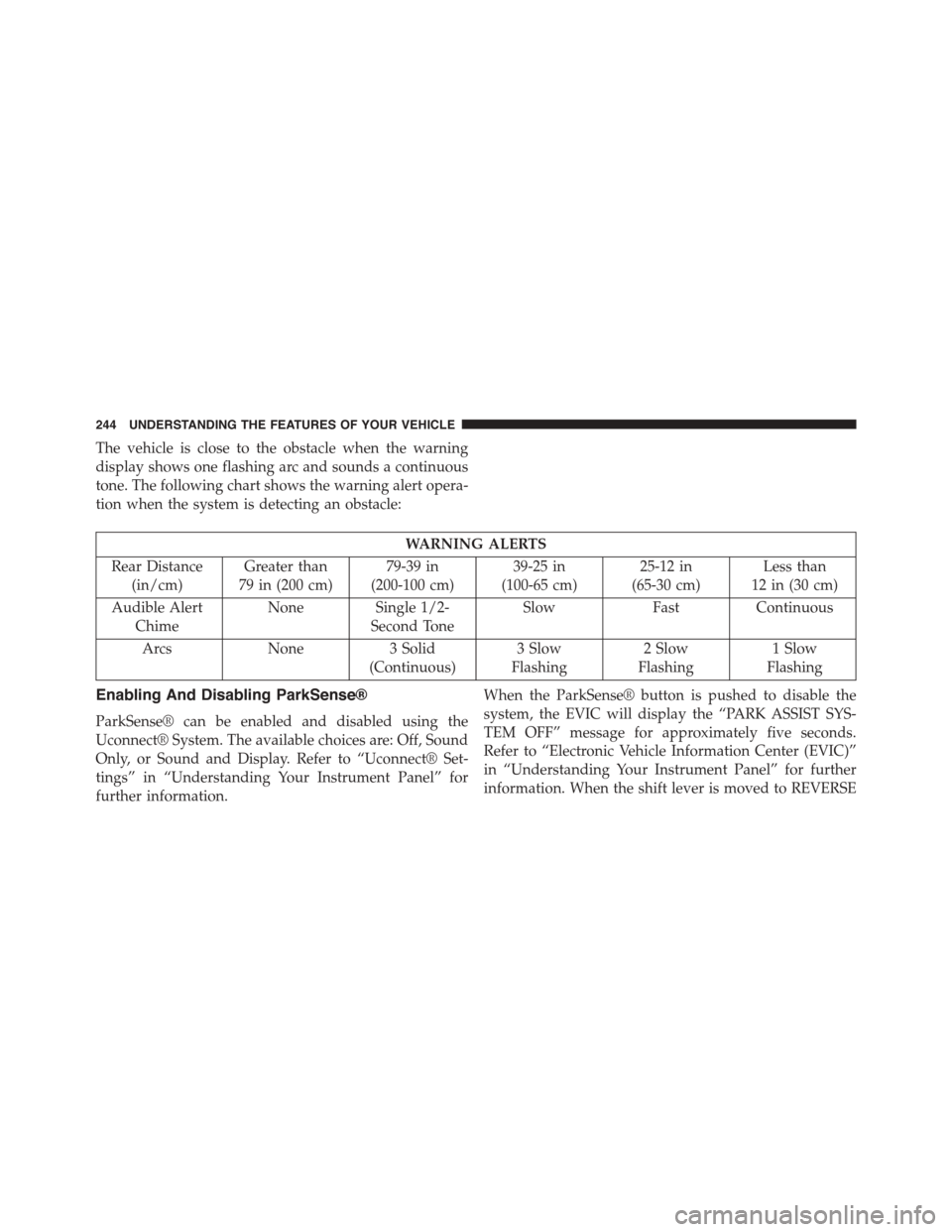
The vehicle is close to the obstacle when the warning
display shows one flashing arc and sounds a continuous
tone. The following chart shows the warning alert opera-
tion when the system is detecting an obstacle:
WARNING ALERTS
Rear Distance
(in/cm)
Greater than
79 in (200 cm)
79-39 in
(200-100 cm)
39-25 in
(100-65 cm)
25-12 in
(65-30 cm)
Less than
12 in (30 cm)
Audible Alert
Chime
None Single 1/2-
Second Tone
SlowFastContinuous
ArcsNone3 Solid
(Continuous)
3 Slow
Flashing
2 Slow
Flashing
1 Slow
Flashing
Enabling And Disabling ParkSense®
ParkSense® can be enabled and disabled using the
Uconnect® System. The available choices are: Off, Sound
Only, or Sound and Display. Refer to “Uconnect® Set-
tings” in “Understanding Your Instrument Panel” for
further information.
When the ParkSense® button is pushed to disable the
system, the EVIC will display the “PARK ASSIST SYS-
TEM OFF” message for approximately five seconds.
Refer to “Electronic Vehicle Information Center (EVIC)”
in “Understanding Your Instrument Panel” for further
information. When the shift lever is moved to REVERSE
244 UNDERSTANDING THE FEATURES OF YOUR VEHICLE