instrument panel DODGE JOURNEY 2015 1.G Owner's Guide
[x] Cancel search | Manufacturer: DODGE, Model Year: 2015, Model line: JOURNEY, Model: DODGE JOURNEY 2015 1.GPages: 648
Page 247 of 648
and the system is disabled, the EVIC will display the
“PARK ASSIST SYSTEM OFF” message for as long as the
vehicle is in REVERSE.
Service The ParkSense® Rear Park Assist
System
During vehicle start up, when the ParkSense® Rear Park
Assist system has detected a fault condition, the Elec-
tronic Vehicle Information Center (EVIC) will actuate a
single chime, once per ignition cycle, and it will display
the “CLEAN PARK ASSIST”, “SERVICE PARK ASSIST”,
or “SERVICE PARK ASSIST SYSTEM” message. Refer to
“Electronic Vehicle Information Center (EVIC)” in “Un-
derstanding Your Instrument Panel” for further informa-
tion. When the shift lever is moved to REVERSE and the
system has detected a fault condition, the EVIC will
display the#CLEAN PARK ASSIST#,#SERVICE PARK
ASSIST#,OR#SERVICE PARK ASSIST SYSTEM#mes-
sages for as long as the vehicle is in REVERSE. Under this
condition, ParkSense® will not operate.
If “CLEAN PARK ASSIST” appears in the Electronic
Vehicle Information Center (EVIC) make sure the outer
surface and the underside of the rear fascia/bumper is
clean and clear of snow, ice, mud, dirt or other obstruc-
tion and then cycle the ignition. If the message continues
to appear see an authorized dealer.
If “SERVICE PARK ASSIST” or “SERVICE PARK ASSIST
SYSTEM” appears in the EVIC, see an authorized dealer.
Cleaning The ParkSense® System
Clean the ParkSense® sensors with water, car wash soap
and a soft cloth. Do not use rough or hard cloths. Do not
scratch or poke the sensors. Otherwise, you could dam-
age the sensors.
3
UNDERSTANDING THE FEATURES OF YOUR VEHICLE 245
Page 251 of 648
vehicle to assist with parking or aligning to a hitch/
receiver. The static grid lines will show separate zones
that will help indicate the distance to the rear of the
vehicle.
NOTE:The ParkView® Rear Back Up Camera has pro-
grammable modes of operation that may be selected
through the Uconnect® System. Refer to “Uconnect®
Settings” in “Understanding Your Instrument Panel” for
further information.
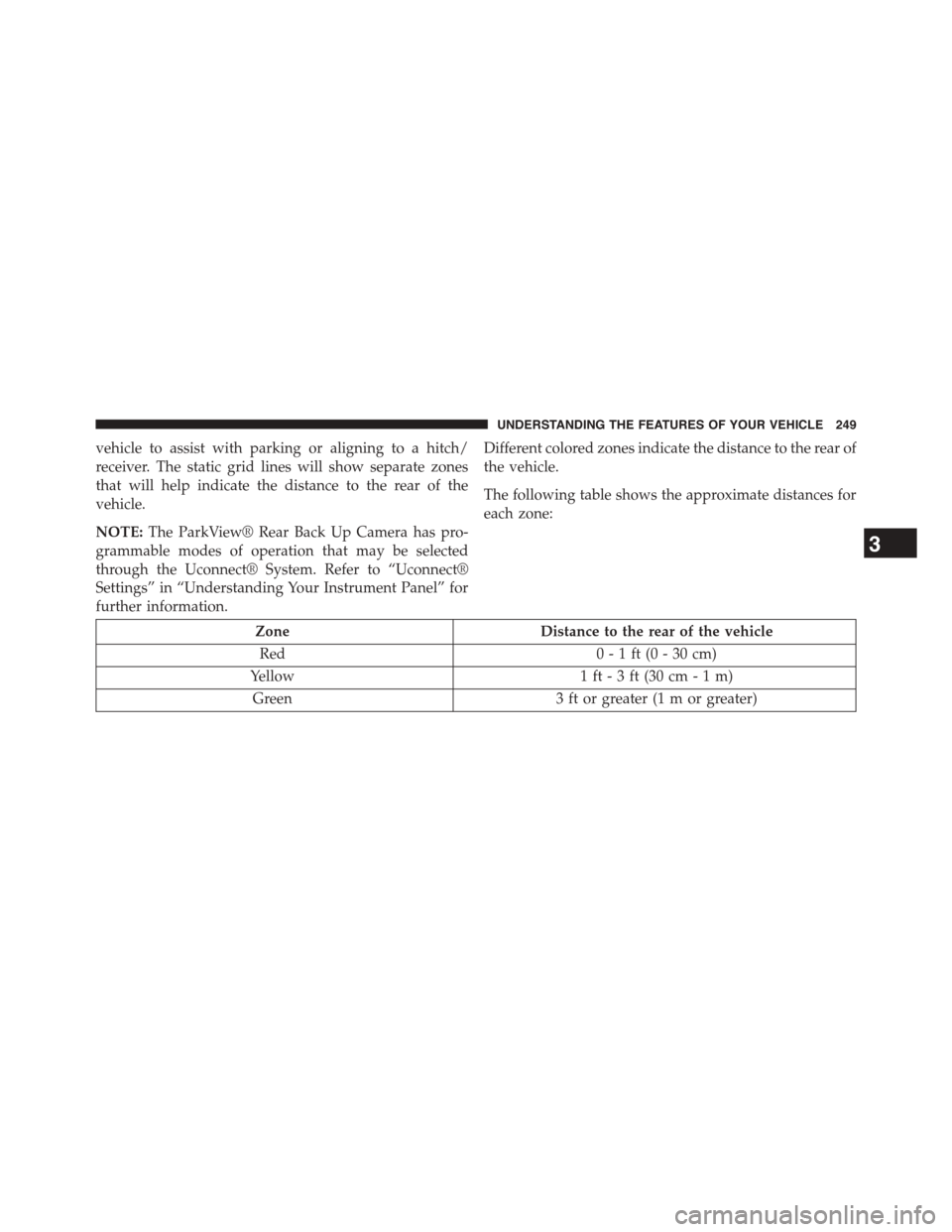
Different colored zones indicate the distance to the rear of
the vehicle.
The following table shows the approximate distances for
each zone:
ZoneDistance to the rear of the vehicle
Red0 - 1 ft (0 - 30 cm)
Yellow1 ft - 3 ft (30 cm - 1 m)
Green3 ft or greater (1 m or greater)
3
UNDERSTANDING THE FEATURES OF YOUR VEHICLE 249
Page 268 of 648
Sunshade Operation
The sunshade can be opened manually. However, the
sunshade will open automatically as the sunroof opens.
NOTE:The sunshade cannot be closed if the sunroof is
open.
Wind Buffeting
Wind buffeting can be described as the perception of
pressure on the ears or a helicopter-type sound in the
ears. Your vehicle may exhibit wind buffeting with the
windows down, or the sunroof (if equipped) in certain
open or partially open positions. This is a normal occur-
rence and can be minimized. If the buffeting occurs with
the rear windows open, open the front and rear windows
together to minimize the buffeting. If the buffeting occurs
with the sunroof open, adjust the sunroof opening to
minimize the buffeting or open any window.
Sunroof Maintenance
Use only a nonabrasive cleaner and a soft cloth to clean
the glass panel.
Ignition Off Operation
The power sunroof switch will remain active for up to
approximately ten minutes after the ignition switch is
turned to the LOCK position. Opening either front door
will cancel this feature.
NOTE:Ignition Off time is programmable through the
Uconnect® System. Refer to “Uconnect® Settings/
Customer Programmable Features” in “Understanding
Your Instrument Panel” for further information.
ELECTRICAL POWER OUTLETS
A 12 Volt (13 Amp) power outlet is located in the center
console below the radio. The power outlet has power
available when the ignition in the ON/RUN or ACC
position.
266 UNDERSTANDING THE FEATURES OF YOUR VEHICLE
Page 271 of 648
NOTE:To ensure proper operation a MOPAR® knob
and element must be used.
CAUTION!
•Do not exceed the maximum power of 160 Watts
(13 Amps) at 12 Volts. If the 160 Watt (13 Amp)
power rating is exceeded the fuse protecting the
system will need to be replaced.
•The power outlet on the bottom of the center
console shares the fuse with the power outlet on
the back of the console. The combined usage must
not exceed 160 Watts (13 Amps) at 12 Volts.
•Power outlets are designed for accessory plugs
only. Do not insert any other object in the power
outlets as this will damage the outlet and blow the
fuse. Improper use of the power outlet can cause
damage not covered by your New Vehicle Limited
Warranty.
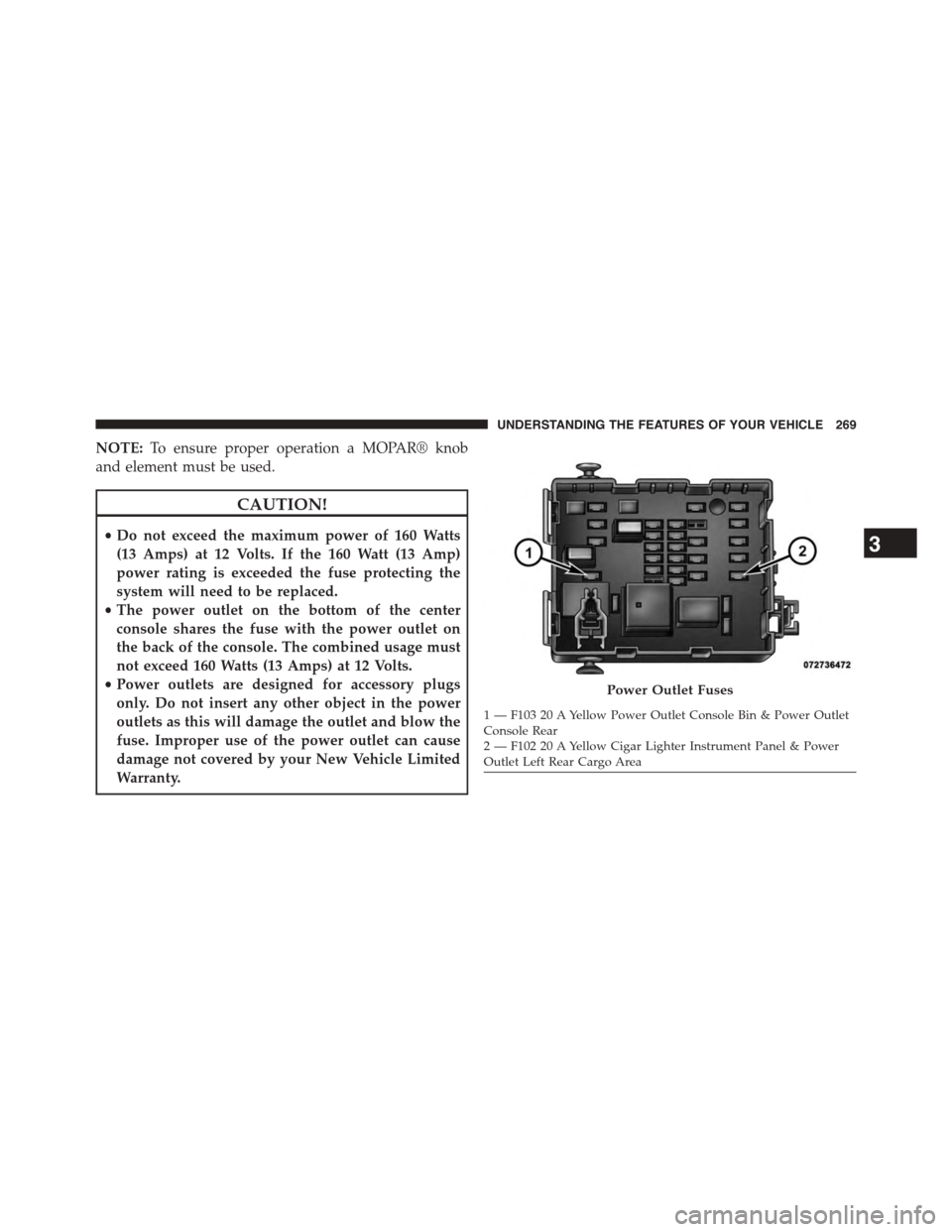
Power Outlet Fuses
1 — F103 20 A Yellow Power Outlet Console Bin & Power OutletConsole Rear2 — F102 20 A Yellow Cigar Lighter Instrument Panel & PowerOutlet Left Rear Cargo Area
3
UNDERSTANDING THE FEATURES OF YOUR VEHICLE 269
Page 276 of 648
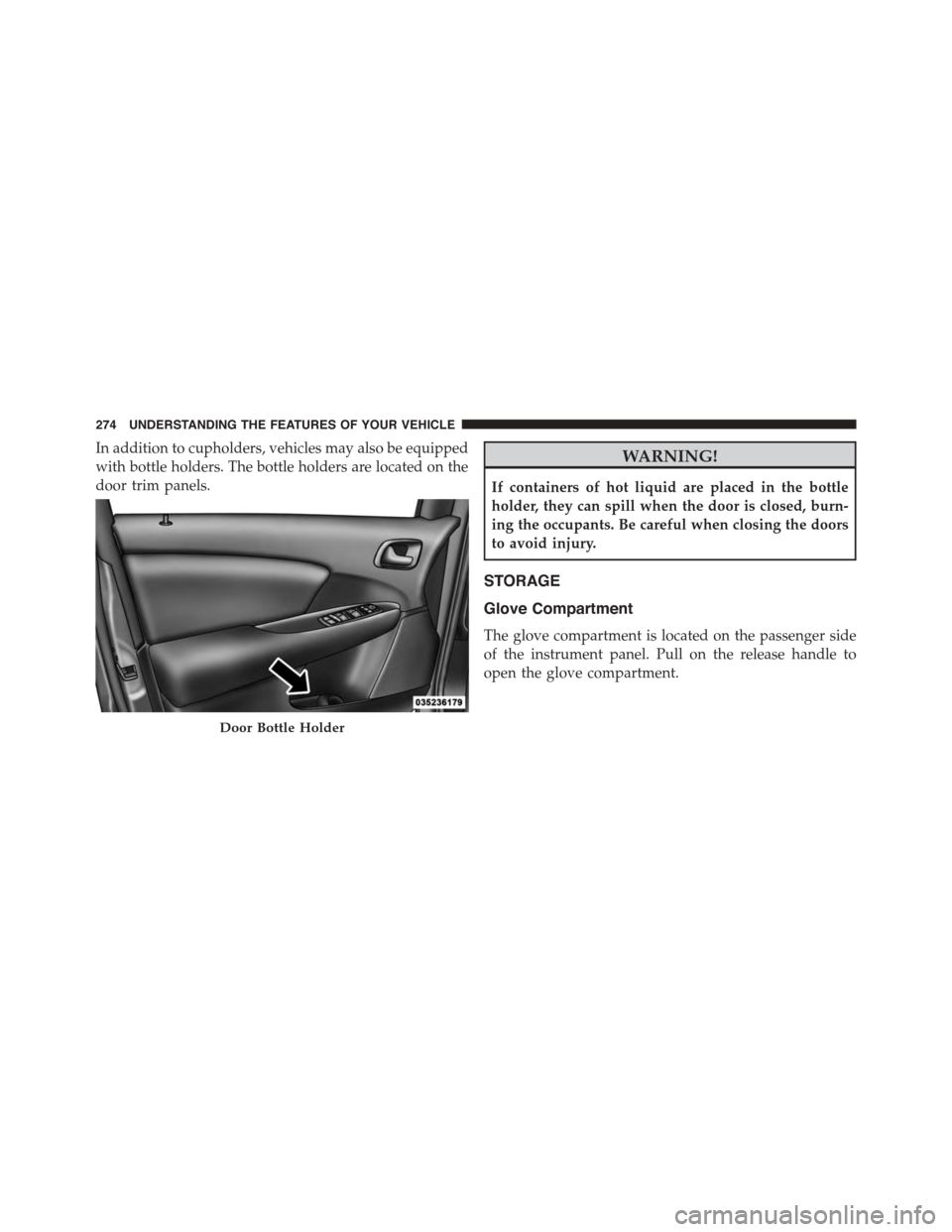
In addition to cupholders, vehicles may also be equipped
with bottle holders. The bottle holders are located on the
door trim panels.
WARNING!
If containers of hot liquid are placed in the bottle
holder, they can spill when the door is closed, burn-
ing the occupants. Be careful when closing the doors
to avoid injury.
STORAGE
Glove Compartment
The glove compartment is located on the passenger side
of the instrument panel. Pull on the release handle to
open the glove compartment.
Door Bottle Holder
274 UNDERSTANDING THE FEATURES OF YOUR VEHICLE
Page 295 of 648
UNDERSTANDING YOUR INSTRUMENT PANEL
CONTENTS
!INSTRUMENT PANEL FEATURES..........296
!INSTRUMENT CLUSTER.................297
!INSTRUMENT CLUSTER DESCRIPTIONS.....298
!ELECTRONIC VEHICLE INFORMATION CENTER
(EVIC)..............................307
▫Electronic Vehicle Information Center (EVIC)
Displays............................309
▫EVIC White Indicators..................312
▫EVIC Amber Indicators.................312
▫EVIC Red Indicators...................313
▫Oil Change Due......................315
▫Fuel Economy........................316
▫Vehicle Speed........................318
▫Trip Info...........................318
▫Ti re P S I . . . . . . . . . . . . . . . . . . . . . . . . . . . ..319
▫Vehicle Info (Customer Information Features) . .319
▫Messages...........................320
▫Turn Menu OFF.......................320
!Uconnect® SETTINGS...................320
▫Buttons On The Faceplate................320
4
Page 296 of 648
▫Buttons On The Touchscreen..............320
▫Customer Programmable Features —
Uconnect® 4.3 Settings..................321
▫Customer Programmable Features —
Uconnect® System 8.4 Settings............333
!Uconnect® MULTIMEDIA — VIDEO
ENTERTAINMENT SYSTEM (VES™) — IF
EQUIPPED...........................347
▫Getting Started.......................348
▫Single Video Screen....................348
▫Play Video Games.....................349
▫Listen To An Audio Source On Channel 2 While A
Video Is Playing On Channel 1............350
▫Important Notes For Single Video Screen
System.............................351
▫Play A DVD Using The Touchscreen Radio . . .352
▫VES™ Remote Control — If Equipped.......353
▫Remote Control Storage.................356
▫Locking The Remote Control.............357
▫Replacing The Remote Control Batteries......357
▫Headphones Operation.................357
▫Replacing The Headphone Batteries.........358
▫Controls............................358
▫Unwired® Stereo Headphone Lifetime Limited
Warranty...........................359
▫System Information....................361
294 UNDERSTANDING YOUR INSTRUMENT PANEL
Page 297 of 648
!iPod®/USB/MP3 CONTROL..............370
!STEERING WHEEL AUDIO CONTROLS......370
▫Right-Hand Switch Functions.............371
▫Left-Hand Switch Functions For Radio
Operation...........................371
▫Left-Hand Switch Functions For Media (i.e., CD)
Operation..........................371
!CD/DVD DISC MAINTENANCE...........372
!RADIO OPERATION AND MOBILE PHONES . .372
!CLIMATE CONTROLS...................373
▫Manual Climate Controls With Touchscreen — If
Equipped...........................373
▫Rear Manual Temperature Control (MTC) — If
Equipped...........................381
▫Automatic Temperature Control (ATC) With
Touchscreen — If Equipped..............386
▫Rear Automatic Temperature Control (ATC) — If
Equipped...........................395
4
UNDERSTANDING YOUR INSTRUMENT PANEL 295
Page 298 of 648
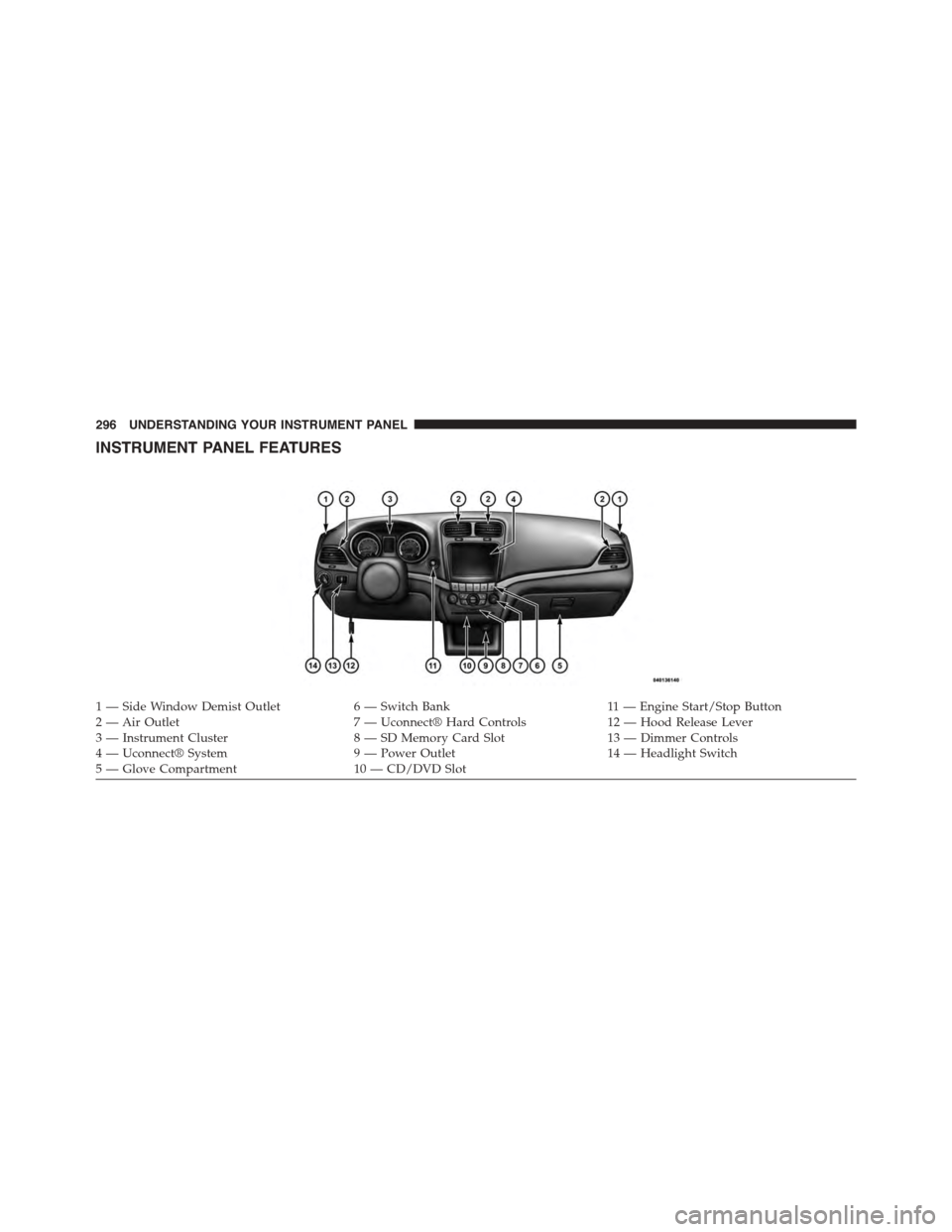
INSTRUMENT PANEL FEATURES
1—SideWindowDemistOutlet6—SwitchBank11 — E n g i n e S t a r t / S t o p B u t t o n2 — Air Outlet7 — Uconnect® Hard Controls12 — Hood Release Lever3 — Instrument Cluster8 — SD Memory Card Slot13 — Dimmer Controls4 — Uconnect® System9 — Power Outlet14 — Headlight Switch5—GloveCompartment10 — CD/DVD Slot
296 UNDERSTANDING YOUR INSTRUMENT PANEL
Page 299 of 648
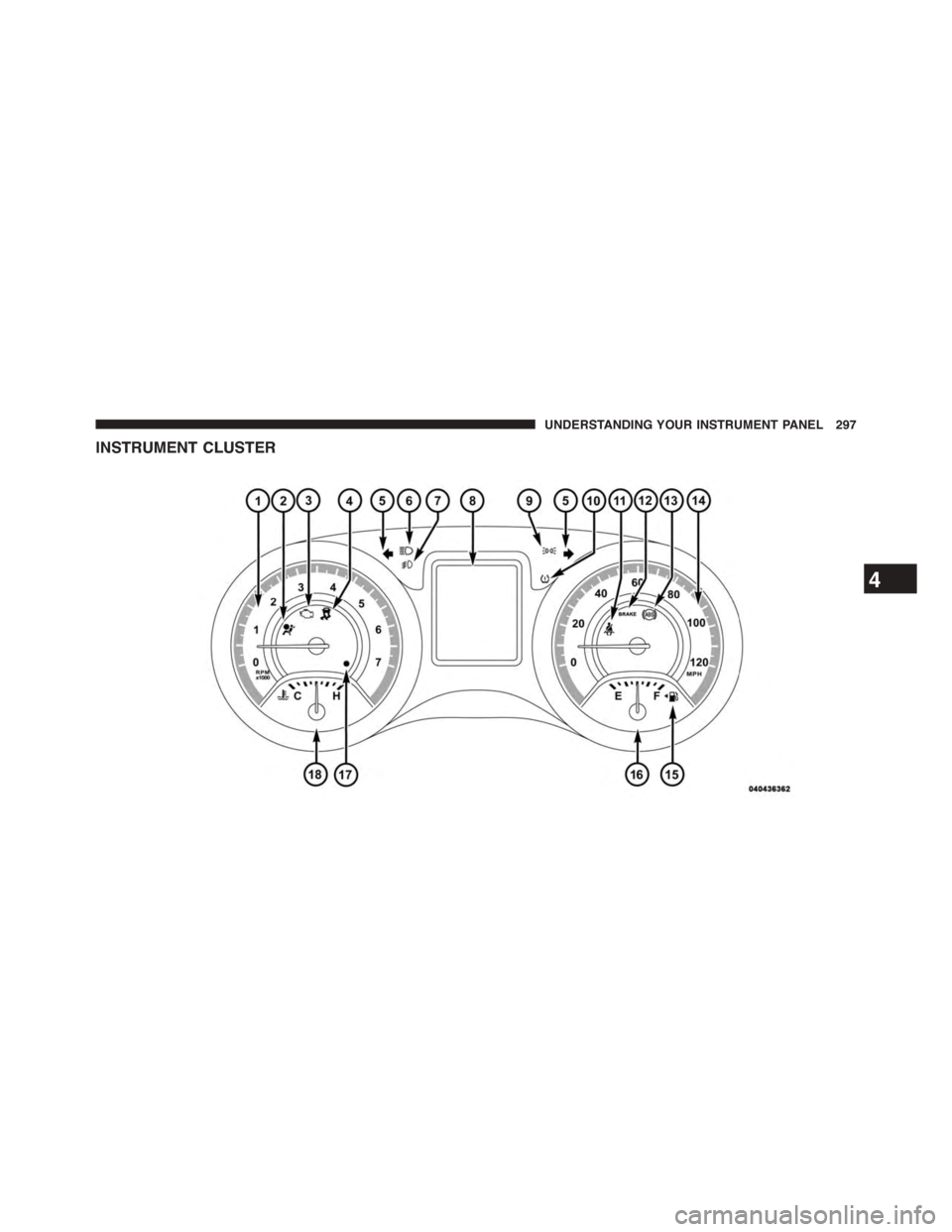
INSTRUMENT CLUSTER
4
UNDERSTANDING YOUR INSTRUMENT PANEL 297