phone DODGE JOURNEY 2015 1.G Manual PDF
[x] Cancel search | Manufacturer: DODGE, Model Year: 2015, Model line: JOURNEY, Model: DODGE JOURNEY 2015 1.GPages: 648
Page 332 of 648
equipped), power sunroof (if equipped), and power
outlets will remain active for up to 10 minutes after the
ignition is cycled to OFF. Opening either front door will
cancel this feature. To change the Engine Off Power
Delay status, press the “0 seconds,” “45 seconds,” “5
minutes” or “10 minutes” button on the touchscreen.
Then press the back arrow button on the touchscreen.
Compass Settings
•Variance
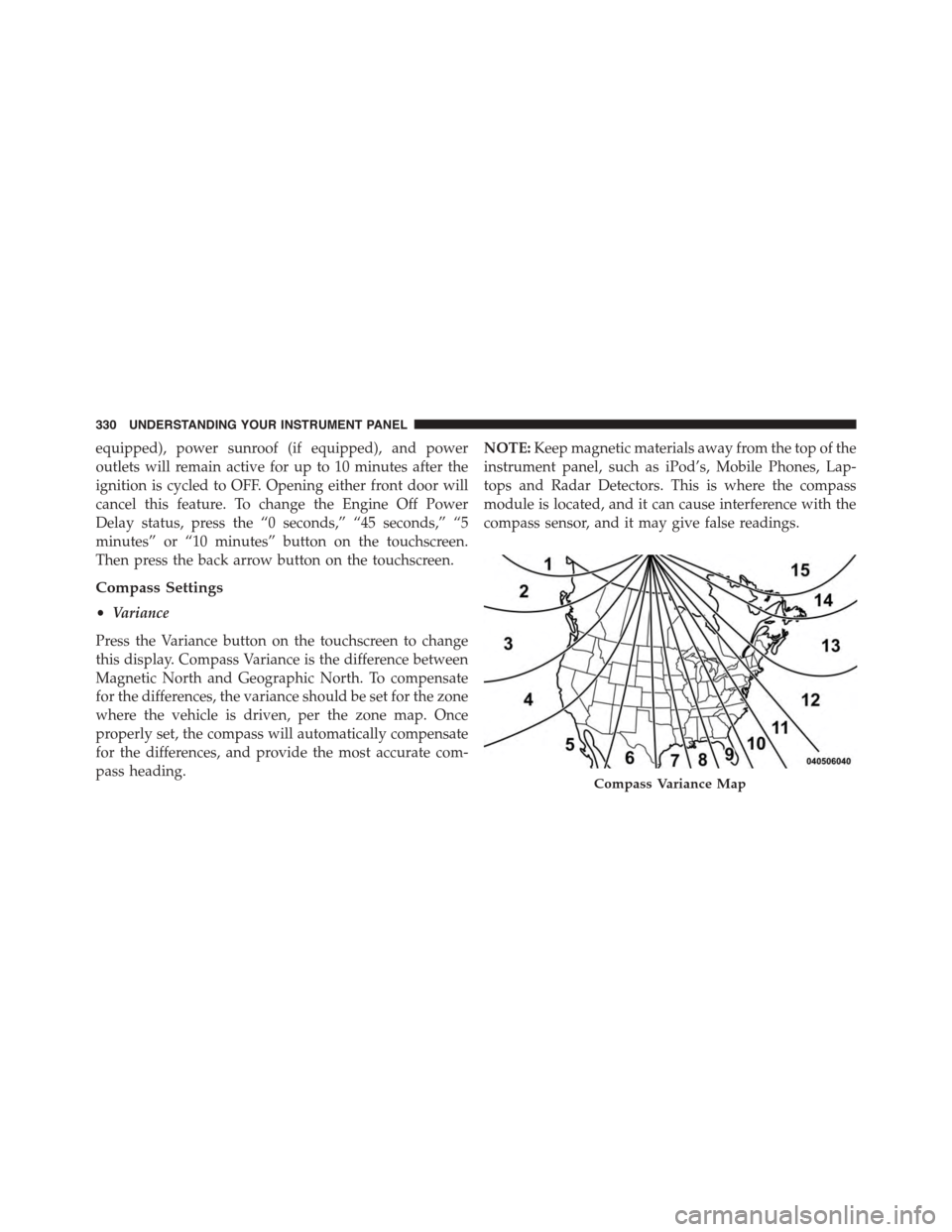
Press the Variance button on the touchscreen to change
this display. Compass Variance is the difference between
Magnetic North and Geographic North. To compensate
for the differences, the variance should be set for the zone
where the vehicle is driven, per the zone map. Once
properly set, the compass will automatically compensate
for the differences, and provide the most accurate com-
pass heading.
NOTE:Keep magnetic materials away from the top of the
instrument panel, such as iPod’s, Mobile Phones, Lap-
tops and Radar Detectors. This is where the compass
module is located, and it can cause interference with the
compass sensor, and it may give false readings.
Compass Variance Map
330 UNDERSTANDING YOUR INSTRUMENT PANEL
Page 334 of 648
•Speed Adjusted Volume
Press the “Speed Adjusted Volume” button on the touch-
screen to change this display. This feature increases or
decreases volume relative to vehicle speed. To change the
Speed Adjusted Volume, press the “OFF,” “1,” “2” or “3”
button on the touchscreen. Then press the back arrow
button on the touchscreen.
•Music Info Cleanup
This feature helps organize music files for optimized
music navigation. To make your selection, press the
Music Info Cleanup button on the touchscreen, select
“ON” or “OFF” followed by pressing the back arrow
button on the touchscreen.
•Surround Sound — If Equipped
Press the “Surround Sound” button on the touchscreen to
change this display. This feature provides simulated
surround sound mode. To make your selection, press the
“Surround Sound” button on the touchscreen and select
“ON” or “OFF.” Then press the back arrow button on the
touchscreen.
Phone/Bluetooth®
•Paired Devices
This feature shows which phones are paired to the
Phone/Bluetooth® system. For further information, refer
to the Uconnect® Supplement.
SIRIUS Setup
•Channel Skip
SIRIUS can be programmed to designate a group of
channels that are the most desirable to listen to or to
exclude undesirable channels while scanning. To make
your selection, press the “Channel Skip” button on the
touchscreen, select the channels you would like to skip.
Then press the back arrow button on the touchscreen.
332 UNDERSTANDING YOUR INSTRUMENT PANEL
Page 335 of 648
•Subscription Info
New vehicle purchasers or lessees will receive a free
limited time subscription to SIRIUS Satellite Radio with
your radio. Following the expiration of the free services,
it will be necessary to access the information on the
Subscription Information screen to re-subscribe.
Press the Subscription Info button on the touchscreen to
access the Subscription Information screen.
Write down the SIRIUS ID numbers for your receiver. To
reactivate your service, either call the number listed on
the screen or visit the provider online.
NOTE:SIRIUS Travel Link is a separate subscription.
Customer Programmable Features — Uconnect®
System 8.4 Settings
Press the “More” button on the touchscreen, then press
the “Settings” button on the touchscreen to display the
menu setting screen. In this mode the Uconnect® system
allows you to access programmable features that may be
equipped such as Display, Clock, Safety/Assistance,
Lights, Doors & Locks, Auto-On Comfort & Remote Start,
Engine Off Operation, Compass Settings, Audio, Phone/
Bluetooth® and SIRIUS Setup.
NOTE:Only one touchscreen area may be selected at a
time.
When making a selection, press the button on the touch-
screen to enter the desired mode. Once in the desired
mode, press and release the preferred setting until a
check-mark appears next to the setting, showing that
setting has been selected.
4
UNDERSTANDING YOUR INSTRUMENT PANEL 333
Page 346 of 648
after the ignition is cycled to OFF. Opening either front
door will cancel this feature. To change the Engine Off
Power Delay status press the “0 seconds,” “45 seconds,#
“5 minutes” or “10 minutes” button on the touchscreen.
Then press the back arrow button on the touchscreen.
•Headlight Off Delay
When this feature is selected, the driver can choose to
have the headlights remain on for 0, 30, 60, or 90 seconds
when exiting the vehicle. To change the Headlight Off
Delay status press the “+” or “–” button on the touch-
screen to select your desired time interval. Press the back
arrow button on the touchscreen to return to the previous
menu.
Compass Settings
After pressing the Compass Settings button on the touch-
screen the following settings will be available.
•Variance
Compass Variance is the difference between Magnetic
North and Geographic North. To compensate for the
differences the variance should be set for the zone where
the vehicle is driven, per the zone map. Once properly
set, the compass will automatically compensate for the
differences, and provide the most accurate compass
heading.
NOTE:Keep magnetic materials away from the top of the
instrument panel, such as iPod’s, Mobile Phones, Laptop
Computers and Radar Detectors. This is where the com-
pass module is located, and it can cause interference with
the compass sensor, and it may give false readings.
344 UNDERSTANDING YOUR INSTRUMENT PANEL
Page 348 of 648
point on the scale between the “+” and “–” buttons on the
touchscreen. Then press the back arrow button on the
touchscreen.
NOTE:Bass/Mid/Treble allow you to simply slide your
finger up or down to change the setting as well as press
directly on the desired setting.
•Speed Adjusted Volume
This feature increases or decreases volume relative to
vehicle speed. To change the Speed Adjusted Volume
press the “Off,” “1,” “2” or “3” button on the touchscreen.
Then press the back arrow button on the touchscreen.
•Music Info Cleanup
This feature helps organize music files for optimized
music navigation. To make your selection, press the
“Music Info Cleanup” button on the touchscreen, select
“On” or “Off” followed by pressing the back arrow
button on the touchscreen.
Phone/Bluetooth®
After pressing the “Phone/Bluetooth®” button on the
touchscreen the following settings will be available.
•Paired Devices
This feature shows which phones are paired to the
Phone/Bluetooth® system. For further information, refer
to the Uconnect® Supplement.
SiriusXM Setup
After pressing the “SIRIUS Setup” button on the touch-
screen the following settings will be available.
•Channel Skip
SiriusXM can be programmed to designate a group of
channels that are the most desirable to listen to or to
exclude undesirable channels while scanning. To make
your selection, press the “Channel Skip” button on the
346 UNDERSTANDING YOUR INSTRUMENT PANEL
Page 349 of 648
touchscreen, select the channels you would like to skip
followed by pressing the back arrow button on the
touchscreen.
•Subscription Information
New vehicle purchasers or lessees will receive a free
limited time subscription to SiriusXM Satellite Radio
with your radio. Following the expiration of the free
services, it will be necessary to access the information on
the Subscription Information screen in order to re-
subscribe.
Press the Subscription Info button on the touchscreen to
access the Subscription Information screen.
Write down the SIRIUS ID numbers for your receiver. To
reactivate your service, either call the number listed on
the screen or visit the provider online.
NOTE:SiriusXM Travel Link is a separate subscription.
Uconnect® MULTIMEDIA — VIDEO
ENTERTAINMENT SYSTEM (VES™) — IF
EQUIPPED
Your rear seat Video Entertainment System (VES™) is
designed to give your family years of enjoyment. You can
play your favorite CDs or DVDs, listen to audio over the
wireless headphones, or plug and play a variety of
standard video games or audio devices. Please review
this Owner’s Manual to become familiar with its features
and operation.
4
UNDERSTANDING YOUR INSTRUMENT PANEL 347
Page 350 of 648
Getting Started
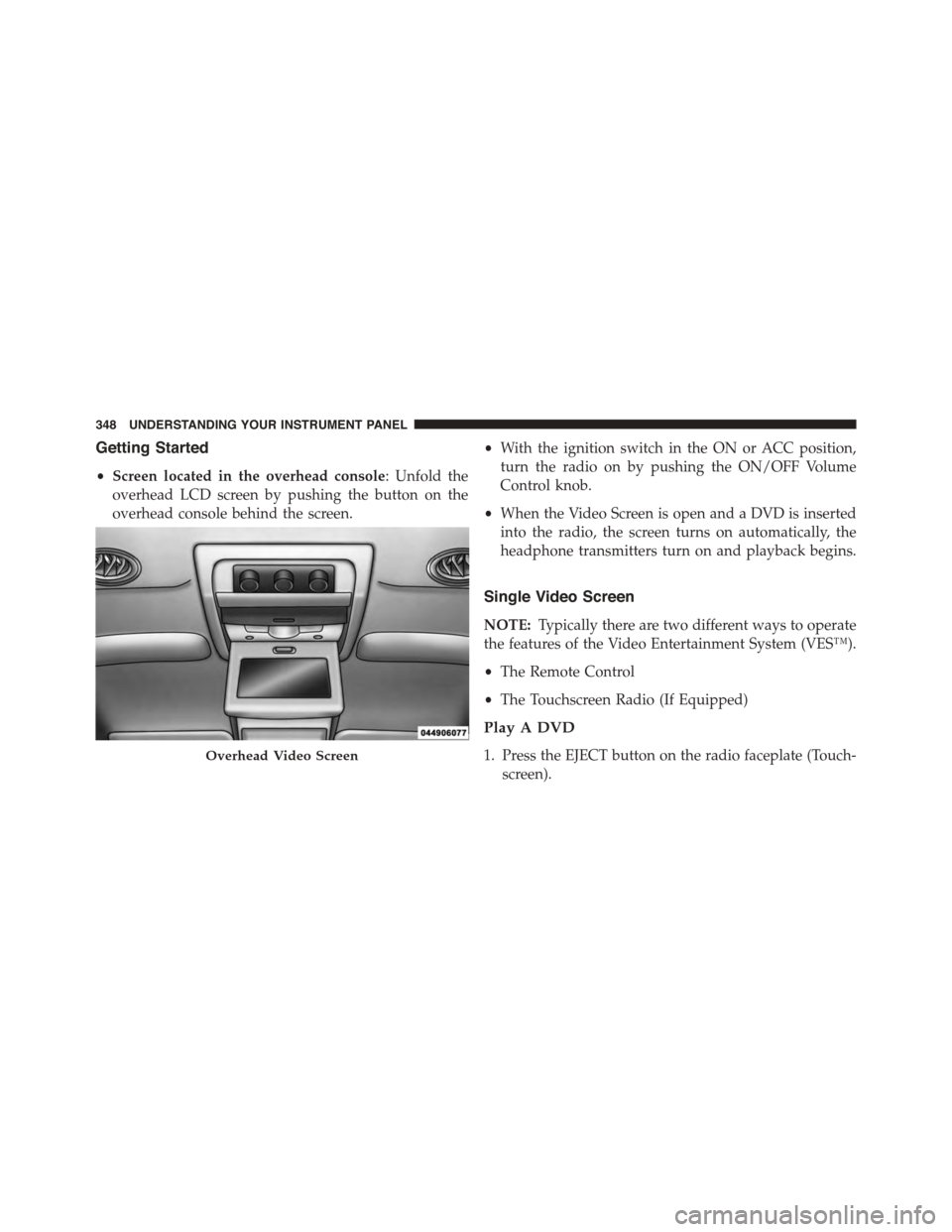
•Screen located in the overhead console: Unfold the
overhead LCD screen by pushing the button on the
overhead console behind the screen.
•With the ignition switch in the ON or ACC position,
turn the radio on by pushing the ON/OFF Volume
Control knob.
•When the Video Screen is open and a DVD is inserted
into the radio, the screen turns on automatically, the
headphone transmitters turn on and playback begins.
Single Video Screen
NOTE:Typically there are two different ways to operate
the features of the Video Entertainment System (VES™).
•The Remote Control
•The Touchscreen Radio (If Equipped)
Play A DVD
1. Press the EJECT button on the radio faceplate (Touch-
screen).
Overhead Video Screen
348 UNDERSTANDING YOUR INSTRUMENT PANEL
Page 351 of 648
2. Insert the DVD with the label facing up. The radio
automatically selects the appropriate mode after the
disc is recognized and displays the menu screen or
starts playing the first track.
3. Ensure the VES™ Remote Control and the Headphone
switch is on Channel 1.
Using The Remote Control
1. Push the MODE button on the Remote Control.
2. While looking at the video screen, highlight DISC by
either pushing Up/Down/Left/Right buttons or by
repeatedly pushing the MODE button, then push
ENTER on the Remote Control.
NOTE:The VES™ system will retain the last setting
when turned off.
Play Video Games
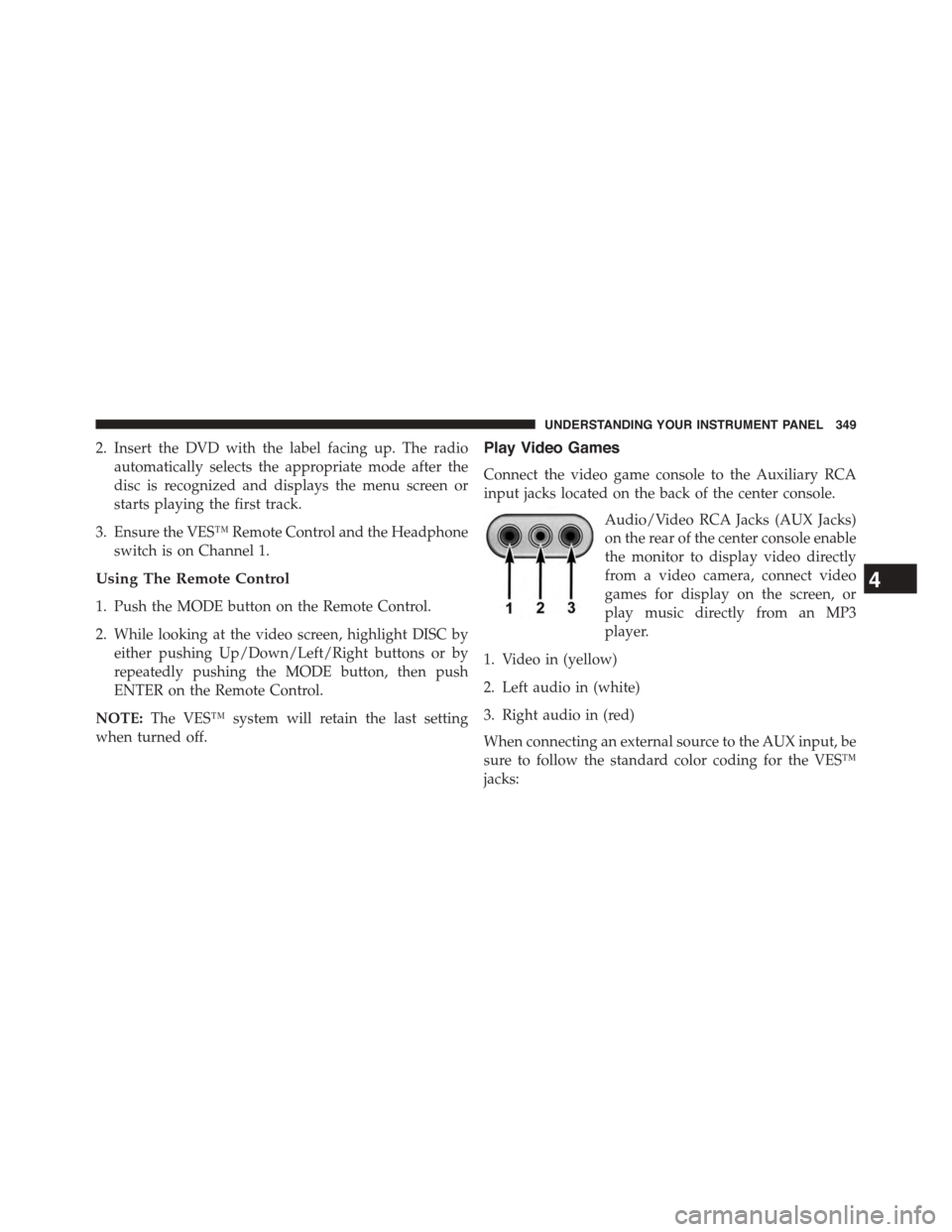
Connect the video game console to the Auxiliary RCA
input jacks located on the back of the center console.
Audio/Video RCA Jacks (AUX Jacks)
on the rear of the center console enable
the monitor to display video directly
from a video camera, connect video
games for display on the screen, or
play music directly from an MP3
player.
1. Video in (yellow)
2. Left audio in (white)
3. Right audio in (red)
When connecting an external source to the AUX input, be
sure to follow the standard color coding for the VES™
jacks:
4
UNDERSTANDING YOUR INSTRUMENT PANEL 349
Page 352 of 648
NOTE:Certain high-end video games, such as Playsta-
tion3 and XBox360 will exceed the power limit of the
vehicle’s Power Inverter. Refer to the Power Inverter
section in your vehicle’s Owner’s Manual for more
information.
Ensure the remote control channel selector switch and
Headphone switch (IR channel) are the same number.
Using The Remote Control
1. Push the MODE button on the Remote Control.
2. While looking at the video screen, highlight VES AUX
2, by either pushing Up/Down/Left/Right buttons or
by repeatedly pushing the MODE button, then push
ENTER on the Remote Control.
Using The Touchscreen Radio Controls
1. Press the “MORE” button on the touchscreen.
2. Press the “Rear Entertainment” button on the touch-
screen to display the Rear Entertainment Controls.
3. If the Rear Entertainment is turned off, press the
“Power” button on the touchscreen.
4. Press the “1” or “2” button on the touchscreen for the
channel desired and press the “Source” button on the
touchscreen to select the desired mode.
Listen To An Audio Source On Channel 2 While A
Video Is Playing On Channel 1
Ensure the Remote Control and Headphone switch is on
Channel 2.
Using The Remote Control
1. Push the MODE button on the Remote Control and the
Mode Select Screen will display, unless a video is
playing then only a small banner will appear on the
bottom of the screen.
350 UNDERSTANDING YOUR INSTRUMENT PANEL
Page 353 of 648
2. While looking at the video screen, either press Up/
Down/Left/Right on the Remote Control to highlight
the desired audio source or repeatedly push the
MODE button on the remote until the desired audio
source appears on the screen.
Using The Touchscreen Radio Controls
1. Press the “MORE” button on the touchscreen.
2. Press the “Rear Entertainment” button on the touch-
screen to display the Rear Entertainment Controls.
3. If the Rear Entertainment is turned off, press the
“Power” button on the touchscreen.
4. Press the “1” or “2” button on the touchscreen for the
channel desired and press the “Source” button on the
touchscreen to select the desired mode.
Important Notes For Single Video Screen System
•VES™ is able to transmit two channels of stereo audio
simultaneously.
•In split screen mode the left side equates to Channel 1
and right side equates to Channel 2.
•If a video source is selected on Channel 1, then
Channel 2 is for audio only.
•When selecting a video source on Channel 1, the video
will display on the screen and the audio will be heard
on Channel 1 in the headphones.
•Audio can be heard through the headphones even
when the Video Screen is closed.
4
UNDERSTANDING YOUR INSTRUMENT PANEL 351