mirror DODGE JOURNEY 2016 1.G User Guide
[x] Cancel search | Manufacturer: DODGE, Model Year: 2016, Model line: JOURNEY, Model: DODGE JOURNEY 2016 1.GPages: 664
Page 175 of 664
Advanced Phone Connectivity
Transfer Call To And From Mobile Phone
The Uconnect Phone allows ongoing calls to be trans-
ferred from your mobile phone to the Uconnect Phone
without terminating the call. To transfer an ongoing call
from your connected mobile phone to the Uconnect
Phone or vice versa, press the “Transfer” button on the
Phone main screen.
Connect Or Disconnect Link Between The
Uconnect Phone And Mobile Phone
If you would like to connect or disconnect the Bluetooth
connection between a Uconnect Phone paired mobile
phone and the Uconnect Phone, follow the instructions
described in your mobile phone User’s Manual.
Things You Should Know About Your Uconnect
Phone
Voice Command
For the best performance:
•Adjust the rearview mirror to provide at least ½ inch
(1 cm) gap between the overhead console (if equipped)
and the mirror.
• Always wait for the beep before speaking.
• Speak normally, without pausing, just as you would
speak to a person sitting a few feet/meters away from
you.
• Ensure that no one other than you is speaking during
a voice command period.3
UNDERSTANDING THE FEATURES OF YOUR VEHICLE 173
Page 254 of 664
WARNING!
Drivers must be careful when backing up even when
using the ParkView Rear Back Up Camera. Always
check carefully behind your vehicle, and be sure to
check for pedestrians, animals, other vehicles, ob-
structions, or blind spots before backing up. You are
responsible for the safety of your surroundings and
must continue to pay attention while backing up.
Failure to do so can result in serious injury or death.
CAUTION!
•To avoid vehicle damage, ParkView should only be
used as a parking aid. The ParkView camera is
unable to view every obstacle or object in your
drive path.
(Continued)
CAUTION! (Continued)
•To avoid vehicle damage, the vehicle must be
driven slowly when using ParkView to be able to
stop in time when an obstacle is seen. It is recom-
mended that the driver look frequently over his/her
shoulder when using ParkView.
NOTE: If snow, ice, mud, or any foreign substance builds
up on the camera lens, clean the lens, rinse with water,
and dry with a soft cloth. Do not cover the lens.
OVERHEAD CONSOLE
The overhead console contains courtesy/reading lights,
storage for sunglasses, an interior observation mirror and
an optional power sunroof switch.
252 UNDERSTANDING THE FEATURES OF YOUR VEHICLE
Page 256 of 664
Sunglasses Storage
To access the storage compartment, push on the raised
bars on the compartment door in the center of the console
and release and the door will swing downward.
Interior Observation Mirror
The convex interior observation mirror provides the
driver and front seat passenger a wide field of view to
conveniently view passengers sitting in the rear passen-
ger seats. To use the interior observation mirror, push on
the raised bars on the compartment door and release (the
door will swing downward), then raise the door until it is
almost closed and release. The door will latch in position
to use the interior observation mirror.
NOTE:From the “observation mirror” position, the door
can only be closed.
To return to the full open position, the door must first be
closed and then opened by pushing the latch again to
release.
Sunglasses Storage Compartment
254 UNDERSTANDING THE FEATURES OF YOUR VEHICLE
Page 257 of 664
Power Sunroof Switch — If Equipped
Refer to “Power Sunroof” in “Understanding the Fea-
tures Of Your Vehicle” for further information.
GARAGE DOOR OPENER — IF EQUIPPED
HomeLink replaces up to three remote controls (hand-
held transmitters) that operate devices such as garage
door openers, motorized gates, lighting or home security
systems. The HomeLink unit operates off your vehicle’s
battery.
The HomeLink buttons, located on either the overhead
console, headliner or sunvisor, designate the three differ-
ent HomeLink channels. The HomeLink indicator is
located above the center button.
Observation Mirror
3
UNDERSTANDING THE FEATURES OF YOUR VEHICLE 255
Page 292 of 664
CAUTION!(Continued)
the blade cannot return to the park position, dam-
age to the rear wiper motor may occur.
Rear Window Defroster
The rear window defroster button is located on
the climate control panel. Push this button to turn
on the rear window defroster and the heated outside
mirrors (if equipped). An indicator in the button will
illuminate when the rear window defroster is on. The
rear window defroster automatically turns off after ap-
proximately 10 minutes.
NOTE: To prevent excessive battery drain, use the rear
window defroster only when the engine is operating.
CAUTION!
Failure to follow these cautions can cause damage to
the heating elements:
• Use care when washing the inside of the rear
window. Do not use abrasive window cleaners on
the interior surface of the window. Use a soft cloth
and a mild washing solution, wiping parallel to the
heating elements. Labels can be peeled off after
soaking with warm water.
• Do not use scrapers, sharp instruments, or abrasive
window cleaners on the interior surface of the
window.
• Keep all objects a safe distance from the window.
ROOF LUGGAGE RACK — IF EQUIPPED
The roof rack cross rails and side rails are designed to
carry cargo weight. The load must not exceed 150 lbs
(68 kg), and it should be distributed uniformly over the
290 UNDERSTANDING THE FEATURES OF YOUR VEHICLE
Page 393 of 664
Button Descriptions (Applies To Both Buttons On The
Faceplate And Buttons On The Touchscreen)
1. MAX A/C Button
Press and release to change the current setting, the
indicator illuminates when A/C is ON. Performing this
function again will cause the MAX A/C operation to
switch into manual mode and the MAX A/C indicator
will turn off.
2. A/C Button
Press and release to change the current setting, the
indicator illuminates when A/C is ON. Performing this
function again will cause the A/C operation to switch
into manual mode and the A/C indicator will turn off.
3. Recirculation Button
Push this button to choose between outside air intake or
recirculation of the air inside the vehicle. An indicator
light will illuminate when you are in Recirculation mode.4. Front Defrost Button
Press and release to change the current airflow setting to
Defrost mode. The indicator illuminates when this fea-
ture is ON. Air comes from the windshield and side
window demist outlets. When the defrost button is
selected, the blower level will increase. Use Defrost mode
with maximum temperature settings for best windshield
and side window defrosting and defogging. Performing
this function will cause the ATC to switch into manual
mode. If the front defrost mode is turned off the climate
system will return the previous setting.
5. Rear Defrost Button
Press and release this button to turn on the rear window
defroster and the heated outside mirrors (if equipped).
An indicator will illuminate when the rear window
defroster is on. The rear window defroster automatically
turns off after 10 minutes.
4
UNDERSTANDING YOUR INSTRUMENT PANEL 391
Page 407 of 664
6. Rear Defrost Button
Press and release this button to turn on the rear window
defroster and the heated outside mirrors (if equipped).
An indicator will illuminate when the rear window
defroster is on. The rear window defroster automatically
turns off after 10 minutes.
CAUTION!
Failure to follow these cautions can cause damage to
the heating elements:
•Use care when washing the inside of the rear
window. Do not use abrasive window cleaners on
the interior surface of the window. Use a soft cloth
and a mild washing solution, wiping parallel to the
heating elements. Labels can be peeled off after
soaking with warm water.
(Continued)
CAUTION!
(Continued)
•Do not use scrapers, sharp instruments, or abrasive
window cleaners on the interior surface of the
window.
• Keep all objects a safe distance from the window.
7. Rear Climate Button — If Equipped
Press and release this button to turn on the rear climate
controls. The indicator will illuminate when the rear
climate controls are ON. Performing this function again
will turn OFF the rear climate controls.
8. Passenger Temperature Control Up Button (Uconnect
8.4)
Provides the passenger with independent temperature
control. Push the button for warmer temperature set-
tings.
4
UNDERSTANDING YOUR INSTRUMENT PANEL 405
Page 426 of 664
STARTING PROCEDURES
Before starting your vehicle, adjust your seat, adjust the
inside and outside mirrors, fasten your seat belt, and if
present, instruct all other occupants to buckle their seat
belts.
WARNING!
•Before exiting a vehicle, always apply the parking
brake, shift the automatic transmission into PARK
or the manual transmission into REVERSE. Always
make sure the keyless ignition node is in the “OFF”
mode, remove the Key Fob from the vehicle and
lock the vehicle.
• Never leave children alone in a vehicle, or with
access to an unlocked vehicle. Leaving children in
a vehicle unattended is dangerous for a number of
reasons. A child or others could be seriously or
(Continued)
WARNING! (Continued)
fatally injured. Children should be warned not to
touch the parking brake, brake pedal or the gear
selector.
• Do not leave the Key Fob in or near the vehicle (or
in a location accessible to children), and do not
leave the ignition of a vehicle equipped with
Keyless Enter-N-Go in the ACC or ON/RUN mode.
A child could operate power windows, other con-
trols, or move the vehicle.
Automatic Transmission
The shift lever must be in the NEUTRAL or PARK
position before you can start the engine. Apply the brakes
before shifting into any driving gear.
424 STARTING AND OPERATING
Page 600 of 664
cleaner. Use caution when cleaning the inside rear win-
dow equipped with electric defrosters or windows
equipped with radio antennas. Do not use scrapers or
other sharp instrument that may scratch the elements.
When cleaning the rear view mirror, spray cleaner on the
towel or cloth that you are using. Do not spray cleaner
directly on the mirror.
Cleaning Plastic Instrument Cluster Lenses
The lenses in front of the instruments in this vehicle are
molded in clear plastic. When cleaning the lenses, care
must be taken to avoid scratching the plastic.
1. Clean with a wet soft cloth. A mild soap solution maybe used, but do not use high alcohol content or
abrasive cleaners. If soap is used, wipe clean with a
clean damp cloth.
2. Dry with a soft cloth.
Seat Belt Maintenance
Do not bleach, dye, or clean the belts with chemical
solvents or abrasive cleaners. This will weaken the fabric.
Sun damage can also weaken the fabric.
If the belts need cleaning, use MOPAR Total Clean, a mild
soap solution, or lukewarm water. Do not remove the
belts from the vehicle to wash them. Dry with a soft cloth.
Replace the belts if they appear frayed or worn or if the
buckles do not work properly.
WARNING!
A frayed or torn belt could rip apart in a collision and
leave you with no protection. Inspect the belt system
periodically, checking for cuts, frays, or loose parts.
Damaged parts must be replaced immediately. Do not
(Continued)
598 MAINTAINING YOUR VEHICLE
Page 603 of 664
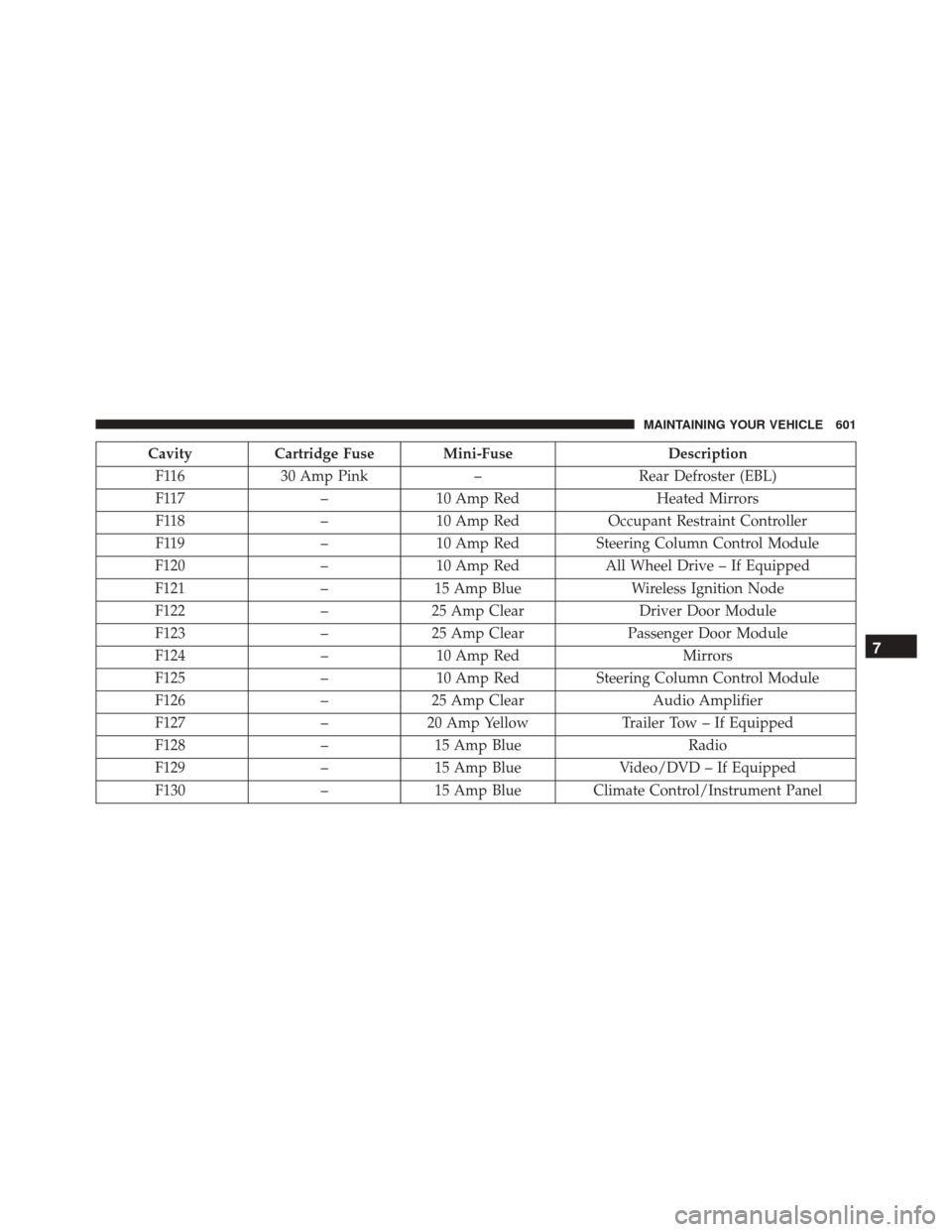
CavityCartridge Fuse Mini-Fuse Description
F116 30 Amp Pink –Rear Defroster (EBL)
F117 –10 Amp Red Heated Mirrors
F118 –10 Amp Red Occupant Restraint Controller
F119 –10 Amp Red Steering Column Control Module
F120 –10 Amp Red All Wheel Drive – If Equipped
F121 –15 Amp Blue Wireless Ignition Node
F122 –25 Amp Clear Driver Door Module
F123 –25 Amp Clear Passenger Door Module
F124 –10 Amp Red Mirrors
F125 –10 Amp Red Steering Column Control Module
F126 –25 Amp Clear Audio Amplifier
F127 –20 Amp Yellow Trailer Tow – If Equipped
F128 –15 Amp Blue Radio
F129 –15 Amp Blue Video/DVD – If Equipped
F130 –15 Amp Blue Climate Control/Instrument Panel
7
MAINTAINING YOUR VEHICLE 601