MULTIMEDIA DODGE JOURNEY 2019 Owners Manual
[x] Cancel search | Manufacturer: DODGE, Model Year: 2019, Model line: JOURNEY, Model: DODGE JOURNEY 2019Pages: 524, PDF Size: 5.29 MB
Page 483 of 524
NOTE:
•This equipment has been tested and found to comply
with the limits for a Class B digital device, pursuant to
Part 15 of the FCC Rules. These limits are designed to
provide reasonable protection against harmful interfer-
ence in a residential installation. This equipment gener-
ates, uses and can radiate radio frequency energy and, if
not installed and used in accordance with the instruc-
tions, may cause harmful interference to radio commu-
nications. However, there is no guarantee that interfer-
ence will not occur in a particular installation.
• If this equipment does cause harmful interference to
radio or television reception, which can be determined
by turning the equipment off and on, the user is encour-
aged to try to correct the interference by one or more of
the following measures:
1. Increase the separation between the equipment and receiver.
2. Consult an authorized dealer or an experienced radio technician for help.VOICE COMMAND (UCONNECT 3/3 NAV)
Uconnect 3/3 NAV
The Uconnect Voice Command system allows
you to control your AM, FM radio, satellite radio,
disc player, SD Card, USB/iPod and SiriusXM
Travel Link.
The Uconnect Voice Command system allows you to
control your AM, FM radio, disc player, SD Card,
USB/iPod.
NOTE:
Take care to speak into the Voice Command system
as calmly and normally as possible. The ability of the Voice
Command system to recognize user voice commands may be
negatively affected by rapid speaking or a raised voice level.
WARNING!
Any voice commanded system should be used only in
safe driving conditions following all applicable laws,
including laws regarding phone use. Your attention
should be focused on safely operating the vehicle.
Failure to do so may result in a collision causing
serious injury or death.
10
MULTIMEDIA 481
Page 484 of 524
When you push the Uconnect Voice Commandbutton,
you hear a beep. The beep is your signal to give a
command.
If no command is spoken the system says one of two
responses:
• I didn’t understand
• I didn’t get that, etc.
If a command is not spoken a second time, the system will
respond with an error and give some direction as what can
be said based on the context you are in. After three
consecutive failures of a spoken command the VR session
will end.
Pushing the Uconnect Voice Command
button while
the system is speaking is known as “barging in.” The
system will be interrupted, and after the beep, you can say
a command. This becomes helpful once you start to learn
the options.
NOTE: At any time, you can say the words “Cancel” or
“Help.”
These commands are universal and can be used from any
menu. All other commands can be used depending upon
the active application. When using this system, you should speak clearly and at a
normal speaking volume.
The system best recognizes your speech if the windows are
closed, and the heater/air conditioning fan is set to low.
At any point, if the system does not recognize one of your
commands, you will be prompted to repeat it.
To hear available commands, push the Uconnect Voice
Command
button and say “Help.” You hear available
commands for the screen displayed.
Natural Speech
Natural speech allows the user to speak commands in
phrases or complete sentences. The system filters out
certain non-word utterances and sounds such as “ah” and
“eh.” The system handles fill-in words such as “I would
like to.”
The system handles multiple inputs in the same phrase or
sentence such as “make a phone call” and “to Kelly Smith.”
For multiple inputs in the same phrase or sentence, the
system identifies the topic or context and provides the
482 MULTIMEDIA
Page 485 of 524
associated follow-up prompt such as “Who do you want to
call?” in the case where a phone call was requested but the
specific name was not recognized.
The system utilizes continuous dialog; when the system
requires more information from the user it will ask a
question to which the user can respond without pressing
the Uconnect Voice Command
button.
Uconnect Voice Commands
The Uconnect Voice Command system understands two
types of commands. Universal commands are available at
all times. Local commands are available if the supported
radio mode is active.
Start a dialogue by pushing the Uconnect Voice Command
button.
Changing The Volume
1. Start a dialogue by pushing the Voice Commandbut-
ton.
2. Say a command (e.g., “Help”). 3. Use the ON/OFF VOLUME rotary knob to adjust the
volume to a comfortable level while the Voice Com-
mand system is speaking. Please note the volume set-
ting for Voice Command is different than the audio
system.
Starting Voice Recognition (VR) Session In
Radio/Player Modes
In this mode, you can say the following commands:
NOTE: The commands can be said on any screen when a
call is not active after pushing the Uconnect Voice Com-
mand
button.
Source
To switch to the audio source, say “Change source to Disc”
for example. This command can be given in any mode or
screen:
• “Track” (#) (to change the track)
10
MULTIMEDIA 483
Page 486 of 524
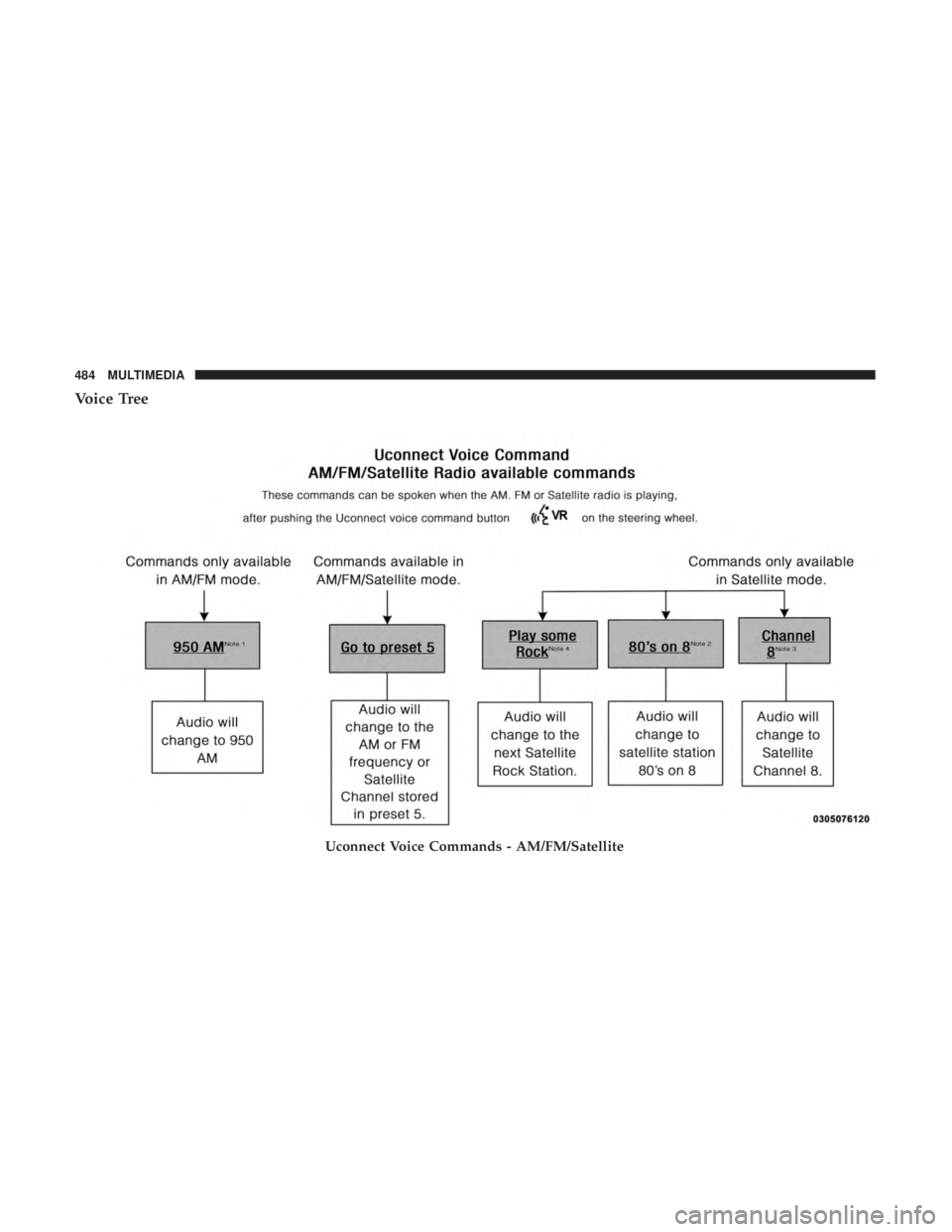
Voice Tree
Uconnect Voice Commands - AM/FM/Satellite
484 MULTIMEDIA
Page 487 of 524
NOTE:
•You can replace “950 AM” with any other AM or FM
frequency, such as “98.7 FM.”
• You can replace “80’s on 8” with any other station name
received by the radio.
• You can replace “8” with any other channel number
received by the radio. •
You can replace “rock” with any of the music types.
• Available Voice Commands are shown in bold face and
shaded grey.
10
MULTIMEDIA 485
Page 488 of 524
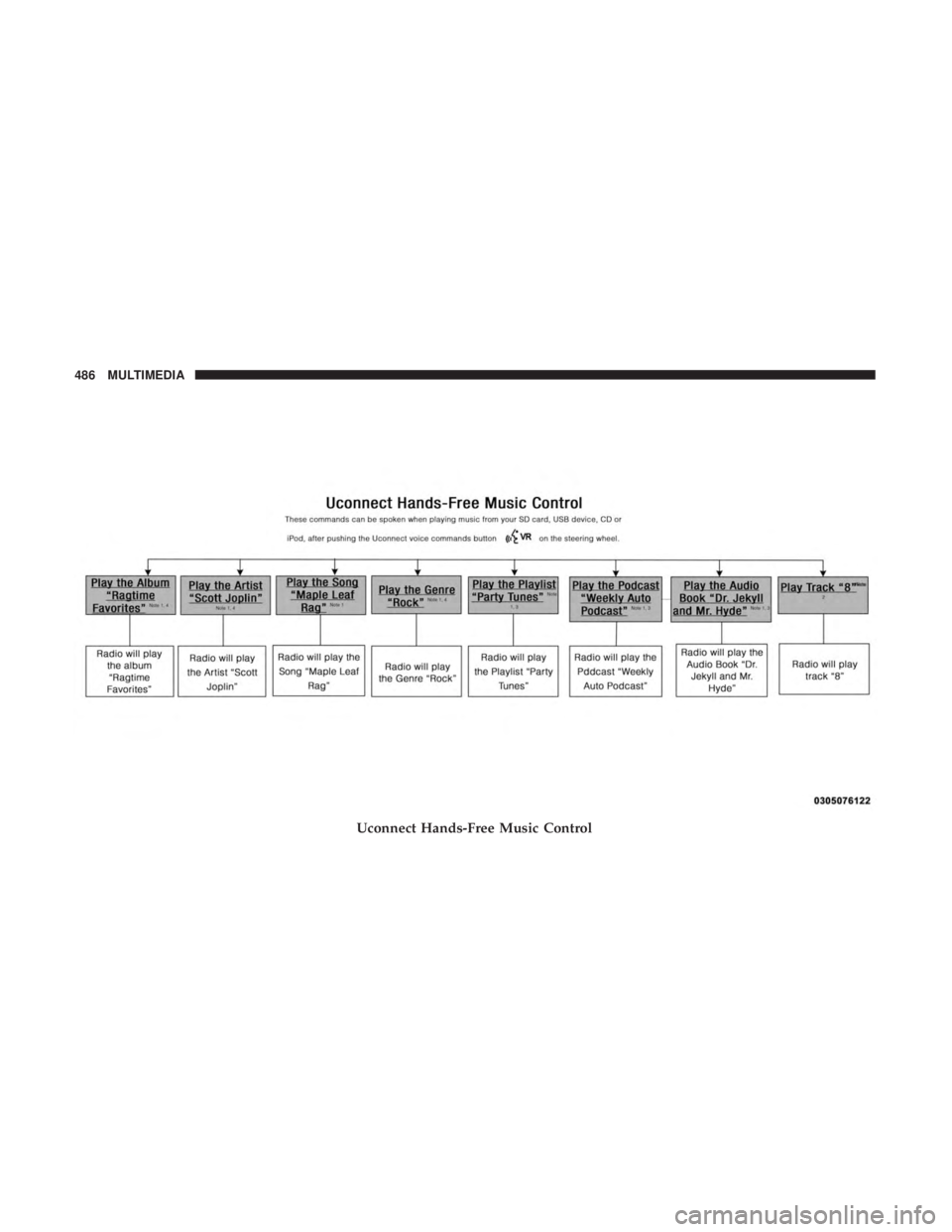
Uconnect Hands-Free Music Control
486 MULTIMEDIA
Page 489 of 524
NOTE:
•You can replace the album, artist, song, genre, playlist,
podcast and audio book names with any corresponding
names on the current device that is playing.
• You can replace “8” with any track on the CD that is
currently playing. Command is only available when CD
is playing.
• Playlist, Podcast and audio book commands are only
available when the iPod is connected and playing. •
VR commands, Albums, Artists, and Genre names are
based on the music metadata contained on the loaded/
connected device.
• Available Voice Commands are shown in bold face and
shaded grey.
10
MULTIMEDIA 487
Page 490 of 524
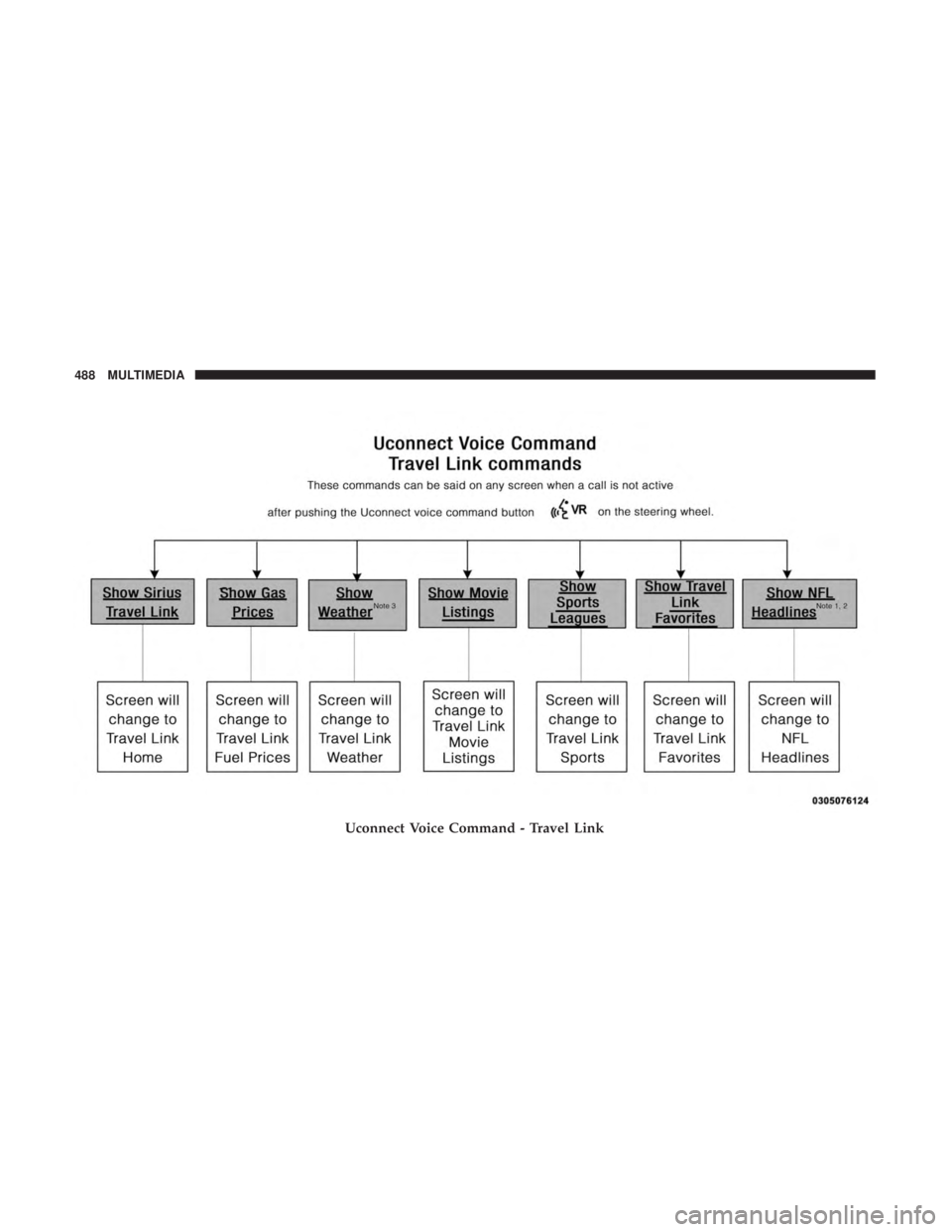
Uconnect Voice Command - Travel Link
488 MULTIMEDIA
Page 491 of 524

NOTE:
•You can replace “NFL” with any league shown on the
sports league screen. For example you can say “Show
MLB headlines” or “Show PGA headlines.”
• You can replace “Headlines” with any menu items
shown on a league screen. For example you can say
“Show NFL Schedule and results” or “Show NCAA
Basketball AP top 25” or “Show Major League Baseball
Teams.” •
You can also say “Show Current Weather” or “Show
extended weather” or “Show five day forecast” or
“Show ski info” to get other forecasts.
• Available Voice Commands are shown in bold face and
shaded grey.
10
MULTIMEDIA 489
Page 492 of 524

Uconnect Voice Command - Non-Phone
490 MULTIMEDIA