alarm DODGE JOURNEY 2019 User Guide
[x] Cancel search | Manufacturer: DODGE, Model Year: 2019, Model line: JOURNEY, Model: DODGE JOURNEY 2019Pages: 524, PDF Size: 5.29 MB
Page 35 of 524
To change the current setting, refer to “Uconnect Settings”
in “Multimedia” for further information.
NOTE:Use the Automatic Unlock Doors On Exit feature
in accordance with local laws.
Keyless Enter-N-Go — Passive Entry (If Equipped)
The Passive Entry system is an enhancement to the vehi-
cle’s Remote Keyless Entry (RKE) system and a feature of
Keyless Enter-N-Go. This feature allows you to lock and
unlock the vehicle’s door(s) without having to push the key
fob lock or unlock buttons.
NOTE:
• Passive Entry may be programmed ON/OFF; refer to
“Uconnect Settings” in “Multimedia” for further infor-
mation.
• If wearing gloves on your hands, or if it has been
raining/snowing on the Passive Entry door handle, the
unlock sensitivity can be affected, resulting in a slower
response time.
• If the vehicle is unlocked by Passive Entry and no door
is opened within 60 seconds, the vehicle will re-lock and
if equipped will arm the security alarm. •
The key fob may not be detected by the vehicle passive
entry system if it is located next to a mobile phone,
laptop, or other electronic device; these devices may
interfere with the key fob’s wireless signal and prevent
the passive entry system from locking/unlocking the
vehicle.
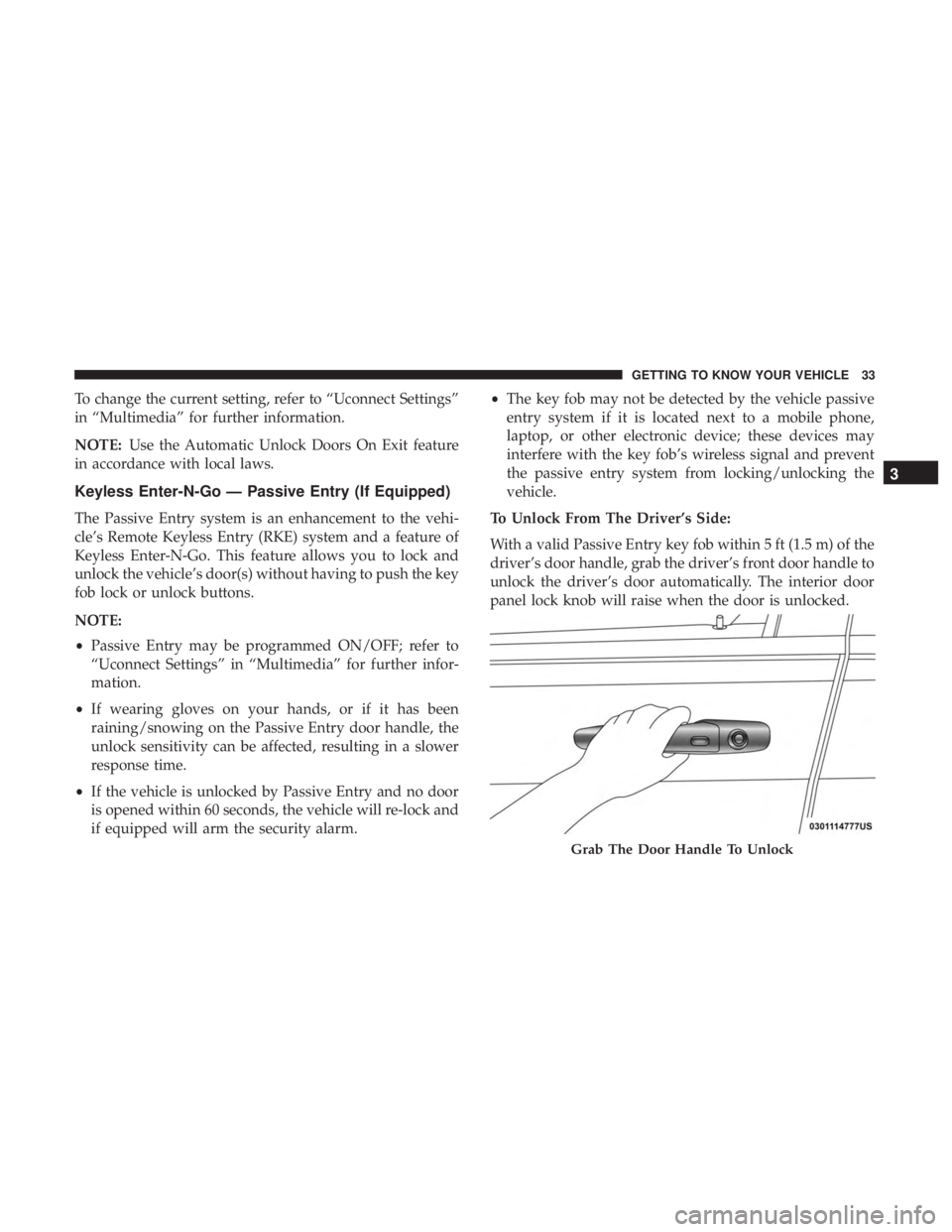
To Unlock From The Driver’s Side:
With a valid Passive Entry key fob within 5 ft (1.5 m) of the
driver’s door handle, grab the driver’s front door handle to
unlock the driver’s door automatically. The interior door
panel lock knob will raise when the door is unlocked.
Grab The Door Handle To Unlock
3
GETTING TO KNOW YOUR VEHICLE 33
Page 116 of 524
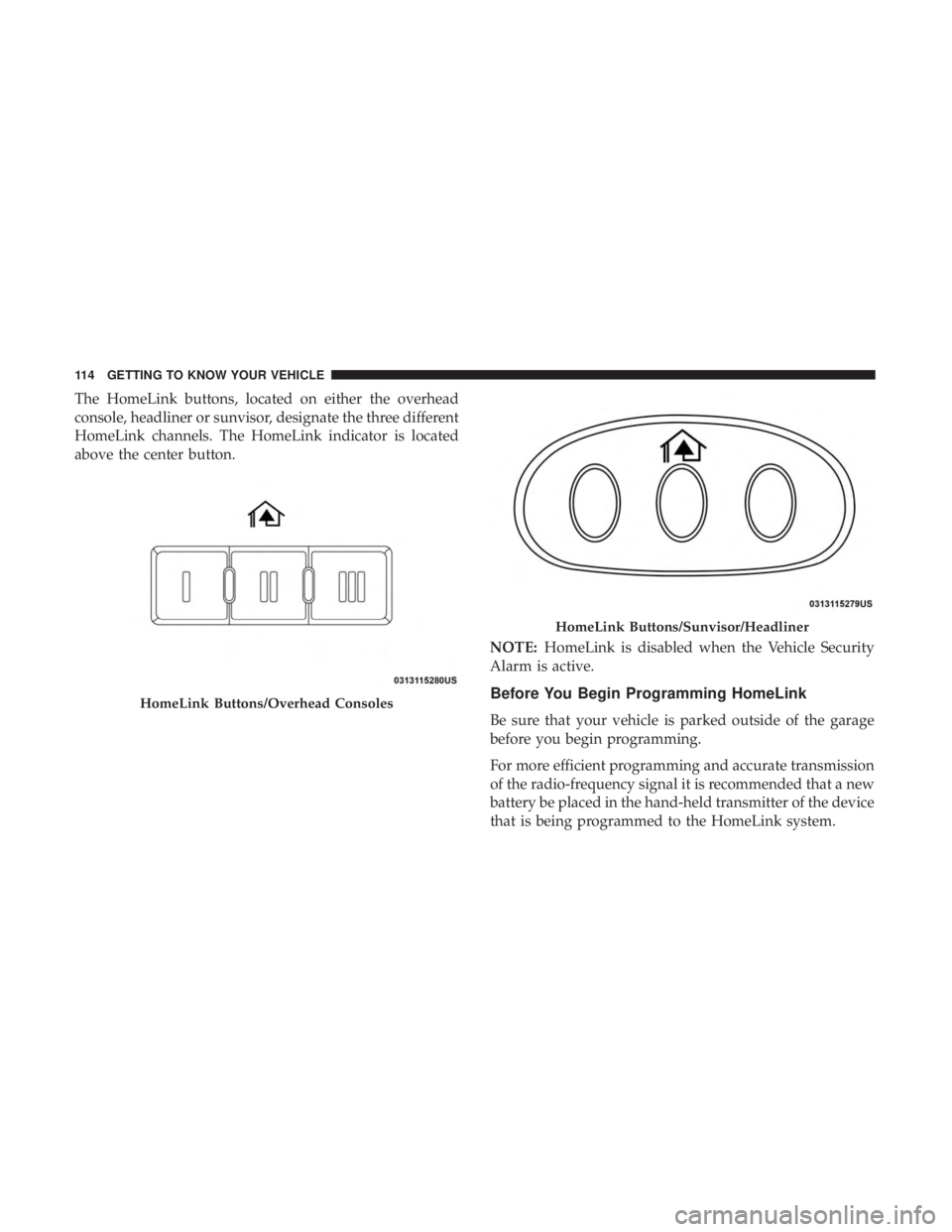
The HomeLink buttons, located on either the overhead
console, headliner or sunvisor, designate the three different
HomeLink channels. The HomeLink indicator is located
above the center button.NOTE:HomeLink is disabled when the Vehicle Security
Alarm is active.
Before You Begin Programming HomeLink
Be sure that your vehicle is parked outside of the garage
before you begin programming.
For more efficient programming and accurate transmission
of the radio-frequency signal it is recommended that a new
battery be placed in the hand-held transmitter of the device
that is being programmed to the HomeLink system.
HomeLink Buttons/Overhead Consoles
HomeLink Buttons/Sunvisor/Headliner
114 GETTING TO KNOW YOUR VEHICLE
Page 120 of 524
4. Watch for the HomeLink indicator to change flash rates.When it changes, it is programmed. It may take up to 30
seconds or longer in rare cases. The garage door may
open and close while you are programming.
5. Push and hold the programmed HomeLink button and observe the indicator light.
NOTE: •If the indicator light stays on constantly, programming
is complete and the garage door/device should acti-
vate when the HomeLink button is pushed.
• To program the two remaining HomeLink buttons,
repeat each step for each remaining button. DO NOT
erase the channels.
If you unplugged the garage door opener/device for
programming, plug it back in at this time.
Using HomeLink
To operate, push and release the programmed HomeLink
button. Activation will now occur for the programmed
device (i.e. garage door opener, gate operator, security
system, entry door lock, home/office lighting, etc.) The
hand-held transmitter of the device may also be used at
any time.
Security
It is advised to erase all channels before you sell or turn in
your vehicle.
To do this, push and hold the two outside buttons for 20
seconds until the red indicator flashes.
NOTE: All channels will be erased. Individual channels
cannot be erased.
The HomeLink Universal Transceiver is disabled when the
Vehicle Security Alarm is active.
Troubleshooting Tips
If you are having trouble programming HomeLink, here
are some of the most common solutions:
• Replace the battery in the Garage Door Opener hand-
held transmitter.
• Push the LEARN button on the Garage Door Opener to
complete the training for a Rolling Code.
• Did you unplug the device for programming and re-
member to plug it back in?
118 GETTING TO KNOW YOUR VEHICLE
Page 147 of 524
•Turning on all possible vehicle electrical loads (e.g.
HVAC to max settings, exterior and interior lights,
overloaded power outlets +12V, 115V AC, USB ports)
during certain driving conditions (city driving, towing,
frequent stopping, etc.).
• Installing options like additional lights, upfitter electri-
cal accessories, audio systems, alarms and similar de-
vices.
• Unusual driving cycles (short trips separated by long
parking periods).
• The vehicle was parked for an extended period of time
(weeks, months).
• The battery was recently replaced and was not charged
completely.
• The battery was discharged by an electrical load left on
when the vehicle was parked.
• The battery was used for an extended period with the
engine not running to supply radio, lights, chargers,
+12V portable appliances like vacuum cleaners, game
consoles and similar devices. What to do when an electrical load reduction action
message is present (“Battery Saver On” or “Battery Saver
Mode”)
During a trip:
•
Reduce power to unnecessary loads if possible:
– Turn off redundant lights (interior or exterior)
– Check what may be plugged in to power outlets +12V, 115V AC, USB ports
– Check HVAC settings (blower, temperature)
– Check the audio settings (volume)
After a trip:
• Check if any aftermarket equipment was installed (ad-
ditional lights, upfitter electrical accessories, audio sys-
tems, alarms) and review specifications if any (load and
Ignition Off Draw currents).
• Evaluate the latest driving cycles (distance, driving time
and parking time).
• The vehicle should have service performed if the mes-
sage is still present during consecutive trips, and if the
evaluation and driving pattern of the vehicle did not
help to identify the cause.
4
GETTING TO KNOW YOUR INSTRUMENT PANEL 145
Page 149 of 524
been corrected. If the problem is related to the brake
booster, the ABS pump will run when applying the brake,
and a brake pedal pulsation may be felt during each stop.
The dual brake system provides a reserve braking capacity
in the event of a failure to a portion of the hydraulic
system. A leak in either half of the dual brake system is
indicated by the Brake Warning Light, which will turn on
when the brake fluid level in the master cylinder has
dropped below a specified level.
The light will remain on until the cause is corrected.
NOTE:The light may flash momentarily during sharp
cornering maneuvers, which change fluid level conditions.
The vehicle should have service performed, and the brake
fluid level checked.
If brake failure is indicated, immediate repair is necessary.
WARNING!
Driving a vehicle with the red brake light on is
dangerous. Part of the brake system may have failed. It
will take longer to stop the vehicle. You could have a
collision. Have the vehicle checked immediately. Vehicles equipped with the Anti-Lock Brake System (ABS)
are also equipped with Electronic Brake Force Distribution
(EBD). In the event of an EBD failure, the Brake Warning
Light will turn on along with the ABS Light. Immediate
repair to the ABS system is required.
Operation of the Brake Warning Light can be checked by
turning the ignition switch from the OFF position to the
ON/RUN position. The light should illuminate for ap-
proximately two seconds. The light should then turn off
unless the parking brake is applied or a brake fault is
detected. If the light does not illuminate, have the light
inspected by an authorized dealer.
The light also will turn on when the parking brake is
applied with the ignition switch in the ON/RUN position.
NOTE:
This light shows only that the parking brake is
applied. It does not show the degree of brake application.
— Vehicle Security Warning Light — If Equipped
This light will flash at a fast rate for approximately 15
seconds when the vehicle security alarm is arming, and
then will flash slowly until the vehicle is disarmed.
4
GETTING TO KNOW YOUR INSTRUMENT PANEL 147
Page 194 of 524
WARNING!(Continued)
•Relying on the air bags alone could lead to more
severe injuries in a collision. The air bags work with
your seat belt to restrain you properly. In some
collisions, air bags won’t deploy at all. Always wear
your seat belts even though you have air bags.
Front Air Bag Operation
Front Air Bags are designed to provide additional protec-
tion by supplementing the seat belts. Front air bags are not
expected to reduce the risk of injury in rear, side, or
rollover collisions. The front air bags will not deploy in all
frontal collisions, including some that may produce sub-
stantial vehicle damage — for example, some pole colli-
sions, truck underrides, and angle offset collisions.
On the other hand, depending on the type and location of
impact, front air bags may deploy in crashes with little
vehicle front-end damage but that produce a severe initial
deceleration.
Because air bag sensors measure vehicle deceleration over
time, vehicle speed and damage by themselves are not
good indicators of whether or not an air bag should have
deployed. Seat belts are necessary for your protection in all collisions,
and also are needed to help keep you in position, away
from an inflating air bag.
When the ORC detects a collision requiring the front air
bags, it signals the inflator units. A large quantity of
non-toxic gas is generated to inflate the front air bags.
The steering wheel hub trim cover and the upper passen-
ger side of the instrument panel separate and fold out of
the way as the air bags inflate to their full size. The front air
bags fully inflate in less time than it takes to blink your
eyes. The front air bags then quickly deflate while helping
to restrain the driver and front passenger.
Knee Impact Bolsters
The Knee Impact Bolsters help protect the knees of the
driver and front passenger, and position the front occu-
pants for improved interaction with the front air bags.
WARNING!
•
Do not drill, cut, or tamper with the knee impact
bolsters in any way.
• Do not mount any accessories to the knee impact
bolsters such as alarm lights, stereos, citizen band
radios, etc.
192 SAFETY
Page 504 of 524
About Your Brakes..................... .234, 373
Adding Engine Coolant (Antifreeze) .............333
Adding Fuel ............................. .257
Adding Washing Fluid ...................... .320
Additives, Fuel ........................... .375
Adjust Down .................................49
Forward ................................49
Rearward ...............................49
Up....................................49
AirBag ................................ .190
Air Bag Operation ....................... .192
Air Bag Warning Light .....................189
Driver Knee Air Bag ..................... .193
Enhanced Accident Response .............198, 309
Event Data Recorder (EDR) .................309
If Deployment Occurs .....................197
Knee Impact Bolsters ..................... .192
Maintaining Your Air Bag System .............200
Maintenance ........................... .200
Side Air Bags .......................... .193
Transporting Pets ....................... .222
Air Bag Light ...................... .146, 189, 224
Air Cleaner, Engine (Engine Air Cleaner Filter) ......324
Air Conditioner Maintenance ..................325 Air Conditioner Refrigerant
................325, 326
Air Conditioner System ..................... .325
Air Conditioning ............................98
Rear ..................................79
Air Conditioning Filter ...................... .101
Air Conditioning, Operating Tips ................99
Air Filter ............................... .324
Air Pressure Tires................................. .352
Alarm Panic ..................................19
Security Alarm....................... .29, 147
All Wheel Drive (AWD) ..................... .245
Alterations/Modifications Vehicle .................................5
Antifreeze (Engine Coolant) ................332,
381
Disposal .............................. .334
Anti-Lock Brake System (ABS) .................160
Anti-Lock Warning Light .....................153
Audio Systems (Radio) ...................... .387
Auto Down Power Windows ..................102
Automatic Climate Controls ....................86
Automatic Dimming Mirror ....................58
Automatic Door Locks ........................32
Automatic Headlights ........................64
502 INDEX
Page 510 of 524
On With Wipers..........................65
Passing ................................64
Switch .................................64
Time Delay ..............................65
Head Restraints ............................52
Heated Mirrors .............................61
Heated Seats ...............................50
Heater, Engine Block ....................... .232
High Beam/Low Beam Select (Dimmer) Switch ......64
Hitches Trailer Towing .......................... .263
Holder, Coin ............................. .122
Holder, Cup ............................. .124
HomeLink (Garage Door Opener) ...............113
Hood Prop .............................. .107
Hood Release ............................ .107
Ignition ..................................22
Switch .................................22
Immobilizer (Sentry Key) ......................27
Inside Rearview Mirror .......................58
Instrument Cluster ......................... .137
Descriptions ........................... .154
Display ........................... .138, 140
Engine Oil Reset ........................ .139Instrument Panel Lens Cleaning
................369
Interior Appearance Care .....................368
Interior Fuses ............................ .283
Interior Lights ..............................67
Intermittent Wipers (Delay Wipers) ...............70
Introduction ................................4
Inverter Power ............................... .130
iPod/USB/MP3 Control ..................... .415
Jacking Instructions ........................ .293
Jack Location ............................ .290
Jack Operation ........................ .293, 341
Jump Starting ............................ .300
Key Fob Panic Alarm .............................19
Programming Additional Key Fobs ..........21, 28
Key Fob Battery Service (Remote Keyless Entry) .....20
Key Fob Programming (Remote Keyless Entry) ......21
Key-In Reminder ............................
24
Keyless Enter-N-Go ..................... .33, 231
Passive Entry ............................33
Passive Entry Programming ..................33
Keys ....................................17
508 INDEX
Page 511 of 524
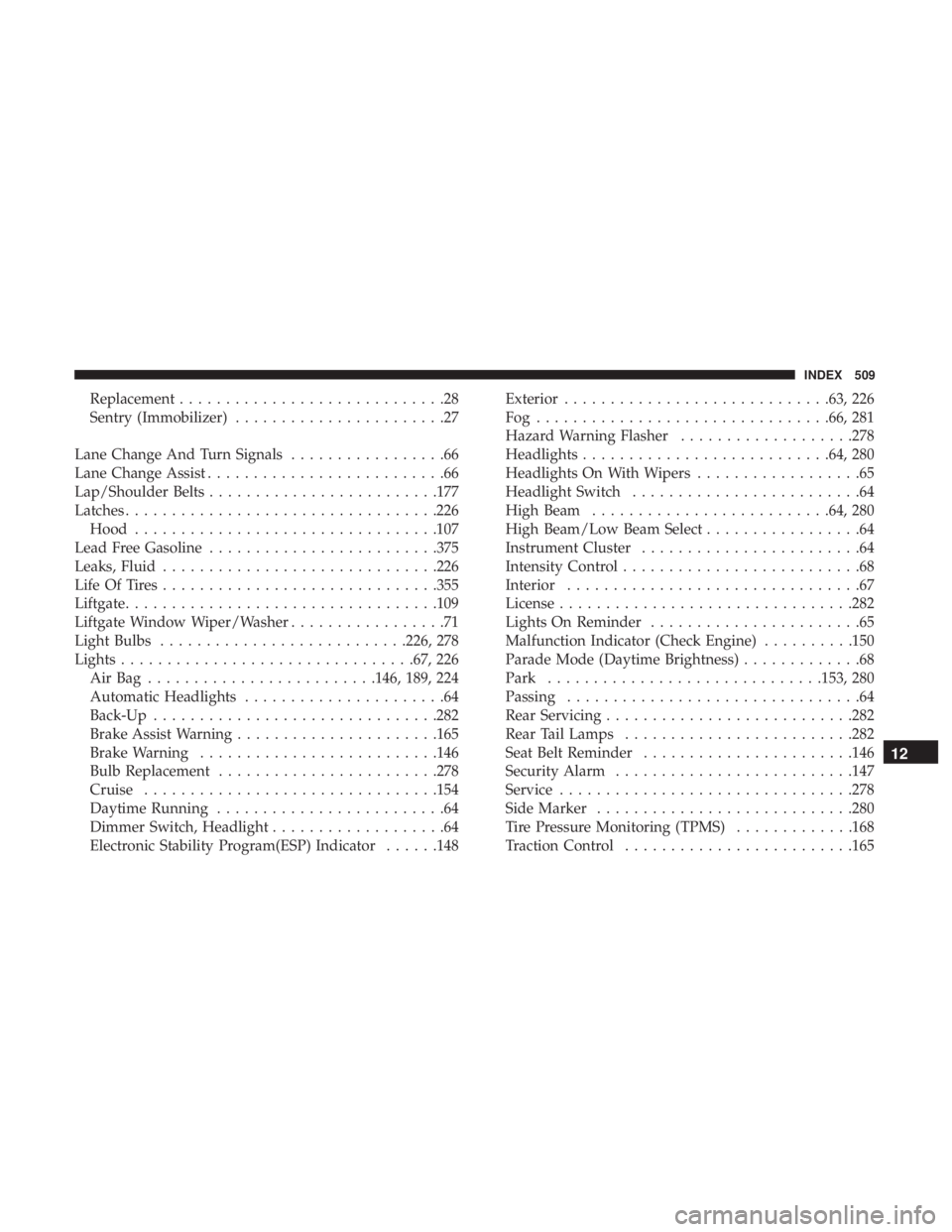
Replacement.............................28
Sentry (Immobilizer) .......................27
Lane Change And Turn Signals .................66
Lane Change Assist ..........................66
Lap/Shoulder Belts ........................ .177
Latches ................................. .226
Hood ................................ .107
Lead Free Gasoline ........................ .375
Leaks, Fluid ............................. .226
Life Of Tires ............................. .355
Liftgate ................................. .109
Liftgate Window Wiper/Washer .................71
Light Bulbs .......................... .226, 278
Lights ............................... .67, 226
AirBag .........................146, 189, 224
Automatic Headlights ......................64
Back-Up .............................. .282
Brake Assist Warning ..................... .165
Brake Warning ......................... .146
Bulb Replacement ....................... .278
Cruise ............................... .154
Daytime Running .........................64
Dimmer Switch, Headlight ...................64
Electronic Stability Program(ESP) Indicator ......148Exterior
............................ .63, 226
Fog............................... .66, 281
Hazard Warning Flasher ...................278
Headlights .......................... .64, 280
Headlights On With Wipers ..................65
Headlight Switch .........................64
High Beam ......................... .64, 280
High Beam/Low Beam Select .................64
Instrument Cluster ........................64
Intensity Control ..........................68
Interior ................................67
License ............................... .282
Lights On Reminder .......................65
Malfunction Indicator (Check Engine) ..........150
Parade Mode (Daytime Brightness) .............68
Park ............................. .153, 280
Passing ................................
64
Rear Servicing .......................... .282
Rear Tail Lamps ........................ .282
Seat Belt Reminder ...................... .146
Security Alarm ......................... .147
Service ............................... .278
Side Marker ........................... .280
Tire Pressure Monitoring (TPMS) .............168
Traction Control ........................ .165
12
INDEX 509
Page 513 of 524
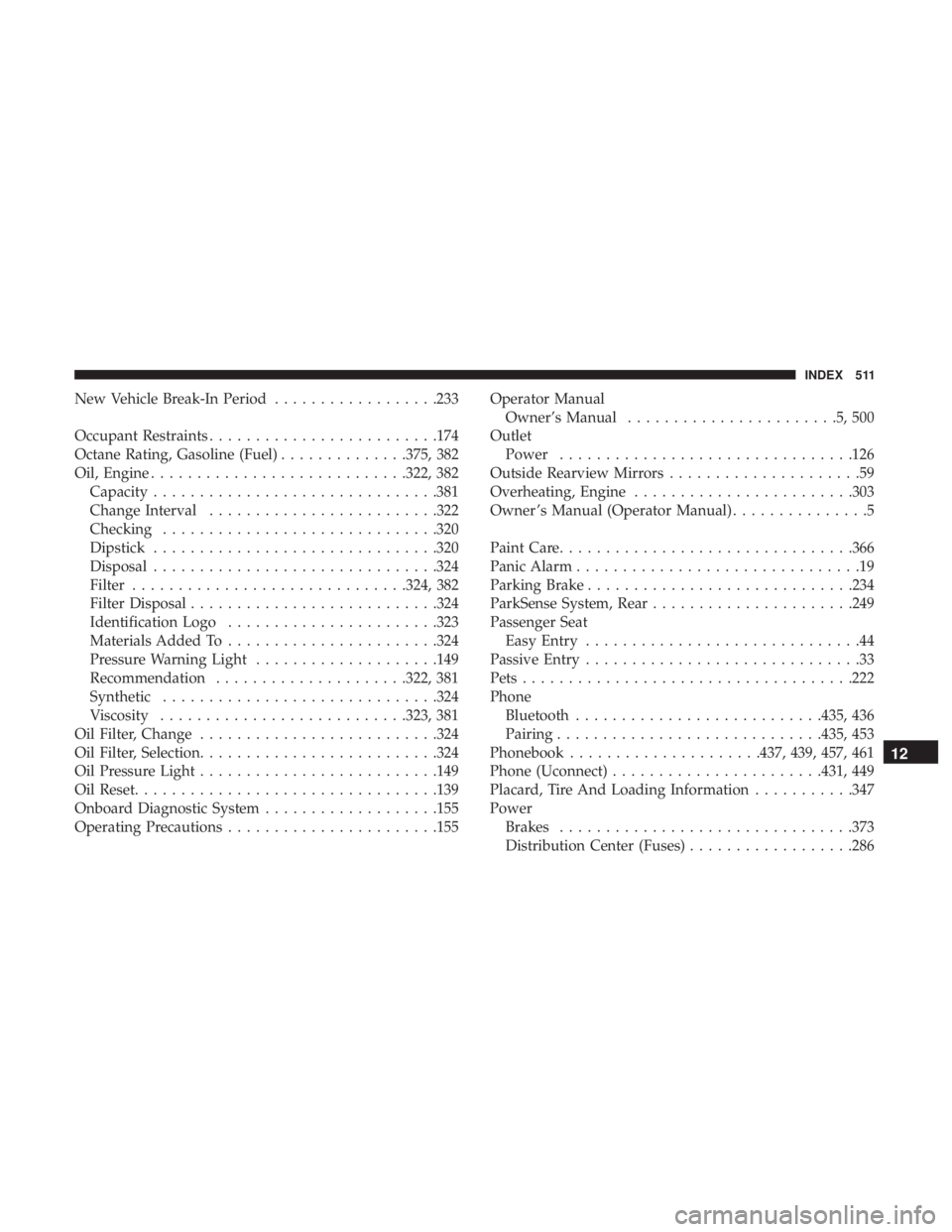
New Vehicle Break-In Period..................233
Occupant Restraints ........................ .174
Octane Rating, Gasoline (Fuel) ..............375, 382
Oil, Engine ........................... .322, 382
Capacity .............................. .381
Change Interval ........................ .322
Checking ............................. .320
Dipstick .............................. .320
Disposal .............................. .324
Filter ............................. .324, 382
Filter Disposal .......................... .324
Identification Logo ...................... .323
Materials Added To ...................... .324
Pressure Warning Light ....................149
Recommendation .....................322, 381
Synthetic ............................. .324
Viscosity .......................... .323, 381
Oil Filter, Change ......................... .324
Oil Filter, Selection ......................... .324
Oil Pressure Light ......................... .149
Oil Reset ................................ .139
Onboard Diagnostic System ...................155
Operating Precautions ...................... .155Operator Manual
Owner’s Manual .......................5,500
Outlet Power ............................... .126
Outside Rearview Mirrors .....................59
Overheating, Engine ....................... .303
Owner ’s Manual (Operator Manual) ...............5
Paint Care ............................... .366
Panic Alarm ...............................19
Parking Brake ............................ .234
ParkSense System, Rear ..................... .249
Passenger Seat Easy Entry ..............................44
Passive Entry ..............................33
Pets ................................... .222
Phone Bluetooth .......................... .435,
436
Pairing ............................ .435, 453
Phonebook .....................437, 439, 457, 461
Phone (Uconnect) ...................... .431, 449
Placard, Tire And Loading Information ...........347
Power Brakes ............................... .373
Distribution Center (Fuses) ..................286
12
INDEX 511