ECU DODGE JOURNEY 2020 User Guide
[x] Cancel search | Manufacturer: DODGE, Model Year: 2020, Model line: JOURNEY, Model: DODGE JOURNEY 2020Pages: 396, PDF Size: 25.53 MB
Page 23 of 396
GETTING TO KNOW YOUR VEHICLE 21
NOTE:
Use the Automatic Unlock Doors On Exit feature
i n
accordance with local laws.
KEYLESS ENTER-N-GO — PASSIVE
E
NTRY (IF EQUIPPED)
The Passive Entry system is an enhancement to
the vehicle’s Remote Keyless Entry (RKE)
system and a feature of Keyless Enter-N-Go.
This feature allows you to lock and unlock the
vehicle’s door(s) without having to push the key
fob lock or unlock buttons.
NOTE:
Passive Entry may be programmed on/off;
refer to “Uconnect Settings” in “Multimedia”
for further information.
If wearing gloves on your hands, or if it has
been raining/snowing on the Passive Entry
door handle, the unlock sensitivity can be
affected, resulting in a slower response time.
If the vehicle is unlocked by Passive Entry
and no door is opened within 60 seconds, the
vehicle will re-lock and if equipped will arm
the security alarm.
The key fob may not be detected by the
vehicle Passive Entry system if it is located
next to a mobile phone, laptop, or other elec -
tronic device; these devices may interfere
w i
th the key fob’s wireless signal and prevent
the Passive Entry system from locking/
unlocking the vehicle.
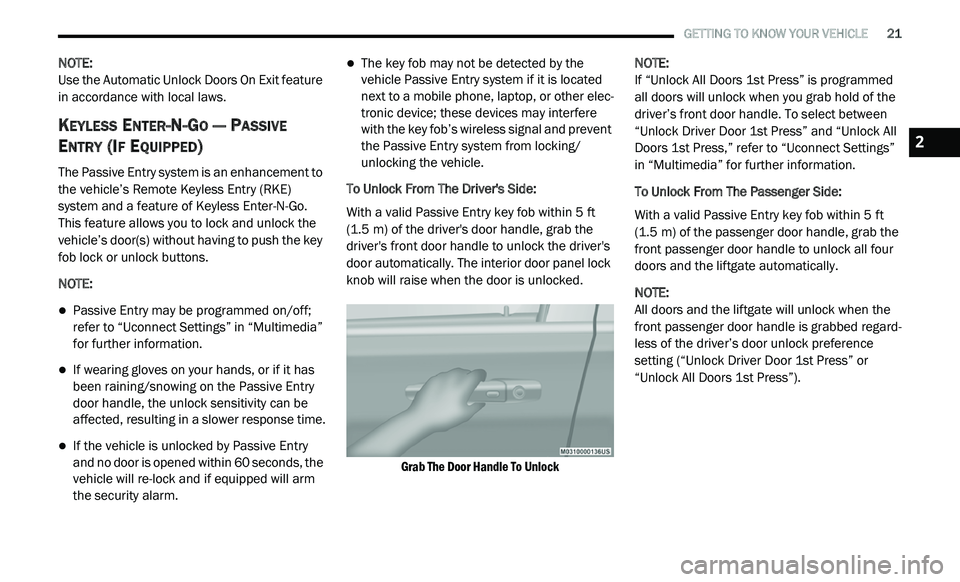
To Unlock From The Driver's Side:
With a valid Passive Entry key fob within 5 ft
( 1
.5 m) of the driver's door handle, grab the
d r
iver's front door handle to unlock the driver's
door automatically. The interior door panel lock
knob will raise when the door is unlocked.
Grab The Door Handle To Unlock
NOTE:
If “Unlock All Doors 1st Press” is programmed
a l
l doors will unlock when you grab hold of the
driver’s front door handle. To select between
“Unlock Driver Door 1st Press” and “Unlock All
Doors 1st Press,” refer to “Uconnect Settings”
in “Multimedia” for further information.
To Unlock From The Passenger Side:
With a valid Passive Entry key fob within 5 ft
( 1
.5 m) of the passenger door handle, grab the
f r
ont passenger door handle to unlock all four
doors and the liftgate automatically.
NOTE:
All doors and the liftgate will unlock when the
fr
ont passenger door handle is grabbed regard -
less of the driver’s door unlock preference
s e
tting (“Unlock Driver Door 1st Press” or
“Unlock All Doors 1st Press”).
2
Page 30 of 396
28 GETTING TO KNOW YOUR VEHICLE
Stadium Tip 'n Slide (Easy Entry/Exit Seat) —
Seven Passenger Models
This feature allows passengers to easily enter or
exit the third-row passenger seats from either
side of the vehicle.
To Move The Second-Row Passenger Seat
Fo
rward
NOTE:
Raise the seatback/armrest before moving the
s e
at to allow for full seat travel.
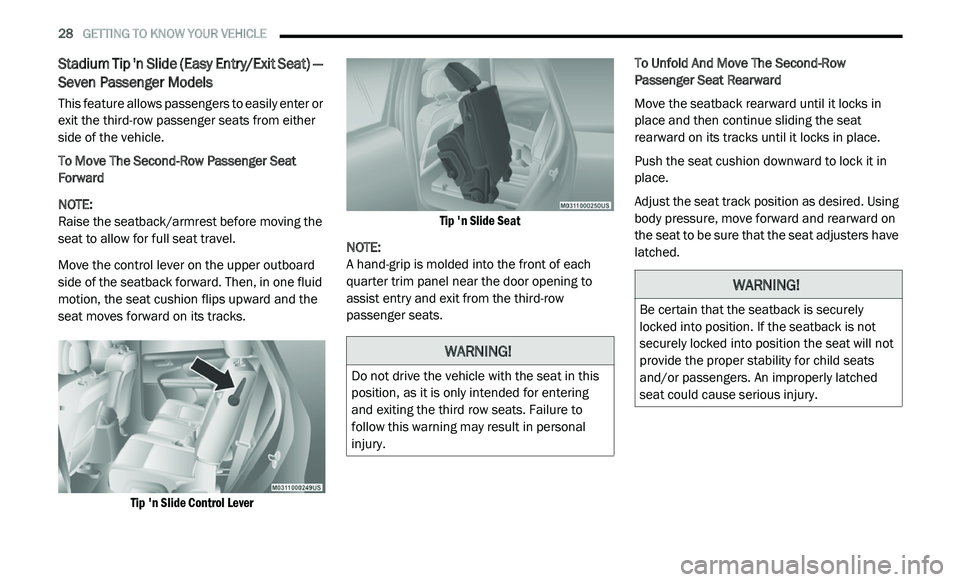
Move the control lever on the upper outboard
s i
de of the seatback forward. Then, in one fluid
motion, the seat cushion flips upward and the
seat moves forward on its tracks.
Tip 'n Slide Control Lever Tip 'n Slide Seat
NOTE:
A hand-grip is molded into the front of each
q u
arter trim panel near the door opening to
assist entry and exit from the third-row
passenger seats. To Unfold And Move The Second-Row
P
a
ssenger Seat Rearward
Move the seatback rearward until it locks in
p l
ace and then continue sliding the seat
rearward on its tracks until it locks in place.
Push the seat cushion downward to lock it in
p l
ace.
Adjust the seat track position as desired. Using
b o
dy pressure, move forward and rearward on
the seat to be sure that the seat adjusters have
latched.
WARNING!
Do not drive the vehicle with the seat in this
position, as it is only intended for entering
and exiting the third row seats. Failure to
follow this warning may result in personal
injury.
WARNING!
Be certain that the seatback is securely
locked into position. If the seatback is not
securely locked into position the seat will not
provide the proper stability for child seats
and/or passengers. An improperly latched
seat could cause serious injury.
Page 31 of 396
GETTING TO KNOW YOUR VEHICLE 29
Manual Folding Second Row Seat
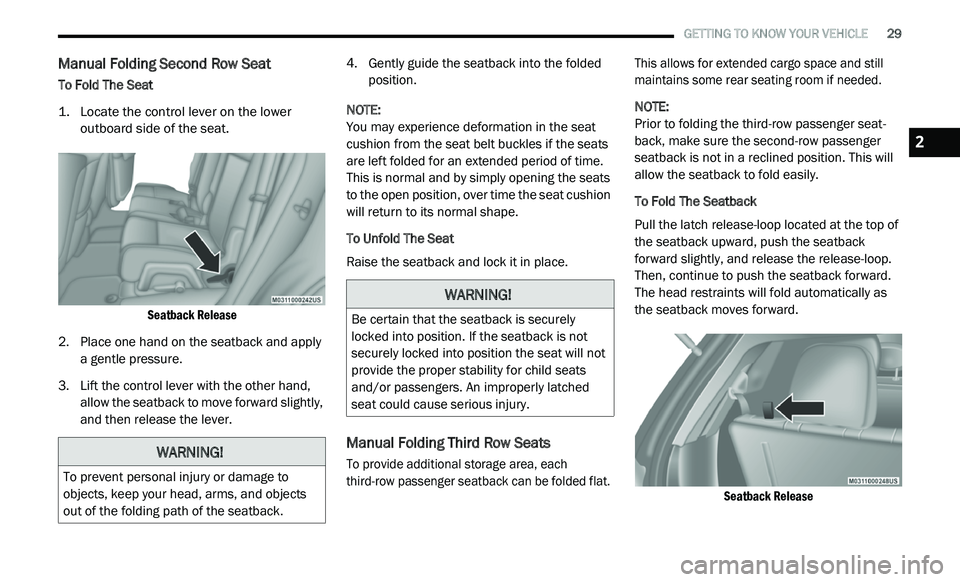
To Fold The Seat
1. L ocate the control lever on the lower
o
utboard side of the seat.
Seatback Release
2. P lace one hand on the seatback and apply
a
gentle pressure.
3. Li ft the control lever with the other hand,
a
llow the seatback to move forward slightly,
and then release the lever. 4. G
ently guide the seatback into the folded
p
osition.
NOTE:
You may experience deformation in the seat
cu
shion from the seat belt buckles if the seats
are left folded for an extended period of time.
This is normal and by simply opening the seats
to the open position, over time the seat cushion
will return to its normal shape.
To Unfold The Seat
Raise the seatback and lock it in place.
Manual Folding Third Row Seats
To provide additional storage area, each
third-row passenger seatback can be folded flat. This allows for extended cargo space and still
maintains some rear seating room if needed.
NOTE:
Prior to folding the third-row passenger seat -
back, make sure the second-row passenger
s e
atback is not in a reclined position. This will
allow the seatback to fold easily.
To Fold The Seatback
Pull the latch release-loop located at the top of
t h
e seatback upward, push the seatback
forward slightly, and release the release-loop.
Then, continue to push the seatback forward.
The head restraints will fold automatically as
the seatback moves forward.
Seatback Release
WARNING!
To prevent personal injury or damage to
objects, keep your head, arms, and objects
out of the folding path of the seatback.
WARNING!
Be certain that the seatback is securely
locked into position. If the seatback is not
securely locked into position the seat will not
provide the proper stability for child seats
and/or passengers. An improperly latched
seat could cause serious injury.
2
Page 32 of 396
30 GETTING TO KNOW YOUR VEHICLE
NOTE:
You may experience deformation in the seat
c u
shion from the seat belt buckles if the seats
are left folded for an extended period of time.
This is normal and by simply opening the seats
to the open position, over time the seat cushion
will return to its normal shape.
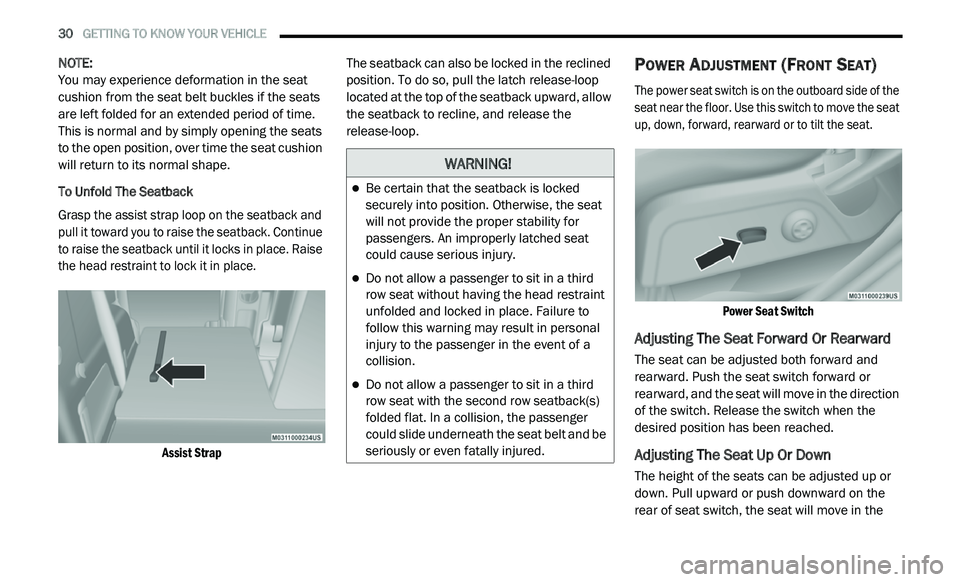
To Unfold The Seatback
Grasp the assist strap loop on the seatback and
p u
ll it toward you to raise the seatback. Continue
to raise the seatback until it locks in place. Raise
the head restraint to lock it in place.
Assist Strap
The seatback can also be locked in the reclined
p
o
sition. To do so, pull the latch release-loop
located at the top of the seatback upward, allow
the seatback to recline, and release the
release-loop.POWER ADJUSTMENT (FRONT SEAT)
The power seat switch is on the outboard side of the
seat near the floor. Use this switch to move the seat
up, down, forward, rearward or to tilt the seat.
Power Seat Switch
Adjusting The Seat Forward Or Rearward
The seat can be adjusted both forward and
rearward. Push the seat switch forward or
rearward, and the seat will move in the direction
of the switch. Release the switch when the
desired position has been reached.
Adjusting The Seat Up Or Down
The height of the seats can be adjusted up or
down. Pull upward or push downward on the
rear of seat switch, the seat will move in the
WARNING!
Be certain that the seatback is locked
securely into position. Otherwise, the seat
will not provide the proper stability for
passengers. An improperly latched seat
could cause serious injury.
Do not allow a passenger to sit in a third
row seat without having the head restraint
unfolded and locked in place. Failure to
follow this warning may result in personal
injury to the passenger in the event of a
collision.
Do not allow a passenger to sit in a third
row seat with the second row seatback(s)
folded flat. In a collision, the passenger
could slide underneath the seat belt and be
seriously or even fatally injured.
Page 34 of 396
32 GETTING TO KNOW YOUR VEHICLE
(Continued)
Vehicles Equipped With Remote Start
On models that are equipped with remote start,
th
e heated seats can be programmed to come
on during a remote start.
This feature can be programmed through the
U c
onnect system. Refer to “Uconnect Settings”
in “Multimedia” for further information.
SEATBACK/ARMREST — SECOND ROW
P
ASSENGER SEAT
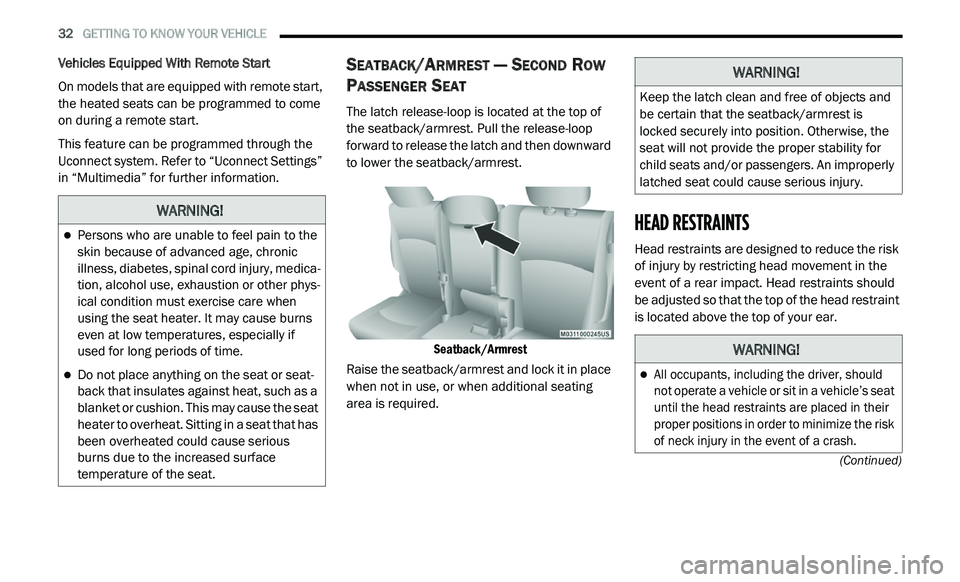
The latch release-loop is located at the top of
the seatback/armrest. Pull the release-loop
forward to release the latch and then downward
to lower the seatback/armrest.
Seatback/Armrest
Raise the seatback/armrest and lock it in place
w h
en not in use, or when additional seating
area is required.
HEAD RESTRAINTS
Head restraints are designed to reduce the risk
of injury by restricting head movement in the
event of a rear impact. Head restraints should
be adjusted so that the top of the head restraint
is located above the top of your ear.
WARNING!
Persons who are unable to feel pain to the
skin because of advanced age, chronic
illness, diabetes, spinal cord injury, medica -
tion, alcohol use, exhaustion or other phys -
ical condition must exercise care when
u s
ing the seat heater. It may cause burns
even at low temperatures, especially if
used for long periods of time.
Do not place anything on the seat or seat -
back that insulates against heat, such as a
b la
nket or cushion. This may cause the seat
heater to overheat. Sitting in a seat that has
been overheated could cause serious
burns due to the increased surface
temperature of the seat.
WARNING!
Keep the latch clean and free of objects and
be certain that the seatback/armrest is
locked securely into position. Otherwise, the
seat will not provide the proper stability for
child seats and/or passengers. An improperly
latched seat could cause serious injury.
WARNING!
All occupants, including the driver, should
not operate a vehicle or sit in a vehicle’s seat
until the head restraints are placed in their
proper positions in order to minimize the risk
of neck injury in the event of a crash.
Page 36 of 396
34 GETTING TO KNOW YOUR VEHICLE
(Continued)
NOTE:
The head restraints should only be removed
by qualified technicians, for service purposes
only. If either of the head restraints require
removal, see an authorized dealer.
In the event of deployment of an Active Head
Restraint, refer to “Occupant Restraints/
Supplemental Active Head Restraints (AHR)/
Resetting Active Head Restraints (AHR)” in
“Safety” for further information.
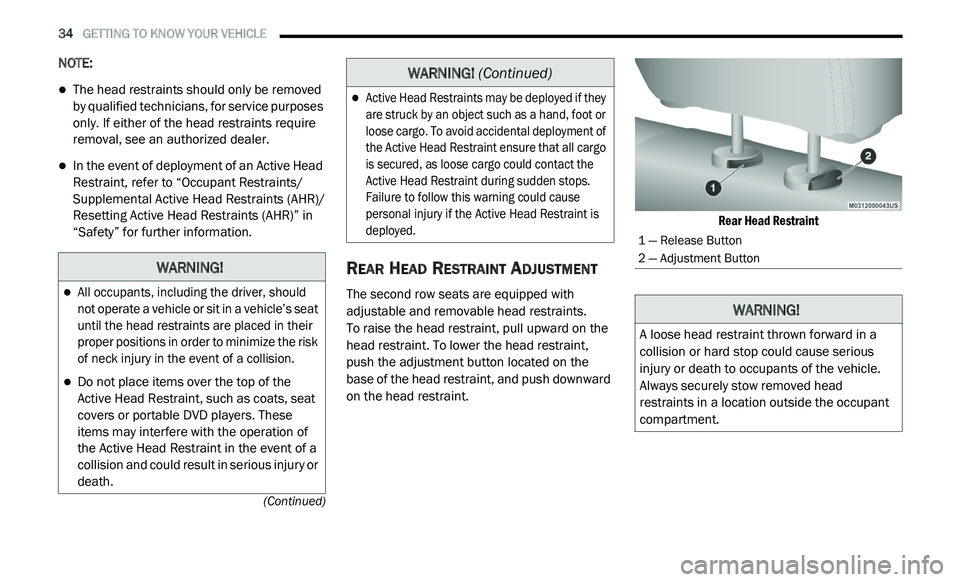
REAR HEAD RESTRAINT ADJUSTMENT
The second row seats are equipped with
adjustable and removable head restraints.
To raise the head restraint, pull upward on the
h e
ad restraint. To lower the head restraint,
push the adjustment button located on the
base of the head restraint, and push downward
on the head restraint.
Rear Head Restraint
WARNING!
All occupants, including the driver, should
not operate a vehicle or sit in a vehicle’s seat
until the head restraints are placed in their
proper positions in order to minimize the risk
of neck injury in the event of a collision.
Do not place items over the top of the
Active Head Restraint, such as coats, seat
covers or portable DVD players. These
items may interfere with the operation of
the Active Head Restraint in the event of a
collision and could result in serious injury or
death.
Active Head Restraints may be deployed if they
are struck by an object such as a hand, foot or
loose cargo. To avoid accidental deployment of
the Active Head Restraint ensure that all cargo
is secured, as loose cargo could contact the
Active Head Restraint during sudden stops.
Failure to follow this warning could cause
personal injury if the Active Head Restraint is
deployed.
WARNING!
(Continued)
1 — Release Button
2 — Adjustment Button
WARNING!
A loose head restraint thrown forward in a
collision or hard stop could cause serious
injury or death to occupants of the vehicle.
Always securely stow removed head
restraints in a location outside the occupant
compartment.
Page 76 of 396
74 GETTING TO KNOW YOUR VEHICLE
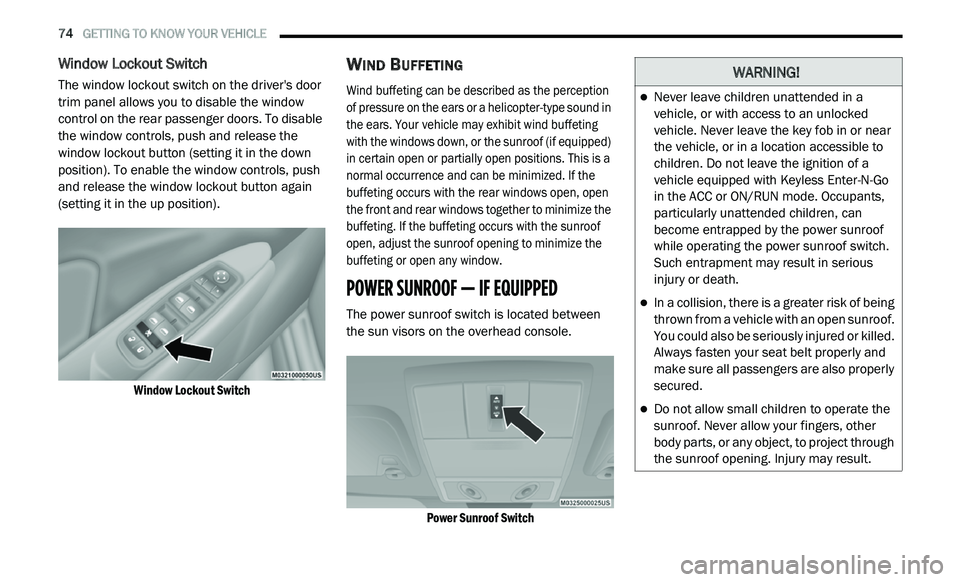
Window Lockout Switch
The window lockout switch on the driver's door
trim panel allows you to disable the window
control on the rear passenger doors. To disable
the window controls, push and release the
window lockout button (setting it in the down
position). To enable the window controls, push
and release the window lockout button again
(setting it in the up position).
Window Lockout Switch
WIND BUFFETING
Wind buffeting can be described as the perception
of pressure on the ears or a helicopter-type sound in
the ears. Your vehicle may exhibit wind buffeting
with the windows down, or the sunroof (if equipped)
in certain open or partially open positions. This is a
normal occurrence and can be minimized. If the
buffeting occurs with the rear windows open, open
the front and rear windows together to minimize the
buffeting. If the buffeting occurs with the sunroof
open, adjust the sunroof opening to minimize the
buffeting or open any window.
POWER SUNROOF — IF EQUIPPED
The power sunroof switch is located between
the sun visors on the overhead console.
Power Sunroof Switch
WARNING!
Never leave children unattended in a
vehicle, or with access to an unlocked
vehicle. Never leave the key fob in or near
the vehicle, or in a location accessible to
children. Do not leave the ignition of a
vehicle equipped with Keyless Enter-N-Go
in the ACC or ON/RUN mode. Occupants,
particularly unattended children, can
become entrapped by the power sunroof
while operating the power sunroof switch.
Such entrapment may result in serious
injury or death.
In a collision, there is a greater risk of being
thrown from a vehicle with an open sunroof.
You could also be seriously injured or killed.
Always fasten your seat belt properly and
make sure all passengers are also properly
secured.
Do not allow small children to operate the
sunroof. Never allow your fingers, other
body parts, or any object, to project through
the sunroof opening. Injury may result.
Page 78 of 396
76 GETTING TO KNOW YOUR VEHICLE
IGNITION OFF OPERATION
The power sunroof switch will remain active for
up to approximately ten minutes after the
ignition is placed in the OFF position. Opening
either front door will cancel this feature.
NOTE:
Ignition Off time is programmable through the
U c
onnect System. Refer to “Uconnect Settings/
Customer Programmable Features” in “Multi -
media” for further information.
HOOD
OPENING
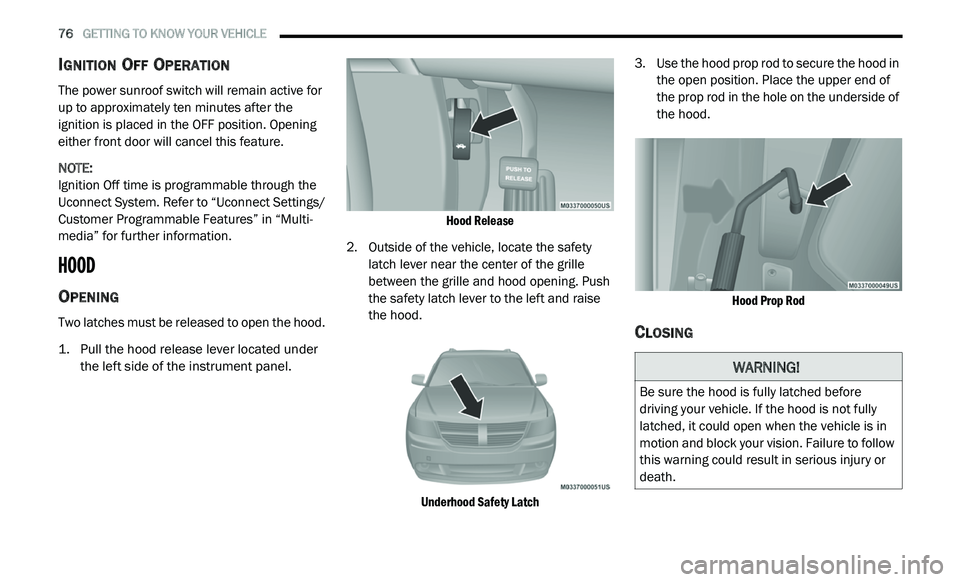
Two latches must be released to open the hood.
1. P ull the hood release lever located under
t
he left side of the instrument panel.
Hood Release
2. Outside of the vehicle, locate the safety l
atch lever near the center of the grille
between the grille and hood opening. Push
the safety latch lever to the left and raise
the hood.
Underhood Safety Latch
3. U
se the hood prop rod to secure the hood in
t
he open position. Place the upper end of
the prop rod in the hole on the underside of
the hood.
Hood Prop Rod
CLOSING
WARNING!
Be sure the hood is fully latched before
driving your vehicle. If the hood is not fully
latched, it could open when the vehicle is in
motion and block your vision. Failure to follow
this warning could result in serious injury or
death.
Page 80 of 396
78 GETTING TO KNOW YOUR VEHICLE
CARGO AREA FEATURES
Cargo Management System
Five Passenger System Features
A raised load floor that sits on top of a large
built-in storage bin.
A tri-fold door built into the load floor that
allows easy access to items in the built-in
storage bin.
60/40 split second-row passenger seats with
fold flat feature, which allows for extended
cargo space. Refer to “Seats” in this chapter
for further information.
An optional front passenger seat with fold flat
feature, which extends cargo space even
further. Refer to “Seats” in this chapter for
further information.
Cargo tie-downs.
A retractable cargo area cover (if equipped).
Seven Passenger System Features
A large built-in storage bin with a hinged hard -
cover located in the floor behind the third-row
p a
ssenger seats.
60/40 split second-row passenger seats with
fold flat feature, which allows for extended
cargo space. Refer to “Seats” in this chapter
for further information.
50/50 split third-row passenger seats with
fold flat feature, which allows for extended
cargo space. Refer to “Seats” in this chapter
for further information.
An optional front passenger seat with fold flat
feature, which extends cargo space even
further. Refer to “Seats” in this chapter for
further information.
Cargo tie-downs.
Retractable Cargo Area Cover (Five
Passenger Models) — If Equipped
NOTE:
The purpose of this cover is for privacy, not to
s e
cure loads. It will not prevent cargo from
shifting or protect passengers from loose cargo.
The removable retractable cargo area cover
m o
unts in the cargo area behind the top of the
rear seats. The cover, when extended, covers the cargo
a
r
ea to keep items out of sight. Notches in the
trim panels near the liftgate opening secure the
extended cover in place.
The cover rolls away neatly inside its housing
w h
en not in use. You can also remove the cover
from the vehicle to make more room in the
cargo area.
To Install The Cover:
1. P osition the cover in the vehicle so that the
f
lat side of the housing faces upward.
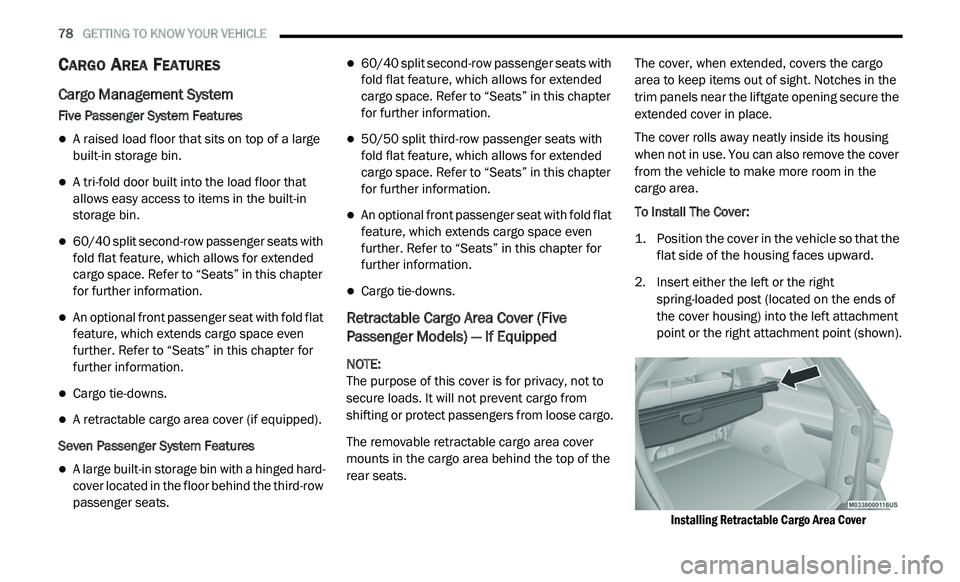
2. I nsert either the left or the right
s
pring-loaded post (located on the ends of
the cover housing) into the left attachment
point or the right attachment point (shown).
Installing Retractable Cargo Area Cover
Page 81 of 396
GETTING TO KNOW YOUR VEHICLE 79
(Continued)
3. Insert the spring-loaded post on the opposite end of the cover housing into the
attachment point on the opposite side of
the vehicle.
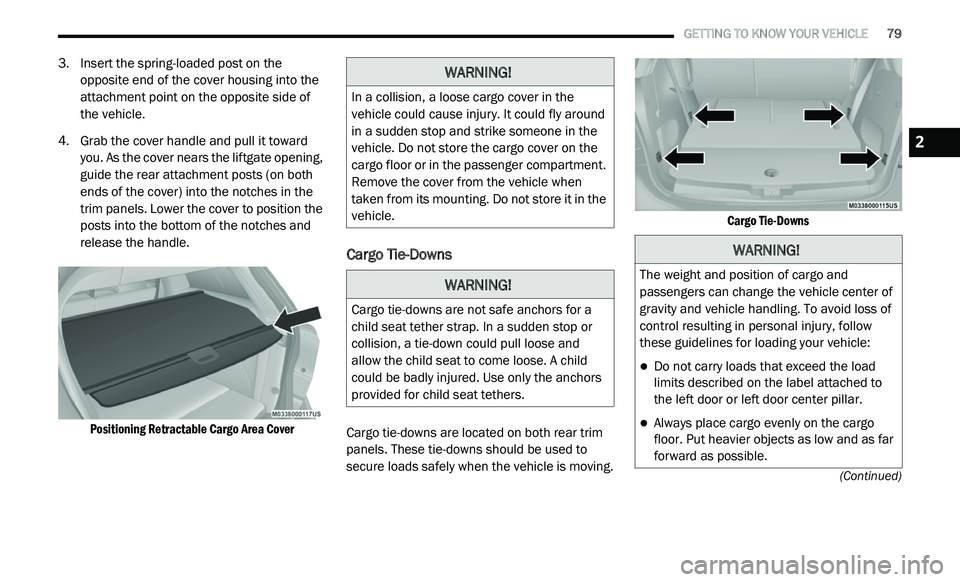
4. Grab the cover handle and pull it toward y
ou. As the cover nears the liftgate opening,
guide the rear attachment posts (on both
ends of the cover) into the notches in the
trim panels. Lower the cover to position the
posts into the bottom of the notches and
release the handle.
Positioning Retractable Cargo Area Cover
Cargo Tie-Downs
Cargo tie-downs are located on both rear trim
panels. These tie-downs should be used to
secure loads safely when the vehicle is moving.
Cargo Tie-Downs
WARNING!
In a collision, a loose cargo cover in the
vehicle could cause injury. It could fly around
in a sudden stop and strike someone in the
vehicle. Do not store the cargo cover on the
cargo floor or in the passenger compartment.
Remove the cover from the vehicle when
taken from its mounting. Do not store it in the
vehicle.
WARNING!
Cargo tie-downs are not safe anchors for a
child seat tether strap. In a sudden stop or
collision, a tie-down could pull loose and
allow the child seat to come loose. A child
could be badly injured. Use only the anchors
provided for child seat tethers.
WARNING!
The weight and position of cargo and
passengers can change the vehicle center of
gravity and vehicle handling. To avoid loss of
control resulting in personal injury, follow
these guidelines for loading your vehicle:
Do not carry loads that exceed the load
limits described on the label attached to
the left door or left door center pillar.
Always place cargo evenly on the cargo
floor. Put heavier objects as low and as far
forward as possible.
2