ECU DODGE JOURNEY 2020 Owner's Manual
[x] Cancel search | Manufacturer: DODGE, Model Year: 2020, Model line: JOURNEY, Model: DODGE JOURNEY 2020Pages: 396, PDF Size: 25.53 MB
Page 82 of 396
80 GETTING TO KNOW YOUR VEHICLE
GARAGE DOOR OPENER — IF EQUIPPED
HomeLink® replaces up to three remote controls
(hand-held transmitters) that operate devices
such as garage door openers, motorized gates,
lighting or home security systems. The
HomeLink® unit operates off your vehicle’s
battery.
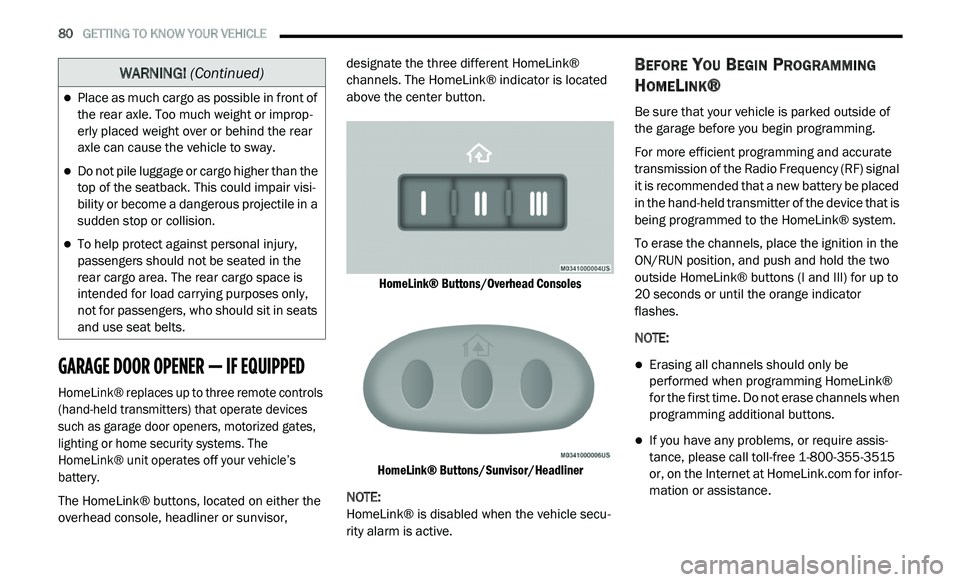
The HomeLink® buttons, located on either the
ov
erhead console, headliner or sunvisor, designate the three different HomeLink®
channels. The HomeLink® indicator is located
above the center button.
HomeLink® Buttons/Overhead Consoles
HomeLink® Buttons/Sunvisor/Headliner
NOTE:
HomeLink® is disabled when the vehicle secu -
rity alarm is active.
BEFORE YOU BEGIN PROGRAMMING
H
OMELINK®
Be sure that your vehicle is parked outside of
the garage before you begin programming.
For more efficient programming and accurate
t r
ansmission of the Radio Frequency (RF) signal
it is recommended that a new battery be placed
in the hand-held transmitter of the device that is
being programmed to the HomeLink® system.
To erase the channels, place the ignition in the
ON
/RUN position, and push and hold the two
outside HomeLink® buttons (I and III) for up to
20 seconds or until the orange indicator
flashes.
NOTE:
Erasing all channels should only be
performed when programming HomeLink®
for the first time. Do not erase channels when
programming additional buttons.
If you have any problems, or require assis -
tance, please call toll-free 1 -
800-355-3515
or, on the Internet at HomeLink.com for infor-
mation or assistance.
Place as much cargo as possible in front of
the rear axle. Too much weight or improp -
erly placed weight over or behind the rear
a x
le can cause the vehicle to sway.
Do not pile luggage or cargo higher than the
top of the seatback. This could impair visi-
bility or become a dangerous projectile in a
su
dden stop or collision.
To help protect against personal injury,
passengers should not be seated in the
rear cargo area. The rear cargo space is
intended for load carrying purposes only,
not for passengers, who should sit in seats
and use seat belts.
WARNING! (Continued)
Page 85 of 396
GETTING TO KNOW YOUR VEHICLE 83
(Continued)
4. Watch for the HomeLink® indicator to change flash rates. When it changes, it is
programmed. It may take up to 30 seconds
or longer in rare cases. The garage door
may open and close while you are
programming.
5. P ush and hold the programmed
H
omeLink® button and observe the
indicator light.
NOTE:
If the indicator light stays on constantly,
programming is complete and the garage
door/device should activate when the
HomeLink® button is pushed.
To program the two remaining HomeLink®
buttons, repeat each step for each remaining
button. DO NOT erase the channels.
If you unplugged the garage door opener/
de
vice for programming, plug it back in at this
time.
USING HOMELINK®
To operate, push and release the programmed
HomeLink® button. Activation will now occur for
the programmed device (i.e. garage door opener,
gate operator, security system, entry door lock,
home/office lighting, etc.) The hand-held
transmitter of the device may also be used at any
time.
SECURITY
It is advised to erase all channels before you sell
or turn in your vehicle.
To do this, push and hold the two outside
b u
ttons for 20 seconds until the red indicator
flashes.
NOTE:
All channels will be erased. Individual channels
ca
nnot be erased.
The HomeLink® Universal Transceiver is disabled
w h
en the vehicle security alarm is active.
TROUBLESHOOTING TIPS
If you are having trouble programming
HomeLink®, here are some of the most
common solutions:
Replace the battery in the garage door
opener hand-held transmitter.
Push the LEARN button on the garage door
opener to complete the training for a Rolling
Code.
Did you unplug the device for programming
and remember to plug it back in?
If you have any problems, or require assistance,
p l
ease call toll-free 1-800-355-3515 or, on the
Internet at HomeLink.com for information or
assistance.
WARNING!
Vehicle exhaust contains carbon monoxide,
a dangerous gas. Do not run your vehicle in
the garage while programming the trans -
ceiver. Exhaust gas can cause serious
i n
jury or death.
2
Page 93 of 396
GETTING TO KNOW YOUR VEHICLE 91
ROOF LUGGAGE RACK — IF EQUIPPED
The roof rack cross rails and side rails are
designed to carry cargo weight. The load must
not exceed 150 lbs (68 kg), and it should be
distributed uniformly over the cross rails. In
addition, the roof rack does not increase the
total load carrying capacity of the vehicle.
Be sure the total load of cargo inside the vehicle
p l
us that on the roof rack does not exceed the
maximum vehicle load capacity.
NOTE:
The roof rack side rails on your vehicle are NOT
de
signed to carry a load without the addition of
crossbars.
Metal crossbars are offered by Mopar accesso -
ries to provide a functional roof rack system.
Se
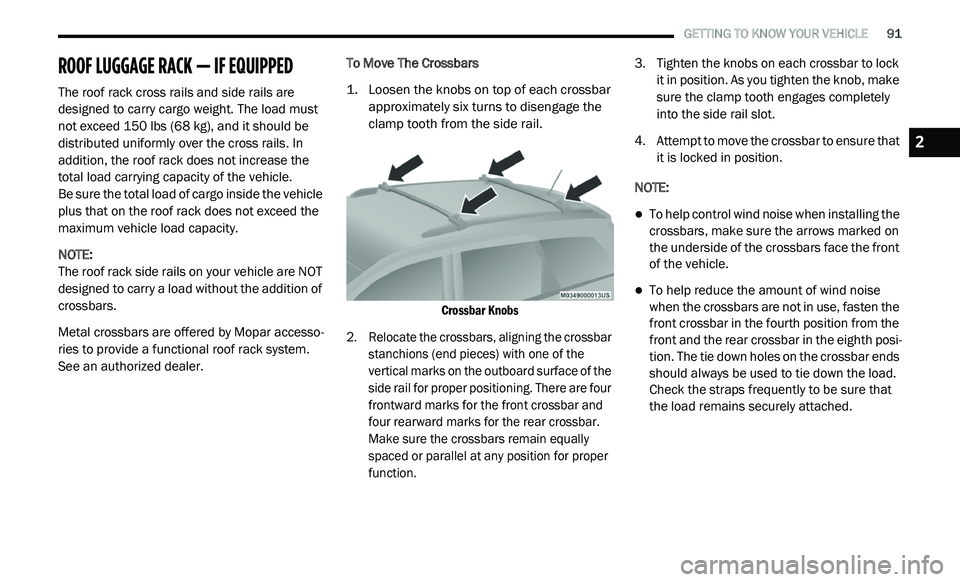
e an authorized dealer. To Move The Crossbars
1. L
oosen the knobs on top of each crossbar
a
pproximately six turns to disengage the
clamp tooth from the side rail.
Crossbar Knobs
2. R elocate the crossbars, aligning the crossbar
s
tanchions (end pieces) with one of the
vertical marks on the outboard surface of the
side rail for proper positioning. There are four
frontward marks for the front crossbar and
four rearward marks for the rear crossbar.
Make sure the crossbars remain equally
spaced or parallel at any position for proper
function.
3. T
ighten the knobs on each crossbar to lock
i
t in position. As you tighten the knob, make
sure the clamp tooth engages completely
into the side rail slot.
4. Attempt to move the crossbar to ensure that i
t is locked in position.
NOTE:
To help control wind noise when installing the
crossbars, make sure the arrows marked on
the underside of the crossbars face the front
of the vehicle.
To help reduce the amount of wind noise
when the crossbars are not in use, fasten the
front crossbar in the fourth position from the
front and the rear crossbar in the eighth posi -
tion. The tie down holes on the crossbar ends
s h
ould always be used to tie down the load.
Check the straps frequently to be sure that
the load remains securely attached.
2
Page 94 of 396
92 GETTING TO KNOW YOUR VEHICLE
(Continued)
(Continued)
WARNING!
Cargo must be securely tied down before
driving your vehicle. Improperly secured loads
can fly off the vehicle, particularly at high
speeds, resulting in personal injury or property
damage. Follow the roof rack cautions when
carrying cargo on your roof rack.
CAUTION!
To prevent damage to the roof of your
vehicle, DO NOT carry any loads on the roof
rack without the crossbars installed. The
load should be secured and placed on top
of the crossbars, not directly on the roof. If
it is necessary to place the load on the roof,
place a blanket or other protective layer
between the load and the roof surface.
Crossbars should remain equally spaced or
parallel at any roof rack position for proper
function. Noncompliance could result in
damage to the roof rack, cargo, and
vehicle.
To avoid damage to the roof rack and
vehicle, do not exceed the maximum roof
rack load capacity of 150 lb (68 kg). Always
distribute heavy loads as evenly as possible
and secure the load appropriately.
Long loads, which extend over the wind -
shield, such as wood panels or surfboards,
s h
ould be secured to both the front and
rear of the vehicle.
CAUTION! (Continued)
Travel at reduced speeds and turn corners
carefully when carrying large or heavy loads
on the roof rack. Wind forces, due to
natural causes or nearby truck traffic, can
add sudden upward lift. This is especially
true on large flat loads and may result in
damage to the cargo or your vehicle.
CAUTION! (Continued)
Page 102 of 396
100 GETTING TO KNOW YOUR INSTRUMENT PANEL
What to do when an electrical load reduction
action message is present (“Battery Saver On”
or “Battery Saver Mode”)
During a trip:
Reduce power to unnecessary loads if possible:
Turn off redundant lights (interior or exterior)
Check what may be plugged in to power
outlets +12 Volts, 115 Volts AC, USB ports
Check HVAC settings (blower, temperature)
Check the audio settings (volume)
After a trip:
Check if any aftermarket equipment was
installed (additional lights, upfitter electrical
accessories, audio systems, alarms) and
review specifications if any (load and ignition
OFF draw currents).
Evaluate the latest driving cycles (distance,
driving time and parking time).
The vehicle should have service performed if
the message is still present during consecu -
tive trips, and if the evaluation and driving
p a
ttern of the vehicle did not help to identify
the cause.
WARNING LIGHTS AND MESSAGES
The warning/indicator lights will illuminate in
the instrument panel together with a dedicated
message and/or acoustic signal when
applicable. These indications are indicative
and precautionary and as such must not be
c o
nsidered as exhaustive. Always refer to the
information in this chapter in the event of a
failure indication. All active telltales will display
first if applicable. The system check menu may
appear different based upon equipment
options and current vehicle status. Some
telltales are optional and may not appear.
RED WARNING LIGHTS
Seat Belt Reminder Warning Light
This warning light indicates when
the driver or passenger seat belt is
u n
buckled. When the ignition is first
placed in the ON/RUN or ACC/ON/RUN
position and if the driver’s seat belt is unbuckled,
a chime will sound and the light will turn on.
When driving, if the driver or front passenger seat
belt remains unbuckled, the Seat Belt Reminder
Light will flash or remain on continuously and a
chime will sound.
Refer to “Occupant Restraint Systems” in
“
S
afety” for further information.
Air Bag Warning Light
This warning light will illuminate to
indicate a fault with the air bag, and
wi
ll turn on for four to eight seconds
as a bulb check when the ignition is
placed in the ON/RUN or ACC/ON/RUN
position. This light will illuminate with a single
chime when a fault with the air bag has been
detected, it will stay on until the fault is cleared.
If the light is either not on during startup, stays
on, or turns on while driving, have the system
inspected at an authorized dealer as soon as
possible.
Brake Warning Light
This warning light monitors various
brake functions, including brake fluid
l e
vel and parking brake application.
If the brake light turns on it may
i n
dicate that the parking brake is applied, that
the brake fluid level is low, or that there is a
problem with the Anti-Lock Brake System
reservoir.
Page 103 of 396
GETTING TO KNOW YOUR INSTRUMENT PANEL 101
If the light remains on when the parking brake has
been disengaged, and the fluid level is at the full
mark on the master cylinder reservoir, it indicates a
possible brake hydraulic system malfunction or that
a problem with the Brake Booster has been
detected by the Anti-Lock Brake System (ABS) /
Electronic Stability Control (ESC) system. In this
case, the light will remain on until the condition has
been corrected. If the problem is related to the
brake booster, the ABS pump will run when applying
the brake, and a brake pedal pulsation may be felt
during each stop.
The dual brake system provides a reserve
br
aking capacity in the event of a failure to a
portion of the hydraulic system. A leak in either
half of the dual brake system is indicated by the
Brake Warning Light, which will turn on when
the brake fluid level in the master cylinder has
dropped below a specified level.
The light will remain on until the cause is
c o
rrected.
NOTE:
The light may flash momentarily during sharp
c o
rnering maneuvers, which change fluid level
conditions. The vehicle should have service
performed, and the brake fluid level checked. If brake failure is indicated, immediate repair is
n
e
cessary.
Vehicles equipped with the Anti-Lock Brake
S y
stem (ABS) are also equipped with Electronic
Brake Force Distribution (EBD). In the event of
an EBD failure, the Brake Warning Light will turn
on along with the ABS Light. Immediate repair to
the ABS system is required.
Operation of the Brake Warning Light can be
c h
ecked by turning the ignition switch from the
OFF position to the ON/RUN position. The light
should illuminate for approximately two
seconds. The light should then turn off unless
the parking brake is applied or a brake fault is
detected. If the light does not illuminate, have
the light inspected by an authorized dealer.
The light also will turn on when the parking
b r
ake is applied with the ignition switch in the
ON/RUN position. NOTE:
This light shows only that the parking brake is
a p
plied. It does not show the degree of brake
application.
Vehicle Security Warning Light — If
Equipped
This light will flash at a fast rate for
approximately 15 seconds when the
v e
hicle security alarm is arming, and
then will flash slowly until the vehicle
is disarmed.
Engine Coolant Temperature Warning
Light
This warning light warns of an
overheated engine condition. If the
e n
gine coolant temperature is too
high, this indicator will illuminate and
a single chime will sound. If the temperature
reaches the upper limit, a continuous chime will
sound for four minutes or until the engine is
able to cool, whichever comes first.
If the light turns on while driving, safely pull over
a n
d stop the vehicle. If the Air Conditioning (A/C)
system is on, turn it off. Also, shift the
transmission into NEUTRAL and idle the vehicle.
WARNING!
Driving a vehicle with the red brake light on is
dangerous. Part of the brake system may
have failed. It will take longer to stop the
vehicle. You could have a collision. Have the
vehicle checked immediately.
3
Page 109 of 396
GETTING TO KNOW YOUR INSTRUMENT PANEL 107
(Continued)
(Continued)
ONBOARD DIAGNOSTIC SYSTEM — OBD II
Your vehicle is equipped with a sophisticated
Onboard Diagnostic system called OBD II.
This system monitors the performance of the
e m
issions, engine, and transmission control
systems. When these systems are operating
properly, your vehicle will provide excellent
performance and fuel economy, as well as
engine emissions well within current
government regulations.
If any of these systems require service, the OBD
I I
system will turn on the Malfunction Indicator
Light (MIL). It will also store diagnostic codes
and other information to assist your service
technician in making repairs. Although your
vehicle will usually be drivable and not need
towing, see an authorized dealer for service as
soon as possible.
ONBOARD DIAGNOSTIC SYSTEM
(OBD II) C
YBERSECURITY
Your vehicle is required to have an Onboard
Diagnostic system (OBD II) and a connection
port to allow access to information related to
the performance of your emissions controls.
Authorized service technicians may need to
access this information to assist with the
diagnosis and service of your vehicle and
emissions system.
For further information, refer to “Cybersecurity”
in
“Multimedia”.
CAUTION!
Prolonged driving with the MIL on could
cause further damage to the emission
control system. It could also affect fuel
economy and driveability. The vehicle must
be serviced before any emissions tests can
be performed.
If the MIL is flashing while the vehicle is
running, severe catalytic converter damage
and power loss will soon occur. Immediate
service is required.
WARNING!
ONLY an authorized service technician
should connect equipment to the OBD II
connection port in order to read the VIN,
diagnose, or service your vehicle.
CAUTION! (Continued)
If unauthorized equipment is connected to
the OBD II connection port, such as a
driver-behavior tracking device, it may:
Be possible that vehicle systems,
including safety related systems, could
be impaired or a loss of vehicle control
could occur that may result in an acci
-
dent involving serious injury or death.
Access, or allow others to access, infor -
mation stored in your vehicle systems,
i n
cluding personal information.
Be possible that vehicle systems,
including safety related systems, could
be impaired or a loss of vehicle control
could occur that may result in an acci -
dent involving serious injury or death.
Access, or allow others to access, infor -
mation stored in your vehicle systems,
i n
cluding personal information.
WARNING! (Continued)
3
Page 123 of 396
SAFETY 121
IMPORTANT SAFETY PRECAUTIONS
Please pay close attention to the information in
this section. It tells you how to use your restraint
system properly, to keep you and your
passengers as safe as possible.
Here are some simple steps you can take to
mi
nimize the risk of harm from a deploying air bag:
1. C hildren 12 years old and under should
a
lways ride buckled up in the rear seat of a
vehicle with a rear seat.
2. A child who is not big enough to wear the
v
ehicle seat belt properly (Refer to “Child
Restraints” in this section for further
information) must be secured in the
appropriate child restraint or belt-positioning
booster seat in a rear seating position.
3. I f a child from 2 to 12 years old (not in a
r
ear-facing child restraint) must ride in the
front passenger seat, move the seat as far
back as possible and use the proper child
restraint (Refer to “Child Restraints” in this
section for further information). 4. N
ever allow children to slide the shoulder
b
elt behind them or under their arm.
5. Y ou should read the instructions provided
w
ith your child restraint to make sure that
you are using it properly.
6. A ll occupants should always wear their lap
a
nd shoulder belts properly.
7. T he driver and front passenger seats should
b
e moved back as far as practical to allow
the front air bags room to inflate.
8. D o not lean against the door or window.
I
f your vehicle has side air bags, and
d e
ployment occurs, the side air bags will
inflate forcefully into the space between
occupants and the door and occupants
could be injured.
9. I f the air bag system in this vehicle needs to
b
e modified to accommodate a disabled
person, refer to the “Customer Assistance”
section for customer service contact
information.
SEAT BELT SYSTEMS
Buckle up even though you are an excellent
driver, even on short trips. Someone on the road
may be a poor driver and could cause a collision
that includes you. This can happen far away
from home or on your own street.
Research has shown that seat belts save lives,
an
d they can reduce the seriousness of injuries
in a collision. Some of the worst injuries happen
when people are thrown from the vehicle. Seat
belts reduce the possibility of ejection and the
risk of injury caused by striking the inside of the
vehicle. Everyone in a motor vehicle should be
belted at all times.
WARNING!
Never place a rear-facing child restraint in front
of an air bag. A deploying passenger front air
bag can cause death or serious injury to a child
12 years or younger, including a child in a
rear-facing child restraint.
Never install a rear-facing child restraint in the
front seat of a vehicle. Only use a rear-facing
child restraint in the rear seat. If the vehicle
does not have a rear seat, do not transport a
rear-facing child restraint in that vehicle.
4
Page 124 of 396
122 SAFETY
Enhanced Seat Belt Use Reminder System
(BeltAlert)
Driver and Passenger BeltAlert (if equipped)
BeltAlert is a feature intended to remind the
driver and outboard front seat passenger (if
e q
uipped with outboard front passenger seat
BeltAlert) to buckle their seat belts. The BeltAlert
feature is active whenever the ignition switch is in
the START or ON/RUN position.
Initial Indication
If the driver is unbuckled when the ignition
s w
itch is first in the START or ON/RUN position,
a chime will signal for a few seconds. If the
driver or outboard front seat passenger
(if equipped with outboard front passenger seat
B e
ltAlert) is unbuckled when the ignition switch
is first in the START or ON/RUN position the
Seat Belt Reminder Light will turn on and
remain on until both outboard front seat belts
are buckled. The outboard front passenger seat
BeltAlert is not active when an outboard front
passenger seat is unoccupied. BeltAlert Warning Sequence
The BeltAlert warning sequence is activated
w
h
en the vehicle is moving above a specified
vehicle speed range and the driver or outboard
front seat passenger is unbuckled (if equipped
with outboard front passenger seat BeltAlert)
(the outboard front passenger seat BeltAlert is
not active when the outboard front passenger
seat is unoccupied). The BeltAlert warning
sequence starts by blinking the Seat Belt
Reminder Light and sounding an intermittent
chime. Once the BeltAlert warning sequence
has completed, the Seat Belt Reminder Light
will remain on until the seat belts are buckled.
The BeltAlert warning sequence may repeat
based on vehicle speed until the driver and
occupied outboard front seat passenger seat
belts are buckled. The driver should instruct all
occupants to buckle their seat belts.
Change of Status
If the driver or outboard front seat passenger
(if equipped with outboard front passenger seat
B e
ltAlert) unbuckles their seat belt while the
vehicle is traveling, the BeltAlert warning
sequence will begin until the seat belts are
buckled again.
The outboard front passenger seat BeltAlert is
n
o
t active when the outboard front passenger
seat is unoccupied. BeltAlert may be triggered
when an animal or other items are placed on the
outboard front passenger seat or when the seat
is folded flat (if equipped). It is recommended
that pets be restrained in the rear seat
(if equipped) in pet harnesses or pet carriers that
ar
e secured by seat belts, and cargo is properly
stowed.
BeltAlert can be activated or deactivated by an
a u
thorized dealer. FCA US LLC does not
recommend deactivating BeltAlert.
NOTE:
If BeltAlert has been deactivated and the driver
or
outboard front seat passenger (if equipped
with outboard front passenger seat BeltAlert) is
unbuckled the Seat Belt Reminder Light will
turn on and remain on until the driver and
outboard front seat passenger seat belts are
buckled.
Lap/Shoulder Belts
All seating positions in your vehicle are
equipped with lap/shoulder belts.
Page 129 of 396
SAFETY 127
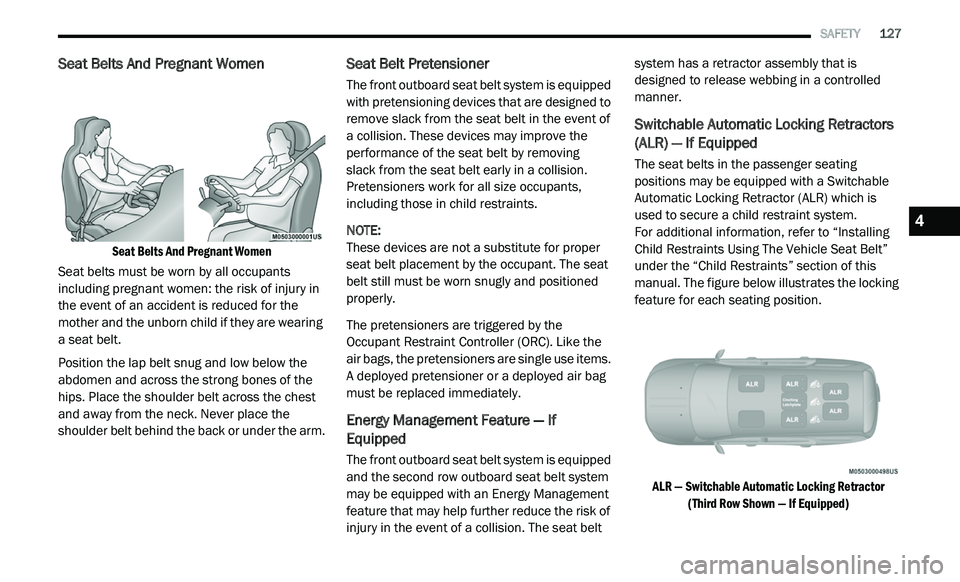
Seat Belts And Pregnant Women
Seat Belts And Pregnant Women
Seat belts must be worn by all occupants
i n
cluding pregnant women: the risk of injury in
the event of an accident is reduced for the
mother and the unborn child if they are wearing
a seat belt.
Position the lap belt snug and low below the
ab
domen and across the strong bones of the
hips. Place the shoulder belt across the chest
and away from the neck. Never place the
shoulder belt behind the back or under the arm.
Seat Belt Pretensioner
The front outboard seat belt system is equipped
with pretensioning devices that are designed to
remove slack from the seat belt in the event of
a collision. These devices may improve the
performance of the seat belt by removing
slack from the seat belt early in a collision.
P r
etensioners work for all size occupants,
including those in child restraints.
NOTE:
These devices are not a substitute for proper
se
at belt placement by the occupant. The seat
belt still must be worn snugly and positioned
properly.
The pretensioners are triggered by the
Oc
cupant Restraint Controller (ORC). Like the
air bags, the pretensioners are single use items.
A deployed pretensioner or a deployed air bag
must be replaced immediately.
Energy Management Feature — If
Equipped
The front outboard seat belt system is equipped
and the second row outboard seat belt system
may be equipped with an Energy Management
feature that may help further reduce the risk of
injury in the event of a collision. The seat belt system has a retractor assembly that is
designed to release webbing in a controlled
manner.
Switchable Automatic Locking Retractors
(ALR) — If Equipped
The seat belts in the passenger seating
positions may be equipped with a Switchable
Automatic Locking Retractor (ALR) which is
used to secure a child restraint system.
For additional information, refer to “Installing
C h
ild Restraints Using The Vehicle Seat Belt”
under the “Child Restraints” section of this
manual. The figure below illustrates the locking
feature for each seating position.
ALR — Switchable Automatic Locking Retractor (T
hird Row Shown — If Equipped)
4