reset DODGE JOURNEY 2020 User Guide
[x] Cancel search | Manufacturer: DODGE, Model Year: 2020, Model line: JOURNEY, Model: DODGE JOURNEY 2020Pages: 396, PDF Size: 25.53 MB
Page 140 of 396
138 SAFETY
(Continued)
Your vehicle may also be designed to perform
any of these other functions in response to the
Enhanced Accident Response System:
Turn off the Fuel Filter Heater, Turn off the
HVAC Blower Motor, Close the HVAC Circula-
tion Door
Cut off battery power to the:
Engine
Electric Motor (if equipped)
Electric power steering
Brake booster
Electric park brake
Automatic transmission gear selector
Horn
Front wiper
Headlamp washer pump NOTE:
After an accident, remember to cycle the ignition
t o
the STOP (OFF/LOCK) position and remove the
key from the ignition switch to avoid draining the
battery. Carefully check the vehicle for fuel leaks
in the engine compartment and on the ground
near the engine compartment and fuel tank
before resetting the system and starting the
engine. If there are no fuel leaks or damage to
the vehicle electrical devices (e.g. headlights)
after an accident, reset the system by following
the procedure described below. If you have any
doubt, contact an authorized dealer.
Enhanced Accident Response System
Reset Procedure
In order to reset the Enhanced Accident
Response System functions after an event, the
ignition switch must be changed from ignition
START or ON/RUN to ignition OFF. Carefully
check the vehicle for fuel leaks in the engine
compartment and on the ground near the
engine compartment and fuel tank before
resetting the system and starting the engine.
Maintaining Your Air Bag System
WARNING!
Modifications to any part of the air bag
system could cause it to fail when you need
it. You could be injured if the air bag system
is not there to protect you. Do not modify
the components or wiring, including adding
any kind of badges or stickers to the
steering wheel hub trim cover or the upper
passenger side of the instrument panel.
Do not modify the front bumper, vehicle
bo
dy structure, or add aftermarket side
steps or running boards.
It is dangerous to try to repair any part of
the air bag system yourself. Be sure to tell
anyone who works on your vehicle that it
has an air bag system.
Page 169 of 396
STARTING AND OPERATING 167
Transmission Limp Home Mode
Transmission function is monitored
electronically for abnormal conditions. If a
condition is detected that could result in
transmission damage, Transmission Limp
Home Mode is activated. In this mode, the
transmission remains in SECOND gear
regardless of which forward gear is selected.
PARK, REVERSE, and NEUTRAL will continue to
operate. The Malfunction Indicator Light (MIL)
may be illuminated. Limp Home Mode allows
the vehicle to be driven to an authorized dealer
for service without damaging the transmission.
In the event of a momentary problem, the
tr
ansmission can be reset to regain all forward
gears by performing the following steps:
1. S top the vehicle.
2
. S hift the transmission into PARK.
3
. T urn the ignition OFF.
4
. W ait approximately 10 seconds.
5
. R estart the engine.
6
. S hift into the desired gear range. If the
p
roblem is no longer detected, the
transmission will return to normal operation.
NOTE:
Even if the transmission can be reset, we
r e
commend that you visit an authorized dealer
at your earliest possible convenience. An autho -
rized dealer has diagnostic equipment to
a s
sess the condition of your transmission.
If the transmission cannot be reset, authorized
d e
aler service is required.
Overdrive Operation
The automatic transmission includes an
electronically controlled Overdrive (top gear).
The transmission will automatically shift into
Overdrive if the following conditions are
present:
The gear selector is in the DRIVE position.
The transmission fluid has reached an
adequate temperature.
The engine coolant has reached an adequate
temperature.
The vehicle speed is sufficiently high.
The driver is not heavily pressing the acceler -
ator.
Torque Converter Clutch
A feature designed to improve fuel economy
has been included in the automatic
transmission on your vehicle. A clutch within the
torque converter engages automatically at
calibrated speeds. This may result in a slightly
different feeling or response during normal
operation in the upper gears. When the vehicle
speed drops or during some accelerations, the
clutch automatically disengages.
NOTE:
The torque converter clutch will not engage until
t h
e transmission fluid and engine coolant are
warm (usually after 1 to 3 miles [2 to 5 km] of
d r
iving). Because the engine speed is higher
when the torque converter clutch is not
engaged, it may seem as if the transmission is
not shifting into Overdrive when cold. This is
normal. Using the AutoStick shift control, when
the transmission is sufficiently warm, will
demonstrate that the transmission is able to
shift into and out of Overdrive.
5
Page 171 of 396
STARTING AND OPERATING 169
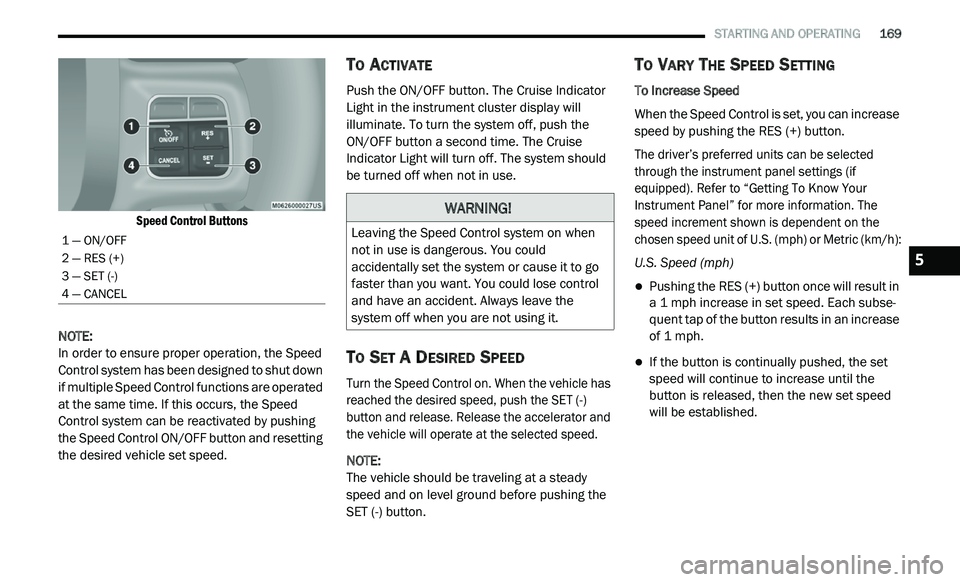
Speed Control Buttons
NOTE:
In order to ensure proper operation, the Speed
Co
ntrol system has been designed to shut down
if multiple Speed Control functions are operated
at the same time. If this occurs, the Speed
Control system can be reactivated by pushing
the Speed Control ON/OFF button and resetting
the desired vehicle set speed.
TO ACTIVATE
Push the ON/OFF button. The Cruise Indicator
Light in the instrument cluster display will
illuminate. To turn the system off, push the
ON/OFF button a second time. The Cruise
I n
dicator Light will turn off. The system should
be turned off when not in use.
TO SET A DESIRED SPEED
Turn the Speed Control on. When the vehicle has
reached the desired speed, push the SET (-)
button and release. Release the accelerator and
the vehicle will operate at the selected speed.
NOTE:
The vehicle should be traveling at a steady
s p
eed and on level ground before pushing the
SET (-) button.
TO VARY THE SPEED SETTING
To Increase Speed
When the Speed Control is set, you can increase
s p
eed by pushing the RES (+) button.
The driver’s preferred units can be selected
t h
rough the instrument panel settings (if
equipped). Refer to “Getting To Know Your
Instrument Panel” for more information. The
speed increment shown is dependent on the
chosen speed unit of U.S. (mph) or Metric (km/h):
U.S. Speed (mph)
Pushing the RES (+) button once will result in
a 1 mph increase in set speed. Each subse -
quent tap of the button results in an increase
o f
1 mph.
If the button is continually pushed, the set
speed will continue to increase until the
button is released, then the new set speed
will be established.
1 — ON/OFF
2 — RES (+)
3 — SET (-)
4 — CANCEL
WARNING!
Leaving the Speed Control system on when
not in use is dangerous. You could
accidentally set the system or cause it to go
faster than you want. You could lose control
and have an accident. Always leave the
system off when you are not using it.
5
Page 218 of 396
216
SERVICING AND MAINTENANCE
SCHEDULED SERVICING
Your vehicle is equipped with an automatic
oil change indicator system. The oil change
i n
dicator system will remind you that it is time to
take your vehicle in for scheduled maintenance.
Based on engine operation conditions, the
oil change indicator message will illuminate.
This means that service is required for your
v e
hicle. Operating conditions such as frequent
short-trips, trailer tow, extremely hot or cold
ambient temperatures, and E-85 fuel usage will
influence when the “Change Oil” or “Oil Change
Required” message is displayed. Severe
operating conditions can cause the change oil
message to illuminate as early as 3,500 miles
(5,600 km) since last reset. Have your vehicle
s e
rviced as soon as possible, within the next
500 miles (805 km).
An authorized dealer will reset the oil change
i
n
dicator message after completing the
scheduled oil change. If a scheduled oil change
is performed by someone other than an
authorized dealer, the message can be reset
by referring to the steps described under
“ I
nstrument Cluster Display” in “Getting To
Know Your Instrument Panel” for further
information.
NOTE:
Under no circumstances should oil change
i n
tervals exceed 10,000 miles (16,000 km),
1 2
months or 350 hours of engine run time,
w h
ichever comes first. The 350 hours of engine
run or idle time is generally only a concern for
fleet customers.
Severe Duty All Models
Change engine oil at 4,000 miles (6,500 km) or
3 5
0 hours of engine run time if the vehicle is
operated in a dusty and off road environment or
is operated predominately at idle or only very
low engine RPM. This type of vehicle use is
considered Severe Duty. Once A Month Or Before A Long Trip:
Check engine oil level.
Check windshield washer fluid level.
Check tire pressure and look for unusual
wear or damage. Rotate tires at the first sign
of irregular wear, even if it occurs before the
oil indicator system turns on.
Check the fluid levels of the coolant reservoir,
brake master cylinder, power steering, and
transmission (4-speed only) and fill as
needed.
Check function of all interior and exterior
lights.
Page 274 of 396
272 MULTIMEDIA
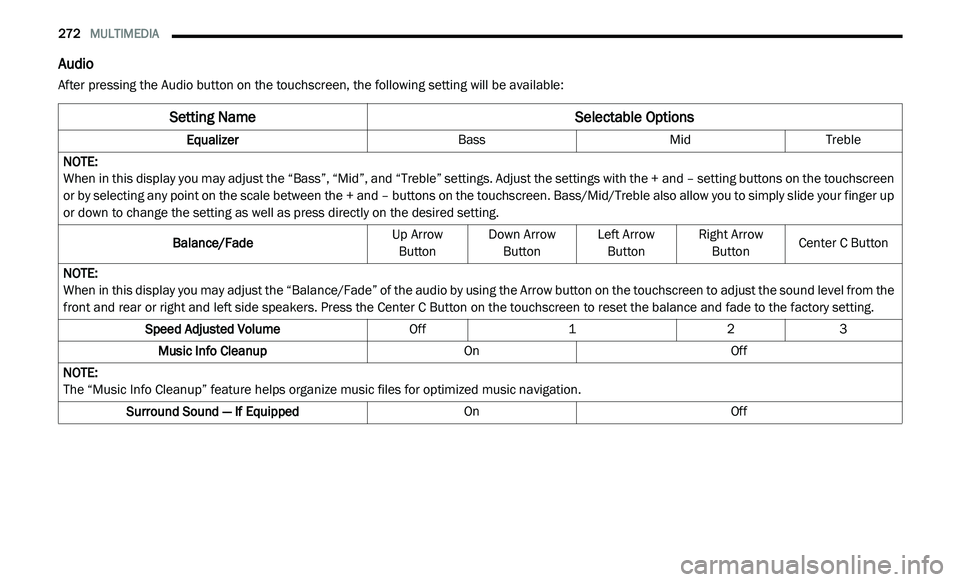
Audio
After pressing the Audio button on the touchscreen, the following setting will be available:
Setting Name Selectable Options
EqualizerBassMidTreble
NOTE:
When in this display you may adjust the “Bass”, “Mid”, and “Treble” settings. Adjust the settings with the + and – setting buttons on the touchscreen
o r
by selecting any point on the scale between the + and – buttons on the touchscreen. Bass/Mid/Treble also allow you to simply slide your finger up
or down to change the setting as well as press directly on the desired setting.
Balance/Fade Up Arrow
B u
tton Down Arrow
Bu tton Left Arrow
Bu tton Right Arrow
Bu tton Center C Button
NOTE:
When in this display you may adjust the “Balance/Fade” of the audio by using the Arrow button on the touchscreen to adjust the sound level from the
f r
ont and rear or right and left side speakers. Press the Center C Button on the touchscreen to reset the balance and fade to the factory setting.
Speed Adjusted Volume Off123
Music Info Cleanup OnOff
NOTE:
The “Music Info Cleanup” feature helps organize music files for optimized music navigation.
Surround Sound — If Equipped OnOff
Page 284 of 396
282 MULTIMEDIA
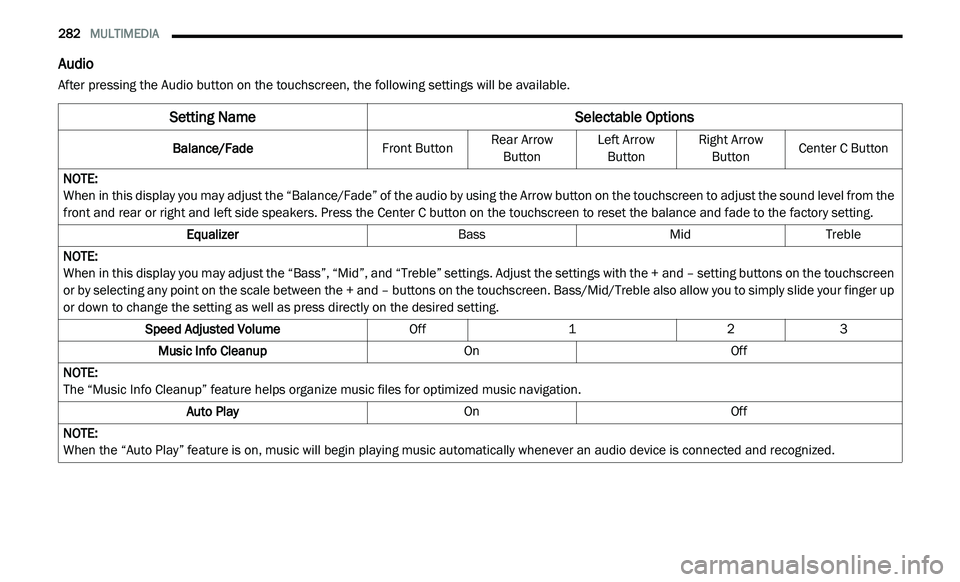
Audio
After pressing the Audio button on the touchscreen, the following settings will be available.
Setting Name Selectable Options
Balance/FadeFront ButtonRear Arrow
Bu
tton Left Arrow
Bu tton Right Arrow
Bu tton Center C Button
NOTE:
When in this display you may adjust the “Balance/Fade” of the audio by using the Arrow button on the touchscreen to adjust the sound level from the
f r
ont and rear or right and left side speakers. Press the Center C button on the touchscreen to reset the balance and fade to the factory setting.
Equalizer BassMidTreble
NOTE:
When in this display you may adjust the “Bass”, “Mid”, and “Treble” settings. Adjust the settings with the + and – setting buttons on the touchscreen
or
by selecting any point on the scale between the + and – buttons on the touchscreen. Bass/Mid/Treble also allow you to simply slide your finger up
or down to change the setting as well as press directly on the desired setting.
Speed Adjusted Volume Off123
Music Info Cleanup OnOff
NOTE:
The “Music Info Cleanup” feature helps organize music files for optimized music navigation.
Auto Play OnOff
NOTE:
When the “Auto Play” feature is on, music will begin playing music automatically whenever an audio device is connected and recognized.
Page 290 of 396
288 MULTIMEDIA
Fast Seek Up
Press and hold the Seek Up button on the
touchscreen to advance the radio through the
a v
ailable stations or channels at a faster rate,
the radio stops at the next available station or
channel when the button on the touchscreen is
released.
Seek Down
Press and release the Seek Down button on
the touchscreen to tune the radio to the next
l i
stenable station or channel.
During a Seek Down function, if the radio
r e
aches the starting station after passing
through the entire band two times, the radio will
stop at the station where it began.
Fast Seek Down
Press and hold the Seek Down button on the
touchscreen to advance the radio through the
a v
ailable stations or channel at a faster rate,
the radio stops at the next available station or
channel when the button is released.
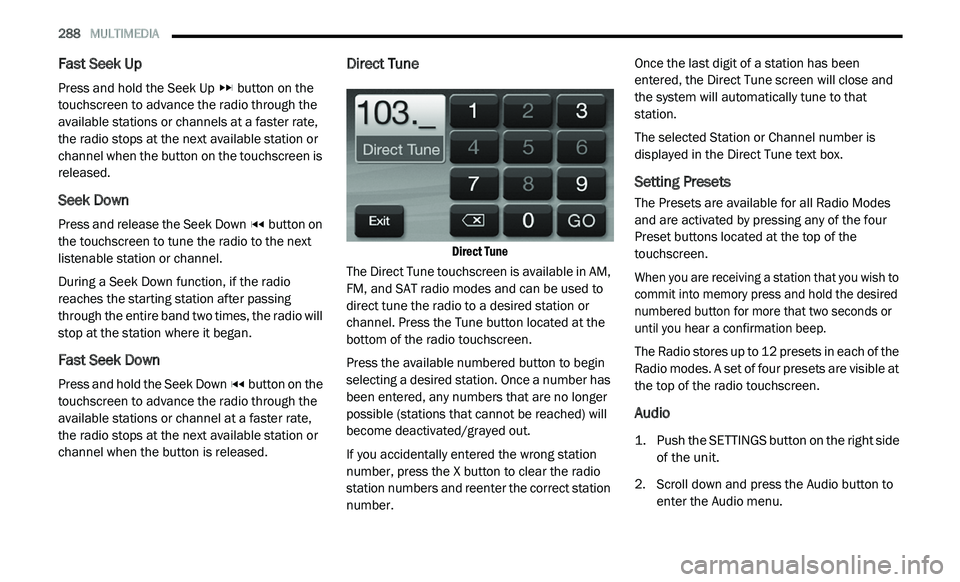
Direct Tune
Direct Tune
The Direct Tune touchscreen is available in AM,
F M
, and SAT radio modes and can be used to
direct tune the radio to a desired station or
channel. Press the Tune button located at the
bottom of the radio touchscreen.
Press the available numbered button to begin
se
lecting a desired station. Once a number has
been entered, any numbers that are no longer
possible (stations that cannot be reached) will
become deactivated/grayed out.
If you accidentally entered the wrong station
nu
mber, press the X button to clear the radio
station numbers and reenter the correct station
number. Once the last digit of a station has been
en
tered, the Direct Tune screen will close and
the system will automatically tune to that
station.
The selected Station or Channel number is
d i
splayed in the Direct Tune text box.
Setting Presets
The Presets are available for all Radio Modes
and are activated by pressing any of the four
Preset buttons located at the top of the
touchscreen.
When you are receiving a station that you wish to
co
mmit into memory press and hold the desired
numbered button for more that two seconds or
until you hear a confirmation beep.
The Radio stores up to 12 presets in each of the
R a
dio modes. A set of four presets are visible at
the top of the radio touchscreen.
Audio
1. Push the SETTINGS button on the right side of the unit.
2. S croll down and press the Audio button to
e
nter the Audio menu.
Page 291 of 396
MULTIMEDIA 289
The Audio Menu shows the following options
for you to customize your audio settings.
Equalizer
Press the Equalizer button to adjust the
Bass, Mid and Treble. Use the + or –
buttons to adjust the equalizer to your
desired settings. Press the Back Arrow
button when done.
Balance/Fade
Press the Balance/Fade button to adjust
the sound from the speakers. Use the
arrow button to adjust the sound level
from the front and rear or right and left
side speakers. Press the Center C button
to reset the balance and fade to the
factory setting. Press the Back Arrow
button when done.
Speed Adjusted Volume
Press the Speed Adjusted Volume button
to select between OFF, 1, 2 or 3. This will
decrease the radio volume relative to a
decrease in vehicle speed. Press the
Back Arrow button when done.
3. P ress the Exit button to exit from the Audio
M
enu.
SiriusXM® Satellite Radio Mode — If
Equipped
SiriusXM® services require a subscription, sold
separately after the 12-month trial period
included with the new vehicle purchase. If you
decide to continue your service at the end of
your trial subscription, the plan you choose will
automatically renew and bill at then-current
rates until you call SiriusXM® at
1-866-635-2349 to cancel.
See SiriusXM® Customer Agreement for
c o
mplete terms at www.siriusxm.com for US
residents, and www.siriusxm.ca for Canadian
residents. All fees and programming subject to
c h
ange. Our satellite service is available only to
those at least 18 and older in the 48 contiguous
USA and D.C. Our Sirius satellite service is also
available in PR (with coverage limitations). Our
Internet radio service is available throughout
our satellite service area and in AK and HI.
© 2020 SiriusXM® Radio Inc. SiriusXM® and
al
l related marks and logos are trademarks of
SiriusXM® Radio Inc.
This functionality is only available for radios
e q
uipped with a Satellite receiver. To receive
satellite radio, the vehicle needs to be outside
with a clear view to the sky. If the screen shows Acquiring Signal, you might
h
a
ve to change the vehicle’s position to receive
a signal. In most cases, the satellite radio does
not receive a signal in underground parking
garages or tunnels.
No Subscription
Radios equipped with a Satellite receiver,
r e
quire a subscription to the SiriusXM® Service.
When the radio does not have the necessary
subscription, the radio is able to receive the
preview channel only.
Acquiring SiriusXM® Subscription
To activate the SiriusXM® subscription, call the
t o
ll free number on the SiriusXM® Settings. You
will need to provide the Sirius ID (ESN) located
on your vehicle's screen.
The satellite mode is activated by pressing the
A M
/SAT button on the touchscreen located
at the bottom of the radio screen. Press the
AM/SAT button on the touchscreen and then
p r
ess the SAT button on the touchscreen.9
Page 292 of 396
290 MULTIMEDIA
When in SiriusXM® Satellite mode:
The SiriusXM® Presets are displayed at the
top of the screen.
The SiriusXM® Channel Number is displayed
along with Artist and Song name.
The SiriusXM® function buttons on the
touchscreen are displayed on the bottom.
In addition to the tuning functions common to
a l
l radio modes, the browse, info, and more
button on the faceplate functions are available
in SiriusXM® Mode. Pressing the more button
slides over the additional functions that are on
the second level of the bottom bar. This second
level stays for 10 seconds and then returns to
the main top level of the bottom bar. The
second level displays audio, Fav, Gamezone
and Replay buttons.
Browse
Press the Browse button at the bottom left of
t h
e screen to enter the browse screen.
The Browse screen in SAT mode provides you
t h
e ability to browse by All, Favorites or Genres.
You can also access Gamezone, and Traffic and
Weather settings in the Browse screen. Favorites
Press the More... button and then the Fav
b
u
tton to access the favorites feature.
The favorites feature enables you to set a
f a
vorite artist, or song. The radio then uses this
information to alert you when either the favorite
song, or works by the favorite artist are being
played at any time by any of the SiriusXM®
Channels.
Gamezone
Press the More... button and then the
G a
mezone button to access the Gamezone
feature. This feature provides you with the
ability to Select teams, edit the selection, and
set Alerts.
Replay
The replay function provides a means to store
a n
d replay up to 22 minutes of music audio and
4 8
minutes of talk radio. Once the channel is
s w
itched, content in replay memory is lost.
Press the Replay button. The Play/Pause,
R e
wind/Forward and Live buttons will display at
the top of the screen, along with the replay time.
You can exit by pressing the Replay button any
t i
me during the Replay mode. Play/Pause
Press the Pause or Play buttons to pause
p
l
aying of the content at any time that the
content is playing live or rewound content.
Play can be resumed again by pressing the
P a
use/Play button.
Rewind
Press the RW button to rewind the content in
st
eps of five seconds. Pressing the RW button
for more than two seconds rewinds the content.
The Radio begins playing the content when the
RW button is released.
Forward
Each press of the FW button forwards the
c o
ntent in steps of five seconds. Forwarding of
the content can only be done when the content
is previously rewound, and therefore, can not be
done for live content. A continuous press of the
FW button also forwards the content. The Radio
begins playing the content when the FW button
is released.
Live
Press the Live button to resume playing Live
c o
ntent.
Page 301 of 396
MULTIMEDIA 299
A maximum of 2,000 entries per phone will
be downloaded and updated every time a
phone is connected to the Uconnect Phone.
Depending on the maximum number of entries
downloaded, there may be a short delay
before the latest downloaded names can be
used. Until then, if available, the previously
downloaded phonebook is available for use.
Only the phonebook of the currently
connected mobile phone is accessible.
This downloaded phonebook cannot be
edited or deleted on the Uconnect Phone.
These can only be edited on the mobile
phone. The changes are transferred and
updated to Uconnect Phone on the next
phone connection.
Emergency And Towing Assistance
The 911/Help numbers can only be altered.
Th
ese can not be deleted or the names can not
be changed. To change the 911/Help number, follow these
s
t
eps:
1. P ress the Phonebook button on the
t
ouchscreen from the Phone main screen.
2. P ress the 911/Help button on the
t
ouchscreen. Press the appropriate listing
to alter, Emergency for example.
3. O nce Emergency is pressed, the Edit button
o
n the touchscreen appears. Press the Edit
button on the touchscreen and you will be
given the choice to Edit Number or Reset to
Default.
4. F ollow the on-screen prompts to complete
t
he task.
Phone Call Features
The following features can be accessed through
the Uconnect Phone if the feature(s) are
available on your mobile service plan.
For example, if your mobile service plan
p r
ovides three-way calling, this feature can
be accessed through the Uconnect Phone.
C h
eck with your mobile service provider for the
features that you have. Ways To Initiate A Phone Call
Listed below are all the ways you can initiate a
p
h
one call with Uconnect Phone.
Redial
Dial by pressing in the number
Voice Commands (Dial by Saying a Number,
Call by Saying a Phonebook Name, Redial, or
Call Back)
Mobile Phonebook
Recent Call Log
NOTE:
All of the above operations except Redial can be
do
ne with one call or less active.
Dial By Saying A Number
1. P ush the Phone
button to begin.
2. A fter the “Listening” prompt and the
f
ollowing beep, say “Dial 248-555-1212.”
3. T he Uconnect Phone will dial
2
48-555-1212.
9