reset DODGE JOURNEY 2020 Owner's Manual
[x] Cancel search | Manufacturer: DODGE, Model Year: 2020, Model line: JOURNEY, Model: DODGE JOURNEY 2020Pages: 396, PDF Size: 25.53 MB
Page 311 of 396
MULTIMEDIA 309
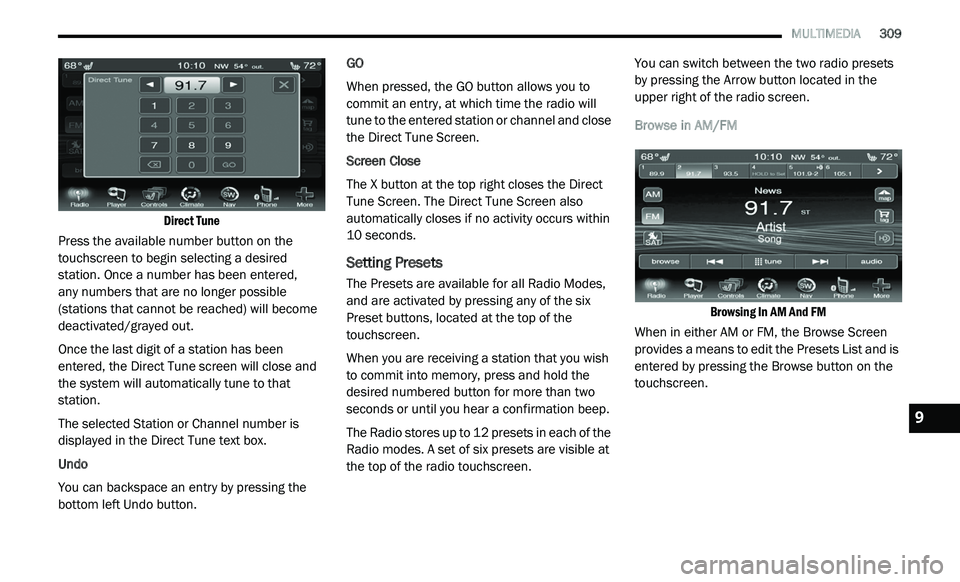
Direct Tune
Press the available number button on the
t o
uchscreen to begin selecting a desired
station. Once a number has been entered,
any numbers that are no longer possible
( s
tations that cannot be reached) will become
deactivated/grayed out.
Once the last digit of a station has been
e n
tered, the Direct Tune screen will close and
the system will automatically tune to that
station.
The selected Station or Channel number is
d i
splayed in the Direct Tune text box.
Undo
You can backspace an entry by pressing the
bo
ttom left Undo button. GO
When pressed, the GO button allows you to
c
o
mmit an entry, at which time the radio will
tune to the entered station or channel and close
the Direct Tune Screen.
Screen Close
The X button at the top right closes the Direct
T u
ne Screen. The Direct Tune Screen also
automatically closes if no activity occurs within
10 seconds.
Setting Presets
The Presets are available for all Radio Modes,
and are activated by pressing any of the six
Preset buttons, located at the top of the
touchscreen.
When you are receiving a station that you wish
t o
commit into memory, press and hold the
desired numbered button for more than two
seconds or until you hear a confirmation beep.
The Radio stores up to 12 presets in each of the
R a
dio modes. A set of six presets are visible at
the top of the radio touchscreen. You can switch between the two radio presets
b
y
pressing the Arrow button located in the
upper right of the radio screen.
Browse in AM/FM
Browsing In AM And FM
When in either AM or FM, the Browse Screen
p r
ovides a means to edit the Presets List and is
entered by pressing the Browse button on the
touchscreen.
9
Page 312 of 396
310 MULTIMEDIA
Scrolling Preset List
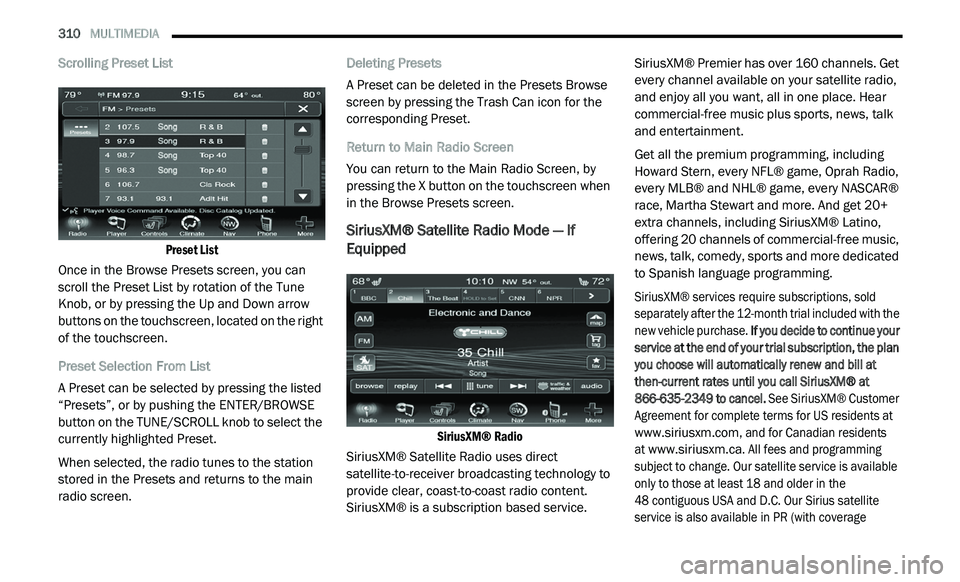
Preset List
Once in the Browse Presets screen, you can
s c
roll the Preset List by rotation of the Tune
Knob, or by pressing the Up and Down arrow
buttons on the touchscreen, located on the right
of the touchscreen.
Preset Selection From List
A Preset can be selected by pressing the listed
“ P
resets”, or by pushing the ENTER/BROWSE
button on the TUNE/SCROLL knob to select the
currently highlighted Preset.
When selected, the radio tunes to the station
s t
ored in the Presets and returns to the main
radio screen. Deleting Presets
A Preset can be deleted in the Presets Browse
sc
reen by pressing the Trash Can icon for the
corresponding Preset.
Return to Main Radio Screen
You can return to the Main Radio Screen, by
p r
essing the X button on the touchscreen when
in the Browse Presets screen.
SiriusXM® Satellite Radio Mode — If
Equipped
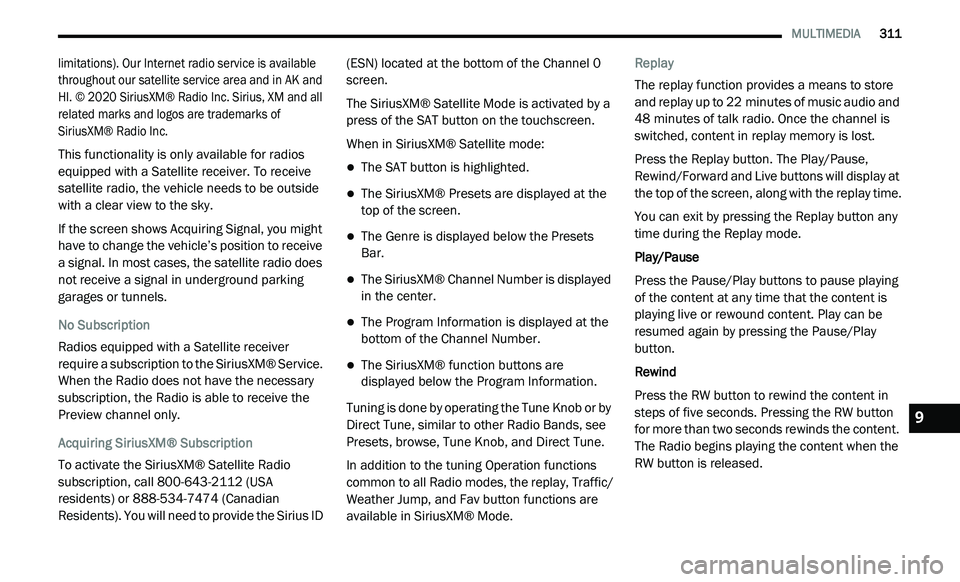
SiriusXM® Radio
SiriusXM® Satellite Radio uses direct
s a
tellite-to-receiver broadcasting technology to
provide clear, coast-to-coast radio content.
SiriusXM® is a subscription based service. SiriusXM® Premier has over 160 channels. Get
e
v
ery channel available on your satellite radio,
and enjoy all you want, all in one place. Hear
commercial-free music plus sports, news, talk
and entertainment.
Get all the premium programming, including
Ho
ward Stern, every NFL® game, Oprah Radio,
every MLB® and NHL® game, every NASCAR®
race, Martha Stewart and more. And get 20+
extra channels, including SiriusXM® Latino,
offering 20 channels of commercial-free music,
news, talk, comedy, sports and more dedicated
to Spanish language programming.
SiriusXM® services require subscriptions, sold
s e
parately after the 12-month trial included with the
new vehicle purchase. If you decide to continue your
service at the end of your trial subscription, the plan
you choose will automatically renew and bill at
then-current rates until you call SiriusXM® at
866-635-2349 to cancel. See SiriusXM® Customer
Agreement for complete terms for US residents at
www.siriusxm.com
, and for Canadian residents
at
www.siriusxm.ca
. All fees and programming
subject to change. Our satellite service is available
o n
ly to those at least 18 and older in the
48 contiguous USA and D.C. Our Sirius satellite
s e
rvice is also available in PR (with coverage
Page 313 of 396
MULTIMEDIA 311
limitations). Our Internet radio service is available
throughout our satellite service area and in AK and
HI. © 2020 SiriusXM® Radio Inc. Sirius, XM and all
related marks and logos are trademarks of
SiriusXM® Radio Inc.
This functionality is only available for radios
eq
uipped with a Satellite receiver. To receive
satellite radio, the vehicle needs to be outside
with a clear view to the sky.
If the screen shows Acquiring Signal, you might
h a
ve to change the vehicle’s position to receive
a signal. In most cases, the satellite radio does
not receive a signal in underground parking
garages or tunnels.
No Subscription
Radios equipped with a Satellite receiver
r e
quire a subscription to the SiriusXM® Service.
When the Radio does not have the necessary
subscription, the Radio is able to receive the
Preview channel only.
Acquiring SiriusXM® Subscription
To activate the SiriusXM® Satellite Radio
s u
bscription, call 800-643-2112 (USA
residents) or 888-534-7474 (Canadian
Residents). You will need to provide the Sirius ID (ESN) located at the bottom of the Channel 0
screen.
The SiriusXM® Satellite Mode is activated by a
pr
ess of the SAT button on the touchscreen.
When in SiriusXM® Satellite mode:
The SAT button is highlighted.
The SiriusXM® Presets are displayed at the
top of the screen.
The Genre is displayed below the Presets
Bar.
The SiriusXM® Channel Number is displayed
in the center.
The Program Information is displayed at the
bottom of the Channel Number.
The SiriusXM® function buttons are
displayed below the Program Information.
Tuning is done by operating the Tune Knob or by
D i
rect Tune, similar to other Radio Bands, see
Presets, browse, Tune Knob, and Direct Tune.
In addition to the tuning Operation functions
c o
mmon to all Radio modes, the replay, Traffic/
Weather Jump, and Fav button functions are
available in SiriusXM® Mode. Replay
The replay function provides a means to store
a
n
d replay up to 22 minutes of music audio and
4 8
minutes of talk radio. Once the channel is
s w
itched, content in replay memory is lost.
Press the Replay button. The Play/Pause,
R e
wind/Forward and Live buttons will display at
the top of the screen, along with the replay time.
You can exit by pressing the Replay button any
t i
me during the Replay mode.
Play/Pause
Press the Pause/Play buttons to pause playing
of
the content at any time that the content is
playing live or rewound content. Play can be
resumed again by pressing the Pause/Play
button.
Rewind
Press the RW button to rewind the content in
s t
eps of five seconds. Pressing the RW button
for more than two seconds rewinds the content.
The Radio begins playing the content when the
RW button is released.
9
Page 314 of 396
312 MULTIMEDIA
Forward
Each press of the FW button forwards the
co
ntent in steps of five seconds. Forwarding of
the content can only be done when the content
is previously rewound, and therefore, can not be
done for live content. A continuous press of the
FW button also forwards the content. The Radio
begins playing the content when the FW button
is released.
Live
Press the Live button to resume playing Live
c o
ntent.
Favorites
Press the Fav button to activate the favorites
m e
nu, which will time out in five seconds in
absence of user interaction.
You can exit the Favorites Menu by a press of
t h
e “X” in the top right corner.
The favorites feature enables you to set a
f a
vorite artist, or song that is currently playing.
The Radio then uses this information to alert
you when either the favorite song, or favorite
artist are being played at any time by any of the
SiriusXM® Channels. The maximum number of favorites that can be
s
t
ored in the Radio is 50.
Fav. Artist
While the song is playing, to set a Favorite Artist,
pr
ess the Fav button and then the Fav Artist
button.
Fav. Song
While the song is playing, to set a Favorite Song,
p r
ess the Fav button and then the Fav Song
button.
Traffic & Weather
Press the Traffic & Weather button to tune to a
S i
riusXM® Traffic & Weather channel. To set a
Traffic & Weather alert for any one of the cities
in the Browse list, see Browse in SAT.
When the Traffic & Weather button is pressed,
t h
e Jump Traffic & Weather channel is tuned.
If the Traffic & Weather alert City is not set, you
a r
e presented with a pop-up to allow you to
select the favorite city using the Browse Screen.
Browse In Sat
Press the Browse button to edit Presets,
Favorites, Game Zone, and Jump settings, along
with providing the SiriusXM® Channel List.
This Screen contains many submenus. You can
e x
it a submenu to get back to a parent menu by
a press of the Back Arrow.
All
Press the All button on the touchscreen at the
l e
ft of the Browse Screen.
Channel List
P
ress the Channel List to display all the
S i
riusXM® Channel Numbers along with the
corresponding Genre. You can scroll the
Channel list by pressing the Up and Down
Arrows, located on the right side of the screen.
Scrolling can also be done by operating the
Tune/Scroll Knob.
Genre
Press the Genre button to display a list of
G e
nres. You can select any desired Genre by
pressing the Genre list, at which point, the
Radio tunes to a channel with the content in the
selected Genre.
Page 315 of 396
MULTIMEDIA 313
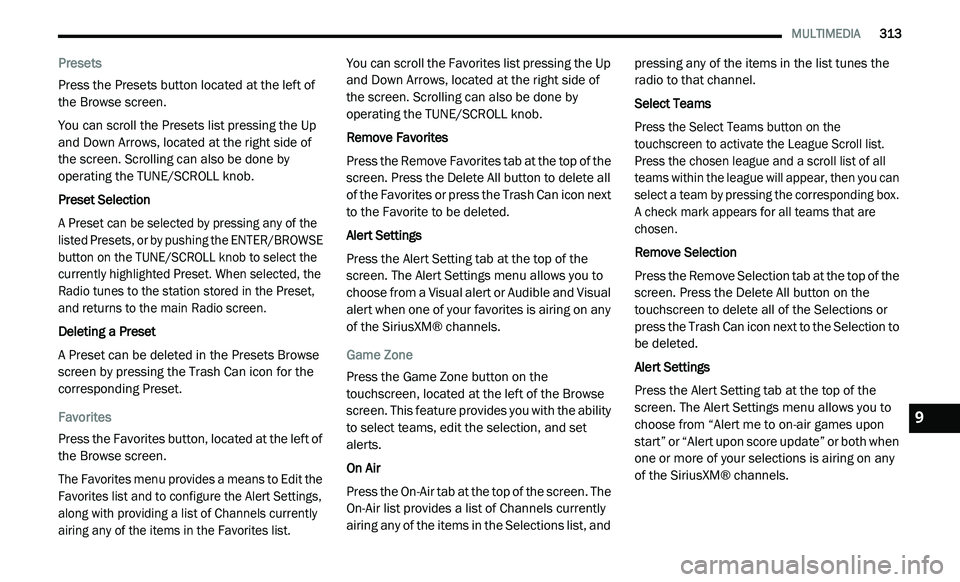
Presets
Press the Presets button located at the left of
th
e Browse screen.
You can scroll the Presets list pressing the Up
a n
d Down Arrows, located at the right side of
the screen. Scrolling can also be done by
operating the TUNE/SCROLL knob.
Preset Selection
A Preset can be selected by pressing any of the
l i
sted Presets, or by pushing the ENTER/BROWSE
button on the TUNE/SCROLL knob to select the
currently highlighted Preset. When selected, the
Radio tunes to the station stored in the Preset,
and returns to the main Radio screen.
Deleting a Preset
A Preset can be deleted in the Presets Browse
s c
reen by pressing the Trash Can icon for the
corresponding Preset.
Favorites
Press the Favorites button, located at the left of
t h
e Browse screen.
The Favorites menu provides a means to Edit the
F a
vorites list and to configure the Alert Settings,
along with providing a list of Channels currently
airing any of the items in the Favorites list.
You can scroll the Favorites list pressing the Up
an
d Down Arrows, located at the right side of
the screen. Scrolling can also be done by
operating the TUNE/SCROLL knob.
Remove Favorites
Press the Remove Favorites tab at the top of the
s c
reen. Press the Delete All button to delete all
of the Favorites or press the Trash Can icon next
to the Favorite to be deleted.
Alert Settings
Press the Alert Setting tab at the top of the
s c
reen. The Alert Settings menu allows you to
choose from a Visual alert or Audible and Visual
alert when one of your favorites is airing on any
of the SiriusXM® channels.
Game Zone
Press the Game Zone button on the
t o
uchscreen, located at the left of the Browse
screen. This feature provides you with the ability
to select teams, edit the selection, and set
alerts.
On Air
Press the On-Air tab at the top of the screen. The
O n
-Air list provides a list of Channels currently
airing any of the items in the Selections list, and pressing any of the items in the list tunes the
radio to that channel.
Select Teams
Press the Select Teams button on the
t
o
uchscreen to activate the League Scroll list.
Press the chosen league and a scroll list of all
teams within the league will appear, then you can
select a team by pressing the corresponding box.
A check mark appears for all teams that are
chosen.
Remove Selection
Press the Remove Selection tab at the top of the
s c
reen. Press the Delete All button on the
touchscreen to delete all of the Selections or
press the Trash Can icon next to the Selection to
be deleted.
Alert Settings
Press the Alert Setting tab at the top of the
s c
reen. The Alert Settings menu allows you to
choose from “Alert me to on-air games upon
start” or “Alert upon score update” or both when
one or more of your selections is airing on any
of the SiriusXM® channels.
9
Page 334 of 396
332 MULTIMEDIA
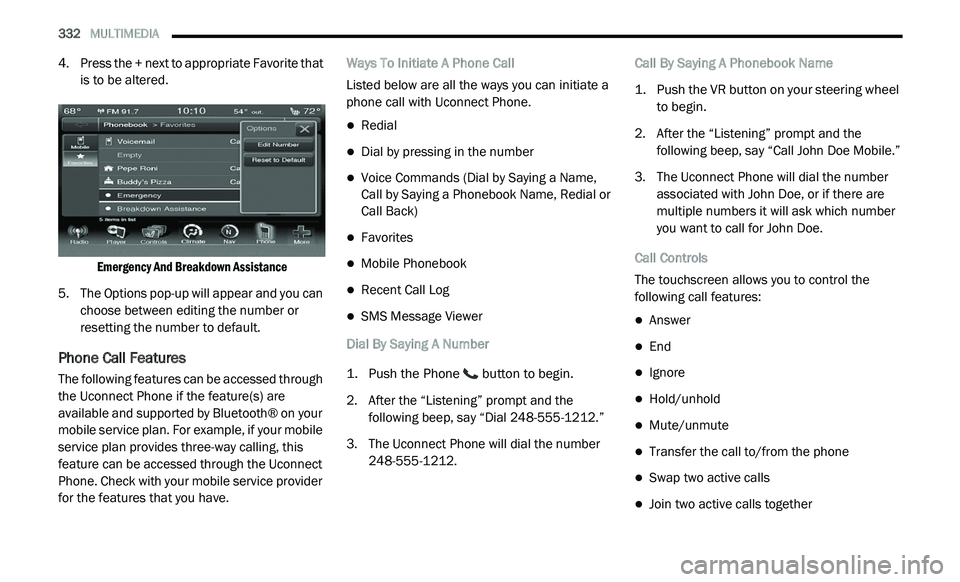
4. Press the + next to appropriate Favorite that
is to be altered.
Emergency And Breakdown Assistance
5. T he Options pop-up will appear and you can
c
hoose between editing the number or
resetting the number to default.
Phone Call Features
The following features can be accessed through
the Uconnect Phone if the feature(s) are
available and supported by Bluetooth® on your
mobile service plan. For example, if your mobile
service plan provides three-way calling, this
feature can be accessed through the Uconnect
Phone. Check with your mobile service provider
for the features that you have. Ways To Initiate A Phone Call
Listed below are all the ways you can initiate a
p
h
one call with Uconnect Phone.
Redial
Dial by pressing in the number
Voice Commands (Dial by Saying a Name,
Call by Saying a Phonebook Name, Redial or
Call Back)
Favorites
Mobile Phonebook
Recent Call Log
SMS Message Viewer
Dial By Saying A Number
1. P ush the Phone
button to begin.
2. A fter the “Listening” prompt and the
f
ollowing beep, say “Dial 248-555-1212.”
3. T he Uconnect Phone will dial the number
2
48-555-1212. Call By Saying A Phonebook Name
1. P
ush the VR button on your steering wheel
t
o begin.
2. A fter the “Listening” prompt and the
f
ollowing beep, say “Call John Doe Mobile.”
3. T he Uconnect Phone will dial the number
a
ssociated with John Doe, or if there are
multiple numbers it will ask which number
you want to call for John Doe.
Call Controls
The touchscreen allows you to control the
f o
llowing call features:
Answer
End
Ignore
Hold/unhold
Mute/unmute
Transfer the call to/from the phone
Swap two active calls
Join two active calls together
Page 340 of 396
338 MULTIMEDIA
Voice Text Reply
Uconnect Phone can read or send new
me
ssages on your phone.
Your phone must support SMS over Bluetooth®
t o
use this feature. If the Uconnect Phone
determines your phone is not compatible
with SMS messaging over Bluetooth®, the
M e
ssaging button will be grayed out and the
feature will not be available for use.
NOTE:
Uconnect Phone SMS is only available when the
ve
hicle is not moving.
Read Messages:
If you receive a new text message while your
p h
one is connected to Uconnect Phone, an
announcement will be made to notify you that
you have a new text message.
Once a message is received and viewed or
l i
stened to, you will have the following options:
Send a Reply
Forward
Call
Send Messages Using Buttons On The Touchscreen:
You can send messages using Uconnect Phone.
T
o
send a new message:
1. P ress the Phone button on the
t
ouchscreen.
2. P ress the Messaging button on the
t
ouchscreen then “New Message.”
3. P ress one of the 18 preset messages and the
p
erson you wish to send the message to.
4. I f multiple numbers are available for the
c
ontact, select which number you would like
to have the message sent.
5. P ress “Send” or “Cancel.”
S
end Messages Using Voice Commands:
1. P ush the Phone
button.
2. A fter the “Listening” prompt and the
f
ollowing beep, say “Send message to John
Smith mobile.”
3. A fter the system prompts you for what
m
essage you want to send, say the
message you wish to send or say “List.”
There are 18 preset messages. While the list of defined messages are being
re
ad, you can interrupt the system by pushing
the Voice Command button and saying the
message you want to send.
After the system confirms that you want to send
y o
ur message to John Smith, your message will
be sent.
List of Preset Messages:
1. Y es.
2
. N o.
3
. O kay.
4
. I can't talk right now.
5
. C all me.
6
. I 'll call you later.
7
. I 'm on my way.
8
. T hanks.
9
. I 'll be late.
1
0. I will be
1
1. S ee you in
1
2. S tuck in traffic.
Page 345 of 396
MULTIMEDIA 343
6. Press to return to the previous page. Press
and hold to return to the main menu.
7. P ress to create a turn-by-turn route to this
l
ocation.
Setting A Home Location
You can set your home location for the location
yo
u return to most often.
1. Fr om the main menu, press
W
here
To? > Go Home
.
2. S elect Enter M
y Address, Use My Current
Location or Recently Found .
Going Home
Before you can navigate to home you must set
a
home location.
From the main menu, press Where To? > Go
Home .
Resetting Your Home Location
1. F rom the main menu, press
W
here To? > > Set Home Location
.
2. S elect an option to change your address. E
diting Your Home Location Information
1. Fr om the main menu, press
W
here
To? > Favorites > Home
.
2. P ress
> Edit.
3. E nter your changes.
4
. P ress Done .
V
iewing A List Of Recently Found Locations
Your navigation system stores the last
50 locations you have found.
From the main menu, press Where
To? > Recently Found .
Clearing The List Of Recently Found Locations
From the main menu, press Wh
ere To? >
Recently Found > > Clear > Yes.
About Favorites
You can save locations in your Favorites so you
c a
n quickly find them and create routes to
them. Your home location is also stored in
Favorites. Saving Your Current Location To Favorites
1. Fr
om the map, press the vehicle icon.
2
. P ress Save .
3
. E nter a name.
4
. P ress Done .
T
he location is saved in Fa
vorites.
Saving Locations To Favorites
1. Search for the location.
2
. From the Go! page, press
> Save > OK.
Finding Favorites
1. Fr om the main menu, press
W
here
To? > Favorites
.
2. I f necessary, select a category.
3
. S elect a saved location.
E
diting Favorites
1. Fr om the main menu, press
W
here
To? > Favorites
.
2. S elect a category.
9
Page 350 of 396
348 MULTIMEDIA
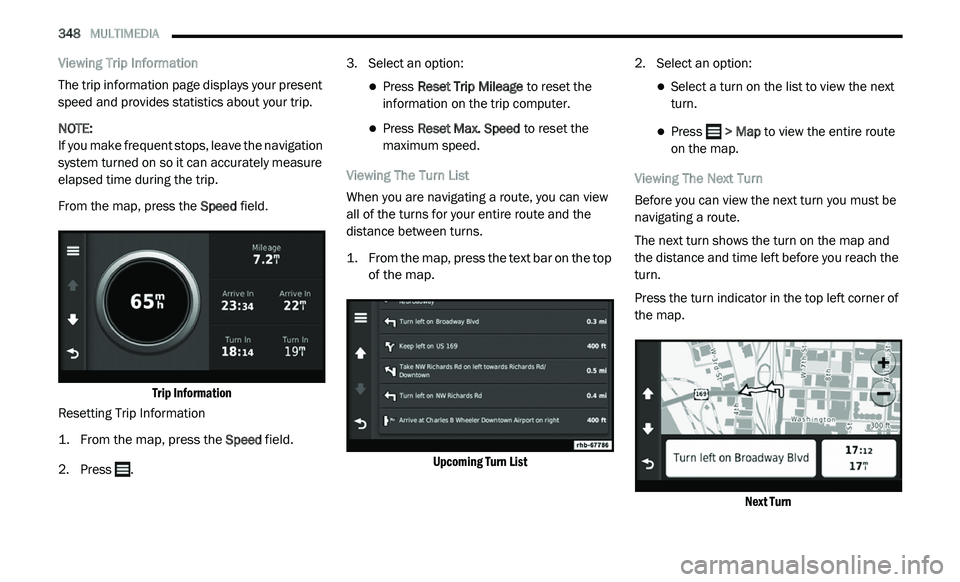
Viewing Trip Information
The trip information page displays your present
sp
eed and provides statistics about your trip.
NOTE:
If you make frequent stops, leave the navigation
s y
stem turned on so it can accurately measure
elapsed time during the trip.
From the map, press the Sp
eed field.
Trip Information
Resetting Trip Information
1. Fr om the map, press the
S
peed
field.
2. Press . 3
. S
elect an option:
Press Reset Trip Mileage to reset the
information on the trip computer.
Press Reset Max. Speed to reset the
maximum speed.
Viewing The Turn List
When you are navigating a route, you can view
al
l of the turns for your entire route and the
distance between turns.
1. Fr om the map, press the text bar on the top
o
f the map.
Upcoming Turn List
2. S
elect an option:
Select a turn on the list to view the next
turn.
Press > Map to view the entire route
o
n the map.
Viewing The Next Turn
Before you can view the next turn you must be
n a
vigating a route.
The next turn shows the turn on the map and
t h
e distance and time left before you reach the
turn.
Press the turn indicator in the top left corner of
t h
e map.
Next Turn
Page 366 of 396
364 MULTIMEDIA
The left-hand control is a rocker-type switch with
a push button in the center. The function of the
left-hand control is different depending on
which mode you are in.
The following describes the left-hand control
op
eration in each mode:
RADIO OPERATION
Pushing the top of the switch will “Seek” up for
the next listenable station and pushing the
bottom of the switch will “Seek” down for the
next listenable station.
The button located in the center of the left-hand
co
ntrol will tune to the next preset station that
you have programmed in the radio preset
button.
MEDIA MODE
Pushing the top of the switch once goes to the
next track on the selected media (AUX/USB/
Bluetooth®). Pushing the bottom of the switch
once goes to the beginning of the current track,
or to the beginning of the previous track if it is
within eight seconds after the current track
begins to play.
IPOD®/USB/MP3 CONTROL
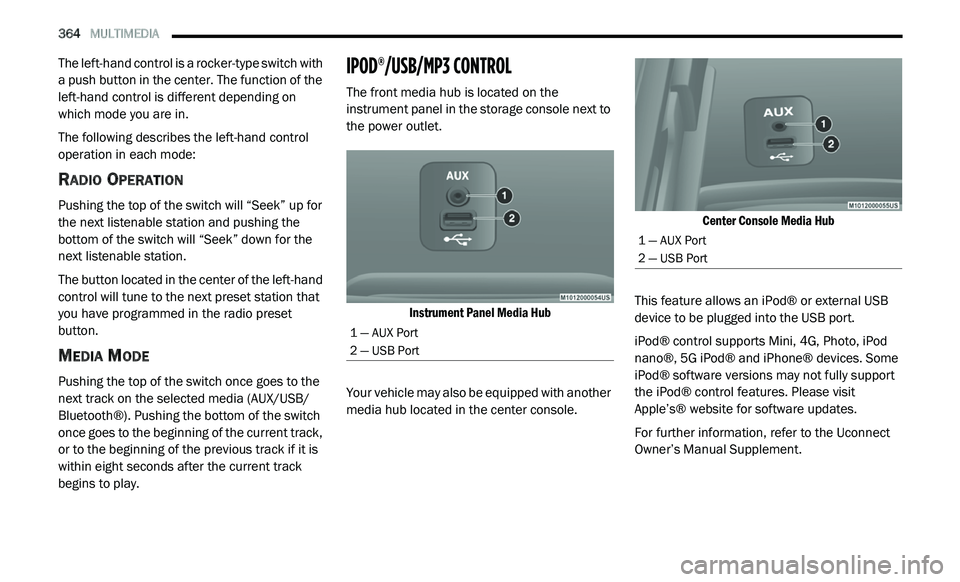
The front media hub is located on the
instrument panel in the storage console next to
the power outlet.
Instrument Panel Media Hub
Your vehicle may also be equipped with another
me
dia hub located in the center console.
Center Console Media Hub
This feature allows an iPod® or external USB
d e
vice to be plugged into the USB port.
iPod® control supports Mini, 4G, Photo, iPod
n a
no®, 5G iPod® and iPhone® devices. Some
iPod® software versions may not fully support
the iPod® control features. Please visit
Apple’s® website for software updates.
For further information, refer to the Uconnect
Ow
ner’s Manual Supplement.
1 — AUX Port
2 — USB Port
1 — AUX Port
2 — USB Port