climate control DODGE JOURNEY 2020 Owner's Manual
[x] Cancel search | Manufacturer: DODGE, Model Year: 2020, Model line: JOURNEY, Model: DODGE JOURNEY 2020Pages: 396, PDF Size: 25.53 MB
Page 71 of 396
GETTING TO KNOW YOUR VEHICLE 69
Rear Temperature Control Knob
Turn the rear temperature knob to adjust the temperature. Turn it to the right (clockwise) to raise the temperature. Turn it to
th
e left (counterclockwise) to lower the temperature. The rear temperature setting is displayed in the control head.
Rear Blower Control Knob
The rear blower control can be manually set to off, or any fixed blower speed by rotating the Blower Control Knob in the rear
o f
the vehicle. This allows the rear seat occupants to control the volume of air circulated in the rear of the vehicle.
When rear controls are locked by the front system, the Rear Lock symbol on the temperature knob is illuminated and any
r e
ar overhead adjustments are ignored.
Rear AUTO Setting
Turn the blower knob to the AUTO setting. The rear AUTO setting is displayed in the control head when REAR AUTO is on. This
f e
ature automatically controls the rear interior cabin temperature by adjusting airflow distribution and amount. Changing the
blower knob to any other blower setting will cause the rear system to switch to manual mode. Refer to "Automatic Operation"
within this section for more information.
Rear Climate Control/Blower Off
To turn the Rear Climate Controls off, turn the Blower Control knob to the O (off) position.
Icon Description
2
Page 72 of 396
70 GETTING TO KNOW YOUR VEHICLE
CLIMATE CONTROL FUNCTIONS
A/C (Air Conditioning)
The Air Conditioning (A/C) button allows the
operator to manually activate or deactivate
the air conditioning system. When the air
c o
nditioning system is turned on, cool
dehumidified air will flow through the outlets into
the cabin. For improved fuel economy, press the
A/C button to turn off the air conditioning and
manually adjust the blower and airflow mode
settings. Also, make sure to select only Panel,
Bi-Level, or Floor modes.
NOTE:
For Manual Climate Controls, if the system is
in Mix, Floor or Defrost Mode, the A/C can be
turned off, but the A/C system shall remain
active to prevent fogging of the windows.
If fog or mist appears on the windshield or
side glass, select Defrost mode, and increase
blower speed if needed.
If your air conditioning performance seems
lower than expected, check the front of the
A/C condenser (located in front of the radi -
ator), for an accumulation of dirt or insects. C
le
an with a gentle water spray from the front
of the radiator and through the condenser.
MAX A/C
MAX A/C sets the control for maximum cooling
p e
rformance.
Press and release to toggle between MAX A/C
a n
d the prior settings. The button illuminates
when MAX A/C is on.
In MAX A/C, the blower level and mode position
c a
n be adjusted to desired user settings.
Pressing other settings will cause the MAX A/C
operation to switch to the selected setting and
MAX A/C to exit.
Recirculation
In cold weather, use of Recirculation mode
may lead to excessive window fogging. The
R e
circulation feature may be unavailable (button
on the touchscreen greyed out) if conditions exist
that could create fogging on the inside of the
windshield.
On systems with Manual Climate Controls,
if equipped, the Recirculation mode is not
a l
lowed in Defrost mode to improve window
clearing operation. Recirculation is disabled
automatically if this mode is selected. Attempting to use Recirculation while in this
mode causes the LED in the control button to
blink and then turns off.
AUTOMATIC TEMPERATURE CONTROL
(ATC) — I
F EQUIPPED
Automatic Operation
1. Push the AUTO button on the faceplate, or
the AUTO button on the touchscreen on the
Automatic Temperature Control (ATC)
Panel.
2. Next, adjust the temperature you would like t
he system to maintain by adjusting the
driver and passenger temperature control
buttons. Once the desired temperature is
displayed, the system achieves and
automatically maintains that comfort level.
3. W hen the system is set up for your comfort
l
evel, it is not necessary to change the
settings. You will experience the greatest
efficiency by simply allowing the system to
function automatically.
Page 74 of 396
72 GETTING TO KNOW YOUR VEHICLE
Outside Air Intake
Make sure the air intake, located directly in
front of the windshield, is free of obstructions
such as leaves. Leaves collected in the air
intake may reduce airflow, and if they enter
the plenum, they could plug the water drains.
In winter months, make sure the air intake is
c le
ar of ice, slush, and snow.
A/C Air Filter
The climate control system filters out dust and
pollen from the air. Refer to an authorized
dealer for filter replacement instructions.
Economy Mode
If ECONOMY mode is desired, push the A/C
button to turn off the LED indicator and the A/C
compressor. Rotate the temperature control
knob to the desired temperature. Also, make
sure to select only Panel, Bi-Level, or Floor
modes.
Operating Tips ChartWINDOWS
POWER WINDOWS
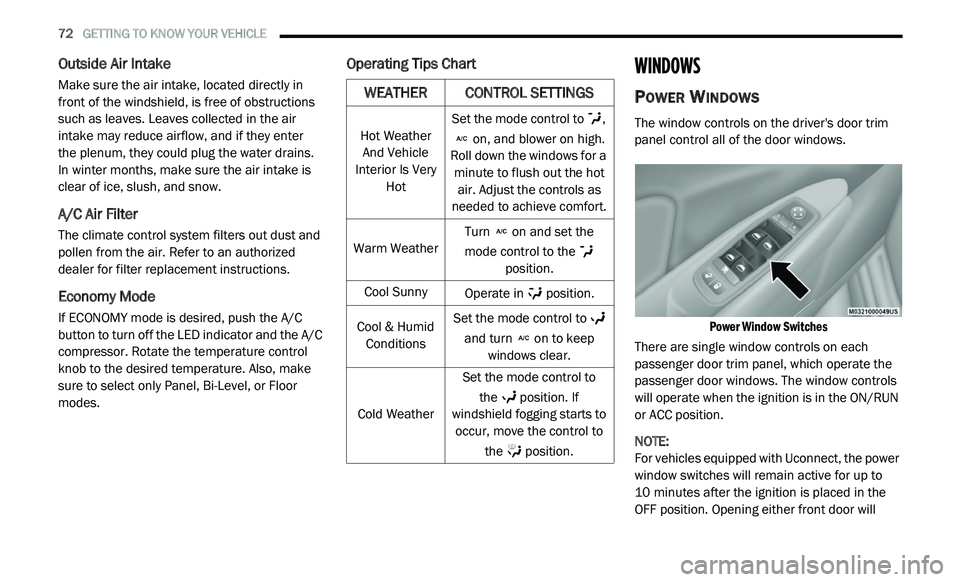
The window controls on the driver's door trim
panel control all of the door windows.
Power Window Switches
There are single window controls on each
p a
ssenger door trim panel, which operate the
passenger door windows. The window controls
will operate when the ignition is in the ON/RUN
or ACC position.
NOTE:
For vehicles equipped with Uconnect, the power
w i
ndow switches will remain active for up to
10 minutes after the ignition is placed in the
O F
F position. Opening either front door will
WEATHER CONTROL SETTINGS
Hot Weather
And Vehicle
Interior Is Very Hot Set the mode control to
,
on, and blower on high.
Roll down the windows for a m i
nute to flush out the hot
air. Adjust the controls as
needed to achieve comfort.
Warm Weather Turn
on and set the
mode control to the
position.
Cool Sunny Operate in position.
Cool & Humid Co
nditions Set the mode control to
and turn on to keep
windows clear.
Cold Weather Set the mode control to
th
e position. If
windshield fogging starts to o c
cur, move the control to
the position.
Page 79 of 396
GETTING TO KNOW YOUR VEHICLE 77
LIFTGATE
OPENING
The liftgate can be unlocked or locked pushing
the unlock or lock button on the Remote
Keyless Entry key fob, the Keyless Enter-N-Go
(Passive Entry) lock/unlock button underneath
the left side of the accent bar, which is located
on the liftgate below the glass, or by activating
the power door lock switch located on either
front door trim panel. Refer to “Keyless Enter-N-Go — Passive Entry” in
“
D
oors” in this chapter for further information
on Keyless Enter-N-Go (Passive Entry).
NOTE:
The liftgate cannot be unlocked or locked with
th
e manual door locks on the door trim panels
or the door lock cylinder on the driver's door.
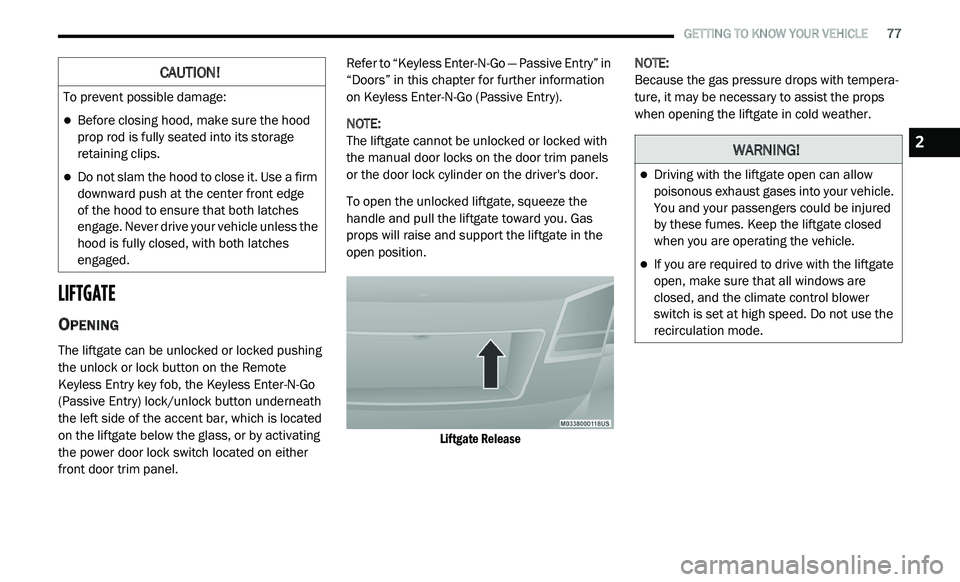
To open the unlocked liftgate, squeeze the
h a
ndle and pull the liftgate toward you. Gas
props will raise and support the liftgate in the
open position.
Liftgate Release
NOTE:
Because the gas pressure drops with tempera -
ture, it may be necessary to assist the props
w h
en opening the liftgate in cold weather.
CAUTION!
To prevent possible damage:
Before closing hood, make sure the hood
prop rod is fully seated into its storage
retaining clips.
Do not slam the hood to close it. Use a firm
downward push at the center front edge
of the hood to ensure that both latches
e n
gage. Never drive your vehicle unless the
hood is fully closed, with both latches
engaged.
WARNING!
Driving with the liftgate open can allow
poisonous exhaust gases into your vehicle.
You and your passengers could be injured
by these fumes. Keep the liftgate closed
when you are operating the vehicle.
If you are required to drive with the liftgate
open, make sure that all windows are
closed, and the climate control blower
switch is set at high speed. Do not use the
recirculation mode.
2
Page 117 of 396
SAFETY 115
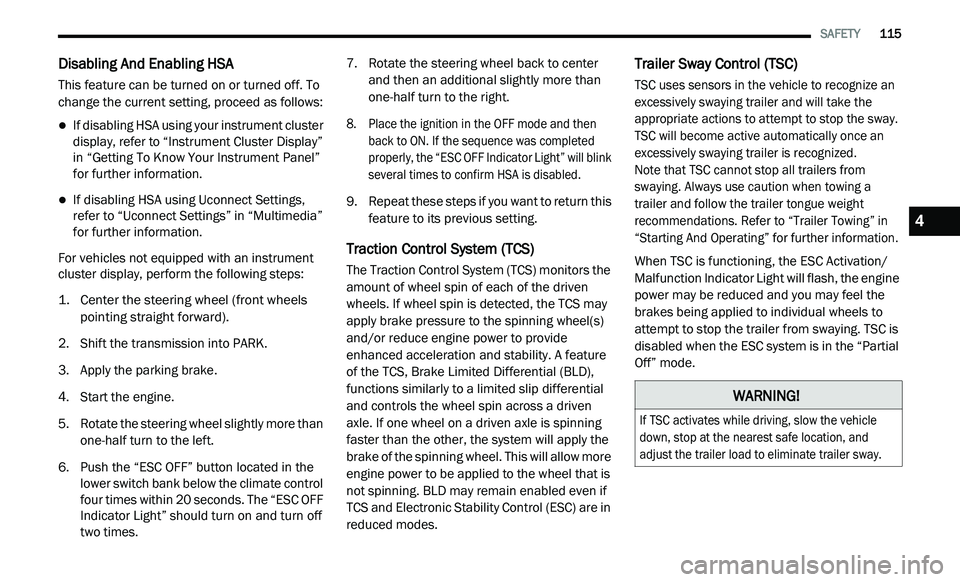
Disabling And Enabling HSA
This feature can be turned on or turned off. To
change the current setting, proceed as follows:
If disabling HSA using your instrument cluster
display, refer to “Instrument Cluster Display”
in “Getting To Know Your Instrument Panel”
for further information.
If disabling HSA using Uconnect Settings,
refer to “Uconnect Settings” in “Multimedia”
for further information.
For vehicles not equipped with an instrument
c lu
ster display, perform the following steps:
1. C enter the steering wheel (front wheels
p
ointing straight forward).
2. S hift the transmission into PARK.
3
. A pply the parking brake.
4
. S tart the engine.
5
. R otate the steering wheel slightly more than
o
ne-half turn to the left.
6. P ush the “ESC OFF” button located in the
l
ower switch bank below the climate control
four times within 20 seconds. The “ESC OFF
Indicator Light” should turn on and turn off
two times. 7. R
otate the steering wheel back to center
a
nd then an additional slightly more than
one-half turn to the right.
8. P lace the ignition in the OFF mode and then
b
ack to ON. If the sequence was completed
properly, the “ESC OFF Indicator Light” will blink
several times to confirm HSA is disabled.
9. Repeat these steps if you want to return this f
eature to its previous setting.
Traction Control System (TCS)
The Traction Control System (TCS) monitors the
amount of wheel spin of each of the driven
wheels. If wheel spin is detected, the TCS may
apply brake pressure to the spinning wheel(s)
and/or reduce engine power to provide
enhanced acceleration and stability. A feature
of the TCS, Brake Limited Differential (BLD),
functions similarly to a limited slip differential
and controls the wheel spin across a driven
axle. If one wheel on a driven axle is spinning
faster than the other, the system will apply the
brake of the spinning wheel. This will allow more
engine power to be applied to the wheel that is
not spinning. BLD may remain enabled even if
TCS and Electronic Stability Control (ESC) are in
reduced modes.
Trailer Sway Control (TSC)
TSC uses sensors in the vehicle to recognize an
excessively swaying trailer and will take the
appropriate actions to attempt to stop the sway.
TSC will become active automatically once an
excessively swaying trailer is recognized.
Note that TSC cannot stop all trailers from
s w
aying. Always use caution when towing a
trailer and follow the trailer tongue weight
r e
commendations. Refer to “Trailer Towing” in
“Starting And Operating” for further information.
When TSC is functioning, the ESC Activation/
M a
lfunction Indicator Light will flash, the engine
power may be reduced and you may feel the
brakes being applied to individual wheels to
attempt to stop the trailer from swaying. TSC is
disabled when the ESC system is in the “Partial
Off” mode.
WARNING!
If TSC activates while driving, slow the vehicle
down, stop at the nearest safe location, and
adjust the trailer load to eliminate trailer sway.
4
Page 156 of 396
154 SAFETY
(Continued)
(Continued)
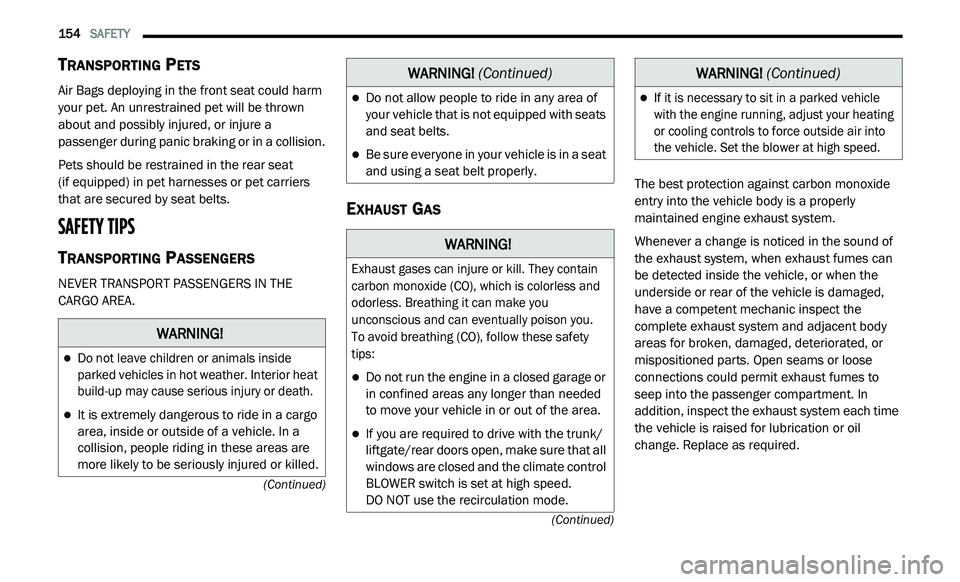
TRANSPORTING PETS
Air Bags deploying in the front seat could harm
your pet. An unrestrained pet will be thrown
about and possibly injured, or injure a
passenger during panic braking or in a collision.
Pets should be restrained in the rear seat
(if equipped) in pet harnesses or pet carriers
th
at are secured by seat belts.
SAFETY TIPS
TRANSPORTING PASSENGERS
NEVER TRANSPORT PASSENGERS IN THE
CARGO AREA.
EXHAUST GAS
The best protection against carbon monoxide
entry into the vehicle body is a properly
maintained engine exhaust system.
Whenever a change is noticed in the sound of
th
e exhaust system, when exhaust fumes can
be detected inside the vehicle, or when the
underside or rear of the vehicle is damaged,
have a competent mechanic inspect the
complete exhaust system and adjacent body
areas for broken, damaged, deteriorated, or
mispositioned parts. Open seams or loose
connections could permit exhaust fumes to
seep into the passenger compartment. In
addition, inspect the exhaust system each time
the vehicle is raised for lubrication or oil
change. Replace as required.
WARNING!
Do not leave children or animals inside
parked vehicles in hot weather. Interior heat
build-up may cause serious injury or death.
It is extremely dangerous to ride in a cargo
area, inside or outside of a vehicle. In a
collision, people riding in these areas are
more likely to be seriously injured or killed.
Do not allow people to ride in any area of
your vehicle that is not equipped with seats
and seat belts.
Be sure everyone in your vehicle is in a seat
and using a seat belt properly.
WARNING!
Exhaust gases can injure or kill. They contain
carbon monoxide (CO), which is colorless and
odorless. Breathing it can make you
unconscious and can eventually poison you.
To avoid breathing (CO), follow these safety
t i
ps:
Do not run the engine in a closed garage or
in confined areas any longer than needed
to move your vehicle in or out of the area.
If you are required to drive with the trunk/
liftgate/rear doors open, make sure that all
windows are closed and the climate control
BLOWER switch is set at high speed.
DO NOT use the recirculation mode.
WARNING! (Continued)
If it is necessary to sit in a parked vehicle
with the engine running, adjust your heating
or cooling controls to force outside air into
the vehicle. Set the blower at high speed.
WARNING! (Continued)
Page 191 of 396
189
IN CASE OF EMERGENCY
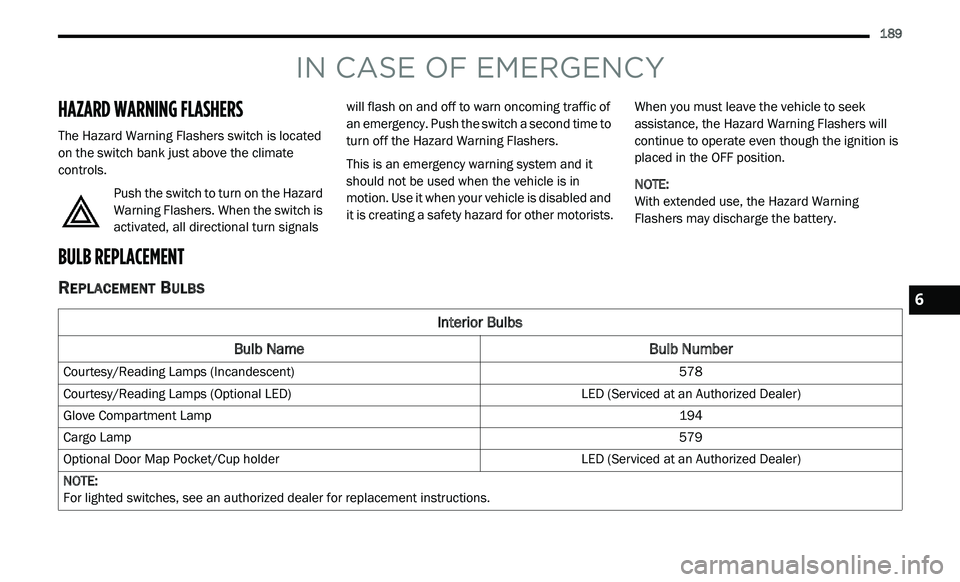
HAZARD WARNING FLASHERS
The Hazard Warning Flashers switch is located
on the switch bank just above the climate
controls.
Push the switch to turn on the Hazard
Warning Flashers. When the switch is
ac
tivated, all directional turn signals will flash on and off to warn oncoming traffic of
an emergency. Push the switch a second time to
turn off the Hazard Warning Flashers.
This is an emergency warning system and it
s
h
ould not be used when the vehicle is in
motion. Use it when your vehicle is disabled and
it is creating a safety hazard for other motorists. When you must leave the vehicle to seek
a
s
sistance, the Hazard Warning Flashers will
continue to operate even though the ignition is
placed in the OFF position.
NOTE:
With extended use, the Hazard Warning
F l
ashers may discharge the battery.
BULB REPLACEMENT
REPLACEMENT BULBS
Interior Bulbs
Bulb Name Bulb Number
Courtesy/Reading Lamps (Incandescent) 578
Courtesy/Reading Lamps (Optional LED) LED (Serviced at an Authorized Dealer)
Glove Compartment Lamp 194
Cargo Lamp 579
Optional Door Map Pocket/Cup holder LED (Serviced at an Authorized Dealer)
NOTE:
For lighted switches, see an authorized dealer for replacement instructions.
6
Page 196 of 396
194 IN CASE OF EMERGENCY
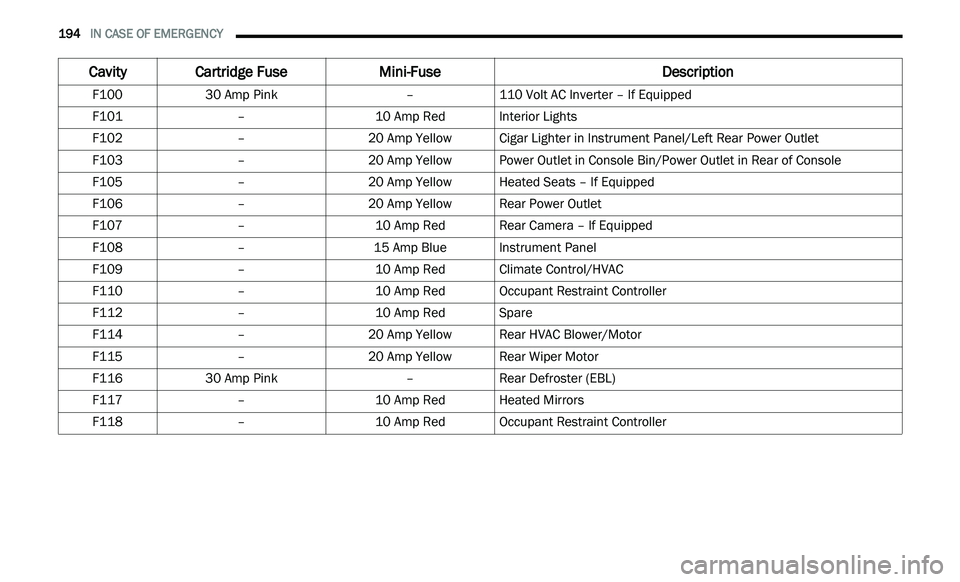
Cavity Cartridge Fuse Mini-Fuse Description
F10030 Amp Pink –110 Volt AC Inverter – If Equipped
F101 –10 Amp RedInterior Lights
F102 –20 Amp Yellow Cigar Lighter in Instrument Panel/Left Rear Power Outlet
F103 –20 Amp Yellow Power Outlet in Console Bin/Power Outlet in Rear of Console
F105 –20 Amp Yellow Heated Seats – If Equipped
F106 –20 Amp Yellow Rear Power Outlet
F107 –10 Amp RedRear Camera – If Equipped
F108 –15 Amp BlueInstrument Panel
F109 –10 Amp RedClimate Control/HVAC
F110 –10 Amp RedOccupant Restraint Controller
F112 –10 Amp RedSpare
F114 –20 Amp Yellow Rear HVAC Blower/Motor
F115 –20 Amp Yellow Rear Wiper Motor
F116 30 Amp Pink –Rear Defroster (EBL)
F117 –10 Amp RedHeated Mirrors
F118 –10 Amp RedOccupant Restraint Controller
Page 197 of 396
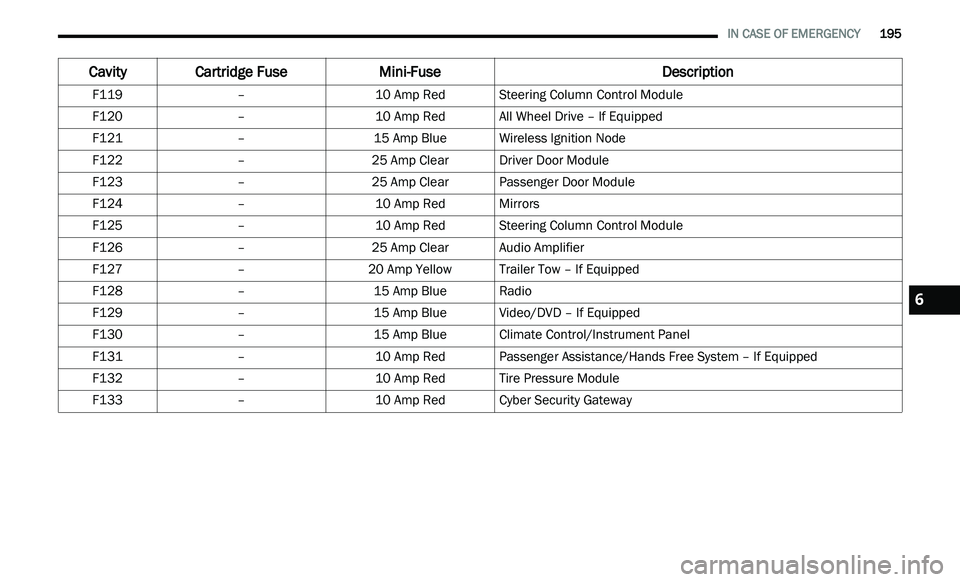
IN CASE OF EMERGENCY 195
F119 –10 Amp RedSteering Column Control Module
F120 –10 Amp RedAll Wheel Drive – If Equipped
F121 –15 Amp BlueWireless Ignition Node
F122 –25 Amp ClearDriver Door Module
F123 –25 Amp ClearPassenger Door Module
F124 –10 Amp RedMirrors
F125 –10 Amp RedSteering Column Control Module
F126 –25 Amp ClearAudio Amplifier
F127 –20 Amp Yellow Trailer Tow – If Equipped
F128 –15 Amp BlueRadio
F129 –15 Amp BlueVideo/DVD – If Equipped
F130 –15 Amp BlueClimate Control/Instrument Panel
F131 –10 Amp RedPassenger Assistance/Hands Free System – If Equipped
F132 –10 Amp RedTire Pressure Module
F133 –10 Amp RedCyber Security Gateway
Cavity Cartridge Fuse Mini-FuseDescription
6
Page 198 of 396
196 IN CASE OF EMERGENCY
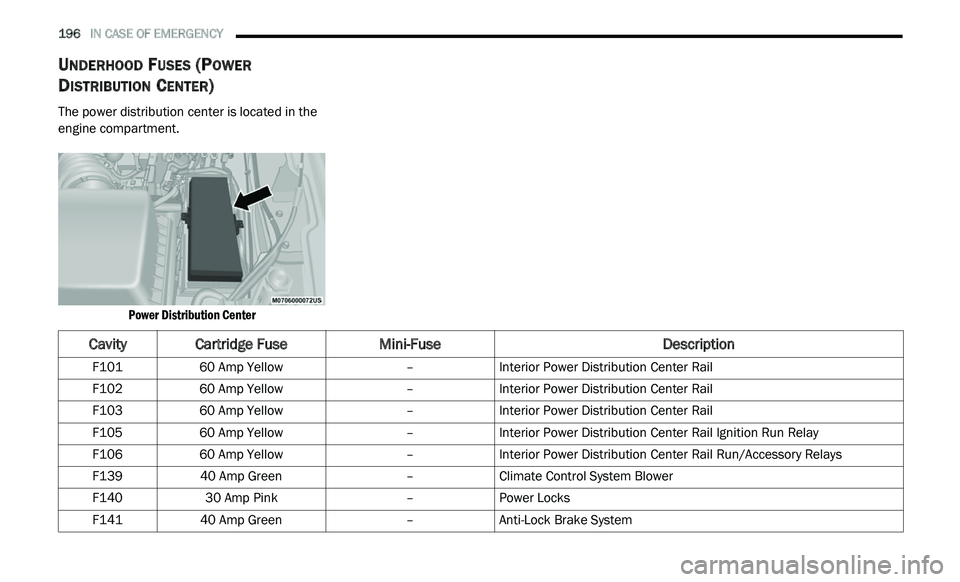
UNDERHOOD FUSES (POWER
D
ISTRIBUTION CENTER)
The power distribution center is located in the
engine compartment.
Power Distribution Center
CavityCartridge Fuse Mini-Fuse Description
F10160 Amp Yellow –Interior Power Distribution Center Rail
F102 60 Amp Yellow –Interior Power Distribution Center Rail
F103 60 Amp Yellow –Interior Power Distribution Center Rail
F105 60 Amp Yellow –Interior Power Distribution Center Rail Ignition Run Relay
F106 60 Amp Yellow –Interior Power Distribution Center Rail Run/Accessory Relays
F139 40 Amp Green –Climate Control System Blower
F140 30 Amp Pink –Power Locks
F141 40 Amp Green –Anti-Lock Brake System