warning DODGE JOURNEY 2020 Owner's Guide
[x] Cancel search | Manufacturer: DODGE, Model Year: 2020, Model line: JOURNEY, Model: DODGE JOURNEY 2020Pages: 396, PDF Size: 25.53 MB
Page 81 of 396
GETTING TO KNOW YOUR VEHICLE 79
(Continued)
3. Insert the spring-loaded post on the opposite end of the cover housing into the
attachment point on the opposite side of
the vehicle.
4. Grab the cover handle and pull it toward y
ou. As the cover nears the liftgate opening,
guide the rear attachment posts (on both
ends of the cover) into the notches in the
trim panels. Lower the cover to position the
posts into the bottom of the notches and
release the handle.
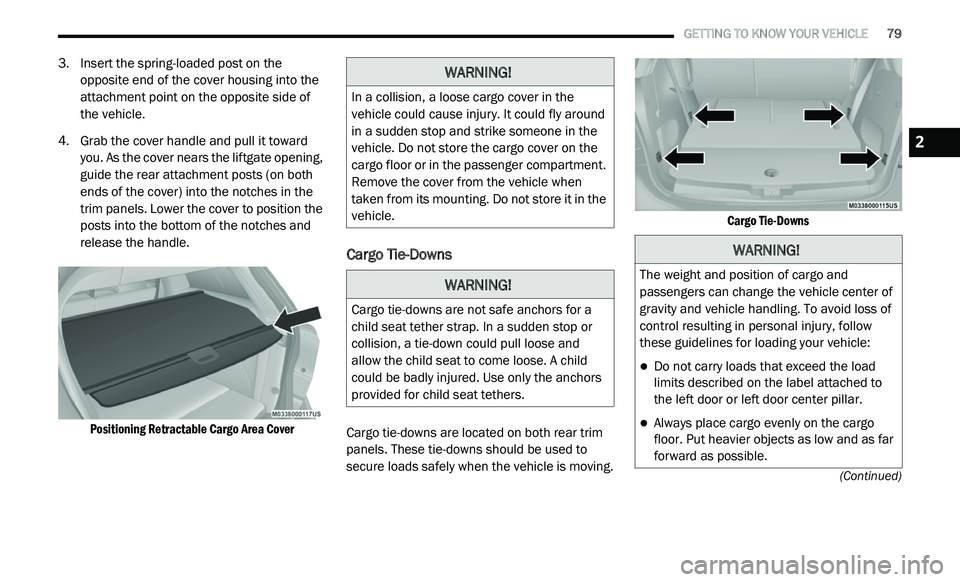
Positioning Retractable Cargo Area Cover
Cargo Tie-Downs
Cargo tie-downs are located on both rear trim
panels. These tie-downs should be used to
secure loads safely when the vehicle is moving.
Cargo Tie-Downs
WARNING!
In a collision, a loose cargo cover in the
vehicle could cause injury. It could fly around
in a sudden stop and strike someone in the
vehicle. Do not store the cargo cover on the
cargo floor or in the passenger compartment.
Remove the cover from the vehicle when
taken from its mounting. Do not store it in the
vehicle.
WARNING!
Cargo tie-downs are not safe anchors for a
child seat tether strap. In a sudden stop or
collision, a tie-down could pull loose and
allow the child seat to come loose. A child
could be badly injured. Use only the anchors
provided for child seat tethers.
WARNING!
The weight and position of cargo and
passengers can change the vehicle center of
gravity and vehicle handling. To avoid loss of
control resulting in personal injury, follow
these guidelines for loading your vehicle:
Do not carry loads that exceed the load
limits described on the label attached to
the left door or left door center pillar.
Always place cargo evenly on the cargo
floor. Put heavier objects as low and as far
forward as possible.
2
Page 82 of 396
80 GETTING TO KNOW YOUR VEHICLE
GARAGE DOOR OPENER — IF EQUIPPED
HomeLink® replaces up to three remote controls
(hand-held transmitters) that operate devices
such as garage door openers, motorized gates,
lighting or home security systems. The
HomeLink® unit operates off your vehicle’s
battery.
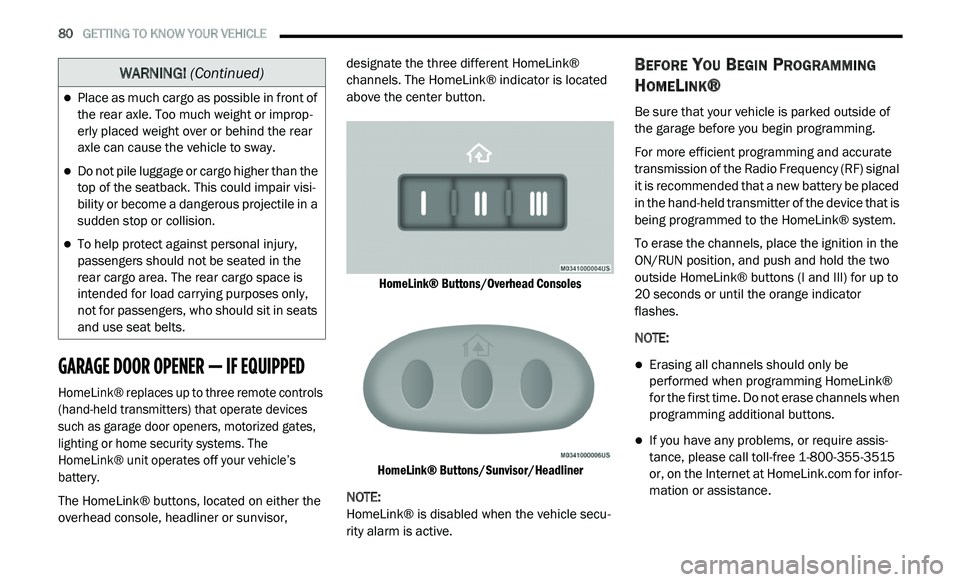
The HomeLink® buttons, located on either the
ov
erhead console, headliner or sunvisor, designate the three different HomeLink®
channels. The HomeLink® indicator is located
above the center button.
HomeLink® Buttons/Overhead Consoles
HomeLink® Buttons/Sunvisor/Headliner
NOTE:
HomeLink® is disabled when the vehicle secu -
rity alarm is active.
BEFORE YOU BEGIN PROGRAMMING
H
OMELINK®
Be sure that your vehicle is parked outside of
the garage before you begin programming.
For more efficient programming and accurate
t r
ansmission of the Radio Frequency (RF) signal
it is recommended that a new battery be placed
in the hand-held transmitter of the device that is
being programmed to the HomeLink® system.
To erase the channels, place the ignition in the
ON
/RUN position, and push and hold the two
outside HomeLink® buttons (I and III) for up to
20 seconds or until the orange indicator
flashes.
NOTE:
Erasing all channels should only be
performed when programming HomeLink®
for the first time. Do not erase channels when
programming additional buttons.
If you have any problems, or require assis -
tance, please call toll-free 1 -
800-355-3515
or, on the Internet at HomeLink.com for infor-
mation or assistance.
Place as much cargo as possible in front of
the rear axle. Too much weight or improp -
erly placed weight over or behind the rear
a x
le can cause the vehicle to sway.
Do not pile luggage or cargo higher than the
top of the seatback. This could impair visi-
bility or become a dangerous projectile in a
su
dden stop or collision.
To help protect against personal injury,
passengers should not be seated in the
rear cargo area. The rear cargo space is
intended for load carrying purposes only,
not for passengers, who should sit in seats
and use seat belts.
WARNING! (Continued)
Page 85 of 396
GETTING TO KNOW YOUR VEHICLE 83
(Continued)
4. Watch for the HomeLink® indicator to change flash rates. When it changes, it is
programmed. It may take up to 30 seconds
or longer in rare cases. The garage door
may open and close while you are
programming.
5. P ush and hold the programmed
H
omeLink® button and observe the
indicator light.
NOTE:
If the indicator light stays on constantly,
programming is complete and the garage
door/device should activate when the
HomeLink® button is pushed.
To program the two remaining HomeLink®
buttons, repeat each step for each remaining
button. DO NOT erase the channels.
If you unplugged the garage door opener/
de
vice for programming, plug it back in at this
time.
USING HOMELINK®
To operate, push and release the programmed
HomeLink® button. Activation will now occur for
the programmed device (i.e. garage door opener,
gate operator, security system, entry door lock,
home/office lighting, etc.) The hand-held
transmitter of the device may also be used at any
time.
SECURITY
It is advised to erase all channels before you sell
or turn in your vehicle.
To do this, push and hold the two outside
b u
ttons for 20 seconds until the red indicator
flashes.
NOTE:
All channels will be erased. Individual channels
ca
nnot be erased.
The HomeLink® Universal Transceiver is disabled
w h
en the vehicle security alarm is active.
TROUBLESHOOTING TIPS
If you are having trouble programming
HomeLink®, here are some of the most
common solutions:
Replace the battery in the garage door
opener hand-held transmitter.
Push the LEARN button on the garage door
opener to complete the training for a Rolling
Code.
Did you unplug the device for programming
and remember to plug it back in?
If you have any problems, or require assistance,
p l
ease call toll-free 1-800-355-3515 or, on the
Internet at HomeLink.com for information or
assistance.
WARNING!
Vehicle exhaust contains carbon monoxide,
a dangerous gas. Do not run your vehicle in
the garage while programming the trans -
ceiver. Exhaust gas can cause serious
i n
jury or death.
2
Page 86 of 396
84 GETTING TO KNOW YOUR VEHICLE
GENERAL INFORMATION
The following regulatory statement applies to all
Radio Frequency (RF) devices equipped in this
vehicle:
This device complies with Part 15 of the FCC
Ru
les and with Innovation, Science and
Economic Development Canada license-exempt
RSS standard(s). Operation is subject to the
following two conditions:
1. T his device may not cause harmful
i
nterference, and
2. This device must accept any interference
r
eceived, including interference that may
cause undesired operation.
Le présent appareil est conforme aux CNR
d`
Innovation, Science and Economic
Development applicables aux appareils radio
exempts de licence. L'exploitation est autorisée
aux deux conditions suivantes:
1. l 'appareil ne doit pas produire de
b
rouillage, et
2. l 'utilisateur de l'appareil doit accepter tout
b
rouillage radioélectrique subi, même si le
brouillage est susceptible d'en compro -
mettre le fonctionnement.
La operación de este equipo está sujeta a las
s i
guientes dos condiciones:
1. e s posible que este equipo o dispositivo no
c
ause interferencia perjudicial y
2. e ste equipo o dispositivo debe aceptar
c
ualquier interferencia, incluyendo la que
pueda causar su operación no deseada. NOTE:
Changes or modifications not expressly
a p
proved by the party responsible for compli -
ance could void the user’s authority to operate
t h
e equipment.
INTERNAL EQUIPMENT
STORAGE
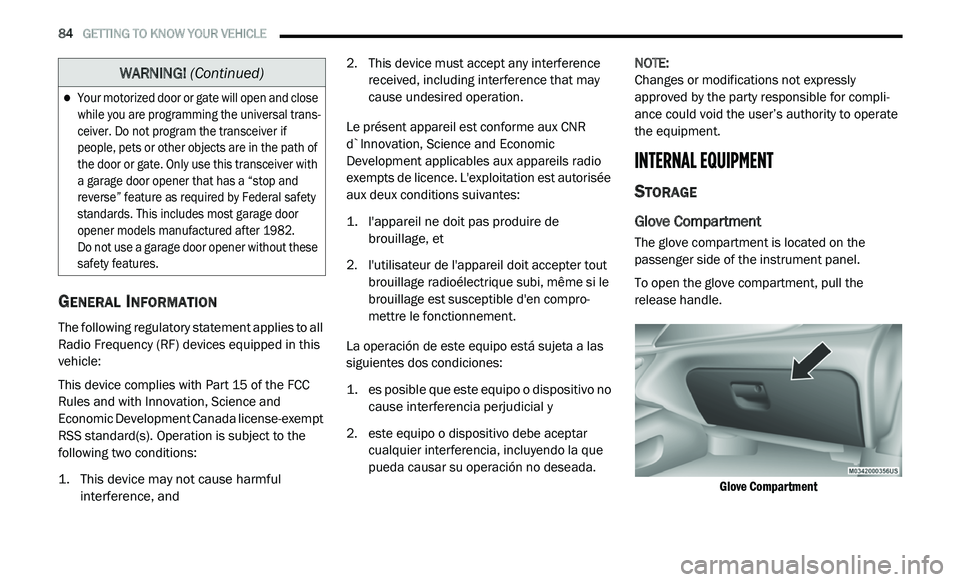
Glove Compartment
The glove compartment is located on the
passenger side of the instrument panel.
To open the glove compartment, pull the
re
lease handle.
Glove Compartment
Your motorized door or gate will open and close
while you are programming the universal trans -
ceiver. Do not program the transceiver if
p e
ople, pets or other objects are in the path of
the door or gate. Only use this transceiver with
a garage door opener that has a “stop and
reverse” feature as required by Federal safety
standards. This includes most garage door
opener models manufactured after 1982.
Do not use a garage door opener without these
s a
fety features.
WARNING! (Continued)
Page 88 of 396
86 GETTING TO KNOW YOUR VEHICLE
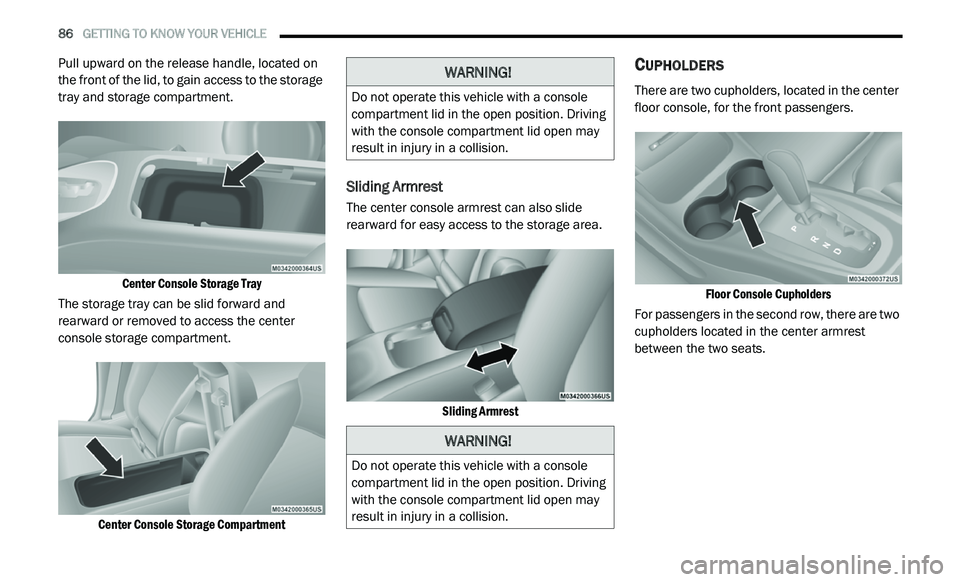
Pull upward on the release handle, located on
the front of the lid, to gain access to the storage
tray and storage compartment.
Center Console Storage Tray
The storage tray can be slid forward and
r e
arward or removed to access the center
console storage compartment.
Center Console Storage Compartment
Sliding Armrest
The center console armrest can also slide
rearward for easy access to the storage area.
Sliding Armrest
CUPHOLDERS
There are two cupholders, located in the center
floor console, for the front passengers.
Floor Console Cupholders
For passengers in the second row, there are two
c u
pholders located in the center armrest
between the two seats.
WARNING!
Do not operate this vehicle with a console
compartment lid in the open position. Driving
with the console compartment lid open may
result in injury in a collision.
WARNING!
Do not operate this vehicle with a console
compartment lid in the open position. Driving
with the console compartment lid open may
result in injury in a collision.
Page 89 of 396
GETTING TO KNOW YOUR VEHICLE 87
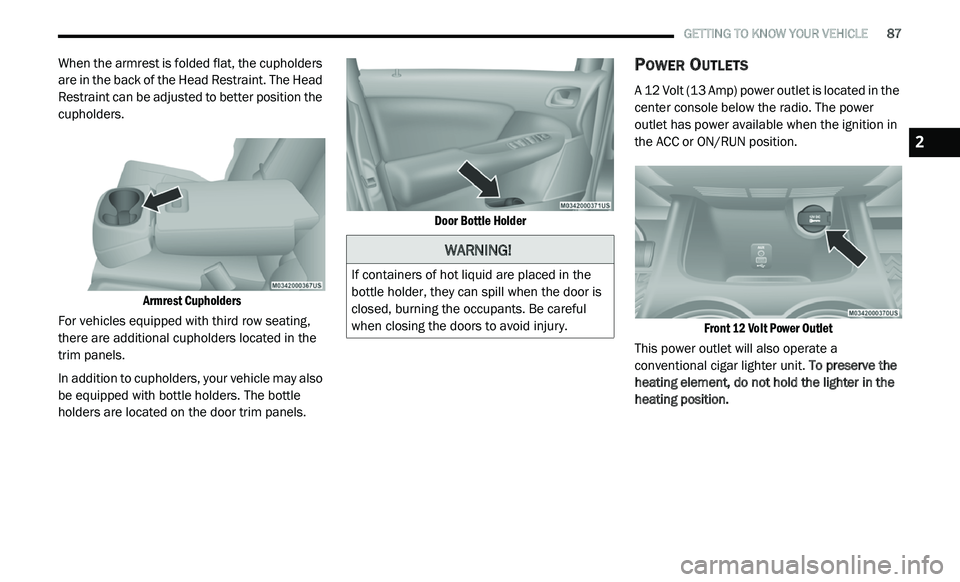
When the armrest is folded flat, the cupholders
are in the back of the Head Restraint. The Head
Restraint can be adjusted to better position the
cupholders.
Armrest Cupholders
For vehicles equipped with third row seating,
t h
ere are additional cupholders located in the
trim panels.
In addition to cupholders, your vehicle may also
b e
equipped with bottle holders. The bottle
holders are located on the door trim panels.
Door Bottle Holder
POWER OUTLETS
A 12 Volt (13 Amp) power outlet is located in the
center console below the radio. The power
outlet has power available when the ignition in
the ACC or ON/RUN position.
Front 12 Volt Power Outlet
This power outlet will also operate a
c o
nventional cigar lighter unit. To preserve the
heating element, do not hold the lighter in the
heating position.
WARNING!
If containers of hot liquid are placed in the
bottle holder, they can spill when the door is
closed, burning the occupants. Be careful
when closing the doors to avoid injury.
2
Page 91 of 396
GETTING TO KNOW YOUR VEHICLE 89
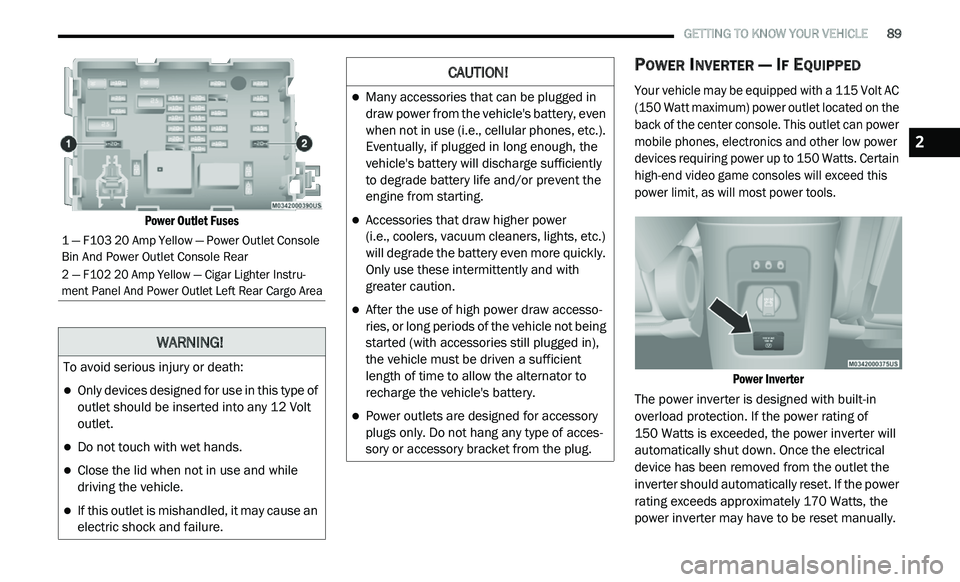
Power Outlet Fuses
POWER INVERTER — IF EQUIPPED
Your vehicle may be equipped with a 115 Volt AC
(150 Watt maximum) power outlet located on the
back of the center console. This outlet can power
mobile phones, electronics and other low power
devices requiring power up to 150 Watts. Certain
high-end video game consoles will exceed this
power limit, as will most power tools.
Power Inverter
The power inverter is designed with built-in
o v
erload protection. If the power rating of
150 Watts is exceeded, the power inverter will
a u
tomatically shut down. Once the electrical
device has been removed from the outlet the
inverter should automatically reset. If the power
rating exceeds approximately 170 Watts, the
power inverter may have to be reset manually.
1 — F103 20 Amp Yellow — Power Outlet Console
Bin And Power Outlet Console Rear
2 — F102 20 Amp Yellow — Cigar Lighter Instru -
ment Panel And Power Outlet Left Rear Cargo Area
WARNING!
To avoid serious injury or death:
Only devices designed for use in this type of
outlet should be inserted into any 12 Volt
outlet.
Do not touch with wet hands.
Close the lid when not in use and while
driving the vehicle.
If this outlet is mishandled, it may cause an
electric shock and failure.
CAUTION!
Many accessories that can be plugged in
draw power from the vehicle's battery, even
when not in use (i.e., cellular phones, etc.).
Eventually, if plugged in long enough, the
vehicle's battery will discharge sufficiently
to degrade battery life and/or prevent the
engine from starting.
Accessories that draw higher power
(i.e., coolers, vacuum cleaners, lights, etc.)
w i
ll degrade the battery even more quickly.
Only use these intermittently and with
greater caution.
After the use of high power draw accesso -
ries, or long periods of the vehicle not being
s t
arted (with accessories still plugged in),
the vehicle must be driven a sufficient
length of time to allow the alternator to
recharge the vehicle's battery.
Power outlets are designed for accessory
plugs only. Do not hang any type of acces -
sory or accessory bracket from the plug.
2
Page 92 of 396
90 GETTING TO KNOW YOUR VEHICLE
To reset the inverter manually press the power
inverter button off and on within the Uconnect
Settings. To avoid overloading the circuit, check
the power ratings on electrical devices prior to
using the inverter.
NOTE:
Due to built-in overload protection, the power
o u
tlet will shut down if the 115 Volt AC
(150 Watt maximum) power rating is exceeded.
Power Inverter Operation
The power inverter is turned on and off using
the Uconnect System.
Vehicles Equipped With Radio 4.3
To turn the power inverter on or off perform the
f o
llowing:
1. P ress the “More” button on the faceplate
(
located next to the Uconnect display).
2. P ress the “Outlet” button on the
t
ouchscreen (located on the Uconnect
display) to turn the power inverter on or off.
Vehicles Equipped With Uconnect 3/3 NAV
To turn the power inverter on or off perform the
f o
llowing:
1. P ress the “Controls” button on the
t
ouchscreen.
2. P ress the “Outlet” button on the touchscreen
t
o turn the power inverter on or off.
SUNGLASSES STORAGE
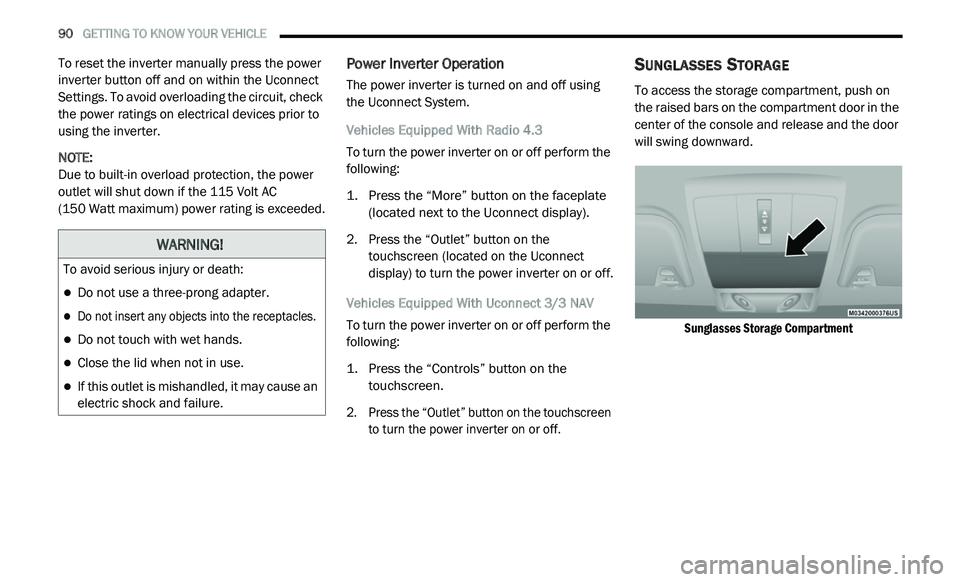
To access the storage compartment, push on
the raised bars on the compartment door in the
center of the console and release and the door
will swing downward.
Sunglasses Storage Compartment
WARNING!
To avoid serious injury or death:
Do not use a three-prong adapter.
Do not insert any objects into the receptacles.
Do not touch with wet hands.
Close the lid when not in use.
If this outlet is mishandled, it may cause an
electric shock and failure.
Page 94 of 396
92 GETTING TO KNOW YOUR VEHICLE
(Continued)
(Continued)
WARNING!
Cargo must be securely tied down before
driving your vehicle. Improperly secured loads
can fly off the vehicle, particularly at high
speeds, resulting in personal injury or property
damage. Follow the roof rack cautions when
carrying cargo on your roof rack.
CAUTION!
To prevent damage to the roof of your
vehicle, DO NOT carry any loads on the roof
rack without the crossbars installed. The
load should be secured and placed on top
of the crossbars, not directly on the roof. If
it is necessary to place the load on the roof,
place a blanket or other protective layer
between the load and the roof surface.
Crossbars should remain equally spaced or
parallel at any roof rack position for proper
function. Noncompliance could result in
damage to the roof rack, cargo, and
vehicle.
To avoid damage to the roof rack and
vehicle, do not exceed the maximum roof
rack load capacity of 150 lb (68 kg). Always
distribute heavy loads as evenly as possible
and secure the load appropriately.
Long loads, which extend over the wind -
shield, such as wood panels or surfboards,
s h
ould be secured to both the front and
rear of the vehicle.
CAUTION! (Continued)
Travel at reduced speeds and turn corners
carefully when carrying large or heavy loads
on the roof rack. Wind forces, due to
natural causes or nearby truck traffic, can
add sudden upward lift. This is especially
true on large flat loads and may result in
damage to the cargo or your vehicle.
CAUTION! (Continued)
Page 96 of 396
94 GETTING TO KNOW YOUR INSTRUMENT PANEL
INSTRUMENT CLUSTER DESCRIPTIONS
1. Tachometer
Indicates the engine speed in revolutions
per minute (RPM x 1000).
2. I nstrument Cluster Display
When the appropriate conditions exist,
this display shows the instrument cluster
display messages. Refer to “Instrument
Cluster Display” in this chapter for further
information.
3. S peedometer
Indicates vehicle speed.
4. F uel Gauge
The pointer shows the level of fuel in the
fuel tank when the Keyless Push Button
Ignition is in the ON/RUN position.
The fuel pump symbol points
to the side of the vehicle where
t h
e fuel door is located. 5. T
emperature Gauge
The temperature gauge shows engine
coolant temperature. Any reading within
the normal range indicates that the
engine cooling system is operating satis
-
factorily.
The gauge pointer will likely indicate a
higher temperature when driving in hot
weather, up mountain grades, or when
towing a trailer. It should not be allowed
to exceed the upper limits of the normal
operating range.
NOTE:
The hard telltales will illuminate for a bulb check
w h
en the ignition is first cycled.
WARNING!
A hot engine cooling system is dangerous.
You or others could be badly burned by steam
o r
boiling coolant. You may want to call an
authorized dealer for service if your vehicle
overheats. If you decide to look under the hood
yourself, see “Servicing And Maintenance.”
Follow the warnings under the Cooling System
Pressure Cap paragraph.
CAUTION!
Driving with a hot engine cooling system could
damage your vehicle. If the temperature gauge
reads “H,” pull over and stop the vehicle. Idle
the vehicle with the air conditioner turned off
until the pointer drops back into the normal
range. If the pointer remains on the “H,” turn
the engine off immediately and call an
authorized dealer for service.