clock DODGE MAGNUM 2008 1.G User Guide
[x] Cancel search | Manufacturer: DODGE, Model Year: 2008, Model line: MAGNUM, Model: DODGE MAGNUM 2008 1.GPages: 482, PDF Size: 6.94 MB
Page 210 of 482

²Angle ± Repeatedly Pressing SELECT will change
the viewing angle if supported by the DVD disc (If
Equipped).
NOTE:The available selections for each of the above
entries varies depending upon the disc.
NOTE:These selections can only be made while playing
a DVD.
²VES Power -Allows you to turn VES ON and OFF (If
Equipped).
²VES Lock -Locks out rear VES remote controls (If
Equipped).
²VES CH1/CH2 -Allows the user to change mode of
either the IR1 or IR2, wireless headphones, by pressing
the Audio/Select button (If Equipped).
²Set Home Clock -Pressing the SELECT button will
allow user to set the clock. Turn the TUNE control
knob to adjust the hours and then press and turn the
TUNE control knob to adjust the minutes. Press the
TUNE control knob again to save changes.
²Player Defaults -Selecting this item will allow the
user to scroll through the following items, and set
defaults according to customer preference.
Menu Language Ð If Equipped
Selecting this item will allow the user to choose the
default startup DVD menu language (effective only if
language supported by disc). If customer wishes to select
a language not listed, then scroll down and select9other.9
Enter the 4-digit country code using the TUNE control
knob to scroll up and down to select the # and then push
to select.
210 UNDERSTANDING YOUR INSTRUMENT PANEL
Page 221 of 482

camera, and on some models a dual display screen
operation. Refer to your ªNavigation User's Manualº for
detailed operating instructions.
Operating Instructions Ð Satellite Radio
Refer to your ªNavigation User's Manualº for detailed
operating instructions.
Operating Instructions Ð Hands-Free
Communication (UConnectŸ) (If Equipped)
Refer to your ªNavigation User's Manualº for detailed
operating instructions.
Clock Setting Procedure
The GPS receiver in this system is synchronized to the
time data being transmitted by the GPS satellites. The
satellites' clock is Greenwich Mean Time (GMT). This is
the worldwide standard for time. This makes the sys-
tem's clock very accurate once the appropriate time zone
and daylight savings information is set.
Changing the Time Zone
1. Turn on the system.
2. Touch the screen where the time is displayed. The
clock setting menu will appear on the screen. If the words
ªTime: GPS Timeº are displayed at the top of the screen,
proceed to Step 4. Otherwise, proceed to Step 3.
3. If the words ªTime: User Clockº are displayed at the
top of the screen, touch the bottom of the screen where
the words ªUser Clockº are displayed. The GPS time
setting menu will appear on the screen.
4. Touch the screen where the words ªSet Time Zoneº are
displayed. The time zone selection menu will appear on
the screen.
5. Select a time zone by touching the screen where your
selection appears. If you do not see a time zone that you
want to select, touch the screen where the word ªPageº is
displayed to view additional time zones in the menu.
UNDERSTANDING YOUR INSTRUMENT PANEL 221
4
Page 222 of 482

Changing Daylight Savings Time
When selected, this feature will display the time of day in
daylight savings time. Proceed as follows to change the
current setting:
1. Turn on the system.
2. Touch the screen where the time is displayed. The
clock setting menu will appear on the screen.
3. When this feature is on, a check mark will appear in
the box next to the words ªDaylight Savings.º Touch the
screen where the words ªDaylight Savingsº are dis-
played to change the current setting.
Setting the User Clock
If you wish to set the clock to a time different from the
system clock, you can manually adjust the time by
performing the following:
1. Turn on the system.2. Touch the screen where the time is displayed. The
clock setting menu will appear on the screen. If the words
ªTime: User Clockº are displayed at the top of the screen,
proceed to Step 4. Otherwise, proceed to Step 3.
3. If the words ªTime: GPS Timeº are displayed at the top
of the screen, touch the bottom of the screen where the
words ªGPS Timeº are displayed. The user clock time
setting menu will appear on the screen.
4. To move the hour forward, touch the screen where the
word ªHourº with the arrow pointing upward is dis-
played. To move the hour backward, touch the screen
where the word ªHourº with the arrow pointing down-
ward is displayed.
5. To move the minute forward, touch the screen where
the word ªMinº with the arrow pointing upward is
displayed. To move the minute backward, touch the
screen where the word ªMinº with the arrow pointing
downward is displayed.
222 UNDERSTANDING YOUR INSTRUMENT PANEL
Page 223 of 482

6. To save the new time setting, touch the screen where
the word ªSaveº is displayed.
Show Time if Radio is Off
When selected, this feature will display the time of day
on the touch screen when the system is turned off.
Proceed as follows to change the current setting:
1. Turn on the system.
2. Touch the screen where the time is displayed. The
clock setting menu will appear on the screen.
3. When this feature is on, a check mark will appear in
the box next to the words ªShow Time if Radio is Off.º
Touch the screen where the words ªShow Time if Radio is
Offº are displayed to change the current setting.
SALES CODE RES Ð AM/FM STEREO RADIO
WITH CD PLAYER (MP3 AUX JACK)
NOTE:The radio sales code is located on the lower right
side of your radio faceplate.
RES Radio (Non-Satellite Model Shown - With Satellite
Similar)
UNDERSTANDING YOUR INSTRUMENT PANEL 223
4
Page 225 of 482

If your vehicle is not equipped with or this feature is not
available on your vehicle, a ªNot Equipped With UCon-
nectº message will display on the radio screen.
Phone Button (UConnectŸ Hands Free Phone) Ð
If Equipped
Press this button to operate the Hand Free Phone (UCon-
nectŸ) feature (if equipped). Refer to ªHands-Free Com-
munication (UConnectŸ)º in Section 3 for more informa-
tion.
If your vehicle is not equipped with or this feature is not
available on your vehicle, a ªNot Equipped With UCon-
nectº message will display on the radio screen.
TIME Button
Press the TIME button and the time of day will display. In
AM or FM mode, pressing the TIME button will switch
between the time and frequency displays.
Clock Setting Procedure
1. Press and hold the TIME button, until the hours blink.
2. Adjust the hours by turning the right side TUNE
control knob.
3. After adjusting the hours, press the right side TUNE
control knob to set the minutes. The minutes will begin to
blink.
4. Adjust the minutes using the right side TUNE control
knob. Press the TUNE control knob to save time change.
5. To exit, press any button/knob or wait 5 seconds.
The clock can also be set by pressing the SETUP button.
For vehicles equipped with satellite radio, press the
SETUP button, use the TUNE control to select SET
CLOCK, and then follow the above procedure, starting at
UNDERSTANDING YOUR INSTRUMENT PANEL 225
4
Page 226 of 482

Step 2. For vehicles not equipped with satellite radio,
press the SETUP button and then follow the above
procedure, starting at Step 2.
INFO Button
Press the INFO button for an RDS station (one with call
letters displayed). The radio will return a Radio Text
message broadcast from an FM station (FM mode only).
RW/FF
Pressing the RW (Rewind) or FF (Fast Forward) buttons
causes the tuner to search for the next frequency in the
direction of the arrows. This feature operates in either
AM or FM frequencies.
TUNE Control
Turn the right side rotary control clockwise to increase or
counter-clockwise to decrease the frequency.
Setting the Tone, Balance, and Fade
Press the rotary TUNE control knob and BASS will
display. Turn the TUNE control knob to the right or left to
increase or decrease the Bass tones.
Press the rotary TUNE control knob a second time and
MID will display. Turn the TUNE control knob to the
right or left to increase or decrease the Mid Range tones.
Press the rotary TUNE control knob a third time and
TREBLE will display. Turn the TUNE control knob to the
right or left to increase or decrease the Treble tones.
Press the rotary TUNE control knob a fourth time and
BALANCE will display. Turn the TUNE control knob to
the right or left to adjust the sound level from the right or
left side speakers.
226 UNDERSTANDING YOUR INSTRUMENT PANEL
Page 228 of 482
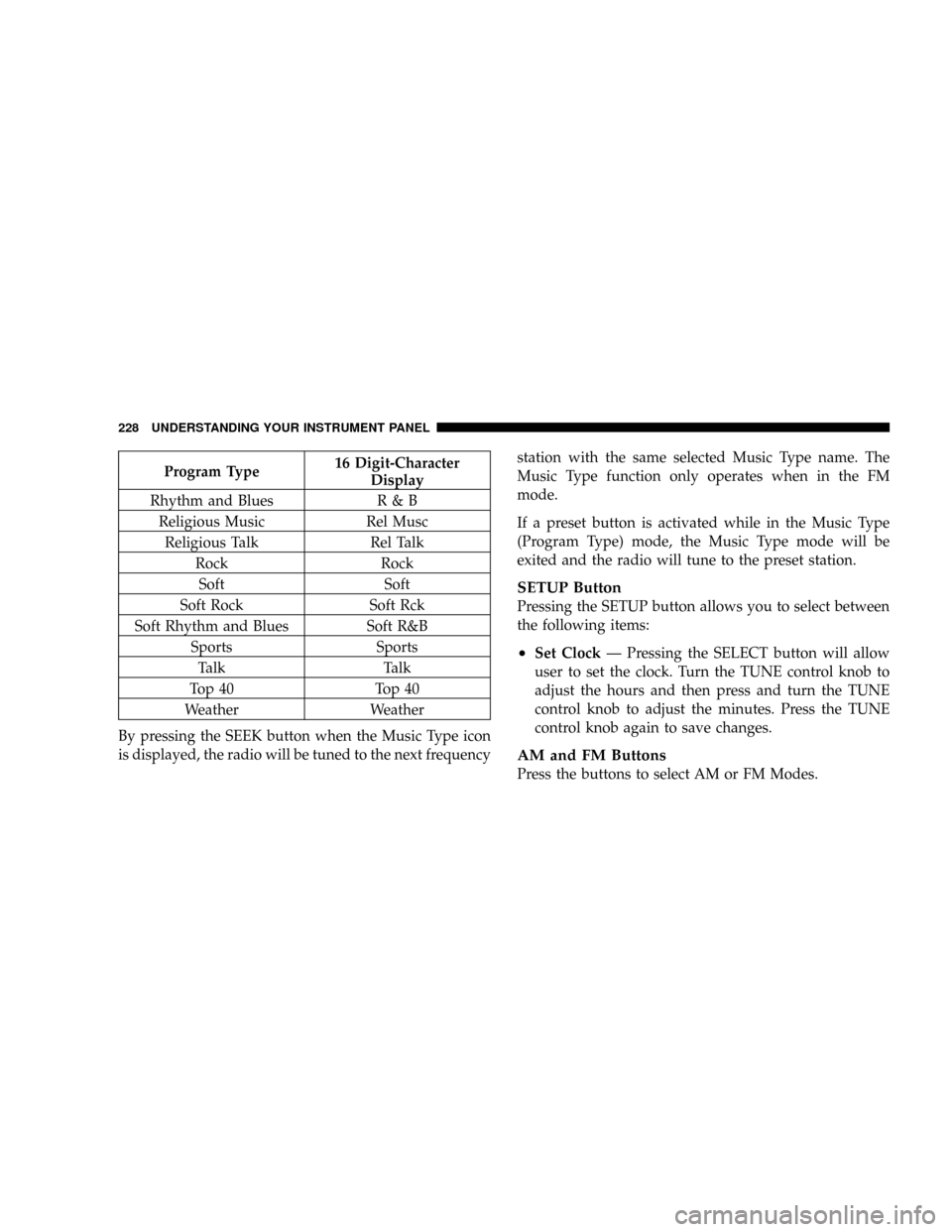
Program Type16 Digit-Character
Display
Rhythm and Blues R & B
Religious Music Rel Musc
Religious Talk Rel Talk
Rock Rock
Soft Soft
Soft Rock Soft Rck
Soft Rhythm and Blues Soft R&B
Sports Sports
Talk Talk
Top 40 Top 40
Weather Weather
By pressing the SEEK button when the Music Type icon
is displayed, the radio will be tuned to the next frequencystation with the same selected Music Type name. The
Music Type function only operates when in the FM
mode.
If a preset button is activated while in the Music Type
(Program Type) mode, the Music Type mode will be
exited and the radio will tune to the preset station.
SETUP Button
Pressing the SETUP button allows you to select between
the following items:
²Set ClockÐ Pressing the SELECT button will allow
user to set the clock. Turn the TUNE control knob to
adjust the hours and then press and turn the TUNE
control knob to adjust the minutes. Press the TUNE
control knob again to save changes.
AM and FM Buttons
Press the buttons to select AM or FM Modes.
228 UNDERSTANDING YOUR INSTRUMENT PANEL
Page 238 of 482

SEEK Buttons
Press and release the SEEK buttons to search for the next
channel in Satellite mode. Press the right switch to seek
up and the left switch to seek down. The radio will
remain tuned to the new channel until you make another
selection. Holding either button will bypass channels
without stopping until you release it.
SCAN Button
Pressing the SCAN button causes the tuner to search for
the next channel, pausing for 8 seconds before continuing
to the next. To stop the search, press the SCAN button a
second time.
INFO Button
Pressing the INFO button will cycle between Artist, Song
Title, and Composer (if available) information. Also,
pressing and holding the INFO button for an additional3 seconds will make the radio display the Song Title all of
the time (press and hold again to return to normal
display).
RW/FF
Pressing the RW (Rewind) or FF (Fast Forward) buttons
causes the tuner to search for the next channel in the
direction of the arrows.
TUNE Control (Rotary)
Turn the right side rotary control clockwise to increase or
counter-clockwise to decrease the channel.
MUSIC TYPE Button
Pressing this button once will turn on the Music Type
mode for 5 seconds. Pressing the MUSIC TYPE button or
turning the TUNE control knob within 5 seconds will
allow the program format type to be selected.
Toggle the MUSIC TYPE button again to select the music
type.
238 UNDERSTANDING YOUR INSTRUMENT PANEL
Page 243 of 482

²the iPodtbattery charges when plugged into the UCI
connector.
Connecting the iPodTDevice
Use the optional connection cable to connect an iPodtto
the vehicle's UCI connector (which is located in the glove
box on some vehicles. This location may vary with
vehicle). Once the iPodtis connected and synchronized
to the vehicle system (this may take a few seconds to
connect), the vehicle brand logo appears on the iPodt
display, and it starts charging and is ready for use by
pressing radio switches as described below.
Controlling the iPodTusing Radio Buttons
To get into the UCI (iPodt) mode and access a connected
iPodt, press the ªAUXº button on the radio faceplate.
Once in the UCI (iPodt) mode, the iPodtaudio track (if
available from iPodt) will start playing over the vehicle
audio system.
Play Mode
When switched to UCI mode the iPodtwill be inPlay
mode. In thisPlay mode, you may use the following
buttons on the radio faceplate to control the iPodtand
display data:
TUNE/SCROLL Knob
Use the ªTUNE/SCROLLº knob to go to the next or
previous track.
The ªTUNE/SCROLLº knob functions similar to the
scroll wheel on the iPodtmobile digital device.
Turning it clockwise (forward) by one click while playing
a track skips to the next track.
Turning it counterclockwise (backward) by one click
during the first 2 seconds of the track will jump to the
previous track in the list and turning this button at any
other time in the track will jump to the beginning of the
current track.
UNDERSTANDING YOUR INSTRUMENT PANEL 243
4
Page 245 of 482

SCAN Button
Pressing the ªSCANº button will play the first 5 seconds
of each track in the current list and then forward to the
next song. To stop the SCAN mode and start playing the
desired track, press the ªSCANº button again.
During the SCAN mode, you can also press the SEEK
button to the left or right to go to the previous or next
tracks.
RND (Random) Button (RES Radios Only)
Pressing the ªRNDº button will switch between the
shuffle on and shuffle off modes of the iPodt.Ifthe
ªRNDº icon is showing on the radio display then the
shuffle mode is on.List or Browse Mode
DuringPlaymode, pressing any of the following buttons
will take you toListmode.Listmode enables you to
scroll through the list of menus and tracks on the iPodt
device.
TUNE/SCROLL Knob
In theListmode, the ªTUNE/SCROLLº knob functions
in a similar manner as the scroll wheel on the iPodt.
Turning the ªTUNE/SCROLLº knob clockwise (forward)
and counter-clockwise (backward) scrolls through lists,
displaying the track detail on the radio display. Once you
have the track to be played highlighted on the radio
display, press the ªTUNE/SCROLLº knob to select and
start playing the track. By turning the ªTUNE/SCROLLº
knob fast, you can jump through the list faster. During
fast scroll, you may notice a slight delay in updating the
information on the radio display.
UNDERSTANDING YOUR INSTRUMENT PANEL 245
4