ECU DODGE NEON 2000 Service Repair Manual
[x] Cancel search | Manufacturer: DODGE, Model Year: 2000, Model line: NEON, Model: DODGE NEON 2000Pages: 1285, PDF Size: 29.42 MB
Page 927 of 1285
TRANSAXLE
REMOVAL
(1) Raise hood.
(2) Disconnect both battery cables, remove battery
hold down clamp and bolt, and remove battery.
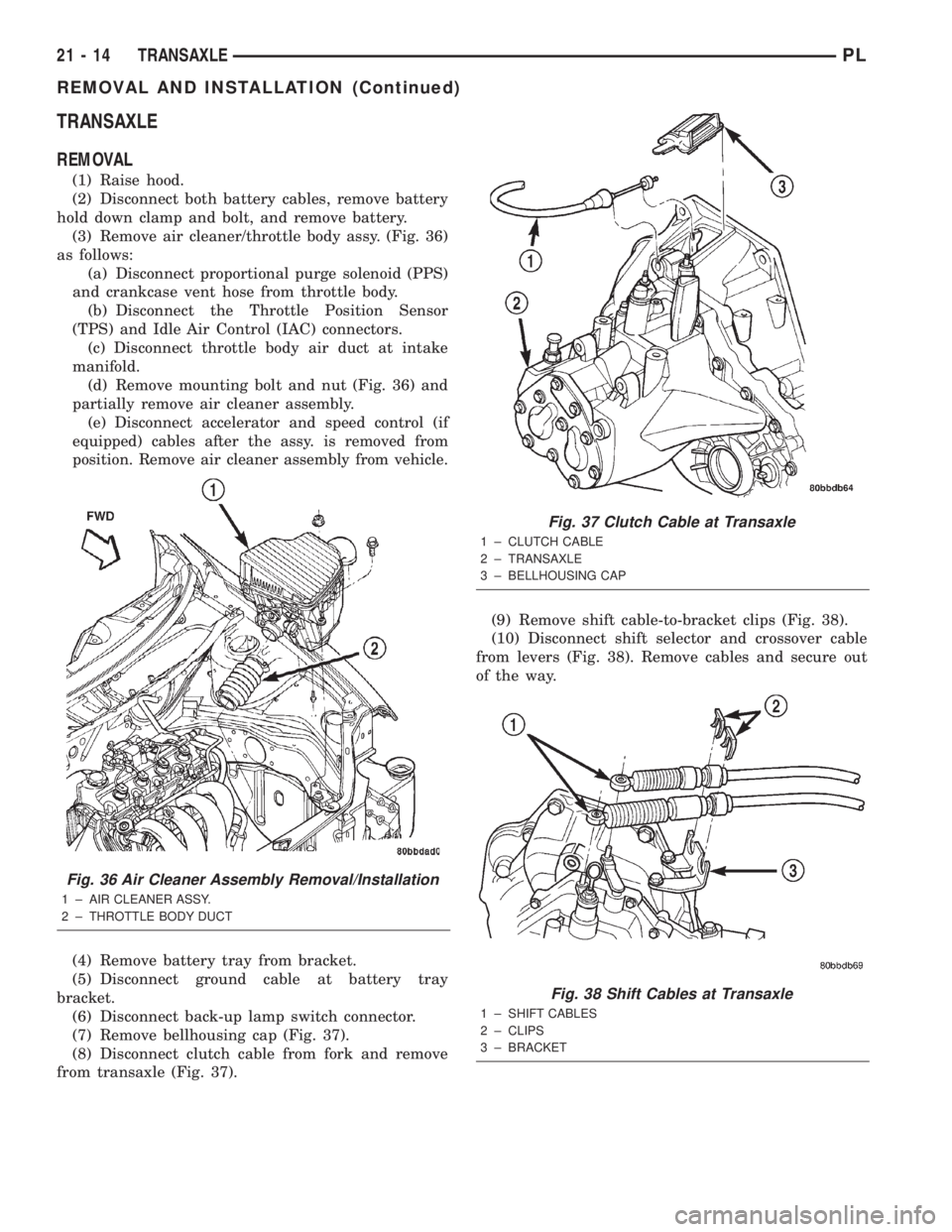
(3) Remove air cleaner/throttle body assy. (Fig. 36)
as follows:
(a) Disconnect proportional purge solenoid (PPS)
and crankcase vent hose from throttle body.
(b) Disconnect the Throttle Position Sensor
(TPS) and Idle Air Control (IAC) connectors.
(c) Disconnect throttle body air duct at intake
manifold.
(d) Remove mounting bolt and nut (Fig. 36) and
partially remove air cleaner assembly.
(e)
Disconnect accelerator and speed control (if
equipped) cables after the assy. is removed from
position. Remove air cleaner assembly from vehicle.
(4) Remove battery tray from bracket.
(5) Disconnect ground cable at battery tray
bracket.
(6) Disconnect back-up lamp switch connector.
(7) Remove bellhousing cap (Fig. 37).
(8) Disconnect clutch cable from fork and remove
from transaxle (Fig. 37).(9) Remove shift cable-to-bracket clips (Fig. 38).
(10) Disconnect shift selector and crossover cable
from levers (Fig. 38). Remove cables and secure out
of the way.
Fig. 36 Air Cleaner Assembly Removal/Installation
1 ± AIR CLEANER ASSY.
2 ± THROTTLE BODY DUCT
Fig. 37 Clutch Cable at Transaxle
1 ± CLUTCH CABLE
2 ± TRANSAXLE
3 ± BELLHOUSING CAP
Fig. 38 Shift Cables at Transaxle
1 ± SHIFT CABLES
2 ± CLIPS
3 ± BRACKET
21 - 14 TRANSAXLEPL
REMOVAL AND INSTALLATION (Continued)
Page 929 of 1285
(23) Carefully lower engine and transaxle on screw
jack until proper removal clearance is obtained.
(24) Obtain a helper to assist in holding transaxle
while removing transaxle-to-engine mounting bolts
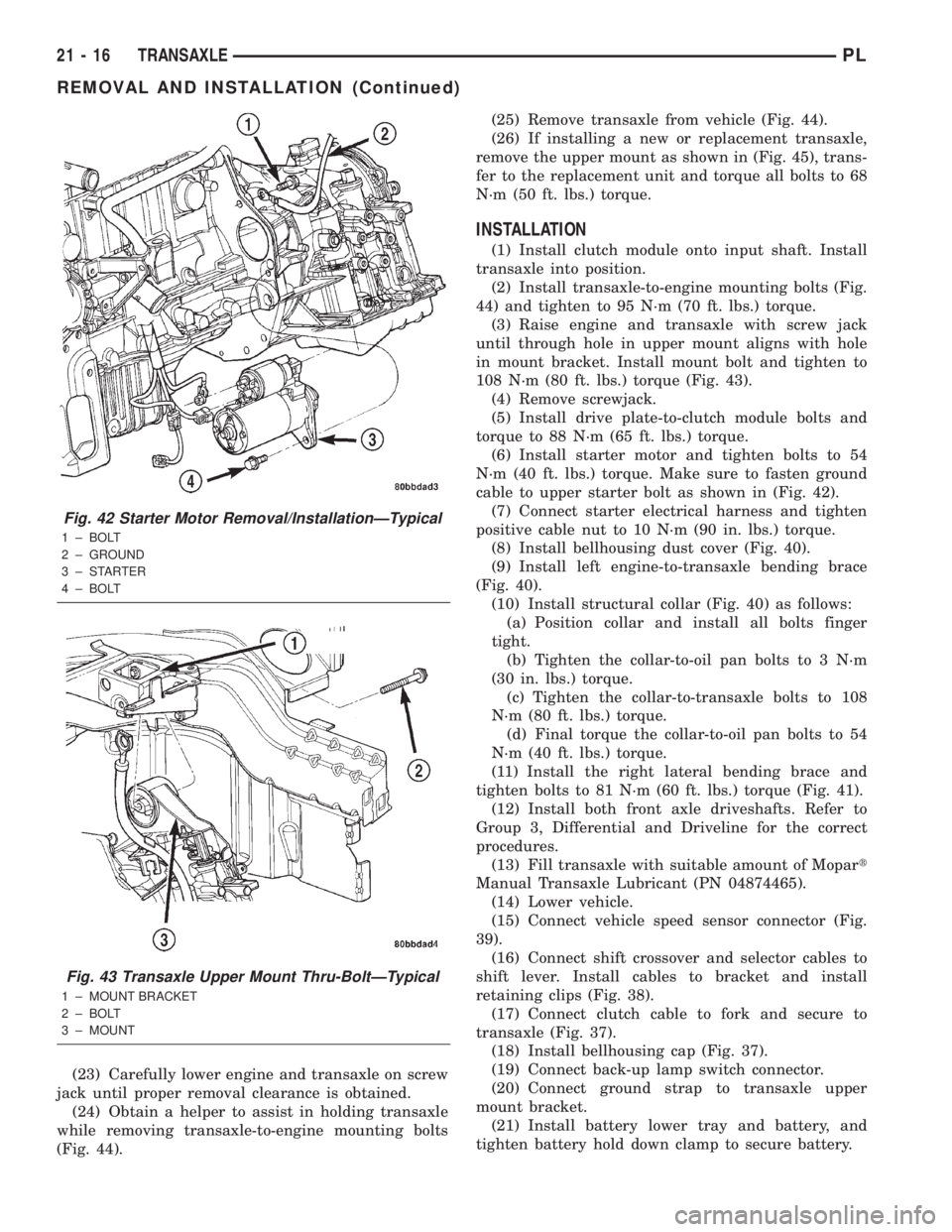
(Fig. 44).(25) Remove transaxle from vehicle (Fig. 44).
(26) If installing a new or replacement transaxle,
remove the upper mount as shown in (Fig. 45), trans-
fer to the replacement unit and torque all bolts to 68
N´m (50 ft. lbs.) torque.
INSTALLATION
(1) Install clutch module onto input shaft. Install
transaxle into position.
(2) Install transaxle-to-engine mounting bolts (Fig.
44) and tighten to 95 N´m (70 ft. lbs.) torque.
(3) Raise engine and transaxle with screw jack
until through hole in upper mount aligns with hole
in mount bracket. Install mount bolt and tighten to
108 N´m (80 ft. lbs.) torque (Fig. 43).
(4) Remove screwjack.
(5) Install drive plate-to-clutch module bolts and
torque to 88 N´m (65 ft. lbs.) torque.
(6) Install starter motor and tighten bolts to 54
N´m (40 ft. lbs.) torque. Make sure to fasten ground
cable to upper starter bolt as shown in (Fig. 42).
(7) Connect starter electrical harness and tighten
positive cable nut to 10 N´m (90 in. lbs.) torque.
(8) Install bellhousing dust cover (Fig. 40).
(9) Install left engine-to-transaxle bending brace
(Fig. 40).
(10) Install structural collar (Fig. 40) as follows:
(a) Position collar and install all bolts finger
tight.
(b) Tighten the collar-to-oil pan bolts to 3 N´m
(30 in. lbs.) torque.
(c) Tighten the collar-to-transaxle bolts to 108
N´m (80 ft. lbs.) torque.
(d) Final torque the collar-to-oil pan bolts to 54
N´m (40 ft. lbs.) torque.
(11) Install the right lateral bending brace and
tighten bolts to 81 N´m (60 ft. lbs.) torque (Fig. 41).
(12) Install both front axle driveshafts. Refer to
Group 3, Differential and Driveline for the correct
procedures.
(13) Fill transaxle with suitable amount of Mopart
Manual Transaxle Lubricant (PN 04874465).
(14) Lower vehicle.
(15) Connect vehicle speed sensor connector (Fig.
39).
(16) Connect shift crossover and selector cables to
shift lever. Install cables to bracket and install
retaining clips (Fig. 38).
(17) Connect clutch cable to fork and secure to
transaxle (Fig. 37).
(18) Install bellhousing cap (Fig. 37).
(19) Connect back-up lamp switch connector.
(20) Connect ground strap to transaxle upper
mount bracket.
(21) Install battery lower tray and battery, and
tighten battery hold down clamp to secure battery.
Fig. 42 Starter Motor Removal/InstallationÐTypical
1 ± BOLT
2 ± GROUND
3±STARTER
4 ± BOLT
Fig. 43 Transaxle Upper Mount Thru-BoltÐTypical
1 ± MOUNT BRACKET
2 ± BOLT
3 ± MOUNT
21 - 16 TRANSAXLEPL
REMOVAL AND INSTALLATION (Continued)
Page 988 of 1285
INSTALLATION
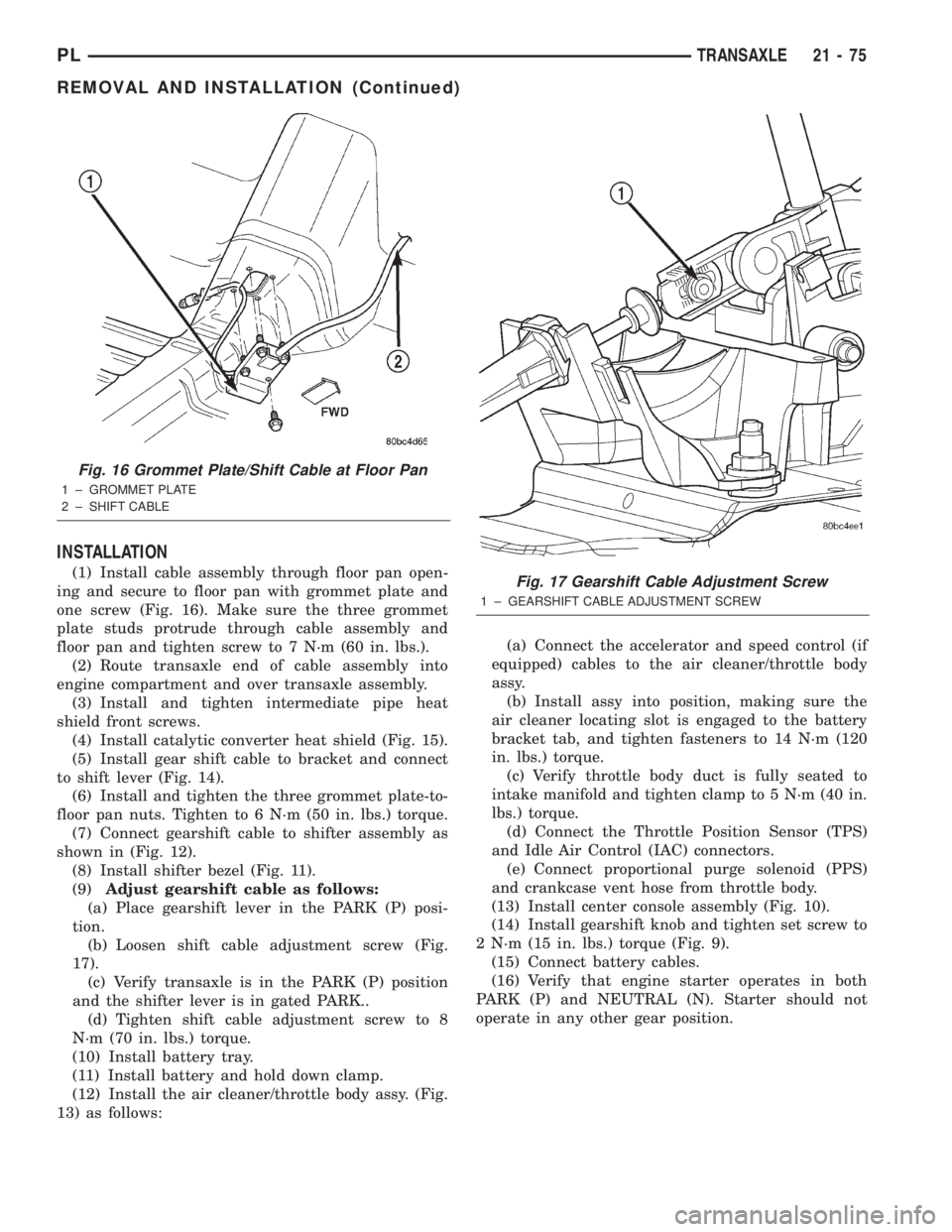
(1) Install cable assembly through floor pan open-
ing and secure to floor pan with grommet plate and
one screw (Fig. 16). Make sure the three grommet
plate studs protrude through cable assembly and
floor pan and tighten screw to 7 N´m (60 in. lbs.).
(2) Route transaxle end of cable assembly into
engine compartment and over transaxle assembly.
(3) Install and tighten intermediate pipe heat
shield front screws.
(4) Install catalytic converter heat shield (Fig. 15).
(5) Install gear shift cable to bracket and connect
to shift lever (Fig. 14).
(6) Install and tighten the three grommet plate-to-
floor pan nuts. Tighten to 6 N´m (50 in. lbs.) torque.
(7) Connect gearshift cable to shifter assembly as
shown in (Fig. 12).
(8) Install shifter bezel (Fig. 11).
(9)Adjust gearshift cable as follows:
(a) Place gearshift lever in the PARK (P) posi-
tion.
(b) Loosen shift cable adjustment screw (Fig.
17).
(c) Verify transaxle is in the PARK (P) position
and the shifter lever is in gated PARK..
(d) Tighten shift cable adjustment screw to 8
N´m (70 in. lbs.) torque.
(10) Install battery tray.
(11) Install battery and hold down clamp.
(12) Install the air cleaner/throttle body assy. (Fig.
13) as follows:(a) Connect the accelerator and speed control (if
equipped) cables to the air cleaner/throttle body
assy.
(b) Install assy into position, making sure the
air cleaner locating slot is engaged to the battery
bracket tab, and tighten fasteners to 14 N´m (120
in. lbs.) torque.
(c) Verify throttle body duct is fully seated to
intake manifold and tighten clamp to 5 N´m (40 in.
lbs.) torque.
(d) Connect the Throttle Position Sensor (TPS)
and Idle Air Control (IAC) connectors.
(e) Connect proportional purge solenoid (PPS)
and crankcase vent hose from throttle body.
(13) Install center console assembly (Fig. 10).
(14) Install gearshift knob and tighten set screw to
2 N´m (15 in. lbs.) torque (Fig. 9).
(15) Connect battery cables.
(16) Verify that engine starter operates in both
PARK (P) and NEUTRAL (N). Starter should not
operate in any other gear position.
Fig. 16 Grommet Plate/Shift Cable at Floor Pan
1 ± GROMMET PLATE
2 ± SHIFT CABLE
Fig. 17 Gearshift Cable Adjustment Screw
1 ± GEARSHIFT CABLE ADJUSTMENT SCREW
PLTRANSAXLE 21 - 75
REMOVAL AND INSTALLATION (Continued)
Page 992 of 1285
(1) Verify cable is routed properly with no kinked
or binding conditions.
(2) Release adjustment locking clip on cable at
throttle body.It is not necessary to remove clip.
(3) Grab cable conduit near adjustment body, push
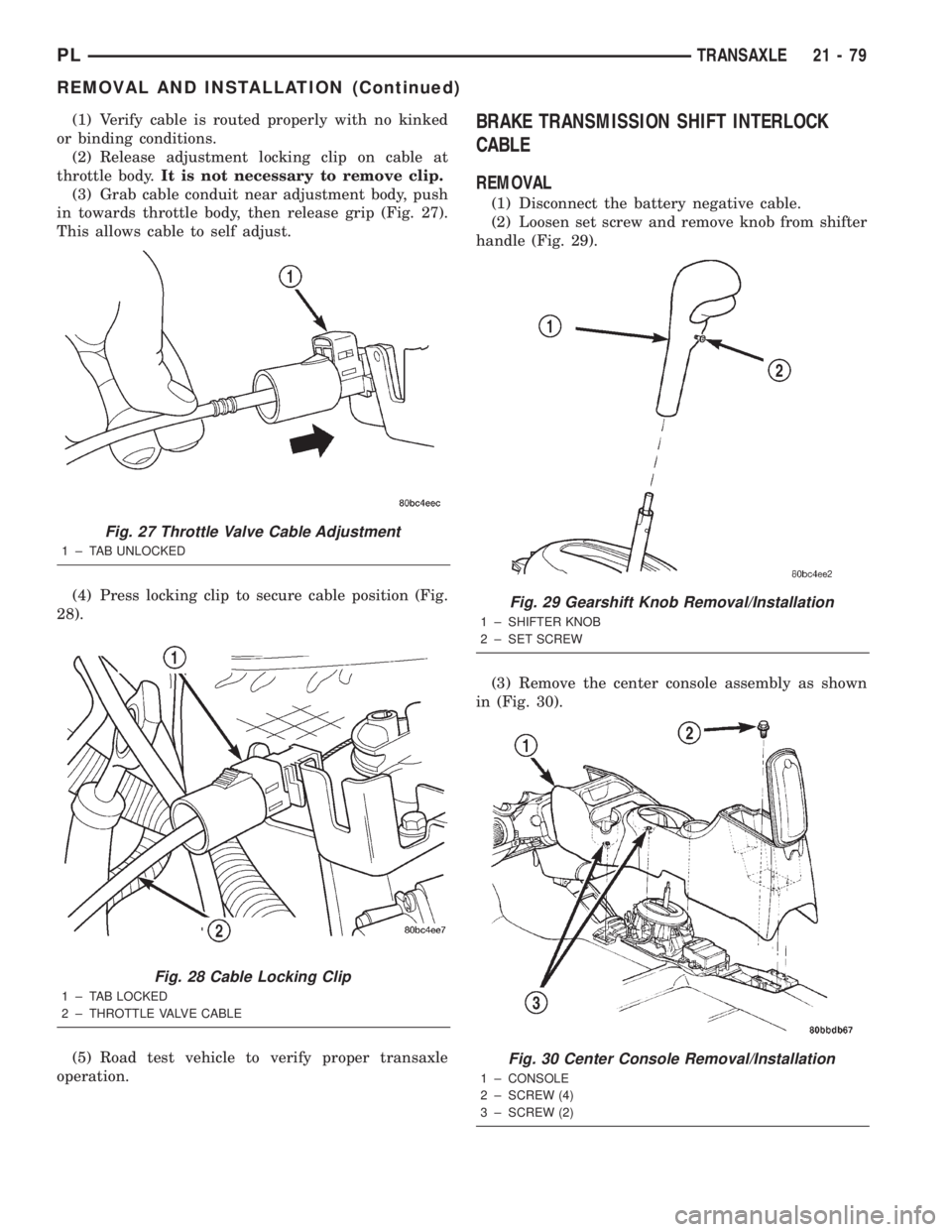
in towards throttle body, then release grip (Fig. 27).
This allows cable to self adjust.
(4) Press locking clip to secure cable position (Fig.
28).
(5) Road test vehicle to verify proper transaxle
operation.BRAKE TRANSMISSION SHIFT INTERLOCK
CABLE
REMOVAL
(1) Disconnect the battery negative cable.
(2) Loosen set screw and remove knob from shifter
handle (Fig. 29).
(3) Remove the center console assembly as shown
in (Fig. 30).
Fig. 27 Throttle Valve Cable Adjustment
1 ± TAB UNLOCKED
Fig. 28 Cable Locking Clip
1 ± TAB LOCKED
2 ± THROTTLE VALVE CABLE
Fig. 29 Gearshift Knob Removal/Installation
1 ± SHIFTER KNOB
2 ± SET SCREW
Fig. 30 Center Console Removal/Installation
1 ± CONSOLE
2 ± SCREW (4)
3 ± SCREW (2)
PLTRANSAXLE 21 - 79
REMOVAL AND INSTALLATION (Continued)
Page 996 of 1285
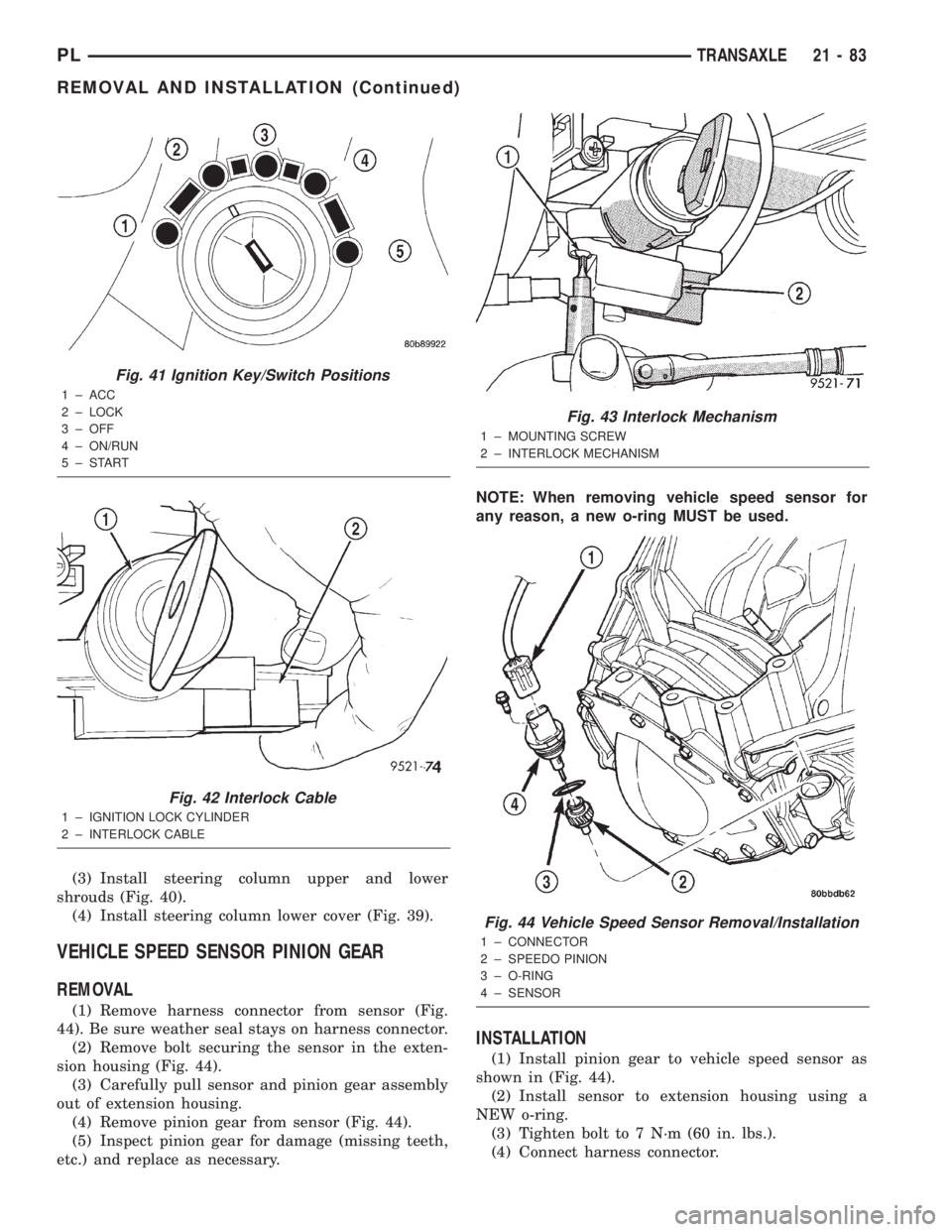
(3) Install steering column upper and lower
shrouds (Fig. 40).
(4) Install steering column lower cover (Fig. 39).
VEHICLE SPEED SENSOR PINION GEAR
REMOVAL
(1) Remove harness connector from sensor (Fig.
44). Be sure weather seal stays on harness connector.
(2) Remove bolt securing the sensor in the exten-
sion housing (Fig. 44).
(3) Carefully pull sensor and pinion gear assembly
out of extension housing.
(4) Remove pinion gear from sensor (Fig. 44).
(5) Inspect pinion gear for damage (missing teeth,
etc.) and replace as necessary.NOTE: When removing vehicle speed sensor for
any reason, a new o-ring MUST be used.
INSTALLATION
(1) Install pinion gear to vehicle speed sensor as
shown in (Fig. 44).
(2) Install sensor to extension housing using a
NEW o-ring.
(3) Tighten bolt to 7 N´m (60 in. lbs.).
(4) Connect harness connector.
Fig. 41 Ignition Key/Switch Positions
1 ± ACC
2 ± LOCK
3 ± OFF
4 ± ON/RUN
5±START
Fig. 42 Interlock Cable
1 ± IGNITION LOCK CYLINDER
2 ± INTERLOCK CABLE
Fig. 43 Interlock Mechanism
1 ± MOUNTING SCREW
2 ± INTERLOCK MECHANISM
Fig. 44 Vehicle Speed Sensor Removal/Installation
1 ± CONNECTOR
2 ± SPEEDO PINION
3 ± O-RING
4 ± SENSOR
PLTRANSAXLE 21 - 83
REMOVAL AND INSTALLATION (Continued)
Page 997 of 1285
PARK/NEUTRAL STARTING AND BACK-UP
LAMP SWITCH
TEST
The park/neutral starting switch is the center ter-
minal of the three terminal switch. It provides
ground for the starter solenoid circuit through the
selector lever in PARK and NEUTRAL positions only.
(1) To test switch, remove wiring connector from
switch and test for continuity between center pin of
switch and transaxle case. Continuity should exist
only when transaxle is in PARK or NEUTRAL.
(2) Check gearshift cable adjustment before replac-
ing a switch that tests bad.
REMOVAL
(1) Unscrew switch from transaxle case allowing
fluid to drain into a container. Move selector lever to
PARK, then to NEUTRAL position, and inspect to see
the switch operating lever fingers are centered in
switch opening.
INSTALLATION
(1) Screw the switch with a new seal into tran-
saxle case and tighten to 33 N´m (24 ft. lbs.). Retest
switch with the test lamp.
(2) Add fluid to transaxle to bring up to proper
level.
(3) The back-up lamp switch circuit is through the
two outside terminals of the three terminal switch.
(4) To test switch, remove wiring connector from
switch and test for continuity between the two out-
side pins.
(5) Continuity should exist only with transaxle in
REVERSE position.
(6) No continuity should exist from either pin to
the case.
TRANSAXLE AND TORQUE CONVERTER
REMOVAL
(1) Raise hood.
(2) Disconnect both battery cables, remove battery
hold down clamp and bolt, and remove battery.
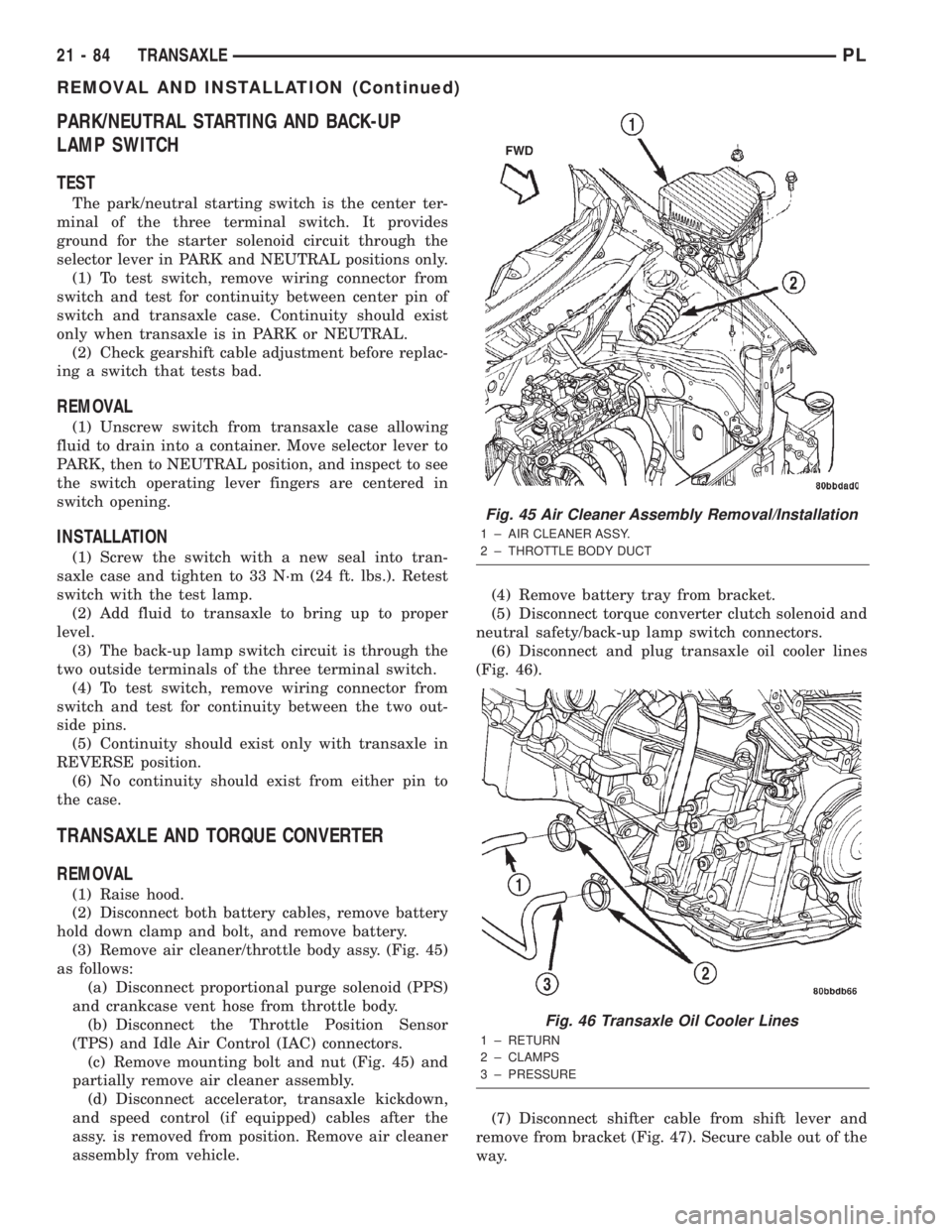
(3) Remove air cleaner/throttle body assy. (Fig. 45)
as follows:
(a) Disconnect proportional purge solenoid (PPS)
and crankcase vent hose from throttle body.
(b) Disconnect the Throttle Position Sensor
(TPS) and Idle Air Control (IAC) connectors.
(c) Remove mounting bolt and nut (Fig. 45) and
partially remove air cleaner assembly.
(d) Disconnect accelerator, transaxle kickdown,
and speed control (if equipped) cables after the
assy. is removed from position. Remove air cleaner
assembly from vehicle.(4) Remove battery tray from bracket.
(5) Disconnect torque converter clutch solenoid and
neutral safety/back-up lamp switch connectors.
(6) Disconnect and plug transaxle oil cooler lines
(Fig. 46).
(7) Disconnect shifter cable from shift lever and
remove from bracket (Fig. 47). Secure cable out of the
way.
Fig. 45 Air Cleaner Assembly Removal/Installation
1 ± AIR CLEANER ASSY.
2 ± THROTTLE BODY DUCT
Fig. 46 Transaxle Oil Cooler Lines
1 ± RETURN
2 ± CLAMPS
3 ± PRESSURE
21 - 84 TRANSAXLEPL
REMOVAL AND INSTALLATION (Continued)
Page 998 of 1285
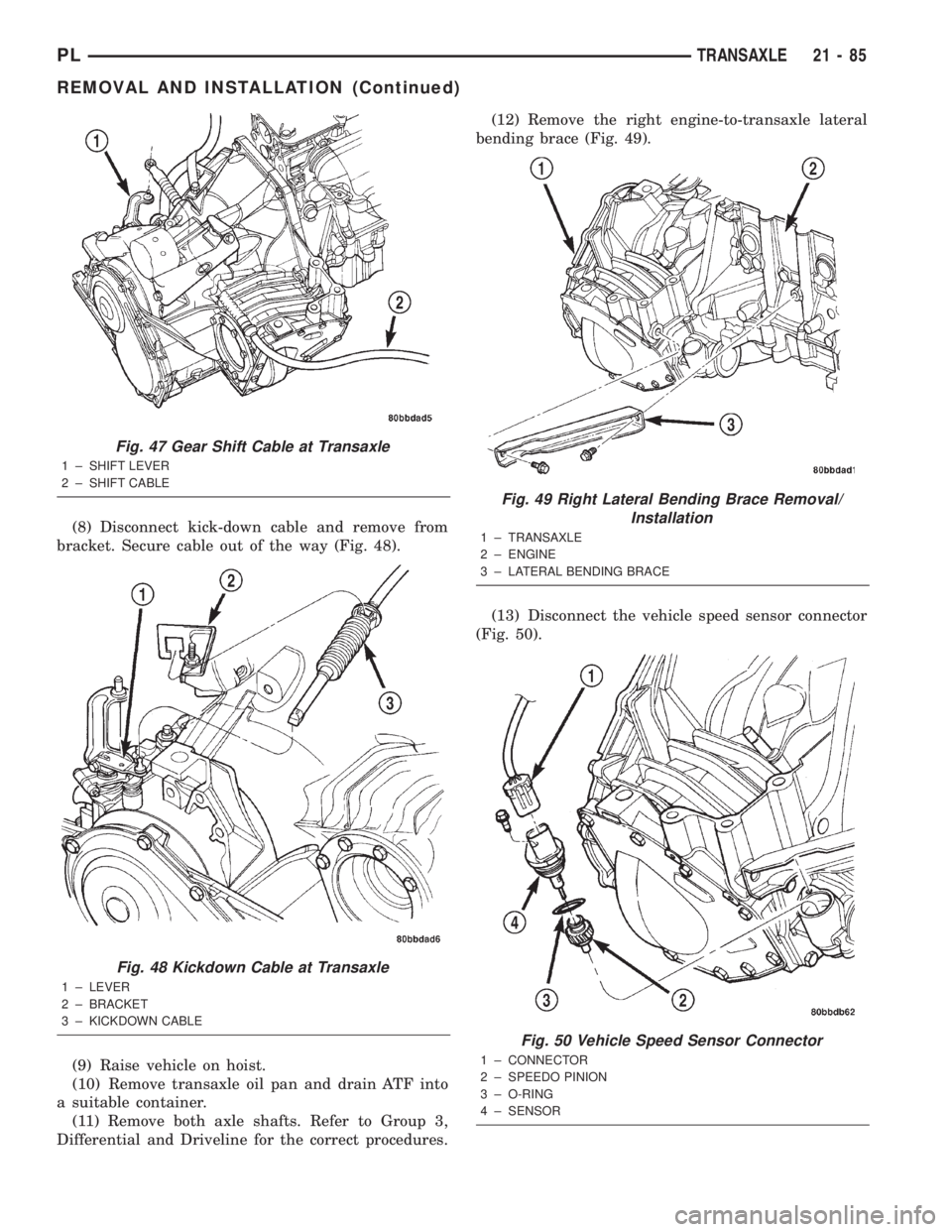
(8) Disconnect kick-down cable and remove from
bracket. Secure cable out of the way (Fig. 48).
(9) Raise vehicle on hoist.
(10) Remove transaxle oil pan and drain ATF into
a suitable container.
(11) Remove both axle shafts. Refer to Group 3,
Differential and Driveline for the correct procedures.(12) Remove the right engine-to-transaxle lateral
bending brace (Fig. 49).
(13) Disconnect the vehicle speed sensor connector
(Fig. 50).
Fig. 47 Gear Shift Cable at Transaxle
1 ± SHIFT LEVER
2 ± SHIFT CABLE
Fig. 48 Kickdown Cable at Transaxle
1 ± LEVER
2 ± BRACKET
3 ± KICKDOWN CABLE
Fig. 49 Right Lateral Bending Brace Removal/
Installation
1 ± TRANSAXLE
2 ± ENGINE
3 ± LATERAL BENDING BRACE
Fig. 50 Vehicle Speed Sensor Connector
1 ± CONNECTOR
2 ± SPEEDO PINION
3 ± O-RING
4 ± SENSOR
PLTRANSAXLE 21 - 85
REMOVAL AND INSTALLATION (Continued)
Page 1001 of 1285
(c) Tighten the collar-to-transaxle bolts to 108
N´m (80 ft. lbs.) torque.
(d) Final torque the collar-to-oil pan bolts to 54
N´m (40 ft. lbs.) torque.
(11) Install both front axle driveshafts. Refer to
Group 3, Differential and Driveline for the correct
procedures.
(12) Connect vehicle speed sensor connector (Fig.
50).
(13) Install right lateral bending brace and tighten
bolts to 81 N´m (60 ft. lbs.) torque.
(14) Lower vehicle.
(15) Connect transaxle cooler lines and tighten
clamps (Fig. 46).
(16) Connect torque converter clutch solenoid and
neutral safety/back-up lamp switch connectors.
(17) Install transaxle dipstick tube.
(18) Install gear shift cable to bracket and connect
to shift lever (Fig. 47).
(19) Install transaxle kickdown cable to bracket
and lever as shown in (Fig. 48).
(20) Install battery lower tray and battery, and
tighten battery hold down clamp to secure battery.
(21) Install the air cleaner/throttle body assy. as
follows:
(a) Connect the accelerator, transaxle kickdown,
and speed control (if equipped) cables to the air
cleaner/throttle body assy.
(b) Install assy into position and tighten fasten-
ers to 14 N´m (120 in. lbs.) torque.
(c) Connect the Throttle Position Sensor (TPS)
and Idle Air Control (IAC) connectors.
(d) Connect proportional purge solenoid (PPS)
and crankcase vent hose from throttle body.
(22) Fill transaxle with a suitable amount of
ATF+4.
(23) Road test vehicle.
(24) Check for leaks, inspect fluid level, and adjust
as necessary.
PUMP OIL SEAL
The pump oil seal can be replaced without remov-
ing the pump and reaction shaft support assembly
from the transaxle case.
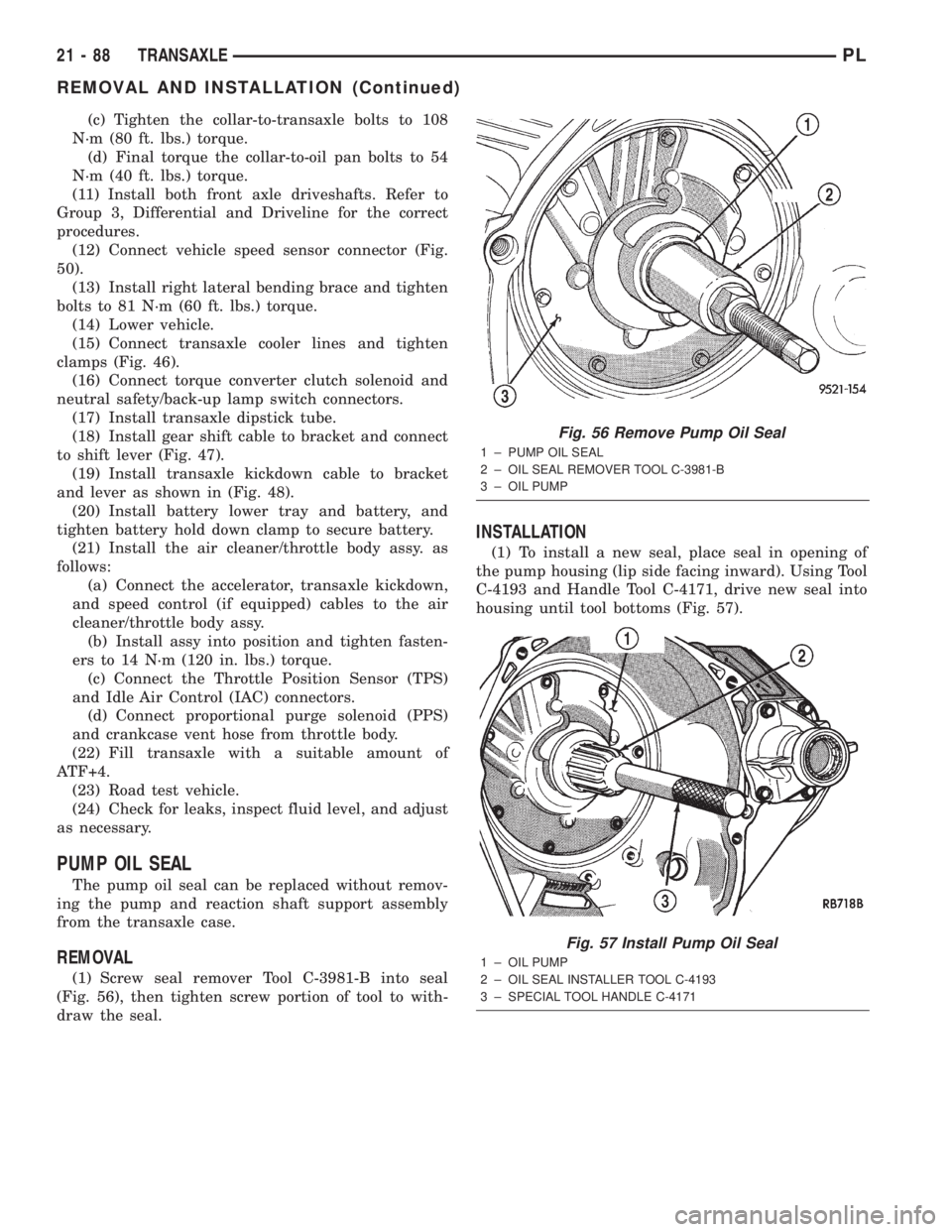
REMOVAL
(1) Screw seal remover Tool C-3981-B into seal
(Fig. 56), then tighten screw portion of tool to with-
draw the seal.
INSTALLATION
(1) To install a new seal, place seal in opening of
the pump housing (lip side facing inward). Using Tool
C-4193 and Handle Tool C-4171, drive new seal into
housing until tool bottoms (Fig. 57).
Fig. 56 Remove Pump Oil Seal
1 ± PUMP OIL SEAL
2 ± OIL SEAL REMOVER TOOL C-3981-B
3 ± OIL PUMP
Fig. 57 Install Pump Oil Seal
1 ± OIL PUMP
2 ± OIL SEAL INSTALLER TOOL C-4193
3 ± SPECIAL TOOL HANDLE C-4171
21 - 88 TRANSAXLEPL
REMOVAL AND INSTALLATION (Continued)
Page 1049 of 1285
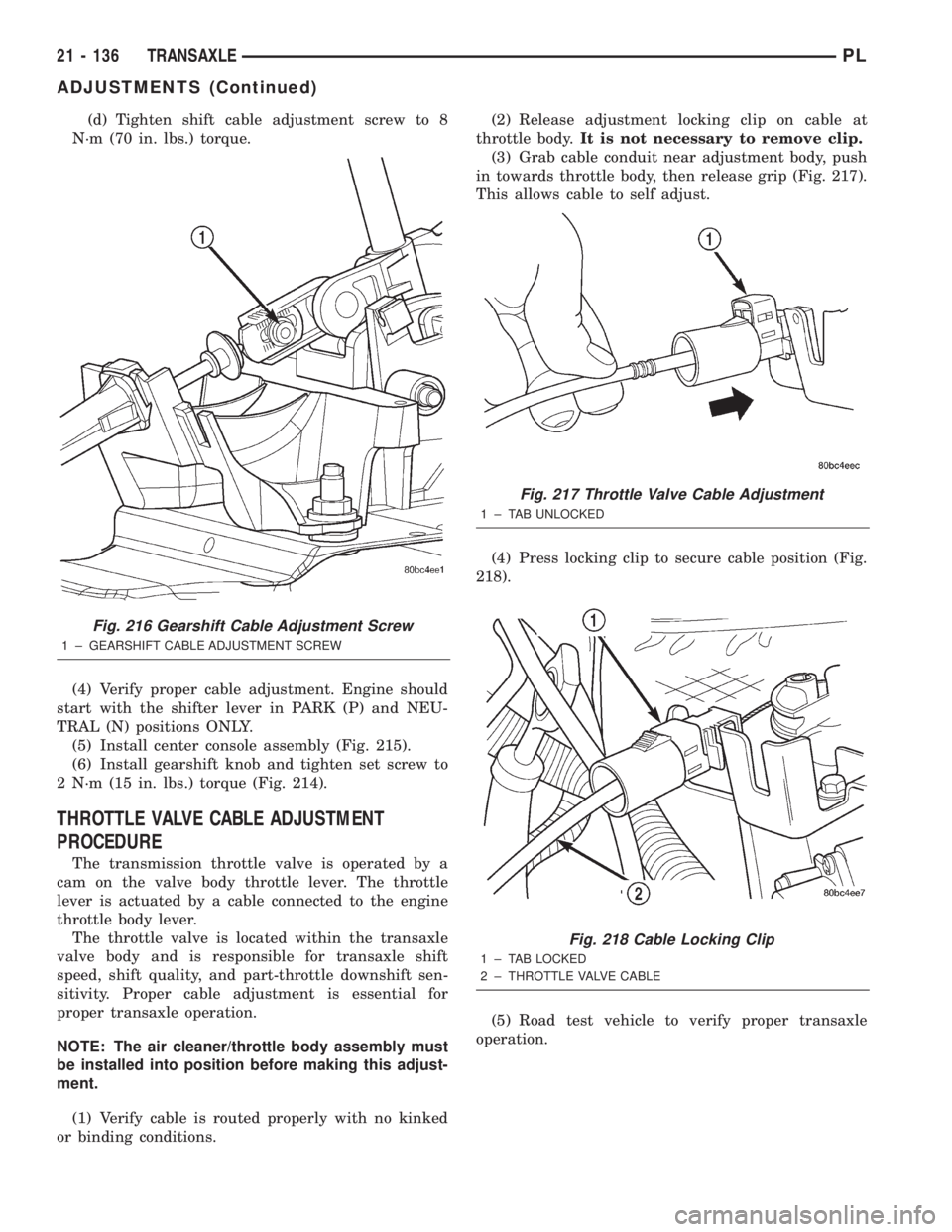
(d) Tighten shift cable adjustment screw to 8
N´m (70 in. lbs.) torque.
(4) Verify proper cable adjustment. Engine should
start with the shifter lever in PARK (P) and NEU-
TRAL (N) positions ONLY.
(5) Install center console assembly (Fig. 215).
(6) Install gearshift knob and tighten set screw to
2 N´m (15 in. lbs.) torque (Fig. 214).
THROTTLE VALVE CABLE ADJUSTMENT
PROCEDURE
The transmission throttle valve is operated by a
cam on the valve body throttle lever. The throttle
lever is actuated by a cable connected to the engine
throttle body lever.
The throttle valve is located within the transaxle
valve body and is responsible for transaxle shift
speed, shift quality, and part-throttle downshift sen-
sitivity. Proper cable adjustment is essential for
proper transaxle operation.
NOTE: The air cleaner/throttle body assembly must
be installed into position before making this adjust-
ment.
(1) Verify cable is routed properly with no kinked
or binding conditions.(2) Release adjustment locking clip on cable at
throttle body.It is not necessary to remove clip.
(3) Grab cable conduit near adjustment body, push
in towards throttle body, then release grip (Fig. 217).
This allows cable to self adjust.
(4) Press locking clip to secure cable position (Fig.
218).
(5) Road test vehicle to verify proper transaxle
operation.
Fig. 216 Gearshift Cable Adjustment Screw
1 ± GEARSHIFT CABLE ADJUSTMENT SCREW
Fig. 217 Throttle Valve Cable Adjustment
1 ± TAB UNLOCKED
Fig. 218 Cable Locking Clip
1 ± TAB LOCKED
2 ± THROTTLE VALVE CABLE
21 - 136 TRANSAXLEPL
ADJUSTMENTS (Continued)
Page 1090 of 1285
that may induce an erroneous failure. This prevents
illuminating the MIL for the wrong fault and allows
more precis diagnosis.
For example, if the PCM is storing a one trip fault
for the Oxygen Sensor and the EGR monitor, the
Task Manager may still run the EGR Monitor but
will suspend the results until the Oxygen Sensor
Monitor either passes or fails. At that point the Task
Manager can determine if the EGR system is actu-
ally failing or if an Oxygen Sensor is failing.
MIL Illumination
The PCM Task Manager carries out the illumina-
tion of the MIL. The Task Manager triggers MIL illu-
mination upon test failure, depending on monitor
failure criteria.
The Task Manager Screen shows both a Requested
MIL state and an Actual MIL state. When the MIL is
illuminated upon completion of a test for a third trip,
the Requested MIL state changes to OFF. However,
the MIL remains illuminated until the next key
cycle. (On some vehicles, the MIL will actually turn
OFF during the third key cycle) During the key cycle
for the third good trip, the Requested MIL state is
OFF, while the Actual MILL state is ON. After the
next key cycle, the MIL is not illuminated and both
MIL states read OFF.
Diagnostic Trouble Codes (DTCs)
With OBD II, different DTC faults have different
priorities according to regulations. As a result, the
priorities determine MIL illumination and DTC era-
sure. DTCs are entered according to individual prior-
ity. DTCs with a higher priority overwrite lower
priority DTCs.
Priorities
²Priority 0 ÐNon-emissions related trouble codes
²Priority 1 Ð One trip failure of a two trip fault
for non-fuel system and non-misfire.
²Priority 2 Ð One trip failure of a two trip fault
for fuel system (rich/lean) or misfire.
²Priority3ÐTwotrip failure for a non-fuel sys-
tem and non-misfire or matured one trip comprehen-
sive component fault.
²Priority4ÐTwotrip failure or matured fault
for fuel system (rich/lean) and misfire or one trip cat-
alyst damaging misfire.
Non-emissions related failures have no priority.
One trip failures of two trip faults have low priority.
Two trip failures or matured faults have higher pri-
ority. One and two trip failures of fuel system and
misfire monitor take precedence over non-fuel system
and non-misfire failures.DTC Self Erasure
With one trip components or systems, the MIL is
illuminated upon test failure and DTCs are stored.
Two trip monitors are components requiring failure
in two consecutive trips for MIL illumination. Upon
failure of the first test, the Task Manager enters a
maturing code. If the component fails the test for a
second time the code matures and a DTC is set.
After three good trips the MIL is extinguished and
the Task Manager automatically switches the trip
counter to a warm-up cycle counter. DTCs are auto-
matically erased following 40 warm-up cycles if the
component does not fail again.
For misfire and fuel system monitors, the compo-
nent must pass the test under a Similar Conditions
Window in order to record a good trip. A Similar Con-
ditions Window is when engine RPM is within6375
RPM and load is within610% of when the fault
occurred.
NOTE: It is important to understand that a compo-
nent does not have to fail under a similar window of
operation to mature. It must pass the test under a
Similar Conditions Window when it failed to record
a Good Trip for DTC erasure for misfire and fuel
system monitors.
DTCs can be erased anytime with a DRB III. Eras-
ing the DTC with the DRB III erases all OBD II
information. The DRB III automatically displays a
warning that erasing the DTC will also erase all
OBD II monitor data. This includes all counter infor-
mation for warm-up cycles, trips and Freeze Frame.
Trip Indicator
TheTripis essential for running monitors and
extinguishing the MIL. In OBD II terms, a trip is a
set of vehicle operating conditions that must be met
for a specific monitor to run. All trips begin with a
key cycle.
Good Trip
The Good Trip counters are as follows:
²Global Good Trip
²Fuel System Good Trip
²Misfire Good Trip
²Alternate Good Trip (appears as a Global Good
Trip on DRB III)
²Comprehensive Components
²Major Monitor
²Warm-Up Cycles
Global Good Trip
To increment a Global Good Trip, the Oxygen sen-
sor and Catalyst efficiency monitors must have run
and passed.
Fuel System Good Trip
To count a good trip (three required) and turn off
the MIL, the following conditions must occur:
PLEMISSION CONTROL SYSTEMS 25 - 3
DESCRIPTION AND OPERATION (Continued)