torque DODGE NEON 2000 Service Workshop Manual
[x] Cancel search | Manufacturer: DODGE, Model Year: 2000, Model line: NEON, Model: DODGE NEON 2000Pages: 1285, PDF Size: 29.42 MB
Page 128 of 1285
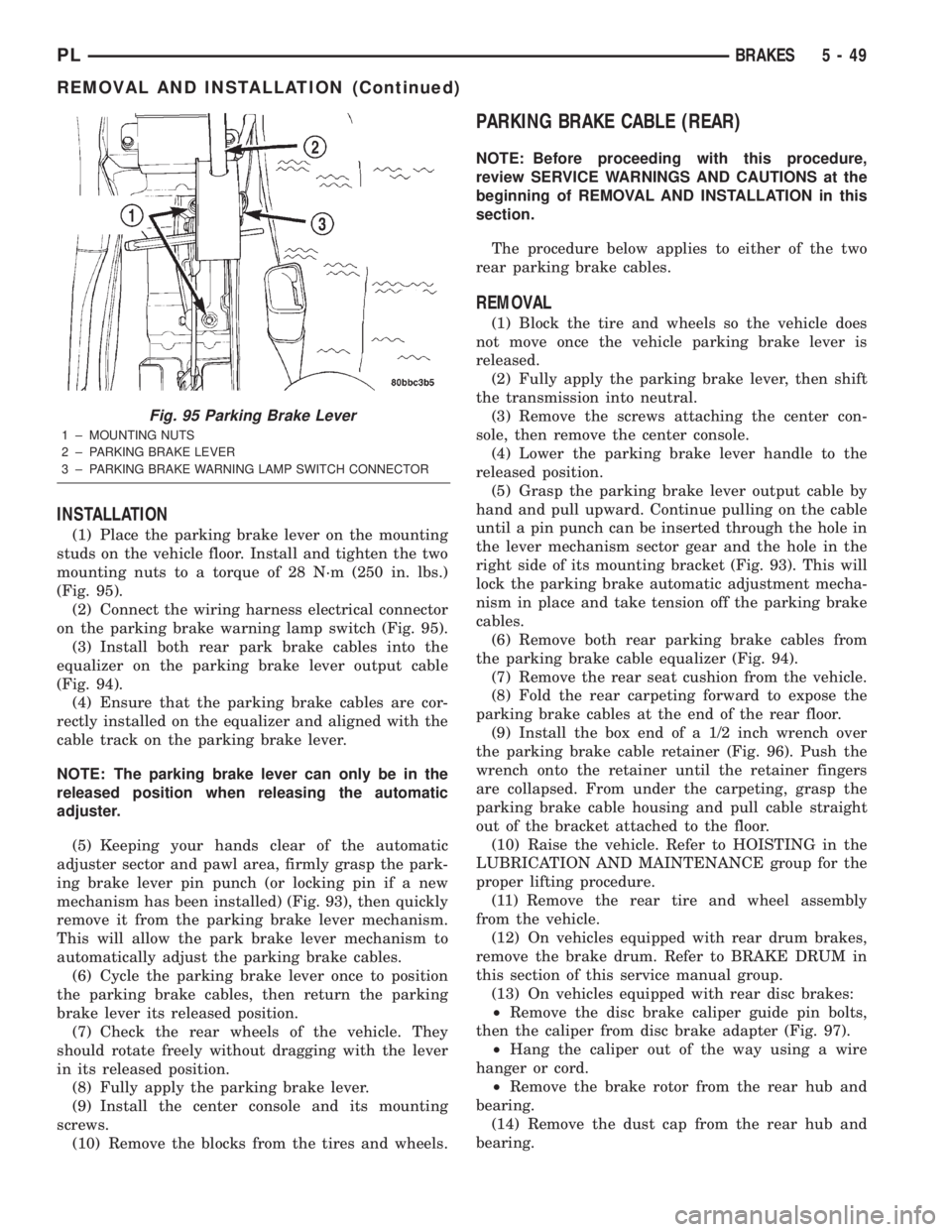
INSTALLATION
(1) Place the parking brake lever on the mounting
studs on the vehicle floor. Install and tighten the two
mounting nuts to a torque of 28 N´m (250 in. lbs.)
(Fig. 95).
(2) Connect the wiring harness electrical connector
on the parking brake warning lamp switch (Fig. 95).
(3) Install both rear park brake cables into the
equalizer on the parking brake lever output cable
(Fig. 94).
(4) Ensure that the parking brake cables are cor-
rectly installed on the equalizer and aligned with the
cable track on the parking brake lever.
NOTE: The parking brake lever can only be in the
released position when releasing the automatic
adjuster.
(5) Keeping your hands clear of the automatic
adjuster sector and pawl area, firmly grasp the park-
ing brake lever pin punch (or locking pin if a new
mechanism has been installed) (Fig. 93), then quickly
remove it from the parking brake lever mechanism.
This will allow the park brake lever mechanism to
automatically adjust the parking brake cables.
(6) Cycle the parking brake lever once to position
the parking brake cables, then return the parking
brake lever its released position.
(7) Check the rear wheels of the vehicle. They
should rotate freely without dragging with the lever
in its released position.
(8) Fully apply the parking brake lever.
(9) Install the center console and its mounting
screws.
(10) Remove the blocks from the tires and wheels.
PARKING BRAKE CABLE (REAR)
NOTE: Before proceeding with this procedure,
review SERVICE WARNINGS AND CAUTIONS at the
beginning of REMOVAL AND INSTALLATION in this
section.
The procedure below applies to either of the two
rear parking brake cables.
REMOVAL
(1) Block the tire and wheels so the vehicle does
not move once the vehicle parking brake lever is
released.
(2) Fully apply the parking brake lever, then shift
the transmission into neutral.
(3) Remove the screws attaching the center con-
sole, then remove the center console.
(4) Lower the parking brake lever handle to the
released position.
(5) Grasp the parking brake lever output cable by
hand and pull upward. Continue pulling on the cable
until a pin punch can be inserted through the hole in
the lever mechanism sector gear and the hole in the
right side of its mounting bracket (Fig. 93). This will
lock the parking brake automatic adjustment mecha-
nism in place and take tension off the parking brake
cables.
(6) Remove both rear parking brake cables from
the parking brake cable equalizer (Fig. 94).
(7) Remove the rear seat cushion from the vehicle.
(8) Fold the rear carpeting forward to expose the
parking brake cables at the end of the rear floor.
(9) Install the box end of a 1/2 inch wrench over
the parking brake cable retainer (Fig. 96). Push the
wrench onto the retainer until the retainer fingers
are collapsed. From under the carpeting, grasp the
parking brake cable housing and pull cable straight
out of the bracket attached to the floor.
(10) Raise the vehicle. Refer to HOISTING in the
LUBRICATION AND MAINTENANCE group for the
proper lifting procedure.
(11) Remove the rear tire and wheel assembly
from the vehicle.
(12) On vehicles equipped with rear drum brakes,
remove the brake drum. Refer to BRAKE DRUM in
this section of this service manual group.
(13) On vehicles equipped with rear disc brakes:
²Remove the disc brake caliper guide pin bolts,
then the caliper from disc brake adapter (Fig. 97).
²Hang the caliper out of the way using a wire
hanger or cord.
²Remove the brake rotor from the rear hub and
bearing.
(14) Remove the dust cap from the rear hub and
bearing.
Fig. 95 Parking Brake Lever
1 ± MOUNTING NUTS
2 ± PARKING BRAKE LEVER
3 ± PARKING BRAKE WARNING LAMP SWITCH CONNECTOR
PLBRAKES 5 - 49
REMOVAL AND INSTALLATION (Continued)
Page 130 of 1285
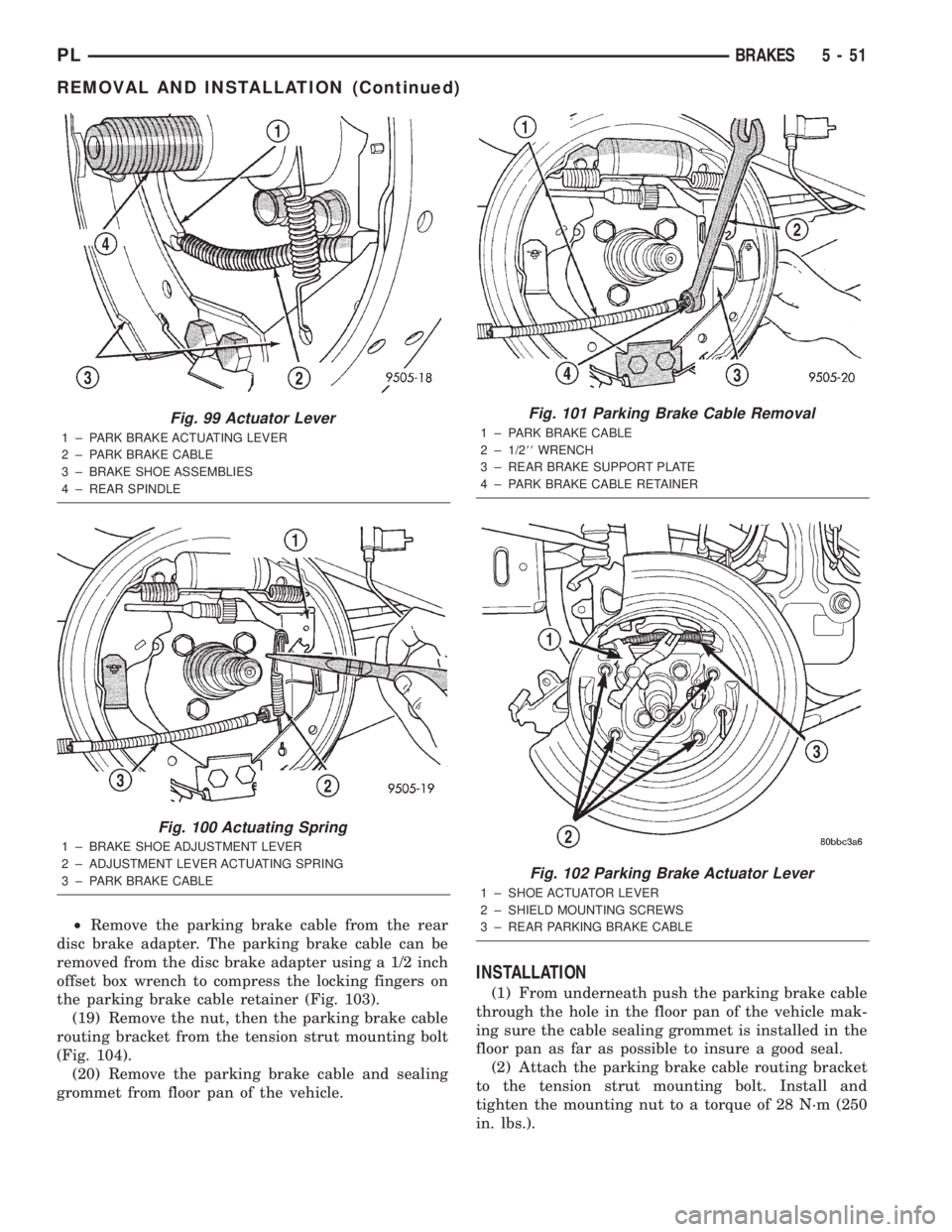
²Remove the parking brake cable from the rear
disc brake adapter. The parking brake cable can be
removed from the disc brake adapter using a 1/2 inch
offset box wrench to compress the locking fingers on
the parking brake cable retainer (Fig. 103).
(19) Remove the nut, then the parking brake cable
routing bracket from the tension strut mounting bolt
(Fig. 104).
(20) Remove the parking brake cable and sealing
grommet from floor pan of the vehicle.
INSTALLATION
(1) From underneath push the parking brake cable
through the hole in the floor pan of the vehicle mak-
ing sure the cable sealing grommet is installed in the
floor pan as far as possible to insure a good seal.
(2) Attach the parking brake cable routing bracket
to the tension strut mounting bolt. Install and
tighten the mounting nut to a torque of 28 N´m (250
in. lbs.).
Fig. 99 Actuator Lever
1 ± PARK BRAKE ACTUATING LEVER
2 ± PARK BRAKE CABLE
3 ± BRAKE SHOE ASSEMBLIES
4 ± REAR SPINDLE
Fig. 100 Actuating Spring
1 ± BRAKE SHOE ADJUSTMENT LEVER
2 ± ADJUSTMENT LEVER ACTUATING SPRING
3 ± PARK BRAKE CABLE
Fig. 101 Parking Brake Cable Removal
1 ± PARK BRAKE CABLE
2 ± 1/288WRENCH
3 ± REAR BRAKE SUPPORT PLATE
4 ± PARK BRAKE CABLE RETAINER
Fig. 102 Parking Brake Actuator Lever
1 ± SHOE ACTUATOR LEVER
2 ± SHIELD MOUNTING SCREWS
3 ± REAR PARKING BRAKE CABLE
PLBRAKES 5 - 51
REMOVAL AND INSTALLATION (Continued)
Page 131 of 1285
(3) Install the parking brake cable into the brake
support plate or the rear disc brake adapter. Be sure
the locking fingers on the cable retainer are
expanded once the cable is pushed all the way into
the support plate or brake adapter hole to ensure the
cable is securely held in place.
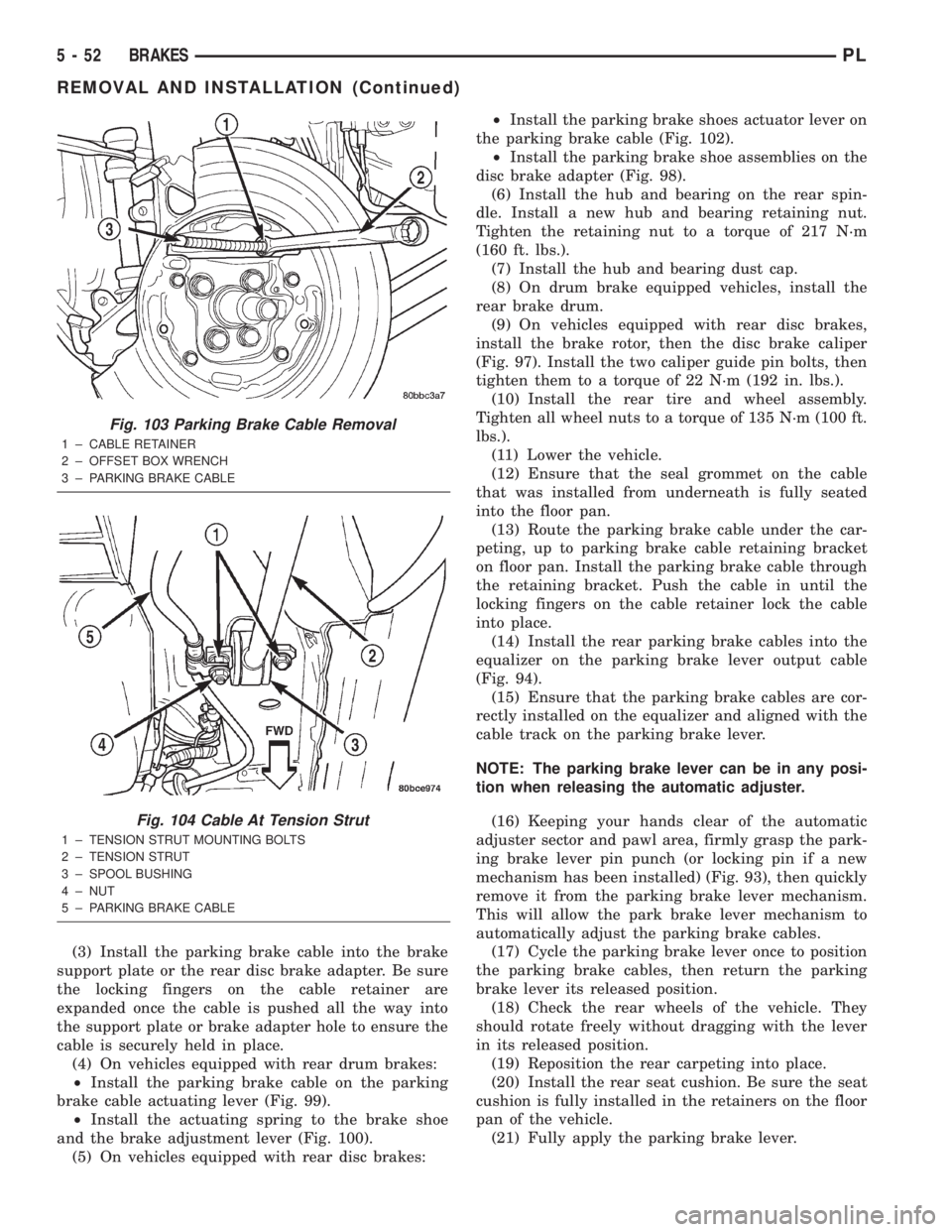
(4) On vehicles equipped with rear drum brakes:
²Install the parking brake cable on the parking
brake cable actuating lever (Fig. 99).
²Install the actuating spring to the brake shoe
and the brake adjustment lever (Fig. 100).
(5) On vehicles equipped with rear disc brakes:²Install the parking brake shoes actuator lever on
the parking brake cable (Fig. 102).
²Install the parking brake shoe assemblies on the
disc brake adapter (Fig. 98).
(6) Install the hub and bearing on the rear spin-
dle. Install a new hub and bearing retaining nut.
Tighten the retaining nut to a torque of 217 N´m
(160 ft. lbs.).
(7) Install the hub and bearing dust cap.
(8) On drum brake equipped vehicles, install the
rear brake drum.
(9) On vehicles equipped with rear disc brakes,
install the brake rotor, then the disc brake caliper
(Fig. 97). Install the two caliper guide pin bolts, then
tighten them to a torque of 22 N´m (192 in. lbs.).
(10) Install the rear tire and wheel assembly.
Tighten all wheel nuts to a torque of 135 N´m (100 ft.
lbs.).
(11) Lower the vehicle.
(12) Ensure that the seal grommet on the cable
that was installed from underneath is fully seated
into the floor pan.
(13) Route the parking brake cable under the car-
peting, up to parking brake cable retaining bracket
on floor pan. Install the parking brake cable through
the retaining bracket. Push the cable in until the
locking fingers on the cable retainer lock the cable
into place.
(14) Install the rear parking brake cables into the
equalizer on the parking brake lever output cable
(Fig. 94).
(15) Ensure that the parking brake cables are cor-
rectly installed on the equalizer and aligned with the
cable track on the parking brake lever.
NOTE: The parking brake lever can be in any posi-
tion when releasing the automatic adjuster.
(16) Keeping your hands clear of the automatic
adjuster sector and pawl area, firmly grasp the park-
ing brake lever pin punch (or locking pin if a new
mechanism has been installed) (Fig. 93), then quickly
remove it from the parking brake lever mechanism.
This will allow the park brake lever mechanism to
automatically adjust the parking brake cables.
(17) Cycle the parking brake lever once to position
the parking brake cables, then return the parking
brake lever its released position.
(18) Check the rear wheels of the vehicle. They
should rotate freely without dragging with the lever
in its released position.
(19) Reposition the rear carpeting into place.
(20) Install the rear seat cushion. Be sure the seat
cushion is fully installed in the retainers on the floor
pan of the vehicle.
(21) Fully apply the parking brake lever.
Fig. 103 Parking Brake Cable Removal
1 ± CABLE RETAINER
2 ± OFFSET BOX WRENCH
3 ± PARKING BRAKE CABLE
Fig. 104 Cable At Tension Strut
1 ± TENSION STRUT MOUNTING BOLTS
2 ± TENSION STRUT
3 ± SPOOL BUSHING
4 ± NUT
5 ± PARKING BRAKE CABLE
5 - 52 BRAKESPL
REMOVAL AND INSTALLATION (Continued)
Page 133 of 1285
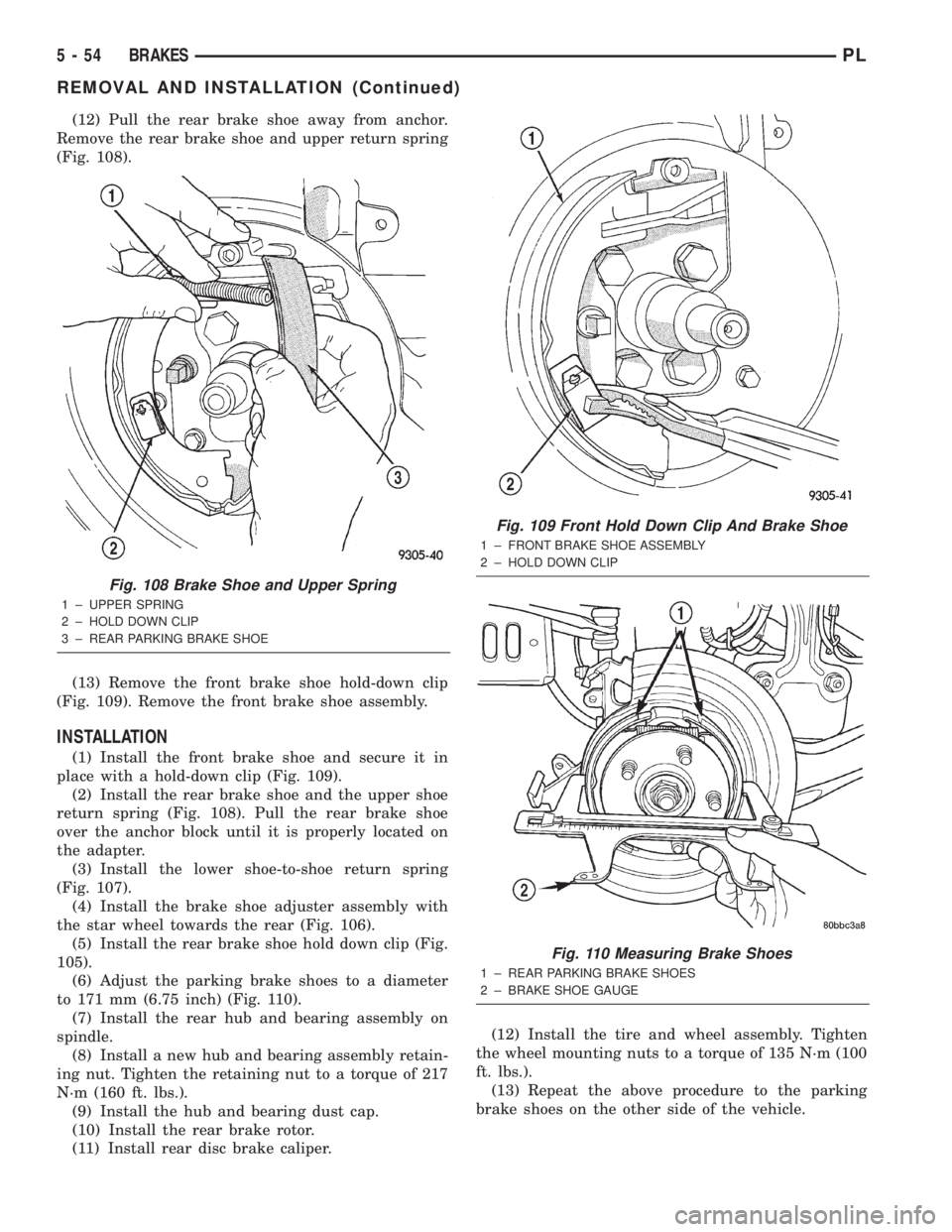
(12) Pull the rear brake shoe away from anchor.
Remove the rear brake shoe and upper return spring
(Fig. 108).
(13) Remove the front brake shoe hold-down clip
(Fig. 109). Remove the front brake shoe assembly.
INSTALLATION
(1) Install the front brake shoe and secure it in
place with a hold-down clip (Fig. 109).
(2) Install the rear brake shoe and the upper shoe
return spring (Fig. 108). Pull the rear brake shoe
over the anchor block until it is properly located on
the adapter.
(3) Install the lower shoe-to-shoe return spring
(Fig. 107).
(4) Install the brake shoe adjuster assembly with
the star wheel towards the rear (Fig. 106).
(5) Install the rear brake shoe hold down clip (Fig.
105).
(6) Adjust the parking brake shoes to a diameter
to 171 mm (6.75 inch) (Fig. 110).
(7) Install the rear hub and bearing assembly on
spindle.
(8) Install a new hub and bearing assembly retain-
ing nut. Tighten the retaining nut to a torque of 217
N´m (160 ft. lbs.).
(9) Install the hub and bearing dust cap.
(10) Install the rear brake rotor.
(11) Install rear disc brake caliper.(12) Install the tire and wheel assembly. Tighten
the wheel mounting nuts to a torque of 135 N´m (100
ft. lbs.).
(13) Repeat the above procedure to the parking
brake shoes on the other side of the vehicle.
Fig. 108 Brake Shoe and Upper Spring
1 ± UPPER SPRING
2 ± HOLD DOWN CLIP
3 ± REAR PARKING BRAKE SHOE
Fig. 109 Front Hold Down Clip And Brake Shoe
1 ± FRONT BRAKE SHOE ASSEMBLY
2 ± HOLD DOWN CLIP
Fig. 110 Measuring Brake Shoes
1 ± REAR PARKING BRAKE SHOES
2 ± BRAKE SHOE GAUGE
5 - 54 BRAKESPL
REMOVAL AND INSTALLATION (Continued)
Page 142 of 1285
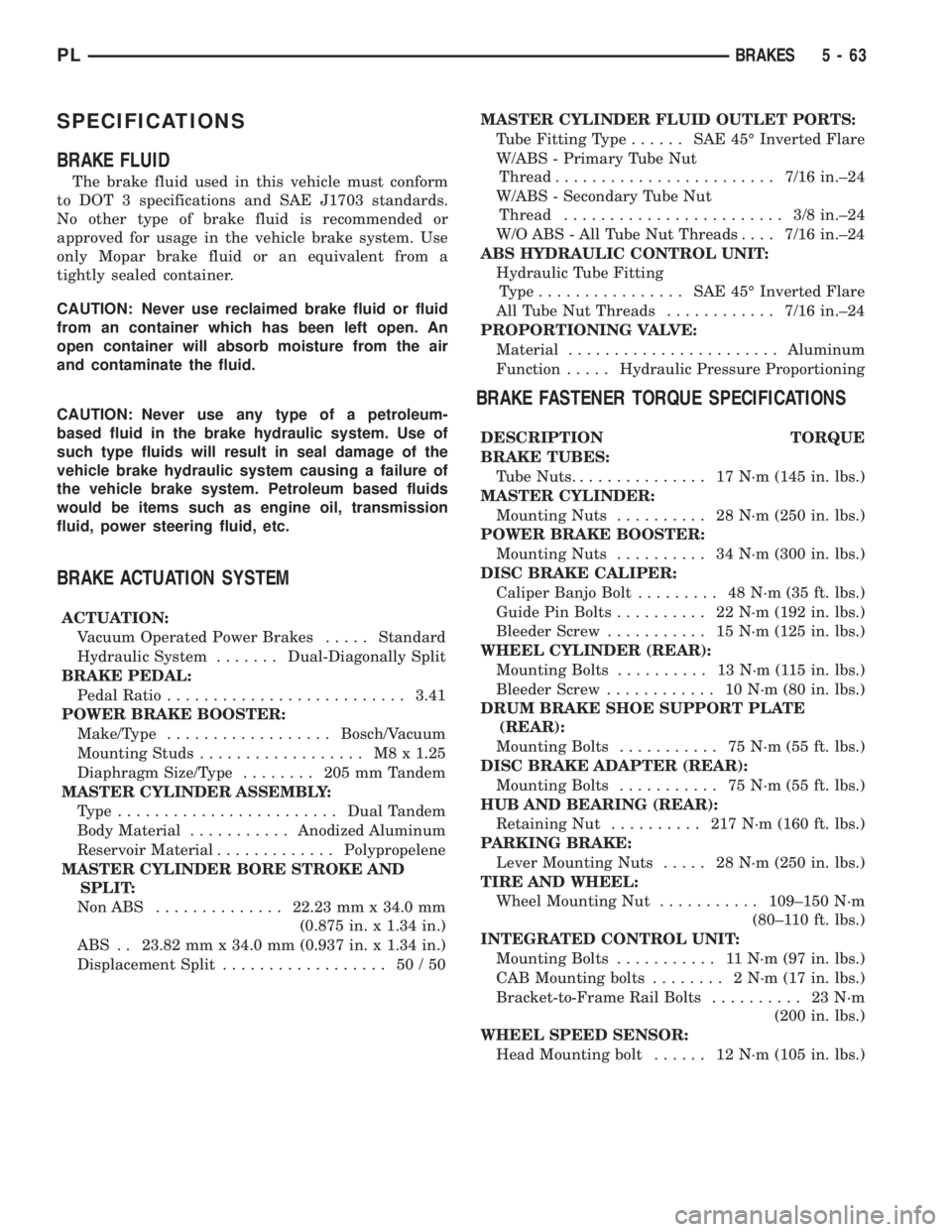
SPECIFICATIONS
BRAKE FLUID
The brake fluid used in this vehicle must conform
to DOT 3 specifications and SAE J1703 standards.
No other type of brake fluid is recommended or
approved for usage in the vehicle brake system. Use
only Mopar brake fluid or an equivalent from a
tightly sealed container.
CAUTION: Never use reclaimed brake fluid or fluid
from an container which has been left open. An
open container will absorb moisture from the air
and contaminate the fluid.
CAUTION: Never use any type of a petroleum-
based fluid in the brake hydraulic system. Use of
such type fluids will result in seal damage of the
vehicle brake hydraulic system causing a failure of
the vehicle brake system. Petroleum based fluids
would be items such as engine oil, transmission
fluid, power steering fluid, etc.
BRAKE ACTUATION SYSTEM
ACTUATION:
Vacuum Operated Power Brakes.....Standard
Hydraulic System.......Dual-Diagonally Split
BRAKE PEDAL:
Pedal Ratio..........................3.41
POWER BRAKE BOOSTER:
Make/Type..................Bosch/Vacuum
Mounting Studs.................. M8x1.25
Diaphragm Size/Type........ 205mmTandem
MASTER CYLINDER ASSEMBLY:
Type ........................Dual Tandem
Body Material...........Anodized Aluminum
Reservoir Material.............Polypropelene
MASTER CYLINDER BORE STROKE AND
SPLIT:
NonABS ..............22.23 mm x 34.0 mm
(0.875 in. x 1.34 in.)
ABS . . 23.82 mm x 34.0 mm (0.937 in. x 1.34 in.)
Displacement Split.................. 50/50MASTER CYLINDER FLUID OUTLET PORTS:
Tube Fitting Type...... SAE45ÉInverted Flare
W/ABS - Primary Tube Nut
Thread........................7/16 in.±24
W/ABS - Secondary Tube Nut
Thread........................ 3/8in.±24
W/O ABS - All Tube Nut Threads....7/16 in.±24
ABS HYDRAULIC CONTROL UNIT:
Hydraulic Tube Fitting
Type................ SAE45ÉInverted Flare
All Tube Nut Threads............7/16 in.±24
PROPORTIONING VALVE:
Material.......................Aluminum
Function.....Hydraulic Pressure Proportioning
BRAKE FASTENER TORQUE SPECIFICATIONS
DESCRIPTION TORQUE
BRAKE TUBES:
Tube Nuts............... 17N´m(145 in. lbs.)
MASTER CYLINDER:
Mounting Nuts.......... 28N´m(250 in. lbs.)
POWER BRAKE BOOSTER:
Mounting Nuts.......... 34N´m(300 in. lbs.)
DISC BRAKE CALIPER:
Caliper Banjo Bolt......... 48N´m(35ft.lbs.)
Guide Pin Bolts.......... 22N´m(192 in. lbs.)
Bleeder Screw........... 15N´m(125 in. lbs.)
WHEEL CYLINDER (REAR):
Mounting Bolts.......... 13N´m(115in.lbs.)
Bleeder Screw............ 10N´m(80in.lbs.)
DRUM BRAKE SHOE SUPPORT PLATE
(REAR):
Mounting Bolts........... 75N´m(55ft.lbs.)
DISC BRAKE ADAPTER (REAR):
Mounting Bolts........... 75N´m(55ft.lbs.)
HUB AND BEARING (REAR):
Retaining Nut.......... 217N´m(160 ft. lbs.)
PARKING BRAKE:
Lever Mounting Nuts..... 28N´m(250 in. lbs.)
TIRE AND WHEEL:
Wheel Mounting Nut...........109±150 N´m
(80±110 ft. lbs.)
INTEGRATED CONTROL UNIT:
Mounting Bolts........... 11N´m(97in.lbs.)
CAB Mounting bolts........ 2N´m(17in.lbs.)
Bracket-to-Frame Rail Bolts.......... 23N´m
(200 in. lbs.)
WHEEL SPEED SENSOR:
Head Mounting bolt...... 12N´m(105 in. lbs.)
PLBRAKES 5 - 63
Page 144 of 1285
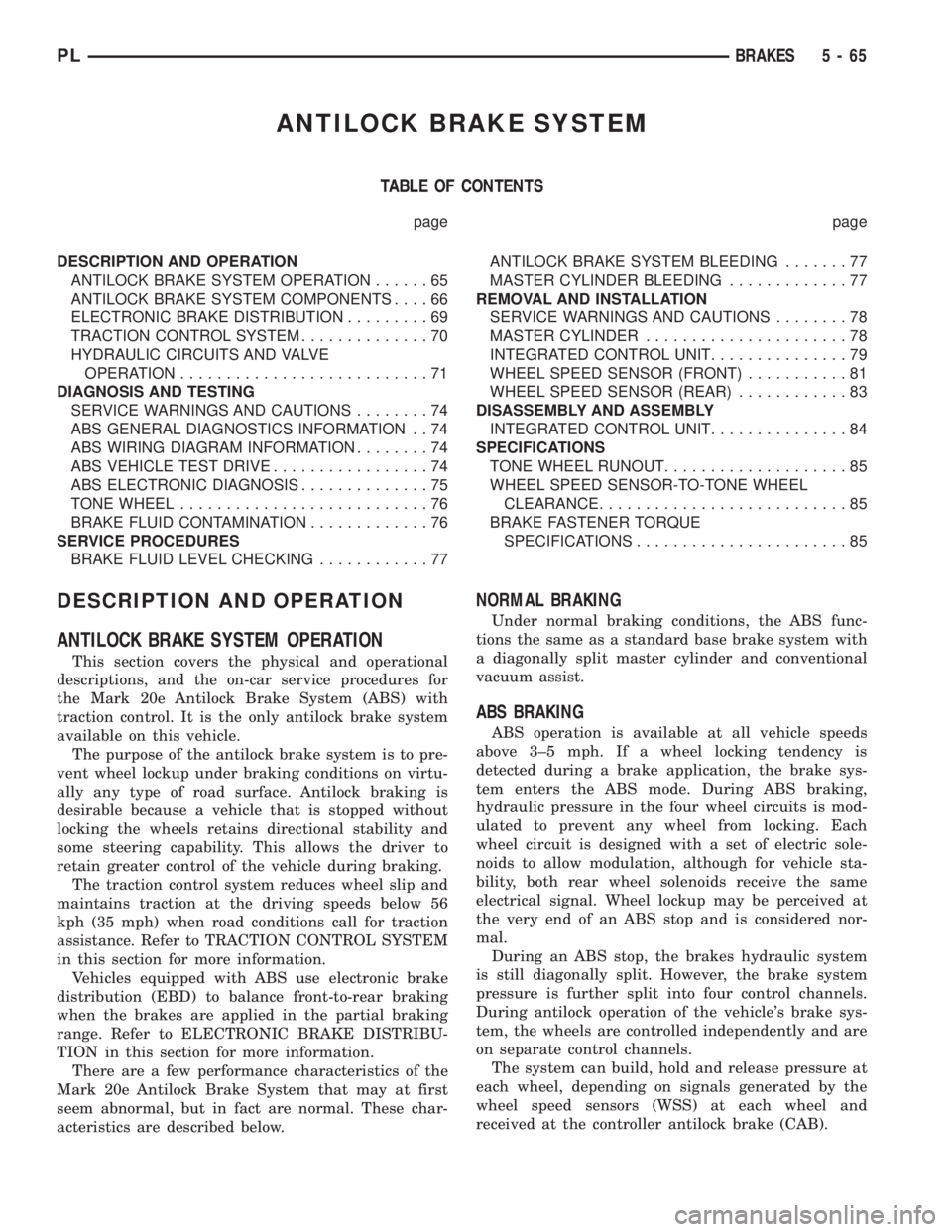
ANTILOCK BRAKE SYSTEM
TABLE OF CONTENTS
page page
DESCRIPTION AND OPERATION
ANTILOCK BRAKE SYSTEM OPERATION......65
ANTILOCK BRAKE SYSTEM COMPONENTS....66
ELECTRONIC BRAKE DISTRIBUTION.........69
TRACTION CONTROL SYSTEM..............70
HYDRAULIC CIRCUITS AND VALVE
OPERATION...........................71
DIAGNOSIS AND TESTING
SERVICE WARNINGS AND CAUTIONS........74
ABS GENERAL DIAGNOSTICS INFORMATION . . 74
ABS WIRING DIAGRAM INFORMATION........74
ABS VEHICLE TEST DRIVE.................74
ABS ELECTRONIC DIAGNOSIS..............75
TONE WHEEL...........................76
BRAKE FLUID CONTAMINATION.............76
SERVICE PROCEDURES
BRAKE FLUID LEVEL CHECKING............77ANTILOCK BRAKE SYSTEM BLEEDING.......77
MASTER CYLINDER BLEEDING.............77
REMOVAL AND INSTALLATION
SERVICE WARNINGS AND CAUTIONS........78
MASTER CYLINDER......................78
INTEGRATED CONTROL UNIT...............79
WHEEL SPEED SENSOR (FRONT)...........81
WHEEL SPEED SENSOR (REAR)............83
DISASSEMBLY AND ASSEMBLY
INTEGRATED CONTROL UNIT...............84
SPECIFICATIONS
TONE WHEEL RUNOUT....................85
WHEEL SPEED SENSOR-TO-TONE WHEEL
CLEARANCE...........................85
BRAKE FASTENER TORQUE
SPECIFICATIONS.......................85
DESCRIPTION AND OPERATION
ANTILOCK BRAKE SYSTEM OPERATION
This section covers the physical and operational
descriptions, and the on-car service procedures for
the Mark 20e Antilock Brake System (ABS) with
traction control. It is the only antilock brake system
available on this vehicle.
The purpose of the antilock brake system is to pre-
vent wheel lockup under braking conditions on virtu-
ally any type of road surface. Antilock braking is
desirable because a vehicle that is stopped without
locking the wheels retains directional stability and
some steering capability. This allows the driver to
retain greater control of the vehicle during braking.
The traction control system reduces wheel slip and
maintains traction at the driving speeds below 56
kph (35 mph) when road conditions call for traction
assistance. Refer to TRACTION CONTROL SYSTEM
in this section for more information.
Vehicles equipped with ABS use electronic brake
distribution (EBD) to balance front-to-rear braking
when the brakes are applied in the partial braking
range. Refer to ELECTRONIC BRAKE DISTRIBU-
TION in this section for more information.
There are a few performance characteristics of the
Mark 20e Antilock Brake System that may at first
seem abnormal, but in fact are normal. These char-
acteristics are described below.
NORMAL BRAKING
Under normal braking conditions, the ABS func-
tions the same as a standard base brake system with
a diagonally split master cylinder and conventional
vacuum assist.
ABS BRAKING
ABS operation is available at all vehicle speeds
above 3±5 mph. If a wheel locking tendency is
detected during a brake application, the brake sys-
tem enters the ABS mode. During ABS braking,
hydraulic pressure in the four wheel circuits is mod-
ulated to prevent any wheel from locking. Each
wheel circuit is designed with a set of electric sole-
noids to allow modulation, although for vehicle sta-
bility, both rear wheel solenoids receive the same
electrical signal. Wheel lockup may be perceived at
the very end of an ABS stop and is considered nor-
mal.
During an ABS stop, the brakes hydraulic system
is still diagonally split. However, the brake system
pressure is further split into four control channels.
During antilock operation of the vehicle's brake sys-
tem, the wheels are controlled independently and are
on separate control channels.
The system can build, hold and release pressure at
each wheel, depending on signals generated by the
wheel speed sensors (WSS) at each wheel and
received at the controller antilock brake (CAB).
PLBRAKES 5 - 65
Page 156 of 1285
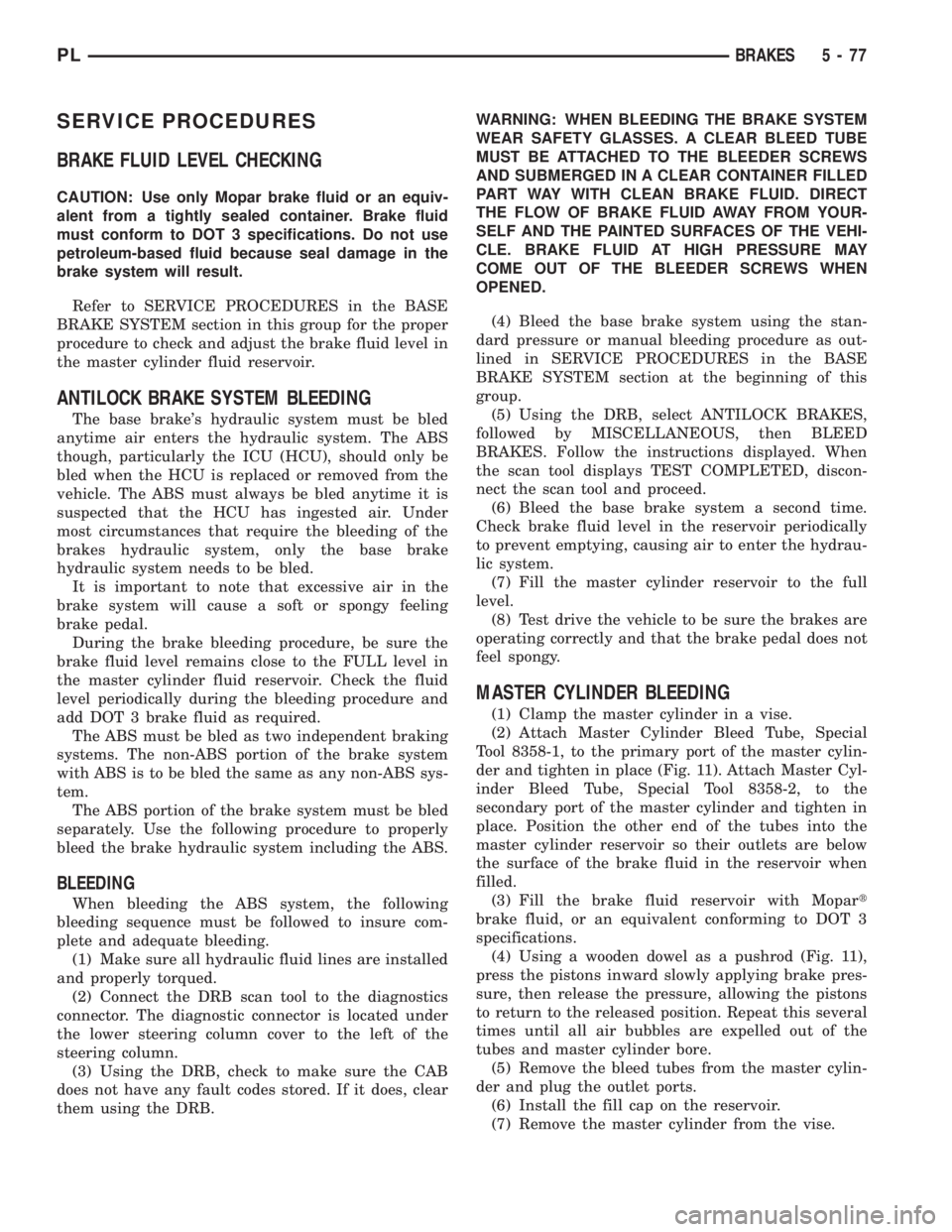
SERVICE PROCEDURES
BRAKE FLUID LEVEL CHECKING
CAUTION: Use only Mopar brake fluid or an equiv-
alent from a tightly sealed container. Brake fluid
must conform to DOT 3 specifications. Do not use
petroleum-based fluid because seal damage in the
brake system will result.
Refer to SERVICE PROCEDURES in the BASE
BRAKE SYSTEM section in this group for the proper
procedure to check and adjust the brake fluid level in
the master cylinder fluid reservoir.
ANTILOCK BRAKE SYSTEM BLEEDING
The base brake's hydraulic system must be bled
anytime air enters the hydraulic system. The ABS
though, particularly the ICU (HCU), should only be
bled when the HCU is replaced or removed from the
vehicle. The ABS must always be bled anytime it is
suspected that the HCU has ingested air. Under
most circumstances that require the bleeding of the
brakes hydraulic system, only the base brake
hydraulic system needs to be bled.
It is important to note that excessive air in the
brake system will cause a soft or spongy feeling
brake pedal.
During the brake bleeding procedure, be sure the
brake fluid level remains close to the FULL level in
the master cylinder fluid reservoir. Check the fluid
level periodically during the bleeding procedure and
add DOT 3 brake fluid as required.
The ABS must be bled as two independent braking
systems. The non-ABS portion of the brake system
with ABS is to be bled the same as any non-ABS sys-
tem.
The ABS portion of the brake system must be bled
separately. Use the following procedure to properly
bleed the brake hydraulic system including the ABS.
BLEEDING
When bleeding the ABS system, the following
bleeding sequence must be followed to insure com-
plete and adequate bleeding.
(1) Make sure all hydraulic fluid lines are installed
and properly torqued.
(2) Connect the DRB scan tool to the diagnostics
connector. The diagnostic connector is located under
the lower steering column cover to the left of the
steering column.
(3) Using the DRB, check to make sure the CAB
does not have any fault codes stored. If it does, clear
them using the DRB.WARNING: WHEN BLEEDING THE BRAKE SYSTEM
WEAR SAFETY GLASSES. A CLEAR BLEED TUBE
MUST BE ATTACHED TO THE BLEEDER SCREWS
AND SUBMERGED IN A CLEAR CONTAINER FILLED
PART WAY WITH CLEAN BRAKE FLUID. DIRECT
THE FLOW OF BRAKE FLUID AWAY FROM YOUR-
SELF AND THE PAINTED SURFACES OF THE VEHI-
CLE. BRAKE FLUID AT HIGH PRESSURE MAY
COME OUT OF THE BLEEDER SCREWS WHEN
OPENED.
(4) Bleed the base brake system using the stan-
dard pressure or manual bleeding procedure as out-
lined in SERVICE PROCEDURES in the BASE
BRAKE SYSTEM section at the beginning of this
group.
(5) Using the DRB, select ANTILOCK BRAKES,
followed by MISCELLANEOUS, then BLEED
BRAKES. Follow the instructions displayed. When
the scan tool displays TEST COMPLETED, discon-
nect the scan tool and proceed.
(6) Bleed the base brake system a second time.
Check brake fluid level in the reservoir periodically
to prevent emptying, causing air to enter the hydrau-
lic system.
(7) Fill the master cylinder reservoir to the full
level.
(8) Test drive the vehicle to be sure the brakes are
operating correctly and that the brake pedal does not
feel spongy.
MASTER CYLINDER BLEEDING
(1) Clamp the master cylinder in a vise.
(2) Attach Master Cylinder Bleed Tube, Special
Tool 8358-1, to the primary port of the master cylin-
der and tighten in place (Fig. 11). Attach Master Cyl-
inder Bleed Tube, Special Tool 8358-2, to the
secondary port of the master cylinder and tighten in
place. Position the other end of the tubes into the
master cylinder reservoir so their outlets are below
the surface of the brake fluid in the reservoir when
filled.
(3) Fill the brake fluid reservoir with Mopart
brake fluid, or an equivalent conforming to DOT 3
specifications.
(4) Using a wooden dowel as a pushrod (Fig. 11),
press the pistons inward slowly applying brake pres-
sure, then release the pressure, allowing the pistons
to return to the released position. Repeat this several
times until all air bubbles are expelled out of the
tubes and master cylinder bore.
(5) Remove the bleed tubes from the master cylin-
der and plug the outlet ports.
(6) Install the fill cap on the reservoir.
(7) Remove the master cylinder from the vise.
PLBRAKES 5 - 77
Page 158 of 1285
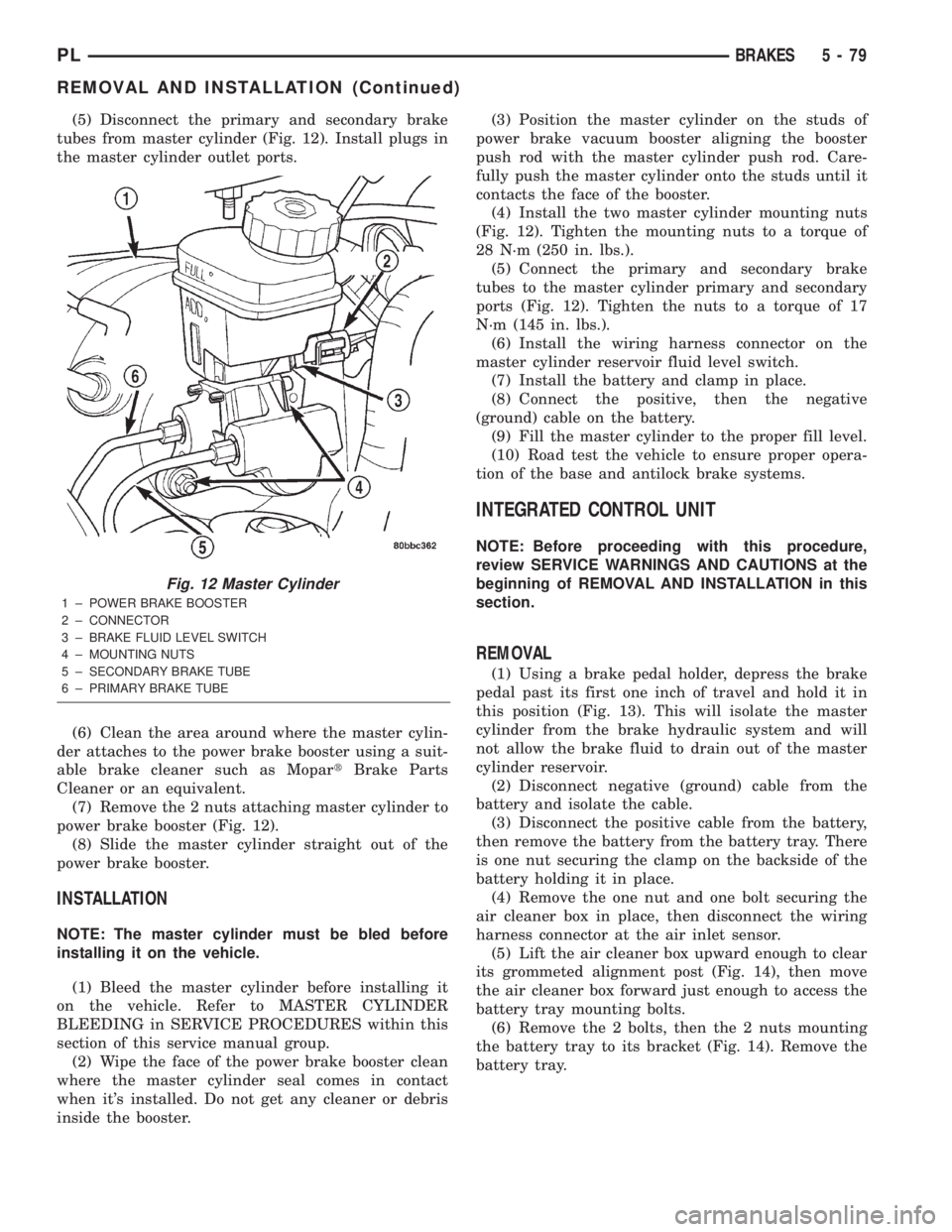
(5) Disconnect the primary and secondary brake
tubes from master cylinder (Fig. 12). Install plugs in
the master cylinder outlet ports.
(6) Clean the area around where the master cylin-
der attaches to the power brake booster using a suit-
able brake cleaner such as MopartBrake Parts
Cleaner or an equivalent.
(7) Remove the 2 nuts attaching master cylinder to
power brake booster (Fig. 12).
(8) Slide the master cylinder straight out of the
power brake booster.
INSTALLATION
NOTE: The master cylinder must be bled before
installing it on the vehicle.
(1) Bleed the master cylinder before installing it
on the vehicle. Refer to MASTER CYLINDER
BLEEDING in SERVICE PROCEDURES within this
section of this service manual group.
(2) Wipe the face of the power brake booster clean
where the master cylinder seal comes in contact
when it's installed. Do not get any cleaner or debris
inside the booster.(3) Position the master cylinder on the studs of
power brake vacuum booster aligning the booster
push rod with the master cylinder push rod. Care-
fully push the master cylinder onto the studs until it
contacts the face of the booster.
(4) Install the two master cylinder mounting nuts
(Fig. 12). Tighten the mounting nuts to a torque of
28 N´m (250 in. lbs.).
(5) Connect the primary and secondary brake
tubes to the master cylinder primary and secondary
ports (Fig. 12). Tighten the nuts to a torque of 17
N´m (145 in. lbs.).
(6) Install the wiring harness connector on the
master cylinder reservoir fluid level switch.
(7) Install the battery and clamp in place.
(8) Connect the positive, then the negative
(ground) cable on the battery.
(9) Fill the master cylinder to the proper fill level.
(10) Road test the vehicle to ensure proper opera-
tion of the base and antilock brake systems.
INTEGRATED CONTROL UNIT
NOTE: Before proceeding with this procedure,
review SERVICE WARNINGS AND CAUTIONS at the
beginning of REMOVAL AND INSTALLATION in this
section.
REMOVAL
(1) Using a brake pedal holder, depress the brake
pedal past its first one inch of travel and hold it in
this position (Fig. 13). This will isolate the master
cylinder from the brake hydraulic system and will
not allow the brake fluid to drain out of the master
cylinder reservoir.
(2) Disconnect negative (ground) cable from the
battery and isolate the cable.
(3) Disconnect the positive cable from the battery,
then remove the battery from the battery tray. There
is one nut securing the clamp on the backside of the
battery holding it in place.
(4) Remove the one nut and one bolt securing the
air cleaner box in place, then disconnect the wiring
harness connector at the air inlet sensor.
(5) Lift the air cleaner box upward enough to clear
its grommeted alignment post (Fig. 14), then move
the air cleaner box forward just enough to access the
battery tray mounting bolts.
(6) Remove the 2 bolts, then the 2 nuts mounting
the battery tray to its bracket (Fig. 14). Remove the
battery tray.
Fig. 12 Master Cylinder
1 ± POWER BRAKE BOOSTER
2 ± CONNECTOR
3 ± BRAKE FLUID LEVEL SWITCH
4 ± MOUNTING NUTS
5 ± SECONDARY BRAKE TUBE
6 ± PRIMARY BRAKE TUBE
PLBRAKES 5 - 79
REMOVAL AND INSTALLATION (Continued)
Page 160 of 1285
(14) Refer to DISASSEMBLY AND ASSEMBLY in
this section of this group for the procedure on sepa-
rating and reattaching the CAB to the HCU.
INSTALLATION
(1) Install the ICU onto its mounting bracket.
(2) Install the 3 bolts attaching the ICU to the
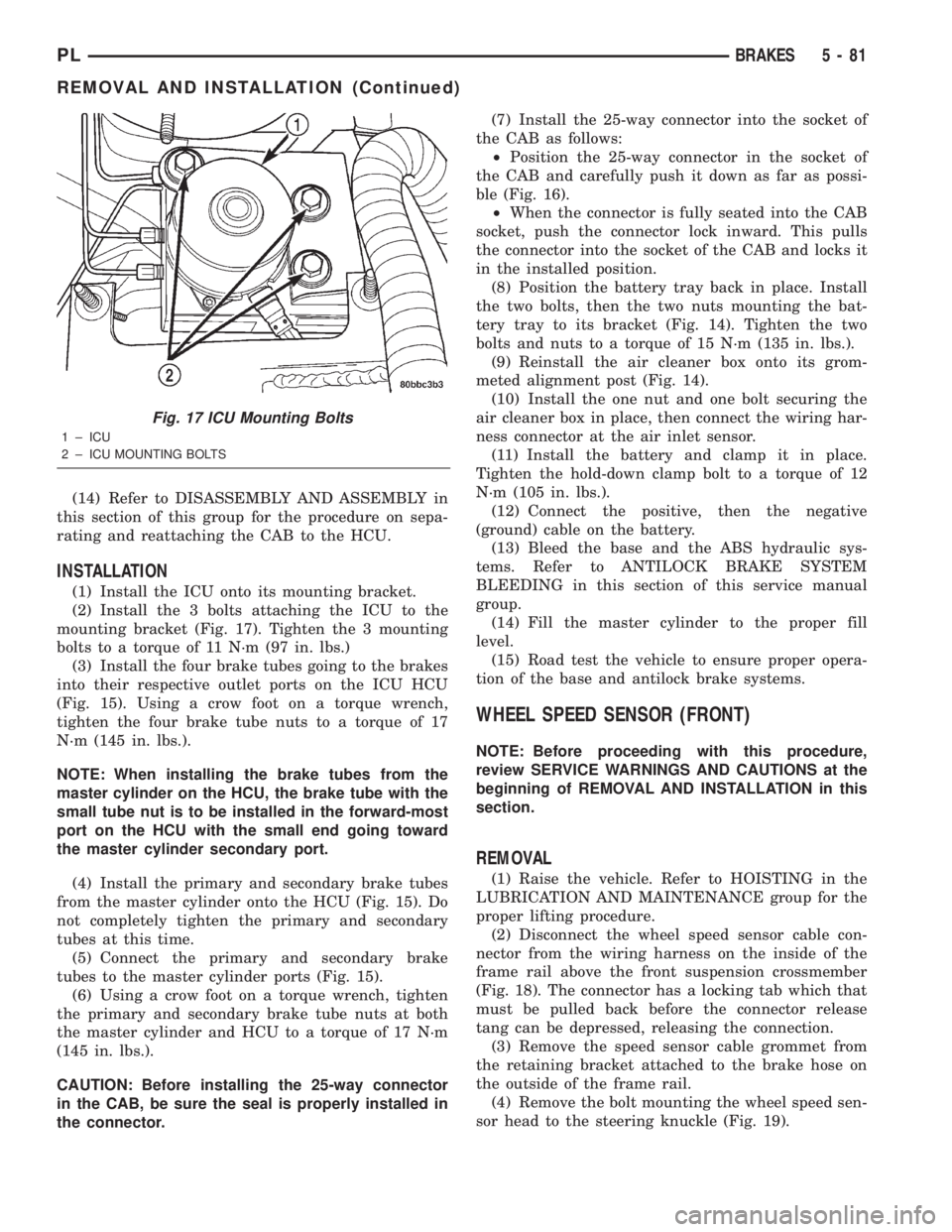
mounting bracket (Fig. 17). Tighten the 3 mounting
bolts to a torque of 11 N´m (97 in. lbs.)
(3) Install the four brake tubes going to the brakes
into their respective outlet ports on the ICU HCU
(Fig. 15). Using a crow foot on a torque wrench,
tighten the four brake tube nuts to a torque of 17
N´m (145 in. lbs.).
NOTE: When installing the brake tubes from the
master cylinder on the HCU, the brake tube with the
small tube nut is to be installed in the forward-most
port on the HCU with the small end going toward
the master cylinder secondary port.
(4) Install the primary and secondary brake tubes
from the master cylinder onto the HCU (Fig. 15). Do
not completely tighten the primary and secondary
tubes at this time.
(5) Connect the primary and secondary brake
tubes to the master cylinder ports (Fig. 15).
(6) Using a crow foot on a torque wrench, tighten
the primary and secondary brake tube nuts at both
the master cylinder and HCU to a torque of 17 N´m
(145 in. lbs.).
CAUTION: Before installing the 25-way connector
in the CAB, be sure the seal is properly installed in
the connector.(7) Install the 25-way connector into the socket of
the CAB as follows:
²Position the 25-way connector in the socket of
the CAB and carefully push it down as far as possi-
ble (Fig. 16).
²When the connector is fully seated into the CAB
socket, push the connector lock inward. This pulls
the connector into the socket of the CAB and locks it
in the installed position.
(8) Position the battery tray back in place. Install
the two bolts, then the two nuts mounting the bat-
tery tray to its bracket (Fig. 14). Tighten the two
bolts and nuts to a torque of 15 N´m (135 in. lbs.).
(9) Reinstall the air cleaner box onto its grom-
meted alignment post (Fig. 14).
(10) Install the one nut and one bolt securing the
air cleaner box in place, then connect the wiring har-
ness connector at the air inlet sensor.
(11) Install the battery and clamp it in place.
Tighten the hold-down clamp bolt to a torque of 12
N´m (105 in. lbs.).
(12) Connect the positive, then the negative
(ground) cable on the battery.
(13) Bleed the base and the ABS hydraulic sys-
tems. Refer to ANTILOCK BRAKE SYSTEM
BLEEDING in this section of this service manual
group.
(14) Fill the master cylinder to the proper fill
level.
(15) Road test the vehicle to ensure proper opera-
tion of the base and antilock brake systems.
WHEEL SPEED SENSOR (FRONT)
NOTE: Before proceeding with this procedure,
review SERVICE WARNINGS AND CAUTIONS at the
beginning of REMOVAL AND INSTALLATION in this
section.
REMOVAL
(1) Raise the vehicle. Refer to HOISTING in the
LUBRICATION AND MAINTENANCE group for the
proper lifting procedure.
(2) Disconnect the wheel speed sensor cable con-
nector from the wiring harness on the inside of the
frame rail above the front suspension crossmember
(Fig. 18). The connector has a locking tab which that
must be pulled back before the connector release
tang can be depressed, releasing the connection.
(3) Remove the speed sensor cable grommet from
the retaining bracket attached to the brake hose on
the outside of the frame rail.
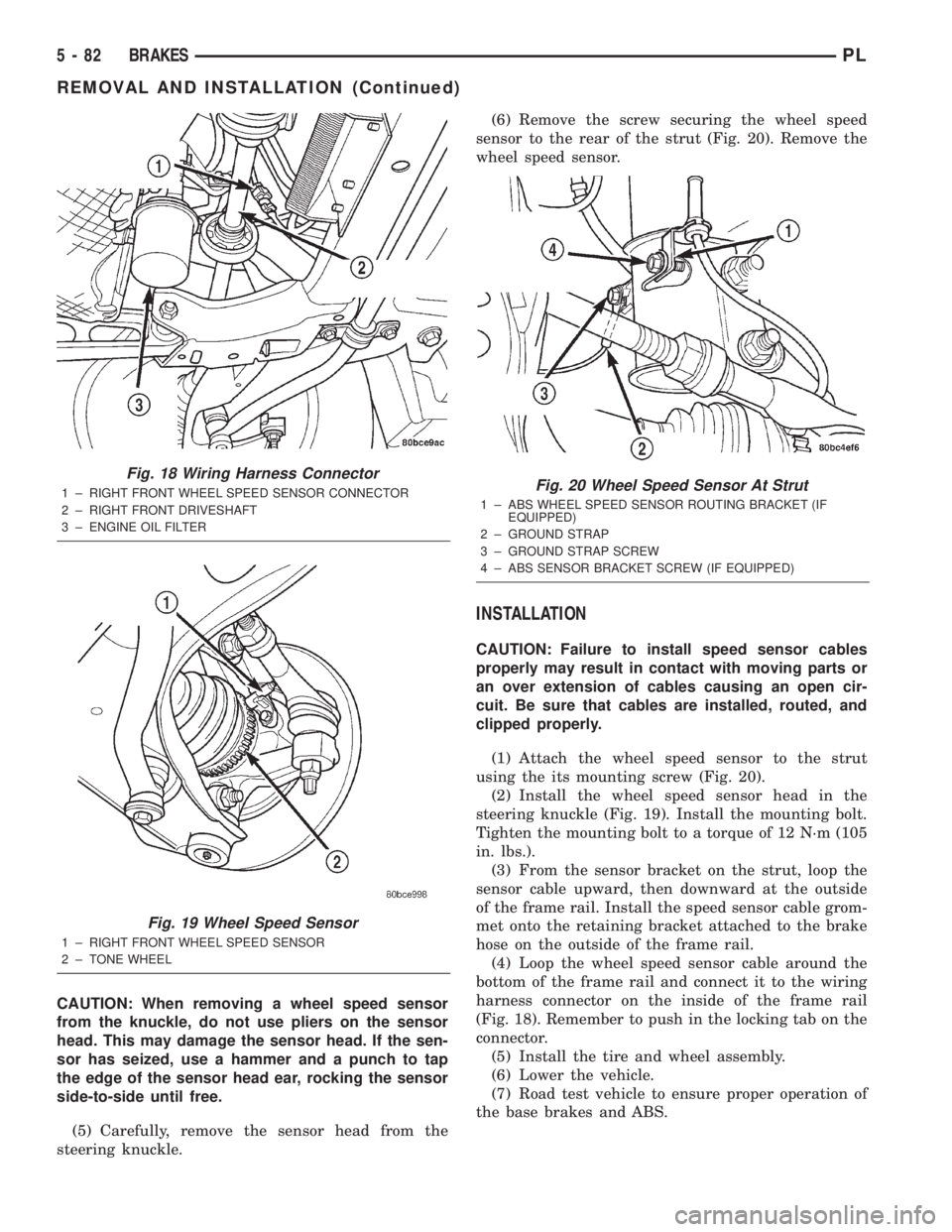
(4) Remove the bolt mounting the wheel speed sen-
sor head to the steering knuckle (Fig. 19).
Fig. 17 ICU Mounting Bolts
1 ± ICU
2 ± ICU MOUNTING BOLTS
PLBRAKES 5 - 81
REMOVAL AND INSTALLATION (Continued)
Page 161 of 1285
CAUTION: When removing a wheel speed sensor
from the knuckle, do not use pliers on the sensor
head. This may damage the sensor head. If the sen-
sor has seized, use a hammer and a punch to tap
the edge of the sensor head ear, rocking the sensor
side-to-side until free.
(5) Carefully, remove the sensor head from the
steering knuckle.(6) Remove the screw securing the wheel speed
sensor to the rear of the strut (Fig. 20). Remove the
wheel speed sensor.
INSTALLATION
CAUTION: Failure to install speed sensor cables
properly may result in contact with moving parts or
an over extension of cables causing an open cir-
cuit. Be sure that cables are installed, routed, and
clipped properly.
(1) Attach the wheel speed sensor to the strut
using the its mounting screw (Fig. 20).
(2) Install the wheel speed sensor head in the
steering knuckle (Fig. 19). Install the mounting bolt.
Tighten the mounting bolt to a torque of 12 N´m (105
in. lbs.).
(3) From the sensor bracket on the strut, loop the
sensor cable upward, then downward at the outside
of the frame rail. Install the speed sensor cable grom-
met onto the retaining bracket attached to the brake
hose on the outside of the frame rail.
(4) Loop the wheel speed sensor cable around the
bottom of the frame rail and connect it to the wiring
harness connector on the inside of the frame rail
(Fig. 18). Remember to push in the locking tab on the
connector.
(5) Install the tire and wheel assembly.
(6) Lower the vehicle.
(7) Road test vehicle to ensure proper operation of
the base brakes and ABS.
Fig. 18 Wiring Harness Connector
1 ± RIGHT FRONT WHEEL SPEED SENSOR CONNECTOR
2 ± RIGHT FRONT DRIVESHAFT
3 ± ENGINE OIL FILTER
Fig. 19 Wheel Speed Sensor
1 ± RIGHT FRONT WHEEL SPEED SENSOR
2 ± TONE WHEEL
Fig. 20 Wheel Speed Sensor At Strut
1 ± ABS WHEEL SPEED SENSOR ROUTING BRACKET (IF
EQUIPPED)
2 ± GROUND STRAP
3 ± GROUND STRAP SCREW
4 ± ABS SENSOR BRACKET SCREW (IF EQUIPPED)
5 - 82 BRAKESPL
REMOVAL AND INSTALLATION (Continued)