instrument panel DODGE NEON 2004 2.G User Guide
[x] Cancel search | Manufacturer: DODGE, Model Year: 2004, Model line: NEON, Model: DODGE NEON 2004 2.GPages: 241, PDF Size: 3.75 MB
Page 58 of 241
WARNING!
²It is extremely dangerous to ride in a cargo area,
inside or outside of a vehicle. In a collision,
people riding in these areas are more likely to be
seriously injured or killed.
²Do not allow people to ride in any area of your
vehicle that is not equipped with seats and seat-
belts
²Be sure that everyone in your vehicle is in a seat
and using a seatbelt properly.
TO OPEN AND CLOSE THE HOOD
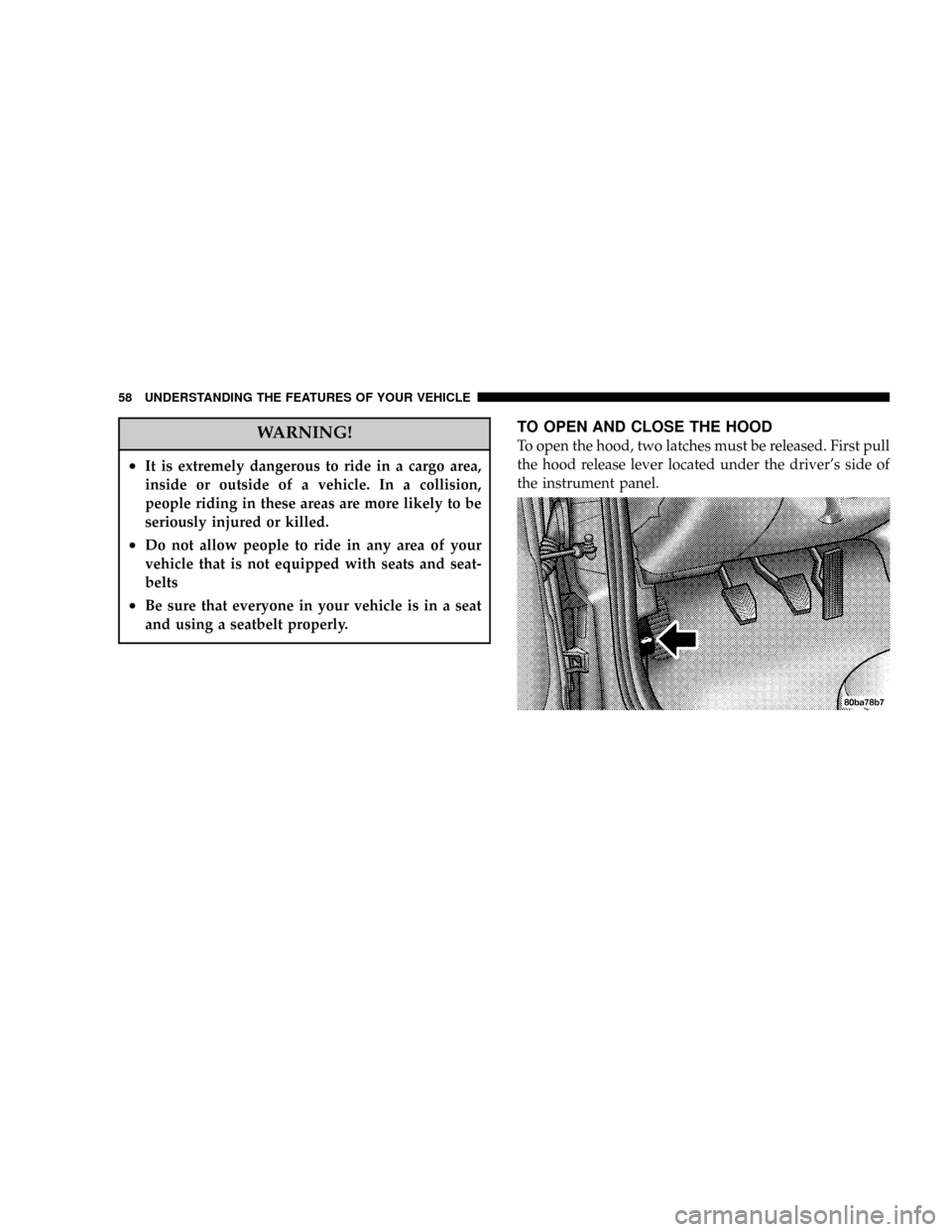
To open the hood, two latches must be released. First pull
the hood release lever located under the driver's side of
the instrument panel.
58 UNDERSTANDING THE FEATURES OF YOUR VEHICLE
Page 60 of 241

LIGHTS
Front Map/Reading Lights Ð If Equipped
These lights, located under the rearview mirror, can be
turned on by means of switches located at the base of the
rearview mirror.
NOTE:The map lights will remain on when the ignition
switch is in the Run or Accessory positions.
Interior Lights
The interior lights come on when a door is opened.
The interior lights will automatically turn off in about 8
minutes if a door is left open or the dimmer control is left
in the Dome light position. Turn the ignition switch ON
to restore the interior light operation.
Dimmer Control
With the park lights or headlights
on, rotating the dimmer control
for the interior lights on the Multi-
Function Control Lever upward
will increase the brightness of the
instrument panel lights.
60 UNDERSTANDING THE FEATURES OF YOUR VEHICLE
Page 61 of 241
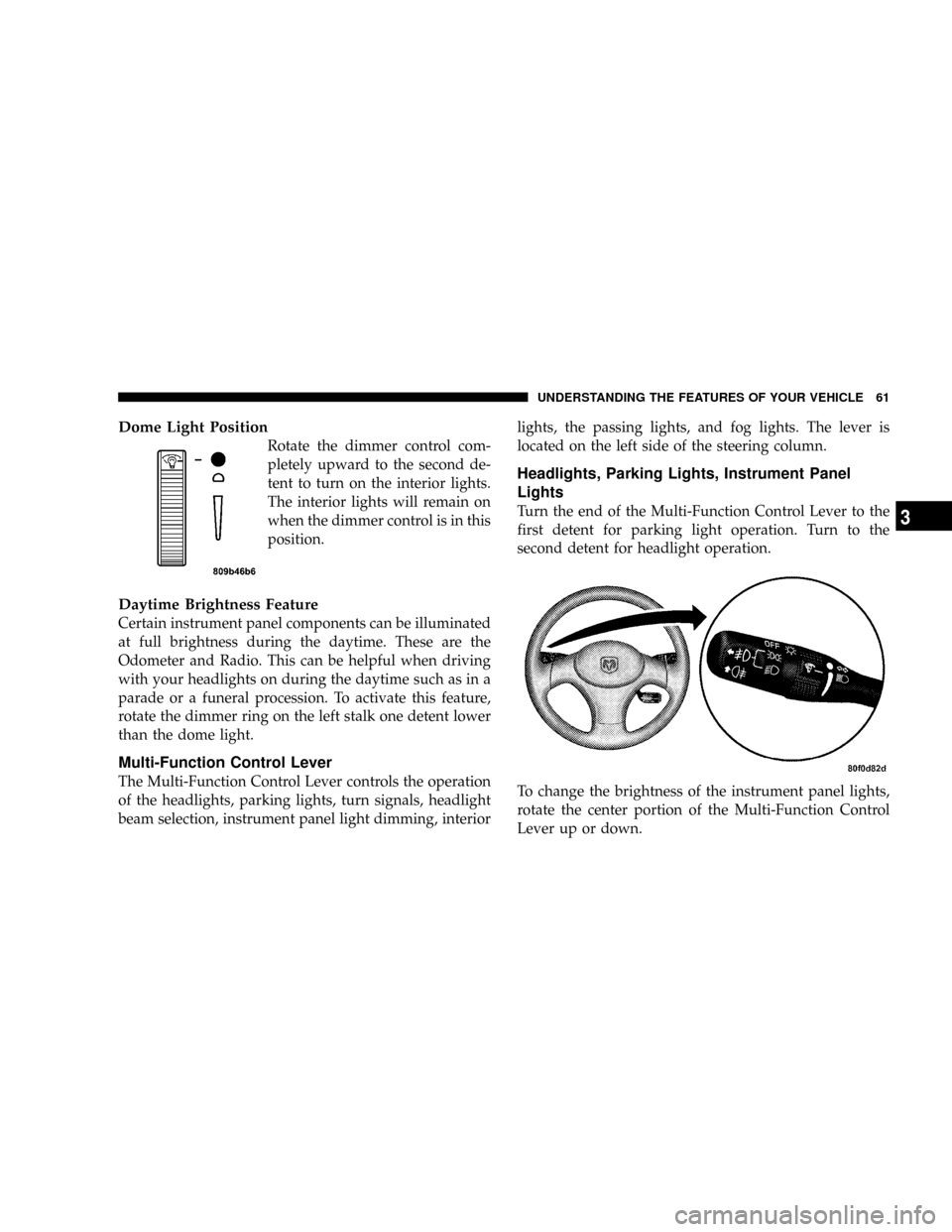
Dome Light Position
Rotate the dimmer control com-
pletely upward to the second de-
tent to turn on the interior lights.
The interior lights will remain on
when the dimmer control is in this
position.
Daytime Brightness Feature
Certain instrument panel components can be illuminated
at full brightness during the daytime. These are the
Odometer and Radio. This can be helpful when driving
with your headlights on during the daytime such as in a
parade or a funeral procession. To activate this feature,
rotate the dimmer ring on the left stalk one detent lower
than the dome light.
Multi-Function Control Lever
The Multi-Function Control Lever controls the operation
of the headlights, parking lights, turn signals, headlight
beam selection, instrument panel light dimming, interiorlights, the passing lights, and fog lights. The lever is
located on the left side of the steering column.
Headlights, Parking Lights, Instrument Panel
Lights
Turn the end of the Multi-Function Control Lever to the
first detent for parking light operation. Turn to the
second detent for headlight operation.
To change the brightness of the instrument panel lights,
rotate the center portion of the Multi-Function Control
Lever up or down.
UNDERSTANDING THE FEATURES OF YOUR VEHICLE 61
3
Page 71 of 241
UNDERSTANDING YOUR INSTRUMENT PANEL
CONTENTS
mInstrument Panel Features................74
mStandard Instrument Cluster...............75
mOptional Instrument Cluster...............76
mOptional Instrument Cluster Ð R/T Model....77
mInstrument Cluster Descriptions............78
mElectronic Digital Clock..................83
NClock Setting Procedure..................83
mRadio General Information................83
NRadio Broadcast Signals..................83
NTwo Types Of Signals...................83
NElectrical Disturbances...................84NAM Reception........................84
NFM Reception.........................84
mSales Code RBBÐAM/FM Stereo Radio With
Cassette Tape Player And CD Changer
Capability
............................84
NOperating Instructions...................84
NPower Button.........................85
NElectronic Volume Control................85
NSeek...............................85
NTune ...............................85
NTo Set The Push-Button Memory...........85
NBalance.............................86
4
Page 72 of 241

NFade...............................86
NBass And Treble Tone Control.............86
NAM/FM Selection......................86
NMode Button.........................86
NCassette Player Features.................86
NCD Changer Control Capability Ð If
Equipped............................87
NRadio Display Messages.................89
mSales Code RBKÐAM/ FM Stereo Radio With
CD Player And CD Changer Controls
........89
NRadio Operation.......................89
NCD Player Operation....................91
NCD Changer Control Capability Ð If
Equipped............................93
NRadio Display Messages.................94
mSatellite Radio Ð If Equipped..............95
NSystem Activation......................95NElectronic Serial Number/Sirius Identification
Number (ENS/SID).....................95
NSelecting Satellite Mode In RBB And RBK
Radios..............................96
NSelecting Satellite Mode In RBP, RBU, RAZ,
And RBQ Radios......................96
NSelecting a Channel.....................96
NStoring And Selecting Pre-Set Channels.......97
NUsing The PTY (Program Type) Button
(If Equipped).........................97
NPTY Button9Scan9......................97
NPTY Button9Seek9......................97
NSatellite Antenna.......................97
NReception Quality......................97
mCassette Tape And Player Maintenance.......98
m6 Disc CD Changer Ð If Equipped..........99
NLoading The CD Changer................99
72 UNDERSTANDING YOUR INSTRUMENT PANEL
Page 73 of 241
NPlaying Discs.........................99
NSeek Button.........................100
NFF/Tune/RW........................100
NMode Button........................100
NProgram Button 1.....................100
NProgram Button 4 (Random Play)..........100
NProgram Button 5.....................100
NTime Button.........................100
NChanging Modes......................100
NRemoving Discs From The CD Changer.....101
NCD Changer Operation With The Changer
Off ...............................101mCompact Disc Maintenance...............101
mRadio Operation And Cellular Phones.......102
mClimate Controls......................102
NHeater Only.........................102
NSide Window Demisters.................103
NOutside Air Intake....................104
NAir Conditioning Ð If Equipped..........104
NOperating Tips.......................108
mElectric Rear Window Defroster...........110
UNDERSTANDING YOUR INSTRUMENT PANEL 73
4
Page 74 of 241

INSTRUMENT PANEL FEATURES
74 UNDERSTANDING YOUR INSTRUMENT PANEL
Page 75 of 241
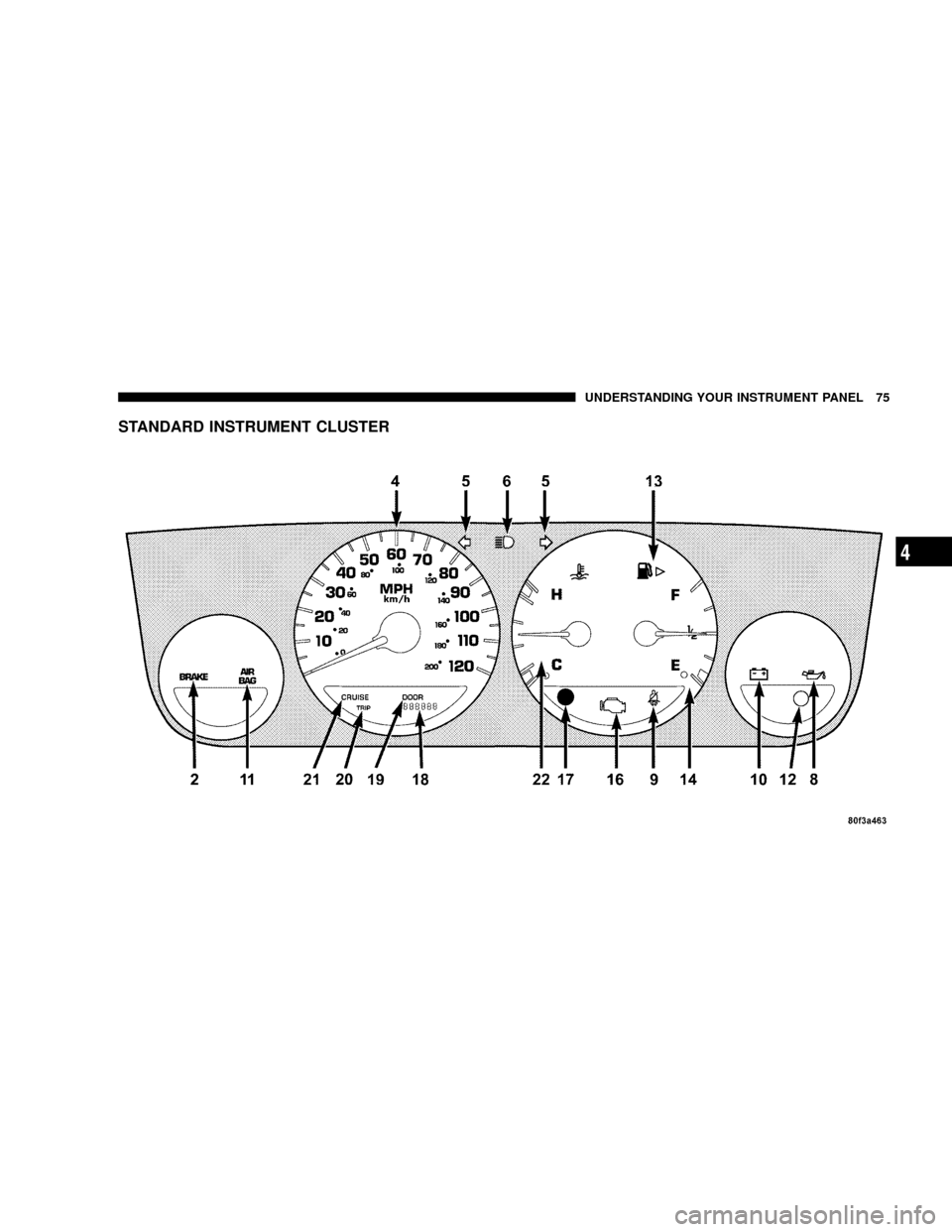
STANDARD INSTRUMENT CLUSTER
UNDERSTANDING YOUR INSTRUMENT PANEL 75
4
Page 76 of 241

OPTIONAL INSTRUMENT CLUSTER
76 UNDERSTANDING YOUR INSTRUMENT PANEL
Page 77 of 241
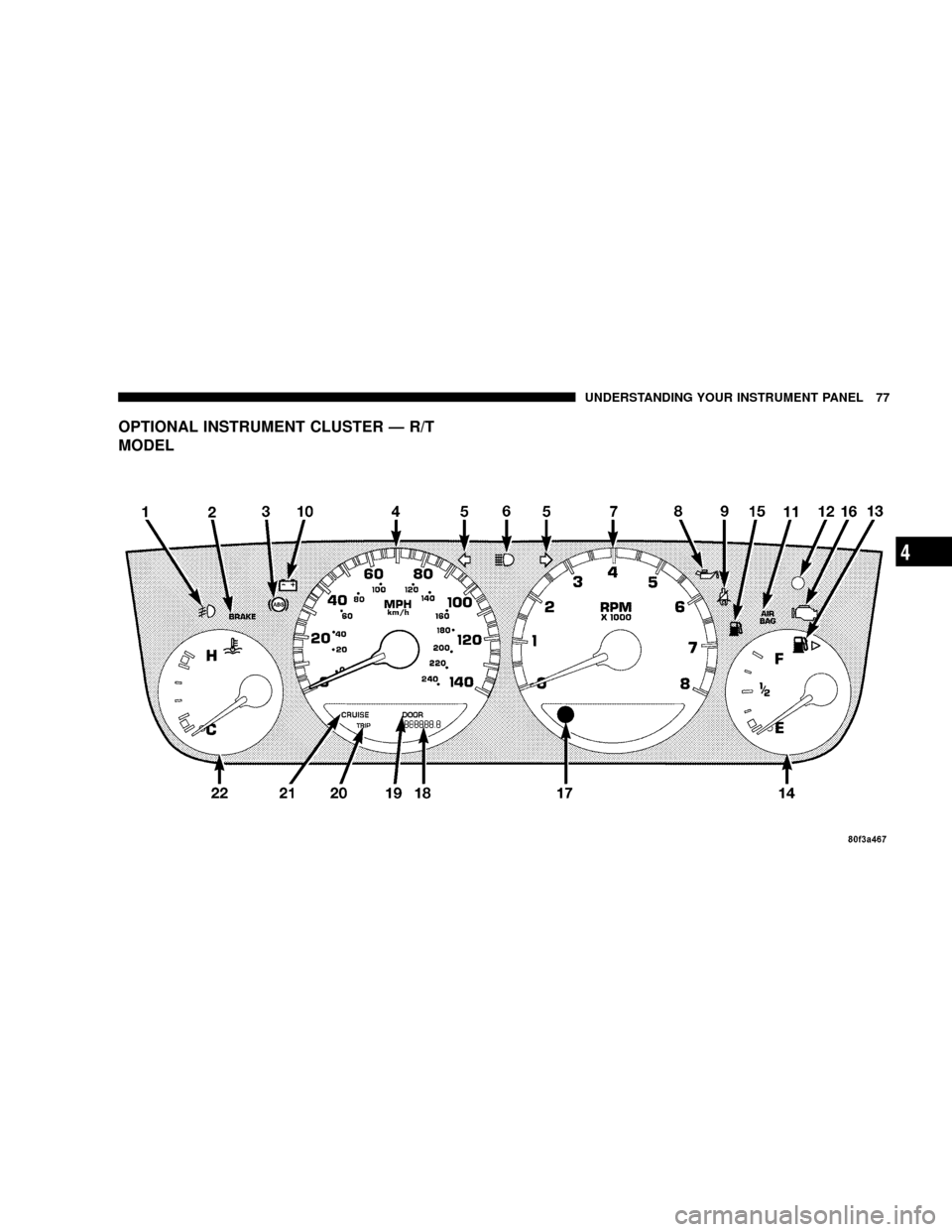
OPTIONAL INSTRUMENT CLUSTER Ð R/T
MODEL
UNDERSTANDING YOUR INSTRUMENT PANEL 77
4