lights DODGE NEON 2004 2.G Owners Manual
[x] Cancel search | Manufacturer: DODGE, Model Year: 2004, Model line: NEON, Model: DODGE NEON 2004 2.GPages: 241, PDF Size: 3.75 MB
Page 17 of 241
To use the system, open each rear door and slide the
control UP to engage the locks and DOWN to disengage
the child-protection locks. When the system on a door is
engaged, that door can only be opened by using the
outside door handle even if the inside door lock is in the
unlocked position.
WARNING!
Avoid trapping anyone in a vehicle in a collision.
Remember that the rear doors can only be opened
from the outside when the child protection locks are
engaged.
NOTE:For emergency exit with the system engaged,
move the door lock rocker switch to the UNLOCK
position, roll down the window and open the door with
the outside door handle.
REMOTE KEYLESS ENTRY Ð IF EQUIPPED
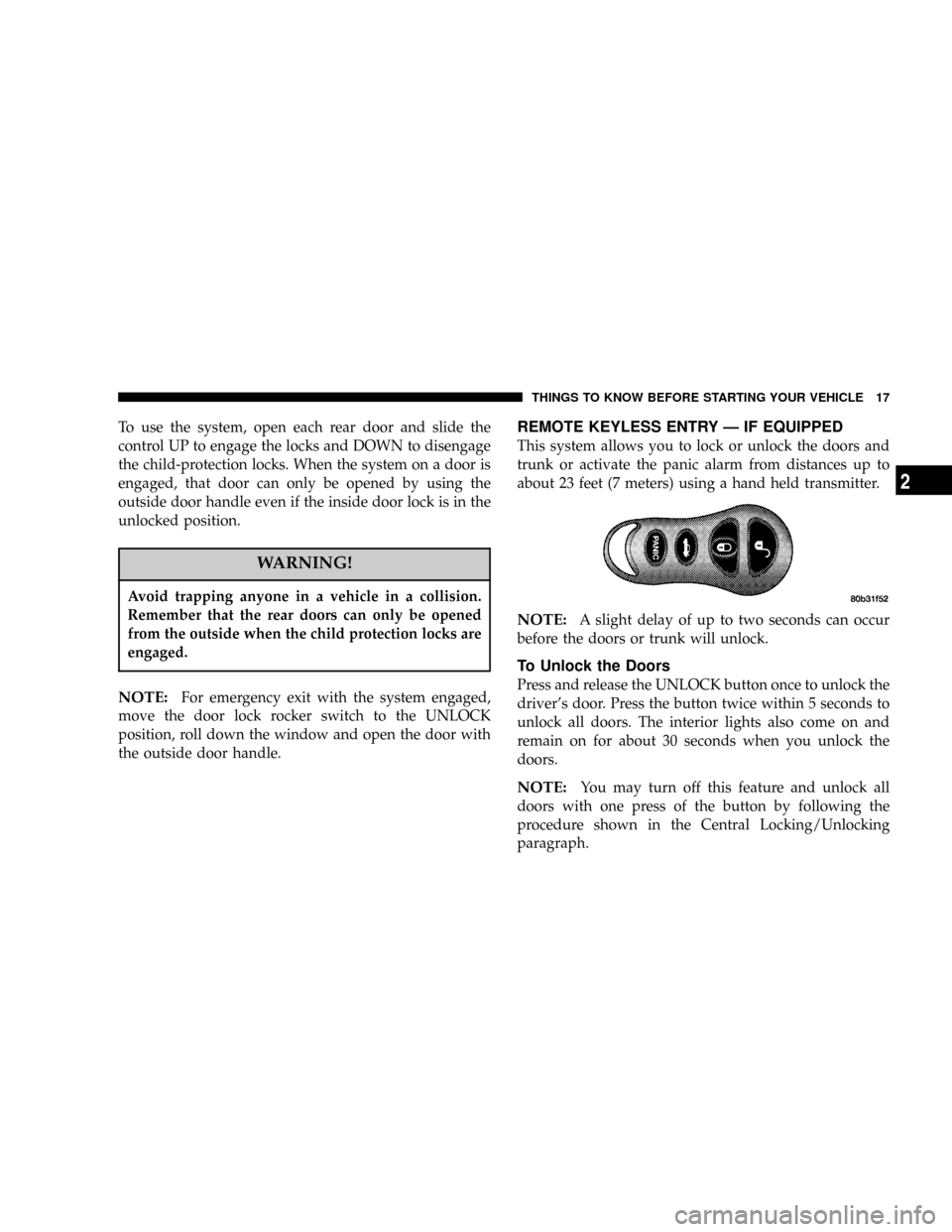
This system allows you to lock or unlock the doors and
trunk or activate the panic alarm from distances up to
about 23 feet (7 meters) using a hand held transmitter.
NOTE:A slight delay of up to two seconds can occur
before the doors or trunk will unlock.
To Unlock the Doors
Press and release the UNLOCK button once to unlock the
driver's door. Press the button twice within 5 seconds to
unlock all doors. The interior lights also come on and
remain on for about 30 seconds when you unlock the
doors.
NOTE:You may turn off this feature and unlock all
doors with one press of the button by following the
procedure shown in the Central Locking/Unlocking
paragraph.
THINGS TO KNOW BEFORE STARTING YOUR VEHICLE 17
2
Page 18 of 241

To Lock the Doors
Press and release the LOCK button to lock all doors. The
park/lamps will flash and the horn will chirp to ac-
knowledge the signal.
Horn Chirp Feature
The horn chirp that signals that the doors have been
locked can be toggled on or off by using the following
procedure:
1. Insert the ignition key and turn the switch to the
ON/RUN position.
2. Press and hold the UNLOCK button on the transmitter
for 4 to 10 seconds.
3. Continue to hold the UNLOCK button and press the
LOCK button.
4. Release both buttons.
A chime will sound to signify that the feature has been
successfully completed.
To Unlock the Trunk
Press the TRUNK button on the transmitter twice to
unlock the trunk.
NOTE:A slight delay of up to two seconds can occur
before the trunk unlatches.
Using The Panic Alarm
To turn on the panic alarm feature, press and release the
PANIC button. When the panic alarm is on the headlights
and park/lamps will flash, the horn will pulse on and off
and the interior lights will turn on.
The panic alarm will stay on for 3 minutes unless you
press the PANIC button a second time, or until vehicle
speed reaches 15 mph (24 km/h).
NOTE:When you turn off the panic alarm by pressing
the PANIC button a second time, you may have to be
closer to the vehicle due to the radio frequency noises of
the system.
18 THINGS TO KNOW BEFORE STARTING YOUR VEHICLE
Page 20 of 241

1. With the transmitter buttons facing down, use a thin
coin or similar object to pry the two halves of the
transmitter apart. Make sure not to damage the rubber
gasket during removal.
2. Remove and replace the batteries. Avoid touching the
new batteries with your fingers. Skin oils may cause
battery deterioration. If you touch a battery, clean it with
rubbing alcohol.
3. To reassemble the transmitter case, snap two halves
together. Make sure there is an even gap between the two
halves. Test transmitter operation.VEHICLE THEFT ALARM Ð IF EQUIPPED
The system monitors the doors, trunk key cylinder, and
ignition for unauthorized operation.
If something triggers the alarm, the system will signal for
about 18 minutes. For the first 3 minutes the horn will
sound and the headlights, park/turn signal lights, tail
lights and the indicator light in the cluster will flash.
Then the exterior lights will flash for another 15 minutes.
If the monitored system which triggered the alarm is
deactivated, the alarm will continue to sound until 3
minutes of alarm time is reached. If the monitored system
which triggered the alarm is deactivated after the alarm
has been on for 3 minutes, the alarm will shut off
immediately.
To set the alarm:
1. Remove the keys from the ignition switch and get out
of the vehicle.
2. Lock the door using either the door key, power door
lock switch, or the Keyless Entry Transmitter and close all
doors.
20 THINGS TO KNOW BEFORE STARTING YOUR VEHICLE
Page 38 of 241

WARNING!
Deployed airbags can't protect you in another colli-
sion. Have the airbags replaced by an authorized
dealer as soon as possible.
Side Airbag System Ð If Equipped
²
The Side Impact Airbag Control Modules determine if
a side collision is severe enough to require the airbag
to inflate. The Side Impact Airbag Control Modules is
not designed to detect roll over, front, or rear impacts.
²The Side Impact Airbag Control Module monitors the
readiness of the electronic parts of the system when-
ever the ignition switch is in the START or ON/RUN
positions. These include all of the items listed above. If
the left or right SIACM detects a malfunction in any
part of the system, it will send a message to the frontal
ACM to turn the Airbag Light on. The Airbag Control
Module also turns on the AIRBAG light in the instru-
ment panel for 6 to 8 seconds when the ignition switch
is first turned on as a diagnostic or system check, then
turns the light off.
²In moderate to severe side collisions, the side airbag
inflator on the crash side of the vehicle is triggered by
the appropriate SIACM, releasing a quantity of non-
toxic gas. The inflating side airbag exits through the
seat seam into the space between the occupant and the
door. The side airbag moves at a very high speed and
with such a high force, that it could injure you if you
are not seated properly, or if items are positioned in
the area where the side airbag inflates. This especially
applies to children.
Enhanced Accident Response Time Ð If Equipped
If the airbags deploy after an impact and the electrical
system remains functional, vehicles equipped with
power door locks will unlock automatically. In addition,
approximately 10 seconds after the vehicle has stopped
moving, the interior lights will light until the ignition
switch is turned off.
38 THINGS TO KNOW BEFORE STARTING YOUR VEHICLE
Page 48 of 241

Defrosters
Check operation by selecting the defrost mode and place
the blower control on high speed. You should be able to
feel the air directed against the windshield.
Periodic Safety Checks You Should Make Outside
The Vehicle
Tires
Examine tires for excessive tread wear or uneven wear
patterns. Check for stones, nails, glass, or other objects
lodged in the tread. Inspect for tread cuts or sidewall
cracks. Check wheel nuts for tightness, and tires (includ-
ing spare) for proper pressure.
Lights
Have someone observe the operation of exterior lights
while you work the controls. Check turn signal and high
beam indicator lights on the instrument panel.
Fluid Leaks
Check area under vehicle after overnight parking for fuel,
water, oil, or other fluid leaks. Also, if gasoline fumes are
present, the cause should be corrected immediately.
48 THINGS TO KNOW BEFORE STARTING YOUR VEHICLE
Page 49 of 241

UNDERSTANDING THE FEATURES OF YOUR VEHICLE
CONTENTS
mMirrors..............................51
NInside Day/Night Mirror.................51
NInside Compass/Temperature MirrorÐIf
Equipped............................51
NOutside Mirror Ð Driver's Side............54
NOutside Mirror Ð Passenger's Side..........54
NElectric Remote-Control Mirrors Ð If
Equipped............................54
mSeats................................55
NFront Seat Adjustment...................55
NReclining Bucket Seats...................56
NAdjustable Head Restraints...............57NFolding Rear Seat......................57
mTo Open And Close The Hood.............58
mLights...............................60
NFront Map/Reading Lights Ð If Equipped....60
NInterior Lights........................60
NMulti-Function Control Lever..............61
NHeadlights, Parking Lights, Instrument Panel
Lights..............................61
NDaytime Running Lights (Canada Only)......62
NLights-On Reminder....................62
NFog Lights Ð If Equipped................62
NTurn Signals..........................62
3
Page 52 of 241

Lights
²
Briefly press the ªRightº button to toggle the right
reading lamp ªON/OFFº. Repeat the key press to
cycle the light
²Briefly press the ªLeftº button to toggle the left
reading lamp ªON/OFFº. Repeat the key press to
cycle the light.
NOTE:The light can be activated with the ignition off.
NOTE:The light(s) will automatically shut off after
seven minutes with ignition off.
Temperature
Press and hold the ªRightº button for 5±10 seconds (until
ÉF/ÉC toggles in the display) then release the button.
Repeat the key press to cycle the ÉF/ÉC in the display.
Display ON/OFF
Press and hold the ªRightº button for 10±15 seconds
(until display toggles ON/OFF) then release the button.
Repeat the key press to cycle the display ON/OFF.
NOTE:The display will default ªONº at each new
ignition cycle.
52 UNDERSTANDING THE FEATURES OF YOUR VEHICLE
Page 60 of 241

LIGHTS
Front Map/Reading Lights Ð If Equipped
These lights, located under the rearview mirror, can be
turned on by means of switches located at the base of the
rearview mirror.
NOTE:The map lights will remain on when the ignition
switch is in the Run or Accessory positions.
Interior Lights
The interior lights come on when a door is opened.
The interior lights will automatically turn off in about 8
minutes if a door is left open or the dimmer control is left
in the Dome light position. Turn the ignition switch ON
to restore the interior light operation.
Dimmer Control
With the park lights or headlights
on, rotating the dimmer control
for the interior lights on the Multi-
Function Control Lever upward
will increase the brightness of the
instrument panel lights.
60 UNDERSTANDING THE FEATURES OF YOUR VEHICLE
Page 61 of 241

Dome Light Position
Rotate the dimmer control com-
pletely upward to the second de-
tent to turn on the interior lights.
The interior lights will remain on
when the dimmer control is in this
position.
Daytime Brightness Feature
Certain instrument panel components can be illuminated
at full brightness during the daytime. These are the
Odometer and Radio. This can be helpful when driving
with your headlights on during the daytime such as in a
parade or a funeral procession. To activate this feature,
rotate the dimmer ring on the left stalk one detent lower
than the dome light.
Multi-Function Control Lever
The Multi-Function Control Lever controls the operation
of the headlights, parking lights, turn signals, headlight
beam selection, instrument panel light dimming, interiorlights, the passing lights, and fog lights. The lever is
located on the left side of the steering column.
Headlights, Parking Lights, Instrument Panel
Lights
Turn the end of the Multi-Function Control Lever to the
first detent for parking light operation. Turn to the
second detent for headlight operation.
To change the brightness of the instrument panel lights,
rotate the center portion of the Multi-Function Control
Lever up or down.
UNDERSTANDING THE FEATURES OF YOUR VEHICLE 61
3
Page 62 of 241

Daytime Running Lights (Canada Only)
The front fog lights will come on as Daytime Running
Lights whenever the ignition is on, the headlights are off,
and the parking brake is off. The headlight switch must
be used for normal night time driving.
Lights-on Reminder
If the headlights or parking lights are on after the ignition
is turned OFF, a chime will sound when the driver's door
is opened. Leaving the headlights on for an extended
period of time will discharge the battery resulting in
reduced battery life and possible inability to start the
vehicle.
Fog Lights Ð If Equipped
The front fog light switch is on the Multi-Function
Control Lever. To activate the front fog lights, turn
on the headlights and pull out the end of the
control lever.
NOTE:The fog lights will only operate with the head-
lights on low beam. Selecting high beam headlights or
park lights will turn off the fog lights.
Turn Signals
Move the Multi-Function Control Lever up or down to
detent and the arrows on each side of the instrument
cluster flash to show proper operation of the front and
rear turn signal lights. You can signal a lane change by
moving the lever partially up or down.
If either light remains on and does not flash, or there is a
very fast flash rate, check for a defective outside light
bulb. If an indicator fails to light when the lever is
moved, it would suggest that the fuse or indicator bulb is
defective.
Headlight Dimmer Switch
Pull the Multi-Function Control Lever towards you to
switch the headlights to HIGH beam. Pull the control
lever a second time to switch the headlights to LOW
beam.
Passing Light
You can signal another vehicle with your headlights by
lightly pulling the Multi-Function Control Lever toward
you. This will cause the headlights to turn on at high
beam and remain on until the lever is released.
62 UNDERSTANDING THE FEATURES OF YOUR VEHICLE