radio DODGE NEON 2005 2.G Owner's Manual
[x] Cancel search | Manufacturer: DODGE, Model Year: 2005, Model line: NEON, Model: DODGE NEON 2005 2.GPages: 246, PDF Size: 3.69 MB
Page 96 of 246

Using the PTY (Program Type) Button (if
equipped)
Follow the PTY button instructions that apply to your
radio.
PTY Button(SCAN(
When the desired program type is obtained, press the
9SCAN9button within five seconds. The radio will play 7
seconds of the selected channel before moving to the next
channel of the selected program type. Press the9SCAN9
button a second time to stop the search.
NOTE:Pressing the9SEEK9or9SCAN9button while
performing a music type scan will change the channel by
one and stop the search. Pressing a pre-set memory
button during a music type scan, will call up the memory
channel and stop the search.
PTY Button(SEEK(
When the desired program is obtained, press the9SEEK9
button within five seconds. The channel will change to
the next channel that matches the program type selected.
Satellite Antenna
To ensure optimum reception, do not place items on the
roof around the rooftop antenna location. Metal objects
placed within the line of sight of the antenna will cause
decreased performance. Larger luggage items should be
placed as far forward as possible. Do not place items
directly on or above the antenna.
Reception Quality
Satellite reception may be interrupted due to one of the
following reasons.
²The vehicle is parked in an underground parking
structure or under a physical obstacle.
²Dense tree coverage may interrupt reception in the
form of short audio mutes.
²Driving under wide bridges or along tall buildings can
cause intermittent reception.
²Placing objects over or too close to the antenna can
cause signal blockage.
96 UNDERSTANDING YOUR INSTRUMENT PANEL
Page 97 of 246

CASSETTE TAPE AND PLAYER MAINTENANCE
To keep the cassette tapes and player in good condition,
take the following precautions:
1. Do not use cassette tapes longer than C-90; otherwise,
sound quality and tape durability will be greatly dimin-
ished.
2. Keep the cassette tape in its case to protect from
slackness and dust when it is not in use.
3. Keep the cassette tape away from direct sunlight, heat
and magnetic fields such as the radio speakers.
4. Before inserting a tape, make sure that the label is
adhering flatly to the cassette.
5. A loose tape should be corrected before use. To rewind
a loose tape, insert the eraser end of a pencil into the tape
drive gear and twist the pencil in the required directions.Maintain your cassette tape player. The head and capstan
shaft in the cassette player can pick up dirt or tape
deposits each time a cassette is played. The result of
deposits on the capstan shaft may cause the tape to wrap
around and become lodged in the tape transport. The
other adverse condition is low or ªmuddyº sound from
one or both channels, as if the treble tone control were
turned all the way down. To prevent this, you should
periodically clean the head with a commercially available
WET cleaning cassette.
As preventive maintenance, clean the head about every
30 hours of use. If you wait until the head becomes very
dirty (noticeably poor sound), it may not be possible to
remove all deposits with a simple WET cleaning cassette.
UNDERSTANDING YOUR INSTRUMENT PANEL 97
4
Page 98 of 246

6 DISC CD CHANGER Ð IF EQUIPPED
The CD changer is located below the radio in the
instrument panel. The changer plays only 43¤4inch (12
cm) discs. The changer holds up to 6 discs. Each disc is
loaded and ejected through a single slot in front of the
changer. Each disc has a numbered button with an amber
light above it which, when illuminated, indicates that a
disc is loaded in that particular chamber.
Loading the CD Changer
When inserting the first CD into the changer if the radio
is on, wait until the single slot is illuminated on both
sides and simply insert the first disc.
To insert additional CDs into the changer, the instructions
follow:
1. Select and press any numbered button without an
illuminated light above it.
2. Insert the CD while the light above the chosen button
is flashing and the two lights on either side of the slot are
illuminated.
3. Upon insertion, the CD will begin to play, and both the
button light and the lights in the corner of the loading
slot will illuminate.
4. Repeat the process for loading any additional CDs.
The CD player will stop while additional CDs are loaded.
6 Disc CD Changer
98 UNDERSTANDING YOUR INSTRUMENT PANEL
Page 99 of 246

Playing Discs
The radio will show the CD number, the CD track
number, and the Track Time Elapsed while the radio is in
the CD mode. If more than one CD is loaded in the
changer, the changer will automatically play the next disc
after playing the last track of the current disc.
Seek Button
Press the top of this button on the radio once to play the
next track. Press the bottom of the button once to return
to the beginning of the current track. Press the bottom of
the button twice to play the previous track.
FF/TUNE/RW
Press the FF (fast forward) button and the CD player will
fast forward through the tracks until the button is re-
leased. Press the RW (rewind) button and the CD player
will reverse through the tracks until the button is re-
leased.
Mode Button
Press this button to toggle between radio and cd modes.
Program Button 1
Press this button to play the next available disc.
Program Button 4 (Random Play)
Press this button while the CD is playing to activate
Random Play. This feature plays the selections on the
current compact disc in random order to provide an
interesting change of pace. The CD changer stays in the
random play mode when changing to the next disc.
NOTE:The changer will not random play between
discs.
Press the top of the Seek button once to move to the next
randomly selected track. Press the bottom of the Seek
button to go back to the beginning of the track.
Press button 4 a second time to stop random play.
Program Button 5
Press this button to play the previous disc.
UNDERSTANDING YOUR INSTRUMENT PANEL 99
4
Page 100 of 246

Time Button
Press this button to switch between time of day and CD
track time.
Changing Modes
While in the radio mode, if a cassette is loaded, press the
Mode button to switch to the tape mode. If a CD is
loaded, press the Mode button to select the CD mode. If
neither a tape nor CD is loaded, the radio will ignore the
command.
²Inserting either a tape or CD automatically starts that
mode of play.
²Pressing the AM/FM button while in the tape or CD
mode will select the radio mode.
²If in the CD mode and the last CD is ejected, the radio
will tune to the last station selected.
Removing Discs from the CD Changer
If there is a single CD in the changer, press the EJT button
and the CD will eject. If the CD is not removed within 15
seconds, it will automatically reload into the CD changer.To eject additional CDs from the changer, first select the
numbered button where the CD is located and then press
the EJT button.
CD Changer Operation with the Changer Off
The CD changer is able to load and eject discs with the
ignition power off. However, while the ignition is off, one
of the six numbered buttons must be pressed first.
COMPACT DISC MAINTENANCE
To keep the compact discs in good condition, take the
following precautions:
1. Handle the disc by its edge; avoid touching the
surface.
2. If the disc is stained, clean the surface with a soft cloth,
wiping from center to edge.
3. Do not apply paper or tape to the disc; avoid scratch-
ing the disc.
4. Do not use solvents such as benzine, thinner, cleaners,
or antistatic sprays.
5. Store the disc in its case after playing.
100 UNDERSTANDING YOUR INSTRUMENT PANEL
Page 101 of 246
6. Do not expose the disc to direct sunlight.
7. Do not store the disc where temperatures may become
too high.
NOTE:If you experience difficulty in playing a particu-
lar disc, it may be damaged, oversized, or have theft
protection encoding. Try a known good disc before
considering disc player service.
RADIO OPERATION AND CELLULAR PHONES
Under certain conditions, the operation of a cellular
phone in your vehicle can cause erratic or noisy perfor-
mance from your radio. This condition may be lessened
or eliminated by relocating the cellular phone antenna.
This condition is not harmful to the radio. If your radio
performance does not satisfactorily ªclearº by the repo-
sitioning of the antenna, it is recommended that the radio
volume be turned down or off during cellular phone
operation.
CLIMATE CONTROLS
Heater Only
The controls are as follows:
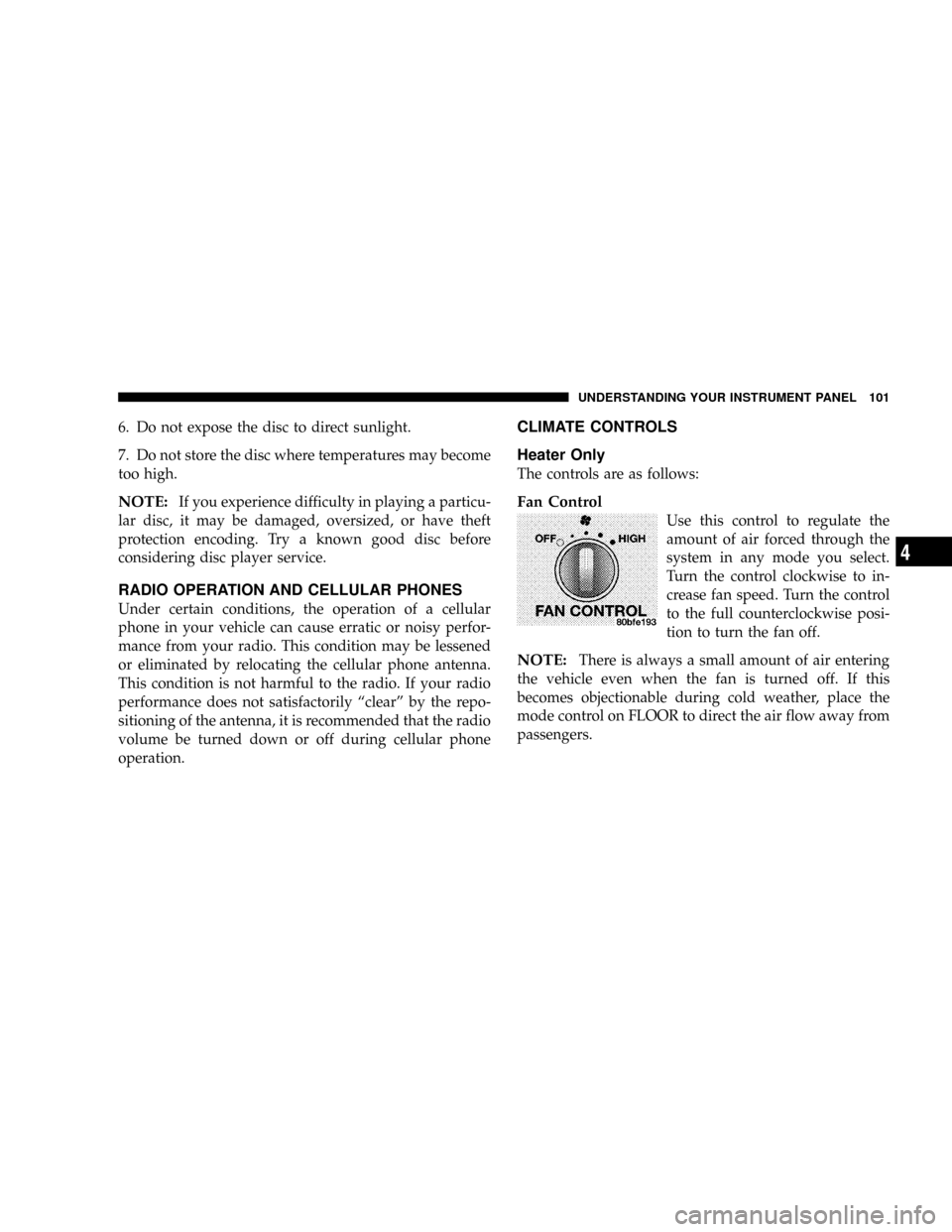
Fan Control
Use this control to regulate the
amount of air forced through the
system in any mode you select.
Turn the control clockwise to in-
crease fan speed. Turn the control
to the full counterclockwise posi-
tion to turn the fan off.
NOTE:There is always a small amount of air entering
the vehicle even when the fan is turned off. If this
becomes objectionable during cold weather, place the
mode control on FLOOR to direct the air flow away from
passengers.
UNDERSTANDING YOUR INSTRUMENT PANEL 101
4
Page 110 of 246
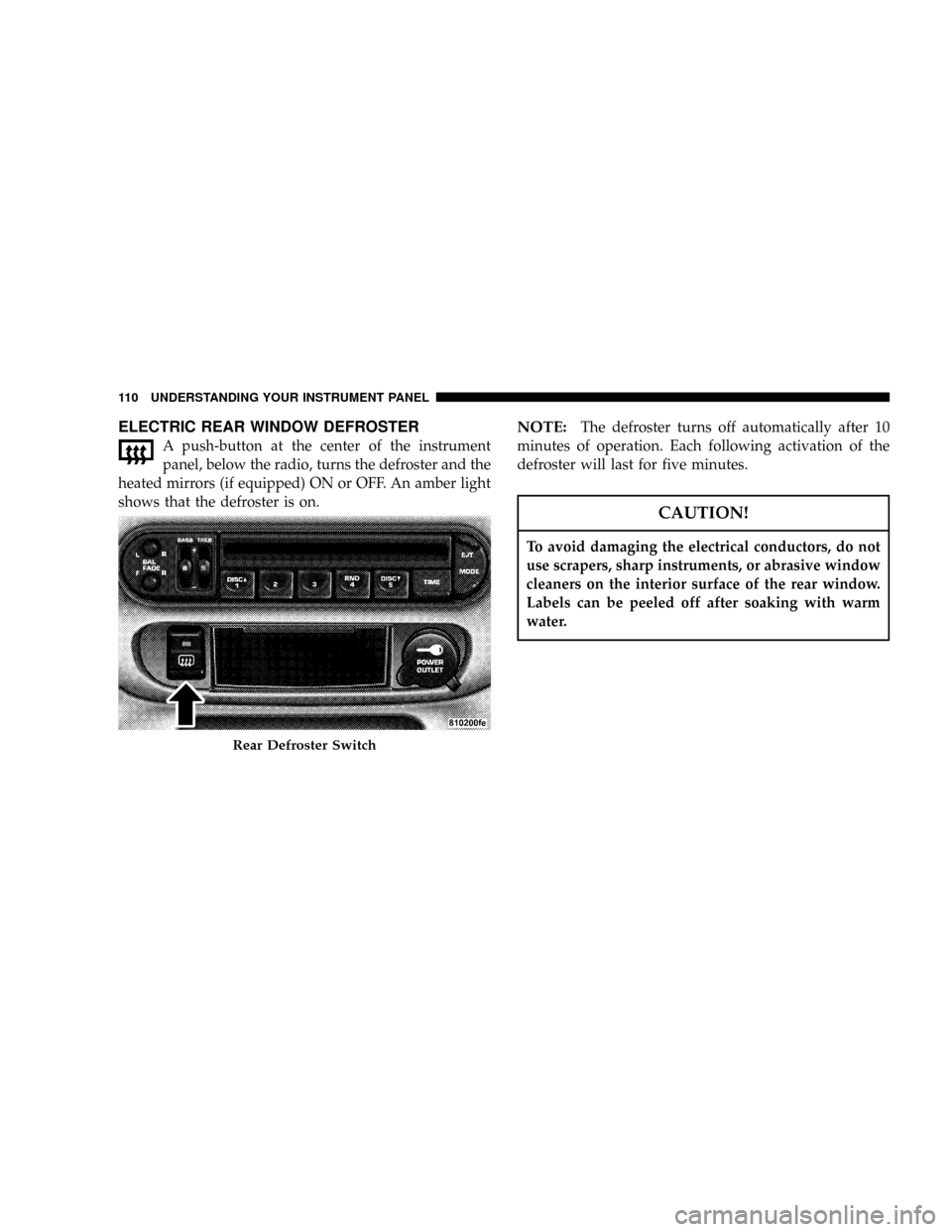
ELECTRIC REAR WINDOW DEFROSTER
A push-button at the center of the instrument
panel, below the radio, turns the defroster and the
heated mirrors (if equipped) ON or OFF. An amber light
shows that the defroster is on.
NOTE:The defroster turns off automatically after 10
minutes of operation. Each following activation of the
defroster will last for five minutes.
CAUTION!
To avoid damaging the electrical conductors, do not
use scrapers, sharp instruments, or abrasive window
cleaners on the interior surface of the rear window.
Labels can be peeled off after soaking with warm
water.
Rear Defroster Switch
110 UNDERSTANDING YOUR INSTRUMENT PANEL
Page 156 of 246
1. Wear eye protection and remove any metal jewelry
such as watch bands or bracelets that might make an
inadvertent electrical contact.
2. When boosting from a battery in another vehicle, park
that vehicle within booster cable reach but without
letting the vehicles touch. Set parking brake, place auto-
matic transaxle in PARK (manual transaxle in NEU-
TRAL) and turn ignition to OFF for both vehicles.
3. Turn off the heater, radio and all unnecessary electrical
loads.
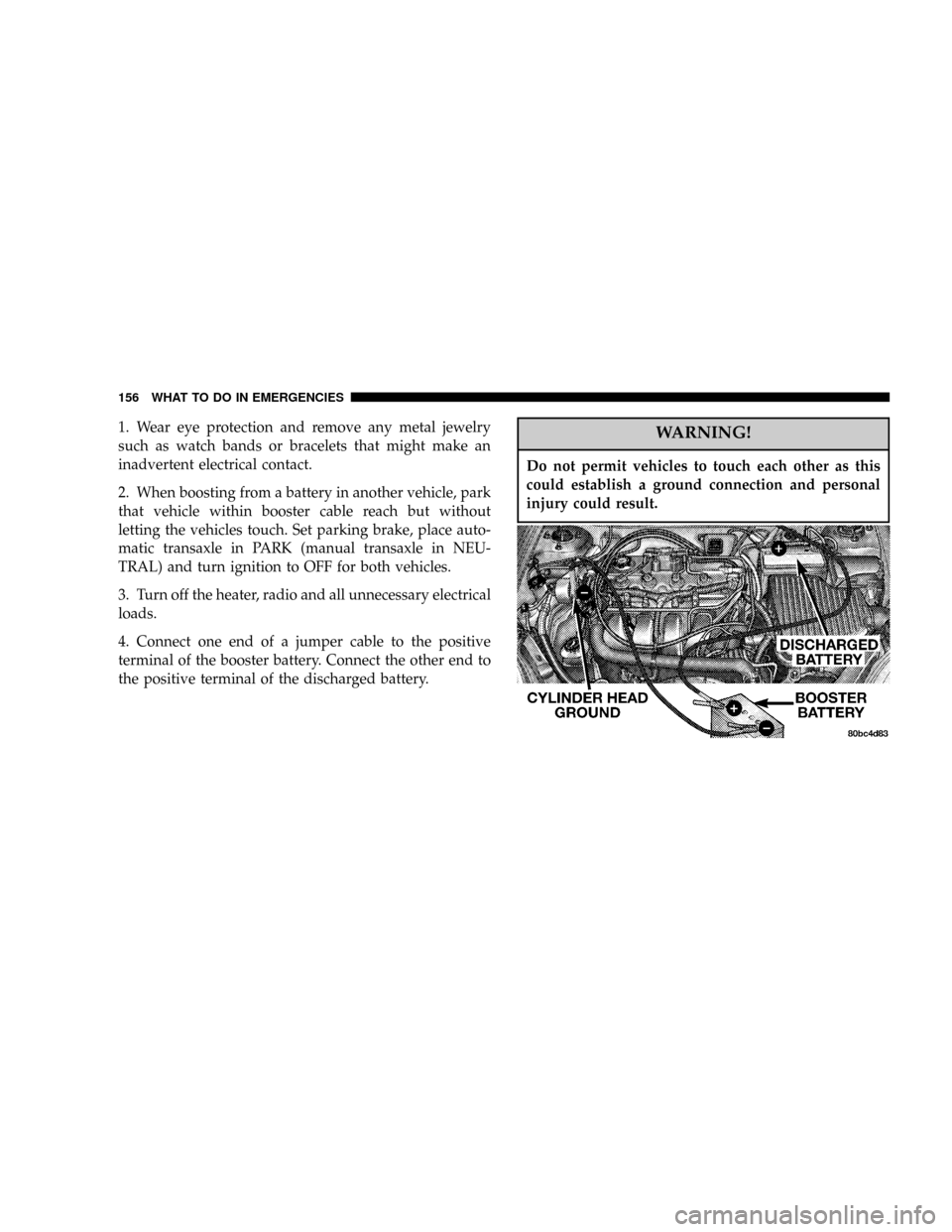
4. Connect one end of a jumper cable to the positive
terminal of the booster battery. Connect the other end to
the positive terminal of the discharged battery.WARNING!
Do not permit vehicles to touch each other as this
could establish a ground connection and personal
injury could result.
156 WHAT TO DO IN EMERGENCIES
Page 196 of 246
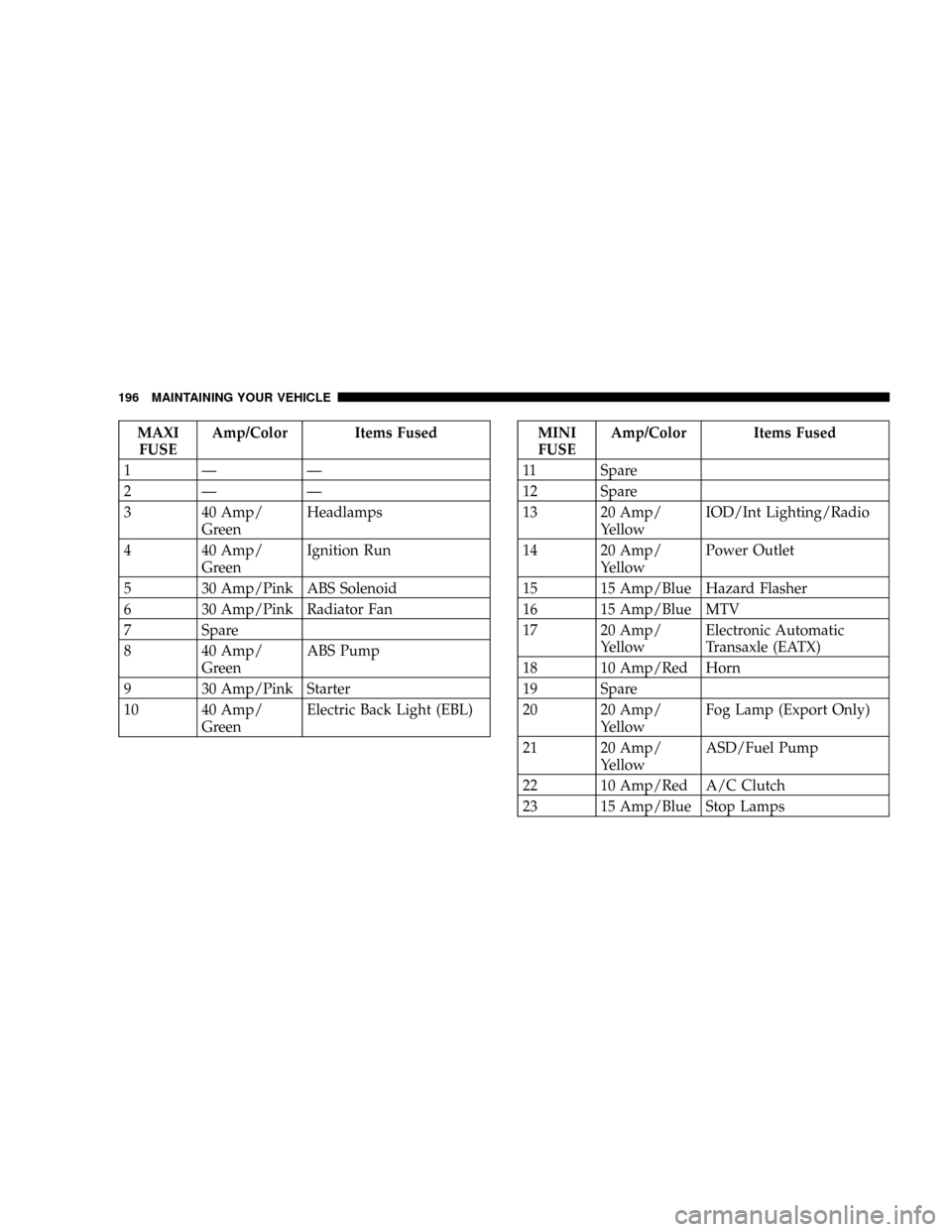
MAXI
FUSEAmp/Color Items Fused
1Ð Ð
2Ð Ð
3 40 Amp/
GreenHeadlamps
4 40 Amp/
GreenIgnition Run
5 30 Amp/Pink ABS Solenoid
6 30 Amp/Pink Radiator Fan
7 Spare
8 40 Amp/
GreenABS Pump
9 30 Amp/Pink Starter
10 40 Amp/
GreenElectric Back Light (EBL)MINI
FUSEAmp/Color Items Fused
11 Spare
12 Spare
13 20 Amp/
YellowIOD/Int Lighting/Radio
14 20 Amp/
YellowPower Outlet
15 15 Amp/Blue Hazard Flasher
16 15 Amp/Blue MTV
17 20 Amp/
YellowElectronic Automatic
Transaxle (EATX)
18 10 Amp/Red Horn
19 Spare
20 20 Amp/
YellowFog Lamp (Export Only)
21 20 Amp/
YellowASD/Fuel Pump
22 10 Amp/Red A/C Clutch
23 15 Amp/Blue Stop Lamps
196 MAINTAINING YOUR VEHICLE
Page 197 of 246
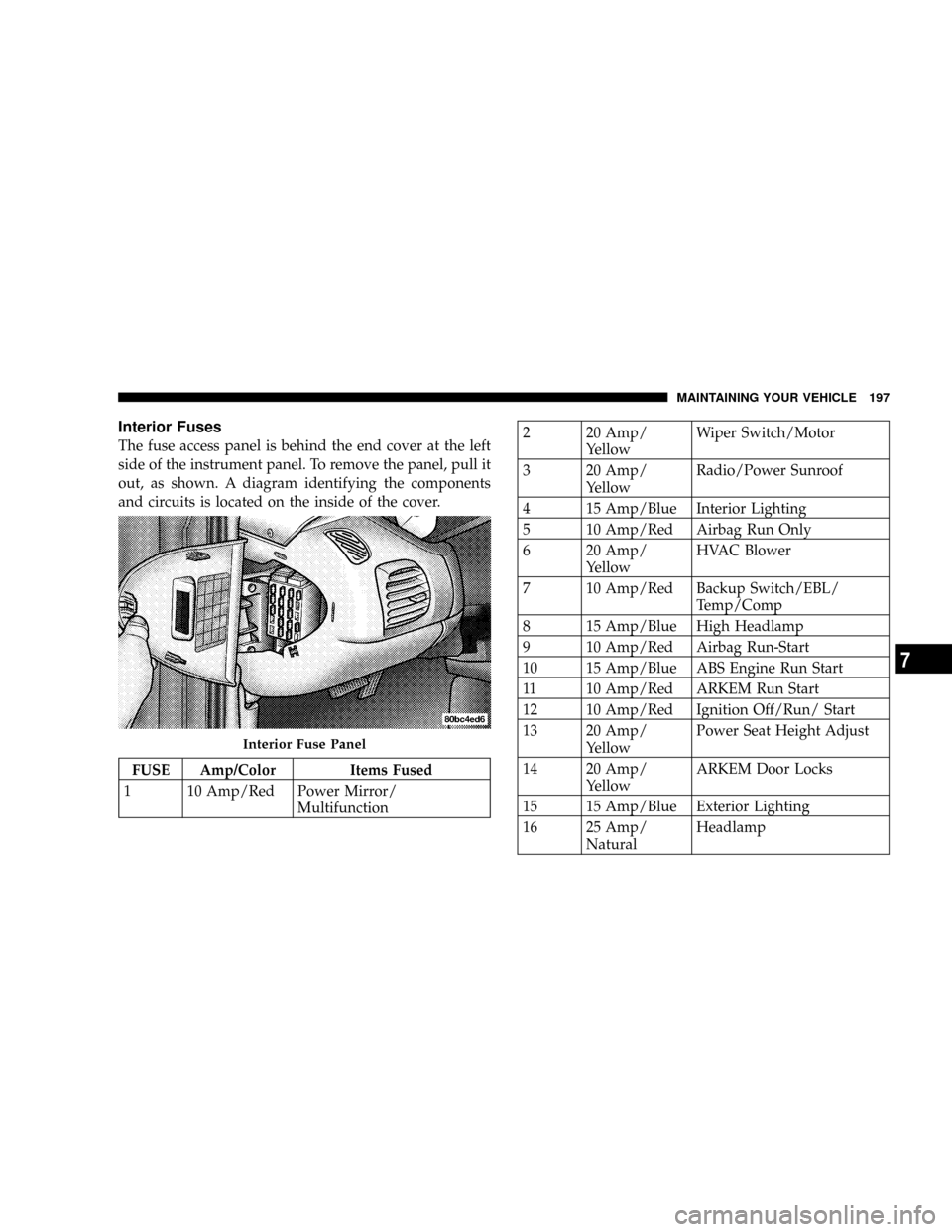
Interior Fuses
The fuse access panel is behind the end cover at the left
side of the instrument panel. To remove the panel, pull it
out, as shown. A diagram identifying the components
and circuits is located on the inside of the cover.
FUSE Amp/Color Items Fused
1 10 Amp/Red Power Mirror/
Multifunction
2 20 Amp/
YellowWiper Switch/Motor
3 20 Amp/
YellowRadio/Power Sunroof
4 15 Amp/Blue Interior Lighting
5 10 Amp/Red Airbag Run Only
6 20 Amp/
YellowHVAC Blower
7 10 Amp/Red Backup Switch/EBL/
Temp/Comp
8 15 Amp/Blue High Headlamp
9 10 Amp/Red Airbag Run-Start
10 15 Amp/Blue ABS Engine Run Start
11 10 Amp/Red ARKEM Run Start
12 10 Amp/Red Ignition Off/Run/ Start
13 20 Amp/
YellowPower Seat Height Adjust
14 20 Amp/
YellowARKEM Door Locks
15 15 Amp/Blue Exterior Lighting
16 25 Amp/
NaturalHeadlamp
Interior Fuse Panel
MAINTAINING YOUR VEHICLE 197
7