change time DODGE NITRO 2008 1.G Owner's Manual
[x] Cancel search | Manufacturer: DODGE, Model Year: 2008, Model line: NITRO, Model: DODGE NITRO 2008 1.GPages: 434, PDF Size: 6.2 MB
Page 218 of 434

If a preset button is activated while in the Music Type
(Program Type) mode, the Music Type mode will be
exited and the radio will tune to the preset station.
SETUP Button
Pressing the SETUP button allows you to select between
the following items:
²Set ClockÐ Pressing the SELECT button will allow
user to set the clock. Turn the TUNE control knob to
adjust the hours and then press and turn the TUNE
control knob to adjust the minutes. Press the TUNE
control knob again to save changes.
AM and FM Buttons
Press the buttons to select AM or FM Modes.
SET Button Ð To Set the Push-Button Memory
When you are receiving a station that you wish to
commit to push-button memory, press the SET button.
The symbol SET 1 will now show in the display window.Select the button (1-6) you wish to lock onto this station
and press and release that button. If a button is not
selected within 5 seconds after pressing the SET button,
the station will continue to play but will not be stored
into push-button memory.
You may add a second station to each push-button by
repeating the above procedure with this exception: Press
the SET button twice and SET 2 will show in the display
window. Each button can be set for SET 1 and SET 2 in
both AM and FM. This allows a total of 12 AM and 12 FM
stations to be stored into push-button memory. The
stations stored in SET 2 memory can be selected by
pressing the push-button twice.
Every time a preset button is used, a corresponding
button number will display.
218 INSTRUMENT PANEL AND CONTROLS
Page 221 of 434

TIME Button
Press this button to change the display from a large CD
playing time display to a small CD playing time display.
RW/FF
Press the RW button to stop the CD at the beginning of
the current CD track/title.
Press and hold FF (Fast Forward) and the CD player will
begin to fast forward until FF is released or RW or
another CD button is pressed. The RW (Reverse) button
works in a similar manner.
AM or FM Button
Switches the Radio to the Radio mode.
RND Button (Random Play Button)
Press this button while the CD is playing to activate
Random Play. This feature plays the selections on the
compact disc in random order to provide an interesting
change of pace.Press the right SEEK button to move to the next ran-
domly selected track.
Press the RND button a second time to stop Random
Play.
Notes On Playing MP3 Files
The radio can play MP3 files; however, acceptable MP3
file recording media and formats are limited. When
writing MP3 files, pay attention to the following restric-
tions.
Supported Media (Disc Types)
The MP3 file recording media supported by the radio are
CDDA, CD-R, CD-RW, MP3, and CDDA+MP3.
Supported Medium Formats (File Systems)
The medium formats supported by the radio are ISO 9660
Level 1 and Level 2 and includes the Joliet extension.
When reading discs recorded using formats other than
ISO 9660 Level 1 and Level 2, the radio may fail to read
INSTRUMENT PANEL AND CONTROLS 221
4
Page 224 of 434

LIST Button (CD Mode for MP3 Play)
Pressing the LIST button will bring up a list of all folders
on the disc. Scrolling up or down the list is done by
turning the TUNE control knob. Selecting a folder by
pressing the TUNE control knob will begin playing the
files contained in that folder (or the next folder in
sequence if the selection does not contain playable files).
The folder list will time out after 5 seconds.
INFO Button (CD Mode for MP3 Play)
Pressing the INFO button repeatedly will scroll through
the following TAG information: Song Title, Artist, File
Name, and Folder Name (if available).
Press the INFO button once more to return to9elapsed
time9priority mode.
Press and hold the INFO button for 3 seconds or more
and radio will display song titles for each file.Press and hold the INFO button again for 3 seconds to
return to9elapsed time9display.
Operation Instructions - Auxiliary Mode
The auxiliary (AUX) jack is an audio input jack, which
allows the user to plug in a portable device such as an
MP3 player, or cassette player, and utilize the vehicle's
audio system to amplify the source and play through the
vehicle speakers.
Pushing the AUX button will change the mode to auxil-
iary device if the AUX jack is connected.
NOTE:The AUX device must be turned on and the
device's volume set to proper level. If the AUX audio is
not loud enough, turn the device's volume up. If the AUX
audio sounds distorted, turn the device's volume down.
224 INSTRUMENT PANEL AND CONTROLS
Page 225 of 434

TIME Button (Auxiliary Mode)
Press this button to change the display to time of day. The
time of day will display for 5 seconds (when ignition is
off).
Operating Instructions - Hands Free Phone
(UConnectŸ) (If Equipped)
Refer to ªHands-Free Communication (UConnectŸ)º in
Section 3 of this manual.
Operating Instructions - Satellite Radio Mode (If
Equipped)
Refer to ªSatellite Radioº in this section.
Operating Instructions - Video Entertainment
System (VESt) (If Equipped)
Refer to separate ªVideo Entertainment System (VESt)
Guide.º
SALES CODE RER Ð AM/FM/CD/DVD RADIO
WITH NAVIGATION SYSTEM Ð IF EQUIPPED
NOTE:The radio sales code is located on the lower right
side of your radio faceplate.
Satellite Navigation Radio with CD Player with MP3
Capability (RER) - combines a Global-Positioning
System-based navigation system with an integrated color
screen to provide maps, turn identification, selection
menus, and instructions for selecting a variety of desti-
nations and routes.
This radio has a hard drive. CD's can be ripped to the
hard drive, and the map data comes loaded on the hard
drive. Refer to your ªNavigation User's Manualº for
detailed operating instructions.
INSTRUMENT PANEL AND CONTROLS 225
4
Page 226 of 434

Operating Instructions Ð Satellite Radio
Refer to your ªNavigation User's Manualº for detailed
operating instructions.
Clock Setting Procedure
The GPS receiver used in this system is synchronized to
the time data being transmitted by the GPS satellite. The
satellites' clock is Greenwich Mean Time (GMT). This is
the worldwide standard for time. This makes the sys-
tem's clock very accurate once the appropriate time zone
and daylight savings information is set.
To Manually Set the Clock
1. Turn the ignition switch to the ON or ACC position.
2. If the radio is off, turn it on by pressing the ON/OFF
Volume radio knob.
3. Press theTimesoft key on the lower left side of the
face of the radio.4. Press theHOUR or MINsoft keys on the face of the
radio.
5. The time setting will change each time you press the
HOUR or MIN soft key.
6. Press theSAVEsoft key on the face of the radio.
Changing the Time Zone
1. Press theTimesoft key on the lower left side of the
face of the radio.
2. Press theSet Time Zonesoft key on the face of the
radio.
3. Select the appropriate time zone for your location, and
press theSAVEsoft key to store your selection.
NOTE:When you are traveling and enter a new time
zone, the clock must be reset manually for the new zone.
226 INSTRUMENT PANEL AND CONTROLS
Page 234 of 434

The button located in the center of the left hand control
will tune to the next pre-set station that you have
programmed in the radio pre-set push-buttons.
CD Player
Pressing the top of the switch once will go to the next
track on the CD. Pressing the bottom of the switch once
will go to the beginning of the current track or to the
beginning of the previous track if it is within one second
after the current track begins to play.
If you press the switch up or down twice it plays the
second track, three times, it will play the third, etc.
The button in the center of the left hand switch changes
CD's on the 6±Disc in-dash CD changer radio. This
button does not function for all other radios.
CD/DVD DISC MAINTENANCE
To keep the CD/DVD discs in good condition, take the
following precautions:
1. Handle the disc by its edge; avoid touching the
surface.
2. If the disc is stained, clean the surface with a soft cloth,
wiping from center to edge.
3. Do not apply paper, paper CD labels, or tape to the
disc; avoid scratching the disc.
4. Do not use solvents such as benzine, thinner, cleaners,
or antistatic sprays.
5. Store the disc in its case after playing.
6. Do not expose the disc to direct sunlight.
7. Do not store the disc where temperatures may become
too high.
234 INSTRUMENT PANEL AND CONTROLS
Page 366 of 434
Exhaust System
The best protection against carbon monoxide entry into
the vehicle body is a properly maintained engine exhaust
system.
If you notice a change in the sound of the exhaust system;
or if the exhaust fumes can be detected inside the vehicle;
or when the underside or rear of the vehicle is damaged;
have an authorized technician inspect the complete ex-
haust system and adjacent body areas for broken, dam-
aged, deteriorated, or mispositioned parts. Open seams
or loose connections could permit exhaust fumes to seep
into the passenger compartment. In addition, inspect the
exhaust system each time the vehicle is raised for lubri-
cation or oil change. Replace as required.
Cooling System
WARNING!
You or others can be badly burned by hot antifreeze/
coolant or steam from your radiator. If you see or hear
steam coming from under the hood, don't open the
hood until the radiator has had time to cool. Never
try to open a cooling system pressure cap when the
radiator or coolant bottle is hot.
Engine Coolant Checks
Check antifreeze/coolant protection every 12 months
(before the onset of freezing weather, where applicable).
If antifreeze/coolant is dirty or rusty in appearance, the
system should be drained, flushed and refilled with fresh
antifreeze/coolant. Check the front of the A/C condenser
(if equipped) or radiator for any accumulation of bugs,
leaves, etc. If dirty, clean by gently spraying water from a
366 MAINTAINING YOUR VEHICLE
Page 398 of 434
EMISSION CONTROL SYSTEM MAINTENANCE
The ªScheduledº maintenance services, listed inbold
typemust be done at the times or mileages specified to
assure the continued proper functioning of the emission
control system. These, and all other maintenance services
included in this manual, should be done to provide best
vehicle performance and reliability. More frequent main-
tenance may be needed for vehicles in severe operating
conditions such as dusty areas and very short trip
driving.
Inspection and service also should be done any time a
malfunction is suspected.
NOTE:Maintenance, replacement, or repair of the emis-
sion control devices and systems on your vehicle may be
performed by any automotive repair establishment or
individual using any automotive part, which has been
certified pursuant to U.S. EPA or, in the State of Califor-
nia, California Air Resources Board regulations.
MAINTENANCE SCHEDULE
The oil change indicator system will remind you that it is
time to take your vehicle in for scheduled maintenance.
On Electronic Vehicle Information Center (EVIC)
equipped vehicles ªOil Change Requiredº will be dis-
played in the EVIC and a single chime will sound,
indicating that an oil change is necessary.
On Non-EVIC equipped vehicles ªChange Oilº will flash
in the instrument cluster odometer and a single chime
will sound, indicating that an oil change is necessary.
Based on engine operation condition the oil change
indicator message will illuminate, this means that service
is required for your vehicle. Have your vehicle serviced
as soon as possible, within the next 500 miles (805 km).
398 MAINTENANCE SCHEDULES
8
M
A
I
N
T
E
N
A
N
C
E
S
C
H
E
D
U
L
E
S
Page 399 of 434
NOTE:
²The oil change indicator message will not monitor the
time since the last oil change. Change your vehicles oil
if it has been 6 months since your last oil change even
if the oil change indicator message is NOT illumi-
nated.
²Change your engine oil more often if you drive your
vehicle off-road for an extended period of time.
²Under no circumstances should oil change intervals
exceed 6,000 miles (10,000 km) or 6 months, whichever
comes first.
Your dealer will reset the oil change indicator message
after completing the scheduled oil change. If this sched-
uled oil change is performed by someone other than yourdealer the message can be reset by referring to the steps
described under ªOil Change Requiredº in ªUse Factory
Settingsº of the EVIC section in this manual or under
ªOdometer/Trip Odometerº in the ªInstrument Cluster
Descriptions section of this manual.
At Each Stop for Fuel
²Check the engine oil level about 5 minutes after a fully
warmed engine is shut off. Checking the oil level while
the vehicle is on level ground will improve the accu-
racy of the oil level reading. Add oil only when the
level is at or below the ADD or MIN mark.
²Check the windshield washer solvent and add if
required.
MAINTENANCE SCHEDULES 399
8
M
A
I
N
T
E
N
A
N
C
E
S
C
H
E
D
U
L
E
S
Page 401 of 434
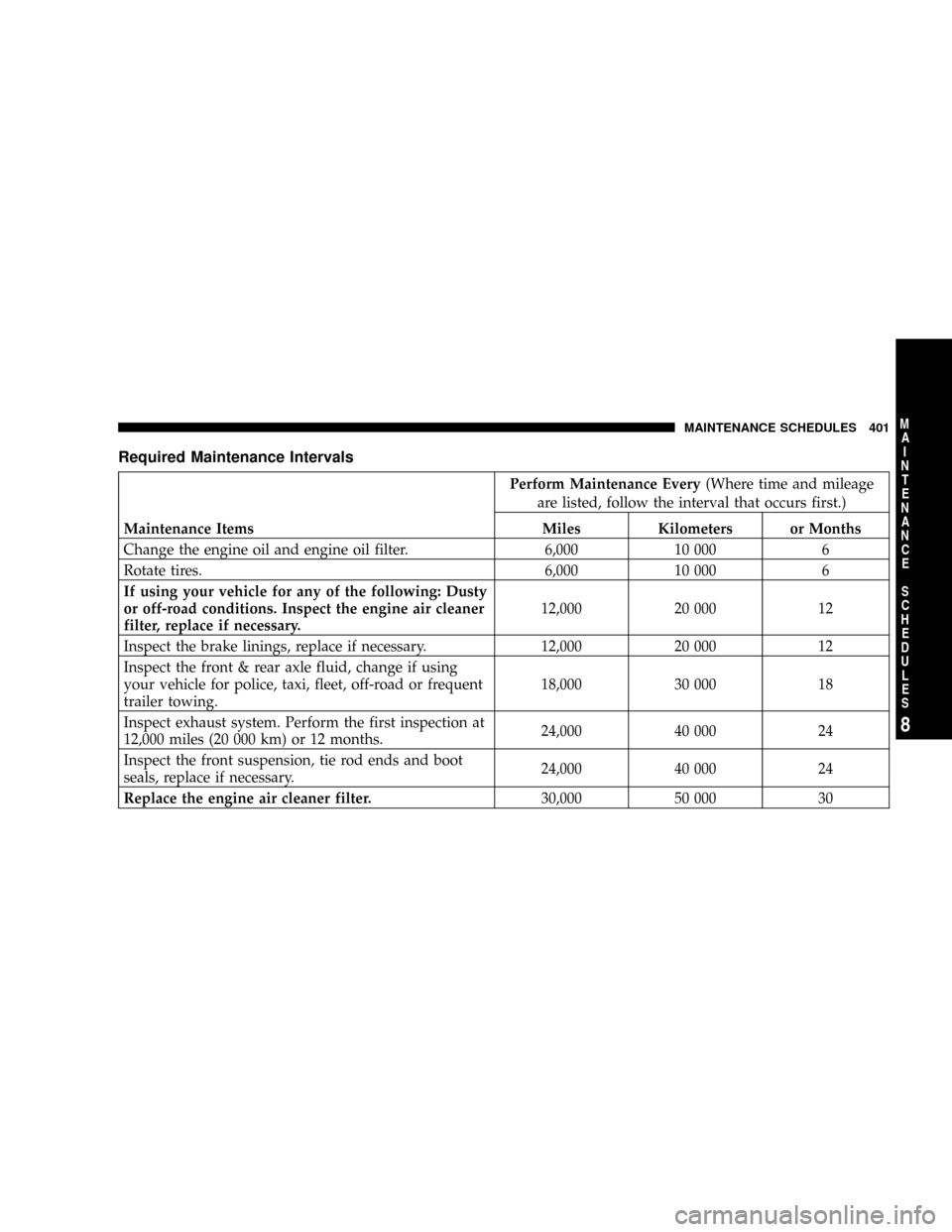
Required Maintenance Intervals
Perform Maintenance Every(Where time and mileage
are listed, follow the interval that occurs first.)
Maintenance Items Miles Kilometers or Months
Change the engine oil and engine oil filter. 6,000 10 000 6
Rotate tires. 6,000 10 000 6
If using your vehicle for any of the following: Dusty
or off-road conditions. Inspect the engine air cleaner
filter, replace if necessary.12,000 20 000 12
Inspect the brake linings, replace if necessary. 12,000 20 000 12
Inspect the front & rear axle fluid, change if using
your vehicle for police, taxi, fleet, off-road or frequent
trailer towing.18,000 30 000 18
Inspect exhaust system. Perform the first inspection at
12,000 miles (20 000 km) or 12 months.24,000 40 000 24
Inspect the front suspension, tie rod ends and boot
seals, replace if necessary.24,000 40 000 24
Replace the engine air cleaner filter.30,000 50 000 30
MAINTENANCE SCHEDULES 401
8
M
A
I
N
T
E
N
A
N
C
E
S
C
H
E
D
U
L
E
S