door lock DODGE NITRO 2008 1.G Owner's Manual
[x] Cancel search | Manufacturer: DODGE, Model Year: 2008, Model line: NITRO, Model: DODGE NITRO 2008 1.GPages: 434, PDF Size: 6.2 MB
Page 36 of 434
NOTE:
²If the window runs into any obstacle during auto-
closure, it will reverse direction and then stop. Remove
the obstacle and use the window switch again to close
the window.
²Any impact due to rough road conditions may trigger
the auto reverse function unexpectedly during auto-
closure. If this happens, pull the switch lightly to the
first detent and hold to close window manually.
WARNING!
There is no anti-pinch protection when the window
is almost closed. Be sure to clear all objects from the
window before closing.
Reset
It may be necessary at some point in time to reactivate the
auto-up feature. To do so, perform the following proce-
dure:
1. Pull the window switch up to close window com-
pletely and continue to hold the switch up for an
additional two seconds after the window is closed.
2. Push the window switch down firmly to the second
detent to open the window completely and continue to
hold the switch down for an additional two seconds after
the window is fully open.
Window Lockout Switch
The window lockout switch on the driver's door (below
the power window switches) allows you to disable the
window control on the other doors. To disable the
window controls on the other doors, press the window
lockout button. To enable the window controls, press the
window lockout button again.
36 THINGS TO KNOW BEFORE STARTING YOUR VEHICLE
Page 38 of 434

LIFTGATE
The vacuum fluorescent (VF) display located in the
odometer area displays the word ªGATEº as an indica-
tion of when the liftgate is not completely closed. When
the vehicle is not moving, and the liftgate is not com-
pletely closed, the VF display will show the word
ªGATE.º On EVIC equipped vehicles, ªGATE AJARº will
be displayed.
If any other active warnings are present, they will be
shown in the VF display and will also continue to cycle.
If the vehicle is moving, three single chimes will occur if
the rear liftgate is open (one chime for each complete
display cycle). After this, the VF display will continue to
sequence only (no chimes).
If the trip/reset button is pressed while the VF warnings
are being displayed, the VF display will revert back to
only displaying the odometer/trip odometer mileage.To open the liftgate, pull up (squeeze) on the handle and
lift. Manually unlocking the vehicle doors with the
plunger or a key in the lock cylinder will not unlock the
liftgate.
Liftgate Release
38 THINGS TO KNOW BEFORE STARTING YOUR VEHICLE
Page 62 of 434
inflation. These airborne particles may irritate the skin,
eyes, nose, or throat. If you have skin or eye irritation,
rinse the area with cool water. For nose or throat
irritation, move to fresh air. If the irritation continues,
see your doctor. If these particles settle on your
clothing, follow the garment manufacturer's instruc-
tions for cleaning.
²It is not advisable to drive your vehicle after the
airbags have deployed. If you are involved in another
collision, the airbags will not be in place to protect you.
WARNING!
Deployed airbags and seat belt pretensioners cannot
protect you in another collision. Have the airbags,
seat belt pretensioner, and seat belt retractor assem-
bly, replaced by an authorized dealer as soon as
possible. Also, have the Occupant Classification Sys-
tem serviced as well.
Enhanced Accident Response System
In the event of an impact that causes airbag deployment,
with the vehicle stopped, and the vehicle communication
network intact, and the power intact, the Enhanced
Accident Response System performs the following func-
tions:
²Cuts off fuel to the engine.
²Flashes hazard lights.
²Turns on the interior lamps which remain on as long as
the battery has power or until the ignition key is
removed.
²Unlocks the doors automatically
62 THINGS TO KNOW BEFORE STARTING YOUR VEHICLE
Page 81 of 434

NElectronic Speed Control Operation........128
NTo Activate..........................128
NTo Set At A Desired Speed...............129
NTo Deactivate........................129
NTo Resume Speed.....................129
NTo Vary The Speed Setting...............129
NManual Transmission..................130
NTo Accelerate For Passing...............130
mElectronic Brake Control System............131
NABS (Anti-Lock Brake System)............131
NTCS (Traction Control System)............132
NBAS (Brake Assist System)...............132
NERM (Electronic Roll Mitigation)..........133NESP (Electronic Stability Program).........134
NESP/BAS Warning Lamp................137
mGarage Door Opener Ð If Equipped.........137
NProgramming HomeLinkt...............139
NGate Operator/Canadian Programming.....141
NUsing HomeLinkt.....................142
NReprogramming a Single HomeLinktButton . . 142
NSecurity............................143
NTroubleshooting Tips...................143
NGeneral Information...................143
mPower Sunroof Ð If Equipped.............144
NOpening Sunroof - Express..............145
NClosing Sunroof - Express...............145
UNDERSTANDING THE FEATURES OF YOUR VEHICLE 81
3
Page 122 of 434
To prevent possible damage, do not slam the hood to
close it. Use a firm downward push at the center front
edge of the hood to ensure that both latches engage.
Never drive your vehicle unless the hood is fully closed,
with both latches engaged.
NOTE:Ensure hood prop rod is fully seated into clip
before closing hood to prevent damage to grille.
WARNING!
If the hood is not fully latched, it could fly up when
the vehicle is moving and block your forward vision.
Be sure all hood latches are fully latched before
driving.
LIGHTS
Interior Lights
The overhead light comes on when a door is opened. It
may also be turned on by rotating the control for the
dimmer switch on the multi-function control lever fully
upward.
The overhead light will automatically turn off in about 20
minutes if a door is left open or the dimmer control is left
in the dome light position. Turn the ignition switch ON to
restore the overhead light operation.
Daytime Brightness Feature
Certain instrument panel components (odometer, radio
display) can be illuminated at full brightness during the
daytime. This can be helpful when driving with your
headlights on during the daytime such as in a parade or
a funeral procession. To activate this feature, rotate the
left stalk one detent lower than the dome light.
122 UNDERSTANDING THE FEATURES OF YOUR VEHICLE
Page 142 of 434

Similar to this Canadian law, some U.S. gate operators are
designed to ªtime-outº in the same manner.
It may be helpful to unplug the device during the cycling
process to prevent possible overheating of the garage
door or gate motor.
If you are having difficulties programming a garage door
opener or a gate operator, replace ªProgramming
HomeLinktº Step 3 with the following:
3. Continue to press and hold the HomeLinktbutton
while you press and release - every two seconds
(ªcycleº) your hand-held transmitter until HomeLinkt
has successfully accepted the frequency signal. The
indicator light will flash slowly and then rapidly when
fully trained.
If you unplugged the device for training, plug it back in
at this time.Then proceed with Step 4 under ªProgramming
HomeLinkt.º earlier in this section.
Using HomeLinkT
To operate, simply press and release the programmed
HomeLinktbutton. Activation will now occur for the
trained device (i.e. garage door opener, gate operator,
security system, entry door lock, home/office lighting,
etc. The hand-held transmitter of the device may also be
used at any time.
Reprogramming a Single HomeLinkTButton
To re-program a channel that has been previously
trained, follow these steps:
1. Turn the ignition switch to the ON/RUN position.
2. Press and hold the desired HomeLinktbutton until
the indicator light begins to flash after 20 seconds.Do not
release the button.
142 UNDERSTANDING THE FEATURES OF YOUR VEHICLE
Page 194 of 434

Use the SCROLL button to display one of the following
choices:
Language
When in this display you may select one of five lan-
guages for all display nomenclature, including the trip
functions and the navigation system (if equipped). Press
the FUNCTION SELECT button while in this display to
select English, Espanol, or Francais. Then, as you con-
tinue, the information will display in the selected lan-
guage.
NOTE:The EVIC will not change the UConnectŸ
language selection. Please refer to ªLanguage Selectionº
in the HANDS±FREE COMMUNICATION (UConnectŸ)
section of this manual for details.
Lock Doors Automatically at 15 mph (24 km/h)
When ON is selected, all doors will lock automatically
when the vehicle reaches a speed of 15 mph (24 km/h).
To make your selection, press and release the FUNC-
TION SELECT button until ªONº or ªOFFº appears.
Unlock Doors Automatically on Exit
When ON is selected, all doors will unlock when the
vehicle is stopped and the transmission is in the P (Park)
or N (Neutral) position and the driver's door is opened.
To make your selection, press and release the FUNC-
TION SELECT button until ªONº or ªOFFº appears.
Remote Key Unlock
WhenDriver Door 1st Pressis selected, only the driver's
door will unlock on the first press of the remote keyless
entry unlock button. When Driver Door 1st Press is
selected, you must press of the remote keyless entry
unlock button twice to unlock the passenger's doors.
WhenAll Doors 1st Pressis selected, all of the doors will
unlock on the first press of the remote keyless entry
unlock button. To make your selection, press and release
the FUNCTION SELECT button until ªDriver Door 1st
Pressº or ªAll Doors 1st Pressº appears.
194 INSTRUMENT PANEL AND CONTROLS
Page 195 of 434

Sound Horn with Remote Key Lock
When ON is selected, a short horn sound will occur when
the remote keyless entry ªLockº button is pressed. This
feature may be selected with or without the flash lights
on lock/unlock feature. To make your selection, press
and release the FUNCTION SELECT button until ªONº
or ªOFFº appears.
Flash Lights with Remote Key Lock
When ON is selected, the front and rear turn signals will
flash when the doors are locked or unlocked with the remote
keyless entry transmitter. This feature may be selected with
or without the sound horn on lock feature selected. To make
your selection, press and release the FUNCTION SELECT
button until ªONº or ªOFFº appears.
Delay Turning Headlights Off
When this feature is selected, the driver can choose to
have the headlights remain on for 0, 30, 60, or 90 secondswhen exiting the vehicle. To make your selection, press
and release the FUNCTION SELECT button until ª0,º
ª30,º ª60,º or ª90º appears.
Turn Headlights On with Remote Key Unlock
When this feature is selected, the headlights will activate
and remain on for up to 90 seconds when the doors are
unlocked with the remote keyless entry transmitter. To
make your selection, press and release the FUNCTION
SELECT button until ªOFF,º ª30 sec.,º ª60 sec.,º or ª90
sec.º appears.
Delay Power Off to Accessories Until Exit
When this feature is selected, the power window
switches, radio, hands±free system (if equipped), DVD
video system (if equipped), power sunroof (if equipped),
and power outlets will remain active for up to 60 minutes
after the ignition switch is turned off. Opening a vehicle
door will cancel this feature. To make your selection,
press and release the FUNCTION SELECT button until
ªOff,º ª45 sec.,º ª5 min.,º or ª10 min.º appears.
INSTRUMENT PANEL AND CONTROLS 195
4
Page 364 of 434
WARNING!
Fluid level should be checked on a level surface with
the engine off to prevent injury from moving parts,
and to insure accurate fluid level reading. Do not
overfill. Use only the manufacturer's recommended
fluid.
If necessary, add fluid to restore to the proper indicated
level. With a clean cloth, wipe any spilled fluid from all
surfaces. Refer to Fluids, Lubricants, and Genuine Parts
for correct fluid type.
NOTE:Upon initial start-up in cold weather, the power
steering pump may make noise for a short period of time.
This is due to the cold, thick fluid in the steering system.
This noise should be considered normal, and does not in
any way damage the steering system.
Driveline And Steering Component Lubrication
All driveline and steering components are sealed and do
not require lubrication. Driveshafts are not serviceable.
Body Lubrication
Locks and all body pivot points, including such items as
seat tracks, doors, tailgate and hood hinges, should be
lubricated periodically to assure quiet, easy operation
and to protect against rust and wear. Prior to the appli-
cation of any lubricant, the parts concerned should be
wiped clean to remove dust and grit; after lubricating
excess oil and grease should be removed. Particular
attention should also be given to hood latching compo-
nents to insure proper function. When performing other
underhood services, the hood latch, release mechanism
and safety catch should be cleaned and lubricated.
The external lock cylinders should be lubricated twice a
year, preferably in the fall and spring. Apply a small
364 MAINTAINING YOUR VEHICLE
Page 382 of 434
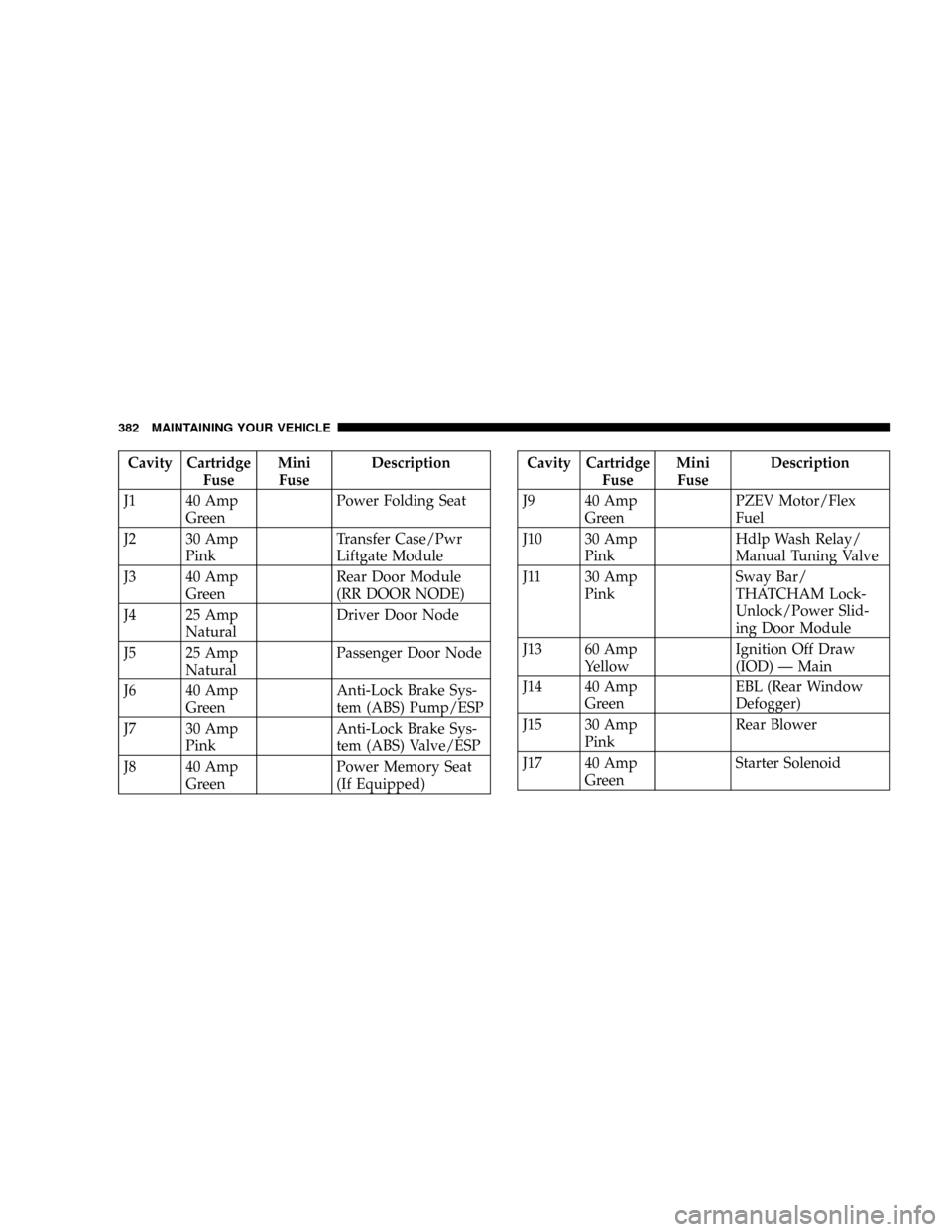
Cavity Cartridge
FuseMini
FuseDescription
J1 40 Amp
GreenPower Folding Seat
J2 30 Amp
PinkTransfer Case/Pwr
Liftgate Module
J3 40 Amp
GreenRear Door Module
(RR DOOR NODE)
J4 25 Amp
NaturalDriver Door Node
J5 25 Amp
NaturalPassenger Door Node
J6 40 Amp
GreenAnti-Lock Brake Sys-
tem (ABS) Pump/ESP
J7 30 Amp
PinkAnti-Lock Brake Sys-
tem (ABS) Valve/ESP
J8 40 Amp
GreenPower Memory Seat
(If Equipped)Cavity Cartridge
FuseMini
FuseDescription
J9 40 Amp
GreenPZEV Motor/Flex
Fuel
J10 30 Amp
PinkHdlp Wash Relay/
Manual Tuning Valve
J11 30 Amp
PinkSway Bar/
THATCHAM Lock-
Unlock/Power Slid-
ing Door Module
J13 60 Amp
YellowIgnition Off Draw
(IOD) Ð Main
J14 40 Amp
GreenEBL (Rear Window
Defogger)
J15 30 Amp
PinkRear Blower
J17 40 Amp
GreenStarter Solenoid
382 MAINTAINING YOUR VEHICLE