remote control DODGE NITRO 2008 1.G Owners Manual
[x] Cancel search | Manufacturer: DODGE, Model Year: 2008, Model line: NITRO, Model: DODGE NITRO 2008 1.GPages: 434, PDF Size: 6.2 MB
Page 53 of 434
WARNING!
²Relying on the airbags alone could lead to more
severe injuries in a collision. The airbags work
with your seat belt to restrain you properly. In
some collisions the airbags won't deploy at all.
Always wear your seat belts even though you have
airbags.
²Being too close to the steering wheel or instrument
panel during airbag deployment could cause seri-
ous injury. Airbags need room to inflate. Sit back,
comfortably extending your arms to reach the
steering wheel or instrument panel.
²The side curtain airbags need room to inflate. Do
not lean against the door or window. Sit upright in
the center of the seat.
Airbag System Components
The airbag system consists of the following:
²Occupant Restraint Control Module
²Airbag Warning Light
²Driver Airbag
²Passenger Airbag
²Side Curtain Airbags above Side Windows
²Side Remote Acceleration Sensors
²Steering Wheel and Column
²Instrument Panel
²Interconnecting Wiring
THINGS TO KNOW BEFORE STARTING YOUR VEHICLE 53
2
Page 54 of 434

²Front Remote Acceleration Sensors
²Seat Track Position Sensors (STPS) Ð If Present
²Driver and Front Passenger Seat Belt Pretensioner
²Driver and Front Passenger Seat Belt Retractors
²Occupant Classification System (OCS) Ð Front Pas-
senger Seat Only
þOccupant Classification Module
þPassenger Airbag Disable (PAD) Indicator Light
þWeight Sensors
How The Airbag System Works
²
TheOccupant Restraint Control (ORC) Modulede-
termines if a frontal, side, or rollover collision is severe
enough to require the airbags to inflate. The front
airbag inflators are designed to provide different rates
of airbag inflation from direction provided by the
ORC. The ORC may also modify the rate of inflation
based on the occupant size provided by the Occupant
Classification Module. The ORC will detect roll over,
but not rear impacts.
The ORC also monitors the readiness of the electronic
parts of the system whenever the ignition switch is in
the START or ON positions. These include all of the
items listed above except the instrument panel, and
the steering wheel and column. If the key is in the
LOCK position, in the ACC position, or not in the
ignition, the airbags are not on and will not inflate.
54 THINGS TO KNOW BEFORE STARTING YOUR VEHICLE
Page 79 of 434

UNDERSTANDING THE FEATURES OF YOUR VEHICLE
CONTENTS
mMirrors...............................83
NInside Day/Night Mirror.................83
NAutomatic Dimming Mirror Ð If Equipped....84
NOutside Mirrors.......................84
NExterior Mirrors Folding Feature...........85
NPower Remote Control Mirrors.............85
NIlluminated Vanity Mirrors Ð If Equipped....86
mHands±Free Communication (UConnectt)Ð
If Equipped............................87NOperation............................89
NPhone Call Features....................96
NUConnecttSystem Features...............99
NAdvanced Phone Connectivity............103
NThings You Should Know About Your
UConnecttSystem....................105
NGeneral Information...................113
mSeats................................113
NFront Manual Seat Adjustment............113
3
Page 85 of 434
WARNING!
Vehicles and other objects seen in the right side
convex mirror will look smaller and farther away
than they really are. Relying too much on your right
side mirror could cause you to collide with another
vehicle or other object. Use your inside mirror when
judging the size or distance of a vehicle seen in the
right side mirror.
Exterior Mirrors Folding Feature
Folding exterior mirrors are hinged and may be moved
either forward or rearward to resist damage.
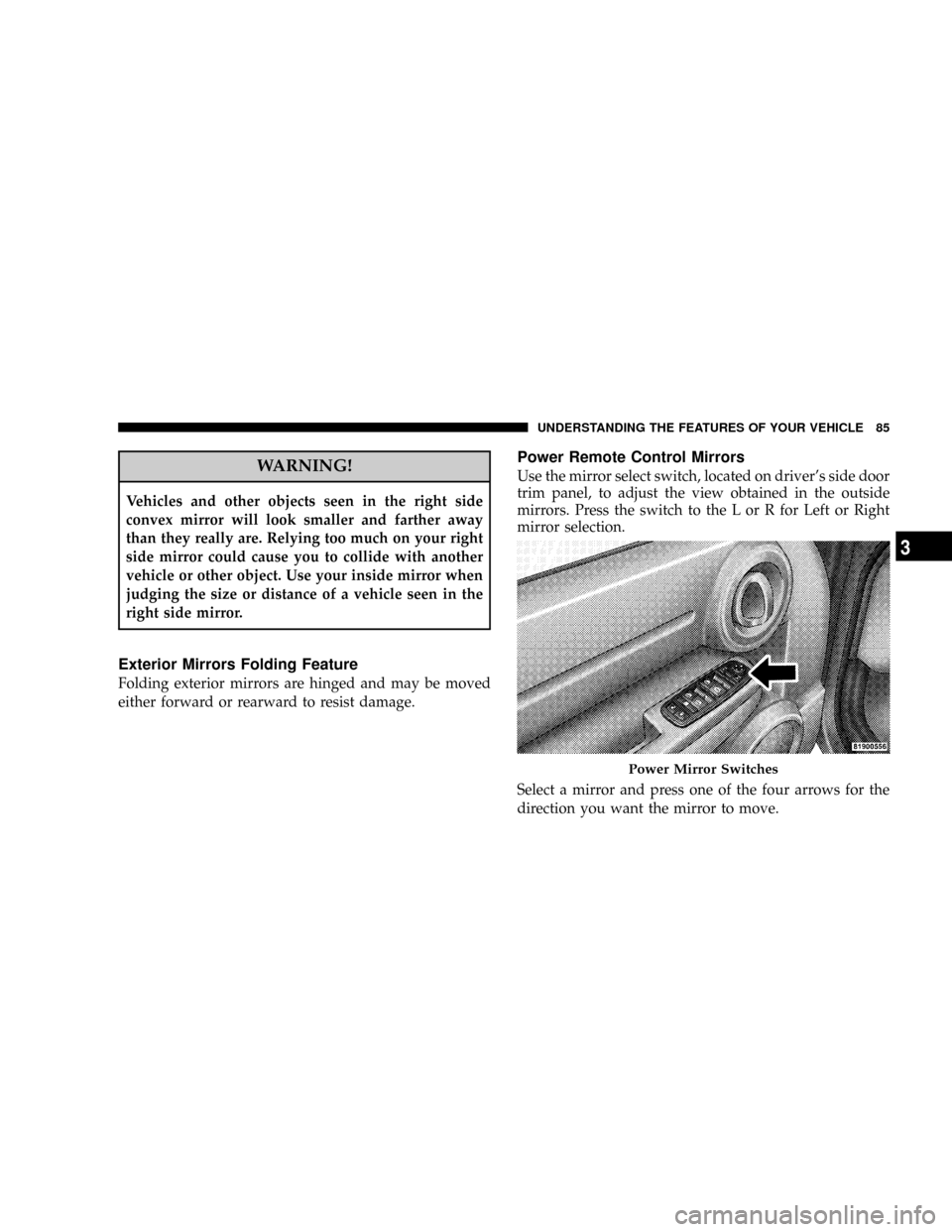
Power Remote Control Mirrors
Use the mirror select switch, located on driver's side door
trim panel, to adjust the view obtained in the outside
mirrors. Press the switch to the L or R for Left or Right
mirror selection.
Select a mirror and press one of the four arrows for the
direction you want the mirror to move.
Power Mirror Switches
UNDERSTANDING THE FEATURES OF YOUR VEHICLE 85
3
Page 137 of 434

situation requiring ESP to be switched to the ªPartial Offº
mode is overcome, turn ESP back on by momentarily
depressing the ªESP OFFº switch. This may be done
while the vehicle is in motion.
ESP/BAS Warning Lamp
The malfunction indicator lamp for the ESP is
combined with BAS. The ªESP/BAS Warning
Lampº and the ªESP/TCS Indicator Lightº in
the instrument cluster both come on when the
ignition switch is turned to the ªONº position. They
should go out with the engine running. If the ªESP/BAS
Warning Lampº comes on continuously with the engine
running, a malfunction has been detected in either the
ESP or the BAS system. If this light remains on after
several ignition cycles, and the vehicle has been driven
several miles at speeds greater than 30 mph (48 km/h),
see your authorized dealer as soon as possible to have the
problem diagnosed and corrected.NOTE:
²9The9ESP/TCS Indicator Light9and the9ESP/BAS
Warning Lamp9come on momentarily each time the
ignition switch is turned ON.
²Each time the ignition is turned ON, the ESP System
will be ON even if it was turned off previously.
²The ESP Control System will make buzzing or clicking
sounds when it is active. This is normal; the sounds
will stop when ESP becomes inactive following the
maneuver that caused the ESP activation.
GARAGE DOOR OPENER Ð IF EQUIPPED
HomeLinktreplaces up to three remote controls (hand
held transmitters) that operate devices such as garage
door openers, motorized gates, lighting, or home security
systems. The HomeLinktunit operates off your vehicle's
battery.
UNDERSTANDING THE FEATURES OF YOUR VEHICLE 137
3
Page 159 of 434

Adding Washer Fluid
The fluid reservoir for the windshield washers and the
rear window washer is shared. It is located in the front of
the engine compartment, and should be checked for fluid
level at regular intervals. Fill the reservoir with wind-
shield washer solvent (not radiator antifreeze) and oper-
ate the system for a few seconds to flush out the residual
water.
Rear Window Defroster Ð If Equipped
The push-button is located on
the bottom of the blower con-
trol knob. Press this button to
turn on the rear window de-
froster, and the optional elec-
tric remote control heated
mirrors. An amber light
shows that the defroster is on.The defroster will automatically turn off after about ten
minutes. For five more minutes of operation, press the
switch again. To prevent excessive battery drain, use the
defroster only when the engine is operating.
CAUTION!
Use care when washing the inside of the rear window
to prevent damage to heating elements. Use a soft
cloth and a mild washing solution, wiping parallel to
the heating elements. Also, keep all objects a safe
distance from the window to prevent damaging the
heating elements.
UNDERSTANDING THE FEATURES OF YOUR VEHICLE 159
3
Page 165 of 434

NSystem Activation.....................227
NElectronic Serial Number/Sirius Identification
Number (ENS/SID)....................228
NSelecting Satellite Mode.................228
NSatellite Antenna......................228
NReception Quality.....................228
NOperating Instructions - Satellite Mode......229
NOperating Instructions - Hands Free Phone
(If Equipped)........................231
NOperating Instructions - Video Entertainment
System (VESŸ) (If Equipped).............231mVideo Entertainment System (Sales Code XRV) Ð
If Equipped...........................231
mRemote Sound System Controls Ð If Equipped . . 233
NRadio Operation......................233
NCD Player..........................234
mCD/DVD Disc Maintenance...............234
mClimate Controls.......................235
NManual Air Conditioning And Heating
System.............................235
NOperating Tips.......................239
INSTRUMENT PANEL AND CONTROLS 165
4
Page 194 of 434

Use the SCROLL button to display one of the following
choices:
Language
When in this display you may select one of five lan-
guages for all display nomenclature, including the trip
functions and the navigation system (if equipped). Press
the FUNCTION SELECT button while in this display to
select English, Espanol, or Francais. Then, as you con-
tinue, the information will display in the selected lan-
guage.
NOTE:The EVIC will not change the UConnectŸ
language selection. Please refer to ªLanguage Selectionº
in the HANDS±FREE COMMUNICATION (UConnectŸ)
section of this manual for details.
Lock Doors Automatically at 15 mph (24 km/h)
When ON is selected, all doors will lock automatically
when the vehicle reaches a speed of 15 mph (24 km/h).
To make your selection, press and release the FUNC-
TION SELECT button until ªONº or ªOFFº appears.
Unlock Doors Automatically on Exit
When ON is selected, all doors will unlock when the
vehicle is stopped and the transmission is in the P (Park)
or N (Neutral) position and the driver's door is opened.
To make your selection, press and release the FUNC-
TION SELECT button until ªONº or ªOFFº appears.
Remote Key Unlock
WhenDriver Door 1st Pressis selected, only the driver's
door will unlock on the first press of the remote keyless
entry unlock button. When Driver Door 1st Press is
selected, you must press of the remote keyless entry
unlock button twice to unlock the passenger's doors.
WhenAll Doors 1st Pressis selected, all of the doors will
unlock on the first press of the remote keyless entry
unlock button. To make your selection, press and release
the FUNCTION SELECT button until ªDriver Door 1st
Pressº or ªAll Doors 1st Pressº appears.
194 INSTRUMENT PANEL AND CONTROLS
Page 195 of 434

Sound Horn with Remote Key Lock
When ON is selected, a short horn sound will occur when
the remote keyless entry ªLockº button is pressed. This
feature may be selected with or without the flash lights
on lock/unlock feature. To make your selection, press
and release the FUNCTION SELECT button until ªONº
or ªOFFº appears.
Flash Lights with Remote Key Lock
When ON is selected, the front and rear turn signals will
flash when the doors are locked or unlocked with the remote
keyless entry transmitter. This feature may be selected with
or without the sound horn on lock feature selected. To make
your selection, press and release the FUNCTION SELECT
button until ªONº or ªOFFº appears.
Delay Turning Headlights Off
When this feature is selected, the driver can choose to
have the headlights remain on for 0, 30, 60, or 90 secondswhen exiting the vehicle. To make your selection, press
and release the FUNCTION SELECT button until ª0,º
ª30,º ª60,º or ª90º appears.
Turn Headlights On with Remote Key Unlock
When this feature is selected, the headlights will activate
and remain on for up to 90 seconds when the doors are
unlocked with the remote keyless entry transmitter. To
make your selection, press and release the FUNCTION
SELECT button until ªOFF,º ª30 sec.,º ª60 sec.,º or ª90
sec.º appears.
Delay Power Off to Accessories Until Exit
When this feature is selected, the power window
switches, radio, hands±free system (if equipped), DVD
video system (if equipped), power sunroof (if equipped),
and power outlets will remain active for up to 60 minutes
after the ignition switch is turned off. Opening a vehicle
door will cancel this feature. To make your selection,
press and release the FUNCTION SELECT button until
ªOff,º ª45 sec.,º ª5 min.,º or ª10 min.º appears.
INSTRUMENT PANEL AND CONTROLS 195
4
Page 202 of 434

By pressing the SEEK button when the Music Type icon
is displayed, the radio will be tuned to the next frequency
station with the same selected Music Type name. The
Music Type function only operates when in the FM
mode.
If a preset button is activated while in the Music Type
(Program Type) mode, the Music Type mode will be
exited and the radio will tune to the preset station.
SETUP Button
Pressing the SETUP button allows you to select between
the following items:
NOTE:Use the Tune Control Knob to scroll through the
entries. Push the Audio/Select button to select an entry
and make changes.
²DVD Enter -When the disc is in DVD Menu mode,
selecting DVD Enter will allow you to play the current
highlighted selection. Use the remote control to scroll
up and down the menu (If Equipped).
²DISC Play/Pause -You can toggle between
playing the DVD and pausing the DVD by
pushing the SELECT button (If Equipped).
²DVD Play Options -Selecting the DVD Play Options
will display the following:
²Subtitle ± Repeatedly Pressing SELECT will switch
subtitles to different subtitle languages that are
available on the disc (If Equipped).
²Audio Stream ± Repeatedly Pressing SELECT will
switch to different audio languages (if supported on
the disc) (If Equipped).
202 INSTRUMENT PANEL AND CONTROLS