tow DODGE POWER WAGON 2007 2.G User Guide
[x] Cancel search | Manufacturer: DODGE, Model Year: 2007, Model line: POWER WAGON, Model: DODGE POWER WAGON 2007 2.GPages: 492, PDF Size: 8.25 MB
Page 89 of 492
{ª248-555-12129). Your cellular phone's audio is trans-
mitted through your vehicle's audio system; the system
will automatically mute your radio when using the
UConnectŸ system.
NOTE:The UConnectŸ system use requires a cellular
phone equipped with the Bluetooth9Hands-Free Profile,9
version 0.96 or higher. See www.chrysler.com/uconnect
for supported phones.
UConnectŸ allows you to transfer calls between the
system and your cellular phone as you enter or exit your
vehicle, and enables you to mute the system's micro-
phone for private conversation.
The UConnectŸ phonebook enables you to store up to 32
names and four numbers per name. Each language has a
separate 32-name phonebook accessible only in that
language. This system is driven through your Blue-
toothŸ Hands-Free profile cellular phone. UConnectŸ
features BluetoothŸ technology - the global standardthat enables different electronic devices to connect to
each other without wires or a docking station, so UCon-
nect works no matter where you stow your cellular
phone (be it your purse, pocket, or briefcase), as long as
your phone is turned on and has been paired to the
vehicle's UConnectŸ system. The UConnectŸ system
allows up to seven cellular phones to be linked to system.
Only one linked (or paired) cellular phone can be used
with the system at a time. The system is available in
English, Spanish, or French languages (as equipped).
The rearview mirror contains the microphone for the
system and the control buttons that will enable you to
access the system.
88 UNDERSTANDING THE FEATURES OF YOUR VEHICLE
Page 101 of 492
emergency situations when the cell phone has network
coverage and stays paired to the UConnectŸ system.
Towing Assistance
If you need towing assistance,
²Press the 'Phone' button to begin.
²After the9Ready9prompt and the following beep, say
9Towing Assistance.9
NOTE:The Towing Assistance number dialed is based
on the Country where the vehicle is purchased (1-800-
528-2069 for USA, 1-877-213-4525 for Canada, 55-14-3454
for Mexico city and 1-800-712-3040 for outside Mexico
city in Mexico).
Please refer to the 24-Hour ªTowing Assistanceº cover-
age details in the Warranty information booklet and on
the 24±Hour Towing Assistance Card.
Paging
To learn how to page, refer to9Working with Automated
Systems.9Paging works properly except for pagers of
certain companies which time-out a little too soon to
work properly with the UConnectŸ system.
Voice Mail Calling
To learn how to access your voice mail, refer to9Working
with Automated Systems.9
Working with Automated Systems
This method is designed to be used in instances where
one generally has to press numbers on the cellular phone
keypad while navigating through an automated tele-
phone system.
You can use your UConnectŸ system to access a voice-
mail system or an automated service, such as, paging
service or automated customer service. Some services
require immediate response selection, in some instances,
that may be too quick for use of UConnectŸ system.
100 UNDERSTANDING THE FEATURES OF YOUR VEHICLE
Page 125 of 492
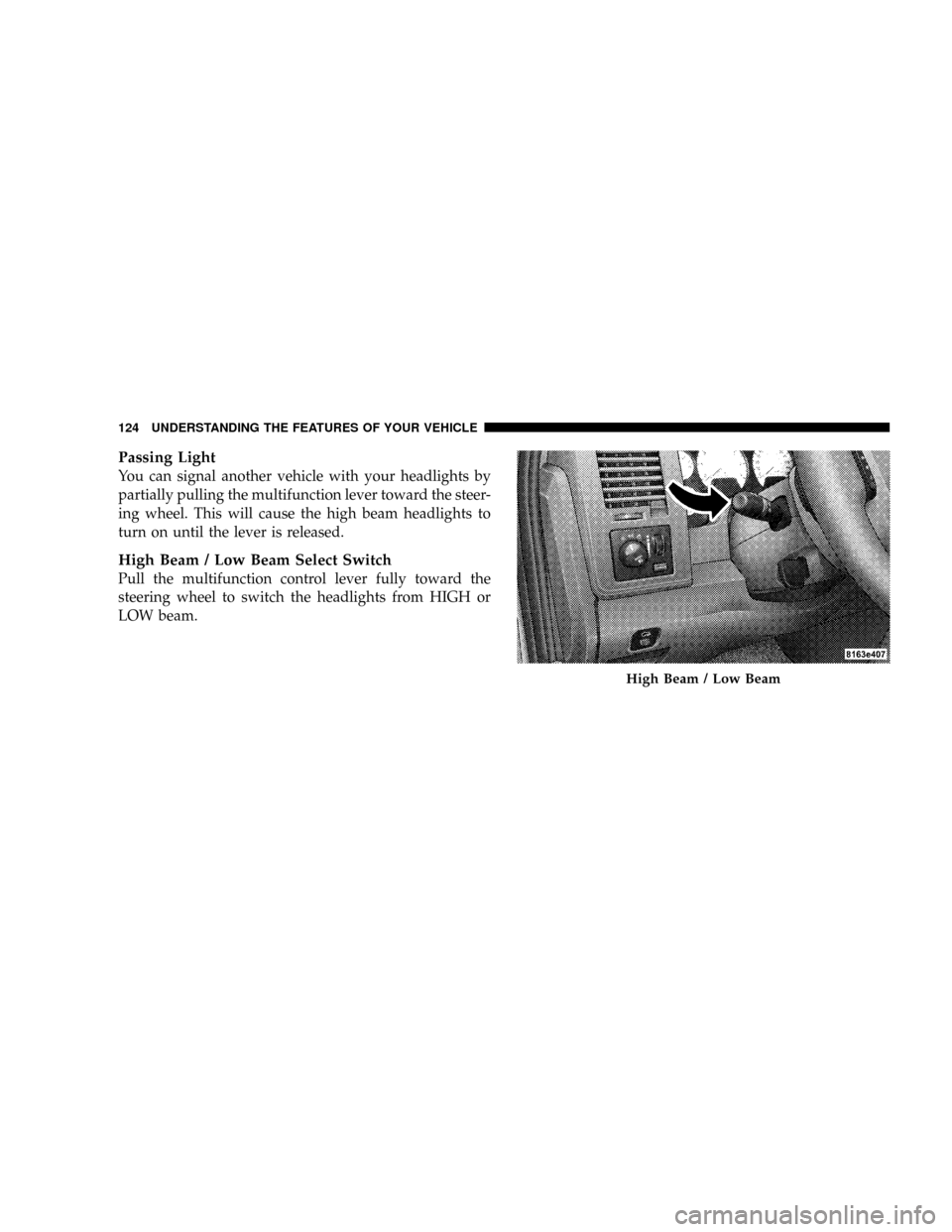
Passing Light
You can signal another vehicle with your headlights by
partially pulling the multifunction lever toward the steer-
ing wheel. This will cause the high beam headlights to
turn on until the lever is released.
High Beam / Low Beam Select Switch
Pull the multifunction control lever fully toward the
steering wheel to switch the headlights from HIGH or
LOW beam.
High Beam / Low Beam
124 UNDERSTANDING THE FEATURES OF YOUR VEHICLE
Page 131 of 492
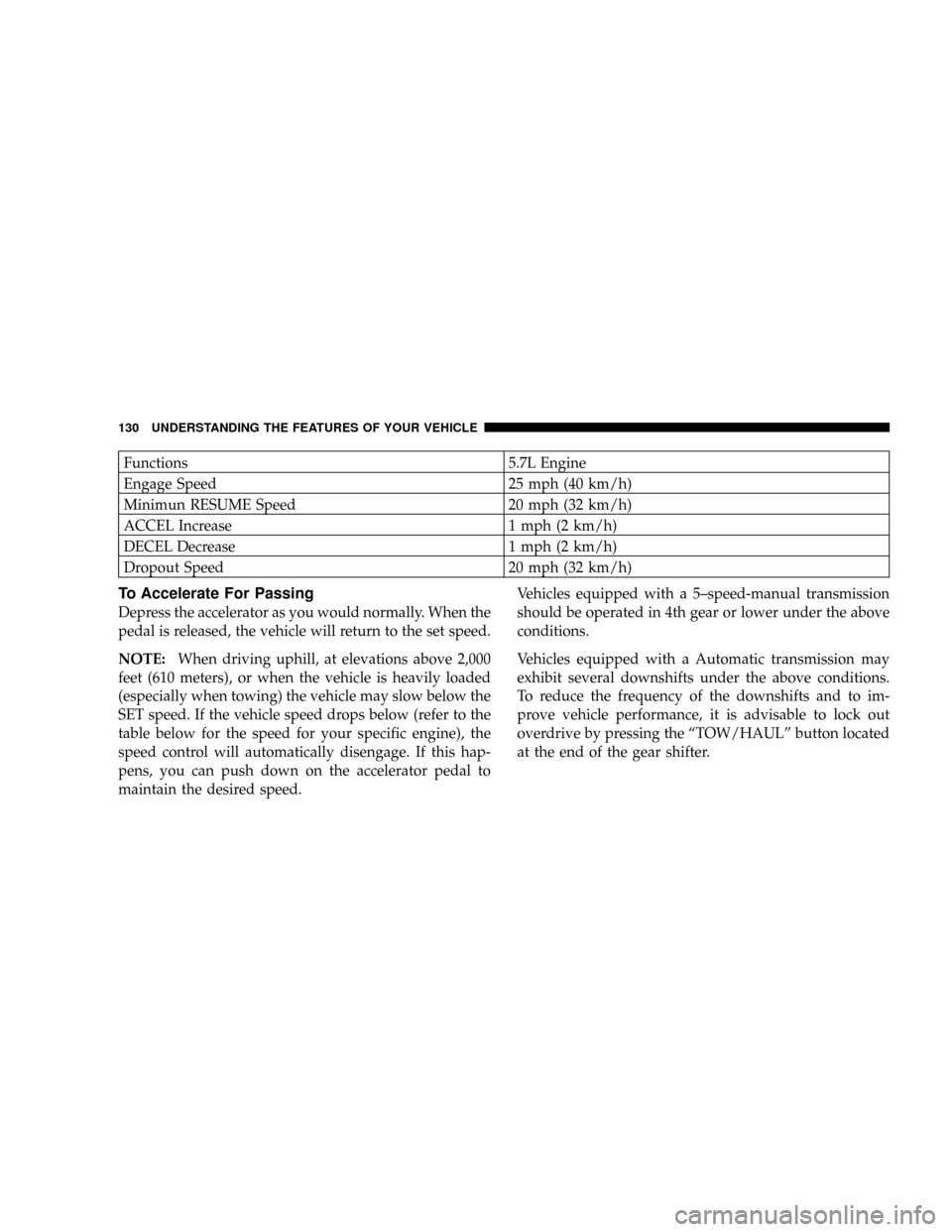
Functions 5.7L Engine
Engage Speed 25 mph (40 km/h)
Minimun RESUME Speed 20 mph (32 km/h)
ACCEL Increase 1 mph (2 km/h)
DECEL Decrease 1 mph (2 km/h)
Dropout Speed 20 mph (32 km/h)
To Accelerate For Passing
Depress the accelerator as you would normally. When the
pedal is released, the vehicle will return to the set speed.
NOTE:When driving uphill, at elevations above 2,000
feet (610 meters), or when the vehicle is heavily loaded
(especially when towing) the vehicle may slow below the
SET speed. If the vehicle speed drops below (refer to the
table below for the speed for your specific engine), the
speed control will automatically disengage. If this hap-
pens, you can push down on the accelerator pedal to
maintain the desired speed.Vehicles equipped with a 5±speed-manual transmission
should be operated in 4th gear or lower under the above
conditions.
Vehicles equipped with a Automatic transmission may
exhibit several downshifts under the above conditions.
To reduce the frequency of the downshifts and to im-
prove vehicle performance, it is advisable to lock out
overdrive by pressing the ªTOW/HAULº button located
at the end of the gear shifter.
130 UNDERSTANDING THE FEATURES OF YOUR VEHICLE
Page 148 of 492
Closing Sunroof - Express
Press the switch forward and release, and the sunroof
will close automatically from any position. The sunroof
will close fully and stop automatically. This is called
Express Close. During Express Close operation, any
movement of the switch will stop the sunroof.
Pinch Protect Feature
This feature will detect an obstruction in the opening of
the sunroof during Express Close operation. If an ob-
struction in the path of the sunroof is detected, the
sunroof will automatically retract. Remove the obstruc-
tion if this occurs. Next, press the switch forward and
release to Express Close.
Pinch Protect Override
If a known obstruction (ice, debris, etc.) prevents closing,
press the switch forward and hold for two seconds after
the reversal occurs. This allows the sunroof to move
towards the closed position.NOTE:Pinch protection is disabled while the switch is
pressed.
Venting Sunroof - Express
Press and release the9V9button, and the sunroof will
open to the vent position. This is called Express Vent, and
will occur regardless of sunroof position. During Express
Vent operation, any movement of the switch will stop the
sunroof.
Sunshade Operation
The sunshade can be opened manually. However, the
sunshade will open automatically as the sunroof opens.
NOTE:The sunshade cannot be closed if the sunroof is
open.
UNDERSTANDING THE FEATURES OF YOUR VEHICLE 147
3
Page 152 of 492
CUPHOLDERS
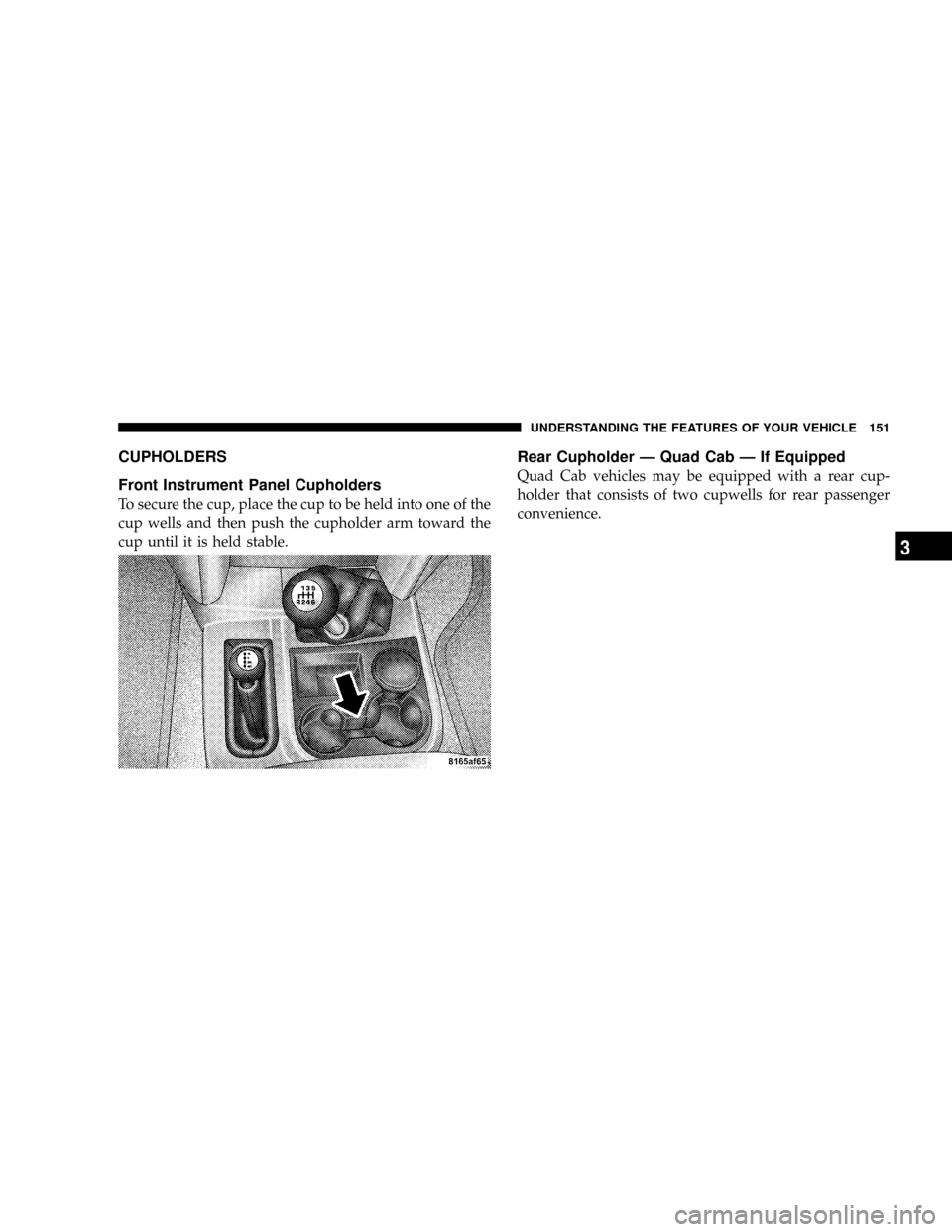
Front Instrument Panel Cupholders
To secure the cup, place the cup to be held into one of the
cup wells and then push the cupholder arm toward the
cup until it is held stable.
Rear Cupholder Ð Quad Cab Ð If Equipped
Quad Cab vehicles may be equipped with a rear cup-
holder that consists of two cupwells for rear passenger
convenience.
UNDERSTANDING THE FEATURES OF YOUR VEHICLE 151
3
Page 176 of 492
NOTE:If the gauge pointer moves to either extreme of
the gauge, the ªCheck Gagesº indicator will illuminate
and a single chime will sound.
10. Transfer Case Position
(See page 258 for more information.)
11 .TOW HAUL
The TOW HAUL button is located at the end of the gear
shift lever. This light will illuminate when the TOW
HAUL OD/OFF button is pushed once. (See page 254 for
more information.)
12.OD/OFF
the OD/OFF button is located at the end of the gear shift
lever. This light will illuminate when the TOW HAUL
OD/OFF button is pushed twice. (See page 254 for more
information.)13. Temperature Gauge
The temperature gauge indicates engine coolant
temperature. Any reading within the normal
range indicates that the cooling system is operat-
ing satisfactorily. The gauge needle will likely indicate a
higher temperature when driving in hot weather, up
mountain grades, in heavy traffic, or when towing a
trailer. If the needle rises to the ª245ÉFº mark, stop the
vehicle, shift into N (Neutral), and increase the engine
idle speed for 2 to 3 minutes. If the temperature reading
does not return to normal, shut your engine OFF and
allow it to cool. Seek authorized service immediately. See
Cooling System information in the section on ªMaintain-
ing Your Vehicle.º
UNDERSTANDING YOUR INSTRUMENT PANEL 175
4
Page 178 of 492
NOTE:The odometer/trip odometer Vacuum Fluores-
cent Display will also may display GASCAP, which
indicates that your gas cap is possibly loose or damaged.
The Vacuum Fluorescent Display will also display NO-
FUSE, which indicates that the IOD fuse is removed from
the Integrated Power Module. (See page 430 for more
information.)
NOTE:There is also an engine hour function. This
indicates the total number of hours the engine has been
running. To display the engine hours perform the follow-
ing: Place the ignition in RUN, but do not start the
engine. With the odometer value displayed, hold the trip
button down for a period of 6 seconds. The odometer will
change to trip value first, then it will display the engine
hour value. The engine hours will be displayed for a
period of 30 seconds until the ignition is turned off or the
engine is started.17. Check Gages Light
This light is part of an onboard diagnostic system
which monitors the emissions and engine control
system. If the vehicle is ready for emissions
testing the light will come on when the ignition is first
turned on and remain on, as a bulb check, until the
engine is started. If the vehicle is not ready for emissions
testing the light will come on when the ignition is first
turned on and remain on for 15 seconds, then blink for 5
seconds, and remain on until the vehicle is started. If the
bulb does not come on during starting, have the condi-
tion investigated promptly.
If this light comes on and remains on while driving, it
suggests a potential engine control problem and the need
for system service.
Although your vehicle will usually be drivable and not
need towing, see your dealer for service as soon as
possible.
UNDERSTANDING YOUR INSTRUMENT PANEL 177
4
Page 180 of 492
that the anti-lock portion of the brake system is not
functioning and that service is required. See your autho-
rized dealer immediately. The ABS light could also
illuminate during loss of traction and remain illuminated
until the brake pedal is pressed.
20. Cargo Light
The Cargo Lamp light will illuminate when the Cargo
Lamp is activated by pressing the Cargo Light Button on
the headlight switch.
21. Electronic Throttle Control (ETC)
This light informs you of a problem with the
Electronic Throttle Control system. If a prob-
lem is detected the light will come on while the
engine is running. If the light remains lit with
the engine running your vehicle will usually be drivable,
however, see your dealer for service as soon as possible.
If the light is flashing when the engine is running,
immediate service is required and you may experiencereduced performance, an elevated/rough idle or engine
stall and your vehicle may require towing. The light will
come on when the ignition is first turned on and remain
on for 15 seconds as a bulb check. If the light does not
come on during starting, have the system checked by an
authorized dealer.
22. SERV 4WD Indicator
The 4WD indicator will be illuminated whenever the
4WD mode is engaged for either the manual or electric
shift 4WD systems. The SERV 4WD indicator monitors
the electric shift 4WD system. If the SERV 4WD light
stays on or comes on during driving, it means that the
4WD system is not functioning properly and that service
is required.
23. Front Fog Light Indicator Ð If Equipped
This light shows when the front fog lights are ON.
UNDERSTANDING YOUR INSTRUMENT PANEL 179
4
Page 181 of 492
24. Low Washer Fluid Light
This light comes on when the washer fluid level falls
below approximately 1/4 full. The light will remain on
until fluid is added and ignition switch is cycled.
25. Transmission Oil Temperature Warning Light
(Automatic Transmissions Only)
This light indicates that there is excessive trans-
mission fluid temperature that might occur
with severe usage such as trailer towing. It may
also occur when operating the vehicle in a high
torque converter slip condition, such as 4-wheel-drive
operation (e.g. snow plowing, off- road operation). If this
light comes on, stop the vehicle and run the engine at idle
or faster, with the transmission in NEUTRAL until the
light goes off.26. Odometer/Trip Odometer Button
Press this button to toggle between the odometer and the
trip odometer display. Holding the button in resets the
trip odometer reading when in trip mode.
27. Fuel Gauge
Shows level of fuel in tank when ignition switch is in the
ON position.
28. Low Fuel Warning Light
When the fuel level drops to 1/16 tank, the fuel
symbol will light and a single chime will sound.
NOTE:If your vehicle is equipped with an overhead
console module (CMTC), it is possible for DTE to display
ªLO FUELº before the low fuel warning light turns on in
the instrument cluster. This could occur because the low
fuel warning is set to a specified fuel tank volume and
DTE is an estimated distance calculation based on vehicle
fuel economy and remaining fuel tank volume.
180 UNDERSTANDING YOUR INSTRUMENT PANEL