air DODGE RAM 1500 1998 2.G Workshop Manual
[x] Cancel search | Manufacturer: DODGE, Model Year: 1998, Model line: RAM 1500, Model: DODGE RAM 1500 1998 2.GPages: 2627
Page 564 of 2627

BRAKE LAMP
REMOVAL
REMOVAL - WITH CARGO BOX
(1) Disconnect and isolate the negative battery
cable.
(2) Remove the tail lamp unit (Refer to 8 - ELEC-
TRICAL/LAMPS/LIGHTING - EXTERIOR/TAIL
LAMP UNIT - REMOVAL).
(3) Remove the lamp back plate from the tail lamp
unit.
(4) Release the brake lamp bulb locking tabs and
remove the bulb from the back plate.
REMOVAL - WITHOUT CARGO BOX
(1) Disconnect and isolate the negative battery
cable.
(2) Remove the four screws that secure the tail
lamp lens to the tail lamp housing (Fig. 3).
(3) Separate the tail lamp lens from the tail lamp
housing.
(4) Push the brake lamp bulb inward and rotate it
counter-clockwise.
(5) Remove the brake lamp bulb from the brake
lamp socket.
INSTALLATION
INSTALLATION - WITH CARGO BOX
(1) Install the brake lamp bulb into the lamp back
plate.
(2) Install the lamp back plate onto the tail lamp
unit.
(3) Install the tail lamp unit (Refer to 8 - ELEC-
TRICAL/LAMPS/LIGHTING - EXTERIOR/TAIL
LAMP UNIT - INSTALLATION).
(4) Reconnect the negative battery cable.
INSTALLATION - WITHOUT CARGO BOX
(1) Install the brake lamp bulb into the brake
lamp socket by pushing inward and rotating it clock-
wise.
NOTE: Install the tail lamp lens with the clear por-
tion (back-up lens) at the top of the housing. Make
sure that the gasket is correctly in place and not
twisted or torn.
(2) Position the tail lamp lens and gasket onto the
tail lamp unit.
NOTE: Do not overtighten the tail lamp lens screws
or damage to the tail lamp lens may result.
(3) Install the four screws that secure the tail
lamp lens to the tail lamp unit. Tighten the screws
securely.
(4) Reconnect the negative battery cable.
BRAKE LAMP SWITCH
DESCRIPTION
The plunger type brake lamp switch is mounted on
a bracket attached to the base of the steering col-
umn, under the instrument panel.
CAUTION: The switch can only be adjusted during
initial installation. If the switch is not adjusted prop-
erly a new switch must be installed.
OPERATION
The brake lamp switch is hard wired to the Center
High Mount Stop Lamp (CHMSL) and also moni-
tored by the Instrument Cluster for use by the brake
lamp, speed control brake sensor circuits and elec-
tronic brake distribution (EBD). The brake lamp cir-
cuit is open until the plunger is depressed. The speed
control and brake sensor circuits are closed until the
plunger is depressed. When the brake lamp switch
transitions, the CHMSL transitions and instrument
cluster transmits a brake applied/released message
on the bus. The Integrated Power Module (IPM) will
then transition the brake lamps.
When the brake light switch is activated, the Pow-
ertrain Control Module (PCM) receives an input indi-
cating that the brakes are being applied. After
receiving this input, the PCM maintains idle speed to
a scheduled rpm through control of the Idle Air Con-
trol (IAC) motor. The brake switch input is also used
to disable vent and vacuum solenoid output signals
to the speed control servo.
Fig. 3 Tail Lamp Lens
DRLAMPS/LIGHTING - EXTERIOR 8L - 9
Page 568 of 2627

ment of the vehicle. The front fog lamp relay is a
conventional International Standards Organization
(ISO) micro relay (Fig. 9). Relays conforming to the
ISO specifications have common physical dimensions,
current capacities, terminal patterns, and terminal
functions. The relay is contained within a small, rect-
angular, molded plastic housing and is connected to
all of the required inputs and outputs by five integral
male spade-type terminals that extend from the bot-
tom of the relay base.
The front fog lamp relay cannot be adjusted or
repaired and, if faulty or damaged, the unit must be
replaced.
OPERATION
The front fog lamp relay is an electromechanical
switch that uses a low current input from the Front
Control Module (FCM) to control a high current out-
put to the front fog lamps. The movable common feed
contact point is held against the fixed normally
closed contact point by spring pressure. When the
relay coil is energized, an electromagnetic field is
produced by the coil windings. This electromagnetic
field draws the movable relay contact point away
from the fixed normally closed contact point, and
holds it against the fixed normally open contact
point. When the relay coil is de-energized, spring
pressure returns the movable contact point back
against the fixed normally closed contact point. A
resistor is connected in parallel with the relay coil in
the relay, and helps to dissipate voltage spikes and
electromagnetic interference that can be generated as
the electromagnetic field of the relay coil collapses.
The front fog lamp relay terminals are connected
to the vehicle electrical system through a connector
receptacle in the Power Distribution Center (PDC).
The inputs and outputs of the front fog lamp relay
include:
²Common Feed Terminal- The common feed
terminal (30) receives battery voltage at all times
from a fuse in the PDC through a fused B(+) circuit.
²Coil Ground Terminal- The coil ground termi-
nal (85) is connected to a control output of the Front
Control Module (FCM) through a front fog lamp relay
control circuit. The FCM controls front fog lamp oper-
ation by controlling a ground path through this cir-
cuit.
²Coil Battery Terminal- The coil battery ter-
minal (86) receives battery voltage at all times from
a fuse in the PDC through a fused B(+) circuit.
²Normally Open Terminal- The normally open
terminal (87) is connected to the front fog lamps
through a front fog lamp relay output circuit and
provides battery voltage to the front fog lamps when-
ever the relay is energized.²Normally Closed Terminal- The normally
closed terminal (87A) is not connected in this appli-
cation.
The front fog lamp relay can be diagnosed using
conventional diagnostic tools and methods. Refer to
the appropriate wiring information for diagnosis and
testing of the front fog lamp micro-relay and for com-
plete wiring diagrams.
REMOVAL
WARNING: ON VEHICLES EQUIPPED WITH AIR-
BAGS, DISABLE THE SUPPLEMENTAL RESTRAINT
SYSTEM BEFORE ATTEMPTING ANY STEERING
WHEEL, STEERING COLUMN, DRIVER AIRBAG,
PASSENGER AIRBAG, SEAT BELT TENSIONER,
FRONT IMPACT SENSORS, SIDE CURTAIN AIRBAG,
OR INSTRUMENT PANEL COMPONENT DIAGNOSIS
OR SERVICE. DISCONNECT AND ISOLATE THE
BATTERY NEGATIVE (GROUND) CABLE, THEN
WAIT TWO MINUTES FOR THE SYSTEM CAPACI-
TOR TO DISCHARGE BEFORE PERFORMING FUR-
THER DIAGNOSIS OR SERVICE. THIS IS THE ONLY
SURE WAY TO DISABLE THE SUPPLEMENTAL
RESTRAINT SYSTEM. FAILURE TO TAKE THE
PROPER PRECAUTIONS COULD RESULT IN ACCI-
DENTAL AIRBAG DEPLOYMENT AND POSSIBLE
PERSONAL INJURY.
(1) Disconnect and isolate the battery negative
cable.
(2) Remove the cover for the Power Distribution
Center (PDC).
(3) Remove the front fog lamp relay by grasping it
firmly and pulling it straight out from the receptacle
in the PDC.
INSTALLATION
WARNING: ON VEHICLES EQUIPPED WITH AIR-
BAGS, DISABLE THE SUPPLEMENTAL RESTRAINT
SYSTEM BEFORE ATTEMPTING ANY STEERING
WHEEL, STEERING COLUMN, DRIVER AIRBAG,
PASSENGER AIRBAG, SEAT BELT TENSIONER,
FRONT IMPACT SENSORS, SIDE CURTAIN AIRBAG,
OR INSTRUMENT PANEL COMPONENT DIAGNOSIS
OR SERVICE. DISCONNECT AND ISOLATE THE
BATTERY NEGATIVE (GROUND) CABLE, THEN
WAIT TWO MINUTES FOR THE SYSTEM CAPACI-
TOR TO DISCHARGE BEFORE PERFORMING FUR-
THER DIAGNOSIS OR SERVICE. THIS IS THE ONLY
SURE WAY TO DISABLE THE SUPPLEMENTAL
RESTRAINT SYSTEM. FAILURE TO TAKE THE
PROPER PRECAUTIONS COULD RESULT IN ACCI-
DENTAL AIRBAG DEPLOYMENT AND POSSIBLE
PERSONAL INJURY.
DRLAMPS/LIGHTING - EXTERIOR 8L - 13
FOG LAMP RELAY (Continued)
Page 569 of 2627

(1) Position the front fog lamp relay to the proper
receptacle in the Power Distribution Center (PDC).
(2) Align the front fog lamp relay terminals with
the terminal cavities in the PDC.
(3) Press firmly and evenly on the top of the front
fog lamp relay until the terminals are fully seated in
the PDC.
(4) Reconnect the battery negative cable.
HAZARD SWITCH
DESCRIPTION
The hazard switch is activated by a push button
located in the multifunction switch on the top of the
steering column between the steering wheel and
instrument cluster.
The hazard warning system allows the vehicle
operator to provide other vehicle operators in the
near proximity an optical indication that the vehicle
is disabled or an obstacle to traffic flow. The hazard
warning system has battery voltage at all times,
regardless of ignition position.
OPERATION
The instrument cluster monitors the multiplexed
multifunction switch operation. When the hazard
warning switch is activated, the instrument cluster
will send a J1850 bus message to the Front Control
Module (FCM), then activate the two turn signal
indicators and audible click in the instrument clus-
ter.
The FCM will then activate the necessary relays in
the Power Distribution Center (PDC) to begin flash-
ing both the front and rear turn signal indicator
lamps.
HEADLAMP
REMOVAL
(1) Disconnect and isolate the negitive battery
cable.
(2) Remove the headlamp unit (Refer to 8 - ELEC-
TRICAL/LAMPS/LIGHTING - EXTERIOR/HEAD-
LAMP UNIT - REMOVAL).
(3) Seperate the socket from the headlamp unit.
INSTALLATION
CAUTION: Do Not Touch the bulb glass with fingers
or other oily surfaces. Reduced bulb life will result.
(1) Install the socket into the headlamp unit.
(2) Install the headlamp unit (Refer to 8 - ELEC-
TRICAL/LAMPS/LIGHTING - EXTERIOR/HEAD-
LAMP UNIT - INSTALLATION).(3) Connect the negitive battery cable.
HEADLAMP SWITCH
DESCRIPTION
The multiplexed headlamp switch is located on the
instrument panel. The headlamp switch controls the
parking lamps, fog lamps and the headlamps. A sep-
arate switch in the module controls the interior
lamps and instrument cluster illumination. This
switch also contains a rheostat for controlling the
illumination level of the cluster lamps.
OPERATION
The multiplexed headlamp switch has an off, park-
ing lamp, fog lamp and a headlamp on position. High
beams are controlled by the multiplexed multifunc-
tion switch on the steering column. The fog lamps
are illuminated by pulling back on the headlamp
switch knob when in the parking lamp or headlamp
ON position.The headlamp switch cannot be
repaired. It must be replaced.
The Instrument Cluster monitors the headlamp
and multifunction switch operation. When the head-
lamp switch is rotated to the parking lamp or On
position the Instrument Cluster sends a J1850 mes-
sage to the Front Control Module, which is mated to
the power distribution center to become the Inte-
grated Control Module, to illuminate the appropriate
bulbs. When the multifunction switch is activated to
the optical horn or high beam position the Instru-
ment Cluster illuminates the high beam indicator
and sends a J1850 message to the Front Control
Module to illuminate the appropriate bulbs.
REMOVAL
WARNING: ON VEHICLES EQUIPPED WITH AIR-
BAGS, DISABLE THE AIRBAG SYSTEM BEFORE
ATTEMPTING ANY STEERING WHEEL, STEERING
COLUMN, OR INSTRUMENT PANEL COMPONENT
DIAGNOSIS OR SERVICE. DISCONNECT AND ISO-
LATE THE BATTERY NEGATIVE (GROUND) CABLE,
THEN WAIT TWO MINUTES FOR THE AIRBAG SYS-
TEM CAPACITOR TO DISCHARGE BEFORE PER-
FORMING FURTHER DIAGNOSIS OR SERVICE. THIS
IS THE ONLY SURE WAY TO DISABLE THE AIRBAG
SYSTEM. FAILURE TO TAKE THE PROPER PRE-
CAUTIONS COULD RESULT IN ACCIDENTAL AIR-
BAG DEPLOYMENT AND POSSIBLE PERSONAL
INJURY.
(1) Disconnect and isolate the battery negative
cable.
8L - 14 LAMPS/LIGHTING - EXTERIORDR
FOG LAMP RELAY (Continued)
Page 570 of 2627

(2) Remove the left instrument panel bezel. (Refer
to 23 - BODY/INSTRUMENT PANEL/CLUSTER
BEZEL - REMOVAL).
(3) Disconnect the harness connector.
(4) Remove the screws that secure the headlamp
switch to the instrument panel bezel (Fig. 10).
(5) Remove the headlamp switch from the instru-
ment panel bezel.
INSTALLATION
WARNING: ON VEHICLES EQUIPPED WITH AIR-
BAGS, DISABLE THE AIRBAG SYSTEM BEFORE
ATTEMPTING ANY STEERING WHEEL, STEERING
COLUMN, OR INSTRUMENT PANEL COMPONENT
DIAGNOSIS OR SERVICE. DISCONNECT AND ISO-
LATE THE BATTERY NEGATIVE (GROUND) CABLE,
THEN WAIT TWO MINUTES FOR THE AIRBAG SYS-
TEM CAPACITOR TO DISCHARGE BEFORE PER-
FORMING FURTHER DIAGNOSIS OR SERVICE. THIS
IS THE ONLY SURE WAY TO DISABLE THE AIRBAG
SYSTEM. FAILURE TO TAKE THE PROPER PRE-
CAUTIONS COULD RESULT IN ACCIDENTAL AIR-
BAG DEPLOYMENT AND POSSIBLE PERSONAL
INJURY.
(1) Position the headlamp switch to the left instru-
ment panel bezal and secure with screws.Tighten the
screws to 2.2 N´m (20 in. lbs.).(2) Reconnect the instrument panel wire harness
connector for the headlamp switch.
(3) Position the left instrument panel bezal on to
the instrument panel.
(4) Install the cluster bezel onto the instrument
panel (Fig. 10).
(5) Connect the battery negative cable.
HEADLAMP UNIT
REMOVAL
(1) Disconnect and isolate the battery negative
cable.
(2) Remove the push pins attaching the seal to the
fender.
(3) Remove the bolts attaching the headlamp unit
to the fender (Fig. 11).
(4) Remove the bulb sockets from the headlamp
unit
(5) Separate headlamp unit from vehicle.
INSTALLATION
CAUTION: Do not touch the bulb glass with fingers
or other oily surfaces. Reduced bulb life will result.
(1) Install the bulb sockets for the front park/turn
signal and headlamp.
(2) Position headlamp unit in inner fender panel.
Fig. 10 Headlamp Switch Removal
1 - DASH BOARD
2 - HEADLAMP SWITCH
3 - INSTRUMENT PANEL BEZAL
Fig. 11 Headlamp - Typical
1 - SEAL
2 - PUSH PIN
3 - SCREW
4 - HEADLAMP UNIT
DRLAMPS/LIGHTING - EXTERIOR 8L - 15
HEADLAMP SWITCH (Continued)
Page 574 of 2627
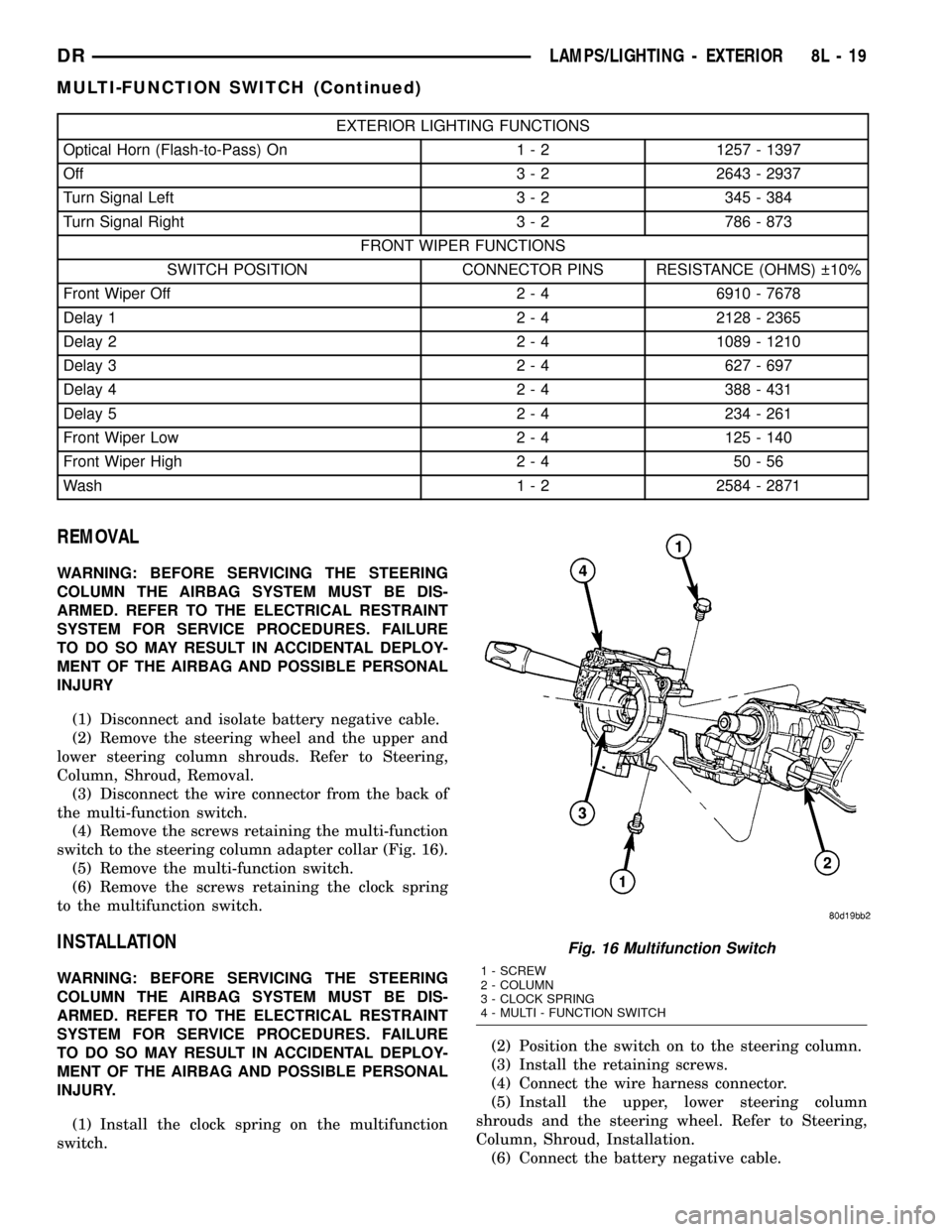
EXTERIOR LIGHTING FUNCTIONS
Optical Horn (Flash-to-Pass) On 1 - 2 1257 - 1397
Off 3 - 2 2643 - 2937
Turn Signal Left 3 - 2 345 - 384
Turn Signal Right 3 - 2 786 - 873
FRONT WIPER FUNCTIONS
SWITCH POSITION CONNECTOR PINS RESISTANCE (OHMS) 10%
Front Wiper Off 2 - 4 6910 - 7678
Delay 1 2 - 4 2128 - 2365
Delay 2 2 - 4 1089 - 1210
Delay 3 2 - 4 627 - 697
Delay 4 2 - 4 388 - 431
Delay 5 2 - 4 234 - 261
Front Wiper Low 2 - 4 125 - 140
Front Wiper High 2 - 4 50 - 56
Wash 1 - 2 2584 - 2871
REMOVAL
WARNING: BEFORE SERVICING THE STEERING
COLUMN THE AIRBAG SYSTEM MUST BE DIS-
ARMED. REFER TO THE ELECTRICAL RESTRAINT
SYSTEM FOR SERVICE PROCEDURES. FAILURE
TO DO SO MAY RESULT IN ACCIDENTAL DEPLOY-
MENT OF THE AIRBAG AND POSSIBLE PERSONAL
INJURY
(1) Disconnect and isolate battery negative cable.
(2) Remove the steering wheel and the upper and
lower steering column shrouds. Refer to Steering,
Column, Shroud, Removal.
(3) Disconnect the wire connector from the back of
the multi-function switch.
(4) Remove the screws retaining the multi-function
switch to the steering column adapter collar (Fig. 16).
(5) Remove the multi-function switch.
(6) Remove the screws retaining the clock spring
to the multifunction switch.
INSTALLATION
WARNING: BEFORE SERVICING THE STEERING
COLUMN THE AIRBAG SYSTEM MUST BE DIS-
ARMED. REFER TO THE ELECTRICAL RESTRAINT
SYSTEM FOR SERVICE PROCEDURES. FAILURE
TO DO SO MAY RESULT IN ACCIDENTAL DEPLOY-
MENT OF THE AIRBAG AND POSSIBLE PERSONAL
INJURY.
(1) Install the clock spring on the multifunction
switch.(2) Position the switch on to the steering column.
(3) Install the retaining screws.
(4) Connect the wire harness connector.
(5) Install the upper, lower steering column
shrouds and the steering wheel. Refer to Steering,
Column, Shroud, Installation.
(6) Connect the battery negative cable.
Fig. 16 Multifunction Switch
1 - SCREW
2 - COLUMN
3 - CLOCK SPRING
4 - MULTI - FUNCTION SWITCH
DRLAMPS/LIGHTING - EXTERIOR 8L - 19
MULTI-FUNCTION SWITCH (Continued)
Page 575 of 2627

PARK LAMP RELAY
DESCRIPTION
The park lamp relay is located in the Power Dis-
tribution Center (PDC) of the vehicle. The park lamp
relay is a conventional International Standards
Organization (ISO) micro relay (Fig. 17). Relays con-
forming to the ISO specifications have common phys-
ical dimensions, current capacities, terminal
patterns, and terminal functions.
The park lamp relay cannot be adjusted or
repaired and, if faulty or damaged, the unit must be
replaced.
OPERATION
The park lamp relay is an electromechanical
switch that uses a low current input from the Front
Control Module (FCM) to control a high current out-
put to the park lamps. The movable common feed
contact point is held against the fixed normally
closed contact point by spring pressure. When the
relay coil is energized, an electromagnetic field is
produced by the coil windings. This electromagnetic
field draws the movable relay contact point away
from the fixed normally closed contact point, and
holds it against the fixed normally open contact
point. When the relay coil is de-energized, spring
pressure returns the movable contact point back
against the fixed normally closed contact point. A
resistor is connected in parallel with the relay coil in
the relay, and helps to dissipate voltage spikes and
electromagnetic interference that can be generated as
the electromagnetic field of the relay coil collapses.The park lamp relay terminals are connected to
the vehicle electrical system through a connector in
the Junction Block (JB). The inputs and outputs of
the headlamp low beam relay include:
²Common Feed Terminal- The common feed
terminal (30) is connected to the park lamps through
the park lamp relay output circuit and provides
ground to the park lamps when the relay is de-ener-
gized, and battery current to the park lamps when-
ever the relay is energized.
²Coil Ground Terminal- The coil ground termi-
nal (85) is connected to a control output of the Front
Control Module (FCM) through a park lamp relay
control circuit. The FCM controls park lamp opera-
tion by controlling a ground path through this cir-
cuit.
²Coil Battery Terminal- The coil battery ter-
minal (86) receives battery current at all times from
a fuse in the PDC through a fused B(+) circuit.
²Normally Open Terminal- The normally open
terminal (87) receives battery current at all times
from a fuse in the Power Distribution Center (PDC)
through a fused B(+) circuit.
²Normally Closed Terminal- The normally
closed terminal (87A) is connected to ground at all
times.
The park lamp relay can be diagnosed using con-
ventional diagnostic tools and methods.
DIAGNOSIS AND TESTING - PARK LAMP
RELAY
The park lamp relay (Fig. 18) is located in the
Power Distribution Center (PDC). Refer to the appro-
priate wiring information.
WARNING: ON VEHICLES EQUIPPED WITH AIR-
BAGS, DISABLE THE SUPPLEMENTAL RESTRAINT
SYSTEM BEFORE ATTEMPTING ANY STEERING
WHEEL, STEERING COLUMN, DRIVER AIRBAG,
PASSENGER AIRBAG, SEAT BELT TENSIONER,
FRONT IMPACT SENSORS, SIDE CURTAIN AIRBAG,
OR INSTRUMENT PANEL COMPONENT DIAGNOSIS
OR SERVICE. DISCONNECT AND ISOLATE THE
BATTERY NEGATIVE (GROUND) CABLE, THEN
WAIT TWO MINUTES FOR THE SYSTEM CAPACI-
TOR TO DISCHARGE BEFORE PERFORMING FUR-
THER DIAGNOSIS OR SERVICE. THIS IS THE ONLY
SURE WAY TO DISABLE THE SUPPLEMENTAL
RESTRAINT SYSTEM. FAILURE TO TAKE THE
PROPER PRECAUTIONS COULD RESULT IN ACCI-
DENTAL AIRBAG DEPLOYMENT AND POSSIBLE
PERSONAL INJURY.
(1) Remove the park lamp relay from the PDC.
(2) A relay in the de-energized position should
have continuity between terminals 87A and 30, and
Fig. 17 ISO Micro Relay
30 - COMMON FEED
85 - COIL GROUND
86 - COIL BATTERY
87 - NORMALLY OPEN
87A - NORMALLY CLOSED
8L - 20 LAMPS/LIGHTING - EXTERIORDR
Page 576 of 2627

no continuity between terminals 87 and 30. If OK, go
to Step 3. If not OK, replace the faulty relay.
(3) Resistance between terminals 85 and 86 (elec-
tromagnet) should be 75 8 ohms. If OK, go to Step
4. If not OK, replace the faulty relay.
(4) Connect a battery to terminals 85 and 86.
There should now be continuity between terminals
30 and 87, and no continuity between terminals 87A
and 30. If OK, reinstall the relay and use a DRBIIIt
scan tool to perform further testing. Refer to the
appropriate diagnostic information.
REMOVAL
WARNING: ON VEHICLES EQUIPPED WITH AIR-
BAGS, DISABLE THE SUPPLEMENTAL RESTRAINT
SYSTEM BEFORE ATTEMPTING ANY STEERING
WHEEL, STEERING COLUMN, DRIVER AIRBAG,
PASSENGER AIRBAG, SEAT BELT TENSIONER,
FRONT IMPACT SENSORS, SIDE CURTAIN AIRBAG,
OR INSTRUMENT PANEL COMPONENT DIAGNOSIS
OR SERVICE. DISCONNECT AND ISOLATE THE
BATTERY NEGATIVE (GROUND) CABLE, THEN
WAIT TWO MINUTES FOR THE SYSTEM CAPACI-
TOR TO DISCHARGE BEFORE PERFORMING FUR-
THER DIAGNOSIS OR SERVICE. THIS IS THE ONLY
SURE WAY TO DISABLE THE SUPPLEMENTAL
RESTRAINT SYSTEM. FAILURE TO TAKE THE
PROPER PRECAUTIONS COULD RESULT IN ACCI-
DENTAL AIRBAG DEPLOYMENT AND POSSIBLE
PERSONAL INJURY.
(1) Disconnect and isolate the battery negative
cable.(2) Remove the Power Distribution Center (PDC)
cover.
(3) Remove the park lamp relay by grasping it
firmly and pulling it straight out from the receptacle
in the PDC.
INSTALLATION
WARNING: ON VEHICLES EQUIPPED WITH AIR-
BAGS, DISABLE THE SUPPLEMENTAL RESTRAINT
SYSTEM BEFORE ATTEMPTING ANY STEERING
WHEEL, STEERING COLUMN, DRIVER AIRBAG,
PASSENGER AIRBAG, SEAT BELT TENSIONER,
FRONT IMPACT SENSORS, SIDE CURTAIN AIRBAG,
OR INSTRUMENT PANEL COMPONENT DIAGNOSIS
OR SERVICE. DISCONNECT AND ISOLATE THE
BATTERY NEGATIVE (GROUND) CABLE, THEN
WAIT TWO MINUTES FOR THE SYSTEM CAPACI-
TOR TO DISCHARGE BEFORE PERFORMING FUR-
THER DIAGNOSIS OR SERVICE. THIS IS THE ONLY
SURE WAY TO DISABLE THE SUPPLEMENTAL
RESTRAINT SYSTEM. FAILURE TO TAKE THE
PROPER PRECAUTIONS COULD RESULT IN ACCI-
DENTAL AIRBAG DEPLOYMENT AND POSSIBLE
PERSONAL INJURY.
(1) Position the park lamp relay to the proper
receptacle in the Power Distribution Center (PDC).
(2) Align the park lamp relay terminals with the
terminal cavities in the PDC.
(3) Press firmly and evenly on the top of the park
lamp relay until the terminals are fully seated in the
PDC.
(4) Install the PDC cover.
(5) Reconnect the battery negative cable.
PARK/TURN SIGNAL LAMP
REMOVAL
(1) Disconnect and isolate the negative battery
cable.
(2) Remove the headlamp unit.(Refer to 8 - ELEC-
TRICAL/LAMPS/LIGHTING - EXTERIOR/HEAD-
LAMP UNIT - REMOVAL).
(3) Remove the bulb socket from the headlamp
unit.
(4) Release the front park/turn signal bulb locking
tabs and remove the bulb from the socket (Fig. 19).
INSTALLATION
(1) Install the front park/turn signal bulb into the
bulb socket.
(2) Install the bulb socket into the headlamp unit.
(3) Install the headlamp unit (Refer to 8 - ELEC-
TRICAL/LAMPS/LIGHTING - EXTERIOR/HEAD-
LAMP UNIT - INSTALLATION).
Fig. 18 ISO Micro Relay
30 - COMMON FEED
85 - COIL GROUND
86 - COIL BATTERY
87 - NORMALLY OPEN
87A - NORMALLY CLOSED
DRLAMPS/LIGHTING - EXTERIOR 8L - 21
PARK LAMP RELAY (Continued)
Page 582 of 2627

(4) Push the right side of the lamp in the head-
liner opening and push the lamp lens up into the
lamp to secure (Fig. 1).
DOOR AJAR SWITCH
DESCRIPTION
The door ajar switches are integral to the door
latches on each door. The switches close a path to
ground for the Instrument Cluster when a door is
opened.
The door ajar switches cannot be repaired and, if
faulty or damaged, the door latch unit must be
replaced. Refer to the Body section under Doors for
the removal and installation procedure.
OPERATION
The door ajar switches close a path to ground for
the Instrument Cluster when a door is opened. The
passenger front door is connected in a parallel-series
circuit between ground and the Instrument Cluster,
while the driver side front door ajar switch is con-
nected in series between ground and the Instrument
Cluster to provide a unique input. The Instrument
Cluster reads the switch status, then sends the
proper switch status messages to other electronic
modules over the Programmable Communications
Interface (PCI) data bus network. The door ajar
switches can be diagnosed using conventional diag-
nostic tools and methods. Refer to the Body section
under Doors for the Removal and Installation proce-
dures.
GLOVE BOX LAMP/SWITCH
REMOVAL
(1) Disconnect and isolate the battery negative
cable.
(2) Remove the glove box from the instrument
panel. (Refer to 23 - BODY/INSTRUMENT PANEL/
GLOVE BOX - REMOVAL) for the procedures.
(3) Reach through the glove box opening and
behind the glove box lamp and switch mounting
bracket to access the instrument panel wire harness
connector on the glove box lamp and switch (Fig. 3).
(4) Disconnect the instrument panel wire harness
connector from the connector receptacle on the back
of the glove box lamp and switch unit.
(5) Reach through the glove box opening and
behind the glove box lamp and switch mounting
bracket to depress the retaining tabs on the top and
bottom of the glove box lamp and switch housing.
(6) While holding the retaining tabs depressed,
push the glove box lamp and switch unit out through
the hole in the mounting bracket on the instrument
panel glove box opening upper reinforcement.
(7) Remove the glove box lamp and switch unit
from the instrument panel.
Fig. 2 Dome Lamp
1 - SLIDE LAMP
Fig. 3 Glove Box Lamp and Switch Remove/Install
1 - WIRE HARNESS CONNECTOR
2 - DASH BOARD
3 - GLOVE BOX SWITCH/LIGHT
DRLAMPS/LIGHTING - INTERIOR 8L - 27
DOME LAMP (Continued)
Page 587 of 2627

The compass unit also will compensate for magne-
tism the body of the vehicle may acquire during nor-
mal use. However, avoid placing anything magnetic
directly on the roof of the vehicle. Magnetic mounts
for an antenna, a repair order hat, or a funeral pro-
cession flag can exceed the compensating ability of
the compass unit if placed on the roof panel. Mag-
netic bit drivers used on the fasteners that hold the
overhead console assembly to the roof header can
also affect compass operation. If the vehicle roof
should become magnetized, the demagnetizing and
calibration procedures found in this section may be
required to restore proper compass operation.
TEMPERATURE DISPLAY
All the available overhead consoles on this model
include Temperature information. The temperature
displays the outside ambient temperature in whole
degrees. The temperature display can be toggled
from Fahrenheit to Celsius by selecting the desired
U.S./Metric option from the customer programmable
features. The displayed temperature is not an instant
reading of conditions, but an average temperature. It
may take the temperature display several minutes to
respond to a major temperature change, such as driv-
ing out of a heated garage into winter temperatures.
When the ignition switch is turned to the Off posi-
tion, the last displayed temperature reading stays in
the electronic control modules, (CMTC, EVIC) mem-
ory. When the ignition switch is turned to the On
position again, the electronic module will display the
memory temperature for one minute; then update the
display to the current average temperature reading
within five minutes.The temperature function is supported by an ambi-
ent temperature sensor. This sensor is mounted out-
side the passenger compartment near the front and
center of the vehicle, and is hard wired to the Front
Control Module (FCM). The FCM sends temperature
status messages to the module over the J1850 PCI
data bus circuit. For more information on the ambi-
ent temperature sensor, refer to Ambient Tempera-
ture Sensor later in this section.
Following are general descriptions of the major
components used in the overhead console. Refer to
Wiring Diagrams for complete circuit schematics.
OPERATION
Refer to the vehicle Owner's Manual for specific
operation of each overhead console and its systems.
DIAGNOSIS AND TESTING - OVERHEAD
CONSOLE
If the problem with the overhead console is an
inaccurate or scrambled display, refer toSELF-DI-
AGNOSTIC TESTlater in this text. If the problem
with the overhead console is incorrect Vacuum Fluo-
rescent Display (VFD) dimming levels, use a DRB
IIItscan tool and the proper Diagnostic Procedures
manual to test for the correct dimming message
inputs being received from the Body Control Module
(BCM) or Front Control Module (FCM) over the
J1850 Programmable Communications Interface
(PCI) data bus circuit. If the problem is a no-display
condition, use the following procedure. For complete
circuit diagrams, refer toOverhead Consolein the
Wiring Diagrams section of the service manual.
(1) Remove the overhead console from the head-
liner (Refer to 8 - ELECTRICAL/OVERHEAD CON-
SOLE - REMOVAL).
(2) Check for battery voltage at the overhead con-
sole electrical connector. Refer to Wiring for connec-
tor information. If OK, go to Step 3. If not OK, Check
for battery voltage at the appropriate B(+) fuse in the
integrated power module, repair the open fused B(+)
circuit as required.
(3) Turn the ignition switch to the On position.
Check the fused ignition switch output circuit(s) at
the overhead console electrical connector. If OK, go to
Step 4. If not OK, repair the open or shorted circuit
as required.
(4) Turn the ignition switch to the Off position.
Disconnect and isolate the battery negative cable.
Check for continuity between the ground circuit cav-
ity of the overhead console electrical connector and a
good ground. There should be continuity. If OK, refer
toSELF-DIAGNOSTIC TESTbelow for further
diagnosis of the electronics module and the J1850
PCI data bus circuit. If not OK, repair the open
ground circuit as required.
Fig. 1 DR OVERHEAD CONSOLE ± EVIC
8M - 2 MESSAGE SYSTEMSDR
OVERHEAD CONSOLE (Continued)
Page 592 of 2627

NOTE: If a new module has been installed, the com-
pass will have to be calibrated and the variance set.
Refer to Compass Variation Adjustment and Com-
pass Calibration in the Standard Procedures sec-
tion of this group for the procedures.
ELECTRONIC VEHICLE INFO
CENTER
DESCRIPTION
The Electronic Vehicle Information Center (EVIC)
is a module located in the overhead console on some
models. The EVIC module features a large Vacuum
Fluorescent Display (VFD) screen for displaying
information, and back-lit push button switches
labeled C/T (compass/temperature), RESET, STEP,
and MENU.
The EVIC module contains a central processing
unit and interfaces with other electronic modules in
the vehicle over the Programmable Communications
Interface (PCI) J1850 data bus circuit. The PCI data
bus circuit allows the sharing of sensor information.
This helps to reduce wire harness complexity, reduce
internal controller hardware, and reduce component
sensor current loads. At the same time, this system
provides increased reliability, enhanced diagnostics,
and allows the addition of many new feature capabil-
ities.The EVIC ªMenuº push button provides the vehicle
operator with a user interface, which allows the
selection of several optional customer programmable
electronic features to suit individual preferences.
Refer toELECTRONIC VEHICLE INFORMA-
TION CENTER PROGRAMMINGin the Standard
Procedures section of this group for more information
on the customer programmable feature options.
If the vehicle is equipped with the optional univer-
sal transmitter transceiver, the EVIC will also dis-
play messages and an icon indicating when the
universal transmitter transceiver is being trained,
which of the three transmitter buttons is transmit-
ting, and when the transceiver is cleared.
Data input for all EVIC functions, including VFD
dimming level, is received through the J1850 PCI
data bus circuit. The EVIC module uses its internal
programming and all of its data inputs to calculate
and display the requested data. If the data displayed
is incorrect, perform the self-diagnostic tests as
described in this group. If these tests prove inconclu-
sive, the use of a DRB IIItscan tool and the proper
Diagnostic Procedures manual are recommended for
further testing of the EVIC module and the J1850
PCI data bus circuit.
The EVIC module cannot be repaired, and is avail-
able for service only as a unit. If any part is faulty or
damaged, the complete EVIC module must be
replaced.
OPERATION
The Electronic Vehicle Information Center is wired
to both constant 12v and ignition switched sources of
battery current so that some of its features remain
operational at any time, while others may only oper-
ate with the ignition switch in the On position. When
the ignition switch is turned to the On position, the
EVIC module display will return to the last function
being displayed before the ignition was turned to the
Off position.
The compass/temperature display is the normal
EVIC display. With the ignition switch in the On
position, momentarily depressing and releasing the
C/T (compass/temperature) push button switch will
cause the EVIC to return to the compass/tempera-
ture display mode from any other mode. While in the
compass/temperature display mode, momentarily
depressing and releasing the Step push button will
step through the available trip computer display
options.
The EVIC trip computer features several functions
that can be reset. The functions that can be reset
are: average fuel economy, trip odometer and elapsed
time. With the ignition switch in the On position and
with one of the functions of the trip computer that
can be reset currently displayed, depressing the
Fig. 5 OVERHEAD CONSOLE MODULE REMOVAL
1 - COMPASS MINI-TRIP COMPUTER MODULE
2 - OVERHEAD CONSOLE
DRMESSAGE SYSTEMS 8M - 7
COMPASS/MINI-TRIP COMPUTER (Continued)