Glass DODGE RAM 1500 1998 2.G User Guide
[x] Cancel search | Manufacturer: DODGE, Model Year: 1998, Model line: RAM 1500, Model: DODGE RAM 1500 1998 2.GPages: 2627
Page 371 of 2627

RADIATOR - 5.9L DIESEL
DESCRIPTION
The radiator is a aluminum cross-flow design with
horizontal tubes through the radiator core and verti-
cal plastic side tanks (Fig. 38).
This radiator does not contain an internal trans-
mission oil cooler.
OPERATION
The radiator supplies sufficient heat transfer using
the cooling fins interlaced between the horizontal
tubes in the radiator core to cool the engine.
DIAGNOSIS AND TESTING - RADIATOR
COOLANT FLOW
Use the following procedure to determine if coolant
is flowing through the cooling system.
(1) Idle engine until operating temperature is
reached. If the upper radiator hose is warm to the
touch, the thermostat is opening and coolant is flow-
ing to the radiator.
WARNING: HOT, PRESSURIZED COOLANT CAN
CAUSE INJURY BY SCALDING. USING A RAG TO
COVER THE RADIATOR PRESSURE CAP, OPEN
RADIATOR CAP SLOWLY TO THE FIRST STOP. THIS
WILL ALLOW ANY BUILT-UP PRESSURE TO VENT
TO THE RESERVE/OVERFLOW TANK. AFTER PRES-
SURE BUILD-UP HAS BEEN RELEASED, REMOVE
CAP FROM FILLER NECK.
(2) Drain a small amount of coolant from the radi-
ator until the ends of the radiator tubes are visible
through the filler neck. Idle the engine at normal
operating temperature. If coolant is flowing past the
exposed tubes, the coolant is circulating.
REMOVAL
(1) Disconnect both battery negative cables.
WARNING: DO NOT REMOVE THE CYLINDER
BLOCK DRAIN PLUGS OR LOOSEN THE RADIATOR
DRAINCOCK WITH THE SYSTEM HOT AND UNDER
PRESSURE. SERIOUS BURNS FROM COOLANT
CAN OCCUR.
(2) Drain the cooling system (Refer to 7 - COOL-
ING - STANDARD PROCEDURE).
WARNING: CONSTANT TENSION HOSE CLAMPS
ARE USED ON MOST COOLING SYSTEM HOSES.
WHEN REMOVING OR INSTALLING, USE ONLY
TOOLS DESIGNED FOR SERVICING THIS TYPE OF
CLAMP, SUCH AS SPECIAL CLAMP TOOL (NUMBER6094). ALWAYS WEAR SAFETY GLASSES WHEN
SERVICING CONSTANT TENSION CLAMPS.
CAUTION: A number or letter is stamped into the
tongue of constant tension clamps. If replacement
is necessary, use only an original equipment clamp
with a matching number or letter.
(3) Remove air box and turbocharger inlet tube.
(4) Remove coolant tank hose, washer bottle hose
and the positive battery cable from the fastening
clips located on top of the radiator.
(5) Remove hose clamps and hoses from radiator.
(6) Remove the power steering cooler mounting
bolts and position the power steering cooler out of
the way.
(7) Disconnect the transmission cooler lines at the
transmission cooler. The transmission cooler will
remain on the radiator and can be removed as an
assembly.
(8) Disconnect the electronic viscous fan drive elec-
trical connector.
(9) Using a fastener removal tool, remove the two
push pins and the lower shroud assembly and elec-
tronic viscous fan drive wiring from the upper shroud
assembly. Position wiring out of the way. Do not
impact or damage the electronic viscous fan drive or
pull it's wiring.
(10) Using a fastener tool, remove the wiring har-
ness bracket from the upper fan shroud.
(11) Remove the two radiator upper mounting
bolts (Fig. 38).
(12) Lift radiator straight up and out of engine
compartment. The bottom of the radiator is equipped
with two alignment dowels that fit into holes in the
lower radiator support panel. Rubber biscuits (insu-
lators) are installed to these dowels. Take care not to
damage cooling fins or tubes on the radiator and air
conditioning condenser or the electronic viscous fan
connector when removing.
CLEANING
Clean radiator fins are necessary for good heat
transfer. The radiator and oil cooler fins should be
cleaned when an accumulation of debris has
occurred. With the engine cold, apply cold water and
compressed air to the back (engine side) of the radi-
ator to flush the radiator and/or oil coolers of debris.
INSPECTION
Inspect the radiator side tanks for cracks, and bro-
ken or missing fittings. Inspect the joint where the
tanks seam up to the radiator core for signs of leak-
age and/or deteriorating seals.
Inspect radiator core for corroded, bent or missing
cooling fins. Inspect the core for bent or damaged
cooling tubes.
7 - 56 ENGINEDR
Page 375 of 2627

engine warm-up preventing the coolant from flowing
through the radiator (Fig. 44).
OPERATION
OPERATIONÐWATER PUMP
A centrifugal water pump circulates coolant
through the water jackets, passages, intake manifold,
radiator core, cooling system hoses and heater core,
this coolant absorbs the heat generated when the
engine is running. The pump is driven by the engine
crankshaft via a drive belt.
OPERATION - WATER PUMP BYPASS
When the thermostat is in the closed position the
bypass gallery is not obstructed allowing 100% flow.
When the thermostat is in the open position the pill
partially covers the bypass hole, reducing the amount
of bypass flow. This design allows the coolant to
reach operating temperature quickly when cold,
while adding extra cooling during normal tempera-
ture operation.
REMOVAL
The water pump on 3.7L/4.7L engines is bolted
directly to the engine timing chain case cover.
(1) Disconnect the negative battery cable.(2) Drain cooling system (Refer to 7 - COOLING -
STANDARD PROCEDURE).
(3) Remove fan/viscous fan drive assembly from
water pump (Fig. 45) (Refer to 7 - COOLING/EN-
GINE/FAN DRIVE VISCOUS CLUTCH -
REMOVAL). Do not attempt to remove fan/viscous
fan drive assembly from vehicle at this time.
WARNING: CONSTANT TENSION HOSE CLAMPS
ARE USED ON MOST COOLING SYSTEM HOSES.
WHEN REMOVING OR INSTALLING, USE ONLY
TOOLS DESIGNED FOR SERVICING THIS TYPE OF
CLAMP. ALWAYS WEAR SAFETY GLASSES WHEN
SERVICING CONSTANT TENSION CLAMPS.
CAUTION: A number or letter is stamped into the
tongue of constant tension clamps. If replacement
is necessary, use only an original equipment clamp
with matching number or letter and width.
(4) If the water pump is being replaced, do not
unbolt the fan blade assembly from the thermal vis-
cous fan drive.
Fig. 43 Water Pump and Timing Chain Cover - 4.7L
1 - INTEGRAL WATER PUMP PULLEY
2 - TIMING CHAIN COVER
3 - THERMOSTAT HOUSING
4 - HEATER HOSE FITTINGS
5 - WATER PUMP
Fig. 44 Water/Coolant Bypass Flow and Thermostat
1 - FROM HEATER AND DEGAS CONTAINER
2 - FROM RADIATOR
3 - TO WATER PUMP
4- THERMOSTAT
7 - 60 ENGINEDR
WATER PUMP - 3.7L/4.7L (Continued)
Page 379 of 2627

REMOVAL
NOTE:
The water pump on all models can be removed
without discharging the air conditioning system (if
equipped).
The water pump on all gas powered engines is
bolted directly to the engine timing chain case/
cover.
On the 8.0L V-10 engine, a rubber o-ring (instead of
a gasket) is used as a seal between the water pump
and timing chain case/cover.
If water pump is replaced because of bearing/shaft
damage or leaking shaft seal, the mechanical cooling
fan assembly should also be inspected. Inspect for
fatigue cracks, loose blades or loose rivets that could
have resulted from excessive vibration. Replace fan if
any of these conditions are found. Also check condi-
tion of the thermal viscous fan drive (Refer to 7 -
COOLING/ENGINE/FAN DRIVE VISCOUS
CLUTCH - DIAGNOSIS AND TESTING).
(1) Disconnect negative battery cable from battery.
(2) Drain cooling system (Refer to 7 - COOLING -
STANDARD PROCEDURE).
Do not waste reusable coolant. If solution is clean,
drain coolant into a clean container for reuse.
(3) Remove windshield washer reservoir tank from
radiator fan shroud.
(4) Remove the four fan shroud mounting bolts at
the radiator (Fig. 51). Do not attempt to remove
shroud from vehicle at this time.
WARNING: CONSTANT TENSION HOSE CLAMPS
ARE USED ON MOST COOLING SYSTEM HOSES.WHEN REMOVING OR INSTALLING, USE ONLY
TOOLS DESIGNED FOR SERVICING THIS TYPE OF
CLAMP, SUCH AS SPECIAL CLAMP TOOL NUMBER
6094. ALWAYS WEAR SAFETY GLASSES WHEN
SERVICING CONSTANT TENSION CLAMPS.
CAUTION: A number or letter is stamped into the
tongue of constant tension clamps. If replacement
is necessary, use only an original equipment clamp
with a matching number or letter.
(5) Remove radiator upper hose at radiator.
(6) The thermal viscous fan drive is threaded on to
the water pump hub shaft (Fig. 53). Remove the fan/
fan drive assembly from water pump by turning the
mounting nut counterclockwise (as viewed from
front). Threads on the fan drive areRIGHT-HAND.
A 36 MM fan wrench can be used with Tool 6958
Spanner Wrench and Adapter Pins 8346 (Fig. 52) to
prevent the pulley from rotating.
(7) If water pump is being replaced, do not unbolt
fan blade assembly (Fig. 53) from the thermal control
fan drive.
(8) Remove fan blade/fan drive and fan shroud as
an assembly from vehicle.
After removing fan blade/fan drive assembly,do
notplace the thermal viscous fan drive in the hori-
zontal position. If stored horizontally, the silicone
Fig. 51 Typical Fan Shroud Mounting
1 - RADIATOR SUPPORT
2 - RADIATOR
3 - BOLTS (4)
4 - FAN SHROUD
Fig. 52 Using Special Tool 6958 Spanner Wrench
and Adapter Pins 8346
1 - SPECIAL TOOL 6958 SPANNER WRENCH WITH ADAPTER
PINS 8346
2-FAN
7 - 64 ENGINEDR
WATER PUMP - 8.0L (Continued)
Page 437 of 2627
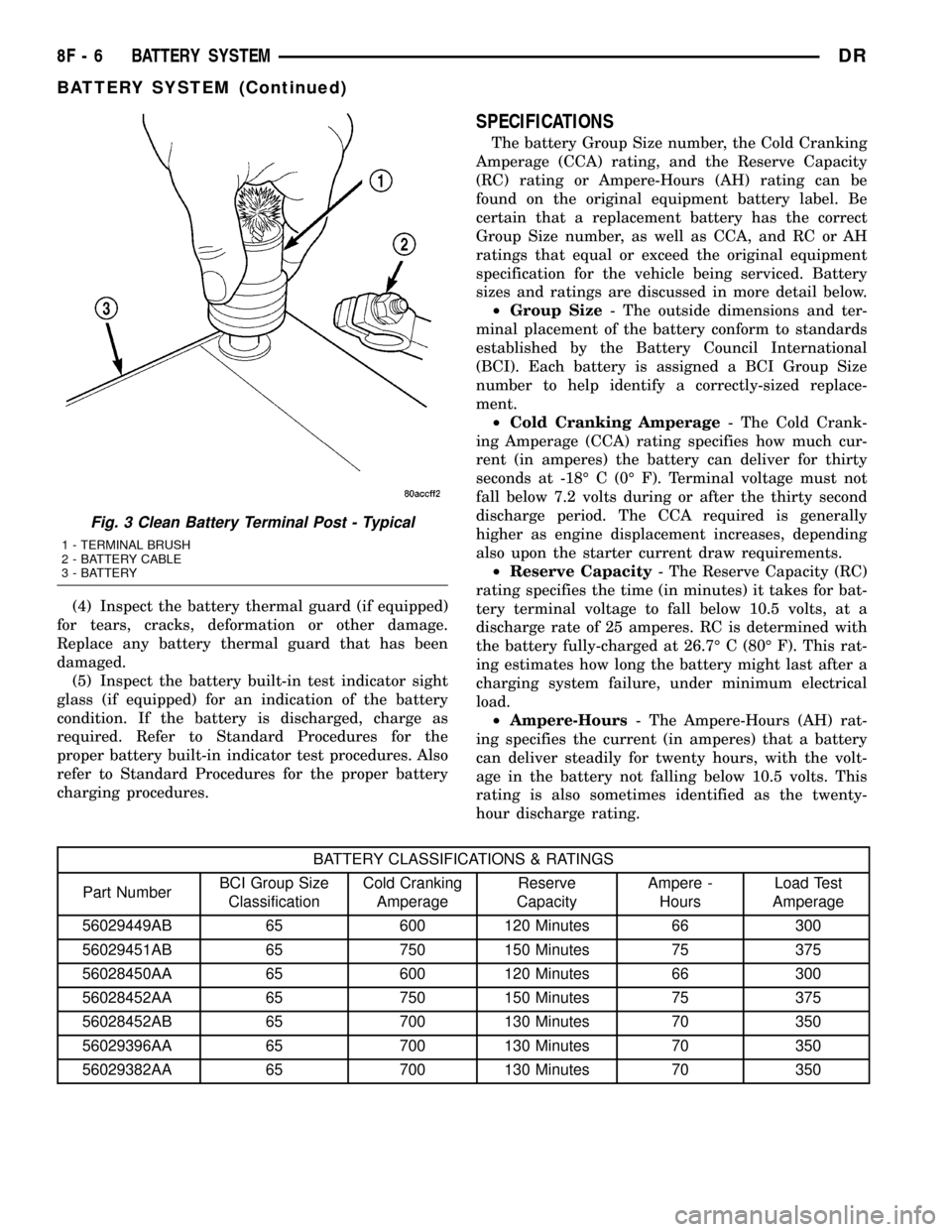
(4) Inspect the battery thermal guard (if equipped)
for tears, cracks, deformation or other damage.
Replace any battery thermal guard that has been
damaged.
(5) Inspect the battery built-in test indicator sight
glass (if equipped) for an indication of the battery
condition. If the battery is discharged, charge as
required. Refer to Standard Procedures for the
proper battery built-in indicator test procedures. Also
refer to Standard Procedures for the proper battery
charging procedures.
SPECIFICATIONS
The battery Group Size number, the Cold Cranking
Amperage (CCA) rating, and the Reserve Capacity
(RC) rating or Ampere-Hours (AH) rating can be
found on the original equipment battery label. Be
certain that a replacement battery has the correct
Group Size number, as well as CCA, and RC or AH
ratings that equal or exceed the original equipment
specification for the vehicle being serviced. Battery
sizes and ratings are discussed in more detail below.
²Group Size- The outside dimensions and ter-
minal placement of the battery conform to standards
established by the Battery Council International
(BCI). Each battery is assigned a BCI Group Size
number to help identify a correctly-sized replace-
ment.
²Cold Cranking Amperage- The Cold Crank-
ing Amperage (CCA) rating specifies how much cur-
rent (in amperes) the battery can deliver for thirty
seconds at -18É C (0É F). Terminal voltage must not
fall below 7.2 volts during or after the thirty second
discharge period. The CCA required is generally
higher as engine displacement increases, depending
also upon the starter current draw requirements.
²Reserve Capacity- The Reserve Capacity (RC)
rating specifies the time (in minutes) it takes for bat-
tery terminal voltage to fall below 10.5 volts, at a
discharge rate of 25 amperes. RC is determined with
the battery fully-charged at 26.7É C (80É F). This rat-
ing estimates how long the battery might last after a
charging system failure, under minimum electrical
load.
²Ampere-Hours- The Ampere-Hours (AH) rat-
ing specifies the current (in amperes) that a battery
can deliver steadily for twenty hours, with the volt-
age in the battery not falling below 10.5 volts. This
rating is also sometimes identified as the twenty-
hour discharge rating.
BATTERY CLASSIFICATIONS & RATINGS
Part NumberBCI Group Size
ClassificationCold Cranking
AmperageReserve
CapacityAmpere -
HoursLoad Test
Amperage
56029449AB 65 600 120 Minutes 66 300
56029451AB 65 750 150 Minutes 75 375
56028450AA 65 600 120 Minutes 66 300
56028452AA 65 750 150 Minutes 75 375
56028452AB 65 700 130 Minutes 70 350
56029396AA 65 700 130 Minutes 70 350
56029382AA 65 700 130 Minutes 70 350
Fig. 3 Clean Battery Terminal Post - Typical
1 - TERMINAL BRUSH
2 - BATTERY CABLE
3 - BATTERY
8F - 6 BATTERY SYSTEMDR
BATTERY SYSTEM (Continued)
Page 438 of 2627

SPECIAL TOOLS
BATTERY SYSTEM SPECIAL TOOLS
BATTERY
DESCRIPTION
A large capacity, low-maintenance storage battery
(Fig. 4) is standard factory-installed equipment on
this model. Models equipped with a diesel engine
must utilize two 12-volt batteries connected in paral-
lel. Male post type terminals made of a soft lead
material protrude from the top of the molded plastic
battery case to provide the means for connecting the
battery to the vehicle electrical system. The battery
positive terminal post is physically larger in diameter
than the negative terminal post to ensure proper bat-
tery connection. The lettersPOSandNEGare also
molded into the top of the battery case adjacent to
their respective positive and negative terminal posts
for identification confirmation. Refer to Battery
Cables for more information on the battery cables
that connect the battery to the vehicle electrical sys-
tem.
The battery is made up of six individual cells that
are connected in series. Each cell contains positively
charged plate groups that are connected with lead
straps to the positive terminal post, and negatively
charged plate groups that are connected with lead
straps to the negative terminal post. Each plate con-
sists of a stiff mesh framework or grid coated with
lead dioxide (positive plate) or sponge lead (negative
plate). Insulators or plate separators made of a non-
conductive material are inserted between the positive
and negative plates to prevent them from contacting
or shorting against one another. These dissimilar
metal plates are submerged in a sulfuric acid and
water solution called an electrolyte.
The factory-installed battery has a built-in test
indicator (hydrometer). The color visible in the sight
glass of the indicator will reveal the battery condi-
tion. Refer to Standard Procedures for the proper
built-in indicator test procedures.The factory-in-
stalled low-maintenance battery has non-re-
movable battery cell caps.Water cannot be added
to this battery. The battery is not sealed and has
vent holes in the cell caps. The chemical composition
of the metal coated plates within the low-mainte-
nance battery reduces battery gassing and water
loss, at normal charge and discharge rates. There-
fore, the battery should not require additional water
in normal service. Rapid loss of electrolyte can be
caused by an overcharging condition.
DIAGNOSIS AND TESTING - BATTERY
The battery must be completely charged and the
terminals should be properly cleaned and inspected
before diagnostic procedures are performed. Refer to
Battery System Cleaning for the proper cleaning pro-
cedures, and Battery System Inspection for the
proper battery inspection procedures. Refer to Stan-
dard Procedures for the proper battery charging pro-
cedures.
Micro 420 Battery Tester
Fig. 4 Low-Maintenance Battery - Typical
1 - POSITIVE POST
2 - VENT
3 - CELL CAP
4 - TEST INDICATOR (IF EQUIPPED)
5 - CELL CAP
6 - VENT
7 - NEGATIVE POST
8 - GREEN BALL
9 - ELECTROLYTE LEVEL
10 - PLATE GROUPS
11 - LOW-MAINTENANCE BATTERY
DRBATTERY SYSTEM 8F - 7
BATTERY SYSTEM (Continued)
Page 439 of 2627

MICRO 420 BATTERY TESTER
The Micro 420 automotive battery tester is
designed to help the dealership technician diagnose
the cause of a defective battery. Follow the instruc-
tion manual supplied with the tester to properly
diagnose a battery. If the instruction manual is not
available, refer to the standard procedure in this sec-
tion, which includes the directions for using the
Micro 420 battery tester.
WARNING: IF THE BATTERY SHOWS SIGNS OF
FREEZING, LEAKING OR LOOSE POSTS, DO NOT
TEST, ASSIST-BOOST, OR CHARGE. THE BATTERY
MAY ARC INTERNALLY AND EXPLODE. PERSONAL
INJURY AND/OR VEHICLE DAMAGE MAY RESULT.
WARNING: EXPLOSIVE HYDROGEN GAS FORMS IN
AND AROUND THE BATTERY. DO NOT SMOKE,
USE FLAME, OR CREATE SPARKS NEAR THE BAT-
TERY. PERSONAL INJURY AND/OR VEHICLE DAM-
AGE MAY RESULT.
WARNING: THE BATTERY CONTAINS SULFURIC
ACID, WHICH IS POISONOUS AND CAUSTIC. AVOID
CONTACT WITH THE SKIN, EYES, OR CLOTHING.
IN THE EVENT OF CONTACT, FLUSH WITH WATER
AND CALL A PHYSICIAN IMMEDIATELY. KEEP OUT
OF THE REACH OF CHILDREN.
A battery that will not accept a charge is faulty,
and must be replaced. Further testing is not
required. A fully-charged battery must be load tested
to determine its cranking capacity. A battery that is
fully-charged, but does not pass the load test, is
faulty and must be replaced. Always test battery
using the Micro 420 battery tester before attempting
to replace a battery under the manufactures war-
ranty provisions.
NOTE: Completely discharged batteries may take
several hours to accept a charge. Refer to Standard
Procedures for the proper battery charging proce-
dures.
STANDARD PROCEDURE
STANDARD PROCEDURE - BATTERY
CHARGING
Battery charging can be performed fast or slow, in
terms of time.Slowbattery charging is the best
means of restoring a battery to full potential. Fast
battery charging should only be performed when
absolutely necessary due to time restraints. A battery
is fully-charged when:²All of the battery cells are gassing freely during
battery charging.
²A green color is visible in the sight glass of the
battery built-in test indicator.
²Three hydrometer tests, taken at one-hour inter-
vals, indicate no increase in the temperature-cor-
rected specific gravity of the battery electrolyte.
²Open-circuit voltage of the battery is 12.65 volts
or above.
WARNING: NEVER EXCEED TWENTY AMPERES
WHEN CHARGING A COLD (-1É C [30É F] OR
LOWER) BATTERY. THE BATTERY MAY ARC INTER-
NALLY AND EXPLODE. PERSONAL INJURY AND/OR
VEHICLE DAMAGE MAY RESULT.
CAUTION: Always disconnect and isolate the bat-
tery negative cable before charging a battery. Do
not exceed sixteen volts while charging a battery.
Damage to the vehicle electrical system compo-
nents may result.
CAUTION: Battery electrolyte will bubble inside the
battery case during normal battery charging. Elec-
trolyte boiling or being discharged from the battery
vents indicates a battery overcharging condition.
Immediately reduce the charging rate or turn off the
charger to evaluate the battery condition. Damage
to the battery may result from overcharging.
CAUTION: The battery should not be hot to the
touch. If the battery feels hot to the touch, turn off
the charger and let the battery cool before continu-
ing the charging operation. Damage to the battery
may result.
NOTE: Models equipped with the diesel engine are
equipped with two 12-volt batteries, connected in
parallel (positive-to-positive and negative-to-nega-
tive). In order to ensure proper charging of each
battery, these batteries MUST be disconnected from
each other, as well as from the vehicle electrical
system while being charged.
Some battery chargers are equipped with polarity-
sensing circuitry. This circuitry protects the battery
charger and the battery from being damaged if they
are improperly connected. If the battery state-of-
charge is too low for the polarity-sensing circuitry to
detect, the battery charger will not operate. This
makes it appear that the battery will not accept
charging current. See the instructions provided by
the manufacturer of the battery charger for details
on how to bypass the polarity-sensing circuitry.
8F - 8 BATTERY SYSTEMDR
BATTERY (Continued)
Page 441 of 2627
BATTERY CHARGING TIME TABLE
Charging
Amperage5 Amps10
Amps20 Amps
Open Circuit
VoltageHours Charging @ 21É C (70É
F)
12.25 to 12.49 6 hours 3 hours 1.5
hours
12.00 to 12.24 10 hours 5 hours 2.5
hours
10.00 to 11.99 14 hours 7 hours 3.5
hours
Below 10.00 18 hours 9 hours 4.5
hours
STANDARD PROCEDURE - BUILT-IN
INDICATOR TEST
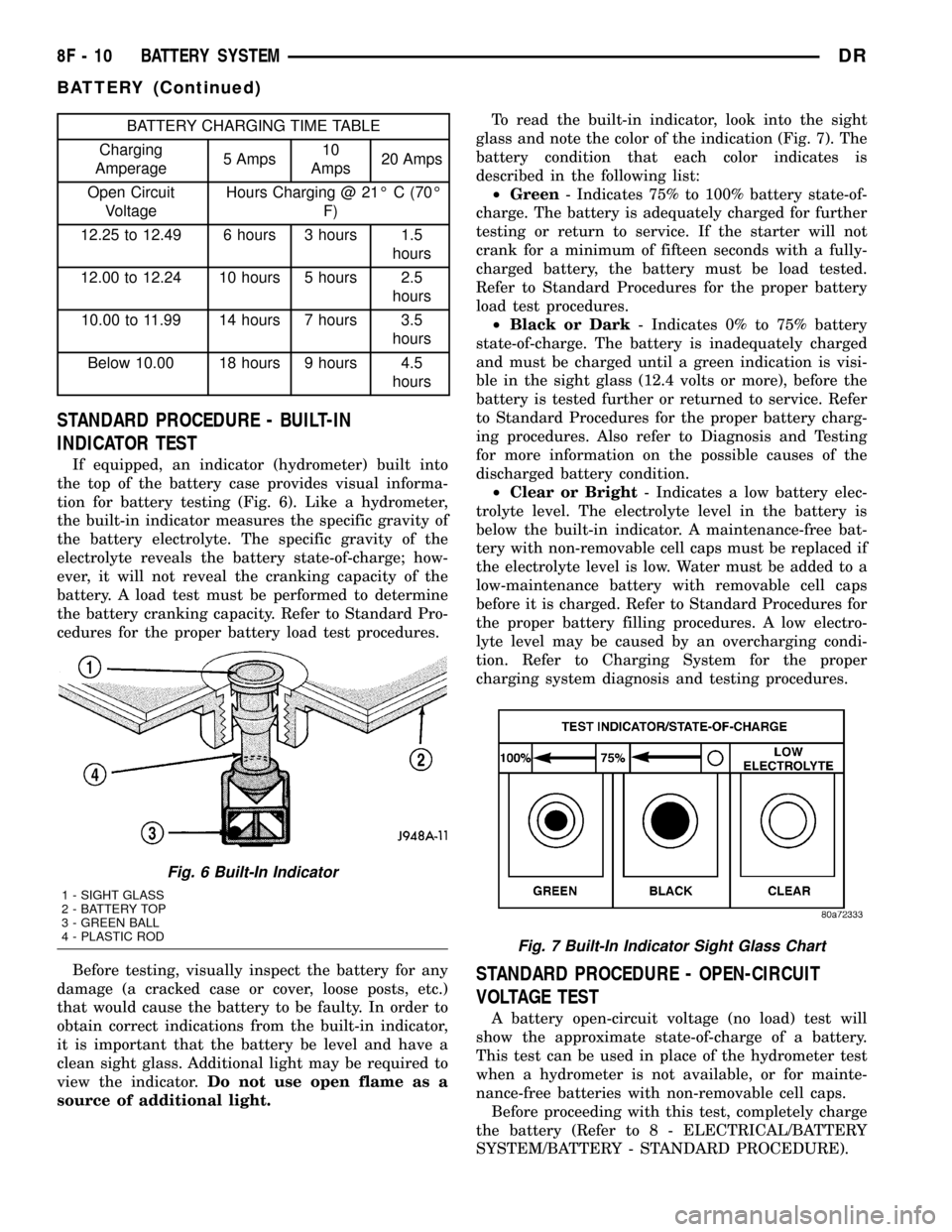
If equipped, an indicator (hydrometer) built into
the top of the battery case provides visual informa-
tion for battery testing (Fig. 6). Like a hydrometer,
the built-in indicator measures the specific gravity of
the battery electrolyte. The specific gravity of the
electrolyte reveals the battery state-of-charge; how-
ever, it will not reveal the cranking capacity of the
battery. A load test must be performed to determine
the battery cranking capacity. Refer to Standard Pro-
cedures for the proper battery load test procedures.
Before testing, visually inspect the battery for any
damage (a cracked case or cover, loose posts, etc.)
that would cause the battery to be faulty. In order to
obtain correct indications from the built-in indicator,
it is important that the battery be level and have a
clean sight glass. Additional light may be required to
view the indicator.Do not use open flame as a
source of additional light.To read the built-in indicator, look into the sight
glass and note the color of the indication (Fig. 7). The
battery condition that each color indicates is
described in the following list:
²Green- Indicates 75% to 100% battery state-of-
charge. The battery is adequately charged for further
testing or return to service. If the starter will not
crank for a minimum of fifteen seconds with a fully-
charged battery, the battery must be load tested.
Refer to Standard Procedures for the proper battery
load test procedures.
²Black or Dark- Indicates 0% to 75% battery
state-of-charge. The battery is inadequately charged
and must be charged until a green indication is visi-
ble in the sight glass (12.4 volts or more), before the
battery is tested further or returned to service. Refer
to Standard Procedures for the proper battery charg-
ing procedures. Also refer to Diagnosis and Testing
for more information on the possible causes of the
discharged battery condition.
²Clear or Bright- Indicates a low battery elec-
trolyte level. The electrolyte level in the battery is
below the built-in indicator. A maintenance-free bat-
tery with non-removable cell caps must be replaced if
the electrolyte level is low. Water must be added to a
low-maintenance battery with removable cell caps
before it is charged. Refer to Standard Procedures for
the proper battery filling procedures. A low electro-
lyte level may be caused by an overcharging condi-
tion. Refer to Charging System for the proper
charging system diagnosis and testing procedures.
STANDARD PROCEDURE - OPEN-CIRCUIT
VOLTAGE TEST
A battery open-circuit voltage (no load) test will
show the approximate state-of-charge of a battery.
This test can be used in place of the hydrometer test
when a hydrometer is not available, or for mainte-
nance-free batteries with non-removable cell caps.
Before proceeding with this test, completely charge
the battery (Refer to 8 - ELECTRICAL/BATTERY
SYSTEM/BATTERY - STANDARD PROCEDURE).
Fig. 6 Built-In Indicator
1 - SIGHT GLASS
2 - BATTERY TOP
3 - GREEN BALL
4 - PLASTIC ROD
Fig. 7 Built-In Indicator Sight Glass Chart
8F - 10 BATTERY SYSTEMDR
BATTERY (Continued)
Page 445 of 2627

(6) Remove the battery hold down retaining bolt.
WARNING: WEAR A SUITABLE PAIR OF RUBBER
GLOVES (NOT THE HOUSEHOLD TYPE) WHEN
REMOVING A BATTERY BY HAND. SAFETY
GLASSES SHOULD ALSO BE WORN. IF THE BAT-
TERY IS CRACKED OR LEAKING, THE ELECTRO-
LYTE CAN BURN THE SKIN AND EYES.
(7) Remove the battery from the battery tray.
INSTALLATION
(1) Clean and inspect the battery.
(2) Position the battery onto the battery tray.
Ensure that the battery positive and negative termi-
nal posts are correctly positioned. The battery cable
terminal clamps must reach the correct battery ter-
minal post without stretching the cables.
(3) Position the battery hold down and install the
retaining bolt.
CAUTION: Be certain that the battery cable terminal
clamps are connected to the correct battery termi-
nal posts. Reversed battery polarity may damage
electrical components of the vehicle.
(4) Clean the battery cable terminal clamps and
the battery terminal posts.
(5) Reconnect the battery positive cable terminal
clamp to the battery positive terminal post. Tighten
the terminal clamp pinch-bolt hex nut to 4 N´m (35
in. lbs.).
(6) Reconnect the battery negative cable terminal
clamp to the battery negative terminal post. Tighten
the terminal clamp pinch-bolt hex nut to 4 N´m (35
in. lbs.).
(7) Apply a thin coating of petroleum jelly or chas-
sis grease to the exposed surfaces of the battery cable
terminal clamps and the battery terminal posts.
(8) Obtain a DRB IIItscan tool and check the
PCM for any stored battery disconnect trouble code,
if required.
BATTERY HOLDDOWN
DESCRIPTION
The battery hold down hardware includes a bolt
and a molded plastic hold down bracket which
meshes with the battery tray when properly
installed. The battery tray and hold down hardware
combine to form a very stable and secure battery
hold down assembly.
OPERATION
The battery holddown secures the battery in the
battery tray. This holddown is designed to prevent
battery movement during the most extreme vehicle
operation conditions. Periodic removal and lubrica-
tion of the battery holddown hardware is recom-
mended to prevent hardware seizure at a later date.
CAUTION: Never operate a vehicle without a battery
holddown device properly installed. Damage to the
vehicle, components and battery could result.
REMOVAL
(1) Loosen and remove the battery hold down
retaining bolt.
(2) Remove the battery hold down bracket from
the battery case.
INSTALLATION
(1) Clean and inspect the battery hold down hard-
ware (Refer to 8 - ELECTRICAL/BATTERY SYSTEM
- CLEANING).
(2) Position the battery hold down bracket in the
battery tray. Be certain that the hold down bracket is
properly positioned in the battery tray before tight-
ening the hold down hardware.
(3) Install and tighten the battery hold down
retaining bolt.
BATTERY CABLES
DESCRIPTION
The battery cables are large gauge, stranded cop-
per wires sheathed within a heavy plastic or syn-
thetic rubber insulating jacket. The wire used in the
battery cables combines excellent flexibility and reli-
ability with high electrical current carrying capacity.
Refer to Wiring for the location of the proper battery
cable wire gauge information.
The battery cables cannot be repaired and, if dam-
aged or faulty they must be replaced. Both the bat-
tery positive and negative cables are available for
service replacement only as a unit with the battery
positive cable wire harness or the battery negative
cable wire harness, which may include portions of
the wiring circuits for the generator and other com-
ponents on some models.
Most models feature a stamped brass clamping
type female battery terminal crimped onto one end of
the battery cable wire and then solder-dipped. A
pinch-bolt and hex nut are installed at the open end
of the female battery terminal clamp. The battery
positive cable also includes a red molded rubber pro-
tective cover for the female battery terminal clamp.
8F - 14 BATTERY SYSTEMDR
BATTERY (Continued)
Page 470 of 2627

HEATED SYSTEMS
TABLE OF CONTENTS
page page
HEATED GLASS........................... 1
HEATED MIRRORS......................... 6HEATED SEAT SYSTEM..................... 7
HEATED GLASS
TABLE OF CONTENTS
page page
HEATED GLASS
DESCRIPTION..........................1
OPERATION............................1
DIAGNOSIS AND TESTING - REAR WINDOW
DEFOGGER SYSTEM...................2
REAR WINDOW DEFOGGER RELAY
DESCRIPTION..........................2
OPERATION............................3REMOVAL.............................3
INSTALLATION..........................4
REAR WINDOW DEFOGGER SWITCH
DESCRIPTION..........................4
OPERATION............................4
REAR WINDOW DEFOGGER GRID
STANDARD PROCEDURE - GRID LINE AND
TERMINAL REPAIR.....................4
HEATED GLASS
DESCRIPTION
CAUTION:Grid lines can be damaged or scraped off
with sharp instruments. Care should be taken in
cleaning glass or removing foreign materials, decals
or stickers. Normal glass cleaning solvents or hot
water used with rags or toweling is recommended.
The rear window defogger system consists of a
back glass with two vertical electrical bus bars linked
by a series of grid lines fired onto the inside surface
of the optional heated rear window.
The rear window defogger system is turned On or
Off by a switch and a timing circuit integral to the
A/C-heater control located at the center of the instru-
ment panel.
Circuit protection is provided by a cartridge fuse
located in the power distribution center (PDC) for the
heated grid circuit, and a fuse located in the fuse
block for the control circuit.
OPERATION
The rear window defogger system is turned on by a
momentary switch located in the A/C-heater control
on the instrument panel. When the rear windowdefogger switch is pressed to the On position, current
is directed through the rear window defogger relay to
the rear defogger grid lines. The heated grid lines
heat the rear glass to help clear the rear window sur-
face of fog or frost.
A yellow indicator above the switch will illuminate
to indicate when the rear window defogger system is
turned on. The A/C-heater control contains the rear
window defogger system control circuitry.
NOTE: The rear window defogger turns off automat-
ically after approximately 10 minutes of initial oper-
ation. Each following activation cycle of the
defogger system will last approximately ten minutes
also.
The rear window defogger system will be automat-
ically turned off after a programmed time interval of
about ten minutes. After the initial time interval has
expired, if the defogger switch is pressed to the On
position again during the same ignition cycle, the
rear window defogger system will automatically turn
off after about ten minutes also.
The rear window defogger system will automati-
cally shut off if the ignition switch is turned to the
Off position, or it can be turned off manually by
pressing the defogger switch a second time.
DRHEATED SYSTEMS 8G - 1
Page 471 of 2627

DIAGNOSIS AND TESTING - REAR WINDOW
DEFOGGER SYSTEM
For circuit descriptions and diagrams, refer to Rear
Window Defogger in Wiring Diagrams. The operation
of the electrically heated rear window defogger sys-
tem can be confirmed in one of the following man-
ners:
1. Turn the ignition switch to the On position.
While monitoring the instrument panel voltmeter, set
the defogger switch in the On position. When the
defogger switch is turned On, a distinct voltmeter
needle deflection should be noted.
2. Turn the ignition switch to the On position. Set
the defogger switch in the On position. The rear win-
dow defogger operation can be checked by feeling the
rear window or outside rear view mirror glass. A dis-
tinct difference in temperature between the grid lines
and the adjacent clear glass or the mirror glass can
be detected within three to four minutes of operation.
3. Using a 12-volt DC voltmeter, contact the rear
glass heating grid terminal A (right side) with the
negative lead, and terminal B (left side) with the pos-
itive lead (Fig. 1). The voltmeter should read battery
voltage.
The above checks will confirm system operation.
Illumination of the defogger switch indicator lamp
means that there is electrical current available at the
output of the rear window defogger logic and timer
circuitry, but does not confirm that the electrical cur-
rent is reaching the rear glass heating grid lines.
If the defogger system does not operate, the prob-
lem should be isolated in the following manner:(1) Confirm that the ignition switch is in the On
position.
(2) Make sure that the rear glass heating grid feed
and ground wires are connected to the glass. Confirm
that the ground wire has continuity to ground.
(3) Check the fuses in the power distribution cen-
ter (PDC) and in the junction block. The fuses must
be tight in their receptacles and all electrical connec-
tions must be secure.
When the above steps have been completed and the
rear glass heating grid is still inoperative, one or
more of the following could be faulty:
²Rear window switch in the A/C-heater control..
²Rear window grid lines (all grid lines would
have to be broken or one of the feed wires discon-
nected for the entire system to be inoperative).
If setting the defogger switch to the On position
produces a severe voltmeter deflection, check for a
short circuit between the rear window switch defog-
ger relay output and the rear glass heating grid.
REAR WINDOW DEFOGGER
RELAY
DESCRIPTION
The rear window defogger relay (Fig. 2) is a Inter-
national Standards Organization (ISO) micro-relay.
Relays conforming to the ISO specifications have
common physical dimensions, current capacities, ter-
minal patterns, and terminal functions. The ISO
micro-relay terminal functions are the same as a con-
ventional ISO relay. However, the ISO micro-relay
terminal pattern (or footprint) is different, the cur-
rent capacity is lower, and the physical dimensions
are smaller than those of the conventional ISO relay.
The rear window defogger relay is located in the
power distribution center (PDC) in the engine com-
partment. Refer to the PDC label for rear window
defogger relay identification and location.
The black, molded plastic case is the most visible
component of the rear window defogger relay. Five
male spade-type terminals extend from the bottom of
the base to connect the relay to the vehicle electrical
system, and the ISO designation for each terminal is
molded into the base adjacent to each terminal. The
ISO terminal designations are as follows:
²30 (Common Feed)- This terminal is con-
nected to the movable contact point of the relay.
²85 (Coil Ground)- This terminal is connected
to the ground feed side of the relay control coil.
²86 (Coil Battery)- This terminal is connected
to the battery feed side of the relay control coil.
²87 (Normally Open)- This terminal is con-
nected to the normally open fixed contact point of the
relay.
Fig. 1 Grid Line Test - Typical
1 - VIEW FROM INSIDE VEHICLE
2 - REAR WINDOW DEFOGGER
3 - BUS BARS
4 - VOLTAGE FEED (A)
5 - VOLTMETER
6 - MID-POINT (C)
7 - PICK-UP LEADS
8 - GROUND (B)
8G - 2 HEATED GLASSDR
HEATED GLASS (Continued)