oil DODGE RAM 1500 1998 2.G Repair Manual
[x] Cancel search | Manufacturer: DODGE, Model Year: 1998, Model line: RAM 1500, Model: DODGE RAM 1500 1998 2.GPages: 2627
Page 188 of 2627

(12)Remove pinion gear from the housing (Fig. 56).
(13) Remove pinion seal with a pry tool or slide-
hammer mounted screw.
(14) Remove front pinion bearing and oil slinger if
equipped.
(15) Remove front pinion bearing cup with
Remover C-4345 and Handle C-4171 (Fig. 57).(16) Remove rear pinion bearing cup from housing
(Fig. 58) with Remover C-4307 and Handle C-4171.
(17) Remove collapsible spacer from the pinion
shaft (Fig. 59).
Fig. 56 PINION GEAR
1 - RAWHIDE HAMMER
Fig. 57 FRONT PINION BEARING CUP
1 - REMOVER
2 - HANDLE
Fig. 58 REAR PINION BEARING CUP
1 - DRIVER
2 - HANDLE
Fig. 59 COLLAPSIBLE SPACER
1 - COLLAPSIBLE SPACER
2 - REAR PINION BEARING
3 - PINION DEPTH SHIM
DRREAR AXLE - 9 1/4 3 - 107
PINION GEAR/RING GEAR/TONE RING (Continued)
Page 211 of 2627

INSTALLATION
(1) Clean the housing cavity with a flushing oil,
light engine oil or lint free cloth.
CAUTION: Do not use water, steam, kerosene or
gasoline for cleaning.
(2) Lubricate differential case bearing.
(3) Install differential case with bearings cups into
the housing.
NOTE: A light coat of grease on the cups will hold
them in place during installation.
(4) Install bearing caps and bolts (Fig. 36). Tighten
the bearing cap bolts finger-tight.
NOTE: Do not torque bearing cap and bolts at this
time.
(5) Slide differential case toward the pinion gear
until the gears make contact/zero backlash. If zero
backlash cannot be obtained, turn the pinion side
adjuster until zero backlash is obtained.
(6) Holding the differential case toward the pinion
gear, turn bearing adjusters with Spanner Wrench
8883 until they make contact with the differential
bearings/cups.
(7) Back off the ring gear side adjuster 4 holes, to
obtain initial ring gear backlash.
(8) Install ring gear side adjuster lock and bolt. Do
not tighten adjuster lock bolt at this time.(9) Tighten pinion gear side adjuster firmly
against the differential case bearing cup.
(10) Rotate the pinion several times to seat the dif-
ferential bearings.
(11) Loosen pinion gear side adjuster until it is no
longer in contact with the bearing cup.
(12) Tighten pinion gear side adjuster until it just
makes contact with the bearing cup.
(13) Tighten pinion gear side adjuster an addi-
tional:
²New Bearings6 Adjuster Holes
²Original Bearings4 Adjuster Holes
(14) Install pinion gear side adjuster lock and bolt.
Do not tighten adjuster lock bolt at this time.
(15) Tighten bearing cap bolts to 165 N´m (122 ft.
lbs.).
(16) Tighten adjuster lock bolts to 25 N´m (18 ft.
lbs.) (Fig. 37).
(17) Measure ring gear backlash and check gear
tooth contact pattern. Refer to Adjustments for pro-
cedure.
(18) Install axle shafts.
(19) Install differential housing gasket and cover.
Tighten cover bolts to 40 N´m (30 ft. lbs.).
(20) Fill axle with lubricant, refer to Lubrication &
Maintenance for capacity and lubricant type.
(21) Install fill plug and tighten to 32 N´m (24 ft.
lbs.).
Fig. 36 CASE BEARING CAP
1 - DIFFERENTIAL HOUSING
2 - BEARING CAP
3 - ADJUSTERFig. 37 ADJUSTER LOCK BOLT
1 - DIFFERENTIAL CASE
2 - ADJUSTER LOCK
3 - ADJUSTER LOCK BOLT
4 - BEARING CAP BOLT
3 - 130 REAR AXLE - 10 1/2 AADR
DIFFERENTIAL (Continued)
Page 213 of 2627
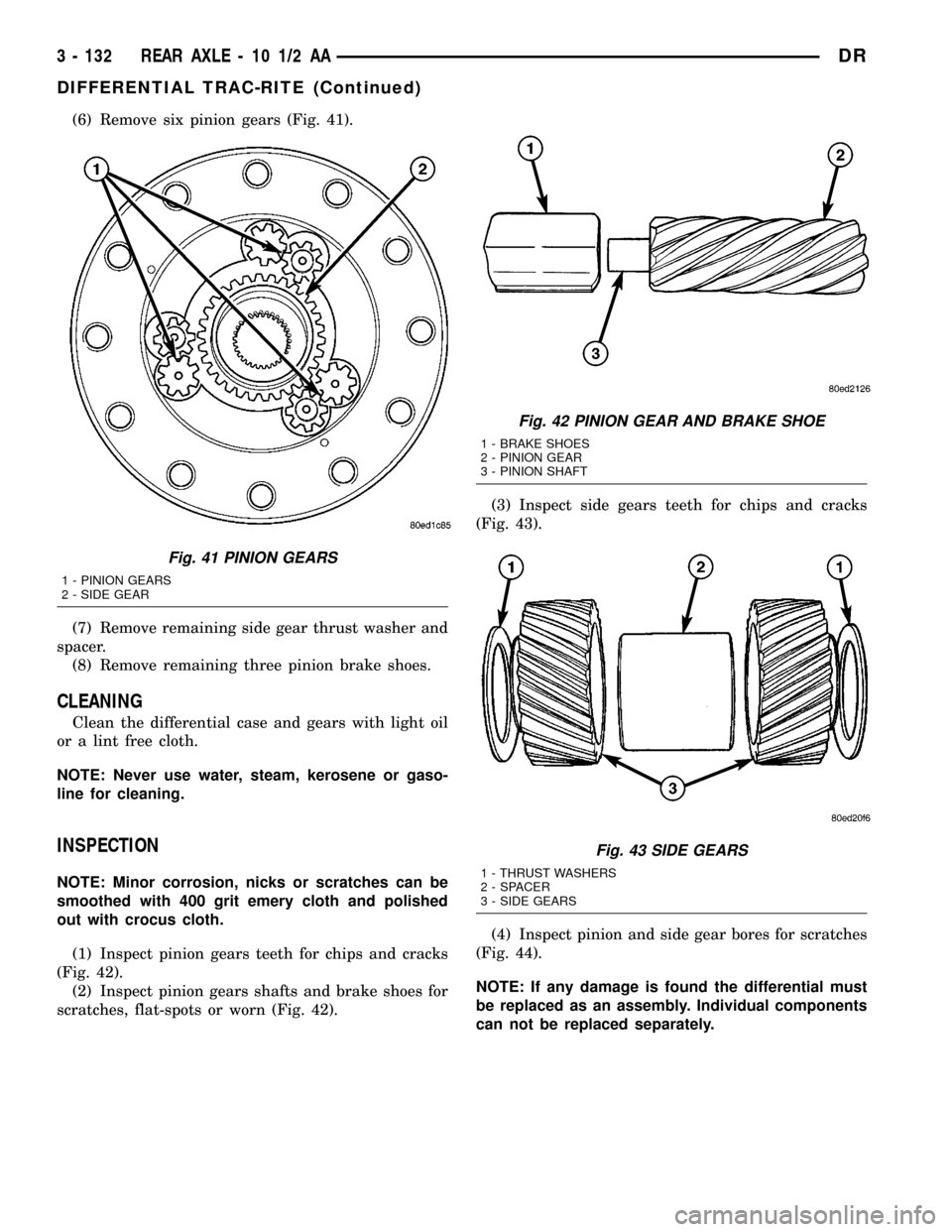
(6) Remove six pinion gears (Fig. 41).
(7) Remove remaining side gear thrust washer and
spacer.
(8) Remove remaining three pinion brake shoes.
CLEANING
Clean the differential case and gears with light oil
or a lint free cloth.
NOTE: Never use water, steam, kerosene or gaso-
line for cleaning.
INSPECTION
NOTE: Minor corrosion, nicks or scratches can be
smoothed with 400 grit emery cloth and polished
out with crocus cloth.
(1) Inspect pinion gears teeth for chips and cracks
(Fig. 42).
(2) Inspect pinion gears shafts and brake shoes for
scratches, flat-spots or worn (Fig. 42).(3) Inspect side gears teeth for chips and cracks
(Fig. 43).
(4) Inspect pinion and side gear bores for scratches
(Fig. 44).
NOTE: If any damage is found the differential must
be replaced as an assembly. Individual components
can not be replaced separately.
Fig. 41 PINION GEARS
1 - PINION GEARS
2 - SIDE GEAR
Fig. 42 PINION GEAR AND BRAKE SHOE
1 - BRAKE SHOES
2 - PINION GEAR
3 - PINION SHAFT
Fig. 43 SIDE GEARS
1 - THRUST WASHERS
2 - SPACER
3 - SIDE GEARS
3 - 132 REAR AXLE - 10 1/2 AADR
DIFFERENTIAL TRAC-RITE (Continued)
Page 238 of 2627

(3) Install first pinion gear into the differential
window and side gears. Rotate the pinion gear to the
back of the case (Fig. 34).
(4) Install the other pinion gear and thrust
washer. Rotate the gears to align hole in the pinion
gears with hole in the differential case.
(5) Slide pinion shaft into the case and through
the pinion gears. Tap the shaft to seat the pinion
shaft snap-ring into the case (Fig. 35).
(6) Install ring gear.
INSTALLATION
(1) Clean the housing cavity with a flushing oil,
light engine oil or lint free cloth.
CAUTION: Do not use water, steam, kerosene or
gasoline for cleaning.
(2) Lubricate differential case bearing.
(3) Install differential case with bearings cups into
the housing.
NOTE: A light coat of grease on the cups will hold
them in place during installation.
(4) Install bearing caps and bolts (Fig. 36). Tighten
the bearing cap bolts finger-tight.
NOTE: Do not torque bearing cap and bolts at this
time.
Fig. 34 PINION GEAR
1 - DIFFERENTIAL WINDOW
2 - SIDE GEARS
3 - PINION GEAR
Fig. 35 PINION SHAFT INSTALLATION
1 - SNAP RING
2 - SIDE GEAR
3 - PINION GEAR
4 - PINION SHAFT
Fig. 36 CASE BEARING CAP
1 - DIFFERENTIAL HOUSING
2 - BEARING CAP
3 - ADJUSTER
DRREAR AXLE - 11 1/2 AA 3 - 157
DIFFERENTIAL (Continued)
Page 241 of 2627

CLEANING
Clean the differential case and gears with light oil
or a lint free cloth.
NOTE: Never use water, steam, kerosene or gaso-
line for cleaning.
INSPECTION
NOTE: Minor corrosion, nicks or scratches can be
smoothed with 400 grit emery cloth and polished
out with crocus cloth.
(1) Inspect pinion gears teeth for chips and cracks
(Fig. 42).
(2) Inspect pinion gears shafts and brake shoes for
scratches, flat-spots or worn (Fig. 42).
(3) Inspect side gears teeth for chips and cracks
(Fig. 43).
(4) Inspect pinion and side gear bores for scratches
(Fig. 44).
NOTE: If any damage is found the differential must
be replaced as an assembly. Individual components
can not be replaced separately.
Fig. 42 PINION GEAR AND BRAKE SHOE
1 - BRAKE SHOES
2 - PINION GEAR
3 - PINION SHAFT
Fig. 43 SIDE GEARS
1 - THRUST WASHERS
2 - SPACER
3 - SIDE GEARS
Fig. 44 PINION/SIDE GEAR BORE
1 - PINION BORES
2 - SIDE GEAR BORE
3 - 160 REAR AXLE - 11 1/2 AADR
DIFFERENTIAL TRAC-RITE (Continued)
Page 253 of 2627

²Drum brake shoes binding on worn/damaged
support plates.
²Mis-assembled components.
²Long booster output rod.
If brake drag occurs at all wheels, the problem
may be related to a blocked master cylinder return
port, or faulty power booster (binds-does not release).
BRAKE FADE
Brake fade is usually a product of overheating
caused by brake drag. However, brake overheating
and resulting fade can also be caused by riding the
brake pedal, making repeated high deceleration stops
in a short time span, or constant braking on steep
mountain roads. Refer to the Brake Drag information
in this section for causes.
BRAKE PULL
Front brake pull condition could result from:
²Contaminated lining in one caliper
²Seized caliper piston
²Binding caliper
²Loose caliper
²Rusty caliper slide surfaces
²Improper brake pads
²Damaged rotor
A worn, damaged wheel bearing or suspension
component are further causes of pull. A damaged
front tire (bruised, ply separation) can also cause
pull.
A common and frequently misdiagnosed pull condi-
tion is where direction of pull changes after a few
stops. The cause is a combination of brake drag fol-
lowed by fade at one of the brake units.
As the dragging brake overheats, efficiency is so
reduced that fade occurs. Since the opposite brake
unit is still functioning normally, its braking effect is
magnified. This causes pull to switch direction in
favor of the normally functioning brake unit.
An additional point when diagnosing a change in
pull condition concerns brake cool down. Remember
that pull will return to the original direction, if the
dragging brake unit is allowed to cool down (and is
not seriously damaged).
REAR BRAKE GRAB OR PULL
Rear grab or pull is usually caused by improperly
adjusted or seized parking brake cables, contami-
nated lining, bent or binding shoes and support
plates, or improperly assembled components. This is
particularly true when only one rear wheel is
involved. However, when both rear wheels are
affected, the master cylinder or proportioning valve
could be at fault.BRAKES DO NOT HOLD AFTER DRIVING THROUGH DEEP
WATER PUDDLES
This condition is generally caused by water soaked
lining. If the lining is only wet, it can be dried by
driving with the brakes very lightly applied for a
mile or two. However, if the lining is both soaked and
dirt contaminated, cleaning and/or replacement will
be necessary.
BRAKE LINING CONTAMINATION
Brake lining contamination is mostly a product of
leaking calipers or worn seals, driving through deep
water puddles, or lining that has become covered
with grease and grit during repair. Contaminated lin-
ing should be replaced to avoid further brake prob-
lems.
WHEEL AND TIRE PROBLEMS
Some conditions attributed to brake components
may actually be caused by a wheel or tire problem.
A damaged wheel can cause shudder, vibration and
pull. A worn or damaged tire can also cause pull.
Severely worn tires with very little tread left can
produce a grab-like condition as the tire loses and
recovers traction. Flat-spotted tires can cause vibra-
tion and generate shudder during brake operation. A
tire with internal damage such as a severe bruise,
cut, or ply separation can cause pull and vibration.
BRAKE NOISES
Some brake noise is common with rear drum
brakes and on some disc brakes during the first few
stops after a vehicle has been parked overnight or
stored. This is primarily due to the formation of trace
corrosion (light rust) on metal surfaces. This light
corrosion is typically cleared from the metal surfaces
after a few brake applications causing the noise to
subside.
BRAKE SQUEAK/SQUEAL
Brake squeak or squeal may be due to linings that
are wet or contaminated with brake fluid, grease, or
oil. Glazed linings and rotors with hard spots can
also contribute to squeak. Dirt and foreign material
embedded in the brake lining will also cause squeak/
squeal.
A very loud squeak or squeal is frequently a sign of
severely worn brake lining. If the lining has worn
through to the brake pads in spots, metal-to-metal
contact occurs. If the condition is allowed to continue,
rotors can become so scored that replacement is nec-
essary.
BRAKE CHATTER
Brake chatter is usually caused by loose or worn
components, or glazed/burnt lining. Rotors with hard
spots can also contribute to chatter. Additional causes
5 - 4 BRAKES - BASEDR
BRAKES - BASE (Continued)
Page 269 of 2627
CAUTION: If the caliper piston is replaced, install
the same type of piston in the caliper. Never inter-
change phenolic resin and steel caliper pistons.
The pistons, seals, seal grooves, caliper bore and
piston tolerances are different.
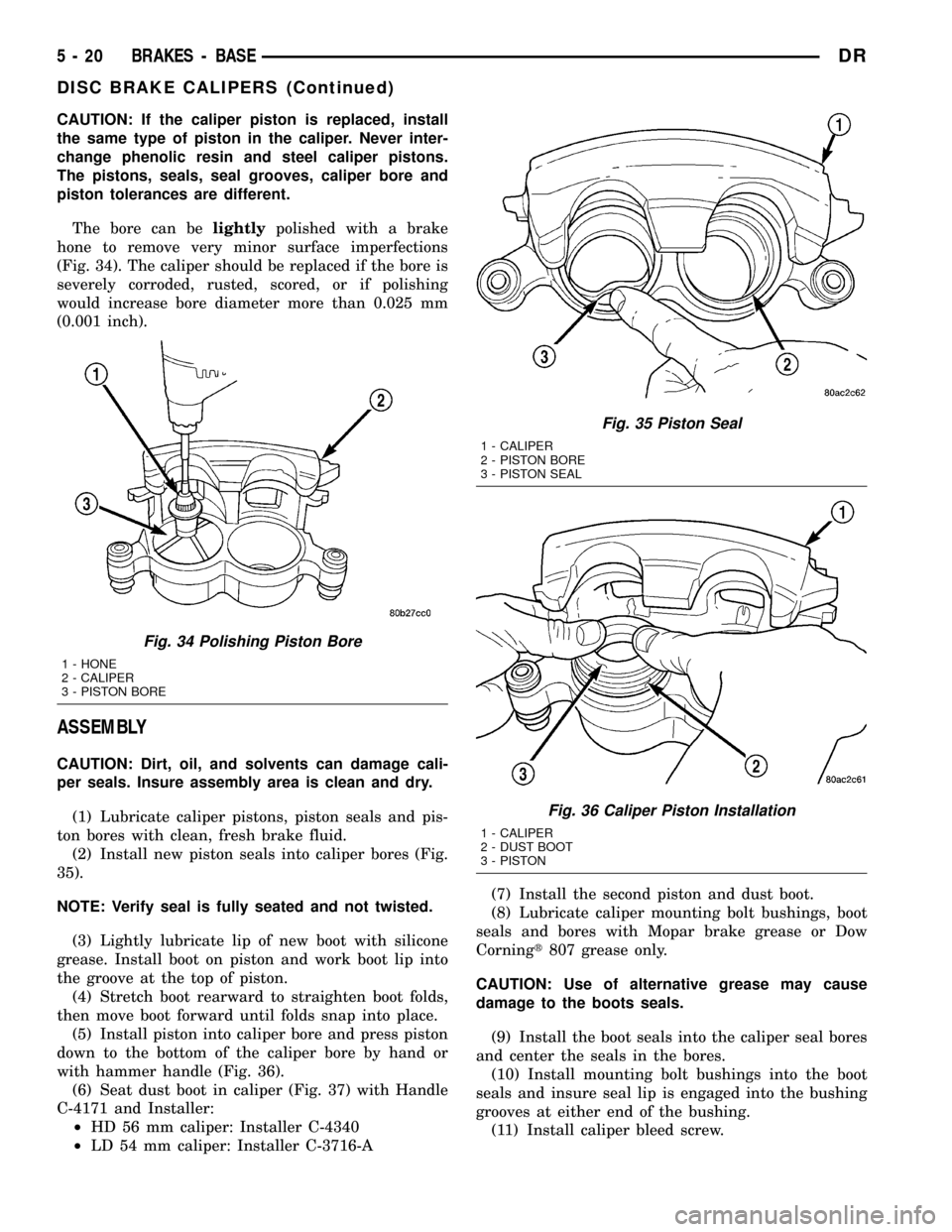
The bore can belightlypolished with a brake
hone to remove very minor surface imperfections
(Fig. 34). The caliper should be replaced if the bore is
severely corroded, rusted, scored, or if polishing
would increase bore diameter more than 0.025 mm
(0.001 inch).
ASSEMBLY
CAUTION: Dirt, oil, and solvents can damage cali-
per seals. Insure assembly area is clean and dry.
(1) Lubricate caliper pistons, piston seals and pis-
ton bores with clean, fresh brake fluid.
(2) Install new piston seals into caliper bores (Fig.
35).
NOTE: Verify seal is fully seated and not twisted.
(3) Lightly lubricate lip of new boot with silicone
grease. Install boot on piston and work boot lip into
the groove at the top of piston.
(4) Stretch boot rearward to straighten boot folds,
then move boot forward until folds snap into place.
(5) Install piston into caliper bore and press piston
down to the bottom of the caliper bore by hand or
with hammer handle (Fig. 36).
(6) Seat dust boot in caliper (Fig. 37) with Handle
C-4171 and Installer:
²HD 56 mm caliper: Installer C-4340
²LD 54 mm caliper: Installer C-3716-A(7) Install the second piston and dust boot.
(8) Lubricate caliper mounting bolt bushings, boot
seals and bores with Mopar brake grease or Dow
Corningt807 grease only.
CAUTION: Use of alternative grease may cause
damage to the boots seals.
(9) Install the boot seals into the caliper seal bores
and center the seals in the bores.
(10) Install mounting bolt bushings into the boot
seals and insure seal lip is engaged into the bushing
grooves at either end of the bushing.
(11) Install caliper bleed screw.
Fig. 34 Polishing Piston Bore
1 - HONE
2 - CALIPER
3 - PISTON BORE
Fig. 35 Piston Seal
1 - CALIPER
2 - PISTON BORE
3 - PISTON SEAL
Fig. 36 Caliper Piston Installation
1 - CALIPER
2 - DUST BOOT
3 - PISTON
5 - 20 BRAKES - BASEDR
DISC BRAKE CALIPERS (Continued)
Page 272 of 2627

(3) Install parking brake cable in the brake lever.
(4) Install the park brake shoes (Refer to 5 -
BRAKES/PARKING BRAKE/SHOES - INSTALLA-
TION). (Fig. 66).
(5) Install axle shaft, (Refer to 3 - DIFFEREN-
TIAL & DRIVELINE/REAR AXLE - 9 1/4/AXLE
SHAFTS - INSTALLATION).
(6) Adjust brake shoes to drum with brake gauge
(Refer to 5 - BRAKES/PARKING BRAKE/SHOES -
ADJUSTMENTS).
(7) Install the rotor (Refer to 5 - BRAKES/HY-
DRAULIC/MECHANICAL/ROTORS - INSTALLA-
TION).
(8) Install the caliper adapter (Refer to 5 -
BRAKES/HYDRAULIC/MECHANICAL/DISC
BRAKE CALIPER ADAPTER - INSTALLATION).
(9) Install the caliper (Refer to 5 - BRAKES/HY-
DRAULIC/MECHANICAL/DISC BRAKE CALIPERS
- INSTALLATION).
(10) Install wheel and tire assembly.
FLUID
DIAGNOSIS AND TESTING - BRAKE FLUID
CONTAMINATION
Indications of fluid contamination are swollen or
deteriorated rubber parts.
Swollen rubber parts indicate the presence of
petroleum in the brake fluid.
To test for contamination, put a small amount of
drained brake fluid in clear glass jar. If fluid sepa-
rates into layers, there is mineral oil or other fluid
contamination of the brake fluid.
If brake fluid is contaminated, drain and thor-
oughly flush system. Replace master cylinder, propor-
tioning valve, caliper seals, wheel cylinder seals,
Antilock Brakes hydraulic unit and all hydraulic
fluid hoses.
STANDARD PROCEDURE - BRAKE FLUID
LEVEL
Always clean the master cylinder reservoir and
caps before checking fluid level. If not cleaned, dirt
could enter the fluid.
The fluid fill level is indicated on the side of the
master cylinder reservoir (Fig. 41).
The correct fluid level is to the MAX indicator on
the side of the reservoir. If necessary, add fluid to the
proper level.
SPECIFICATIONS
BRAKE FLUID
The brake fluid used in this vehicle must conform
to DOT 3 specifications and SAE J1703 standards.
No other type of brake fluid is recommended or
approved for usage in the vehicle brake system. Use
only Mopar brake fluid or an equivalent from a
tightly sealed container.
CAUTION: Never use reclaimed brake fluid or fluid
from an container which has been left open. An
open container of brake fluid will absorb moisture
from the air and contaminate the fluid.
CAUTION: Never use any type of a petroleum-based
fluid in the brake hydraulic system. Use of such
type fluids will result in seal damage of the vehicle
brake hydraulic system causing a failure of the
vehicle brake system. Petroleum based fluids would
be items such as engine oil, transmission fluid,
power steering fluid, etc.
FLUID RESERVOIR
REMOVAL
(1) Install the prop rod on the brake pedal to keep
pressure on the brake system.
(2) Remove the reservoir cap and siphon fluid into
a drain container (Fig. 42).
(3) Remove the electrical connector from the fluid
level switch in the reservoir (Fig. 42).
(4) Remove the reservoir mounting bolt (Fig. 42).
Fig. 41 FLUID LEVEL TYPICAL
1 - FLUID RESERVOIR
2 - MAX LEVEL MARK
DRBRAKES - BASE 5 - 23
DISC BRAKE CALIPER ADAPTER MOUNT (Continued)
Page 296 of 2627
FRONT WHEEL SPEED
SENSOR
DESCRIPTION
The ABS brake system uses 3 wheel speed sensors.
A sensor is mounted to each front hub/bearings. The
third sensor is mounted on top of the rear axle dif-
ferential housing.
OPERATION
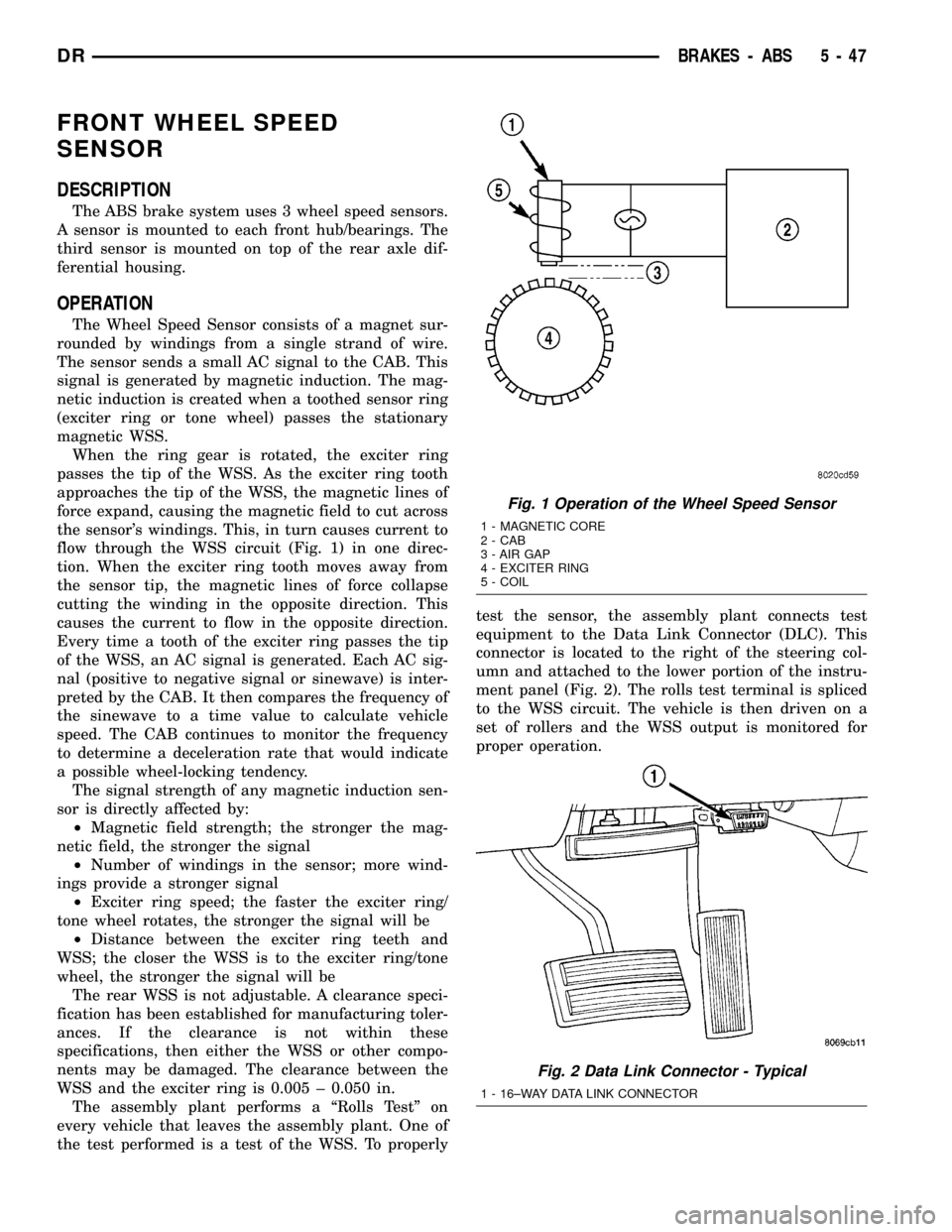
The Wheel Speed Sensor consists of a magnet sur-
rounded by windings from a single strand of wire.
The sensor sends a small AC signal to the CAB. This
signal is generated by magnetic induction. The mag-
netic induction is created when a toothed sensor ring
(exciter ring or tone wheel) passes the stationary
magnetic WSS.
When the ring gear is rotated, the exciter ring
passes the tip of the WSS. As the exciter ring tooth
approaches the tip of the WSS, the magnetic lines of
force expand, causing the magnetic field to cut across
the sensor's windings. This, in turn causes current to
flow through the WSS circuit (Fig. 1) in one direc-
tion. When the exciter ring tooth moves away from
the sensor tip, the magnetic lines of force collapse
cutting the winding in the opposite direction. This
causes the current to flow in the opposite direction.
Every time a tooth of the exciter ring passes the tip
of the WSS, an AC signal is generated. Each AC sig-
nal (positive to negative signal or sinewave) is inter-
preted by the CAB. It then compares the frequency of
the sinewave to a time value to calculate vehicle
speed. The CAB continues to monitor the frequency
to determine a deceleration rate that would indicate
a possible wheel-locking tendency.
The signal strength of any magnetic induction sen-
sor is directly affected by:
²Magnetic field strength; the stronger the mag-
netic field, the stronger the signal
²Number of windings in the sensor; more wind-
ings provide a stronger signal
²Exciter ring speed; the faster the exciter ring/
tone wheel rotates, the stronger the signal will be
²Distance between the exciter ring teeth and
WSS; the closer the WSS is to the exciter ring/tone
wheel, the stronger the signal will be
The rear WSS is not adjustable. A clearance speci-
fication has been established for manufacturing toler-
ances. If the clearance is not within these
specifications, then either the WSS or other compo-
nents may be damaged. The clearance between the
WSS and the exciter ring is 0.005 ± 0.050 in.
The assembly plant performs a ªRolls Testº on
every vehicle that leaves the assembly plant. One of
the test performed is a test of the WSS. To properlytest the sensor, the assembly plant connects test
equipment to the Data Link Connector (DLC). This
connector is located to the right of the steering col-
umn and attached to the lower portion of the instru-
ment panel (Fig. 2). The rolls test terminal is spliced
to the WSS circuit. The vehicle is then driven on a
set of rollers and the WSS output is monitored for
proper operation.
Fig. 1 Operation of the Wheel Speed Sensor
1 - MAGNETIC CORE
2 - CAB
3 - AIR GAP
4 - EXCITER RING
5 - COIL
Fig. 2 Data Link Connector - Typical
1 - 16±WAY DATA LINK CONNECTOR
DRBRAKES - ABS 5 - 47
Page 302 of 2627

CLUTCH
TABLE OF CONTENTS
page page
CLUTCH
WARNING.............................1
DIAGNOSIS AND TESTING................1
SPECIFICATIONS........................5
CLUTCH DISC
REMOVAL.............................5
INSTALLATION..........................5
CLUTCH HOUSING
DIAGNOSIS AND TESTING................7
REMOVAL.............................9
INSTALLATION..........................9
CLUTCH RELEASE BEARING
REMOVAL.............................9
INSTALLATION.........................10
FLYWHEEL
DIAGNOSIS AND TESTING................10REMOVAL.............................11
DISASSEMBLY.........................11
ASSEMBLY............................11
INSTALLATION.........................11
PILOT BEARING
REMOVAL.............................11
INSTALLATION.........................12
LINKAGE
REMOVAL.............................12
INSTALLATION.........................12
CLUTCH PEDAL POSITION SWITCH
DESCRIPTION.........................13
OPERATION...........................13
DIAGNOSIS AND TESTING................13
CLUTCH
WARNING
WARNING: Exercise care when servicing clutch
components. Factory installed clutch discs do not
contain asbestos fibers. Dust and dirt on clutch
parts may contain asbestos fibers from aftermarket
components. Breathing excessive concentrations of
these fibers can cause serious bodily harm. Wear a
respirator during service and never clean clutch
components with compressed air or with a dry
brush. Either clean the components with water
dampened rags or use a vacuum cleaner specifi-
cally designed to remove asbestos fibers and dust.
Do not create dust by sanding a clutch discs.
Replace the disc if the friction material is damaged.
Dispose of all dust and dirt containing asbestos
fibers in sealed bags or containers. This will mini-
mize exposure to yourself and to others. Follow all
recommended safety practices prescribed by the
occupational safety and health administration
(OSHA) and the environmental safety agency (EPA),
for the handling and disposal of products contain-
ing asbestos. Failure to follow these instructions
may result in personal injury or death
DIAGNOSIS AND TESTING
Road test and inspect components to determine a
clutch problem. Road test the vehicle at normalspeeds. Shift the transmission through all gear
ranges and observe clutch action. If clutch chatters,
grabs, slips or does not release properly, remove and
inspect clutch components. If problem is noise or
hard shifting, further diagnosis may be needed to the
transmission and driveline component.
CLUTCH CONTAMINATION
Contamination is a frequent cause of clutch mal-
functions. Oil, water or clutch fluid on the clutch disc
and pressure plate surfaces will cause chatter, slip
and grab. Oil contamination indicates a leak at
either the rear main seal or transmission input shaft.
Clutch fluid leaks are usually from damaged slave
cylinder push rod seals. Heat buildup caused by slip-
page between the pressure plate, disc and flywheel
can bake the oil residue onto the components. The
glaze-like residue ranges in color from amber to
black.
Road splash contamination is dirt/water entering
the clutch housing due to loose bolts, housing cracks.
Driving through deep water puddles can force water/
road splash into the housing through such openings.
IMPROPER RELEASE OR CLUTCH ENGAGEMENT
Clutch release or engagement problems can be
caused by worn or damage clutch components.
Release problems can cause hard shifting and
noise. Look for leaks at clutch cylinders, connecting
line and loose slave cylinder bolts. Also worn/loose
release fork, pivot stud, clutch disc, pressure plate or
release bearing.
DRCLUTCH 6 - 1