drive shaft DODGE RAM 1500 1998 2.G Manual PDF
[x] Cancel search | Manufacturer: DODGE, Model Year: 1998, Model line: RAM 1500, Model: DODGE RAM 1500 1998 2.GPages: 2627
Page 428 of 2627

²Diagnostic capabilities (with DRBIIItscan tool)
NOTE: If the TCM has been replaced, the ªQuick
Learn Procedureº must be performed. (Refer to 8 -
ELECTRICAL/ELECTRONIC CONTROL MODULES/
TRANSMISSION CONTROL MODULE - STANDARD
PROCEDURE)
BATTERY FEED
A fused, direct battery feed to the TCM is used for
continuous power. This battery voltage is necessary
to retain memory in the TCM. When the battery (B+)
is disconnected, this memory is lost. When the bat-
tery (B+) is restored, this memory loss is detected by
the TCM and a Diagnostic Trouble Code (DTC) is set.
CLUTCH VOLUME INDEXES (CVI)
An important function of the TCM is to monitor
Clutch Volume Indexes (CVI). CVIs represent the vol-
ume of fluid needed to compress a clutch pack.
The TCM monitors gear ratio changes by monitor-
ing the Input and Output Speed Sensors. The Input,
or Turbine Speed Sensor sends an electrical signal to
the TCM that represents input shaft rpm. The Out-
put Speed Sensor provides the TCM with output
shaft speed information.
By comparing the two inputs, the TCM can deter-
mine transmission gear position. This is important to
the CVI calculation because the TCM determines
CVIs by monitoring how long it takes for a gear
change to occur (Fig. 11).
Gear ratios can be determined by using the
DRBIIItScan Tool and reading the Input/Output
Speed Sensor values in the ªMonitorsº display. Gear
ratio can be obtained by dividing the Input Speed
Sensor value by the Output Speed Sensor value.
For example, if the input shaft is rotating at 1000
rpm and the output shaft is rotating at 500 rpm,
then the TCM can determine that the gear ratio is
2:1. In direct drive (3rd gear), the gear ratio changes
to 1:1. The gear ratio changes as clutches are applied
and released. By monitoring the length of time it
takes for the gear ratio to change following a shift
request, the TCM can determine the volume of fluid
used to apply or release a friction element.
The volume of transmission fluid needed to apply
the friction elements are continuously updated for
adaptive controls. As friction material wears, the vol-
ume of fluid need to apply the element increases.
Certain mechanical problems within the input
clutch assembly can cause inadequate or out-of-rangeelement volumes. Also, defective Input/Output Speed
Sensors and wiring can cause these conditions. The
following chart identifies the appropriate clutch vol-
umes and when they are monitored/updated:
CLUTCH VOLUMES
Clutch When UpdatedProper Clutch
Volume
L/R2-1 or 3-1
downshift45 to 134
2C3-2 kickdown
shift25 to 85
OD 2-3 upshift 30 to 100
4C 3-4 upshift 30 to 85
UD4-3 kickdown
shift30 to 100
Fig. 11 Example of CVI Calculation
1 - OUTPUT SPEED SENSOR
2 - OUTPUT SHAFT
3 - CLUTCH PACK
4 - SEPARATOR PLATE
5 - FRICTION DISCS
6 - INPUT SHAFT
7 - INPUT SPEED SENSOR
8 - PISTON AND SEAL
DRELECTRONIC CONTROL MODULES 8E - 21
TRANSMISSION CONTROL MODULE (Continued)
Page 517 of 2627

sage-controlled functions of the cluster by lighting
the appropriate indicators, positioning the gauge nee-
dles at several predetermined calibration points
across the gauge faces, and illuminating all segments
of the odometer/trip odometer and gear selector indi-
cator Vacuum-Fluorescent Display (VFD) units.
(Refer to 8 - ELECTRICAL/INSTRUMENT CLUS-
TER - DIAGNOSIS AND TESTING). See the owner's
manual in the vehicle glove box for more information
on the features, use and operation of the EMIC.
GAUGES
All gauges receive battery current through the
EMIC circuitry only when the ignition switch is in
the On or Start positions. With the ignition switch in
the Off position battery current is not supplied to
any gauges, and the EMIC circuitry is programmed
to move all of the gauge needles back to the low end
of their respective scales. Therefore, the gauges do
not accurately indicate any vehicle condition unless
the ignition switch is in the On or Start positions.
All of the EMIC gauges are air core magnetic
units. Two fixed electromagnetic coils are located
within each gauge. These coils are wrapped at right
angles to each other around a movable permanent
magnet. The movable magnet is suspended within
the coils on one end of a pivot shaft, while the gauge
needle is attached to the other end of the shaft. One
of the coils has a fixed current flowing through it to
maintain a constant magnetic field strength. Current
flow through the second coil changes, which causes
changes in its magnetic field strength. The current
flowing through the second coil is changed by the
EMIC circuitry in response to messages received over
the PCI data bus. The gauge needle moves as the
movable permanent magnet aligns itself to the
changing magnetic fields created around it by the
electromagnets.
The gauges are diagnosed using the EMIC self-di-
agnostic actuator test. (Refer to 8 - ELECTRICAL/
INSTRUMENT CLUSTER - DIAGNOSIS AND
TESTING). Proper testing of the PCI data bus and
the electronic data bus message inputs to the EMIC
that control each gauge require the use of a DRBIIIt
scan tool. Refer to the appropriate diagnostic infor-
mation. Specific operation details for each gauge may
be found elsewhere in this service information.
VACUUM-FLUORESCENT DISPLAYS
The Vacuum-Fluorescent Display (VFD) units are
soldered to the EMIC electronic circuit board. With
the ignition switch in the Off or Accessory positions,
the odometer display is activated when the driver
door is opened (Rental Car mode) and is deactivated
when the driver door is closed. Otherwise, both dis-
play units are active when the ignition switch is inthe On or Start positions, and inactive when the igni-
tion switch is in the Off or Accessory positions.
The illumination intensity of the VFD units is con-
trolled by the EMIC circuitry based upon an input
from the headlamp switch and a dimming level input
received from the headlamp dimmer switch. The
EMIC synchronizes the illumination intensity of
other VFD units with that of the units in the EMIC
by sending electronic dimming level messages to
other electronic modules in the vehicle over the PCI
data bus.
The EMIC VFD units have several display capabil-
ities including odometer, trip odometer, engine hours,
gear selector indication (PRNDL) for models with an
automatic transmission, several warning or reminder
indications, and various diagnostic information when
certain fault conditions exist. An odometer/trip odom-
eter switch on the EMIC circuit board is used to con-
trol some of the display modes. This switch is
actuated manually by depressing the odometer/trip
odometer switch button that extends through the
lower edge of the cluster lens, just left of the tachom-
eter. Actuating this switch momentarily with the
ignition switch in the On position will toggle the
VFD between the odometer and trip odometer modes.
Depressing the switch button for about two seconds
while the VFD is in the trip odometer mode will
reset the trip odometer value to zero. While in the
odometer mode with the ignition switch in the On
position and the engine not running, depressing this
switch for about six seconds will display the engine
hours information. Holding this switch depressed
while turning the ignition switch from the Off posi-
tion to the On position will initiate the EMIC self-di-
agnostic actuator test. Refer to the appropriate
diagnostic information for additional details on this
VFD function. The EMIC microprocessor remembers
which display mode is active when the ignition
switch is turned to the Off position, and returns the
VFD display to that mode when the ignition switch is
turned On again.
The VFD units are diagnosed using the EMIC self-
diagnostic actuator test. (Refer to 8 - ELECTRICAL/
INSTRUMENT CLUSTER - DIAGNOSIS AND
TESTING). Proper testing of the PCI data bus and
the electronic data bus message inputs to the EMIC
that control some of the VFD functions requires the
use of a DRBIIItscan tool. Refer to the appropriate
diagnostic information. Specific operation details for
the odometer, the trip odometer, the gear selector
indicator and the various warning and reminder indi-
cator functions of the VFD may be found elsewhere
in this service information.
8J - 8 INSTRUMENT CLUSTERDR
INSTRUMENT CLUSTER (Continued)
Page 548 of 2627

tioned at the relative engine speed position on the
gauge scale until the engine stops running, or until
the ignition switch is turned to the Off position,
whichever occurs first.
²Communication Error- If the cluster fails to
receive an engine speed message, it will hold the
gauge needle at the last indication for about three
seconds, or until the ignition switch is turned to the
Off position, whichever occurs first. After three sec-
onds, the gauge needle will return to the left end of
the gauge scale.
²Actuator Test- Each time the cluster is put
through the actuator test, the tachometer needle will
be swept to several calibration points on the gauge
scale in a prescribed sequence in order to confirm the
functionality of the gauge and the cluster control cir-
cuitry.
On vehicles with a gasoline engine, the PCM con-
tinually monitors the crankshaft position sensor to
determine the engine speed. On vehicles with a die-
sel engine, the ECM continually monitors the engine
speed sensor to determine the engine speed. The
PCM or ECM then sends the proper engine speed
messages to the instrument cluster. For further diag-
nosis of the tachometer or the instrument cluster cir-
cuitry that controls the gauge, (Refer to 8 -
ELECTRICAL/INSTRUMENT CLUSTER - DIAGNO-
SIS AND TESTING). For proper diagnosis of the
crankshaft position sensor, the engine speed sensor,
the PCM, the ECM, the PCI data bus, or the elec-
tronic message inputs to the instrument cluster that
control the tachometer, a DRBIIItscan tool is
required. Refer to the appropriate diagnostic infor-
mation.
TOW/HAUL INDICATOR
DESCRIPTION
A tow/haul indicator is standard equipment on all
instrument clusters (Fig. 30). However, on vehicles
not equipped with the optional overdrive automatic
transmission, this indicator is electronically disabled.
The tow/haul indicator consists of the text ªTOW/
HAULº, which appears in the lower portion of the
odometer/trip odometer indicator Vacuum Fluores-
cent Display (VFD) unit. The VFD is soldered onto
the cluster electronic circuit board and is visible
through a window with a smoked clear lens located
on the lower edge of the tachometer gauge dial face
of the cluster overlay. The dark lens over the VFDprevents the indicator from being clearly visible
when it is not illuminated. The text ªTOW/HAULº
appear in an amber color and at the same lighting
level as the odometer/trip odometer information
when they are illuminated by the instrument cluster
electronic circuit board. The tow/haul indicator is ser-
viced as a unit with the VFD in the instrument clus-
ter.
OPERATION
The tow/haul indicator gives an indication to the
vehicle operator when the Off position of the tow/
haul switch has been selected, disabling the electron-
ically controlled overdrive feature of the automatic
transmission. This indicator is controlled by the
instrument cluster circuit board based upon cluster
programming and electronic messages received by
the cluster from the Powertrain Control Module
(PCM) over the Programmable Communications
Interface (PCI) data bus. The tow/haul indicator is
completely controlled by the instrument cluster logic
circuit, and that logic will only allow this indicator to
operate when the instrument cluster receives a bat-
tery current input on the fused ignition switch out-
put (run-start) circuit. Therefore, the indicator will
always be off when the ignition switch is in any posi-
tion except On or Start. The indicator only illumi-
nates when it is switched to ground by the
instrument cluster circuitry. The instrument cluster
will turn on the tow/haul off indicator for the follow-
ing reasons:
²Tow/Haul Lamp-On Message- Each time the
cluster receives a tow/haul lamp-on message from the
PCM indicating that the Off position of the tow/haul
switch has been selected, the tow/haul indicator will
be illuminated. The indicator remains illuminated
until the cluster receives a tow/haul lamp-off mes-
sage from the PCM, or until the ignition switch is
turned to the Off position, whichever occurs first.
²Actuator Test- Each time the cluster is put
through the actuator test, the tow/haul indicator will
be turned on, then off again during the VFD portion
of the test to confirm the functionality of the VFD
and the cluster control circuitry.
The PCM continually monitors the tow/haul switch
to determine the proper outputs to the automatic
transmission. The PCM then sends the proper tow/
haul lamp-on and lamp-off messages to the instru-
ment cluster. For further diagnosis of the tow/haul
indicator or the instrument cluster circuitry that con-
trols the indicator, (Refer to 8 - ELECTRICAL/IN-
STRUMENT CLUSTER - DIAGNOSIS AND
TESTING). For proper diagnosis of the overdrive con-
trol system, the PCM, the PCI data bus, or the elec-
tronic message inputs to the instrument cluster that
control the tow/haul indicator, a DRBIIItscan tool is
Fig. 30 Tow/Haul Indicator
DRINSTRUMENT CLUSTER 8J - 39
TACHOMETER (Continued)
Page 612 of 2627

DRIVER POWER SEAT SWITCH TEST TABLE
DRIVER SWITCH
POSITIONCONTINUITY BETWEEN
HORIZONTAL
FORWARDA-L, B-K
HORIZONTAL
REARWARDA-K, B-L
FRONT TILT UP A-M, B-N
FRONT TILT DOWN A-N, B-M
REAR TILT UP A-E, B-J
REAR TILT DOWN A-J, B-E
LUMBAR OFF O-P, O-R, P-R
LUMPAR UP (INFLATE) O-P, Q-R
LUMBAR DOWN
(DEFLATE)O-R, P-Q
REMOVAL
(1) Disconnect and isolate the battery negative
cable.
(2) Remove the seat cushion side shield from the
seat. Refer to the Body section of the service manual
for the procedure.
(3) Pull the switch bezel or side shield unit out
from the seat far enough to access the switch wire
harness connector. Gently pry the locking tabs of the
switch away from the wire harness connector and
carefully unplug the connector from the power seat
switch module.
(4) Remove the screws that secure the power seat
switch.
INSTALLATION
(1) Position the power seat switch on the seat
cushion side shield and install the screws that secure
the power seat switch to seat cushion side shield.
(2) Connect the electrical connector.
(3) Install the seat cushion side shield on the seat.
Refer to the Body section of the service manual for
the procedure.
(4) If equipped, install the screw that secures the
recliner lever to the recliner mechanism release shaft
on the outboard side of the front seat.
(5) Connect the battery negative cable.
PASSENGER SEAT SWITCH
DESCRIPTION
The power seat on this model can be adjusted in
eight different directions, up, down, front up, front
down, rear up, rear down, rearward and forward.
The power seat switch (Fig. 3) on this model has an
additional switch knob for adjusting the power lum-bar support. The power seat switch is located on the
outboard side of the seat cushion on the seat cushion
side shield. Refer to the owner's manual in the vehi-
cle glove box for more information on the power seat
switch functions and the seat adjusting procedures.
The individual switches in the power seat switch
assembly cannot be repaired. If one switch is dam-
aged or faulty, the entire power seat switch assembly
must be replaced.
OPERATION
When a power switch control knob or knobs are
actuated, a battery feed and a ground path are
applied through the switch contacts to the power seat
track or recliner adjuster motor. The selected
adjuster motor operates to move the seat track or
recliner through its drive unit in the selected direc-
tion until the switch is released, or until the travel
limit of the adjuster is reached. When the switch is
moved in the opposite direction, the battery feed and
ground path to the motor are reversed through the
switch contacts. This causes the adjuster motor to
run in the opposite direction.
No power seat switch should be held applied in any
direction after the adjuster has reached its travel
limit. The power seat adjuster motors each contain a
self-resetting circuit breaker to protect them from
overload. However, consecutive or frequent resetting
of the circuit breaker must not be allowed to con-
tinue, or the motor may be damaged.
Fig. 3 DR Power Seat Switch
1 - POWER SEAT SWITCH ASSEMBLY
2 - FRONT SEAT CUSHION ADJUSTMENT BUTTON
3 - COMPLETE SEAT ADJUSTMENT BUTTON
4 - REAR SEAT CUSHION ADJUSTMENT BUTTON
5 - LUMBAR ADJUSTMENT BUTTON
DRPOWER SEATS 8N - 15
DRIVER SEAT SWITCH (Continued)
Page 613 of 2627
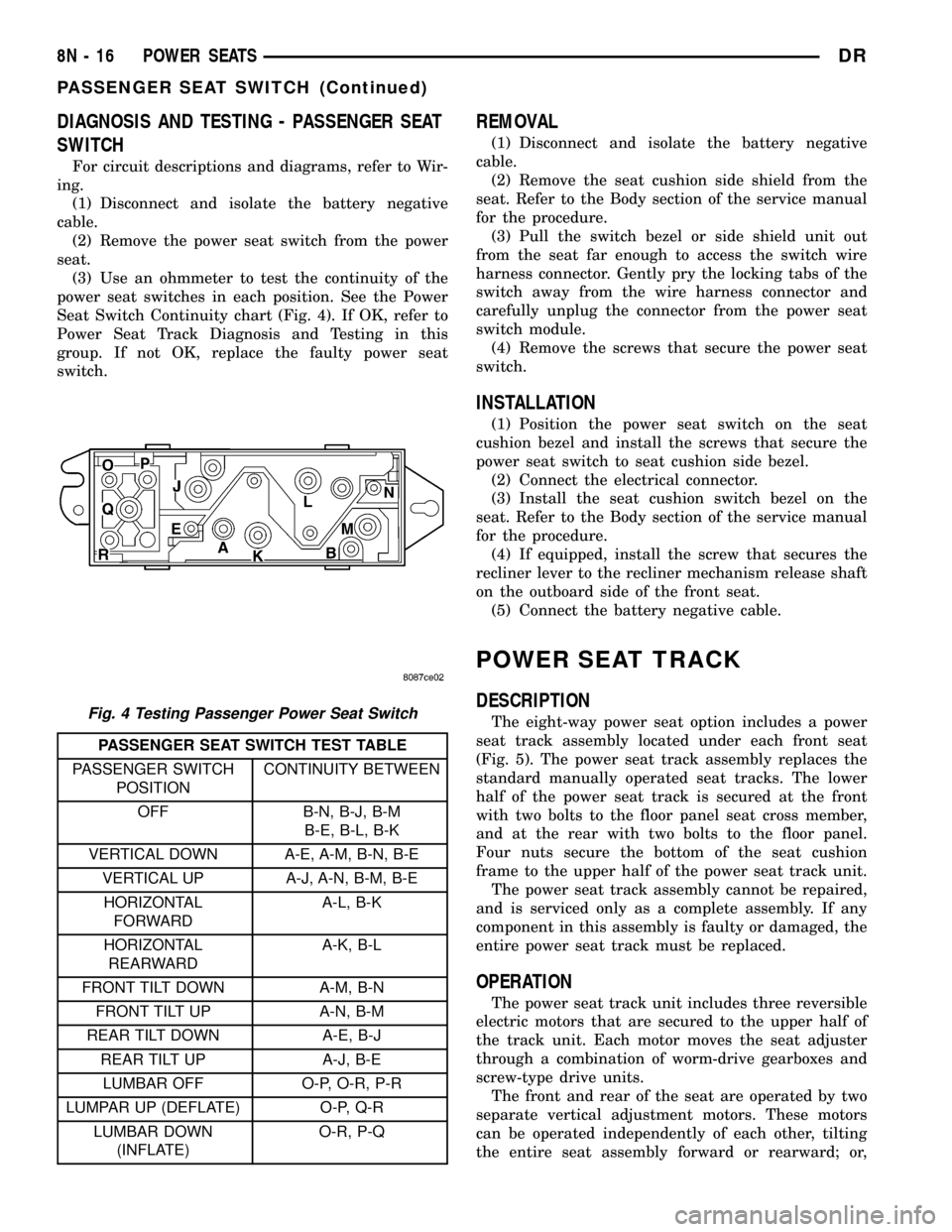
DIAGNOSIS AND TESTING - PASSENGER SEAT
SWITCH
For circuit descriptions and diagrams, refer to Wir-
ing.
(1) Disconnect and isolate the battery negative
cable.
(2) Remove the power seat switch from the power
seat.
(3) Use an ohmmeter to test the continuity of the
power seat switches in each position. See the Power
Seat Switch Continuity chart (Fig. 4). If OK, refer to
Power Seat Track Diagnosis and Testing in this
group. If not OK, replace the faulty power seat
switch.
PASSENGER SEAT SWITCH TEST TABLE
PASSENGER SWITCH
POSITIONCONTINUITY BETWEEN
OFF B-N, B-J, B-M
B-E, B-L, B-K
VERTICAL DOWN A-E, A-M, B-N, B-E
VERTICAL UP A-J, A-N, B-M, B-E
HORIZONTAL
FORWARDA-L, B-K
HORIZONTAL
REARWARDA-K, B-L
FRONT TILT DOWN A-M, B-N
FRONT TILT UP A-N, B-M
REAR TILT DOWN A-E, B-J
REAR TILT UP A-J, B-E
LUMBAR OFF O-P, O-R, P-R
LUMPAR UP (DEFLATE) O-P, Q-R
LUMBAR DOWN
(INFLATE)O-R, P-Q
REMOVAL
(1) Disconnect and isolate the battery negative
cable.
(2) Remove the seat cushion side shield from the
seat. Refer to the Body section of the service manual
for the procedure.
(3) Pull the switch bezel or side shield unit out
from the seat far enough to access the switch wire
harness connector. Gently pry the locking tabs of the
switch away from the wire harness connector and
carefully unplug the connector from the power seat
switch module.
(4) Remove the screws that secure the power seat
switch.
INSTALLATION
(1) Position the power seat switch on the seat
cushion bezel and install the screws that secure the
power seat switch to seat cushion side bezel.
(2) Connect the electrical connector.
(3) Install the seat cushion switch bezel on the
seat. Refer to the Body section of the service manual
for the procedure.
(4) If equipped, install the screw that secures the
recliner lever to the recliner mechanism release shaft
on the outboard side of the front seat.
(5) Connect the battery negative cable.
POWER SEAT TRACK
DESCRIPTION
The eight-way power seat option includes a power
seat track assembly located under each front seat
(Fig. 5). The power seat track assembly replaces the
standard manually operated seat tracks. The lower
half of the power seat track is secured at the front
with two bolts to the floor panel seat cross member,
and at the rear with two bolts to the floor panel.
Four nuts secure the bottom of the seat cushion
frame to the upper half of the power seat track unit.
The power seat track assembly cannot be repaired,
and is serviced only as a complete assembly. If any
component in this assembly is faulty or damaged, the
entire power seat track must be replaced.
OPERATION
The power seat track unit includes three reversible
electric motors that are secured to the upper half of
the track unit. Each motor moves the seat adjuster
through a combination of worm-drive gearboxes and
screw-type drive units.
The front and rear of the seat are operated by two
separate vertical adjustment motors. These motors
can be operated independently of each other, tilting
the entire seat assembly forward or rearward; or,
Fig. 4 Testing Passenger Power Seat Switch
8N - 16 POWER SEATSDR
PASSENGER SEAT SWITCH (Continued)
Page 638 of 2627

receptacles that face the instrument panel, while the
inner end of the tape terminates at the pigtail wires
and connector receptacles on the hub of the clock-
spring rotor that face the steering wheel.
Service replacement clocksprings are shipped pre-
centered and with a molded plastic locking pin that
snaps into a receptacle on the rotor and is engaged
between two tabs on the upper surface of the rotor
case. The locking pin secures the centered clock-
spring rotor to the clockspring case during shipment
and handling, but must be removed from the clock-
spring after it is installed on the steering column.
(Refer to 8 - ELECTRICAL/RESTRAINTS/CLOCK-
SPRING - STANDARD PROCEDURE - CLOCK-
SPRING CENTERING).
The clockspring cannot be repaired. If the clock-
spring is faulty, damaged, or if the driver airbag has
been deployed, the clockspring must be replaced.
OPERATION
The clockspring is a mechanical electrical circuit
component that is used to provide continuous electri-
cal continuity between the fixed instrument panel
wire harness and the electrical components mounted
on or in the rotating steering wheel. On this model
the rotating electrical components include the driver
airbag, the horn switch, the speed control switches,
and the remote radio switches, if the vehicle is so
equipped. The clockspring case is positioned and
secured to the multi-function switch mounting hous-
ing near the top of the steering column. The connec-
tor receptacles on the tail of the fixed clockspring
case connect the clockspring to the vehicle electrical
system through two take outs with connectors from
the instrument panel wire harness.The clockspring rotor is movable and is keyed by
an engagement dowel that is molded onto the rotor
hub between two fins that are cast into the lower
surface of the steering wheel armature. A yellow rub-
ber boot is installed over the engagement dowel to
eliminate contact noise between the dowel and the
steering wheel. The two lobes on the turn signal can-
cel cam on the lower surface of the clockspring rotor
hub contact a turn signal cancel actuator of the
multi-function switch to provide automatic turn sig-
nal cancellation.
Two short, yellow-sleeved pigtail wires on the
upper surface of the clockspring rotor connect the
clockspring to the driver airbag, while a steering
wheel wire harness connects the two connector recep-
tacles on the upper surface of the clockspring rotor to
the horn switch feed pigtail wire connector and, if
the vehicle is so equipped, to the optional speed con-
trol and remote radio switches on the steering wheel.
Like the clockspring in a timepiece, the clockspring
tape has travel limits and can be damaged by being
wound too tightly during full stop-to-stop steering
wheel rotation. To prevent this from occurring, the
clockspring is centered when it is installed on the
steering column. Centering the clockspring indexes
the clockspring tape to the movable steering compo-
nents so that the tape can operate within its
designed travel limits. However, if the clockspring is
removed from the steering column or if the steering
shaft is disconnected from the steering gear, the
clockspring spool can change position relative to the
movable steering components. The clockspring must
be re-centered following completion of this service or
the tape may be damaged.
Service replacement clocksprings are shipped pre-
centered and with a plastic locking pin installed.
This locking pin should not be removed until the
clockspring has been installed on the steering col-
umn. If the locking pin is removed before the clock-
spring is installed on a steering column, the
clockspring centering procedure must be performed.
(Refer to 8 - ELECTRICAL/RESTRAINTS/CLOCK-
SPRING - STANDARD PROCEDURE - CLOCK-
SPRING CENTERING).
STANDARD PROCEDURE - CLOCKSPRING
CENTERING
The clockspring is designed to wind and unwind
when the steering wheel is rotated, but is only
designed to rotate the same number of turns (about
five complete rotations) as the steering wheel can be
turned from stop to stop. Centering the clockspring
indexes the clockspring tape to other steering compo-
nents so that it can operate within its designed
travel limits. The rotor of a centered clockspring can
be rotated two and one-half turns in either direction
Fig. 18 Turn Signal Cancel Cam
1 - LOCKING PIN
2 - CLOCKSPRING CASE
3 - CANCEL CAM
4 - LOWER CONNECTOR RECEPTACLE (2)
DRRESTRAINTS 8O - 19
CLOCKSPRING (Continued)
Page 640 of 2627

(1) Place the front wheels in the straight ahead
position.
(2) Remove the driver airbag from the steering
wheel. (Refer to 8 - ELECTRICAL/RESTRAINTS/
DRIVER AIRBAG - REMOVAL).
(3) Disconnect the steering wheel wire harness
connectors from the upper clockspring connector
receptacles.
CAUTION: Be certain that the screws that secure
the steering wheel puller to the steering wheel are
fully engaged in the steering wheel armature with-
out passing through the steering wheel and damag-
ing the clockspring.
(4) Remove the steering wheel from the steering
column. (Refer to 19 - STEERING/COLUMN/STEER-
ING WHEEL - REMOVAL).
(5) Remove the steering column opening cover
from the instrument panel. (Refer to 23 - BODY/IN-
STRUMENT PANEL/STEERING COLUMN OPEN-
ING COVER - REMOVAL).
(6) If the vehicle is so equipped, grasp the steering
column tilt knob firmly and pull it straight rearward
to remove it from the tilt adjuster mechanism lever
located on the left side of the column just below the
multi-function switch control stalk.
(7) From below the steering column, remove the
two outboard screws that secure the upper shroud to
the lower shroud.
(8) Using hand pressure, push gently inward on
both sides of the upper shroud near the parting line
between the upper and lower shrouds to release the
snap features that secure it to the lower shroud.
(9) Remove the upper shroud from the lower
shroud.
(10) From below the steering column, remove the
one center screw that secures the lower shroud to the
steering column lock housing.
(11) Remove the lower shroud from the steering
column.
(12) Disconnect the two instrument panel wire
harness connectors for the clockspring from the two
connector receptacles below the steering column on
the back of the clockspring housing.
(13) Remove the two screws that secure the clock-
spring to the multi-function switch mounting housing
(Fig. 20).
(14) Remove the clockspring from the multi-func-
tion switch mounting housing. The clockspring can-
not be repaired. It must be replaced if faulty or
damaged, or if the driver airbag has been deployed.
(15) If the removed clockspring is to be reused, be
certain to secure the clockspring rotor to the clock-
spring case to maintain clockspring centering until it
is reinstalled on the steering column. If clockspring
centering is not maintained, the clockspring must becentered again before it is reinstalled. (Refer to 8 -
ELECTRICAL/RESTRAINTS/CLOCKSPRING -
STANDARD PROCEDURE - CLOCKSPRING CEN-
TERING).
INSTALLATION
The clockspring cannot be repaired. It must be
replaced if faulty or damaged, or if the driver airbag
has been deployed.
If the clockspring is not properly centered in rela-
tion to the steering wheel, steering shaft and steer-
ing gear, it may be damaged. (Refer to 8 -
ELECTRICAL/RESTRAINTS/CLOCKSPRING -
STANDARD PROCEDURE - CLOCKSPRING CEN-
TERING). Service replacement clocksprings are
shipped pre-centered and with a locking pin
installed. This locking pin should not be removed
until the clockspring has been installed on the steer-
ing column. If the locking pin is removed before the
clockspring is installed on a steering column, the
clockspring centering procedure must be performed.
Fig. 20 Clockspring Remove/Install
1 - CLOCKSPRING
2 - LOCATING PIN
3 - SCREW (2)
4 - LOCKING PIN
5 - ENGAGEMENT DOWEL BOOT
DRRESTRAINTS 8O - 21
CLOCKSPRING (Continued)
Page 641 of 2627

WARNING: TO AVOID PERSONAL INJURY OR
DEATH, ON VEHICLES EQUIPPED WITH AIRBAGS,
DISABLE THE SUPPLEMENTAL RESTRAINT SYS-
TEM BEFORE ATTEMPTING ANY STEERING
WHEEL, STEERING COLUMN, AIRBAG, SEAT BELT
TENSIONER, IMPACT SENSOR, OR INSTRUMENT
PANEL COMPONENT DIAGNOSIS OR SERVICE.
DISCONNECT AND ISOLATE THE BATTERY NEGA-
TIVE (GROUND) CABLE, THEN WAIT TWO MINUTES
FOR THE SYSTEM CAPACITOR TO DISCHARGE
BEFORE PERFORMING FURTHER DIAGNOSIS OR
SERVICE. THIS IS THE ONLY SURE WAY TO DIS-
ABLE THE SUPPLEMENTAL RESTRAINT SYSTEM.
FAILURE TO TAKE THE PROPER PRECAUTIONS
COULD RESULT IN ACCIDENTAL AIRBAG DEPLOY-
MENT.
NOTE: Before starting this procedure, be certain
that the front wheels are still in the straight-ahead
position.
(1) While holding the centered clockspring rotor
and case stationary in relation to each other, care-
fully slide the clockspring down over the steering col-
umn upper shaft.
(2) Align and seat the hole in the locating tab at
the eleven o'clock position on the clockspring case
over the locating pin on the multi-function switch
mounting housing (Fig. 20).
(3) Install and tighten the two screws that secure
the clockspring to the multi-function switch mount-
ing housing. Tighten the screws to 2 N´m (20 in.
lbs.).
(4) Reconnect the two instrument panel wire har-
ness connectors for the clockspring to the two connec-
tor receptacles below the steering column on the back
of the clockspring housing.
(5) Position the lower shroud onto the steering col-
umn.
(6) From below the steering column, install and
tighten the one center screw that secures the lower
shroud to the steering column lock housing. Tighten
the screw to 2 N´m (20 in. lbs.).(7) Position the upper shroud onto the steering col-
umn. If the vehicle is equipped with an automatic
transmission, be certain to engage the gearshift lever
gap hider into the openings in the right side of the
upper and lower shrouds.
(8) Align the snap features on the upper shroud
with the receptacles on the lower shroud and apply
hand pressure to snap them together.
(9) From below the steering column, install and
tighten the two screws that secure the upper shroud
to the lower shroud. Tighten the screws to 2 N´m (20
in. lbs.).
(10) If the vehicle is equipped with the optional tilt
steering column, align the steering column tilt knob
with the tilt adjuster mechanism lever located on the
left side of the column just below the multi-function
switch control stalk and, using hand pressure, push
the knob firmly onto the lever.
(11) Reinstall the steering column opening cover
onto the instrument panel. (Refer to 23 - BODY/IN-
STRUMENT PANEL/STEERING COLUMN OPEN-
ING COVER - INSTALLATION).
(12) If a new clockspring has been installed,
remove the plastic locking pin that is securing the
clockspring rotor to the clockspring case to maintain
clockspring centering.
NOTE: When reinstalling the steering wheel, be cer-
tain to index the yellow rubber booted engagement
dowel on the upper surface of the clockspring rotor
between the two fins cast into the lower surface of
the steering wheel armature hub.
(13) Reinstall the steering wheel onto the steering
column. (Refer to 19 - STEERING/COLUMN/STEER-
ING WHEEL - INSTALLATION).
(14) Reconnect the steering wheel wire harness
connectors to the upper clockspring connector recep-
tacles. Be certain that the steering wheel wire har-
ness is routed between the steering wheel back trim
cover and the steering wheel armature.
(15) Reinstall the driver airbag onto the steering
wheel. (Refer to 8 - ELECTRICAL/RESTRAINTS/
DRIVER AIRBAG - INSTALLATION).
8O - 22 RESTRAINTSDR
CLOCKSPRING (Continued)
Page 700 of 2627

is secured by integral mounting tabs and a snap fea-
ture to slots in the right side of the cooling module
shroud in the engine compartment. On models with
an optional diesel engine, the washer reservoir is
secured by screws to the back of the upright left ver-
tical member of the radiator support in the engine
compartment. The washer reservoir filler neck is
accessed from the engine compartment.
²Wiper Arm- The two wiper arms are secured
with integral latches to the serrated ends of the two
wiper pivot shafts, which extend through the cowl
plenum cover/grille panel located near the base of the
windshield.
²Wiper Blade- The two wiper blades are
secured to the two wiper arms with an integral latch,
and are parked on the glass near the bottom of the
windshield when the wiper system is not in opera-
tion.
²Wiper High/Low Relay- The wiper high/low
relay is an International Standards Organization
(ISO) micro relay located in the Integrated Power
Module (IPM) in the engine compartment near the
battery.
²Wiper Module- The wiper pivot shafts are the
only visible components of the wiper module. The
remainder of the module is concealed within the cowl
plenum area beneath the cowl plenum cover/grille
panel. The wiper module includes the wiper module
bracket, four rubber-isolated wiper module mounts,
the wiper motor, the wiper motor crank arm, the two
wiper drive links, and the two wiper pivots.
²Wiper On/Off Relay- The wiper on/off relay is
an International Standards Organization (ISO) micro
relay located in the Integrated Power Module (IPM)
in the engine compartment near the battery.
Hard wired circuitry connects the wiper and
washer system components to the electrical system of
the vehicle. These hard wired circuits are integral to
several wire harnesses, which are routed throughout
the vehicle and retained by many different methods.
These circuits may be connected to each other, to the
vehicle electrical system and to the wiper and washer
system components through the use of a combination
of soldered splices, splice block connectors, and many
different types of wire harness terminal connectors
and insulators. Refer to the appropriate wiring infor-
mation. The wiring information includes wiring dia-
grams, proper wire and connector repair procedures,
further details on wire harness routing and reten-
tion, as well as pin-out and location views for the
various wire harness connectors, splices and grounds.
OPERATING MODES
The components of the wiper and washer system
are designed to work in concert to provide the follow-
ing operating modes:²Continuous Wipe Mode- The control knob on
the control stalk of the multi-function switch has two
continuous wipe positions, Low and High. When
selected, these switch positions will cause the two-
speed wiper motor to operate in a continuous low or
high speed cycle.
²Intermittent Wipe Mode- The control knob on
the control stalk of the multi-function switch has five
minor detent intermittent wipe positions. When
selected, these switch positions will cause the wiper
system to operate with one of five delay intervals
between complete wipe cycles. The intermittent wipe
delay intervals are speed sensitive and will be dou-
bled when the vehicle speed is about sixteen kilome-
ters-per-hour (ten miles-per-hour) or less.
²Pulse Wipe Mode- When the control knob on
the control stalk of the multi-function switch is
depressed to the momentary Wash position for less
than about one-half second, the wiper system will
operate the wipers for one complete low speed cycle,
then will park the wiper blades near the base of the
windshield.
²Washer Mode- When the control knob on the
control stalk of the multi-function switch is
depressed to the momentary Wash position for more
than about one-half second with the wiper system
turned Off, the washer pump/motor and the wipers
will operate for as long as the washer switch is held
closed up to about thirty seconds, then the wipe-af-
ter-wash mode is invoked when the control knob is
released. When the Wash position is selected with
the wiper system operating in a continuous wipe
mode, washer fluid will be dispensed onto the wind-
shield glass through the washer nozzles for as long
as the washer switch is held closed up to about thirty
seconds. When the Wash position is selected with the
wiper system operating in an intermittent wipe
mode, washer fluid is still dispensed until the control
knob is released; however, the wipers will operate in
a low speed continuous cycle from the time the
washer switch is closed until several wipe cycles
after the switch is released, before returning to the
selected intermittent wipe interval. If the control
knob is held in the depressed Wash position for more
than about thirty seconds, washer system operation
will be suspended until the control knob is released
for about two seconds then cycled back to the Wash
position.
²Wipe-After-Wash Mode- When the control
knob on the control stalk of the multi-function switch
is depressed to the momentary Wash position for
more than about one-half second with the wiper sys-
tem turned Off, the washer pump/motor and the wip-
ers will operate for as long as the washer switch is
held closed up to about thirty seconds, then provide
several additional wipe cycles after the control knob
DRWIPERS/WASHERS 8R - 3
WIPERS/WASHERS (Continued)
Page 719 of 2627

INSTALLATION
(1) Position the wiper high/low relay to the proper
receptacle in the Integrated Power Module (IPM)
(Fig. 24).
(2) Align the wiper high/low relay terminals with
the terminal cavities in the IPM receptacle.
(3) Push firmly and evenly on the top of the wiper
high/low relay until the terminals are fully seated in
the terminal cavities in the IPM receptacle.
(4) Reinstall the cover onto the IPM.
(5) Reconnect the battery negative cable.
WIPER MODULE
DESCRIPTION
The wiper motor bracket is secured with two
screws below the wiper motor through two rubber
insulators to the bottom of the cowl plenum panel
beneath the cowl plenum cover/grille panel (Fig. 25).
Two screws secure the top of the wiper module
bracket to the cowl plenum panel through rubber
insulators located on the outboard end of each pivot
bracket. The ends of the wiper pivot shafts that pro-
trude through dedicated openings in the cowl plenum
cover/grille panel to drive the wiper arms and bladesare the only visible components of the wiper module.
The wiper module consists of the following major
components:
²Bracket- The wiper module bracket consists of
a long tubular steel main member that has a die cast
pivot bracket formation near each end where the two
wiper pivots are secured. A stamped steel clamp
secures the center of the tubular member to the die
cast bracket integral to the wiper motor with two
screws.
²Crank Arm- The wiper motor crank arm is a
stamped steel unit with a slotted hole on the driven
end that is secured to the wiper motor output shaft
with a nut, and has a ball stud secured to the drive
end.
²Linkage- Two stamped steel drive links con-
nect the wiper motor crank arm to the wiper pivot
lever arms. The left side drive link has a plastic sock-
et-type bushing on each end. The right side drive
link has a plastic socket-type bushing on one end,
and a plastic sleeve-type bushing on the other end.
The socket-type bushing on one end of each drive
link is snap-fit over the ball stud on the lever arm of
its respective pivot. The right side drive link sleeve-
type bushing end is then fit over the motor crank
arm ball stud, and the other socket-type bushing of
the left side drive link is snap-fit over the exposed
end of the wiper motor crank arm ball stud.
²Motor- The wiper motor features an integral
die cast bracket to which the wiper module bracket is
secured with a stamped steel clamp and two screws
near the top and which has two rubber insulated
mounting ears at the bottom. This die casting also
serves as the wiper motor transmission housing from
which the wiper motor output shaft exits. A nut
secures the wiper motor crank arm to the motor out-
put shaft. The two-speed permanent magnet wiper
motor features an integral transmission, an internal
park switch, and an internal automatic resetting cir-
cuit breaker.
²Pivots- The two front wiper pivots are secured
within the die cast pivot brackets on the outboard
ends of the wiper module main member. The lever
arms that extend from the center of the pivot shafts
each have a ball stud on their end. The upper end of
each pivot shaft where the wiper arms will be fas-
tened each has a serrated driver with a keyway. The
lower ends of the pivot shafts are installed through
lubricated bushings in the pivot brackets and are
secured with snap rings.
The wiper module cannot be adjusted or repaired.
If any component of the module is faulty or damaged,
the entire wiper module unit must be replaced.
Fig. 25 Wiper Module
1 - PIVOT BRACKET (2)
2 - TUBE
3 - CLAMP
4 - PIVOT SHAFT (2)
5 - INSULATOR (4)
6 - LINKAGE BUSHING (4)
7 - DRIVE LINK (2)
8 - PIVOT CRANK ARM (2)
9 - PIGTAIL WIRE CONNECTOR
10 - MOTOR CRANK ARM
11 - WIPER MOTOR
8R - 22 WIPERS/WASHERSDR
WIPER HIGH/LOW RELAY (Continued)