display DODGE RAM 1500 GAS 2004 3.G User Guide
[x] Cancel search | Manufacturer: DODGE, Model Year: 2004, Model line: RAM 1500 GAS, Model: DODGE RAM 1500 GAS 2004 3.GPages: 429, PDF Size: 7.52 MB
Page 150 of 429

24. Low Wash Light
This light comes on when the washer fluid level falls
below approximately 1/4 filled. The light will remain on
until fluid is added and one minute has elapsed.
25. Odometer/Trip Odometer Button
Press this button to toggle between the odometer and the
trip odometer display. Holding the button in resets the
trip odometer reading when in trip mode.
26. Fuel Gauge
Shows level of fuel in tank when ignition switch is in the
ON position.
27. Low Fuel Warning Light
Glows when the pointer is between ªEº and 1/8
indication mark (approximately 15% of tank vol-
ume) on the fuel gauge. When the fuel gauge
pointer is on ªEº (equivalent to Distance To Empty [DTE]
= 0 on the overhead console if so equipped) there isreserve fuel capacity, which corresponds to approxi-
mately 8% of tank volume. This reserve capacity was put
in place to prevent the likelihood of customers running
out of fuel when operating at maximum load conditions
in areas where there aren't many gas stations.
Ram fuel tank volumes are as follows:
²26 gallons (98L) - 1500 short box models
²34 gallons (129L) - 2500/3500 short box models
²35 gallons (132L) - 1500/2500/3500 long box models
28. Transmission Oil Temperature Warning Light
This light indicates that there is excessive trans-
mission fluid temperature that might occur
with severe usage such as trailer towing. If this
light comes on, stop the vehicle and run the
engine at idle or faster, with the transmission in NEU-
TRAL until the light goes off.
150 UNDERSTANDING YOUR INSTRUMENT PANEL
Page 151 of 429

ELECTRONIC DIGITAL CLOCK
The clock and radio each use the display panel built into
the radio. A digital readout shows the time in hours and
minutes whenever the ignition switch is in the ªONº or
ªACCº position.
When the ignition switch is in the ªOFFº position, or
when the radio frequency is being displayed, time keep-
ing is accurately maintained.
Clock Setting Procedure
1. Turn the ignition switch to the ªONº or ªACCº
position. Using the point of a ballpoint pen or similar
object, press either the ªHº (Hour) or ªMº (Minute)
buttons on the radio. The display will show the time.
2. Press the ªHº button to set hours or the ªMº button to
set minutes. The time setting will increase each time you
press a button.
SALES CODE RBBÐAM/FM STEREO RADIO
WITH CASSETTE TAPE PLAYER AND CD
CHANGER CAPABILITY
Operating Instructions
NOTE:Power to operate the radio is supplied through
the ignition switch. It must be in the ON or ACC position
to operate the radio.
UNDERSTANDING YOUR INSTRUMENT PANEL 151
4
Page 152 of 429

NOTE:When first learning the control functions, the
user should set the controls as shown in the following
list.
Tone Controls¼As illustrated.
Speaker Control¼Centered.
Power Button
The volume control/power button pops out when
pressed, this turns the sound system ON in the mode last
used. Pushing the button back in turns the sound system
OFF.
Electronic Volume Control
The electronic volume control turns continuously (360
degrees) in either direction without stopping. Turning the
volume control to the right increases the volume and to
the left decreases it.
When the audio system is turned on, the sound will be
set at the same volume level as last played.For your convenience, the volume can be turned down,
but not up, when the audio system is off and the ignition
is ON.
Seek
Press and release the SEEK button to search for the next
station in either the AM or FM mode. Press the top of the
button to seek up and the bottom to seek down. The
radio will remain tuned to the new station until you
make another selection. Holding the button will bypass
stations without stopping until you release it.
Tune
Press the TUNE control up or down to increase or
decrease the frequency. If the button is pushed and held,
the radio will continue to tune until the button is
released. The frequency will be displayed and continu-
ously updated while the button is pushed.
152 UNDERSTANDING YOUR INSTRUMENT PANEL
Page 153 of 429

To Set The Push-Button Memory
When you are receiving a station that you wish to
commit to push-button memory, press the SET button.
The symbol SET 1 will now show in the display window.
Select the ª1±5º button you wish to lock onto this station
and press and release that button. If a button is not
selected within 5 seconds after pressing the SET button,
the station will continue to play but will not be locked
into push-button memory.
You may add a second station to each push-button by
repeating the above procedure with this exception: Press
the SET button twice and SET 2 will show in the display
window. Each button can be set for SET 1 and SET 2 in
both AM and FM. This allows a total of 10 AM and 10 FM
stations to be locked into push-button memory. The
stations stored in SET 2 memory can be selected by
pressing the push-button twice.Every time a preset button is used a corresponding
button number will be displayed.
Balance
The balance control adjusts the left-to-right speaker bal-
ance. Press the BAL button in and it will pop out. Adjust
the balance and push the button back in.
Fade
The fade control provides for balance between the front
and rear speakers. Press the FADE button in and it will
pop out. Adjust the balance and push the button back in.
Bass and Treble Tone Control
The tone controls consist of 2 separate bands. The bass
band is on the left, and the treble band is on the right.
Each band is adjusted by a slider control with a detent at
the mid-position. Moving the control up or down in-
creases or decreases amplification of that band. The mid
position provides a balanced output.
UNDERSTANDING YOUR INSTRUMENT PANEL 153
4
Page 154 of 429

AM/FM Selection
Press the AM/FM button to change from AM to FM. The
operating mode will be displayed next to the station
frequency. The display will show ST when a stereo
station is received in the FM mode.
Mode Button
Press the MODE button to select between the cassette
tape player, CD changer, or the Satellite Radio (if
equipped). When the Satellite Radio (if equipped) is
selected ªSAº will appear in your radio display.
A CD or tape may remain in the player while in the
Satellite or radio mode.
Cassette Player Features
With ignition OFF and the sound system OFF, you can
eject the tape cassette by pushing the EJECT button.You can turn the tape player ON by inserting a cassette or
activating the MODE button (with a cassette in the radio),
but only when the ignition and radio are on.
Each time a cassette is inserted the tape player will begin
playing on the side of the cassette that is facing up in the
player.
Music Search
Pressing the SEEK button while playing a tape will start
the Music Search mode. Press the SEEK button up for the
next selection on the tape and down to return to the
beginning of the current selection, or return to the
beginning of the previous selection if the tape is within
the first 5 seconds of the current selection.
The SEEK symbol appears on the display when Music
Search is in operation. Music Search shuts off automati-
cally when a selection has been located.
154 UNDERSTANDING YOUR INSTRUMENT PANEL
Page 155 of 429

Selective Music Search
Press the SEEK button up or down to move the track
number to skip forward or backward 1 to 7 selections.
Press the SEEK button once to move 1 selection, twice to
move 2 selections, etc.
Fast Forward And Rewind Buttons
Pressing the TUNE button up or down momentarily
activates Fast Forward or Rewind and makes the direc-
tional arrows appear on the display.
To stop Fast Forward or Rewind, press the TUNE button
again.
Time Button
Press the time button to toggle between station frequency
and time of day.
Pressing this button while playing a cassette tape will
change the side of the tape being played.
NR (Noise Reduction)
Pushing the Number 2 Pre-set button when a tape is
playing deactivates the Dolby Noise Reduction System*.
When Dolby is ON, the NR symbol appears on the
display. Each time a tape is inserted the Dolby will turn
ON.
* ªDolbyº noise reduction manufactured under license
from Dolby Laboratories Licensing Corporation. Dolby
and the double-D symbol are trademarks of Dolby Labo-
ratories Licensing Corporation.
CD Changer Control Capability Ð If Equipped
This radio is compatible with a remote mounted CD
changer available through Mopar Accessories. The fol-
lowing instructions are for the radio controls that operate
this CD changer.
UNDERSTANDING YOUR INSTRUMENT PANEL 155
4
Page 156 of 429

Mode Button
To activate the CD changer, press the MODE button until
CD information appears on the display.
Push-Button
While the CD changer is playing, press the NUMBER 1
push-button or the NUMBER 5 push-button to select a
disc numbered higher or lower than the one currently
being played.
Seek Button
Press the SEEK up or down to select another track on the
same disc. A SEEK symbol will appear on the display.
Fast Forward And Rewind Buttons
Press and hold the FF button for fast forward. Press and
hold the RW button for fast reverse.
The audio output can be heard when fast forward and
fast reverse are activated.
Random Play (RND)
Press the Random button to play the tracks on the
selected disc in random order for an interesting change of
pace.
Random can be cancelled by pressing the button a second
time or by ejecting the CD from the changer.
CD Diagnostic Indicators
When driving over a very rough road, the CD player may
skip momentarily. Skipping will not damage the disc or
the player, and play will resume automatically.
As a safeguard and to protect your CD player, one of the
following warning symbols may appear on your display.
A CD HOT symbol indicates the player is too hot.
CD HOT will pause the operation. Play can be resumed
when the operating temperature is corrected or another
MODE is selected.
156 UNDERSTANDING YOUR INSTRUMENT PANEL
Page 157 of 429

An ERR symbol will appear on the display if the laser is
unable to read the Disc data for the following reasons:
²Excessive vibration
²Disc inserted upside down
²Damaged disc
²Water condensation on optics
Radio Display Messages
Your radio has been designed to display certain messages
when a problem is detected with the CD player.
UNDERSTANDING YOUR INSTRUMENT PANEL 157
4
Page 158 of 429

SALES CODE RAZÐAM/ FM STEREO RADIO
WITH CASSETTE TAPE PLAYER, CD PLAYER
AND CD CHANGER CONTROLS Ð IF EQUIPPED
Operating Instructions Ð Radio
NOTE:Power to operate the radio is controlled by the
ignition switch. It must be in the ON or ACC position to
operate the radio.
Power Switch, Volume Control
Press the ON/VOL control to turn the radio on. Turn the
volume control clockwise to increase the volume. The
volume will be displayed and continuously updated
while the button is pressed.
Seek Button (Radio Mode)
Press and release the Seek button to search for the next
station in either the AM or FM mode. Press the top of the
button to seek up and the bottom to seek down. Holding
the button will by pass stations until you release the
button.
Tuning
Press the TUNE control up or down to increase or
decrease the frequency. If you press and hold the button,
the radio will continue to tune until you release the
button. The frequency will be displayed and continu-
ously updated while the button is pressed.
158 UNDERSTANDING YOUR INSTRUMENT PANEL
Page 159 of 429
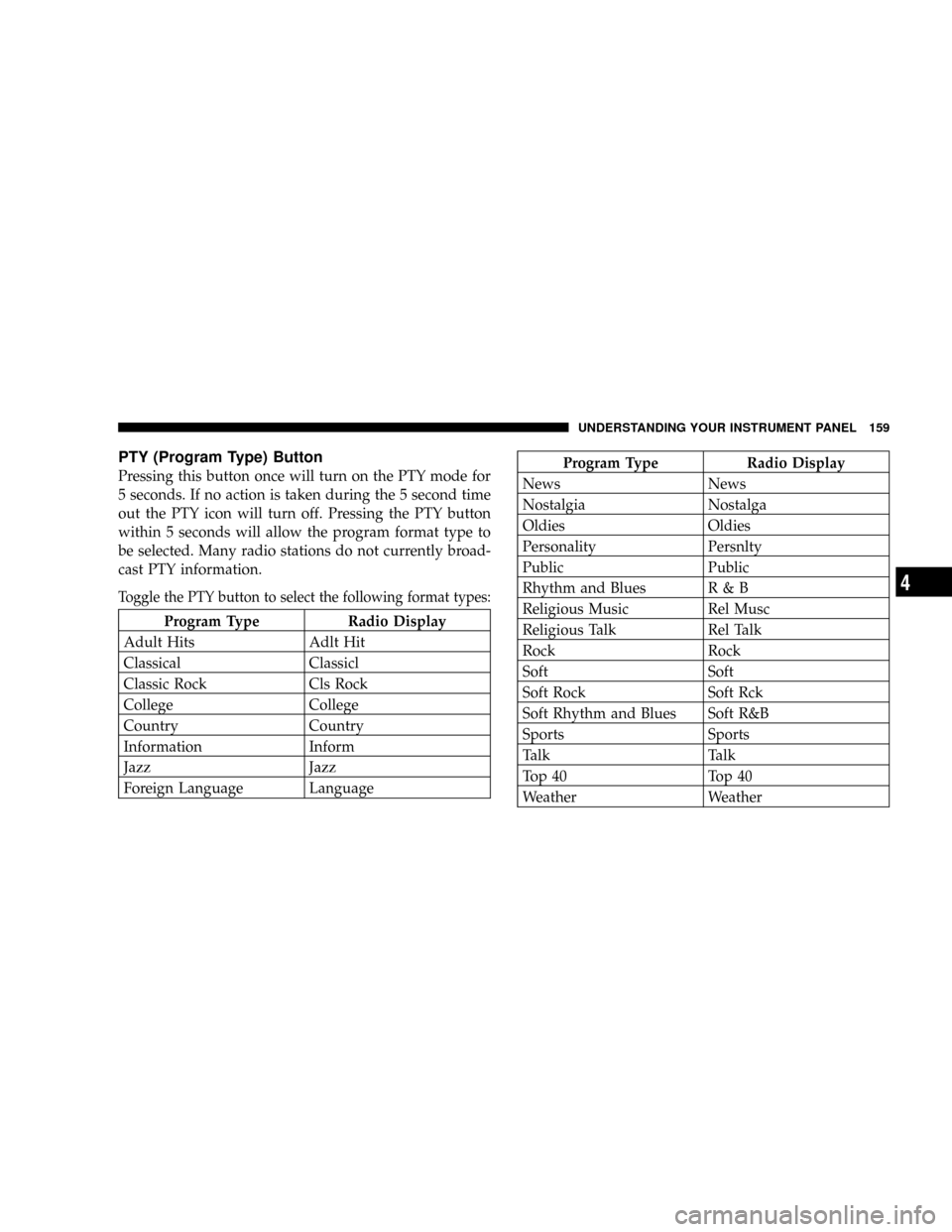
PTY (Program Type) Button
Pressing this button once will turn on the PTY mode for
5 seconds. If no action is taken during the 5 second time
out the PTY icon will turn off. Pressing the PTY button
within 5 seconds will allow the program format type to
be selected. Many radio stations do not currently broad-
cast PTY information.
Toggle the PTY button to select the following format types:
Program Type Radio Display
Adult Hits Adlt Hit
Classical Classicl
Classic Rock Cls Rock
College College
Country Country
Information Inform
Jazz Jazz
Foreign Language Language
Program Type Radio Display
News News
Nostalgia Nostalga
Oldies Oldies
Personality Persnlty
Public Public
Rhythm and Blues R & B
Religious Music Rel Musc
Religious Talk Rel Talk
Rock Rock
Soft Soft
Soft Rock Soft Rck
Soft Rhythm and Blues Soft R&B
Sports Sports
Talk Talk
Top 40 Top 40
Weather Weather
UNDERSTANDING YOUR INSTRUMENT PANEL 159
4