Wiring DODGE RAM 1999 Service User Guide
[x] Cancel search | Manufacturer: DODGE, Model Year: 1999, Model line: RAM, Model: DODGE RAM 1999Pages: 1691, PDF Size: 40.34 MB
Page 116 of 1691
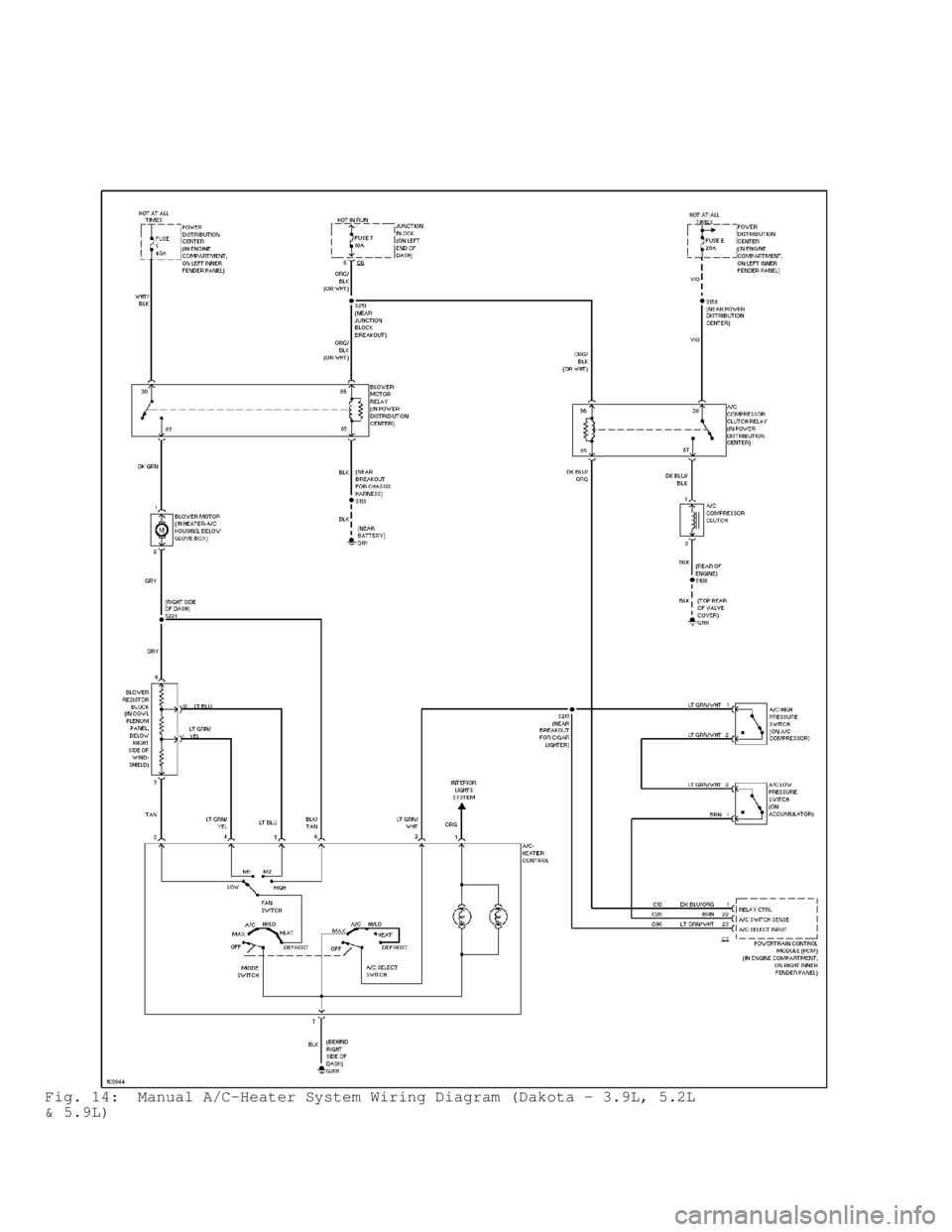
Fig. 14: Manual A/C-Heater System Wiring Diagram (Dakota - 3.9L, 5.2L
& 5.9L)
Page 117 of 1691
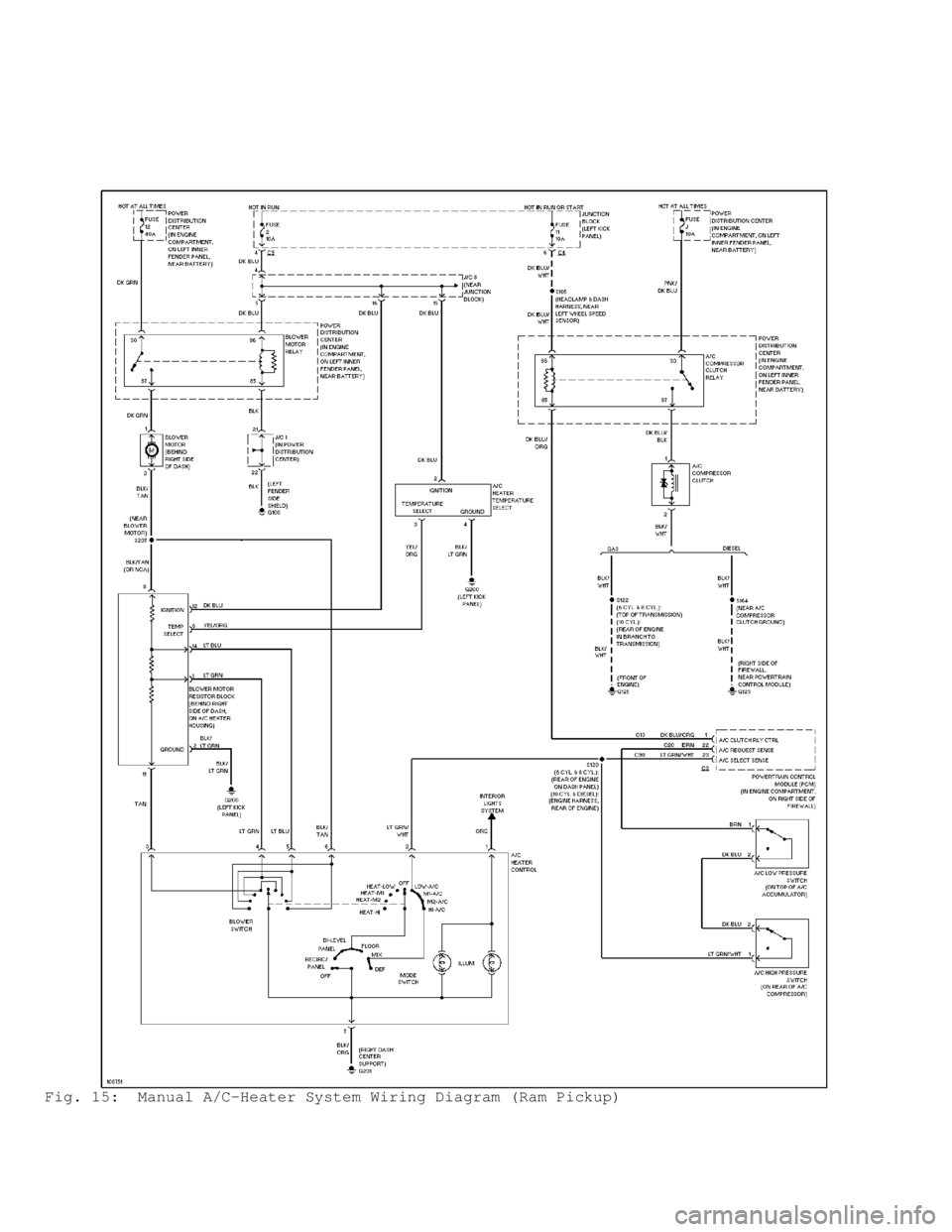
Fig. 15: Manual A/C-Heater System Wiring Diagram (Ram Pickup)
Page 167 of 1691

2) Disconnect vacuum line at PCV valve located in valve
cover. Install .185" fixed orifice Air Metering Fitting (6714) into
disconnected vacuum line in place of PCV valve.
3) Disconnect purge vacuum hose from passenger's side front
corner of throttle body, next to MAP sensor. Place cap on vacuum hose
fitting on throttle body.
4) Connect scan tool to Data Link Connector (DLC) located
below driver's side of instrument panel, near steering column. See
Fig. 1, 2 or 3.
5) Start engine and warm engine to normal operating
temperature. Using scan tool manufacturer's instructions, select
SYSTEM TEST and then access the MINIMUM AIRFLOW display on scan tool.
When accessed, scan tool will count down to stabilize idle RPM and
display minimum airflow idle RPM. Minimum airflow idle RPM should be
500-900 RPM.
6) Shut engine off. If minimum airflow idle RPM is correct,
throttle body is okay. Go to next step. If minimum airflow idle RPM is
not within specification, using approved cleaner, clean throttle body
and recheck minimum airflow idle RPM. If correct minimum airflow idle
RPM cannot be obtained, replace throttle body. Go to next step.
7) Remove air metering fitting. Reinstall vacuum hoses as
necessary. Reinstall air duct on throttle body. Remove scan tool.
Ram Pickup 8.0L
Throttle body minimum airflow cannot be checked on this
application.
THROTTLE POSITION SENSOR
NOTE: Throttle Position (TP) sensor is nonadjustable. Use following\
procedure to check TP sensor calibration. For complete
testing of TP sensor and wiring circuit, see SELF-DIAGNOSTICS
- JEEP, TRUCKS & RWD VANS article.
Dakota, Ram Pickup, Ram Van & Ram Wagon
1) Remove components for access to electrical connector at TP
sensor mounted on throttle body. With electrical connector installed
on TP sensor, turn ignition on with engine off. DO NOT start engine.
2) Using digital volt-ohmmeter, measure voltage at center
terminal on electrical connector for TP sensor with throttle valve
closed (idle position). Voltage should be greater than .35 volt, but
less than .90 volt.
3) Slowly open throttle to full throttle and note voltage
reading. Voltage should smoothly increase to less than 4.50 volts.
Replace TP sensor if voltage is not within specification.
Page 174 of 1691
protective cover is fitted to front of air bag module bearing the SRS
air bag logo. Air bag module contains air bag cushion, inflator and
supporting components. Air bag module is a sealed unit and is not
serviceable. The module inflator assembly produces nitrogen gas to
fill air bag cushion when a small amount of current from ACM is
applied to the ignitor assembly. Gas pressure builds and discharges
from inflator through a diffuser and screen assembly, forcing steering
wheel cover to burst along its seams until air bag is fully inflated.
Once air bag cushion is fully inflated, gas escapes from bag through
vents, away from driver.
Passenger-Side
Air bag module is mounted to instrument panel mounting
bracket. Module is covered by a protective door bearing the SRS air
bag logo. When supplied an electrical signal, inflator will discharge
argon gas directly into air bag. When air bag inflates, protective
door will pivot aside allowing air bag to deploy.
AIR BAG CONTROL MODULE (ACM)
ACM is located under instrument panel, on transmission
tunnel. Impact sensor, energy reserve capacitor and On-Board
Diagnostics (OBD) are an integral part of ACM. ACM monitors critical
input and output circuits within air bag system, ensuring they are
operating correctly. Some circuits are tested continuously; others are
checked only under certain conditions. ACM provides information about
air bag system through AIR BAG warning light and Data Link Connector
(DLC). When diagnostic trouble code (fault message) is stored, AIR B\
AG
warning light will be activated for 12 seconds or more.
DATA LINK CONNECTOR (DLC)
DLC is located under left side of instrument panel, left of
steering column. DLC is used to access SRS on-board diagnostics.
CLOCKSPRING
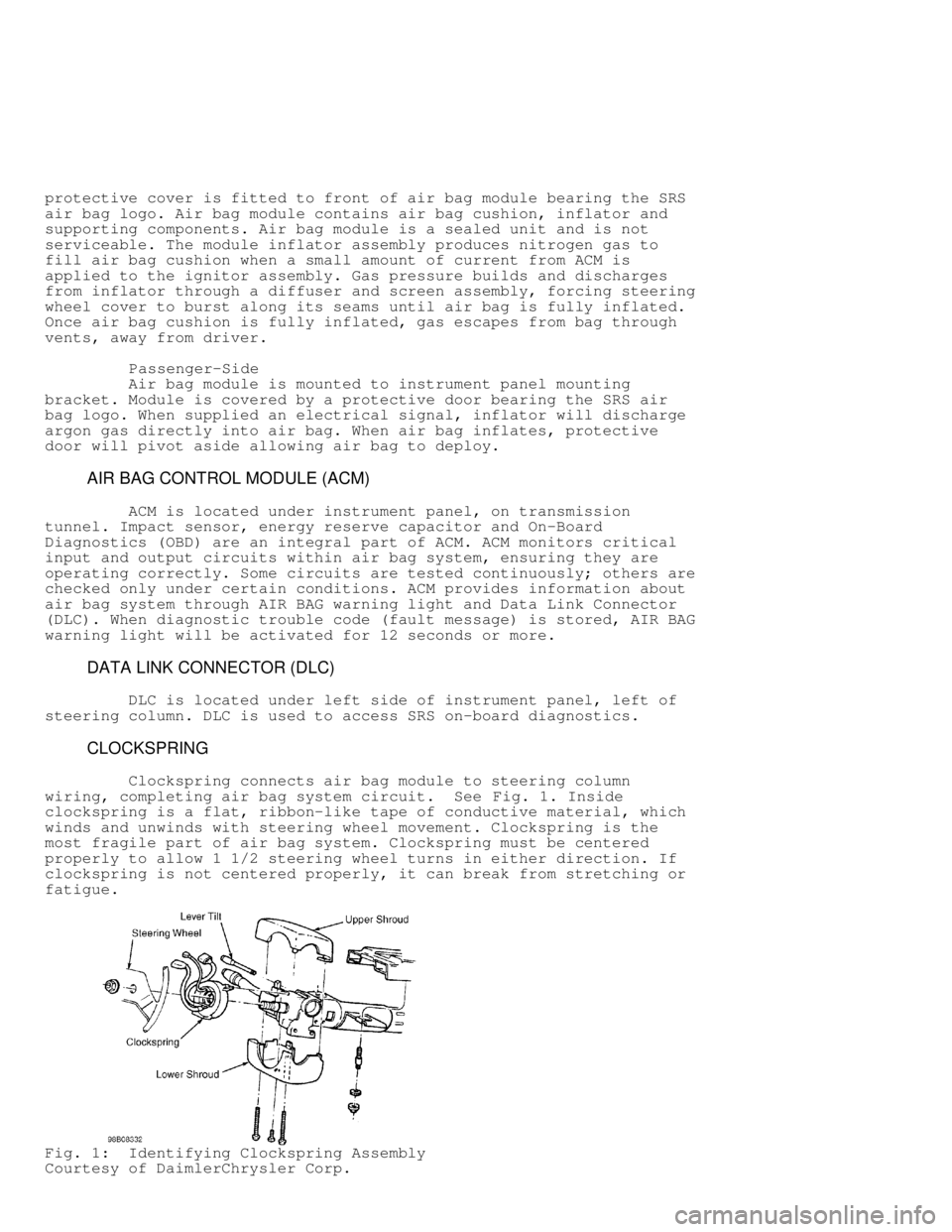
Clockspring connects air bag module to steering column
wiring, completing air bag system circuit. See Fig. 1. Inside
clockspring is a flat, ribbon-like tape of conductive material, which
winds and unwinds with steering wheel movement. Clockspring is the
most fragile part of air bag system. Clockspring must be centered
properly to allow 1 1/2 steering wheel turns in either direction. If
clockspring is not centered properly, it can break from stretching or
fatigue.
Fig. 1: Identifying Clockspring Assembly
Courtesy of DaimlerChrysler Corp.
Page 177 of 1691

WARNING: Vehicle interior will contain sodium hydroxide powder, a
by-product of air bag deployment. Since this powder can
irritate skin, eyes, nose, or throat, be sure to wear
safety glasses, rubber gloves and long-sleeved shirt
during clean-up.
1) Begin clean-up by putting tape over air bag exhaust vent,
so no additional powder will escape into vehicle interior. Remove air
bag modules. Use a vacuum cleaner to remove any residual powder from
vehicle interior. To avoid kneeling or sitting on a non-cleaned area,
clean from outside vehicle and work your way inside.
2) Remove any residual powder from A/C-heater outlets. Turn
blower motor to low for a few minutes and exit vehicle. Turn blower
off. Vacuum any additional powder expelled from plenum. Vacuum
interior a second time to recover all powder.
DEPLOYED AIR BAG
Dispose of deployed air bag module as any other part. No
special disposal procedure is required.
UNDEPLOYED AIR BAG
NOTE: Information on passenger-side air bag deployment is not
available from manufacturer.
Procedure 1: In-Vehicle Deployment (Driver-Side Air Bag)
1) Use this procedure if scrapping a vehicle with an
undeployed air bag. This procedure assumes that air bag wiring is
intact.
2) Disconnect and shield negative battery cable. Disconnect
2-pin clockspring at base of steering column. Cut 2-pin clockspring
connector of at clockspring side of harness.
3) Strip 1" (25 mm) of insulation from wire ends. Make a
harness consisting of 2 wires 20 feet or longer. Connect 20-foot wires
to clockspring harness. Ensure there are no loose parts in passenger
compartment and no one is within 20 feet of vehicle.
4) Staying at least 20 feet away from vehicle, connect other
2 ends of 20 foot wires to terminals of a 12-volt battery. When
deployment is achieved, loud bang will be heard and air bag will
inflate. After air bag module deploys, let module cool and dust settle
before approaching. If air bag fails to deploy, go to PROCEDURE 2.
Procedure 2: Remote Deployment (Driver-Side Air Bag)
1) Use this procedure if scrapping a vehicle with a live air
bag, but a problem in electrical system prevent deployment with air
bag still installed in vehicle. Also use this procedure if PROCEDURE 1
was unsuccessful.
WARNING: Perform remote deployment outdoors. Never attempt to deploy
air bag module inside a building, within 20 feet of
personnel, or with air bag trim cover face down.
2) Before proceeding, see SERVICE PRECAUTIONS. Disable air
bag system. See DISABLING & ACTIVATING AIR BAG SYSTEM . Remove air bag
module. See DRIVER-SIDE AIR BAG MODULE under REMOVAL & INSTALLATION.
3) cut pigtail wiring harness between clockspring and air bag
as close to clockspring housing as possible. Reconnect other end of
pigtail harness back into air bag module.
4) Strip 1" (25 mm) of insulation from cut ends of harness.
Place air bag module face (trim cover) up. Connect two 20-foot wires
to end of harness wires. Move 20 feet away. Connect other end of 200-
Page 181 of 1691

damage clockspring and/or require clockspring to be
readjusted.
NOTE: Clockspring is self-centering and will automatically lock in
the centered position when steering wheel is removed.
Adjustment is only required if centering position is
disturbed.
Removal
1) Before proceeding, see SERVICE PRECAUTIONS. Disable air
bag system. See DISABLING & ACTIVATING AIR BAG SYSTEM .
2) Clockspring is located behind steering wheel. See Fig. 1.
Ensure front wheels are in straight-ahead position. Lock steering
wheel. Remove air bag module. See AIR BAG MODULE.
3) Remove steering wheel nut. Using appropriate steering
wheel puller, remove steering wheel. When steering wheel is removed,
self-centering clockspring will automatically lock in place. Remove
upper and lower steering column shrouds to gain access to clockspring
wiring.
4) Remove knee bolster (if equipped). Disconnect Yellow 2-wa\
y
clockspring harness connector between clockspring and instrument panel
wiring harness, at base of steering column. See Fig. 13. Remove
clockspring by releasing 2 tabs on side of clockspring. Clockspring
cannot be repaired and must be replaced if faulty.
Installation
1) Snap clockspring onto steering column. If clockspring
centering adjustment is disturbed, adjust clockspring before
installing steering wheel. See CLOCKSPRING CENTERING under
ADJUSTMENTS. Connect clockspring wiring connectors. Install steering
column covers. Install knee bolster (if removed).
2) Position steering wheel on steering column. Ensure flats
on steering wheel hub fit formations on inside of clockspring. Pull
clockspring, cruise control switch (if equipped) and horn wires
through lower large holes and upper small holes in steering wheel.
3) Install steering wheel retaining nut and tighten to 45 ft.
lbs. (61 N.m). Connect horn and cruise control wires (if equipped).
Connect clockspring wire to air bag module. To ensure complete
connector connection, latching arms must be visible on top of
connector housing. DO NOT connect negative battery cable at this time.
Go to SYSTEM OPERATION CHECK .
PASSENGER AIR BAG DISARM (PAD) SWITCH
Removal & Installation
1) Before proceeding, see SERVICE PRECAUTIONS. Disable air
bag system. See DISABLING & ACTIVATING AIR BAG SYSTEM .
2) If vehicle is equipped with automatic transmission, turn
ignition switch to UNLOCK position, set parking brake and place
transmission selector lever in LOW position. Tilt steering column to
lowest position (if equipped). Using trim stick, gently pry around
perimeter of cluster bezel and remove bezel.
3) Open glove box. Holding glove box door, push center of
glove box bin towards front of vehicle. Flex glove box bin far enough
so glove box stops will clear sides of instrument panel opening. Roll
glove box down until stop bumpers are beyond sides of instrument panel
opening. Release bin. Lift bottom of glove box upward to disengage
hinge hooks form hinge pins.
4) Reach through glove box opening to access and disconnect 2
passenger-side air bag disarm switch harness connectors. Connectors
are attached to bracket located on inboard glove box opening
reinforcement. See Fig. 4. Remove 3 screws retaining passenger-side
air bag disarm switch bezel to instrument panel.
Page 185 of 1691

as the malfunction is detected. A stored code indicates there was an
active code present at some time. However, the code currently may not
be present as an active code, although another active code could be.
When a trouble code occurs, the AIR BAG warning light
illuminates for 12 seconds minimum (even if problem existed for less
than 12 seconds). Code is stored, along with time in minutes it was
active, and number of times ignition has been cycled since problem was
detected.
When and if malfunction ceases to exist, an ignition cycle
count will be initiated for that code. If ignition cycle count reaches
100 without a reoccurrence of the same malfunction, DTC is erased and
that ignition cycle counter is reset to zero. If malfunction reoccurs
before count reaches 100, ignition cycle counter will be reset and DTC
will continue to be a stored code.
If a particular code is not active while performing
diagnostic test for that code, code diagnostic test may not locate the
source of the problem. In this case, stored code can only indicate an
area of system to inspect.
If no obvious problems are found, erase stored codes, and
with ignition on, wiggle wiring harness and connectors. Recheck for
codes periodically as you work through system. This procedure may
uncover a difficult problem to locate.
PRETEST INSPECTION & DIAGNOSTIC PROCEDURE
Following precautions and procedures must be followed:
* Always follow air bag service precautions to avoid air bag
deployment and possible personal injury. Refer to procedure
under See SERVICE PRECAUTIONS.
* After component replacement, ensure proper system operation.
See SYSTEM OPERATION CHECK .
* When testing voltage or continuity at ACM, use terminal side
(not wire end) of connector. DO NOT probe wire through
insulation.
* Always check if any TECH SERVICE BULLETINS (TSBs) apply to
vehicle.
* When using diagnostic charts, DO NOT skip any steps in chart
or incorrect diagnosis may result. Always perform
SYSTEM OPERATION CHECK after repairs are made.
* Always use most current DRB diagnostic program cartridge
available to prevent erroneous codes or test results.
* When using diagnostic charts, use DRB voltmeter unless
instructed to use an external voltmeter. Never use a test
light in place of a voltmeter.
* When performing electrical tests, prevent accidental
shorting of terminals. Such shorts can damage fuses or
components and may cause a second code (message) to be
set, making diagnosis of original problem more difficult.
* Vehicle must have a fully-charged battery and functional
charging system.
* Each time a connector is disconnected, inspect it to ensure
it is in good condition. Always focus on circuit being
tested. Dirt, water and corrosion, are most common problems
in connectors.
* Always disconnect DRB after use.
* Always disconnect DRB before charging battery.
USING DRB
1) Refer to DRB user guide for instructions and assistance
with reading trouble codes and other DRB functions. Under normal
operation DRB will display one of only 2 error messages: User-
Page 186 of 1691

Requested WARM boot or User-Requested COLD boot. If DRB should display
any other error message, record entire display and contact
manufacturer.
2) If DRB does not power-up, check for loose cable
connections or a bad cable. Check vehicle battery voltage (data link
connector terminal No. 16). A minimum of 11 volts is required to
adequately power DRB.
3) If all connections are proper between DRB and vehicle or
other devices, and vehicle battery is fully charged, an inoperative
DRB may be result of faulty cable or vehicle wiring.
ENTERING ON-BOARD DIAGNOSTICS
1) Before entering on-board diagnostics, refer to
PRETEST INSPECTION & DIAGNOSTIC PROCEDURE . Connect DRB to data link
connector. Data link connector (DLC) is located under left side of
instrument panel, left of steering column.
NOTE: Read active DTCs with PAD switch in both ON and OFF
positions. Always turn ignition off before changing PAD
switch positions,
2) Turn ignition switch to ON position. Exit vehicle with
DRB. Using DRB, read and record active Diagnostic Trouble Code (DTC)
data. Read and record stored DTC data. If any DTCs (fault messages)
exist, perform appropriate test.
3) If PAD switch OFF indicator fails to illuminate when in
the OFF position, go to PAD SWITCH INDICATOR PROBLEMS . If PAD switch
OFF indicator illuminates when switch is in ON position or key
cylinder does not operate, replace PAD switch.
4) Air Bag Control Module (ACM) may report any of the
following DTCs or fault messages. If the following active or stored
codes are reported by DRB, replace ACM. See
AIR BAG CONTROL MODULE (ACM) under REMOVAL & INSTALLATION.
* ACM OUTPUT DRIVER CIRCUIT OPEN
* ACM ACCELEROMETER
* ACM INTERNAL DIAGNOSTIC CODE #1
* WARNING LAMP DRIVER ERROR
* FIRING CAPACITOR LOW
* LOGIC CAPACITOR LOW
* SAFING SENSOR SHORTED
If the following active codes are reported by DRB, go to the
appropriate procedure under DIAGNOSTIC TESTS.
* CLUSTER MESSAGE MISMATCH
* DRIVER SQUIB CIRCUIT OPEN
* DRIVER SQUIB CIRCUIT SHORTED
* DRIVER SQUIB CIRCUIT SHORTED TO BATTERY
* DRIVER SQUIB CIRCUIT SHORTED TO GROUND
* LOSS OF IGNITION RUN ONLY
* LOSS OF IGNITION RUN/START
* NO CLUSTER CCD MESSAGE
* NO CCD COMMUNICATION
* MISSING OR INVALID VIN
* PASSENGER SQUIB CIRCUIT OPEN
* PASSENGER SQUIB CIRCUIT SHORTED
* PASSENGER SQUIB CIRCUIT SHORTED TO BATTERY
* PASSENGER SQUIB CIRCUIT SHORTED TO GROUND
* SCTM FAILURE
* SCTM MESSAGE MISMATCH
* VIN MESSAGE MISMATCH
Page 195 of 1691

NOTE: All active codes must be resolved before diagnosing store
codes.
1) Raise and support vehicle. Start engine and let idle with
transmission in PARK position. Wiggle wiring harness and connectors of
air bag system and rotate steering wheel from stop to stop.
2) Visually inspect related wire harness connectors. Look for
broken, bent, pushed out, spread, corroded or contaminated terminals.
Also, look for chafed, pierced, pinched or partially broken wires.
3) Check for trouble codes as you work through system. If
stored trouble code becomes active, perform appropriate diagnostic
test. If stored code is reproducible, repair or replace wiring
harness, harness connector or terminals or replace component as
necessary.
CLUSTER MESSAGE MISMATCH
NOTE: Perform AIR BAG VERIFICATION TEST after
all repairs. Each time a connector is disconnected, inspect
it to ensure it is in good condition. Always focus on circuit
being tested. Dirt, water and corrosion, are most common
problems in connectors. Due to manufacturer changes in wire
colors, use terminal identification whenever possible.
1) If AIR BAG warning light is on, go to next step. If AIR
BAG warning light is not on, go to step 5).
2) Using DRB, select PASSIVE RESTRAINTS, AIRBAG and MONITOR
DISPLAY. Read WARNING LAMP STATUS. If DRB does not display MIC LAMP
STATUS ON, replace instrument cluster. If DRB displays MIC LAMP STATUS
ON, go to next step.
3) If DRB displays ACM LAMP REQUEST: ON, go to next step. If
DRB does not display ACM LAMP REQUEST: ON, replace instrument cluster.
4) If there are no potential causes for this DTC remaining,
ACM is assumed to be defective. Replace ACM. See
AIR BAG CONTROL MODULE (ACM) under REMOVAL & INSTALLATION.
NOTE: If AIR BAG warning light is defective, instrument cluster
will flash seat belt light for 30 seconds starting 10 seconds
after bulb check stops.
5) Using DRB, read air bag control module active codes
(messages). If CLUSTER MISMATCH is only active message, go to next
step. If other messages are present, go to appropriate diagnostic test
to continue diagnosis.
6) If seat belt warning light flashes for 30 seconds after
bulb check is complete, replace instrument cluster. If seat belt
warning light does not flashes for 30 seconds after bulb check is
complete, go to next step.
7) Using DRB, select PASSIVE RESTRAINTS, AIRBAG and MONITOR
DISPLAY. Read WARNING LAMP STATUS. If DRB displays ACM LAMP REQUEST:
OFF, go to next step. If DRB does not display ACM LAMP REQUEST: OFF,
replace instrument cluster.
8) If DRB displays MIC LAMP REQUEST: OFF, go to next step. If
DRB does not display MIC LAMP REQUEST: OFF, replace instrument
cluster.
9) If there are no potential causes for this DTC remaining,
ACM is assumed to be defective. Replace ACM. See
AIR BAG CONTROL MODULE (ACM) under REMOVAL & INSTALLATION.
DRIVER SQUIB CIRCUIT OPEN
NOTE: Perform AIR BAG VERIFICATION TEST after
all repairs. Each time a connector is disconnected, inspect
Page 203 of 1691

Reconnect battery. Using a voltmeter, check voltage between ground and
passenger-side air bag module 2-pin connector terminals "A" and "B".
If voltage is more than 0.5 volt on either circuit, go to next step.
If voltage is less than 0.5 volt on either circuit, replace ACM.
4) Disconnect PAD switch 4-pin connector. Using a voltmeter,
check voltage between ground and passenger-side air bag module 2-pin
connector terminals "A" (Black/Yellow wire) and "B" (Dark Green/Yello\
w
wire). If voltage is more than 0.5 volt in either circuit, repair
short in Black/Yellow wire or Dark Green/Yellow wire. If voltage is
less than 0.5 volt in either circuit, go to next step.
5) Using a voltmeter, check voltage between ground and PAD
switch 4-pin connector (harness side) terminals No. 1 (Brown/Yellow
wire) and No. 2 (Violet/Yellow wire). If voltage is more than 0.5 vol\
t
on either circuit, repair short in Brown/Yellow wire or Violet/Yellow
wire. If voltage is less than 0.5 volt on either circuit, replace PAD
switch.
REPAIRING SEAT BELT CONTROL TIMER MODULE (SCTM)
NOTE: Perform AIR BAG VERIFICATION TEST after
all repairs. Each time a connector is disconnected, inspect
it to ensure it is in good condition. Always focus on circuit
being tested. Dirt, water and corrosion, are most common
problems in connectors. Due to manufacturer changes in wire
colors, use terminal identification whenever possible.
1) Using a voltmeter, backprobe (do not disconnect connector)\
main seat connector terminal No. 10 (Light Green/Black wire) to
ground. See WIRING DIAGRAMS for terminal identification. If voltage is
between 1-3 volts, replace ACM. If voltage is less than one volt,
repair open in Light Green/Black wire. If voltage is between 9-10
volts, perform Seat Belt Control Timer Module (SCTM) diagnostics.
Repair as required. If voltage is not between 9-10 volts, go to next
step.
2) Disconnect SCTM connector. Using a voltmeter, check
voltage between ground and SCTM connector terminal No. 11 (Light
Green/Black wire). If voltage is between 9-10 volts, replace SCTM. If
voltage is not between 9-10 volts, go to next step.
3) Turn ignition off. Using an ohmmeter, check resistance
between ground and SCTM connector terminal No. 11 (Light Green/Black
wire). If resistance is less than 5 ohms, repair short in Light
Green/Black wire. If resistance is more than 5 ohms, go to next step.
4) Using an ohmmeter, check resistance between ground and
SCTM connector terminals No. 6 (Black/Light Green wire) and No. 13
(Black/Pink wire). If resistance is more than 5 ohms on either
circuit, repair open in Black/Light Green wire or Black/Pink wire. If
resistance is less than 5 ohms on either circuit, go to next step.
5) Turn ignition off. Using a voltmeter, check voltage
between ground and SCTM connector terminal No. 4 (Dark Blue wire). If
voltage is less than 10 volts, repair open in Dark Blue wire. If
voltage is more than 10 volts, go to next step.
6) Using a voltmeter, check voltage between ground and SCTM
connector terminal No. 5 (Pink wire). If voltage is less than 10
volts, repair open in Pink wire. If voltage is more than 10 volts,
replace SCTM.
REPAIRING SCTM MESSAGE MISMATCH
NOTE: Perform AIR BAG VERIFICATION TEST after
all repairs. Each time a connector is disconnected, inspect
it to ensure it is in good condition. Always focus on circuit
being tested. Dirt, water and corrosion, are most common
problems in connectors. Due to manufacturer changes in wire