ignition DODGE RAM 2003 Service Repair Manual
[x] Cancel search | Manufacturer: DODGE, Model Year: 2003, Model line: RAM, Model: DODGE RAM 2003Pages: 2895, PDF Size: 83.15 MB
Page 586 of 2895
STANDARD PROCEDURE
STANDARD PROCEDURE - RKE TRANSMITTER
BATTERIES
NOTE: Do not disturb the metal terminal near the
batteries. Avoid touching the new batteries. Skin
oils may cause battery deterioration. If batteries are
touched, clean with rubbing alcohol.
The Remote Keyless Entry (RKE) transmitter case
snaps open and shut for battery access. To replace
the RKE transmitter batteries:
(1) Using a thin coin, gently pry at the notch in
the center seam of the RKE transmitter case halves
near the key ring until the two halves unsnap. Be
careful not to damage the rubber gasket when sepa-
rating the case halves.
(2) Lift the back half of the transmitter case off of
the RKE transmitter.
(3) Remove the two batteries from the RKE trans-
mitter.
(4) Replace the two batteries with new 3V lithium
2016 cell. Install the batteries with the positive ter-
minal up. Reference the ª+ SIDE UPº on the inside of
the bottom half of the transmitter case.
(5) Align the two RKE transmitter case halves
with each other, and squeeze them firmly and evenly
together until they snap back into place. Test trans-
mitter operation.
STANDARD PROCEDURE - RKE TRANSMITTER
CUSTOMER PREFERENCES
AUTOMATIC (ROLLING) LOCKS
The rolling locks feature can be toggled ON/OFF
by using the DRB IIItonly.
HORN CHIRP DISABLING / ENABLING
The horn chirp can be toggled using a DRB IIItor
by using the Remote Keyless Entry (RKE) transmit-
ter that is already programmed to the vehicle.
To DISABLE (cancel) the horn chirp feature:
(1) Enter the vehicle and close all doors.
(2) Fasten the seat belt (this will cancel the seat
belt chime).
(3) Turn the ignition to the ON position.
(4) Press and hold the LOCK button for 4 seconds.
Within 6 seconds with the LOCK button still
depressed, press the UNLOCK button. When a single
chime is heard, release both buttons.
(5) Turn the ignition OFF.
(6) Turn the ignition ON or wait 60 seconds.(7) Test the horn chirp feature by pressing the
LOCK button.
If a chime is not heard, program mode was can-
celed before the feature could be disabled. If neces-
sary, repeat the procedure.
To ENABLE the horn chirp feature, repeat the
above procedure.
OPTICAL CHIRP (FLASH) DISABLING / ENABLING
The optical chirp can be toggled using a DRB IIIt
or by using the Remote Keyless Entry (RKE) trans-
mitter that is already programmed to the vehicle.
To DISABLE (cancel) the optical chirp feature:
(1) Enter the vehicle and close all doors.
(2) Fasten the seat belt (this will cancel the seat
belt chime).
(3) Turn the ignition to the ON position.
(4) Press and hold the LOCK button for 4 seconds.
Within 6 seconds with the LOCK button still
depressed, press the PANIC button. When a single
chime is heard, release both buttons.
(5) Turn the ignition OFF.
(6) Turn the ignition ON or wait 60 seconds.
(7) Test the optical chirp feature by pressing the
LOCK button.
If a chime is not heard, program mode was can-
celed before the feature could be disabled. If neces-
sary, repeat the procedure.
To ENABLE the optical chirp feature, repeat the
above procedure.
UNLOCK SEQUENCE
The unlock sequence can be toggled using a DRB
IIItor by using the Remote Keyless Entry (RKE)
transmitter that is already programmed to the vehi-
cle.
To toggle between Driver door first and Unlock all
doors function:
(1) Enter the vehicle and close all doors.
(2) Fasten the seat belt (this will cancel the seat
belt chime).
(3) Turn the ignition to the ON position.
(4) Press and hold the UNLOCK button for 4 sec-
onds. Within 6 seconds with the UNLOCK button
still depressed, press the LOCK button. When a sin-
gle chime is heard, release both buttons.
(5) Turn the ignition OFF.
(6) Turn the ignition ON or wait 60 seconds.
If a chime is not heard, program mode was can-
celed before the feature could be disabled. If neces-
sary, repeat the procedure.
To toggle this feature, repeat the above procedure.
DRPOWER LOCKS 8N - 9
REMOTE KEYLESS ENTRY TRANSMITTER (Continued)
Page 587 of 2895
STANDARD PROCEDURE - RKE TRANSMITTER
PROGRAMING
New Remote Keyless Entry (RKE) transmitters can
be programed using the DRB IIItscan tool and the
proper Diagnostic Procedures manual. The DRB IIIt
scan tool can provide confirmation that the PCI data
bus is functional, and that all of the electronic mod-
ules are sending and receiving the proper messages
on the PCI data bus.
The following procedure can be used as long as one
programmed transmitter is available:
NOTE: When entering program mode using that
programmed fob, ALL currently programmed fobs
will be erased and they will have to be repro-
grammed for the vehicle. If program mode is
entered and no action is performed, the previously
programmed fobs will continue to function.
(1) Enter the vehicle and close all doors.
(2) Fasten the seat belt (this will cancel the seat
belt chime). Turn the ignition to the RUN position.
(3) Press and hold the UNLOCK button on a pro-
grammed transmitter for 4 to 10 seconds. Within the
4 to 10 seconds with the UNLOCK button still
depressed, press the PANIC button for one second.
When a single chime is heard, release both button-
s.The chime indicates the system is in program
mode.(4) Press and release both the LOCK and
UNLOCK buttons simultaneously on a fob to be pro-
grammed. A single chime will be heard, this indicates
the fob has been recognized.
(5) Press and release any button on the same fob.
A single chime will be heard, this indicates the fob
has been programmed.
(6) Repeat steps 4 and 5 for up to a total of 4 fobs.
(7) Turn the ignition OFF.
(8) Turn the ignition ON or wait 60 seconds.
The vehicle will remain in program mode for up to
60 seconds from when the original chime (step 3) was
heard. After 60 seconds, all programmed transmitters
will function normally.
SPECIFICATIONS - REMOTE KEYLESS ENTRY
TRANSMITTER
RANGE
Normal operation range is up to a distance of 3 to
7 meters (10 to 23 ft.) of the vehicle. Range may be
better or worse depending on the environment
around the vehicle.
8N - 10 POWER LOCKSDR
REMOTE KEYLESS ENTRY TRANSMITTER (Continued)
Page 588 of 2895
POWER MIRRORS
TABLE OF CONTENTS
page page
POWER MIRRORS
DESCRIPTION.........................11
OPERATION...........................11
DIAGNOSIS AND TESTING - POWER
MIRRORS...........................11
AUTOMATIC DAY / NIGHT MIRROR
DESCRIPTION.........................12
OPERATION...........................12
DIAGNOSIS AND TESTING - AUTOMATIC DAY
/ NIGHT MIRROR......................12REMOVAL.............................13
POWER MIRROR SWITCH
DIAGNOSIS AND TESTING - POWER MIRROR
SWITCH............................13
REMOVAL.............................13
SIDEVIEW MIRROR
REMOVAL.............................13
POWER MIRRORS
DESCRIPTION
AUTOMATIC DAY/NIGHT MIRROR
The automatic day/night mirror system is able to
automatically change the reflectance of the inside
rear view mirror in order to reduce the glare of head-
lamps approaching the vehicle from the rear. The
automatic day/night rear view mirror receives bat-
tery current through a fuse in the Integrated Power
Module (IPM) only when the ignition switch is in the
On position.
OUTSIDE REAR VIEW MIRROR
The power operated outside rear view mirrors
allow the driver to adjust both outside mirrors elec-
trically from the driver side front seat position by
operating a switch on the driver side front door trim
panel. The power mirrors receive a non-switched bat-
tery feed through a fuse in the Integrated Power
Module (IPM) so that the system will remain opera-
tional, regardless of the ignition switch position.
OPERATION
AUTOMATIC DAY/NIGHT MIRROR
A switch located on the bottom of the automatic
day/night mirror housing allows the vehicle operator
to select whether the automatic dimming feature is
operational. When the automatic day/night mirror is
turned on, the mirror switch is lighted by an integral
Light-Emitting Diode (LED). The mirror will auto-
matically disable its self-dimming feature whenever
the vehicle is being driven in reverse.Refer to the owner's manual for more information
on the features, use and operation of the automatic
day/night mirror system.
OUTSIDE REAR VIEW MIRROR
The heated mirrors include an electric heating grid
behind the mirror glass in each outside mirror, which
can clear the mirror glass of ice, snow, or fog. (Refer
to 8 - ELECTRICAL/HEATED MIRRORS -
DESCRIPTION) for more information.
DIAGNOSIS AND TESTING - POWER MIRRORS
WIRING VOLTAGE TEST
The following wiring test determines whether or
not voltage is continuous through the body harness
to switch.
(1) Remove the power mirror switch (Refer to 8 -
ELECTRICAL/POWER LOCKS/DOOR MODULE -
REMOVAL).
(2) Disconnect wire harness connector from back of
power mirror switch.
(3) Connect the clip end of a 12 volt test light to
Pin 5 in the mirror switch harness connector. Touch
the test light probe to Pin 3.
If the test light illuminates, the wiring circuit
between the battery and switch is OK.
If the lamp does not illuminate, first check fuse in
the Integrated Power Module (IPM). If fuse is OK,
then check for a broken wire.
Refer to the appropriate wiring information. The
wiring information includes wiring diagrams, proper
wire and connector repair procedures, details of wire
harness routing and retention, connector pin-out
information and location views for the various wire
harness connectors, splices and grounds.
DRPOWER MIRRORS 8N - 11
Page 589 of 2895
POWER MIRROR MOTOR TEST
If the power mirror switch is receiving proper cur-
rent and ground and mirrors do not operate, proceed
with power mirror motor test. Refer to the appropri-
ate wiring information. The wiring information
includes wiring diagrams, proper wire and connector
repair procedures, details of wire harness routing
and retention, connector pin-out information and
location views for the various wire harness connec-
tors, splices and grounds.
(1) Remove the power mirror switch (Refer to 8 -
ELECTRICAL/POWER LOCKS/DOOR MODULE -
REMOVAL).
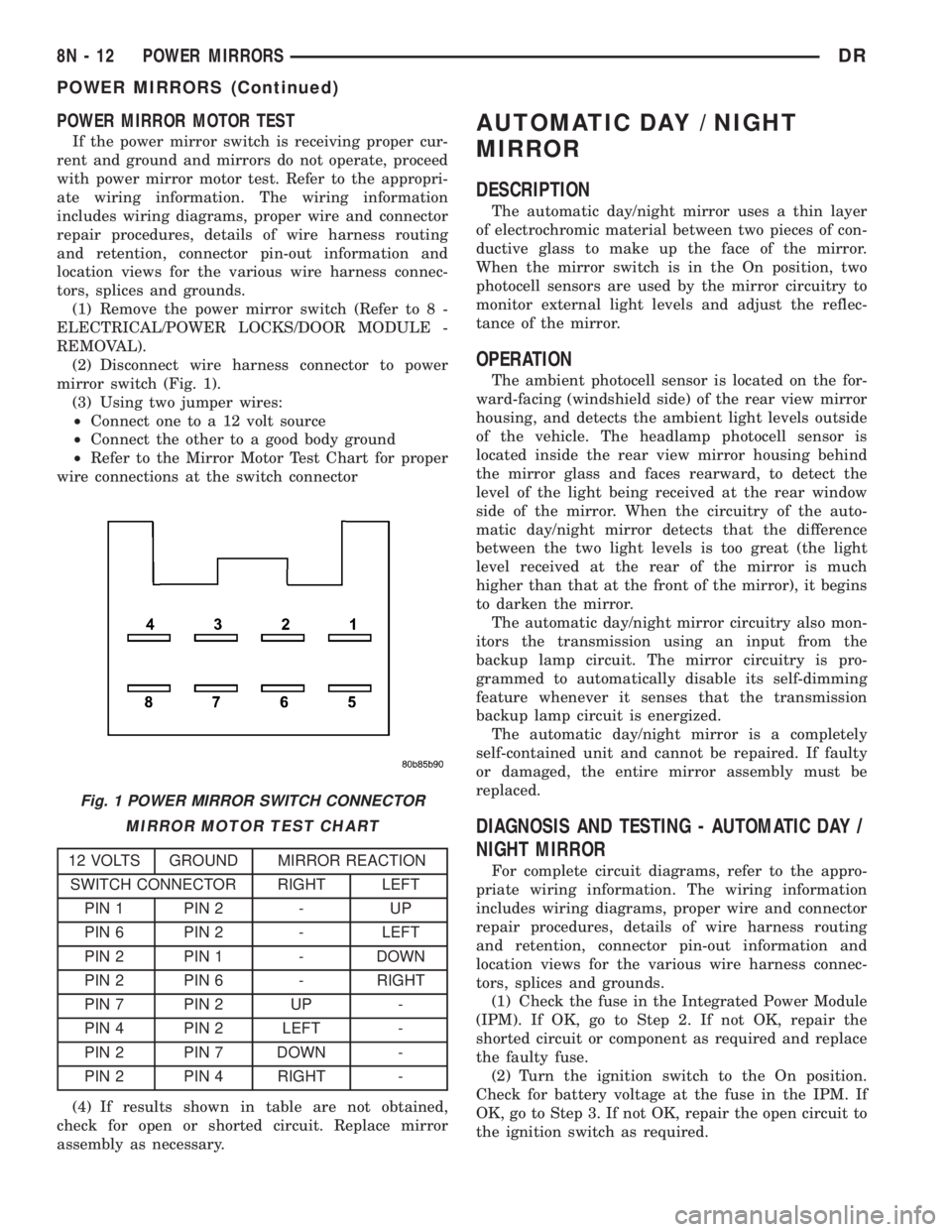
(2) Disconnect wire harness connector to power
mirror switch (Fig. 1).
(3) Using two jumper wires:
²Connect one to a 12 volt source
²Connect the other to a good body ground
²Refer to the Mirror Motor Test Chart for proper
wire connections at the switch connector
MIRROR MOTOR TEST CHART
12 VOLTS GROUND MIRROR REACTION
SWITCH CONNECTOR RIGHT LEFT
PIN 1 PIN 2 - UP
PIN 6 PIN 2 - LEFT
PIN 2 PIN 1 - DOWN
PIN 2 PIN 6 - RIGHT
PIN 7 PIN 2 UP -
PIN 4 PIN 2 LEFT -
PIN 2 PIN 7 DOWN -
PIN 2 PIN 4 RIGHT -
(4) If results shown in table are not obtained,
check for open or shorted circuit. Replace mirror
assembly as necessary.
AUTOMATIC DAY / NIGHT
MIRROR
DESCRIPTION
The automatic day/night mirror uses a thin layer
of electrochromic material between two pieces of con-
ductive glass to make up the face of the mirror.
When the mirror switch is in the On position, two
photocell sensors are used by the mirror circuitry to
monitor external light levels and adjust the reflec-
tance of the mirror.
OPERATION
The ambient photocell sensor is located on the for-
ward-facing (windshield side) of the rear view mirror
housing, and detects the ambient light levels outside
of the vehicle. The headlamp photocell sensor is
located inside the rear view mirror housing behind
the mirror glass and faces rearward, to detect the
level of the light being received at the rear window
side of the mirror. When the circuitry of the auto-
matic day/night mirror detects that the difference
between the two light levels is too great (the light
level received at the rear of the mirror is much
higher than that at the front of the mirror), it begins
to darken the mirror.
The automatic day/night mirror circuitry also mon-
itors the transmission using an input from the
backup lamp circuit. The mirror circuitry is pro-
grammed to automatically disable its self-dimming
feature whenever it senses that the transmission
backup lamp circuit is energized.
The automatic day/night mirror is a completely
self-contained unit and cannot be repaired. If faulty
or damaged, the entire mirror assembly must be
replaced.
DIAGNOSIS AND TESTING - AUTOMATIC DAY /
NIGHT MIRROR
For complete circuit diagrams, refer to the appro-
priate wiring information. The wiring information
includes wiring diagrams, proper wire and connector
repair procedures, details of wire harness routing
and retention, connector pin-out information and
location views for the various wire harness connec-
tors, splices and grounds.
(1) Check the fuse in the Integrated Power Module
(IPM). If OK, go to Step 2. If not OK, repair the
shorted circuit or component as required and replace
the faulty fuse.
(2) Turn the ignition switch to the On position.
Check for battery voltage at the fuse in the IPM. If
OK, go to Step 3. If not OK, repair the open circuit to
the ignition switch as required.
Fig. 1 POWER MIRROR SWITCH CONNECTOR
8N - 12 POWER MIRRORSDR
POWER MIRRORS (Continued)
Page 590 of 2895
(3) Turn the ignition switch to the Off position.
Disconnect and isolate the battery negative cable.
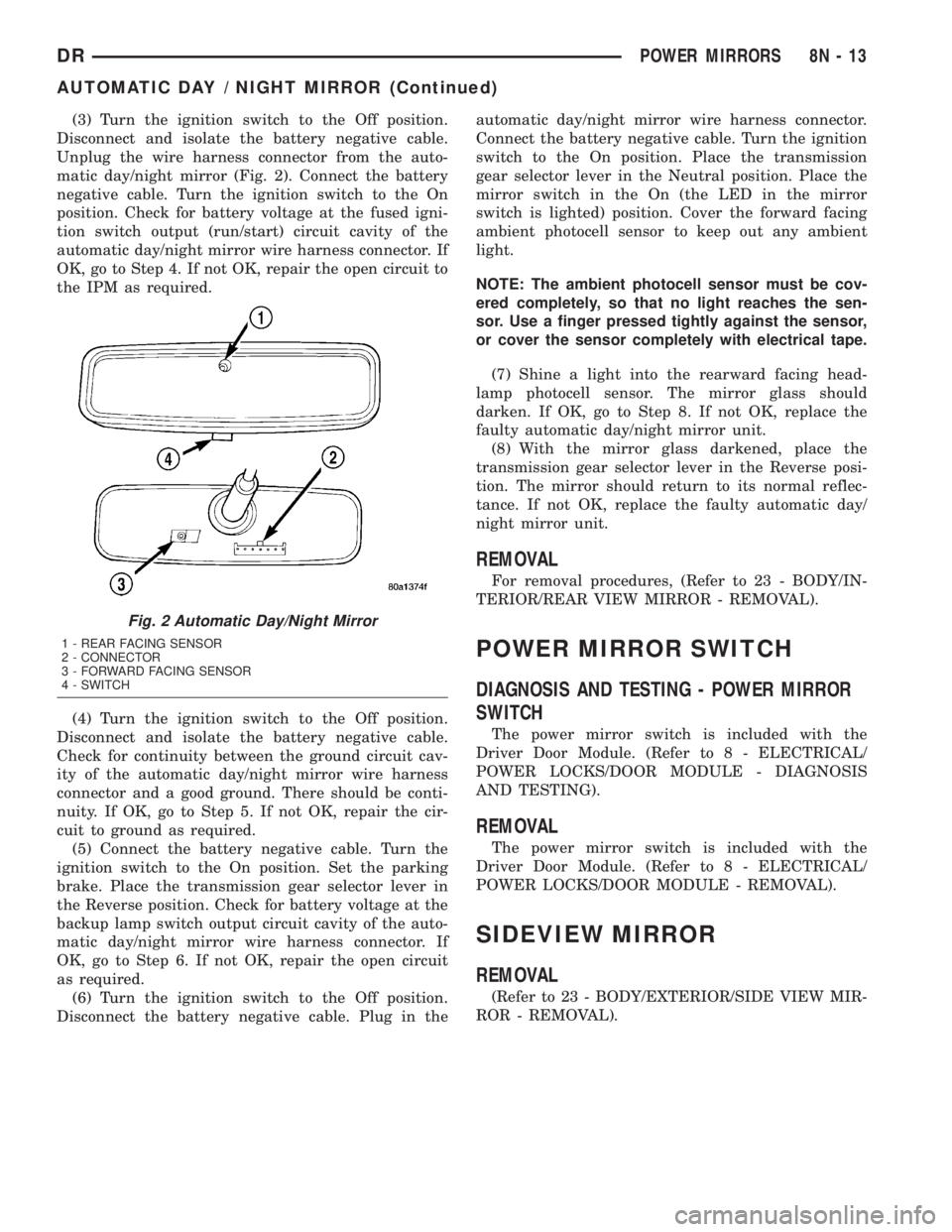
Unplug the wire harness connector from the auto-
matic day/night mirror (Fig. 2). Connect the battery
negative cable. Turn the ignition switch to the On
position. Check for battery voltage at the fused igni-
tion switch output (run/start) circuit cavity of the
automatic day/night mirror wire harness connector. If
OK, go to Step 4. If not OK, repair the open circuit to
the IPM as required.
(4) Turn the ignition switch to the Off position.
Disconnect and isolate the battery negative cable.
Check for continuity between the ground circuit cav-
ity of the automatic day/night mirror wire harness
connector and a good ground. There should be conti-
nuity. If OK, go to Step 5. If not OK, repair the cir-
cuit to ground as required.
(5) Connect the battery negative cable. Turn the
ignition switch to the On position. Set the parking
brake. Place the transmission gear selector lever in
the Reverse position. Check for battery voltage at the
backup lamp switch output circuit cavity of the auto-
matic day/night mirror wire harness connector. If
OK, go to Step 6. If not OK, repair the open circuit
as required.
(6) Turn the ignition switch to the Off position.
Disconnect the battery negative cable. Plug in theautomatic day/night mirror wire harness connector.
Connect the battery negative cable. Turn the ignition
switch to the On position. Place the transmission
gear selector lever in the Neutral position. Place the
mirror switch in the On (the LED in the mirror
switch is lighted) position. Cover the forward facing
ambient photocell sensor to keep out any ambient
light.
NOTE: The ambient photocell sensor must be cov-
ered completely, so that no light reaches the sen-
sor. Use a finger pressed tightly against the sensor,
or cover the sensor completely with electrical tape.
(7) Shine a light into the rearward facing head-
lamp photocell sensor. The mirror glass should
darken. If OK, go to Step 8. If not OK, replace the
faulty automatic day/night mirror unit.
(8) With the mirror glass darkened, place the
transmission gear selector lever in the Reverse posi-
tion. The mirror should return to its normal reflec-
tance. If not OK, replace the faulty automatic day/
night mirror unit.
REMOVAL
For removal procedures, (Refer to 23 - BODY/IN-
TERIOR/REAR VIEW MIRROR - REMOVAL).
POWER MIRROR SWITCH
DIAGNOSIS AND TESTING - POWER MIRROR
SWITCH
The power mirror switch is included with the
Driver Door Module. (Refer to 8 - ELECTRICAL/
POWER LOCKS/DOOR MODULE - DIAGNOSIS
AND TESTING).
REMOVAL
The power mirror switch is included with the
Driver Door Module. (Refer to 8 - ELECTRICAL/
POWER LOCKS/DOOR MODULE - REMOVAL).
SIDEVIEW MIRROR
REMOVAL
(Refer to 23 - BODY/EXTERIOR/SIDE VIEW MIR-
ROR - REMOVAL).
Fig. 2 Automatic Day/Night Mirror
1 - REAR FACING SENSOR
2 - CONNECTOR
3 - FORWARD FACING SENSOR
4 - SWITCH
DRPOWER MIRRORS 8N - 13
AUTOMATIC DAY / NIGHT MIRROR (Continued)
Page 591 of 2895
POWER SEATS
TABLE OF CONTENTS
page page
POWER SEATS
DESCRIPTION.........................14
OPERATION...........................14
DIAGNOSIS AND TESTING - POWER SEAT
SYSTEM............................14
DRIVER SEAT SWITCH
DESCRIPTION.........................15
OPERATION...........................15
DIAGNOSIS AND TESTING - DRIVER SEAT
SWITCH............................15
REMOVAL.............................16
INSTALLATION.........................16
PASSENGER SEAT SWITCH
DESCRIPTION.........................16
OPERATION...........................17
DIAGNOSIS AND TESTING - PASSENGER
SEAT SWITCH........................17REMOVAL.............................17
INSTALLATION.........................18
POWER SEAT TRACK
DESCRIPTION.........................18
OPERATION...........................18
DIAGNOSIS AND TESTING - POWER SEAT
TRACK.............................18
REMOVAL.............................19
INSTALLATION.........................19
LUMBAR CONTROL SWITCH
DESCRIPTION.........................19
OPERATION...........................19
REMOVAL.............................19
LUMBAR MOTOR
DESCRIPTION.........................19
OPERATION...........................20
DIAGNOSIS AND TESTING - LUMBAR MOTOR..20
POWER SEATS
DESCRIPTION
The power seat system option allows the driver or
passenger to electrically adjust the seat position for
optimum control and comfort using the power seat
switches located on the outboard seat cushion side
shield. The power seat system allows the seating
position to be adjusted forward, rearward, front up,
front down, rear up, or rear down. The power seat
system receives battery current through a fuse in the
Integrated Power Module, regardless of the ignition
switch position. The power seat system includes the
following components:
²Driver Power Seat Switch
²Passenger Power Seat Switch
²Driver Power Seat Track
²Passenger Power Seat Track
²Power Lumbar Adjuster(s)
Some models equipped with the power seat option
also feature a power operated lumbar support in the
seat back. The power lumbar support allows the user
to inflate or deflate a bladder located in the lower
seat back to achieve optimum comfort and support in
the lower lumbar region of the spinal column. The
power lumbar support shares the battery feed circuit
of the power seat system.
Following are general descriptions of the major
components in the power seat system. Refer to
Heated Seat Systemfor information on the individ-ually controlled heated front seats. Refer to the own-
er's manual in the vehicle glove box for more
information on the features, use and operation of the
power seat system.
OPERATION
The power seat system allows the driver and/or
front passenger seating positions to be adjusted elec-
trically and independently using the separate power
seat switches found on the outboard seat cushion
side shield of each front seat. See the owner's manual
in the vehicle glove box for more information on the
features, use and operation of the power seat system.
DIAGNOSIS AND TESTING - POWER SEAT
SYSTEM
Before any testing of the power seat system is
attempted, the battery should be fully-charged and
all wire harness connections and pins checked to
ensure proper continuity and grounds. For circuit
descriptions and diagrams, refer to Wiring Diagrams.
With the dome lamp on, apply the power seat
switch in the direction of the failure. If the dome
lamp dims, the seat may be jamming. Check under
and behind the seat for binding or obstructions. If
the dome lamp does not dim, proceed with testing of
the individual components and circuits.
8N - 14 POWER SEATSDR
Page 598 of 2895
POWER WINDOWS
TABLE OF CONTENTS
page page
POWER WINDOWS
DESCRIPTION.........................21
OPERATION...........................21
DIAGNOSIS AND TESTING - POWER
WINDOWS...........................21
WINDOW MOTOR
REMOVAL.............................22WINDOW SWITCH
DIAGNOSIS AND TESTING - WINDOW
SWITCH............................22
REMOVAL.............................23
INSTALLATION.........................23
POWER WINDOWS
DESCRIPTION
The power window system allows each of the door
windows to be raised and lowered electrically by
actuating a switch on each door panel. A master
switch on the drivers door allows the driver to raise
or lower each of the passenger door windows and to
lock out the individual switches on the passenger
doors from operation. The power window system
receives battery feed through a fuse in the Integrated
Power Module (IPM) and a circuit breaker located in
the instrument panel wiring harness near the park
brake pedal, only when the ignition switch is in the
RUN or ACCESSORY position.
OPERATION
WINDOW SWITCH
The power window switches control the battery
and ground feeds to the power window motors. The
passenger door power window switches receive their
battery and ground feeds through the circuitry of the
drivers window switch. When the power window lock-
out switch is in the Lock position, the battery feed
for the passenger door window switches is inter-
rupted.
WINDOW MOTOR
Window motors use permanent type magnets. The
B+ and ground applied at the motor terminal pins
will cause the motor to rotate in one direction.
Reversing current through the motor terminals will
cause the motor to rotate in the opposite direction.
Refer to the appropriate wiring information. The
wiring information includes wiring diagrams, proper
wire and connector repair procedures, details of wire
harness routing and retention, connector pin-out
information and location views for the various wire
harness connectors, splices and grounds.
DIAGNOSIS AND TESTING - POWER
WINDOWS
WIRING VOLTAGE TEST
The following wiring test determines whether or
not voltage is continuous through the body harness
to the front switch.
(1) Remove the Driver Door Module (Refer to 8 -
ELECTRICAL/POWER LOCKS/DOOR MODULE -
REMOVAL).
(2) Disconnect wire connector from back of power
window switch.
(3) Switch ignition to the ON position.
(4) Connect the clip end of a 12 volt test light to
Pin 14 of the window switch harness connector.
Touch the test light probe to Pin 10.
²If the test light illuminates, the wiring circuit
between the battery and switch is OK.
²If the lamp does not illuminate, first check the
fuse in the Integrated Power Module (IPM). Check
the circuit breaker located near the park brake
pedal. If fuse and circuit breaker are OK, then check
for a broken wire.
Refer to the appropriate wiring information. The
wiring information includes wiring diagrams, proper
wire and connector repair procedures, details of wire
harness routing and retention, connector pin-out
information and location views for the various wire
harness connectors, splices and grounds.
POWER WINDOW MOTOR TEST
If the power window motor is receiving proper cur-
rent and ground and does not operate, proceed with
motor test. Refer to the appropriate wiring informa-
tion. The wiring information includes wiring dia-
grams, proper wire and connector repair procedures,
details of wire harness routing and retention, connec-
tor pin-out information and location views for the
various wire harness connectors, splices and grounds.
(1) Remove front door trim panel as necessary to
gain access to power window motor wire connector
DRPOWER WINDOWS 8N - 21
Page 599 of 2895
(Refer to 23 - BODY/DOOR - FRONT/TRIM PANEL -
REMOVAL).
(2) Disconnect power window motor wire connector
from door harness.
(3) Using two jumper wires, connect one to a bat-
tery (+) source and the other to a good ground (-).
(4) Connect the Negative (-) jumper probe to one of
the motor connector terminals.
(5) Momentarily touch the Positive (+) jumper
probe to the other motor connector terminal.
When positive probe is connected the motor should
rotate in one direction to either move window up or
down. If window is all the way up or down the motor
will grunt and the inner door panel will flex when
actuated in that one direction.
(6) Reverse jumper probes at the motor connector
terminals and window should now move in opposite
direction. If window does not move or grunt, replace
the motor.
If window moved completely up or down, reverse
the jumper probes and cycle window to the opposite
position to verify full operation.
If motor grunts and does not move, verify that reg-
ulator is not binding.
WINDOW MOTOR
REMOVAL
The window motor is serviced with the window reg-
ulator (Refer to 23 - BODY/DOOR - FRONT/WINDOW
REGULATOR - REMOVAL) or (Refer to 23 - BODY/
DOORS - REAR/WINDOW REGULATOR - REMOVAL).
WINDOW SWITCH
DIAGNOSIS AND TESTING - WINDOW SWITCH
The Light-Emitting Diode (LED) illumination
lamps for all of the power window and lock switch
and bezel unit switch paddles receive battery current
through the power window circuit breaker in the
junction block. If all of the LEDs are inoperative in
both the power window and lock switch units and the
power windows are inoperative, (Refer to 8 - ELEC-
TRICAL/POWER WINDOWS - DIAGNOSIS AND
TESTING). If the power windows operate, but any or
all of the LEDs are inoperative, the power window
and lock switch units with the inoperative LED(s) is
faulty and must be replaced. For complete circuit dia-
grams, refer to the appropriate wiring information.
The wiring information includes wiring diagrams,
proper wire and connector repair procedures, details
of wire harness routing and retention, connector pin-
out information and location views for the various
wire harness connectors, splices and grounds.(1) Check the fuse in the Integrated Power Module
(IPM) and the circuit breaker located near the park
brake pedal. If OK, go to Step 2. If not OK, replace
the faulty fuse or circuit breaker.
(2) Turn the ignition switch to the On position.
Check for battery voltage at the fuse in the Inte-
grated Power Module (IPM). If OK, turn the ignition
switch to the Off position and go to Step 3. If not OK,
check circuit breaker and repair the circuit to the
ignition switch as required.
(3) Disconnect and isolate the battery negative
cable. Remove the power window switch unit from
the door trim panel (passenger doors). The drivers
door switch is included with the Driver Door Module
(Refer to 8 - ELECTRICAL/POWER LOCKS/DOOR
MODULE - DIAGNOSIS AND TESTING) for service
procedures. Unplug the wire harness connector from
the switch unit.
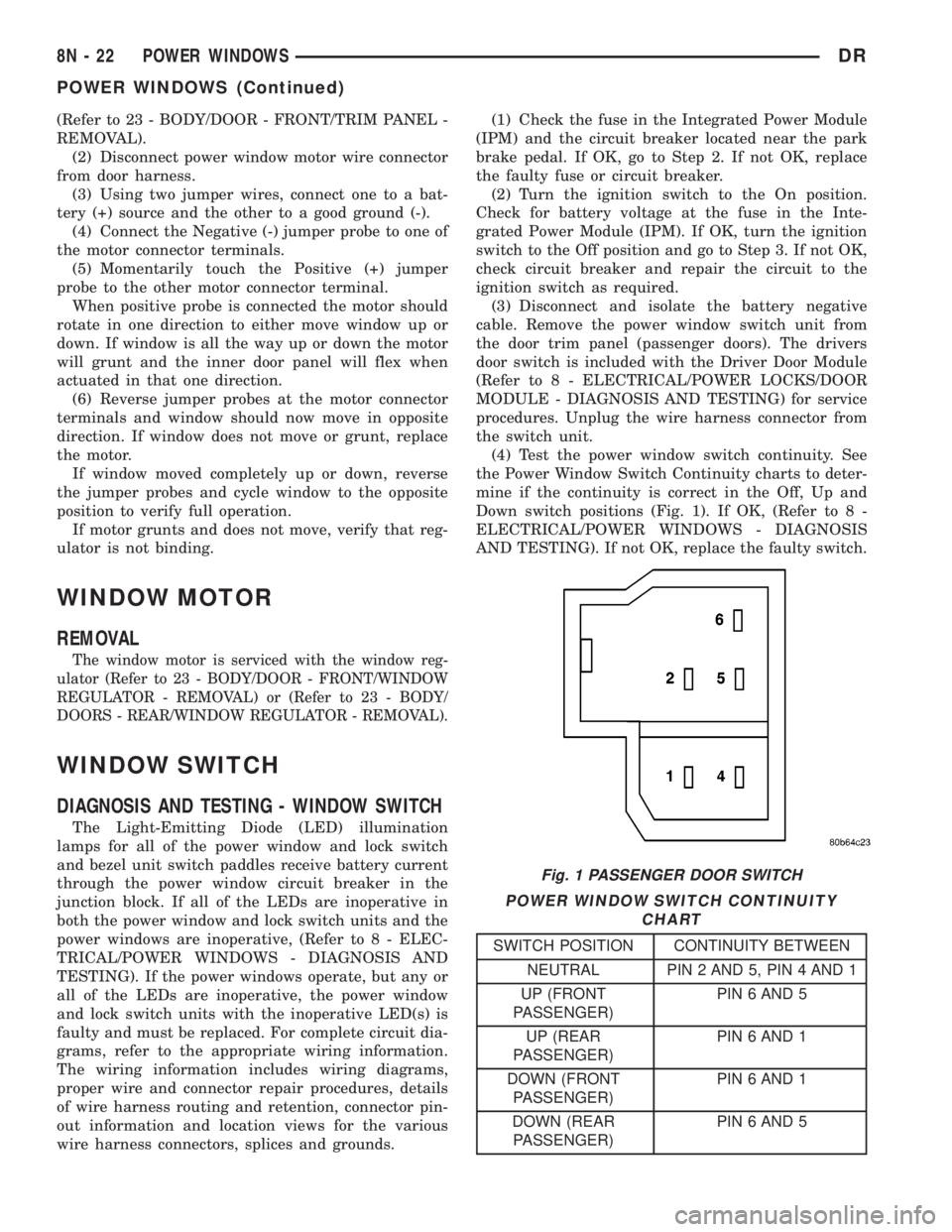
(4) Test the power window switch continuity. See
the Power Window Switch Continuity charts to deter-
mine if the continuity is correct in the Off, Up and
Down switch positions (Fig. 1). If OK, (Refer to 8 -
ELECTRICAL/POWER WINDOWS - DIAGNOSIS
AND TESTING). If not OK, replace the faulty switch.
POWER WINDOW SWITCH CONTINUITY
CHART
SWITCH POSITION CONTINUITY BETWEEN
NEUTRAL PIN 2 AND 5, PIN 4 AND 1
UP (FRONT
PASSENGER)PIN 6 AND 5
UP (REAR
PASSENGER)PIN 6 AND 1
DOWN (FRONT
PASSENGER)PIN 6 AND 1
DOWN (REAR
PASSENGER)PIN 6 AND 5
Fig. 1 PASSENGER DOOR SWITCH
8N - 22 POWER WINDOWSDR
POWER WINDOWS (Continued)
Page 604 of 2895
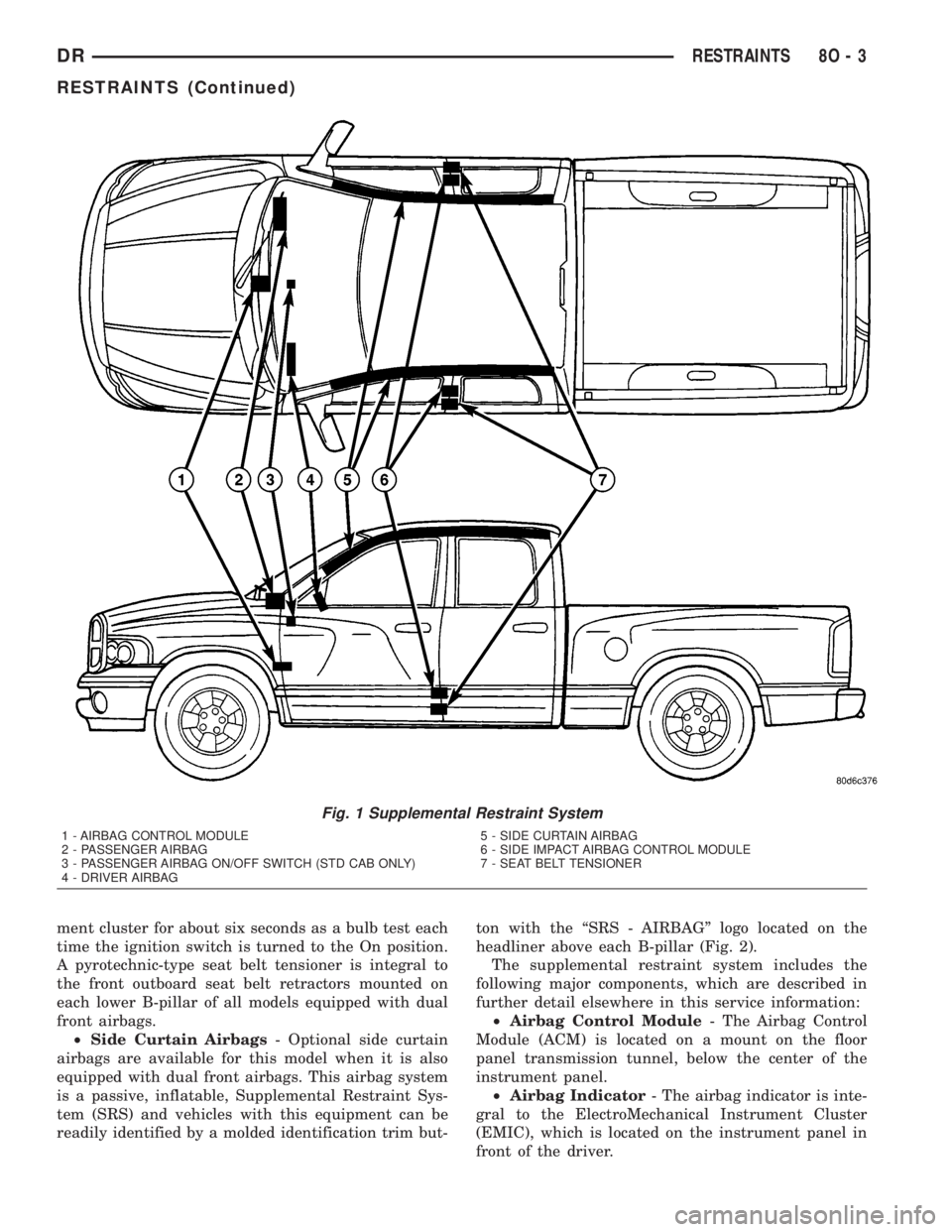
ment cluster for about six seconds as a bulb test each
time the ignition switch is turned to the On position.
A pyrotechnic-type seat belt tensioner is integral to
the front outboard seat belt retractors mounted on
each lower B-pillar of all models equipped with dual
front airbags.
²Side Curtain Airbags- Optional side curtain
airbags are available for this model when it is also
equipped with dual front airbags. This airbag system
is a passive, inflatable, Supplemental Restraint Sys-
tem (SRS) and vehicles with this equipment can be
readily identified by a molded identification trim but-ton with the ªSRS - AIRBAGº logo located on the
headliner above each B-pillar (Fig. 2).
The supplemental restraint system includes the
following major components, which are described in
further detail elsewhere in this service information:
²Airbag Control Module- The Airbag Control
Module (ACM) is located on a mount on the floor
panel transmission tunnel, below the center of the
instrument panel.
²Airbag Indicator- The airbag indicator is inte-
gral to the ElectroMechanical Instrument Cluster
(EMIC), which is located on the instrument panel in
front of the driver.
Fig. 1 Supplemental Restraint System
1 - AIRBAG CONTROL MODULE
2 - PASSENGER AIRBAG
3 - PASSENGER AIRBAG ON/OFF SWITCH (STD CAB ONLY)
4 - DRIVER AIRBAG5 - SIDE CURTAIN AIRBAG
6 - SIDE IMPACT AIRBAG CONTROL MODULE
7 - SEAT BELT TENSIONER
DRRESTRAINTS 8O - 3
RESTRAINTS (Continued)
Page 606 of 2895
Impact Airbag Control Modules (SIACM). An airbag
indicator in the ElectroMechanical Instrument Clus-
ter (EMIC) illuminates for about six seconds as a
bulb test each time the ignition switch is turned to
the On or Start positions. Following the bulb test,
the airbag indicator is turned on or off by the ACM
to indicate the status of the supplemental restraint
system. If the airbag indicator comes on at any time
other than during the bulb test, it indicates that
there is a problem in the supplemental restraint sys-
tem electrical circuits. Such a problem may cause air-
bags not to deploy when required, or to deploy when
not required.
Deployment of the supplemental restraints
depends upon the angle and severity of an impact.
Deployment is not based upon vehicle speed; rather,
deployment is based upon the rate of deceleration as
measured by the forces of gravity (G force) upon the
impact sensors. When an impact is severe enough,
the microprocessor in the ACM or the SIACM signals
the inflator of the appropriate airbag units to deploy
their airbag cushions. The outboard front seat belt
tensioners are provided with a deployment signal by
the ACM in conjunction with the driver and passen-
ger airbags. During a frontal vehicle impact, the
knee blockers work in concert with properly fastened
and adjusted seat belts to restrain both the driver
and the front seat passenger in the proper position
for an airbag deployment. The knee blockers also
absorb and distribute the crash energy from the
driver and the front seat passenger to the structure
of the instrument panel. The seat belt tensioner
removes the slack from the outboard front seat belts
to provide further assurance that the driver and
front seat passenger are properly positioned and
restrained for an airbag deployment.
Typically, the vehicle occupants recall more about
the events preceding and following a collision than
they do of an airbag deployment itself. This is
because the airbag deployment and deflation occur so
rapidly. In a typical 48 kilometer-per-hour (30 mile-
per-hour) barrier impact, from the moment of impact
until the airbags are fully inflated takes about 40
milliseconds. Within one to two seconds from the
moment of impact, the airbags are almost entirely
deflated. The times cited for these events are approx-
imations, which apply only to a barrier impact at the
given speed. Actual times will vary somewhat,
depending upon the vehicle speed, impact angle,
severity of the impact, and the type of collision.When the ACM monitors a problem in any of the
dual front airbag system circuits or components,
including the seat belt tensioners, it stores a fault
code or Diagnostic Trouble Code (DTC) in its memory
circuit and sends an electronic message to the EMIC
to turn on the airbag indicator. When the SIACM
monitors a problem in any of the side curtain airbag
system circuits or component, it stores a fault code or
DTC in its memory circuit and sends an electronic
message to the ACM, and the ACM sends an elec-
tronic message to the EMIC to turn on the airbag
indicator. Proper testing of the supplemental
restraint system components, the Programmable
Communications Interface (PCI) data bus, the elec-
tronic message inputs to and outputs from the EMIC,
the SIACM, or the ACM, as well as the retrieval or
erasure of a DTC from the ACM, SIACM, or EMIC
requires the use of a DRBIIItscan tool. Refer to the
appropriate diagnostic information.
See the owner's manual in the vehicle glove box for
more information on the features, use and operation
of all of the factory-installed passive restraints.
WARNING
WARNINGS - RESTRAINT SYSTEM
WARNING: DURING AND FOLLOWING ANY SEAT
BELT OR CHILD RESTRAINT ANCHOR SERVICE,
CAREFULLY INSPECT ALL SEAT BELTS, BUCKLES,
MOUNTING HARDWARE, RETRACTORS, TETHER
STRAPS, AND ANCHORS FOR PROPER INSTALLA-
TION, OPERATION, OR DAMAGE. REPLACE ANY
BELT THAT IS CUT, FRAYED, OR TORN.
STRAIGHTEN ANY BELT THAT IS TWISTED.
TIGHTEN ANY LOOSE FASTENERS. REPLACE ANY
BELT THAT HAS A DAMAGED OR INOPERATIVE
BUCKLE OR RETRACTOR. REPLACE ANY BELT
THAT HAS A BENT OR DAMAGED LATCH PLATE
OR ANCHOR PLATE. REPLACE ANY CHILD
RESTRAINT ANCHOR OR THE UNIT TO WHICH THE
ANCHOR IS INTEGRAL THAT HAS BEEN BENT OR
DAMAGED. NEVER ATTEMPT TO REPAIR A SEAT
BELT OR CHILD RESTRAINT COMPONENT.
ALWAYS REPLACE DAMAGED OR FAULTY SEAT
BELT AND CHILD RESTRAINT COMPONENTS WITH
THE CORRECT, NEW AND UNUSED REPLACEMENT
PARTS LISTED IN THE DAIMLERCHRYSLER MOPAR
PARTS CATALOG.
DRRESTRAINTS 8O - 5
RESTRAINTS (Continued)