Operation DODGE RAM 2500 DIESEL 2004 3.G User Guide
[x] Cancel search | Manufacturer: DODGE, Model Year: 2004, Model line: RAM 2500 DIESEL, Model: DODGE RAM 2500 DIESEL 2004 3.GPages: 426, PDF Size: 7.22 MB
Page 80 of 426

ªCallº or ªDialº). Your cellular phone's audio is trans-
mitted through your vehicle's stereo system; the system
will automatically mute your radio before receiving or
sending a call.
UConnectŸ allows you to transfer calls between the
system and your cellular phone as you enter or exit your
vehicle, and enables you to mute the system's micro-
phone for private conversations.
The UConnectŸ; phone book enables you to store up to
32 names and four numbers per name. This system is
driven through your BluetoothŸ Hands-Free Profile
cellular phone. UConnectŸ features BluetoothŸ technol-
ogy - the global standard that enables different electronic
devices to connect to each other without wires or a
docking station, so UConnectŸ works no matter where
you stow your cellular phone (be it your purse, pocket, or
briefcase). UConnectŸ allows up to seven cellularphones to be linked to the system, and it is available in
English, French, or Spanish formats (as equipped).
The rearview mirror contains the microphone for the
system and the control buttons that will enable you to
access the system. The diagram below shows the mirror
with the appropriate buttons. Individual button behavior
is discussed in the ªOperationº Section.
80 UNDERSTANDING THE FEATURES OF YOUR VEHICLE
Page 81 of 426

The UConnectŸ system can be used with any Hands
Free Profile certified BluetoothŸ cellular phone. If your
cellular phone has a different profile (i.e. headset profile),
you will not be able to use any UConnectŸ features.
The UConnectŸ system is fully integrated into your
vehicle, including your vehicle's stereo system. All voice
prompts as well as the other party's voice in a conversa-
tion will be played over your vehicle's stereo system. The
volume of the UConnectŸ system can be controlled
through your normal stereo controls.
The radio display will be used for visual prompts from
the UConnectŸ system such as caller ID.
Operation
Voice commands can be used in the operation of the
UConnectŸ system and to navigate through the UCon-
nectŸ menu structure. Voice commands should be given
after each UConnectŸ system prompt. You will beprompted for a specific command and then guided
through the available options. There are two ways to give
commands to the UConnectŸ system:
²You can say9Dial9at the9Ready9prompt. When
prompted for the phone number you wish to dial, say
the phone number (9123 456 78909).
Pairing a Cellular Phone to the UConnectŸ System
To begin using your UConnectŸ system, you must pair
your compatible BluetoothŸ enabled cellular phone. To
complete the registration process, you will need to refer-
ence your cellular phone owner's manual.
²Press the 'Phone' button to begin.
²After the9Ready9prompt, say9Setup9.
²When prompted, say ª Phone Pairingº.
UNDERSTANDING THE FEATURES OF YOUR VEHICLE 81
3
Page 103 of 426

CARGO LIGHT
The cargo lights are turned on by rotating the dimmer
control to the optional fully upward position. The cargo
lights will also turn on for 30 seconds when a key fob
Unlock is pressed, as part of the illuminated entry
feature.
MULTIFUNCTION CONTROL LEVER
The multifunction control lever is located on the left side
of the steering column.
Turn Signals
Move the lever up or down to signal a right-hand or
left-hand turn.
The arrow on either side of the instrument cluster flashes
to indicate the direction of the turn, and proper operation
of the front and rear turn signal lights. If a defective bulb
or wiring circuit is detected for the turn signal system, the
arrow indicators will flash at a faster rate. Also, the
9LAMP OUT9indicator in the instrument cluster will beilluminated and a chime will be heard. If an indicator
fails to light when the lever is moved, it would suggest
that the switch or indicator lamp is defective.
You can signal a lane change by moving the lever
partially up or down.
UNDERSTANDING THE FEATURES OF YOUR VEHICLE 103
3
Page 115 of 426

Global Reset
If the RESET button is pressed twice within 4 seconds
while in any of the 3 resettable displays, the Global Reset
will reset all 3 displays.
Step Button
Use this button to choose or cycle through the four trip
conditions.
Average Fuel Economy (AVG ECO)
Shows the average fuel economy since the last reset. This
display mode becomes less sensitive to instantaneous
changes in fuel consumption as the number of total
vehicle miles since the last reset increases. It is suggested
that this mode be reset periodically for general operation
or when driving conditions change significantly (for
example, at the end of a trip or when a trailer is
connected or disconnected).
Distance To Empty (DTE)
Shows the estimated distance that can be travelled with
the fuel remaining in the tank. The estimated distance is
determined by a weighted average of the instantaneous
and average fuel economy, according to the current fuel
tank level.
When Distance To Empty = 0, the fuel gauge pointer will
initially be on the red ªEº marker. At this point (fuel
gauge pointer on the red ªEº marker) there is reserve fuel
UNDERSTANDING THE FEATURES OF YOUR VEHICLE 115
3
Page 119 of 426

To set the variance: Turn the ignition ON and set the
display to ªCompass/Temperature.º Press the RESET
button approximately five seconds. The last variance
zone number will be displayed. Press the STEP button to
select the new variance zone and press the RESET button
to resume normal operation.
Outside Temperature
Because the ambient temperature sensor is located un-
derhood, engine temperature can influence the displayed
temperature, therefore, temperature readings are slowly
updated when the vehicle speed is below 20 mph (30
km/h) or during stop and go driving.
UNDERSTANDING THE FEATURES OF YOUR VEHICLE 119
3
Page 125 of 426

Reprogramming a Single HomeLink Button
To program a device to HomeLink using a HomeLink
button previously trained, follow these steps:
1. Press and hold the desired HomeLink button.DO
NOTrelease the button.
2. The indicator light will begin to flash after 20 seconds.
Without releasing the HomeLink button, proceed with
9Programming9step 2
For questions or comments, contact HomeLink at:
www.homelink.com or 1-800-355-3515.
Security
If you sell your vehicle, be sure to erase the frequencies.
To erase all of the previously trained frequencies, hold
down both outside buttons until the green light begins to
flash.This device complies with part 15 of FCC rules and with
RSS-210 of Industry Canada. Operation is subject to the
following conditions:
²This device may not cause harmful interference.
²This device must accept any interference that may be
received including interference that may cause undes-
ired operation.
NOTE:Changes or modifications not expressly ap-
proved by the party responsible for compliance could
void the user's authority to operate the equipment.
HomeLinktis a trademark owned by Johnson Controls,
Inc.
UNDERSTANDING THE FEATURES OF YOUR VEHICLE 125
3
Page 129 of 426
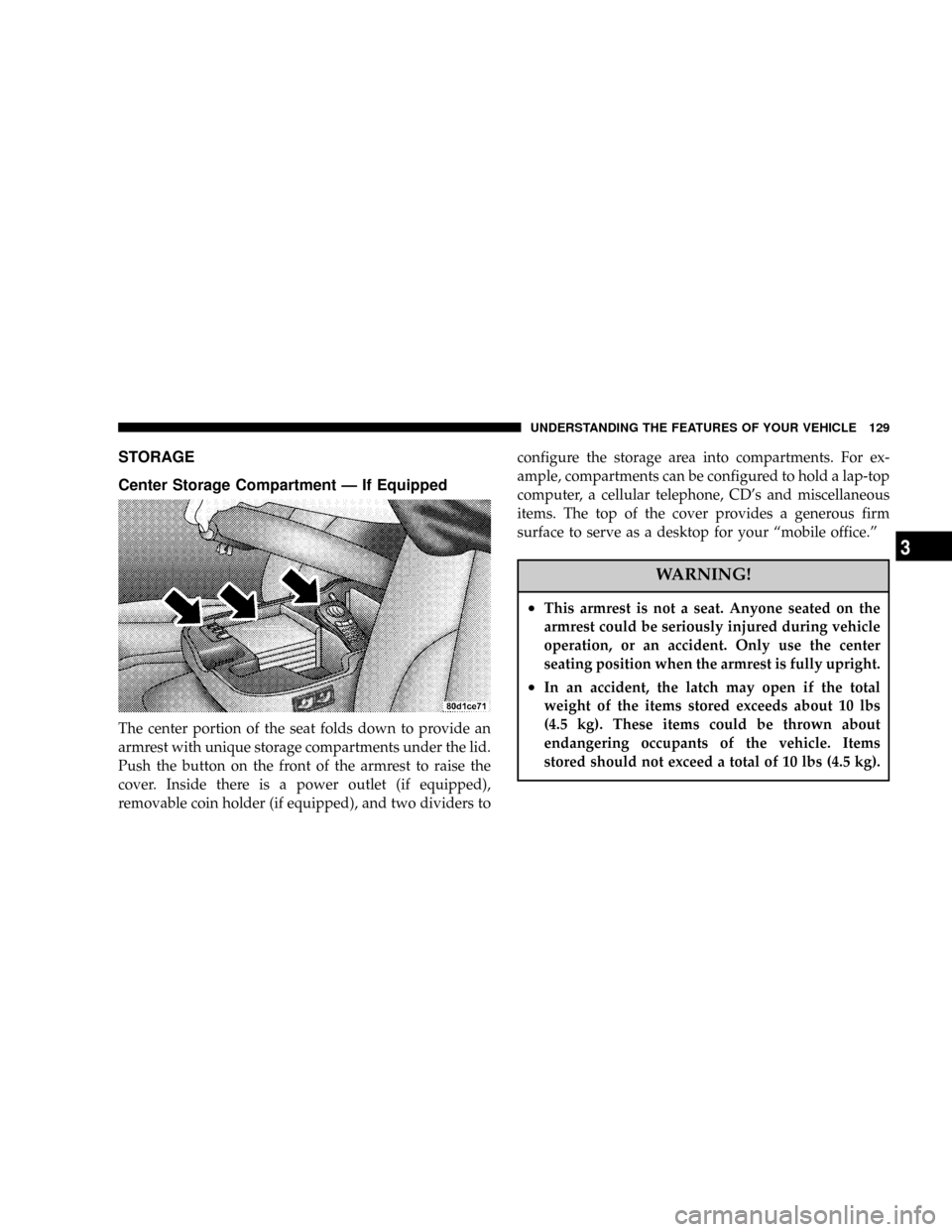
STORAGE
Center Storage Compartment Ð If Equipped
The center portion of the seat folds down to provide an
armrest with unique storage compartments under the lid.
Push the button on the front of the armrest to raise the
cover. Inside there is a power outlet (if equipped),
removable coin holder (if equipped), and two dividers toconfigure the storage area into compartments. For ex-
ample, compartments can be configured to hold a lap-top
computer, a cellular telephone, CD's and miscellaneous
items. The top of the cover provides a generous firm
surface to serve as a desktop for your ªmobile office.º
WARNING!
²This armrest is not a seat. Anyone seated on the
armrest could be seriously injured during vehicle
operation, or an accident. Only use the center
seating position when the armrest is fully upright.
²In an accident, the latch may open if the total
weight of the items stored exceeds about 10 lbs
(4.5 kg). These items could be thrown about
endangering occupants of the vehicle. Items
stored should not exceed a total of 10 lbs (4.5 kg).
UNDERSTANDING THE FEATURES OF YOUR VEHICLE 129
3
Page 139 of 426

NPinch Roller Release...................164
NNoise Reduction......................164
NOperating Instructions Ð CD Player........164
NInserting The Compact Disc..............164
NSeek Button.........................165
NEJT CD (Eject) Button..................165
NFF/Tune/RW........................166
NProgram Button 4 (Random Play)..........166
NMode..............................166
NTape CD Button......................166
NTime Button.........................167
NScan Button.........................167NCD Changer Control Capability Ð If
Equipped...........................167
mSales Code RBKÐAM/ FM Stereo Radio With
CD Player And CD Changer Controls........168
NRadio Operation......................168
NCD Player Operation...................171
NCD Changer Control Capability Ð If
Equipped...........................172
NRadio Display Messages................174
mSales Code RBQÐAM/FM Stereo Radio With
6 - Disc CD Changer....................175
NRadio Operation......................175
NCD Player Operation...................177
UNDERSTANDING YOUR INSTRUMENT PANEL 139
4
Page 140 of 426

mRemote Sound System Controls Ð If Equipped . . 181
NRadio Operation......................182
NTape Player.........................182
NCD Player..........................182
mCassette Tape And Player Maintenance.......183
mCompact Disc Maintenance................184
mRadio Operation And Cellular Phones........184
mClimate Controls.......................185NHeater Only Ð Fleet Vehicles.............185
NAir ConditioningÐIf Equipped...........187
NElectric Rear Window Defroster And Heated
Sideview Mirrors Ð If Equipped..........191
NAir Conditioning With Dual Zone Temperature
Control Ð If Equipped.................191
NOperating Tips.......................196
NOperating Tips Chart...................198
140 UNDERSTANDING YOUR INSTRUMENT PANEL
Page 148 of 426

If brake failure is indicated, immediate repair is necessary
and continued operation of the vehicle in this condition is
dangerous.
Acceleration which causes the rear wheels to slip for a
period of time may result in the red brake light illumi-
nating and a brake switch code being set on ABS
equipped vehicles. Depressing the brake pedal should
extinguish the red brake light.
19. Wait To Start Indicator
The Wait To Start Indicator will illuminate when
the ignition key is first turned to the ON position.
Wait until the Wait To Start Indicator turns OFF then start
the vehicle.
20. Odometer/Trip Odometer
The odometer shows the total distance the vehicle has
been driven.If the odometer reading is changed during repair or
replacement, be sure to keep a record of the reading
before and after the service so that the correct mileage can
be determined.
The trip odometer shows individual trip mileage. To
toggle between the odometer and the trip odometer,
press the Odometer/Trip Odometer Button. To reset the
Trip Odometer, press and hold the button while in trip
mode, until the Trip Odometer resets.
NOTE:There is also an engine hour function. This
indicates the total number of hours the engine has been
running. To display the engine hours perform the follow-
ing: Place the ignition in RUN, but do not start the
engine. With the odometer value displayed, hold the trip
button down for a period of 6 seconds. The odometer will
change to trip value first, then it will display the engine
148 UNDERSTANDING YOUR INSTRUMENT PANEL