reset DODGE RAM 2500 DIESEL 2004 3.G Owners Manual
[x] Cancel search | Manufacturer: DODGE, Model Year: 2004, Model line: RAM 2500 DIESEL, Model: DODGE RAM 2500 DIESEL 2004 3.GPages: 426, PDF Size: 7.22 MB
Page 73 of 426

NTo Set At A Desired Speed...............110
NTo Deactivate........................110
NTo Resume Speed.....................110
NTo Vary The Speed Setting...............111
NTo Accelerate For Passing...............111
mOverhead ConsoleÐ If Equipped...........112
NCourtesy/Reading Lights................113
mOverhead Console With Compass/Temperature
Mini-Trip Computer Ð If Equipped..........113
NUS/M Button........................114
NReset Button.........................114
NGlobal Reset.........................115
NStep Button.........................115NAverage Fuel Economy (AVG ECO)........115
NDistance To Empty (DTE)...............115
NTrip Odometer (ODO)..................116
NElapsed Time (ET).....................116
NC/T Button.........................117
NAutomatic Compass Calibration...........117
NManual Compass Calibration.............118
NTo Put Into a Calibration Mode...........118
NOutside Temperature...................119
mGarage Door Opener Ð If Equipped.........120
NProgramming Homelink................121
NCanadian Programming/Gate Programming . . 123
NUsing Homelink......................124
UNDERSTANDING THE FEATURES OF YOUR VEHICLE 73
3
Page 114 of 426

This overhead console allows you to choose between a
compass/temperature display and one of four trip con-
ditions being monitored.
US/M Button
Use this button to change the display from U.S. to metric
measurement units.
RESET Button
Use this button to reset the following displays to zero:
Average Fuel Economy
Trip Odometer
Elapsed time
114 UNDERSTANDING THE FEATURES OF YOUR VEHICLE
Page 115 of 426

Global Reset
If the RESET button is pressed twice within 4 seconds
while in any of the 3 resettable displays, the Global Reset
will reset all 3 displays.
Step Button
Use this button to choose or cycle through the four trip
conditions.
Average Fuel Economy (AVG ECO)
Shows the average fuel economy since the last reset. This
display mode becomes less sensitive to instantaneous
changes in fuel consumption as the number of total
vehicle miles since the last reset increases. It is suggested
that this mode be reset periodically for general operation
or when driving conditions change significantly (for
example, at the end of a trip or when a trailer is
connected or disconnected).
Distance To Empty (DTE)
Shows the estimated distance that can be travelled with
the fuel remaining in the tank. The estimated distance is
determined by a weighted average of the instantaneous
and average fuel economy, according to the current fuel
tank level.
When Distance To Empty = 0, the fuel gauge pointer will
initially be on the red ªEº marker. At this point (fuel
gauge pointer on the red ªEº marker) there is reserve fuel
UNDERSTANDING THE FEATURES OF YOUR VEHICLE 115
3
Page 116 of 426

capacity, which corresponds to approximately 8% of tank
volume. This reserve capacity was put in place to prevent
the likelihood of customers running out of fuel when
operating at maximum load conditions in areas where
there aren't many gas stations.
NOTE:The Distance To Empty will remain equal to
zero, until the vehicle runs out of fuel or is refueled.
Ram fuel tank volumes are as follows:
²26 gallons - 1500 short box models
²34 gallons - 1500 Quad Cab (if equipped)/2500/3500
short box models
²35 gallons - 1500/2500/3500 long box models
Trip Odometer (ODO)
This display shows the distance traveled since the last
reset.
Elapsed Time (ET)
This display shows the accumulated ignition ON time
since the last reset.
116 UNDERSTANDING THE FEATURES OF YOUR VEHICLE
Page 118 of 426

Manual Compass Calibration
NOTE:To ensure proper compass calibration, make
sure the compass variance is properly set before manu-
ally calibrating the compass.
If the compass appears erratic and the CAL symbol does
not appear, you must manually put the compass into the
ªCalibrationº mode.
To Put Into a Calibration Mode
Turn on the ignition and set the display to ªCompass/
Temperature.º Press and hold the RESET button to
change the display between VAR (compass variance) and
CAL (compass calibration) modes. When the CAL sym-
bol is displayed complete one 360 degree turn in an area
free from large metal objects or power lines. The CAL
symbol will turn off and the compass will function
normally.Compass Varianceis the difference between magnetic
north and geographic north. In some areas of the country,
the difference between magnetic and geographic north is
great enough to cause the compass to give false readings.
If this occurs, the compass variance must be set according
to the Compass Variance Map.
118 UNDERSTANDING THE FEATURES OF YOUR VEHICLE
Page 119 of 426

To set the variance: Turn the ignition ON and set the
display to ªCompass/Temperature.º Press the RESET
button approximately five seconds. The last variance
zone number will be displayed. Press the STEP button to
select the new variance zone and press the RESET button
to resume normal operation.
Outside Temperature
Because the ambient temperature sensor is located un-
derhood, engine temperature can influence the displayed
temperature, therefore, temperature readings are slowly
updated when the vehicle speed is below 20 mph (30
km/h) or during stop and go driving.
UNDERSTANDING THE FEATURES OF YOUR VEHICLE 119
3
Page 148 of 426

If brake failure is indicated, immediate repair is necessary
and continued operation of the vehicle in this condition is
dangerous.
Acceleration which causes the rear wheels to slip for a
period of time may result in the red brake light illumi-
nating and a brake switch code being set on ABS
equipped vehicles. Depressing the brake pedal should
extinguish the red brake light.
19. Wait To Start Indicator
The Wait To Start Indicator will illuminate when
the ignition key is first turned to the ON position.
Wait until the Wait To Start Indicator turns OFF then start
the vehicle.
20. Odometer/Trip Odometer
The odometer shows the total distance the vehicle has
been driven.If the odometer reading is changed during repair or
replacement, be sure to keep a record of the reading
before and after the service so that the correct mileage can
be determined.
The trip odometer shows individual trip mileage. To
toggle between the odometer and the trip odometer,
press the Odometer/Trip Odometer Button. To reset the
Trip Odometer, press and hold the button while in trip
mode, until the Trip Odometer resets.
NOTE:There is also an engine hour function. This
indicates the total number of hours the engine has been
running. To display the engine hours perform the follow-
ing: Place the ignition in RUN, but do not start the
engine. With the odometer value displayed, hold the trip
button down for a period of 6 seconds. The odometer will
change to trip value first, then it will display the engine
148 UNDERSTANDING YOUR INSTRUMENT PANEL
Page 149 of 426

hour value. The engine hours will be displayed for a
period of 30 seconds until the ignition is turned off or the
engine is started.
21. LAMP OUT Light
The LAMP OUT indicator in the instrument cluster alerts
the driver if a defective bulb or wiring circuit is detected
for headlamps, turn signal lamps, and stop lamps.
22. TOW/HAUL (Automatic Transmissions Only)
The TOW/HAUL button is located at the end of the gear
shift lever. This light will illuminate when the TOW/
HAUL button has been selected.
23. SERV 4WD Indicator
The 4WD indicator will be illuminated whenever the
4WD mode is engaged for either the manual or electric
shift 4WD systems. The SERV 4WD indicator monitors
the electric shift 4WD system. If the SERV 4WD lightstays on or comes on during driving, it means that the
4WD system is not functioning properly and that service
is required.
24. LOW WASH Light
This light comes on when the washer fluid level falls
below approximately 1/4 filled. The light will remain on
until fluid is added and one minute has elapsed.
25. Odometer/Trip Odometer Button
Press this button to toggle between the odometer and the
trip odometer display. Holding the button in resets the
trip odometer reading when in trip mode.
26. Fuel Gauge
Shows level of fuel in tank when ignition switch is in the
ON position.
UNDERSTANDING YOUR INSTRUMENT PANEL 149
4
Page 154 of 426

Every time a preset button is used a corresponding
button number will be displayed.
Balance
The balance control adjusts the left-to-right speaker bal-
ance. Press the BAL button in and it will pop out. Adjust
the balance and push the button back in.
Fade
The fade control provides for balance between the front
and rear speakers. Press the FADE button in and it will
pop out. Adjust the balance and push the button back in.
Bass and Treble Tone Control
The tone controls consist of 2 separate bands. The bass
band is on the left, and the treble band is on the right.
Each band is adjusted by a slider control with a detent at
the mid-position. Moving the control up or down in-
creases or decreases amplification of that band. The mid
position provides a balanced output.
AM/FM Selection
Press the AM/FM button to change from AM to FM. The
operating mode will be displayed next to the station
frequency. The display will show ST when a stereo
station is received in the FM mode.
Mode Button
Press the MODE button to select between the cassette
tape player, CD changer, or the Satellite Radio (if
equipped). When the Satellite Radio (if equipped) is
selected ªSAº will appear in your radio display.
A CD or tape may remain in the player while in the
Satellite or radio mode.
Cassette Player Features
With ignition OFF and the sound system OFF, you can
eject the tape cassette by pushing the EJECT button.
154 UNDERSTANDING YOUR INSTRUMENT PANEL
Page 160 of 426
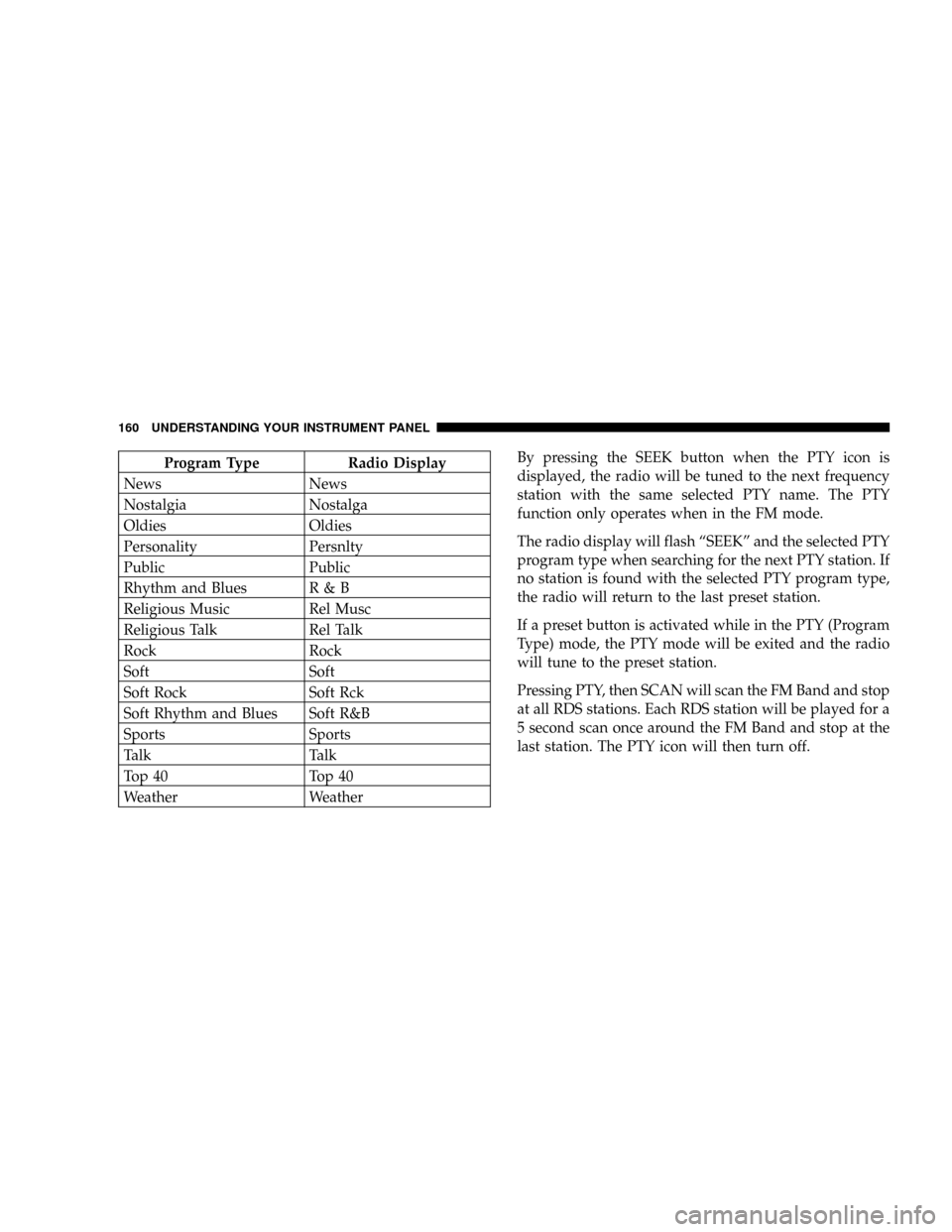
Program Type Radio Display
News News
Nostalgia Nostalga
Oldies Oldies
Personality Persnlty
Public Public
Rhythm and Blues R & B
Religious Music Rel Musc
Religious Talk Rel Talk
Rock Rock
Soft Soft
Soft Rock Soft Rck
Soft Rhythm and Blues Soft R&B
Sports Sports
Talk Talk
Top 40 Top 40
Weather WeatherBy pressing the SEEK button when the PTY icon is
displayed, the radio will be tuned to the next frequency
station with the same selected PTY name. The PTY
function only operates when in the FM mode.
The radio display will flash ªSEEKº and the selected PTY
program type when searching for the next PTY station. If
no station is found with the selected PTY program type,
the radio will return to the last preset station.
If a preset button is activated while in the PTY (Program
Type) mode, the PTY mode will be exited and the radio
will tune to the preset station.
Pressing PTY, then SCAN will scan the FM Band and stop
at all RDS stations. Each RDS station will be played for a
5 second scan once around the FM Band and stop at the
last station. The PTY icon will then turn off.
160 UNDERSTANDING YOUR INSTRUMENT PANEL