display DODGE RAM 2500 DIESEL 2008 3.G Workshop Manual
[x] Cancel search | Manufacturer: DODGE, Model Year: 2008, Model line: RAM 2500 DIESEL, Model: DODGE RAM 2500 DIESEL 2008 3.GPages: 527, PDF Size: 8.88 MB
Page 243 of 527
3. To decrease the clock by one hour, use the Select
Encoder to highlight the ª-º sign. Press ENTER. Press
ENTER again to decrease the clock by another hour.
4. To increase the clock by minutes, make sure ªMIN +º
is highlighted and press ENTER. Press ENTER again to
increase the clock by another minute.
5. To decrease the clock by minutes, use the Select
Encoder to highlight the ª-ª sign. Press ENTER. Press
ENTER again to decrease the clock by another minute.
6. Select ªDONEº to exit from the clock setting mode.
Press ENTER to save your changes. If you press CAN-
CEL or NAV then your changes will not be saved.VIDEO ENTERTAINMENT SYSTEM (SALES CODE
XRV) Ð IF EQUIPPED
The optional Video Entertainment SystemŸ (VESŸ)
consists of a DVD player and LCD (liquid crystal display)
screen, a battery-powered remote control, and two head-
sets. The system is located in the headliner behind the
front row seat. Refer to your VESŸ User's Manual for
detailed operating instructions.
SATELLITE RADIO Ð IF EQUIPPED
Satellite radio uses direct satellite to receiver broadcast-
ing technology to provide clear digital sound, coast to
coast. The subscription service provider is SiriusŸ Satel-
lite Radio. This service offers over 130 channels of music,
sports, news, entertainment, and programming for chil-
dren, directly from its satellites and broadcasting studios.
NOTE:Sirius service is not available in Hawaii and has
limited coverage in Alaska.
UNDERSTANDING YOUR INSTRUMENT PANEL 241
4
Page 244 of 527
System Activation
Sirius Satellite Radio service is pre-activated, and you
may begin listening immediately to the one year of audio
service that is included with the factory-installed satellite
radio system in your vehicle. Sirius will supply a wel-
come kit that contains general information, including
how to setup your on-line listening account at no addi-
tional charge. For further information, call the toll-free
number 888-539-7474, or visit the Sirius web site at
www.sirius.com, or at www.siriuscanada.ca for Cana-
dian residents.
Electronic Serial Number/Sirius Identification
Number (ESN/SID)
Please have the following information available when
calling:
1. The Electronic Serial Number/Sirius Identification
Number (ESN/SID).
2. Your Vehicle Identification Number.To access the ESN/SID, refer to the following procedure.
ESN/SID Access with REF Radios
With the ignition switch in the ACC position and the
radio OFF, press the CD Eject and TIME buttons simul-
taneously for three seconds. The first four digits of the
12-digit ESN/SID number will display. Press the SEEK
UP button to display the next four digits. Continue to
press the SEEK UP button until all 12 ESN/SID digits
display. The SEEK DOWN will page down until the first
four digits display. The radio will exit the ESN/SID mode
when any other button is pushed, the ignition is turned
OFF, or five minutes have passed since any button was
pushed.
ESN/SID Access with RAQ and RAK Radios
With the ignition switch in the ACC position and the
radio OFF, press the CD Eject and TIME buttons simul-
taneously for three seconds. All twelve ESN/SID num-
bers will display. The radio will exit the ESN/SID mode
242 UNDERSTANDING YOUR INSTRUMENT PANEL
Page 245 of 527
when any other button is pushed, the ignition is turned
OFF, or five minutes have passed since any button was
pushed.
ESN/SID Access with REC Navigation Radios
Please refer to your Navigation User's Manual.
With the ignition in the ACC position and the radio off,
press the CD Eject and SET buttons simultaneously until
the 12 digits of the ESN/SID appear on the screen.
Selecting Satellite Mode in REF, RAQ, And RAK
Radios
Selecting Satellite Mode Ð REF Radio
Press the MODE button repeatedly until the word9SAT9
appears in the display.
A CD may remain in the radio while in the Satellite radio
mode.
Selecting Satellite Mode Ð RAQ and RAK Radio
Press the MODE button repeatedly until the word9SAT9
appears in the display.
These radios will also display the current station name
and program type. For more information, such as song
title and artist, press the MSG or INFO button.
A CD or tape may remain in the radio while in the
Satellite radio mode.
Selecting A Channel
Press and release the SEEK or TUNE knob to search for
the next channel. Press the top of the button to search up
and the bottom of the button to search down. Holding the
TUNE button causes the radio to bypass channels until
the button is released.
UNDERSTANDING YOUR INSTRUMENT PANEL 243
4
Page 246 of 527
Press and release the SCAN button (if equipped) to
automatically change channels every seven seconds. The
radio will pause on each channel for seven seconds
before moving on to the next channel. The word9SCAN9
will appear in the display between each channel change.
Press the SCAN button a second time to stop the search.
NOTE:Channels that may contain objectionable content
can be blocked. Contact Sirius Customer Care at 888-539-
7474 to discuss options for channel blocking or unblock-
ing. Please have your ESN/SID information available.
Storing And Selecting Preset Channels
In addition to the 12 AM and 12 FM preset stations, you
may also commit 12 satellite stations to pushbutton
memory. These satellite channel preset stations will not
erase any AM or FM preset memory stations. Follow the
memory preset procedures that apply to your radio.
Using The PTY (Program Type) Button Ð If
Equipped
Follow the PTY button instructions that apply to your
radio.
PTY Button SCAN
When the desired program type is obtained, press the
SCAN button within five seconds. The radio will play
seven seconds of the selected channel before moving to
the next channel of the selected program type. Press the
SCAN button a second time to stop the search.
NOTE:Pressing the SEEK or SCAN button, while
performing a music type scan, will change the channel by
one and stop the search. Pressing a preset memory button
during a music type scan will call up the memory
channel and stop the search.
244 UNDERSTANDING YOUR INSTRUMENT PANEL
Page 272 of 527
CAUTION!
If WATER IN FUEL indicator light remains on DO
NOT START engine before you drain water from the
fuel filter to avoid engine damage. Refer to ªDrain-
ing Fuel/Water Separator Filter (6.7L Diesel Engine)º
under ªMaintenance Proceduresº in Section 7.
4. Turn the ignition key to START and crank the engine.
Do not press the accelerator during starting.
CAUTION!
Do not crank engine for more than 15 seconds at a
time as starter motor damage may result. Turn key to
OFF and wait at least two minutes before trying
again.5. When the engine starts, release the key.
6. Check to see that there is oil pressure.
7. Release the parking brake.
Starting Procedure ± Engine Manifold Air
Temperature Below 66ÉF (19ÉC)
NOTE:The temperature displayed on the overhead
console (if equipped) does not necessarily reflect the
engine manifold air temperature. When certain engine
temperatures fall below 66ÉF (19ÉC) the lights will remain
on indicating the intake manifold heater system is active.
270 STARTING AND OPERATING
Page 287 of 527
TRANSMISSION SHIFTING
Automatic Transmission with Overdrive
(68RFE) Ð If Equipped
The gear selector lever display located in the instrument
panel cluster indicates the transmission gear range (the
selector is illuminated for night driving). The selector
lever is mounted on the right side of the steering column.
You must depress the brake pedal to pull the selector
lever out of PARK position (Brake Interlock System). To
drive, move the selector lever from PARK or NEUTRAL
to the desired DRIVE position. Pull the selector lever
toward you when shifting into REVERSE, SECOND,
FIRST or PARK, or when shifting out of PARK.
Gear Ranges
DO NOT race the engine when shifting from PARK or
NEUTRAL position into another gear range.PARK
This gear position supplements the parking brake by
locking the transmission. The engine can be started in
this range. Never use PARK while the vehicle is in
motion. Apply the parking brake when leaving the
vehicle in this range. Always apply parking brake first,
then place the selector in PARK position. On 4-wheel
drive vehicles be sure that the transfer case is in a drive
position!
WARNING!
Never use PARK position on an automatic transmis-
sion as a substitute for the parking brake. Always
apply parking brake fully when parked to guard
against vehicle movement and possible injury or
damage.
STARTING AND OPERATING 285
5
Page 291 of 527
delayed. Shifts into 5th and 6th gear are still allowed
under steady cruise conditions. Closed throttle down-
shifts (for improved engine braking) may occur during
steady braking maneuvers. Pressing the switch a second
time restores normal operation. Normal operation is
always the default at engine start-up.
The TOW HAUL light will illuminate in the instrument
cluster to indicate when the switch has been activated. If
the TOW HAUL modes are desired, the button must be
pressed each time the engine is started.
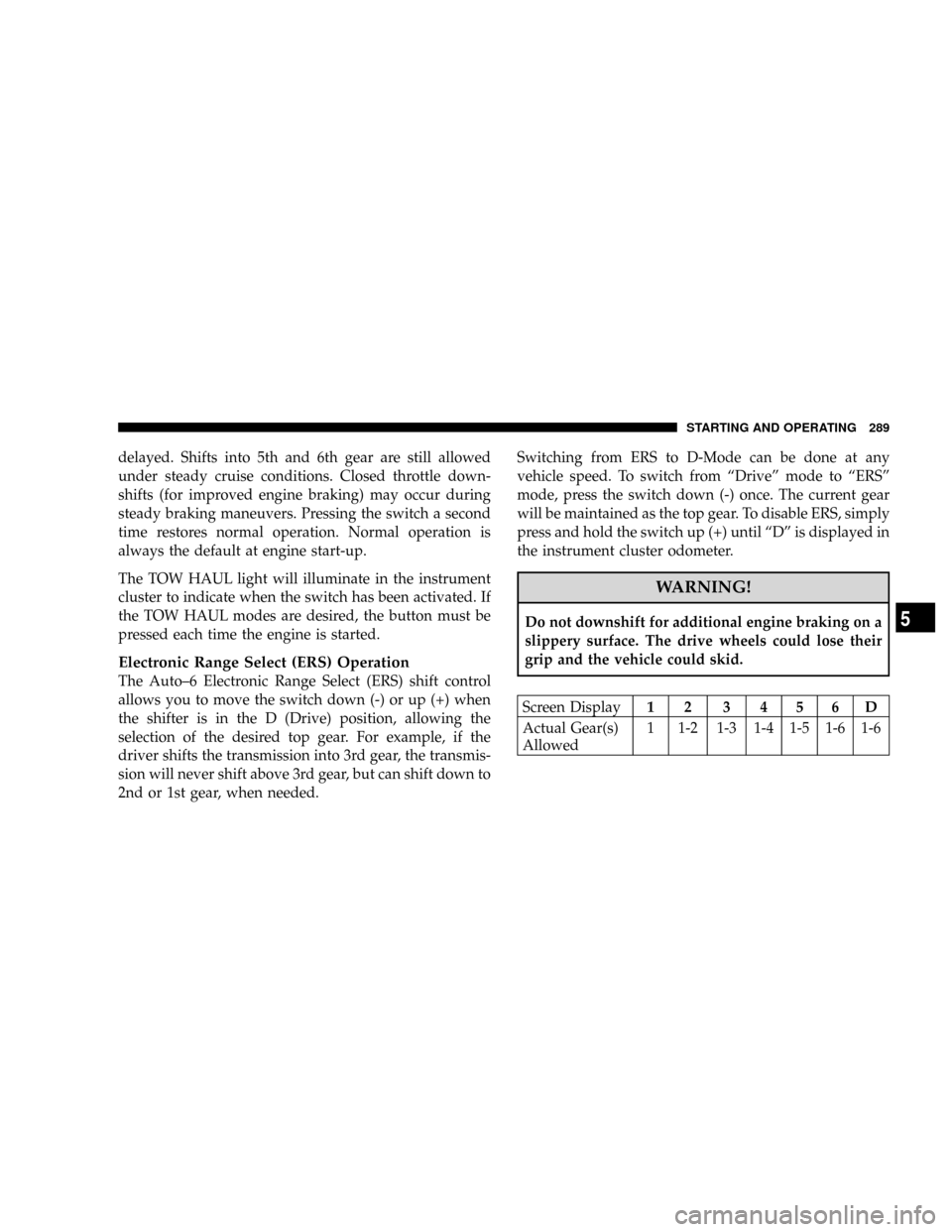
Electronic Range Select (ERS) Operation
The Auto±6 Electronic Range Select (ERS) shift control
allows you to move the switch down (-) or up (+) when
the shifter is in the D (Drive) position, allowing the
selection of the desired top gear. For example, if the
driver shifts the transmission into 3rd gear, the transmis-
sion will never shift above 3rd gear, but can shift down to
2nd or 1st gear, when needed.Switching from ERS to D-Mode can be done at any
vehicle speed. To switch from ªDriveº mode to ªERSº
mode, press the switch down (-) once. The current gear
will be maintained as the top gear. To disable ERS, simply
press and hold the switch up (+) until ªDº is displayed in
the instrument cluster odometer.
WARNING!
Do not downshift for additional engine braking on a
slippery surface. The drive wheels could lose their
grip and the vehicle could skid.
Screen Display12 3456D
Actual Gear(s)
Allowed1 1-2 1-3 1-4 1-5 1-6 1-6
STARTING AND OPERATING 289
5
Page 376 of 527
NOTE:During snowplow usage on vehicles equipped
with an overhead console module, the outside tempera-
ture display will show higher temperatures than the
outside ambient temperature. The higher displayed tem-
perature is due to blocked or reduced airflow to the
underhood ambient temperature sensor by the snow-
plow. This is common and outside temperature display
operation will return to normal when the snowplow is
removed.
General Maintenance
Snowplows should be maintained in accordance with the
plow manufacturer's instructions.
Keep all snowplow electrical connections and battery
terminals clean and free of corrosion.When plowing snow, to avoid transmission and driv-
etrain damage, the following precautions should be ob-
served.
²Operate with transfer case in 4L when plowing small
or congested areas where speeds are not likely to
exceed 15 mph (24 km/h). At higher speeds operate in
4H.
²Vehicles with 68RFE transmissions should use 4L
range when plowing deep or heavy snow for extended
periods of time to avoid transmission overheating.
²Do not shift the transmission unless the engine has
returned to idle and wheels have stopped. Make a
practice of stepping on the brake pedal before shifting
the transmission.
374 STARTING AND OPERATING
Page 421 of 527
Engine Air Cleaner Filter (6.7L Diesel Engines)
CAUTION!
All air entering the engine intake must be filtered.
The abrasive particles in unfiltered air will cause
rapid wear to engine components.
The condition of the air cleaner filter is monitored by the
Engine Control Module. The Electronic Vehicle Informa-
tion Center (EVIC) will display SERVICE AIR FILTER
when service is required.
Do not remove the top of the air filter housing to
inspect the filter element on your diesel engine under
normal operating conditions.
The EVIC message SERVICE AIR FILTER could be dis-
played periodically. This is because engine air flow
requirements change based on driving conditions. As thefilter becomes more restrictive and air flow requirements
increase the EVIC message SERVICE AIR FILTER will be
displayed. The message may not be displayed in subse-
quent drive cycles if the same conditions are not met. The
air filter element should be replaced within 250 miles
from the first time this message is displayed to ensure
proper engine operation during all driving conditions.
The air filter housing on your vehicle may also come
equipped with a Filter MinderŸ. This is an air flow
restriction gauge that will indicate when the filter ele-
ment needs to be replaced.
CAUTION!
Driving with a restricted air filter can cause engine
damage.
MAINTAINING YOUR VEHICLE 419
7
Page 428 of 527
To achieve these emission standards, your vehicle is
equipped with a state of the art engine and exhaust
system. The engine and exhaust aftertreatment system
work together to achieve the EPA Heavy Duty Diesel
Engine Emissions Standards. These systems are seam-
lessly integrated into your vehicle and managed by the
Cumminst6.7L engine Powertrain Control Module
(PCM). The PCM manages engine combustion to allow
the exhaust system's catalyst to trap and burn Particulate
Matter (PM) pollutants, with no input or interaction on
your part.
Additionally, the overhead console in your vehicle has
the ability to alert you to additional maintenance re-
quired on your truck or engine. Refer to the following
messages that may be displayed on your Electronic
Vehicle Information Center (EVIC):WARNING!
A hot exhaust system can start a fire if you park over
materials that can burn. Such materials might be
grass or leaves coming into contact with your exhaust
system. Do not park or operate your vehicle in areas
where your exhaust system can contact anything that
can burn.
Perform Service
The 6.7L Cumminstengine utilizes a Closed Crankcase
Ventilation (CCV) system, EGR valve and an EGR cooler.
This system filters and recycles gasses produced in the
crankcase during the normal combustion process. ªPer-
form Serviceº will be displayed on the overhead console
of your vehicle if the CCV filter, EGR valve and EGR
cooler are due for required maintenance. The CCV filter is
426 MAINTAINING YOUR VEHICLE