display DODGE RAM 2500 DIESEL 2008 3.G User Guide
[x] Cancel search | Manufacturer: DODGE, Model Year: 2008, Model line: RAM 2500 DIESEL, Model: DODGE RAM 2500 DIESEL 2008 3.GPages: 527, PDF Size: 8.88 MB
Page 151 of 527
NOTE:If this feature is enabled, the headlamps will be
on during the engine pre-heat and cold crank; therefore,
it is recommended that the feature be disabled when
overnight ambient temperature is at or below 20ÉF (-7ÉC)
to prevent excessive drain on batteries during cold crank-
ing.
²ªUNIT IN > US/METRICº ± The EVIC and odometer
display can be changed between English and Metric
units of measure. To make your selection, press and
release the RESET button until ªUSº or ªMETRICº
appears.
²ªCOMPASS VARIANCE > 8º ± Press the RESET
button to change the compass variance setting. For
additional information, refer to ªCompass Varianceº
in this section.
²ªCOMPASS CALIBRATE > YESº ± Press the RESET
button to calibrate the compass. For additional infor-
mation, refer to ªCompass Calibrateº in this section.
Compass/Temperature Button
Pressing the Compass/Temperature button
will return the display to the normal compass/
temperature display.
NOTE:Temperature accuracy can be affected from heat
soak. For best accuracy, the vehicle should be driven at a
speed greater than 25 mph (40 km/h) for several min-
utes.
Automatic Compass Calibration
This compass is self-calibrating, which eliminates the
need to set the compass manually. When the vehicle is
new, the compass may appear erratic and the EVIC will
display ªCALº until the compass is calibrated. You may
also calibrate the compass by completing one or more
360É turns (in an area free from large metal or metallic
objects) until the ªCALº message displayed in the EVIC
turns off. The compass will now function normally.
UNDERSTANDING THE FEATURES OF YOUR VEHICLE 149
3
Page 152 of 527
Manual Compass Calibration
If the compass appears erratic and the ªCALº message
does not appear in the EVIC display, you must put the
compass into the Calibration Mode manually as follows:
1.Turn the ignition switch to the ON/RUN position.
2.Press the Menu buttonuntil Personal Settings is
displayed.
3.Press the STEP buttonuntil ªCalibrate Compass YESº
is displayed.
4.Press and release the RESET buttonto start the
calibration. The message ªCALº will display in the EVIC.
5. Slowly drive the vehicle 5 mph (8 km/h) in a complete
360É circle (in an area free from large metal or metallic
objects) until the ªCALº message turns off. The compass
will now function normally.
Compass Variance
Compass Variance is the difference between magnetic
North and Geographic North. In some areas of the
country, the difference between magnetic and geographic
North is great enough to cause the compass to give false
readings. If this occurs, the compass variance must be set
using the following procedure:
NOTE:Magnetic materials should be kept away from
the overhead console. This is where the compass sensor is
located.
150 UNDERSTANDING THE FEATURES OF YOUR VEHICLE
Page 153 of 527
1.Turn the ignition switch to the ON/RUN position.
2.Press the Menu buttonuntil Personal Settings is
displayed.
3.Press the STEP buttonuntil ªCompass Varianceº is
displayed.
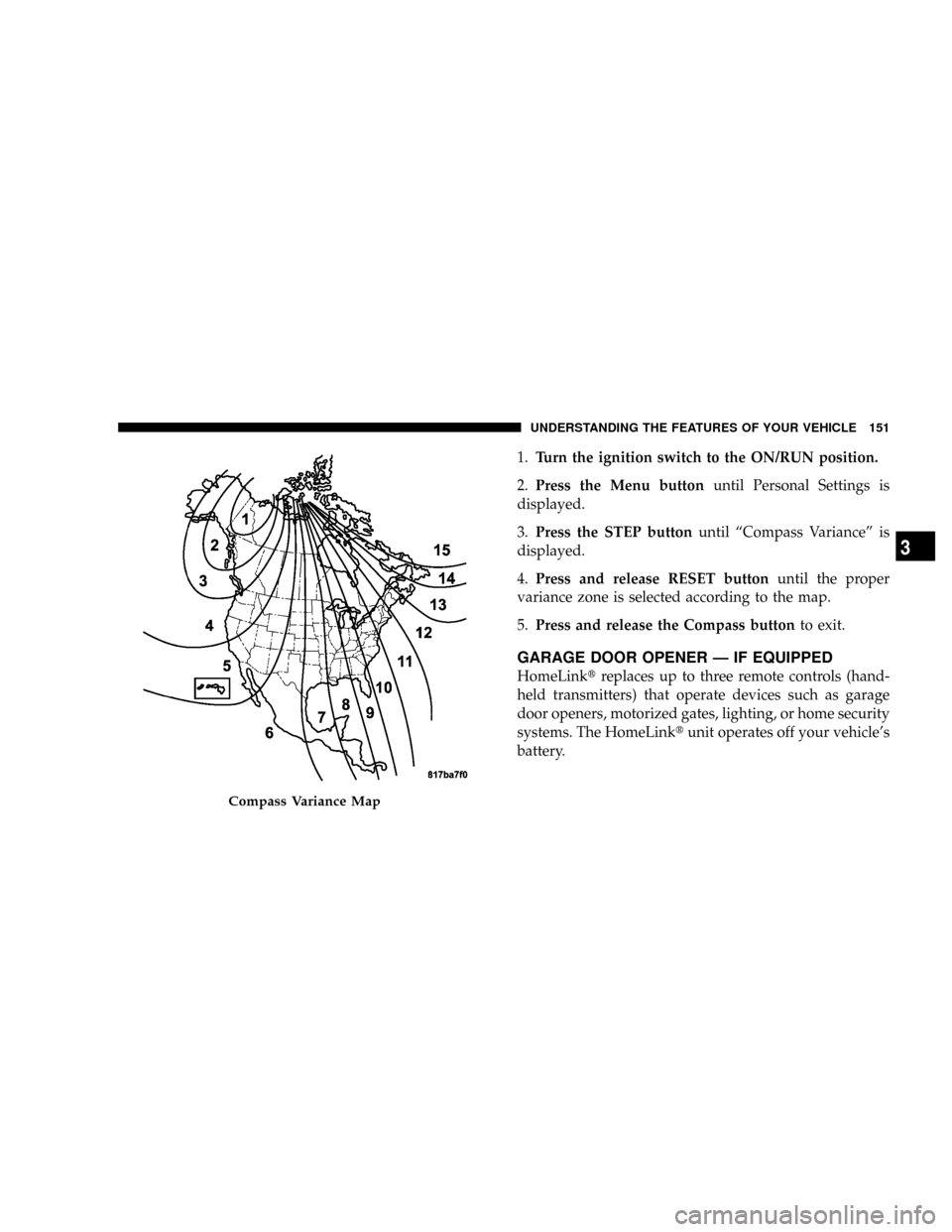
4.Press and release RESET buttonuntil the proper
variance zone is selected according to the map.
5.Press and release the Compass buttonto exit.
GARAGE DOOR OPENER Ð IF EQUIPPED
HomeLinktreplaces up to three remote controls (hand-
held transmitters) that operate devices such as garage
door openers, motorized gates, lighting, or home security
systems. The HomeLinktunit operates off your vehicle's
battery.
Compass Variance Map
UNDERSTANDING THE FEATURES OF YOUR VEHICLE 151
3
Page 155 of 527
WARNING!
Vehicle exhaust contains carbon monoxide, a danger-
ous gas. Do not run your vehicle in the garage while
training the transceiver. Exhaust gas can cause seri-
ous injury or death.
Programming HomeLinkT
Before You Begin
If you have not trained any of the HomeLinktbuttons,
erase all channels before you begin training.
To do this, press and hold the two outside buttons for 20
seconds. The EVIC will display ªCLEARING CHAN-
NELS.º Release the buttons when the EVIC message
states ªCHANNELS CLEARED.ºIt is recommended that a new battery be placed in the
hand-held transmitter of the device being programmed
to HomeLinktfor more efficient training and accurate
transmission of the radio-frequency signal.
Your vehicle should be parked outside of the garage
while training.
1. Turn the ignition switch to the ON/RUN position.
2. Place the hand-held transmitter 1 to 3 in (3 to 8 cm)
from the HomeLinktbuttons while keeping the EVIC
display in view.
For optimal training, point the battery end of the hand-
held transmitter away from the HomeLinkt.
3. Simultaneously, press and hold both the chosen
HomeLinktbutton and the hand-held transmitter button
until the EVIC display changes from ªCHANNEL #
TRAININGº to ªCHANNEL # TRAINED.º
UNDERSTANDING THE FEATURES OF YOUR VEHICLE 153
3
Page 156 of 527
Then release both the HomeLinktand hand-held trans-
mitter buttons.
If the EVIC display states ªDID NOT TRAINº repeat Step
3. If the signal is too weak, replace the battery in the
original hand-held transmitter.
It may take up to 30 seconds, or longer, in rare cases. The
garage door may open and close while you train.
NOTE:Some gate operators and garage door openers
may require you to replace Step 3 with procedures noted
in the ªGate Operator/Canadian Programmingº section.
4. Press and hold the just-trained HomeLinktbutton. If
the channel has been trained, the EVIC display will now
state ªCHANNEL # TRANSMIT.º
If the EVIC display still states ªCHANNEL # TRAIN-
INGº repeat Step 3.NOTE:After training a HomeLinktchannel, if the
garage door does not operate with HomeLinktand the
garage door opener was manufactured after 1995, the
garage door opener may have rolling code. If so, proceed
to the heading ªProgramming A Rolling Code System.º
5. PROGRAMMING A ROLLING CODE SYSTEM
At the garage door opener motor (in the garage), locate
the ªlearnº or ªtrainingº button.
This can usually be found where the hanging antenna
wire is attached to the garage door opener motor (it is
NOT the button normally used to open and close the
door).
154 UNDERSTANDING THE FEATURES OF YOUR VEHICLE
Page 158 of 527
Similar to this Canadian law, some U.S. gate operators are
designed to ªtime-outº in the same manner.
It may be helpful to unplug the device during the cycling
process to prevent possible overheating of the garage
door or gate motor.
If you are having difficulties programming a garage door
opener or a gate operator, replace ªProgramming
HomeLinkº Step 3 with the following:
3. Continue to press and hold the HomeLinktbutton
while you press and release - every two seconds
(ªcycleº) your hand-held transmitter until HomeLinkt
has successfully accepted the frequency signal. The
EVIC display will change from ªCHANNEL # TRAIN-
INGº to ªCHANNEL # TRAINED.º
If you unplugged the device for training, plug it back in
at this time.Then proceed with Step 4 under ªProgramming
HomeLinktº earlier in this section.
Using HomeLinkT
To operate, simply press and release the programmed
HomeLinktbutton. Activation will now occur for the
trained device (i.e., garage door opener, gate operator,
security system, entry door lock, home/office lighting,
etc.) The hand-held transmitter of the device may also be
used at any time.
Reprogramming A Single HomeLinkTButton
To reprogram a channel that has been previously trained,
follow these steps:
1. Turn the ignition switch to the ON/RUN position.
2. Press and hold the desired HomeLinktbutton for 20
seconds until the EVIC display states ªCHANNEL #
TRAINING.ºDo not release the button.
156 UNDERSTANDING THE FEATURES OF YOUR VEHICLE
Page 193 of 527
9. Oil Pressure Gauge
The pointer should always indicate some oil pres-
sure when the engine is running. A continuous
high or low reading, under normal driving conditions,
may indicate a lubrication system malfunction. Immedi-
ate service should be obtained.
NOTE:If the gauge pointer moves to either extreme of
the gauge, the ªCheck Gaugesº indicator will illuminate
and a single chime will sound.
10. Transfer Case Position
This display indicator shows the transfer case position
selection.
For additional information refer to ªFour-Wheel Drive
Operationº in Section 5 of this manual.11 .TOW HAUL
The TOW HAUL button is located at the end of the gear
shift lever. This light will illuminate when the TOW
HAUL button is pushed once.
12. Temperature Gauge
The temperature gauge indicates engine coolant
temperature. Any reading within the normal
range indicates that the cooling system is operat-
ing satisfactorily. The gauge needle will likely indicate a
higher temperature when driving in hot weather, up
mountain grades, in heavy traffic, or when towing a
trailer. If the needle rises to the ª245ÉFº (118ÉC) mark,
stop the vehicle, shift into NEUTRAL, and increase the
engine idle speed for two to three minutes. If the tem-
perature reading does not return to normal, shut your
engine OFF and allow it to cool. Seek authorized service
immediately. Refer to ªCooling Systemº under ªMain-
taining Your Vehicleº in Section 7.
UNDERSTANDING YOUR INSTRUMENT PANEL 191
4
Page 194 of 527
CAUTION!
Do not leave your vehicle unattended with the en-
gine running as you would not be able to react to the
temperature indicator if the engine overheats.
NOTE:Engine idle speed will automatically increase to
1000 rpm at elevated coolant temperatures to improve
engine cooling.
NOTE:If the gauge pointer moves to either extreme of
the gauge, the ªCheck Gaugesº indicator will illuminate
and a single chime will sound.
13. Security Light
The light will flash rapidly for approximately 16 seconds
when the Vehicle Theft Alarm is arming. The light willflash at a slower rate after the alarm is set. The Security
Light will also come on for about two seconds when the
ignition is first turned ON.
14. Transmission Range Indicator (Automatic
Transmissions Only)
When the gear selector lever is moved on vehicles with
the 68RFE transmission, this indicator shows the auto-
matic transmission gear range selected (P R N D). Ve-
hicles equipped with Auto-6/Electronic Range Select
(ERS) will display the selection of the desired top gear, in
the position next to the D (Drive).
15. Odometer/Trip Odometer
The odometer shows the total distance the vehicle has
been driven. U.S. federal regulations require that upon
transfer of vehicle ownership, the seller certify to the
purchaser the correct mileage that the vehicle has been
driven. Therefore, if the odometer reading is changed
192 UNDERSTANDING YOUR INSTRUMENT PANEL
Page 195 of 527
during repair or replacement, be sure to keep a record of
the reading before and after the service so that the correct
mileage can be determined.
The two trip odometers show individual trip mileage. To
switch from odometer to trip odometers, press and
release the Trip Odometer button.
To reset a trip odometer, display the desired trip odom-
eter to be reset then push and hold the button until the
display resets (approximately two seconds).
Vehicle Warning Messages
When the appropriate conditions exist, messages such as
ªdoorº (indicates that a door(s) may be ajar), ªgASCAPº
(which indicates that your gas cap is possibly loose or
damaged), and ªnoFUSEº (indicates that the IOD fuse is
removed from the Integrated Power Module), will dis-
play in the odometer.NOTE:Most warnings will display in the EVIC (Elec-
tronic Vehicle Information Center).
NOTE:There is also an engine hour function. This
indicates the total number of hours the engine has been
running. To display the engine hours perform the follow-
ing: Place the ignition in RUN, but do not start the
engine. With the odometer value displayed, hold the trip
button down for a period of 6 seconds. The odometer will
change to trip value first, then it will display the engine
hour value. The engine hours will be displayed for a
period of 30 seconds until the ignition is turned off or the
engine is started.
16. Front Fog Light Indicator Ð If Equipped
This light shows when the front fog lights are ON.
UNDERSTANDING YOUR INSTRUMENT PANEL 193
4
Page 201 of 527
Follow engine starting procedure for proper engine start-
ing and operating. Wait until the Wait To Start indicator
turns OFF, then start the vehicle.
NOTE:The Wait To Start Indicator may not illuminate if
the engine coolant temperature is warm enough.
27. Odometer/Trip Odometer Button
Press this button to toggle between the odometer and the
trip odometer display. Holding the button in resets the
trip odometer reading when in trip mode.
28. Fuel Gauge
Shows level of fuel in tank when ignition switch is in the
ON position.
29. Low Fuel Warning Light
Glows when the pointer is between ªEº and 1/8
indication mark (approximately 15% of tank vol-
ume) on the fuel gauge. When the fuel gauge
pointer is on ªEº (equivalent to Distance To Empty[DTE]=0ontheoverhead console, if so equipped) there
is reserve fuel capacity, which corresponds to approxi-
mately 8% of tank volume. This reserve capacity was put
in place to prevent the likelihood of customers running
out of fuel when operating at maximum load conditions
in areas where there aren't many fuel stations.
Fuel tank volumes are as follows:
²34 gal (128 L) - 2500/3500 short box models
²35 gal (132 L) - 2500/3500 long box models
30. CRUISE Light
This indicator lights when the electronic speed control
system is turned on.
UNDERSTANDING YOUR INSTRUMENT PANEL 199
4