ignition DODGE RAM 2500 GAS 2008 3.G Owner's Manual
[x] Cancel search | Manufacturer: DODGE, Model Year: 2008, Model line: RAM 2500 GAS, Model: DODGE RAM 2500 GAS 2008 3.GPages: 554, PDF Size: 9.93 MB
Page 54 of 554
Airbag System Components
The airbag system consists of the following:
²Occupant Restraint Controller
²Side Remote Acceleration Sensors (if equipped)
²Airbag Warning Light
²Driver Airbag
²Passenger Airbag
²Window Bags above Side Windows (if equipped)
²Steering Wheel and Column
²Instrument Panel
²Interconnecting Wiring
²Knee Impact Bolsters
²Front Acceleration Sensors (1500 Vehicles Only)
²Driver and Front Passenger Seat Belt Pretensioners (if
equipped)
²Driver Seat Track Position Sensor (if equipped)
²Passenger Side Frontal Airbag ON/OFF Switch (2500/
3500 Regular Cab Vehicles Only)
²Passenger Airbag Disable (PAD) Indicator Light
(2500/3500 Regular Cab Vehicles Only)
How the Airbag System Works
²
TheOccupant Restraint Controller (ORC)determines
if a frontal collision is severe enough to require the
airbags to inflate. The front airbag inflators are de-
signed to provide different rates of airbag inflation
from information provided by the ORC. The ORC will
not detect rollover or rear collisions.
The ORC also monitors the readiness of the electronic
parts of the system whenever the ignition switch is in
52 THINGS TO KNOW BEFORE STARTING YOUR VEHICLE
Page 55 of 554
the START or RUN positions. These include all of the
items listed above except the steering wheel and
column, and knee bolsters. If the key is in the OFF
position, in the ACC position, or not in the ignition,
the airbags are not on and will not inflate.
²Also, the ORC turns on the AIRBAG warn-
ing light in the instrument panel for six to
eight seconds for a self-check when the
ignition is first turned on. After the self-
check, the AIRBAG warning light will turn off. If the
ORC detects a malfunction in any part of the system, it
turns on the AIRBAG warning light either momen-
tarily or continuously. A single chime will sound if the
light comes on again after initial start up.
WARNING!
Ignoring the AIRBAG warning light in your instru-
ment panel could mean you won't have the airbags to
protect you in a collision. If the light does not come
on, stays on after you start the vehicle, or if it comes
on as you drive, have the airbag system checked right
away.
²ThePassenger Airbag Disable (PAD) Indicator Light
(if equipped)(an amber light located in the center of
the instrument panel), tells the driver and front pas-
senger when the front passenger airbag is turned off.
The PAD indicator light illuminates the words9PASS
AIR BAG OFF9to show that the passenger airbag will
not inflate during a collision requiring airbags. The
PAD light will illuminate when the passenger frontal
airbag has been turned off by using the manual
THINGS TO KNOW BEFORE STARTING YOUR VEHICLE 53
2
Page 59 of 554
WARNING!
Whenever an airbag is turned off, even a lap/
shoulder belted passenger may hit their head, neck,
or chest on the dashboard (instrument panel) or
windshield in a crash. This may result in serious
injury or death.
To Shut Off the Passenger Airbag (2500/3500 Regular
Cab Vehicles Only)
Place the ignition key in the Passenger Airbag ON/OFF
Switch, push the key in and turn clockwise, and remove
the key from the switch. This will shut off the passenger
side airbag. The OFF light near the switch will illuminate
when the ignition switch is turned to the ON position.To Turn On the Passenger Airbag (2500/3500 Regular
Cab Vehicles Only)
Place the ignition key in the Passenger Airbag ON/OFF
Switch, push the key in and turn counterclockwise, and
remove the key from the switch. This will turn ON the
passenger airbag. The OFF light near the switch will be
off when the ignition switch is turned to the ON position.
If A Deployment Occurs
The airbag system is designed to deploy the airbags
when the impact sensors detect a moderate-to-severe
frontal collision, to help restrain the driver and front
passenger, and then immediately deflate.
NOTE:A frontal collision that is not severe enough to
need airbag protection will not activate the system. This
does not mean something is wrong with the airbag
system.
THINGS TO KNOW BEFORE STARTING YOUR VEHICLE 57
2
Page 61 of 554
Maintaining Your Airbag System
WARNING!
²Modifications to any part of the airbag system
could cause it to fail when you need it. You could
be injured if the airbag system is not there to
protect you. Do not modify the components or
wiring, including adding any kind of badges or
stickers to the steering wheel hub trim cover or the
upper right side of the instrument panel. Do not
modify the front bumper, vehicle body structure,
or add aftermarket side steps or running boards.
²You need proper knee impact protection in a
collision. Do not mount or locate any aftermarket
equipment on or behind the knee bolsters.
²It is dangerous to try to repair any part of the
airbag system yourself. Be sure to tell anyone who
works on your vehicle that it has an airbag system.NOTE:
Perchlorate Material ± special handling may ap-
ply, see www.dtsc.ca.gov/hazardouswaste/perchlorate
Enhanced Accident Response System
If the airbags deploy after an impact and the electrical
system remains functional, vehicles equipped with
power door locks will unlock automatically. In addition,
approximately five seconds after the vehicle has stopped
moving, the interior lights will light until the ignition
switch is turned off.
Airbag Light
You will want to have the airbags ready to
inflate for your protection in an impact. While
the airbag system is designed to be mainte-
nance free, if any of the following occurs, have
an authorized dealer service the system promptly:
²The airbag light does not come on or flickers during
the six to eight seconds when the ignition switch is
first turned ON.
THINGS TO KNOW BEFORE STARTING YOUR VEHICLE 59
2
Page 63 of 554
obtain permission of the appropriate custodial entity for
the vehicle (usually the vehicle owner or lessee) before
accessing the electronic data stored, unless ordered to
download data by a court with legal jurisdiction (i.e.,
pursuant to a warrant). A copy of the data will be
provided to the custodial entity upon request. General
data that does not identify particular vehicles or crashes
may be released for incorporation in aggregate crash
databases, such as those maintained by the U.S. govern-
ment and various states. Data of a potentially sensitive
nature, such as would identify a particular driver, ve-
hicle, or crash, will be treated confidentially. Confidential
data will not be disclosed by DaimlerChrysler
Corporation to any third party except when:
1. Used for research purposes, such as to match data
with a particular crash record in an aggregate database,
provided confidentiality of personal data is thereafter
preserved2. Used in defense of litigation involving a
DaimlerChrysler Corporation product
3. Requested by police under a legal warrant
4. Otherwise required by law
Data Parameters that May Be Recorded:
²Diagnostic trouble code(s) (DTC's) and warning lamp
status for electronically-controlled safety systems, in-
cluding the airbag system
²Airbag disable lamp status (if equipped)
²9Time9of airbag deployment (in terms of ignition
cycles and vehicle mileage)
²Airbag deployment level (if applicable)
²Impact acceleration and angle
²Seat Belt status
THINGS TO KNOW BEFORE STARTING YOUR VEHICLE 61
2
Page 81 of 554
Safety Checks You Should Make Inside The
Vehicle
Heater Defroster Ducts
Inspect the heater defroster ducts for proper operation.
Check for proper airflow through all defroster ducts. If
there are any questions regarding the operation of your
heater defroster ducts, have the system checked by an
authorized dealer.
Seat Belts
Inspect the belt system periodically, checking for cuts,
frays and loose parts. Damaged parts must be replaced
immediately. Do not disassemble or modify the system.
Seat belt assemblies must be replaced after an accident if
they have been damaged (bent retractor, torn webbing,
etc.) or if the front airbags have deployed. If there is any
question regarding belt or retractor condition, replace the
belt.
Airbag Light
The light should come on and remain on for six to eight
seconds as a bulb check when the ignition switch is first
turned ON. If the light is not lit during starting, see your
authorized dealer. If the light stays on, flickers or comes
on while driving, have the system checked by an autho-
rized dealer. If there is a problem with the airbag light,
the seat belt light will flash.
Safety Checks You Should Make Outside The
Vehicle
Tires
Examine tires for tread wear or uneven wear patterns.
Check for stones, nails, glass or other objects lodged in
the tread.
Inspect for tread cuts or sidewall cracks. Check wheel
nuts for tightness and tires for proper pressure.
THINGS TO KNOW BEFORE STARTING YOUR VEHICLE 79
2
Page 91 of 554
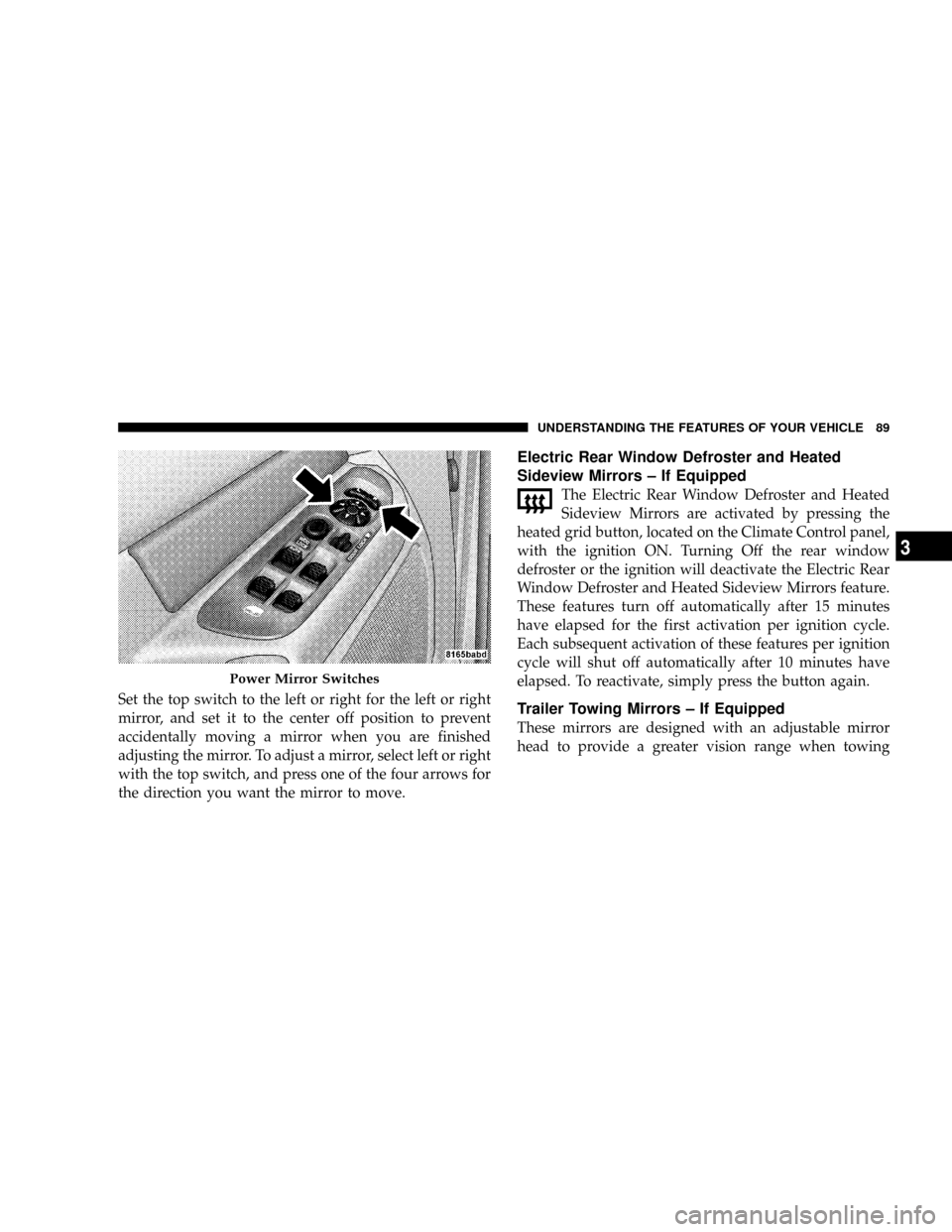
Set the top switch to the left or right for the left or right
mirror, and set it to the center off position to prevent
accidentally moving a mirror when you are finished
adjusting the mirror. To adjust a mirror, select left or right
with the top switch, and press one of the four arrows for
the direction you want the mirror to move.
Electric Rear Window Defroster and Heated
Sideview Mirrors ± If Equipped
The Electric Rear Window Defroster and Heated
Sideview Mirrors are activated by pressing the
heated grid button, located on the Climate Control panel,
with the ignition ON. Turning Off the rear window
defroster or the ignition will deactivate the Electric Rear
Window Defroster and Heated Sideview Mirrors feature.
These features turn off automatically after 15 minutes
have elapsed for the first activation per ignition cycle.
Each subsequent activation of these features per ignition
cycle will shut off automatically after 10 minutes have
elapsed. To reactivate, simply press the button again.
Trailer Towing Mirrors ± If Equipped
These mirrors are designed with an adjustable mirror
head to provide a greater vision range when towing
Power Mirror Switches
UNDERSTANDING THE FEATURES OF YOUR VEHICLE 89
3
Page 104 of 554
Redial
²
Press the PHONE button to begin.
²After the9Ready9prompt and the following beep, say
9Redial.9
²The UConnecttsystem will call the last number that
was dialed from your cellular phone.
NOTE:This may not be the last number dialed from the
UConnecttsystem.
Call Continuation
Call continuation is the progression of a phone call on the
UConnecttsystem after the vehicle ignition key has been
switched to OFF. Call continuation functionality avail-
able on the vehicle can be any one of three types:
²After the ignition key is switched to OFF, a call can
continue on the UConnecttsystem either until the callends, or until the vehicle battery condition dictates
cessation of the call on the UConnecttsystem and
transfer of the call to the mobile phone.
²After the ignition key is switched to OFF, a call can
continue on the UConnecttsystem for a certain dura-
tion, after which the call is automatically transferred
from the UConnecttsystem to the mobile phone.
²An active call is automatically transferred to the
mobile phone after the ignition key is switched to OFF.
UConnectTSystem Features
Language Selection
To change the language that the UConnecttsystem is
using:
²Press the PHONE button to begin.
102 UNDERSTANDING THE FEATURES OF YOUR VEHICLE
Page 113 of 554
²In a convertible vehicle, system performance may be
compromised with the convertible top down.
Far End Audio Performance
²
Audio quality is maximized under:
²low-to-medium blower setting,
²low-to-medium vehicle speed,
²low road noise,
²smooth road surface,
²fully closed windows,
²dry weather conditions, and
²operation from the driver's seat.
²Performance, such as audio clarity, echo, and loudness
to a large degree rely on the phone and network, and
not the UConnecttsystem.
²Echo at the far end can sometimes be reduced by
lowering the in-vehicle audio volume.
²In a convertible vehicle, system performance may be
compromised with the convertible top down.
BluetoothtCommunication Link
Cellular phones have been found to lose connection to
the UConnecttsystem. When this happens, the connec-
tion can generally be re-established by switching the
phone off/on. Your cell phone is recommended to remain
in BluetoothtON mode.
Power-Up
After switching the ignition key from OFF to either ON
or ACC position, or after a language change, you must
wait at least five seconds prior to using the system.
UNDERSTANDING THE FEATURES OF YOUR VEHICLE 111
3
Page 134 of 554
Each heated seat switch has two settings (HI and LOW).
Press the switch once to obtain High heat level, then
press the switch again to obtain Low heat level. Pressing
the switch a third time will turn the heated seats OFF. If
you do not purposefully turn the switch OFF, the seat
heating level will automatically change to the next lower
level, or OFF. The High heat level operates for 30 minutes
(approximate), the Low heat level operates for 30 min-
utes (approximate). The seat heat will also turn OFF
when the ignition is turned OFF. Both of the indicators
ON identifies High heat level. The lower indicator On
only, identifies Low heat level. Flashing indicator lights
on the switch indicate that the Heated Seat System needs
servicing.WARNING!
Persons who are unable to feel pain to the skin
because of advanced age, chronic illness, diabetes,
spinal cord injury, medication, alcohol use, exhaus-
tion or other physical condition must exercise care
when using the seat heater. It may cause burns even
at low temperatures, especially if used for long
periods of time.
Do not place anything on the seat that insulates
against heat, such as a blanket or cushion. This may
cause the seat heater to overheat.
132 UNDERSTANDING THE FEATURES OF YOUR VEHICLE