ignition DODGE RAM 2500 GAS 2008 3.G Workshop Manual
[x] Cancel search | Manufacturer: DODGE, Model Year: 2008, Model line: RAM 2500 GAS, Model: DODGE RAM 2500 GAS 2008 3.GPages: 554, PDF Size: 9.93 MB
Page 205 of 554
that the anti-lock portion of the brake system is not
functioning and that service is required. See your autho-
rized dealer immediately. The ABS light could also
illuminate during loss of traction and remain illuminated
until the brake pedal is pressed.
21. Electronic Throttle Control (ETC)
This light informs you of a problem with the
Electronic Throttle Control system. If a prob-
lem is detected the light will come on while the
engine is running. If the light remains lit with
the engine running your vehicle will usually be drivable,
however, see your authorized dealer for service as soon
as possible. If the light is flashing when the engine is
running, immediate service is required and you may
experience reduced performance, an elevated/rough idle
or engine stall and your vehicle may require towing. The
light will come on when the ignition is first turned ONand remain on for 15 seconds as a bulb check. If the light
does not come on during starting, have the system
checked by an authorized dealer.
22. Cargo Light
The Cargo Lamp light will illuminate when the
Cargo Lamp is activated by pressing the Cargo
Light Button on the headlight switch.
23. SERV 4WD Indicator
The 4WD indicator will be illuminated whenever the
4WD mode is engaged for either the manual or electric
shift 4WD systems. The SERV 4WD indicator monitors
the electric shift 4WD system. If the SERV 4WD light
stays on or comes on during driving, it means that the
4WD system is not functioning properly and that service
is required.
UNDERSTANDING YOUR INSTRUMENT PANEL 203
4
Page 206 of 554
24. ESP/BAS Warning Lamp ± If Equipped
The lamp indicates a problem with one or more
of the functions of ESP. The yellow ªESP/BAS
Warning Lampº in the instrument cluster
comes on when the ignition switch is turned to
the ON position as a bulb check. It should go out with the
engine running. If the ªESP/BAS Warning Lampº comes
on continuously with the engine running, a malfunction
has been detected in the ESP system. If this light remains
on after several ignition cycles, and the vehicle has been
driven several miles/kilometers at speeds greater than 30
mph (48 km/h), see your authorized dealer as soon as
possible.
NOTE:9The9ESP/BAS Warning Lamp9come on mo-
mentarily each time the ignition switch is turned ON.
The ESP Control System will make buzzing or clicking
sounds when it is actively operating.25. Tire Pressure Monitoring Telltale Light Ð If
Equipped
Each tire, including the spare (if provided),
should be checked monthly when cold and
inflated to the inflation pressure recommended
by the vehicle manufacturer on the vehicle
placard or tire inflation pressure label. (If your vehicle
has tires of a different size than the size indicated on the
vehicle placard or tire inflation pressure label, you should
determine the proper tire inflation pressure for those
tires.)
As an added safety feature, your vehicle has been
equipped with a tire pressure monitoring system (TPMS)
that illuminates a low tire pressure telltale when one or
more of your tires is significantly under inflated. Accord-
ingly, when the low tire pressure telltale illuminates, you
should stop and check your tires as soon as possible, and
inflate them to the proper pressure. Driving on a signifi-
cantly under inflated tire causes the tire to overheat and
204 UNDERSTANDING YOUR INSTRUMENT PANEL
Page 209 of 554
27. Transmission Oil Temperature Warning Light
(Automatic Transmissions Only)
This light indicates that there is excessive trans-
mission fluid temperature that might occur
with severe usage such as trailer towing. It may
also occur when operating the vehicle in a high
torque converter slip condition, such as 4-wheel-drive
operation (e.g., snow plowing, off- road operation). If this
light comes on, stop the vehicle and run the engine at idle
or faster, with the transmission in NEUTRAL until the
light goes off.
28. Odometer/Trip Odometer Button
Press this button to toggle between the odometer and the
trip odometer display. Holding the button in resets the
trip odometer reading when in trip mode.
29. Fuel Gauge
Shows level of fuel in tank when ignition switch is in the
ON position.30. Low Fuel Warning Light
When the fuel level drops to 1/16 tank, the fuel
symbol will light and a single chime will sound.
NOTE:If your vehicle is equipped with an overhead
console module (CMTC), it is possible for DTE to display
ªLO FUELº before the low fuel warning light turns on in
the instrument cluster. This could occur because the low
fuel warning is set to a specified fuel tank volume and
DTE is an estimated distance calculation based on vehicle
fuel economy and remaining fuel tank volume.
Vehicle fuel tank volumes are as follows:
²26 gal (98 L) - 1500 short box models
²34 gal (128 L) - 1500/2500/3500 short box models
²35 gal (132 L) - 1500/2500/3500 long box models
UNDERSTANDING YOUR INSTRUMENT PANEL 207
4
Page 211 of 554
ELECTRONIC DIGITAL CLOCK
The clock and radio each use the display panel built into
the radio. A digital readout shows the frequency and/or
time in hours and minutes (depending on your radio
model) whenever the ignition switch is in the ON or ACC
position.
When the ignition switch is in the OFF position, or when
the radio frequency is being displayed, time keeping is
accurately maintained.
On the RAQ radio the time button alternates the location
of the time and frequency on the display. On the REF only
one of the two, time or frequency, is displayed at a time.
Clock Setting Procedure
1. Press and hold the time button until the hours blink.
2. Adjust the hours by turning the right side Tune/
Audio control.3. After the hours are adjusted, press the right side
Tune/Audio control to set the minutes.
4. Adjust the minutes using the right side Tune/Audio
control.
5. To exit, press any button/knob or wait approximately
five seconds.
RADIO GENERAL INFORMATION
RADIO BROADCAST SIGNALS
The radio will provide excellent reception under most
operating conditions. Like any system, however, automo-
tive radios have performance limitations, due to mobile
operation and natural phenomena, which might lead you
to believe your sound system is malfunctioning. To help
you understand and save you concern about these ªap-
parentº malfunctions, you must understand a point or
two about the transmission and reception of radio sig-
nals.
UNDERSTANDING YOUR INSTRUMENT PANEL 209
4
Page 212 of 554
Electrical Disturbances
Radio waves may pick up electrical disturbances during
transmission. They mainly affect the wave amplitude,
and thus remain a part of the AM reception. They
interfere very little with the frequency variations that
carry the FM signal.
TWO TYPES OF SIGNALS
There are two basic types of radio signals: AM or
Amplitude Modulation, in which the transmitted sound
causes the amplitude, or height, of the radio waves to
vary; and FM or Frequency Modulation, in which the
frequency of the wave is varied to carry the sound.
AM Reception
AM sound is based on wave amplitude, so AM reception
can be disrupted by such things as lightning, power lines
and neon signs.
FM Reception
Because FM transmission is based on frequency varia-
tions, interference that consists of amplitude variations
can be filtered out, leaving the reception relatively clear,
which is the major feature of FM radio.
NOTE:The radio, steering wheel radio controls (if
equipped), and six-disc CD/DVD changer (if equipped)
will remain active for up to 10 minutes after the ignition
switch has been turned OFF. Opening a vehicle front
door will cancel this feature.
210 UNDERSTANDING YOUR INSTRUMENT PANEL
Page 213 of 554
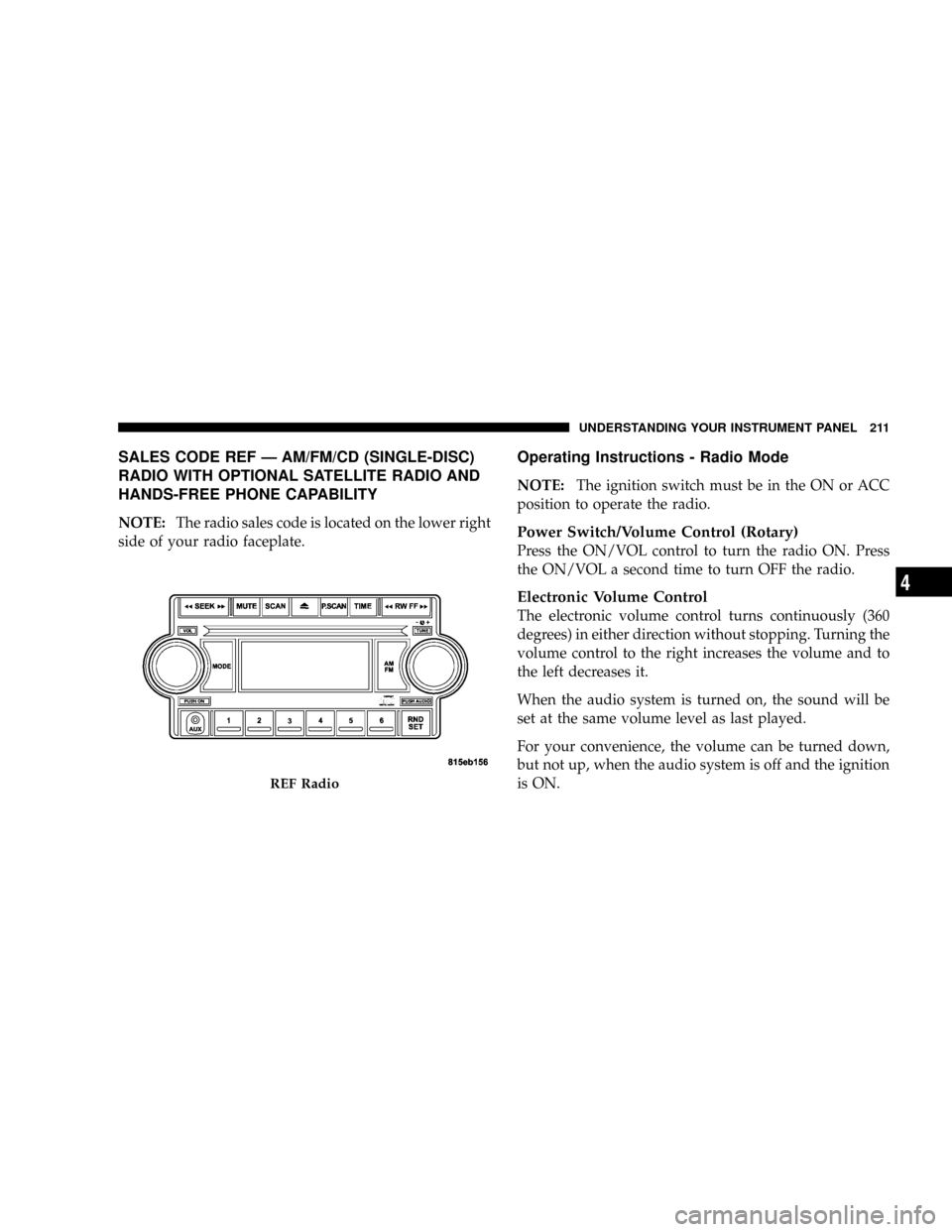
SALES CODE REF Ð AM/FM/CD (SINGLE-DISC)
RADIO WITH OPTIONAL SATELLITE RADIO AND
HANDS-FREE PHONE CAPABILITY
NOTE:The radio sales code is located on the lower right
side of your radio faceplate.
Operating Instructions - Radio Mode
NOTE:The ignition switch must be in the ON or ACC
position to operate the radio.
Power Switch/Volume Control (Rotary)
Press the ON/VOL control to turn the radio ON. Press
the ON/VOL a second time to turn OFF the radio.
Electronic Volume Control
The electronic volume control turns continuously (360
degrees) in either direction without stopping. Turning the
volume control to the right increases the volume and to
the left decreases it.
When the audio system is turned on, the sound will be
set at the same volume level as last played.
For your convenience, the volume can be turned down,
but not up, when the audio system is off and the ignition
is ON.
REF Radio
UNDERSTANDING YOUR INSTRUMENT PANEL 211
4
Page 214 of 554
Mode Button (Radio Mode)
Press the MODE button repeatedly to select between the
CD player and Satellite Radio (if equipped).
SEEK Button (Radio Mode)
Press and release the SEEK button to search for the next
listenable station in either AM/FM or Satellite (if
equipped) mode. Press the right side of the button to seek
up and the left side to seek down. The radio will remain
tuned to the new station until you make another selec-
tion. Holding the button will bypass stations without
stopping until you release it.
MUTE Button (Radio Mode)
Press the MUTE button to cancel the sound from the
speakers. MUTE will display. Press the MUTE button a
second time and the sound from the speakers will return.
Rotating the volume control, turning the radio ON/OFF,
or turning ON/OFF the ignition, will cancel the MUTE
feature.NOTE:In Hands-Free Phone (if equipped) mode, the
MUTE button mutes the microphone.
SCAN Button (Radio Mode)
Pressing the SCAN button causes the tuner to search for
the next listenable station in either, AM, FM, or Satellite
(if equipped) frequencies, pausing for five seconds at
each listenable station before continuing to the next. To
stop the search, press SCAN a second time.
PSCAN Button (Radio Mode)
Pressing the PSCAN button causes the tuner to scan
through preset stations in either, AM, FM, or Satellite (if
equipped) frequencies, pausing for five seconds at each
preset station before continuing to the next. To stop the
search, press PSCAN a second time.
TIME Button
Press the TIME button and the time of day will display
for five seconds.
212 UNDERSTANDING YOUR INSTRUMENT PANEL
Page 217 of 554
Operating Instructions - CD Mode
NOTE:The ignition switch must be in the ON or ACC
position to operate the radio.
Inserting The Compact Disc (Single CD Player)
Gently insert one CD into the CD player with the CD
label facing up. The CD will automatically be pulled into
the CD Player and the CD icon will illuminate on the
radio display.
If the volume control is ON, the unit will switch to CD
mode and begin to play. The display will show the track
number and play time in minutes and seconds. Play will
begin at the start of track one.
NOTE:
²On some vehicles, you may insert or eject a disc with
the radio or ignition switch OFF.
²If you insert a disc with the ignition ON and the radio
OFF, the CD will automatically be pulled into the CD
player.
²This radio does not play discs with MP3 tracks.
SEEK Button (CD Mode)
Press the right side of the SEEK button for the next track
on the CD. Press the left side of the button to return to the
beginning of the current track, or return to the beginning
of the previous track if the CD is within the first 10
seconds of the current selection.
MUTE Button (CD Mode)
Press the MUTE button to cancel the sound from the
speakers.9MUTE9will display. Press the MUTE button a
second time and the sound from the speakers will return.
Rotating the volume control or turning OFF the ignition
will also return the sound from the speakers.
UNDERSTANDING YOUR INSTRUMENT PANEL 215
4
Page 219 of 554
Operating Instructions - Auxiliary Mode
The auxiliary (AUX) jack is an audio input jack, which
allows the user to plug in a portable device such as an
MP3 player, cassette player, or microphone and utilize
the vehicle's audio system to amplify the source and play
through the vehicle speakers.
The auxiliary mode becomes active when an electrical
device is plugged into the AUX jack using a standard 3.5
mm stereo audio cable and the user presses and releases
the MODE button until AUX appears on the display.
NOTE:The radio will return to the last stored mode if
the ignition switch is turned from the OFF/LOCK posi-
tion to the ACC position, the radio is turned on, and the
radio was previously in the AUX mode.
SEEK Button (Auxiliary Mode)
No function.
MUTE Button (Auxiliary Mode)
Press the MUTE button to cancel the sound from the
speakers.9MUTE9will display. Press the MUTE button a
second time and the sound from the speakers will return.
Rotating the volume control or turning off the ignition
will also return the sound from the speakers.
SCAN Button (Auxiliary Mode)
No function.
EJECT Button (Auxiliary Mode)
No function.
PSCAN Button (Auxiliary Mode)
No function.
UNDERSTANDING YOUR INSTRUMENT PANEL 217
4
Page 221 of 554
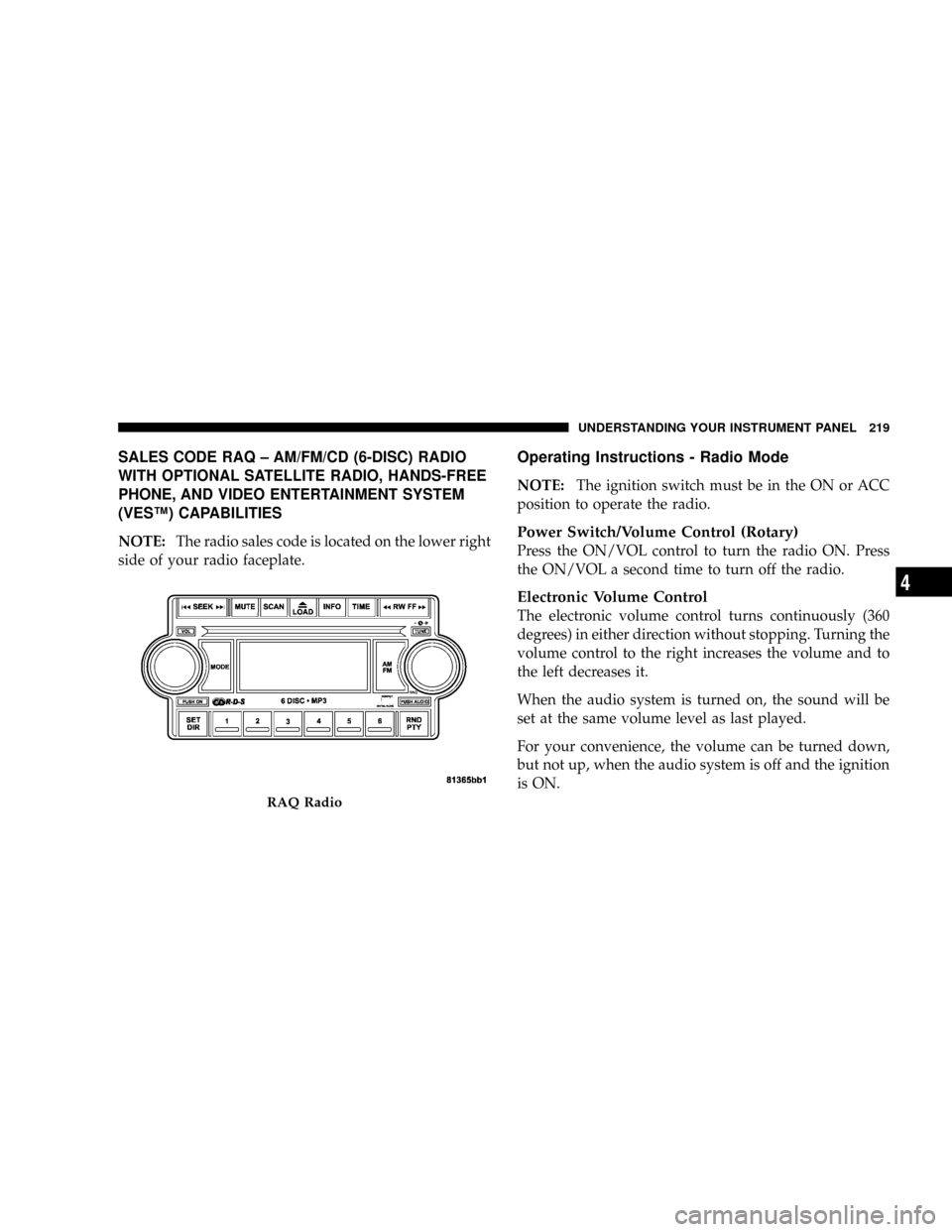
SALES CODE RAQ ± AM/FM/CD (6-DISC) RADIO
WITH OPTIONAL SATELLITE RADIO, HANDS-FREE
PHONE, AND VIDEO ENTERTAINMENT SYSTEM
(VESŸ) CAPABILITIES
NOTE:The radio sales code is located on the lower right
side of your radio faceplate.
Operating Instructions - Radio Mode
NOTE:The ignition switch must be in the ON or ACC
position to operate the radio.
Power Switch/Volume Control (Rotary)
Press the ON/VOL control to turn the radio ON. Press
the ON/VOL a second time to turn off the radio.
Electronic Volume Control
The electronic volume control turns continuously (360
degrees) in either direction without stopping. Turning the
volume control to the right increases the volume and to
the left decreases it.
When the audio system is turned on, the sound will be
set at the same volume level as last played.
For your convenience, the volume can be turned down,
but not up, when the audio system is off and the ignition
is ON.
RAQ Radio
UNDERSTANDING YOUR INSTRUMENT PANEL 219
4